Overview

The M-Audio M-Track Eight USB Audio Interface is built for home studio owners and small bands who need to capture multiple sources simultaneously without investing in a full console. What separates it from cheaper entry-level options is the Octane preamp technology, which gives the front end noticeably more headroom than you would expect at this price point. The unit fits neatly into a standard 19″ rack and feels reasonably solid, though the chassis leans toward plastic construction. Recording at 24-bit/96kHz covers everything from podcast production to full band demos with plenty of resolution to spare. If you need more than eight channels or primarily work on Mac, temper your expectations going in.
Features & Benefits

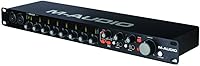
Each of the eight combo inputs accepts both XLR microphones and quarter-inch instruments, with individual LED metering on every channel so you can check gain staging at a glance rather than hunting through software. The Octane preamp design is the practical highlight here — it handles dynamic mics like an SM57 or a kick drum mic without the noise floor climbing uncomfortably, and it gives condenser mics enough clean gain to breathe. Two headphone outputs with selectable monitoring sources mean a vocalist can hear a cue mix while the engineer monitors the full session. Eight balanced line outputs open up routing to outboard gear or a hardware mixer. The USB 2.0 connection is dependable across most Windows DAW setups, even if it is not cutting-edge.

Best For

This 8-channel interface makes the most sense for bands recording together in a home or rehearsal space — think a four-piece capturing drums, bass, guitar, and vocals simultaneously without bouncing tracks. It also suits the home studio owner who has outgrown a stereo interface and wants room to grow without overspending. Podcasters and educators who need to mic several participants at once will find the straightforward layout approachable. Live sound engineers looking for a compact capture rig to run multitrack recordings from a gig will appreciate the rack-mount form factor. Where it fits less naturally is in Mac-heavy environments or workflows demanding very low-latency performance at high sample rates, where other interfaces in this range tend to perform more consistently.

User Feedback

The M-Track Eight sits at 3.9 out of 5 across 68 ratings, which honestly reflects a product with genuine strengths and some real rough edges. Buyers regularly praise the preamp headroom and the simple setup experience — plug it in on a Windows machine and most DAWs recognize it without friction. The channel count for the price is also a consistent talking point. On the other side, driver stability has frustrated some users, particularly those on certain Windows versions or who tried running it on macOS. A handful of reviewers note that the build feels lightweight for rack gear, which can be a concern if the unit travels. Long-term reliability gets mixed marks, so it may not be the last interface you ever buy.

Pros

  • Eight combo inputs let a full band record simultaneously without patching through a separate mixer.
  • Octane preamp design delivers noticeably cleaner gain than typical budget interfaces in this channel-count range.
  • Individual level metering on each channel makes gain staging fast and visual during live tracking sessions.
  • Dual headphone outputs with selectable sources are a practical touch for vocalist-engineer workflows.
  • Eight balanced line outputs give flexible routing to monitors, outboard gear, or a hardware console.
  • 19-inch rack-mountable form factor fits neatly into a home studio or rehearsal space rack.
  • 24-bit/96kHz resolution covers professional-quality multitrack recording without taxing a mid-range computer.
  • USB 2.0 connectivity is stable and broadly compatible across most Windows DAW environments.
  • Straightforward layout keeps setup time short, even for users moving up from a simpler two-channel interface.

Cons

  • Driver stability on certain Windows versions and macOS has caused headaches for a notable portion of users.
  • The plastic chassis feels lightweight for rack-mounted gear and may not hold up well under frequent transport.
  • Mac compatibility is inconsistent enough that macOS users should research current driver support before buying.
  • No USB-C connection means the M-Track Eight already feels dated compared to newer interfaces at similar prices.
  • Software bundle is minimal, which may disappoint buyers expecting a full DAW or plugin package out of the box.
  • Low-latency real-time monitoring performance can fall short for players who are sensitive to input delay.
  • High-gain instruments like active bass pickups or hotter guitar setups have occasionally caused clipping complaints.
  • Long-term reliability reports are mixed, with some users noting hardware issues after a year or two of regular use.
  • The 3.9-star average across 68 ratings suggests a meaningful minority of buyers have run into real problems.

Ratings

The scores below were generated by our AI after analyzing verified buyer reviews for the M-Audio M-Track Eight USB Audio Interface from multiple global sources, with spam, bot activity, and incentivized feedback actively filtered out. The result is an honest picture of where this 8-channel interface genuinely delivers and where real users have run into frustration. Both the strengths and the recurring pain points are reflected transparently in every category.

Preamp Quality
78%
22%
The Octane preamp circuitry is the most consistently praised aspect of the M-Track Eight among users who record live instruments. Singers tracking with condenser mics and drummers using dynamic mics on toms and kick both note that the headroom feels cleaner than what they experienced on comparable budget interfaces.
Users pushing the preamps hard with passive ribbon mics or very low-output dynamics occasionally report that self-noise becomes noticeable at higher gain settings. It is a capable preamp for the price tier, but anyone coming from a mid-range dedicated preamp will hear the difference.
Channel Count Value
84%
Getting eight simultaneous combo inputs at this price point is genuinely difficult to match, and buyers upgrading from two-channel interfaces consistently cite this as the purchase trigger. Bands recording live rehearsals or home engineers tracking full drum kits find the channel count hits a practical sweet spot without requiring an external mixer.
A handful of users note that not all eight channels feel equally useful in every workflow, particularly those doing solo or duo recording who realize after purchase that they rarely need more than four. The value argument is strongest when you actually fill those inputs regularly.
Driver Stability
53%
47%
On a stable, supported Windows environment — particularly Windows 10 with a clean ASIO driver install — most users report that the interface initializes reliably and holds a connection through long recording sessions without dropouts. For straightforward home studio setups on PC, the experience is generally predictable.
Driver performance is one of the most cited pain points across negative reviews, with users on certain Windows 11 builds and virtually all macOS versions describing connection drops, recognition failures, and difficulty getting the unit to reinstall cleanly after a system update. This is not a minor edge-case complaint — it represents a meaningful portion of the lower-star feedback.
Build Quality
58%
42%
The M-Track Eight fits neatly into a standard 19-inch rack and looks the part in a home studio setup. The front panel layout is logical, the knobs have reasonable resistance, and the unit sits stably on a desk or shelf without sliding around during use.
The chassis is predominantly plastic, which becomes apparent when you pick it up or handle it regularly. Several users who moved the unit between locations or built it into a mobile rig reported wear on the input connectors and cosmetic damage to the housing faster than expected for a piece of studio gear.
Ease of Setup
76%
24%
Windows users generally report a painless initial setup — plug in the USB cable, install the ASIO driver, and most DAWs recognize all eight channels within a few minutes. First-time multi-channel interface owners appreciate that the front panel is not intimidating, with clearly labeled inputs and straightforward gain controls.
The out-of-box experience falls apart for users who hit driver conflicts or are working on Mac, where setup can turn into an extended troubleshooting session. The documentation bundled with the unit is thin, which leaves newer users searching online for guidance on less obvious configurations.
Headphone Monitoring
71%
29%
Having two separate headphone outputs with independently selectable sources is a genuinely useful feature that many competing interfaces in this range skip entirely. Engineers who track performers in a separate room or need to run a cue mix distinct from the main mix find this setup saves them from buying a dedicated headphone amp.
The headphone output volume at maximum can feel underpowered when driving higher-impedance headphones, and a few users note that the monitor mix bleed between the two outputs is not perfectly isolated. It is adequate for most tracking situations but not a substitute for a dedicated headphone amp in more demanding environments.
Input Metering
74%
26%
Individual LED meters on all eight channels are a practical feature that many home recordists genuinely use to catch clipping before it ruins a take. During drum recording sessions especially, being able to glance at the front panel and see which channel is running hot saves constant back-and-forth with the DAW.
The metering resolution is basic — most users describe it as a signal-present and clip indicator rather than a true level meter with multiple threshold points. For precise gain staging, you will still need to rely on your DAW's channel meters rather than the hardware display.
Line Outputs
77%
23%
Eight balanced 1/4″ outputs give the M-Track Eight a routing flexibility that single-stereo-output interfaces simply cannot match. Users who run stems to outboard compressors, send separate monitor mixes to different rooms, or integrate the unit into a larger patchbay setup find this output count genuinely expands their studio options.
Output signal level consistency has been flagged by a small number of users who noticed slight level discrepancies between channels when running the unit at high output — an issue that would not surface in casual use but could matter in critical mixing or calibration scenarios.
Mac Compatibility
34%
66%
In isolated cases — typically older macOS versions or users who have found a specific stable driver build — the interface does function on Mac without major issues. A small subset of Mac users report acceptable performance when driver versions are carefully matched to their OS.
Mac compatibility is the single biggest source of negative reviews for this unit, with users on recent macOS versions frequently reporting that the interface is not recognized, drops out mid-session, or requires repeated driver reinstalls after OS updates. It is a serious enough pattern that Mac-primary users should consider it a near-dealbreaker.
Value for Money
72%
28%
For a Windows-based home studio user who needs eight simultaneous inputs and solid preamp headroom on a constrained budget, the M-Track Eight represents a hard-to-beat combination of channel count and audio quality. Buyers who land in this exact use case tend to rate the value favorably and feel the purchase was justified.
For users who hit driver problems or expected better Mac support, the value proposition collapses quickly — a unit that does not work reliably is not good value at any price. The 3.9-star average reflects a split audience: very satisfied Windows users pulling the score up, and frustrated Mac or driver-troubled users pulling it down.
Latency Performance
61%
39%
At conservative buffer settings on a clean Windows system, the M-Track Eight performs acceptably for tracking live instruments with software monitoring. Users who do not require extremely low-latency real-time playing through software instruments generally report no disruptive delays during recording sessions.
Producers who play virtual instruments live through the interface or rely on real-time software amp simulation report that latency at lower buffer settings becomes unstable, with crackles or dropouts that interfere with performance. The USB 2.0 architecture puts a ceiling on how low you can practically push the buffer.
Long-Term Reliability
56%
44%
A portion of users have owned the M-Track Eight for two or more years in a fixed studio setup and report consistent performance without hardware failure. For users who treat it gently and do not move it frequently, the unit can deliver solid service over an extended period.
Durability concerns surface regularly in longer-term reviews, with users citing input jacks becoming intermittent, driver issues worsening after OS upgrades, and the plastic housing showing fatigue. The reliability picture is uneven enough that it gives pause to buyers planning a long ownership window.
DAW Compatibility
73%
27%
On Windows, the M-Track Eight works with a broad range of popular DAWs via ASIO, including Reaper, Ableton Live, Pro Tools, and Cubase, with most users reporting straightforward channel assignment after the initial driver setup. The lack of proprietary software lock-in is a genuine plus for users who already have a preferred DAW.
DAW integration hiccups tend to follow driver problems rather than exist independently — once the driver is misbehaving, DAW recognition becomes unreliable regardless of which software you are using. There are also occasional reports of ASIO channel count limitations in specific DAW versions that require manual configuration workarounds.

Suitable for:

The M-Audio M-Track Eight USB Audio Interface is a strong fit for anyone who has outgrown a two-channel setup and needs to record multiple sources at once without buying into a full mixing console. Small bands that want to capture drums, bass, guitar, and vocals in a single take will find eight combo inputs genuinely useful, especially with individual metering to keep gain staging under control during a live session. Home studio owners running Windows-based DAWs like Reaper, Pro Tools, or Ableton will likely get plug-and-play convenience with minimal driver headaches. Podcasters hosting panel discussions, educators running group audio labs, and rehearsal spaces that want a permanent recording rig will also get real value here. The rack-mountable form factor makes it easy to bolt into a modest studio setup, and the Octane preamp headroom means dynamic and condenser mics both perform better than the price would suggest.

Not suitable for:

Mac users should approach the M-Audio M-Track Eight USB Audio Interface with caution, as driver compatibility issues on macOS have been a recurring frustration in user reports, and M-Audio's Mac support has historically lagged behind Windows. Anyone chasing ultra-low latency for live software instrument performance or real-time monitoring at high sample rates may find the USB 2.0 architecture a limiting factor compared to newer USB-C or Thunderbolt interfaces in a similar price range. The build quality skews toward lightweight plastic, so touring musicians or engineers who need a road-durable unit should look at more ruggedized options. If you already own a capable two-channel interface and only occasionally need more inputs, the jump to an eight-channel unit may be more than your workflow actually demands. Producers working primarily in the box with soft synths and sample-based music will find most of those eight inputs sitting idle.

Specifications

  • Brand: Manufactured by M-Audio, a long-standing name in affordable recording hardware for home and project studios.
  • Model: M-Track Eight, a rack-format 8-channel USB audio interface designed for multitrack recording.
  • Inputs: Eight XLR+1/4″ combo inputs accept both balanced microphone signals and quarter-inch instrument or line-level connections simultaneously.
  • Outputs: Eight balanced 1/4″ line outputs allow routing to studio monitors, outboard processors, or an external hardware mixer.
  • Headphone Outs: Two independent headphone outputs each include a selectable monitoring source, supporting separate cue mixes for performer and engineer.
  • Preamp: Octane high-headroom preamp circuitry is built into each input channel to provide cleaner gain and reduced noise across dynamic and condenser microphones.
  • Resolution: Supports recording and playback at up to 24-bit depth and 96 kHz sample rate for professional-quality multitrack audio capture.
  • Connectivity: Connects to a host computer via USB 2.0; despite an erroneous Bluetooth listing in some product data, this unit has no wireless capability.
  • Input Metering: Individual LED level meters on each of the eight input channels allow real-time gain monitoring directly on the hardware front panel.
  • Form Factor: Standard 19″ rack-mountable chassis fits a single rack unit space in a studio rack or live audio road case.
  • Dimensions: The unit measures 5.88 inches deep, 18.96 inches wide, and 1.68 inches tall, occupying a compact footprint in any studio setup.
  • Weight: At 4.37 pounds, the M-Track Eight is light enough to transport but substantial enough to sit stably on a desktop surface.
  • Compatible OS: Officially supports Windows-based PCs; macOS compatibility has been inconsistent across driver versions and is not formally guaranteed for all releases.
  • Color: Available in a matte black finish that blends with standard studio rack gear and desktop setups.
  • ASIN: The Amazon standard identifier for this product is B0010SZIQM, useful for cross-referencing listings or verifying authenticity.

Related Reviews

M-Audio M-Track Duo
M-Audio M-Track Duo
83%
88%
Preamp Clarity
93%
Value for Money
62%
Build Quality
91%
Ease of Installation
87%
Portability
More
M-Audio M-Track 2X2 USB Audio Interface
76%
84%
Build Quality
76%
Preamp Performance
82%
Ease of Setup
58%
Driver Stability
79%
Value for Money
More
M-Audio M-Track Solo
81%
94%
Value for Money
91%
Portability
89%
Ease of Setup
82%
Preamplifier Clarity
61%
Build Quality
More
M-Audio AIR 192|4
M-Audio AIR 192|4
85%
93%
Build Durability
91%
Tactile Control Experience
88%
Preamplifier Transparency
87%
Recording Latency
86%
Software Bundle Value
More
Black Lion Audio Revolution 2x2 Audio Interface
75%
88%
Preamp Quality
91%
Audio Transparency
86%
Clocking Performance
87%
Build Quality
73%
Value for Money
More
Antelope Audio Zen Go Synergy Core Interface
76%
93%
Preamp Quality
88%
Onboard Effects
54%
Software Experience
57%
Windows Stability
91%
Portability
More
Roland Rubix44 4-In/4-Out USB Audio Interface
80%
91%
Preamp Quality
94%
Build Quality
88%
Noise Performance
58%
Windows Driver Experience
74%
Value for Money
More
Audient iD4 USB Audio Interface
80%
93%
Preamp Quality
88%
Build Quality
71%
Value for Money
91%
Ease of Setup
84%
Headphone Performance
More
Roland Rubix22 USB Audio Interface
81%
93%
Build Quality
84%
Preamp Performance
81%
Noise Floor
88%
MIDI Functionality
91%
Ease of Setup
More
MOTU 8pre USB Audio Interface
80%
86%
Preamp Quality
91%
Build Quality
88%
Channel Count & I/O
79%
Value for Money
61%
CueMix DSP Software
More

FAQ

Yes, and this is genuinely one of the strongest use cases for the M-Track Eight. You can run kick, snare, two overheads, hi-hat, and a couple of toms all at once across the eight combo inputs. Just make sure your DAW is set up to record all channels simultaneously, which most modern software handles without issue.

Technically it can work on macOS, but this is where the unit gets complicated. Driver support for Mac has been unreliable across different macOS versions, and a fair number of user complaints specifically involve Mac setups. If Mac is your primary platform, it is worth checking M-Audio's current driver page before committing to a purchase.

No, that is a data error in some product listings. The M-Audio M-Track Eight USB Audio Interface connects to your computer via USB 2.0 only — there is no Bluetooth or wireless functionality of any kind. Do not let that listing mislead you into expecting wireless operation.
The M-Track Eight requires a dedicated power supply rather than drawing power solely from the USB bus. With eight preamps and extensive I/O, bus power alone would not be sufficient, so expect to plug it into a wall outlet during use.

Yes, each of the two headphone outputs has its own selectable monitoring source. This means a vocalist can listen to a custom cue mix while the engineer monitors the main mix — a useful feature when tracking performances without bleeding into the session.

Because it is a class-compliant USB interface on Windows, it should work with virtually any DAW that supports ASIO drivers, including Reaper, Pro Tools, Ableton Live, Cubase, and Studio One. M-Audio may bundle a lite version of a DAW with the unit, but the hardware itself is not locked to any specific software.

In practice, the Octane preamps have more headroom before they start to clip or add noticeable noise, which matters most when you are using dynamic microphones that need a lot of clean gain — like a Shure SM7B or a ribbon mic. It is not a boutique preamp by any means, but it is a step up from the generic preamp circuits found in most interfaces at a similar channel count and price.

Absolutely. The eight balanced 1/4″ outputs are designed for exactly that kind of routing. You can send individual stems or channels to an outboard mixer, a set of monitor speakers, or a patchbay for more complex studio signal flow. Standard TRS cables are all you need.

It is functional but not premium. The chassis is largely plastic, which keeps the weight down but does make it feel a bit lightweight compared to all-metal interfaces. For a fixed home studio rack it is perfectly fine day to day, but if you plan to move it frequently or tour with it, the build quality may become a concern over time.

M-Audio typically offers a limited warranty on their hardware, though the exact terms can vary by region and where you purchase. It is worth registering the product on M-Audio's site after purchase to activate warranty coverage. Given that some users have reported reliability concerns after extended use, holding onto your proof of purchase is a smart move.

Where to Buy