Overview

The Audient iD4 USB Audio Interface is a compact, two-channel recording device built for solo musicians and home studio creators who want professional preamp quality without a rack full of gear. One important note before you buy: this is the original iD4, not the MkII, which has since replaced it at a lower street price with USB-C connectivity. That distinction matters. Audient has long built mixing consoles for commercial studios, and the iD4 brought that same Class-A preamp circuit down to desktop scale. For the price, it sits above entry-level options from Focusrite and PreSonus — but the gap in audio quality is audible, particularly on vocals and acoustic instruments.

Features & Benefits

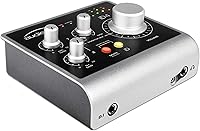
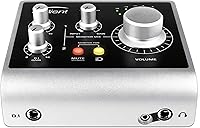
The real draw here is the preamp design. Audient borrowed the actual circuit topology from their high-end consoles, which means you get a mic preamp that handles dynamic range and transient response better than most interfaces in this price bracket. There is also a discrete JFET instrument input on the front panel — plug in a guitar or bass directly, no DI box needed, and the signal stays clean. Zero-latency hardware monitoring lets you hear yourself during recording without the lag that plagues software monitoring. The independent headphone DAC is a genuine bonus: it runs separately from the main outputs, giving your cans a dedicated, high-quality signal path.

Best For

The iD4 is purpose-built for people who need exactly two inputs and nothing more. That means singer-songwriters who track vocals on a mic and guitar through the instrument jack at the same time, podcasters who want broadcast-grade audio without a complicated setup, and guitarists looking for a clean direct-recording chain. It is also a strong first interface for anyone stepping up from built-in laptop audio — the jump in recording quality is immediately obvious. On both Mac and Windows it works as a plug-and-play USB class-compliant device, so there are no driver installations to wrestle with before you can start recording.

User Feedback

Owners of this Audient interface repeatedly call out the low noise floor as its standout quality — particularly compared to similarly priced competitors. The headphone amp also earns consistent praise for being surprisingly loud and accurate. On the downside, some buyers flag that the unit ships with a non-detachable USB-A cable, which becomes a problem if it wears out. A more significant concern for anyone shopping now: the original iD4 uses USB-A, not USB-C, which the MkII corrects. The ScrollControl feature gets occasional mentions — reactions are split, some find it useful, others never engage with it at all.

Pros

  • The Class-A mic preamp delivers noticeably cleaner, quieter recordings than most interfaces in this price range.
  • Zero-latency hardware monitoring means you can track vocals or instruments without any distracting delay in your headphones.
  • The independent headphone DAC provides a strong, transparent signal that works well for critical listening during sessions.
  • Solid metal chassis construction makes the iD4 feel durable and substantial compared to plasticky budget alternatives.
  • Plug-and-play USB class compliance on Mac and Windows means no driver installation headaches out of the box.
  • The discrete JFET instrument input handles guitar and bass signals cleanly without requiring an external DI box.
  • Bus-powered over USB keeps the desk tidy — no separate power adapter needed for everyday studio use.
  • Audient's console heritage translates into AD/DA converter quality that holds up well against more expensive competitors.

Cons

  • This is the original model, now superseded by the MkII which offers USB-C and sells at a lower price — making full-price purchases hard to justify.
  • The non-detachable USB cable is a genuine long-term reliability concern; if it fails, repair options are limited.
  • Only two inputs means the iD4 cannot grow with you if your recording needs expand beyond a single mic and instrument.
  • No USB-C connection is a meaningful inconvenience for users with modern laptops that lack USB-A ports.
  • The ScrollControl encoder feature is largely ignored by most users and adds little practical value for the majority of buyers.
  • Bundled software — Cubase LE and Cubasis LE — is functional but limited, and most serious users will need to budget for a full DAW separately.
  • Competing interfaces at lower price points close the quality gap enough that the premium here requires deliberate justification.

Ratings

Our AI-generated scores for the Audient iD4 USB Audio Interface were produced by analyzing verified global buyer reviews, with spam, incentivized, and bot-flagged feedback actively filtered out before scoring. Each category reflects the honest distribution of real user experiences — strengths and frustrations weighted equally — so the numbers you see represent a genuine consensus rather than a curated highlight reel.

Preamp Quality
93%
This is where the iD4 consistently earns its reputation. Buyers who previously used budget interfaces describe an immediately audible drop in background noise and a more natural, open sound on vocals and acoustic guitar. The Class-A circuit design borrowed from Audient's console work is the main reason users justify the price premium.
A small number of users with very high-gain condenser microphones note they need to push the preamp close to its upper limit, which can introduce a trace of noise in quieter recordings. It is a minor concern, but worth noting for anyone recording in an untreated room with a sensitive mic.
Build Quality
88%
The metal chassis makes an immediate impression out of the box — it feels purposeful and robust in a category full of plasticky competitors. Several users mention taking it to sessions outside the home studio and returning without so much as a scratch or loose connector.
The non-detachable USB cable on certain production runs is the single biggest build complaint, and it is a legitimate one. If that cable wears out at the connector point, you are looking at a support call rather than a simple cable swap.
Value for Money
71%
29%
For buyers who understand what they are paying for — specifically a professional-heritage preamp in a compact form — the iD4 delivers real value. The audio quality per dollar is strong when compared to interfaces at a similar price from other brands.
The value calculation has shifted since the MkII arrived at a lower price with USB-C connectivity. Paying full original retail for this version in the current market is hard to recommend without a significant discount. Budget buyers also have credible alternatives from Focusrite and PreSonus that cost considerably less.
Ease of Setup
91%
USB class compliance means no driver installation on either Mac or Windows — you plug it in and it works. First-time interface buyers repeatedly highlight how stress-free the initial setup was, often describing being up and recording within minutes of opening the box.
A handful of Windows users on older operating systems reported occasional recognition issues, though these appear to be edge cases rather than a systemic problem. There is no dedicated software mixer for complex routing, which more advanced users may find limiting.
Headphone Performance
84%
The independent headphone DAC is a genuine differentiator that owners notice quickly. The output is powerful enough for extended mixing sessions and detailed enough to catch problems in a recording that cheaper headphone amps would mask. Several users specifically upgraded from other interfaces just for this feature.
At maximum volume, a very small number of users with low-impedance headphones report a slight coloration in the high frequencies. It is not a widespread complaint, but audiophile users running sensitive reference headphones may hear a difference compared to a dedicated headphone amplifier.
Zero-Latency Monitoring
86%
Hardware monitoring that routes your live input directly to the output — completely bypassing the DAW — is exactly what singers and guitarists need when tracking. Users who previously struggled with distracting delays while recording vocals call this one of the most practically useful aspects of the interface.
The monitor blend control is functional but basic. Users who want detailed control over their monitoring mix — such as separate reverb sends or individual channel routing — will find the hardware monitoring too simple and will need to rely on DAW monitoring with the latency trade-off that entails.
AD/DA Converter Quality
82%
18%
The converters handle dynamic range and transient response well for the price tier, producing recordings that translate cleanly across different playback systems. Producers who work with acoustic instruments and vocals appreciate the transparent, uncolored character of the conversion chain.
Against high-end standalone converters the difference is audible, though that is an unfair comparison at this price point. A few technically minded users note that the original iD4 converters are slightly behind what the MkII offers in the updated design.
ScrollControl Feature
58%
42%
For the subset of users who incorporate it into their workflow, ScrollControl is a genuinely clever feature — being able to scroll a DAW timeline or plugin list with a large physical knob feels more natural than a mouse wheel during long sessions.
The majority of buyers either forget it exists or actively avoid it to prevent accidental activation while adjusting the main output level. The mode switching is not immediately intuitive, and several users describe it as an unused bonus rather than a meaningful selling point.
Software Bundle
63%
37%
Cubase LE is a functional entry point for total beginners who have never used a DAW before. For new buyers who do not already own recording software, having something usable on day one is a practical benefit that reduces the immediate total cost.
Cubase LE is heavily stripped down compared to the full version, and most users who get serious about recording will outgrow it within months. The Cubasis LE iOS app is useful but feels like a secondary consideration, and neither bundle item adds meaningful value for buyers who already own a DAW.
Portability
79%
21%
At under two pounds with a compact footprint, the iD4 slides easily into a laptop bag alongside a notebook and cables. Singer-songwriters who move between home, rehearsal spaces, and occasional sessions elsewhere appreciate having an interface that does not demand a dedicated carry case.
The fixed USB cable adds bulk and creates a snagging risk in a bag if not managed carefully. The overall dimensions, while compact for a desktop unit, are slightly larger than the smallest portable interfaces on the market, which matters if true minimal portability is the goal.
Instrument Input Quality
87%
The discrete JFET circuit on the front-panel instrument input is a real quality indicator — it preserves the natural character of an electric guitar or bass without the thin, slightly harsh tone that cheaper impedance-matching circuits can introduce. Direct-recorded guitars sit well in a mix without heavy processing.
There is only one instrument input, so anyone wanting to record two guitars simultaneously or run a stereo synth directly is out of luck. It is a limitation of the two-channel design rather than a flaw in the input itself, but it is worth being clear-eyed about.
Long-Term Reliability
73%
27%
The metal construction and quality internal components suggest a unit built to last several years under normal home studio use. Many users report owning the original iD4 for multiple years without hardware failures or degraded performance.
The non-detachable cable remains the most cited long-term risk. Additionally, as a discontinued-generation product, buyers should be aware that finding official support or replacement parts may become more difficult over time compared to the current MkII.

Suitable for:

The Audient iD4 USB Audio Interface is an excellent match for solo musicians, singer-songwriters, and podcasters who want one high-quality mic input and one instrument input — and genuinely nothing more. If you are stepping up from recording directly into a laptop for the first time, the jump in clarity and low-noise performance will be immediately noticeable. Guitarists who want to track direct without buying a separate DI box will appreciate the discrete JFET instrument input on the front panel. It also suits creators who prioritize preamp quality above all else and understand that a smaller channel count is a deliberate trade-off, not a compromise. Because it works plug-and-play on both Mac and Windows with no driver installation required, it is particularly well-suited to anyone who wants a straightforward, no-fuss setup from the moment it arrives.

Not suitable for:

The Audient iD4 USB Audio Interface is not the right choice for producers or bands who routinely record multiple sources at once — two inputs is simply the ceiling, and there is no way to expand that. Anyone who needs more than one microphone input simultaneously, such as drummers tracking with multiple mics or bands doing live room recordings, should look at interfaces with four or more inputs. Modern laptop users who rely exclusively on USB-C will find the original iD4 frustrating, since it uses a fixed USB-A cable — the MkII resolves this, and at a lower price point, making the original harder to recommend at full retail. Budget-conscious buyers who are just starting out may also find cheaper options from Focusrite or PreSonus deliver sufficient quality for casual recording without the added expense. If ScrollControl or bundled software features are high on your priority list, this interface offers only modest value on those fronts.

Specifications

  • Channel Count: The interface provides 2 inputs and 2 outputs, designed specifically for solo recording workflows.
  • Connectivity: It connects to a computer via USB 2.0 and is fully bus-powered, requiring no external power supply.
  • Mic Preamp: A single Class-A microphone preamp derived from Audient console circuit design handles the XLR input.
  • Instrument Input: A discrete JFET instrument input on the front panel accepts a standard quarter-inch jack for direct guitar or bass recording.
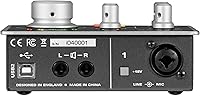
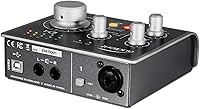
  • Input Connector: The mic and line input share a combined XLR and TRS combo jack on the rear panel.
  • Headphone Output: An independent headphone DAC and amplifier circuit drives the front-panel headphone jack separately from the main outputs.
  • Monitoring: Zero-latency hardware monitoring includes a blend knob and pan control to balance input signal against DAW playback.
  • ScrollControl: The main output encoder doubles as a ScrollControl input, functioning as a system scroll wheel when the mode is activated.
  • AD/DA Converters: High-performance analog-to-digital and digital-to-analog converters are included for clean, transparent signal conversion.
  • OS Compatibility: The interface is USB class-compliant and works on both Windows and macOS without third-party driver installation.
  • Bundled Software: Purchase includes Cubase LE for desktop recording and Cubasis LE for iOS mobile recording.
  • Chassis Material: The outer enclosure is constructed from metal, giving the unit a solid and road-worthy build quality.
  • Weight: The unit weighs 1.63 pounds, making it light enough to carry easily between locations.
  • Dimensions: Physical dimensions measure 5.12 x 4.72 x 16.14 inches, fitting comfortably on a compact desktop setup.
  • USB Cable: The unit ships with a fixed, non-detachable USB-A cable on certain production revisions.
  • Power Source: The interface draws all operating power directly from the USB connection, with no adapter or external supply required.
  • Model Generation: This is the original iD4, the first-generation model, which has since been superseded by the iD4 MkII.
  • Voltage Rating: The unit operates at 5 volts, supplied entirely through the USB bus connection.

Related Reviews
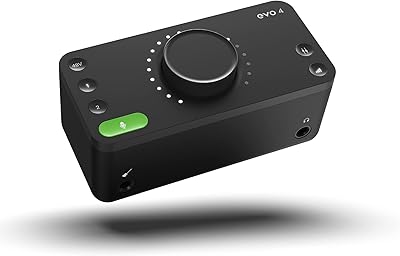
Audient EVO 4

Audient EVO 4
89%
96%
Ease of Setup
92%
Preamplifier Clarity
89%
Software Loopback
94%
Portability & Form Factor
71%
Build Materials
More
M-Audio M-Track Duo
M-Audio M-Track Duo
83%
88%
Preamp Clarity
93%
Value for Money
62%
Build Quality
91%
Ease of Installation
87%
Portability
More
Black Lion Audio Revolution 2x2 Audio Interface
75%
88%
Preamp Quality
91%
Audio Transparency
86%
Clocking Performance
87%
Build Quality
73%
Value for Money
More
M-Audio M-Track 2X2 USB Audio Interface

76%
84%
Build Quality
76%
Preamp Performance
82%
Ease of Setup
58%
Driver Stability
79%
Value for Money
More
Antelope Audio Zen Go Synergy Core Interface
76%
93%
Preamp Quality
88%
Onboard Effects
54%
Software Experience
57%
Windows Stability
91%
Portability
More
Audient iD22 USB Audio Interface
79%
91%
Preamp Quality
88%
Build Quality
89%
Sound Transparency
58%
Windows Driver Stability
86%
Routing Flexibility
More
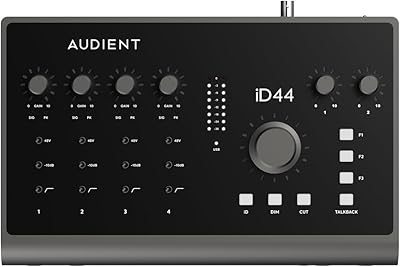
Audient iD44 Audio Interface
80%
88%
Preamp Quality
61%
Driver Stability
91%
I/O Versatility
84%
Build Quality
73%
Value for Money
More
MOTU 8pre USB Audio Interface
80%
86%
Preamp Quality
91%
Build Quality
88%
Channel Count & I/O
79%
Value for Money
61%
CueMix DSP Software
More
Roland Rubix44 4-In/4-Out USB Audio Interface

80%
91%
Preamp Quality
94%
Build Quality
88%
Noise Performance
58%
Windows Driver Experience
74%
Value for Money
More
Audient iD14 MKII
Audient iD14 MKII
87%
94%
Preamplifier Transparency
92%
Build Quality and Weight
89%
Headphone Output Versatility
91%
Digital Expandability
86%
Instrument DI Character
More

FAQ

This is the original first-generation model, not the MkII. Audient has since released the MkII with USB-C connectivity and a lower price point, so if you are shopping today it is worth comparing both before committing.

No, you do not. The interface is USB class-compliant, which means both macOS and Windows will recognize it immediately when you plug it in. You can be up and recording within a couple of minutes of unboxing.

Yes, the front panel has a dedicated instrument input with a discrete JFET circuit designed specifically for high-impedance sources like electric guitar and bass. It sounds clean and handles the signal well without any extra hardware in the chain.

It means you can hear yourself through the headphones in real time while recording, with no audible delay. The interface routes your input signal directly to the output in hardware, completely bypassing your computer and DAW, so there is no lag even if your buffer settings are high.

No. The iD4 has only one XLR mic input. If you need to record two microphones simultaneously — for a podcast with two hosts or a drum overhead setup, for example — you will need an interface with at least two XLR inputs.

The headphone amplifier runs off its own independent DAC, which is unusual at this price tier. In practice it gets quite loud and maintains good clarity at higher volumes, making it a strong option for monitoring during mixing as well as basic tracking.

ScrollControl lets you press the main volume knob into a mode where it acts as a scroll wheel for your computer. Some producers find it handy for scrolling through a DAW timeline or plugin parameters without touching the mouse. Others never use it at all. It is a minor convenience feature rather than a core reason to buy.

It can work with iOS devices using the right camera connection adapter, and Audient bundles Cubasis LE specifically for mobile recording. That said, the experience is smoother on a desktop or laptop, and iOS compatibility depends on your specific device and adapter setup.

On certain production revisions the cable is non-detachable, which is a legitimate long-term concern. If the cable wears out or the connector fails, you would need to contact Audient support or arrange a repair rather than simply swapping in a new cable. It is worth checking with the seller about which revision you are purchasing.

The Scarlett Solo costs noticeably less and is a capable beginner interface. The main reason to spend more on the iD4 is the preamp quality — Audient's circuit design comes from professional console heritage and tends to produce a lower noise floor and more natural-sounding recordings, particularly for vocals and acoustic instruments. If budget is the primary concern, the Scarlett Solo is a solid choice; if you want to grow into the gear rather than outgrow it quickly, the iD4 justifies the difference.

Where to Buy

Music Store US
In stock $193.43
SoundPure.com
In stock $299.99
Portland Music Company
In stock $309.99