Overview

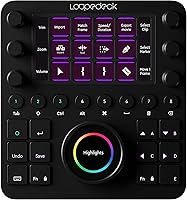
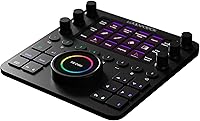
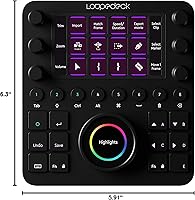
The Loupedeck CT Creative Editing Console is a hardware control surface built for creative professionals who spend serious hours inside photo, video, music, and motion design applications. Loupedeck positioned this device as a physical bridge between your hands and your software — something the keyboard-and-mouse setup simply cannot replicate at speed. The chassis is solid aluminum, and the combination of multi-touch screens, dials, and LED-backlit buttons gives it a genuinely premium feel in hand. That said, this is not a plug-and-play device. Getting real productivity gains requires investing time in configuration and learning the software, so go in with realistic expectations.

Features & Benefits

What makes the Loupedeck CT stand out is the variety of input types packed into a compact footprint. The ball-bearing dials feel noticeably smoother than encoder knobs on competing devices — fine-tuning exposure or saturation in Lightroom Classic becomes a physical act of precision rather than a hunt for sliders. Touch screens let you switch tools or trigger shortcuts without breaking focus. Native integration spans over a dozen major apps, from Premiere Pro to Ableton Live, meaning the device understands software context rather than just sending blind keystrokes. If your app is not natively supported, the custom profile system lets you map virtually any function yourself.

Best For

This editing console genuinely shines in the hands of professional photographers doing high-volume work in Lightroom Classic or Capture One — tactile dial control for grading alone can cut hours off a heavy editing session. Video editors toggling between Premiere Pro and After Effects will appreciate how quickly parameter adjustments happen on a physical knob rather than a virtual slider. Musicians producing in Ableton Live and live streamers using OBS also find real value here. That said, this control surface is a harder sell for casual hobbyists. Initial configuration demands patience, and if you are unwilling to invest time building profiles, the return simply will not be there.

User Feedback

Across more than 800 ratings, two things surface consistently: build quality praise and software frustration. The aluminum chassis earns near-universal admiration, with most long-term users reporting it holds up solidly after years of daily studio use. The software side is more complicated — connectivity hiccups and inconsistent updates have frustrated a notable share of buyers, and customer support has drawn mixed reactions. Photographers working in Lightroom Classic tend to rate their satisfaction highest among all user groups. The general consensus is that the learning curve is real but ultimately worthwhile for professionals who depend on editing speed every single day.

Pros

  • Aluminum chassis feels genuinely premium and holds up well after years of daily studio use.
  • Ball-bearing dials deliver noticeably smoother, more precise control than standard encoder knobs.
  • Native integration with over a dozen major apps means the device works with your software, not around it.
  • Fully customizable profiles let you tailor every dial, button, and screen to your exact workflow.
  • Photographers using Lightroom Classic consistently report among the highest satisfaction rates of any user group.
  • Prebuilt community profiles for apps like DaVinci Resolve give you a solid starting point without building from scratch.
  • The combination of touch screens, dials, and LED buttons covers a wider range of input types than most competing devices.
  • Full-screen editing mode through the Loupedeck software removes distractions during intensive grading or mixing sessions.
  • Compatible with both macOS and Windows, making it flexible for mixed studio environments.

Cons

  • Software reliability is inconsistent — connectivity dropouts and bugs have frustrated a meaningful share of buyers.
  • The learning curve is steep enough that productivity gains can take days or weeks to materialize.
  • Customer support has received mixed feedback, with some users reporting slow or unhelpful responses to technical issues.
  • Software updates have been uneven historically, leaving some features or app integrations feeling behind.
  • Users working outside the natively supported app list face significantly more manual configuration work.
  • At its price tier, software stability issues feel less forgivable and more likely to cause buyer regret.
  • The compact form factor means limited desk presence, which some users find disorienting during initial setup.
  • Windows users have reported more software hiccups on average compared to those on macOS.

Ratings

The Loupedeck CT Creative Editing Console has been evaluated using AI-driven analysis of verified global user reviews, with spam, bot-generated, and incentivized feedback actively filtered out before scoring. Ratings reflect the honest consensus of working photographers, video editors, musicians, and streamers who use this control surface in real professional environments. Both the standout strengths and the recurring frustrations are transparently represented in each category below.

Build Quality
91%
The aluminum chassis earns consistent admiration from users across all creative disciplines. Photographers and editors who keep this control surface on their desk every single day report that it shows minimal wear even after years of continuous use, and the overall fit and finish feels closer to professional studio gear than typical desktop peripherals.
A small number of users have noted that the touch screen surfaces can accumulate smudging quickly under heavy daily use, and the exposed dials — while mechanically solid — can occasionally collect dust in ways that require periodic cleaning to maintain smooth operation.
Dial Precision
88%
The ball-bearing dial mechanism is one of the most praised hardware details across the entire user base. Lightroom Classic users in particular describe the experience of fine-tuning exposure or color temperature as feeling genuinely tactile and controlled, a meaningful upgrade over dragging a mouse across virtual sliders for hours at a stretch.
A portion of users note that dial sensitivity calibration within the software can take trial and error to dial in correctly, and a few have reported that certain dials feel slightly inconsistent in resistance after prolonged heavy use, though this appears to be a minority experience rather than a widespread defect.
Software Integration
74%
26%
For natively supported apps like Lightroom Classic, Premiere Pro, and Ableton Live, the integration feels genuinely context-aware rather than just a button remapper. Video editors switching between timeline work and color grading find that the console understands which tools are active and responds accordingly, which is a real workflow benefit during long sessions.
Integration quality drops noticeably for apps outside the native support list, requiring significant manual configuration to achieve a comparable experience. Users working primarily in non-listed software report spending disproportionate time in the profile editor rather than actually editing their work.
Software Stability
58%
42%
When the software is running cleanly, the experience is genuinely smooth and responsive, with most Mac users in particular reporting sessions that run without interruption across multi-hour editing blocks. Keeping the software updated tends to resolve many minor irritants for users who stay current with releases.
Software reliability is the single most consistent criticism across the user base. Connectivity dropouts, occasional crashes after system updates, and uneven patch schedules have frustrated a meaningful share of buyers — enough that it visibly pulls down the overall satisfaction score for an otherwise strong hardware product.
Customization Depth
86%
The ability to assign virtually any function, shortcut, or macro to any input on the device gives professionals enormous flexibility to shape the console around their specific workflow rather than adapting their workflow to the hardware. The growing library of community-shared profiles for apps like DaVinci Resolve and Cubase gives new users a practical head start.
The depth of customization comes with real complexity, and users who expected a more guided setup experience have expressed frustration. Building a truly optimized profile set from scratch can take several dedicated sessions, and the profile management interface has been described as functional but not particularly intuitive for first-time users.
Learning Curve
61%
39%
Users who commit to the learning process consistently report that the investment pays off over time, with many experienced users describing it as one of those tools that fundamentally changes how they approach editing once the muscle memory is established. Online communities and third-party tutorial resources help shorten the ramp-up period.
The learning curve is steep enough to be a genuine barrier for users who expected faster returns. Several reviewers specifically mention feeling unproductive for the first week or two, and a notable subset of buyers report abandoning full customization efforts and settling for partial setups that underutilize the hardware.
Value for Money
67%
33%
For professionals who use this control surface as a daily production tool and have taken the time to fully configure it, the productivity gains are real enough that the investment feels justified over a multi-year horizon. Photographers doing high-volume client work tend to report the strongest sense of value among all user segments.
At its price tier, the recurring software reliability issues make the value proposition harder to defend for buyers who hit persistent technical problems. Users who paid a premium and then spent hours troubleshooting connectivity issues rather than editing understandably feel the cost-to-experience ratio is off.
Setup Experience
63%
37%
The out-of-box default profiles for major apps like Lightroom Classic allow users to get a functional setup running fairly quickly without any configuration, which is a reasonable starting point for first-time users testing the hardware before committing to deeper customization.
Beyond the defaults, the setup process requires meaningful technical patience. Installing the software, configuring profiles, and troubleshooting early hiccups is a multi-step process that a number of buyers found less polished than expected for a device at this price point.
Touch Screen Usability
77%
23%
The small touch displays embedded in the surface provide a genuinely useful layer of at-a-glance visual feedback during editing sessions, and the multi-touch support makes tool switching feel more intentional than hitting a blind button. Live streamers in particular find these screens useful for scene and setting confirmation mid-broadcast.
The touch screens are small enough that precision tapping can occasionally require a second attempt, particularly for users with larger hands. A few users have also noted that screen responsiveness can feel slightly sluggish during intensive sessions, though this is a minor complaint rather than a deal-breaking issue.
App Compatibility Range
72%
28%
With over 13 natively supported applications spanning photo editing, video production, music production, and live streaming, the breadth of first-party compatibility is genuinely wider than most competing hardware controllers in this category. This makes it practical across multi-discipline creative studios where different software is in use daily.
The compatibility list, while broad, still leaves out enough popular applications that users working outside the supported ecosystem will consistently encounter friction. Tools popular in game development, graphic design, and 3D work are notably absent from the native integration list.
Durability
84%
Long-term users — including those who have owned the device for two or more years of daily studio use — consistently report that the hardware remains functional and physically intact. The aluminum casing in particular shows minimal signs of degradation even under conditions of heavy continuous use.
Some users have reported that button feel can soften slightly over extended use as the tactile feedback becomes less crisp with repeated pressing. This is a gradual change rather than a sudden failure, but it is worth noting for buyers expecting the hardware to feel identical five years in.
Customer Support
52%
48%
Some users have reported positive experiences with Loupedeck support when issues were straightforward software-side problems, and the community forums maintained by the brand provide a useful supplementary resource for troubleshooting common setups.
Customer support responsiveness has drawn mixed to negative feedback across a notable portion of reviews. Users dealing with more complex technical issues — particularly around software crashes or connectivity on specific system configurations — have reported slow response times and resolutions that required multiple follow-up exchanges.
Physical Ergonomics
79%
21%
The compact form factor fits comfortably within a typical professional editing desk setup without dominating the workspace, and the weight is substantial enough that the unit stays firmly in place during active use without requiring any additional anchoring or accessories.
The flat, low-profile design means the device sits flush with the desk surface, which some users find less ergonomically comfortable during extended sessions compared to controllers with a more angled or raised layout. Users with larger hands in particular have occasionally noted that the dial spacing feels slightly tight.

Suitable for:

The Loupedeck CT Creative Editing Console is purpose-built for working creatives who live inside demanding software all day and need more than a keyboard to keep up. Professional photographers handling large Lightroom Classic or Capture One sessions will feel the biggest immediate payoff — physical dials for exposure, contrast, and color grading replace repetitive mouse dragging with something far more intuitive and fast. Video editors who bounce frequently between Premiere Pro and After Effects will also appreciate the ability to map timeline controls and effect parameters to dedicated hardware inputs, cutting down on the constant context-switching that eats into a session. Musicians producing in Ableton Live get hands-on mixing and clip control without reaching for a separate MIDI controller, and live streamers on OBS or Streamlabs can trigger scene changes and audio adjustments mid-broadcast without fumbling. If your livelihood depends on the speed and precision of your edits, this control surface is built with you specifically in mind.

Not suitable for:

The Loupedeck CT Creative Editing Console is a harder sell the moment you move outside a professional or semi-professional context. Hobbyist photographers who edit occasionally, or anyone primarily using apps that lack native integration, will find themselves spending a disproportionate amount of time configuring profiles relative to the actual productivity gains they see. The upfront investment — both financial and in terms of setup time — only makes sense if the device is being used heavily and consistently. Buyers who are not prepared to spend several hours learning the software ecosystem and building out their workflow profiles will likely end up frustrated rather than productive. It is also worth noting that users on tightly managed IT environments or older operating systems have reported compatibility headaches, so it is not as universally plug-and-play as the marketing might suggest.

Specifications

  • Brand: Manufactured by Loupedeck, a Finnish company specializing in hardware editing controllers for creative professionals.
  • Model: The device carries the model designation CT, with the official model code LDCT.
  • Dimensions: The unit measures 6.3 x 5.91 x 0.04 inches, offering a compact desktop footprint without sacrificing input variety.
  • Weight: At 14.1 ounces, the console is light enough to reposition easily but substantial enough to stay stable during use.
  • Casing Material: The top cover is constructed from high-grade aluminum, contributing to both its premium feel and long-term durability.
  • Connectivity: The console connects to a host computer via USB, with no wireless or Bluetooth option available.
  • Compatible OS: Fully supported on both macOS and Windows operating systems through the dedicated Loupedeck software application.
  • Input Types: Physical inputs include ball-bearing dials, a scroll wheel, multi-touch screens, and LED-backlit programmable buttons.
  • Touch Screens: Multiple small touch-sensitive displays are built into the surface, supporting multi-touch gestures for tool switching and shortcut access.
  • Dial Mechanism: Rotary dials use a ball-bearing construction that delivers smoother and more precise resistance compared to standard encoder knobs.
  • Button Lighting: Programmable buttons feature LED backlighting, making the console usable in low-light studio or broadcast environments.
  • Native Integrations: Out of the box, the device natively supports over 13 applications including Lightroom Classic, Premiere Pro, Final Cut Pro, After Effects, Illustrator, Audition, Ableton Live, OBS Studio, and others.
  • Custom Profiles: Users can create, save, and share fully custom profiles that assign any shortcut, function, or macro to virtually any input on the device.
  • Editing Mode: A dedicated full-screen editing mode is available exclusively through the Loupedeck software for distraction-free creative work.
  • Launch Date: The product was first made available in January 2020.
  • User Rating: Based on 806 customer ratings on Amazon, the console holds an average score of 4.0 out of 5 stars.
  • Prebuilt Profiles: Loupedeck provides several ready-to-use community profiles for applications such as DaVinci Resolve and Cubase to help users get started.
  • Seller Rank: The product ranks at approximately number 990 in the Photographic Storage Materials category on Amazon.

Related Reviews
Logitech MX Creative Console
86%
89%
Ease of Use
91%
Customization Options
94%
Software Integration
85%
Build Quality
88%
Tactile Controls
More
CT Sounds CT-7EQ 7-Band Car Audio Equalizer
76%
88%
Sound Quality Improvement
91%
Value for Money
84%
Ease of Installation
74%
Build Quality
58%
Faceplate Readability
More
CT Sounds CT-400.1D Monoblock Amplifier
77%
91%
Value for Money
86%
Power Output
88%
Thermal Management
71%
Build Quality
84%
Ease of Installation
More
CT Sounds CT-150.4D 4-Channel Car Amplifier
75%
83%
Value for Money
78%
Sound Quality
61%
Build Quality
86%
Ease of Installation
77%
Thermal Management
More
CT Sounds CT-1500.1D Class D Car Audio Amplifier
82%
94%
Power Output
86%
Build Quality
91%
Ease of Installation
72%
Thermal Performance
88%
Sound Quality
More
CT Sounds CT-80.4D 4-Channel Car Amplifier
74%
91%
Value for Money
78%
Power Output Accuracy
84%
Installation Ease
61%
Heat Management
67%
Build Quality
More
CT Sounds CT-1000.1D Monoblock Car Amplifier
77%
88%
Value for Money
79%
Power Output
84%
Thermal Management
72%
Build Quality
71%
Installation Ease
More
CT Sounds CT-700.1D Monoblock Amplifier
80%
91%
Value for Money
88%
Bass Output
86%
Thermal Performance
87%
Ease of Installation
74%
Build Quality
More
CT Sounds CT-2000.1D Monoblock Amplifier
77%
88%
Value for Money
74%
Power Output
71%
Build Quality
69%
Thermal Management
86%
Ease of Installation
More
Loupedeck Live Stream Control Console
74%
91%
Build Quality
88%
Dial Feel & Haptics
58%
Software & Setup Experience
61%
Software Stability
82%
Native App Integrations
More

FAQ

It comes with a set of default profiles and prebuilt workspaces so you can start using it immediately for supported apps like Lightroom Classic. That said, to get the most out of it you will want to spend time customizing profiles to match your specific workflow. Think of the defaults as a starting point, not the finish line.

It works on both macOS and Windows. A small number of Windows users have reported slightly more software hiccups than Mac users, but it is officially supported on both platforms and most users on either OS have no major issues once the software is properly installed.

The Stream Deck is primarily a button-based macro launcher, which makes it great for triggering shortcuts but limited for parameter-based adjustments. This control surface adds physical dials, a scroll wheel, and touch screens, which means you can actually turn a knob to adjust exposure or scrub a timeline — something a button grid cannot replicate. For pure creative editing workflows, the dial-based control is a meaningful advantage.

Yes, and that is honestly one of the strongest selling points. The dials use a ball-bearing mechanism that gives them a noticeably smoother and more controlled feel than standard encoder knobs. For fine work like nudging color temperature or exposure in small increments, the physical feedback makes a real difference compared to dragging a mouse.

You can, through the custom profile system. You can manually assign keyboard shortcuts and macros to any button, dial, or screen, so it will function as a programmable controller for practically any application. The experience is just less polished than with natively supported apps, since you will be doing all the mapping yourself without context-aware smart integrations.

Most users report that it takes at least a few days to a couple of weeks before the device starts genuinely speeding them up. The initial period involves learning the software, building or refining profiles, and retraining muscle memory. It is a real investment of time upfront, but experienced users consistently say the long-term payoff is worth it.

The aluminum chassis is one of the most consistently praised aspects across user reviews. It does not feel like a budget peripheral — the materials and weight give it a solid, professional feel. Long-term users also report that the hardware holds up well after extended daily use, which matters for a device that gets handled constantly.

Software reliability has been a genuine pain point for a portion of users, with some reporting occasional connectivity drops or inconsistencies after updates. It is not universal, but it is common enough that you should be aware of it going in. Keeping the Loupedeck software updated and checking community forums when issues arise tends to resolve most problems.

It works well for live streaming on OBS Studio and Streamlabs, letting you trigger scene switches, adjust audio levels, and control other parameters mid-broadcast without breaking your focus. It is primarily marketed toward photo and video editors, but streamers who want tactile hardware control have found real use for it.

The device supports multiple saved profiles, so switching between apps is a matter of loading the appropriate profile for whichever software you are jumping into. For natively supported apps, this context-switching is fairly smooth. For custom-mapped apps, it requires a bit more manual profile management, but it is entirely workable once you have your profiles set up properly.

Where to Buy