Overview

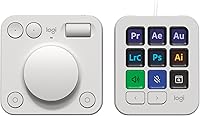
The Logitech MX Creative Console Customizable Keypad arrived at an interesting moment — when designers and editors started pushing back against purely software-based shortcuts and wanted something they could actually feel under their fingers. This creative console takes a two-part approach: a programmable keypad with LCD keys sits alongside a precision control dial and roller, giving you physical input options that a standard keyboard simply cannot replicate. It is aimed squarely at creative professionals — Photoshop power users, video editors, Figma devotees — not gamers chasing reaction speed. There is also a bundled Adobe Creative Cloud membership included, which is a genuine bonus, though it should not be the deciding factor in your purchase.
Features & Benefits

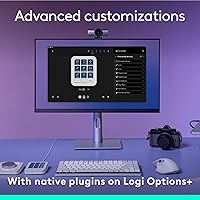
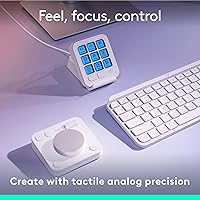
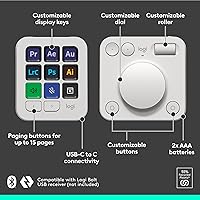
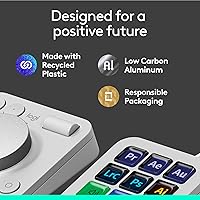
The nine LCD keys are where this customizable keypad makes its strongest case. Each key displays a custom icon you upload yourself, so instead of memorizing which blank button triggers a specific layer merge or clip export, you just glance down. You can build up to 15 shortcut pages per app profile, meaning heavy Premiere Pro users can have dedicated pages for color grading, audio mixing, and timeline navigation without ever touching the keyboard. The analog control dial is the standout physical feature — it handles brush size adjustments, timeline scrubbing, and volume control with a smoothness that mouse-dragging a slider never quite matches. A roller adds a third input modality, and the USB-C wired connection keeps things stable and zero-latency.

Best For

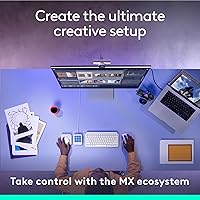
This creative console makes the most sense for designers and illustrators who spend most of their day inside Adobe apps. If you constantly switch between tools in Photoshop, having actions mapped to visible keys — rather than buried in keyboard muscle memory — noticeably cuts friction. Video editors in DaVinci Resolve or Premiere Pro will appreciate the dial most, since scrubbing timelines or adjusting color wheels with a physical knob beats hunting for the right on-screen control every time. Streamers who need quick scene transitions or mute toggles will also find value here. That said, if your primary app lacks a native integration profile, expect a meaningful setup investment before things feel truly intuitive.

User Feedback

Among buyers, the dial feel and overall build quality draw consistent praise — most report that the LCD key layout becomes second nature faster than expected. The criticism that surfaces repeatedly centers on the companion software: it carries a learning curve that frustrates users in the first couple of hours, especially when configuring non-Adobe apps. Battery life splits opinion too; the swappable AAA design is practical when batteries die mid-session, but a built-in rechargeable option would feel more fitting at this price level. A handful of Mac users note a slightly rougher out-of-box experience compared to Windows. At 4.1 stars across 316 ratings, the overall picture is positive — but honestly earned, not unanimous.

Pros

  • Nine LCD keys display custom icons, so you stop guessing which button does what mid-workflow.
  • The analog control dial delivers genuinely smooth, precise adjustments that dragging an on-screen slider cannot replicate.
  • Up to 15 keypad pages per profile means one device covers your entire multi-app creative stack.
  • Out-of-box profiles for Adobe apps, DaVinci Resolve, Figma, and more drastically cut initial setup time.
  • The roller adds a third physical input that is surprisingly useful for scrolling or nudging parameters.
  • USB-C wired connection keeps response consistent with no wireless dropouts or pairing headaches.
  • Most users report adapting to the LCD key layout faster than expected, often within a few sessions.
  • The included stand keeps the keypad stable and well-positioned without needing a separate accessory.
  • Swappable AAA batteries mean a dead device never strands you mid-project for a charging cycle.
  • The bundled Adobe Creative Cloud membership adds meaningful value for anyone not already subscribed.

Cons

  • The companion software has a noticeable learning curve that can frustrate users during the first setup session.
  • Mac users consistently report a rougher out-of-box experience compared to Windows, requiring extra configuration time.
  • AAA battery power feels like an odd choice for a premium creative peripheral; built-in charging would suit the price better.
  • Apps without native profile support require fully manual mapping, which takes real time and patience.
  • The upfront investment is difficult to justify for part-time or casual creatives who open design apps infrequently.
  • At 1.26 pounds with a stand, the footprint is noticeable on smaller desks where space is already tight.
  • Only nine physical keys means heavy shortcut users may find themselves flipping between pages more than they would like.
  • There is no wireless option, so desk cable management becomes a real consideration depending on your setup.

Ratings

The scores below for the Logitech MX Creative Console Customizable Keypad were generated by AI after systematically analyzing verified buyer reviews from around the world, with spam, bot-submitted, and incentivized feedback actively filtered out. Each category reflects the honest consensus of real daily users — designers, editors, and creators who put this creative console through its paces in actual professional workflows. Both the strengths that earned loyalty and the friction points that caused frustration are represented transparently in every score.

Build Quality
83%
The physical construction earns consistent praise, particularly the control dial, which feels solid and purposeful rather than hollow or cheap. Users working long creative sessions report that the keypad stays firmly in place on the desk, and the included stand adds a sense of stability that matches the premium positioning.
A few users note that the plastic housing, while sturdy, does not feel quite as premium as the price point might suggest when compared to metal-bodied competitors. Minor flex in the keypad body has been mentioned, though it rarely affects day-to-day function.
Control Dial Feel
91%
The analog dial is the component that wins the most enthusiastic praise from buyers. Designers adjusting brush sizes in Photoshop and editors scrubbing timelines in Premiere Pro repeatedly describe the low-friction rotation as precise and satisfying in a way that mouse-based parameter control simply cannot replicate.
A small number of users wish the dial offered adjustable resistance tension, as the fixed friction level suits some tasks better than others. Those coming from higher-end dedicated hardware encoders occasionally find it falls slightly short of that tactile benchmark.
LCD Key Customization
88%
The ability to upload custom icons to each key is genuinely useful in daily practice — instead of memorizing which blank button triggers a layer merge or export action, you glance down and see a clear visual cue. Users adapting to the layout report faster onboarding than expected, often within just a few working sessions.
Nine keys is a relatively modest count, and users with dense shortcut libraries find themselves flipping between keypad pages more frequently than they would like. The icon upload process, while functional, is not as streamlined as it could be and adds minor friction during initial personalization.
Software & Setup
57%
43%
For natively supported apps like Adobe Photoshop and DaVinci Resolve, the pre-built profiles mean the MX Creative Console is productive relatively quickly out of the box. Windows users in particular tend to report a smoother initial experience, with most core functions working as expected after installation.
The companion software is the most consistently criticized aspect across reviews. New users frequently describe feeling overwhelmed during their first configuration session, and the interface logic is not always intuitive. Mac users face an additional layer of friction with permission requirements and occasional inconsistencies that Windows users simply do not encounter.
App Compatibility
79%
21%
Native integration with a genuinely broad set of professional tools — Adobe suite, Final Cut Pro, DaVinci Resolve, Figma, Zoom, and Spotify — means that a large share of creative professionals will find pre-built profiles ready to use from day one. This breadth of support is one of the stronger practical arguments for choosing this creative console over simpler alternatives.
Step outside the supported app list and the experience changes significantly. Users working in niche design tools, game engines, or specialized audio software must map everything manually, which is time-consuming and requires a level of technical patience that not everyone wants to invest.
Dial & Roller Precision
86%
For continuous, analog-style adjustments — think color temperature sliders in Lightroom or volume fades in Premiere Pro — the dial delivers a level of control that feels noticeably more accurate than dragging on-screen. The roller adds a useful secondary input for scrolling or nudging values without lifting hands from the desk.
Some users working in highly precise numerical input scenarios note that the dial lacks a click-to-reset or reference-point feature, making it harder to return to a specific value quickly. The roller, while useful, has generated less enthusiastic feedback than the dial itself.
Value for Money
62%
38%
For professionals who use design or video editing software daily, the productivity gains — fewer interruptions hunting for shortcuts, faster parameter adjustments — do add up over weeks of use. The bundled Adobe Creative Cloud membership is a genuine bonus for anyone not already subscribed, softening the upfront investment.
Buyers who use creative software only occasionally will struggle to justify the cost, and that sentiment shows up clearly in the reviews. Compared to less expensive macro pad alternatives, the premium here rests heavily on the dial and native integrations — remove those from your workflow needs and the value proposition weakens considerably.
Battery Life & Power
66%
34%
The swappable AAA battery design has a practical upside that some users genuinely appreciate: when batteries die mid-session, replacement takes seconds with no downtime waiting for a charge cycle. For users who keep spares in a desk drawer, this is a non-issue in daily practice.
For a device at this price tier, a built-in rechargeable battery is what most buyers expect, and the AAA requirement feels like a design compromise rather than a deliberate choice. Users who dislike managing disposable batteries find this friction small but persistent over time.
Ease of Use
71%
29%
Once the initial setup hurdle is cleared and muscle memory starts to form, users consistently describe the MX Creative Console as feeling natural and integrated into their workflow. The visual LCD keys accelerate the learning process compared to blank-button alternatives, which is a meaningful advantage for new adopters.
The first few hours with this device require patience and deliberate effort, particularly for users unfamiliar with macro pad concepts. Those who expect plug-and-play simplicity are likely to feel frustrated before the device starts paying dividends.
Profile Management
74%
26%
The ability to store up to 15 pages per app profile gives power users real depth to work with, allowing a single device to cover an extensive shortcut library across multiple tools without any hardware switching. Switching between app profiles during a working session is quick once the system is configured.
Managing a large number of profiles and pages inside the companion software can become unwieldy, and there is no particularly elegant way to organize or search across all configured shortcuts. Users with complex multi-app setups occasionally report losing track of where specific actions are mapped.
Desk Footprint
78%
22%
The physical size strikes a reasonable balance — compact enough to sit beside a keyboard without dominating a standard-sized desk, but substantial enough to feel intentional rather than cramped. The included stand keeps the unit angled at a comfortable position for both key presses and dial interaction.
Users with smaller workstations or highly organized desk setups note that adding both the keypad and its stand requires a dedicated zone that can feel like a meaningful trade-off. The wired USB-C cable adds to cable management considerations depending on desk layout.
Cross-Platform Consistency
61%
39%
Windows users across reviews report a comparatively smooth experience with reliable software behavior and straightforward profile management. For studios or individuals standardized on Windows, the creative console integrates without significant friction after the initial learning curve.
Mac users are underrepresented in positive feedback relative to Windows users, with recurring notes about permission prompts, occasional software instability, and behavior inconsistencies across macOS versions. It works on Mac, but calling the experience equivalent to Windows would be inaccurate.
Wired Connectivity
84%
The USB-C wired connection is a practical advantage for professional use — there is no wireless latency, no Bluetooth pairing headaches, and no secondary battery to monitor. Editors and designers working on deadline-driven projects appreciate the predictability of a stable wired connection.
The absence of a wireless option is a genuine limitation for users who prefer a clean, cable-free desk setup or who travel with their peripherals. Those accustomed to wireless Logitech devices may find the mandatory cable an unexpected step backward.
Out-of-Box Experience
68%
32%
Users working primarily in Adobe apps or DaVinci Resolve tend to describe a reasonably positive first impression, since pre-loaded profiles mean the device is useful without building everything from scratch. The physical packaging and included accessories also reflect the premium positioning well.
For anyone outside the core supported app ecosystem, the out-of-box experience is considerably thinner. The software installation process has drawn criticism for being longer and more involved than the hardware presentation implies, and first-time macro pad users in particular can feel underprepared.

Suitable for:

The Logitech MX Creative Console Customizable Keypad is built for people who spend serious hours inside creative software and feel the friction of keyboard shortcuts every single day. Graphic designers and illustrators working heavily in Adobe Photoshop or Illustrator will immediately appreciate having tool actions mapped to visible, icon-labeled keys rather than relying on memorized key combinations. Video editors in Premiere Pro or DaVinci Resolve get perhaps the biggest payoff, since the analog control dial turns tedious parameter adjustments — timeline scrubbing, color grading knobs, audio levels — into something that actually feels precise and physical. Content creators and streamers who need reliable, fast scene or app switching will also find this creative console fits naturally into a professional desk setup. If you already pay for Adobe Creative Cloud and live in that ecosystem, the out-of-box profiles mean you are productive within an hour rather than an afternoon.

Not suitable for:

The Logitech MX Creative Console Customizable Keypad is a harder sell if your workflow does not revolve around a handful of deeply supported creative applications. Users who primarily work in niche or proprietary software without native profile support will face a meaningful manual configuration process before the device earns its place on the desk. Casual or part-time creators who open Photoshop a few times a week are unlikely to recoup the time investment in setup and habit-building that this customizable keypad genuinely requires. The AAA battery requirement, while practical in a pinch, feels slightly out of step with what buyers at this price point typically expect from a premium peripheral. Mac users in particular have reported a rougher initial experience compared to Windows, so if you are on macOS, budget extra time for setup. Anyone looking for a budget-friendly macro pad or a simple shortcut solution should explore less expensive alternatives first.
Specifications

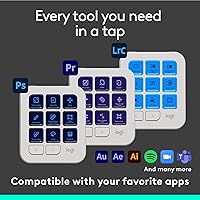
  • LCD Keys: The keypad includes 9 fully customizable LCD keys, each capable of displaying a user-uploaded icon for at-a-glance action identification.
  • Profile Pages: Each app profile supports up to 15 keypad pages, allowing extensive shortcut layering without any hardware changes.
  • Control Inputs: Three distinct physical inputs are provided: a low-friction analog dial, a roller, and the programmable LCD keypad.
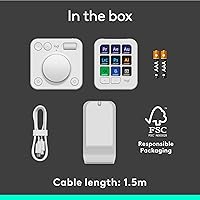
  • Connectivity: The device connects via USB-C wired cable, which is included in the box.
  • Power Source: The unit is powered by 2 AAA batteries, which are included at purchase.
  • Compatible Apps: Native integration profiles are available for Adobe Photoshop, Lightroom, Premiere Pro, Illustrator, Final Cut Pro, DaVinci Resolve, Figma, Zoom, and Spotify.
  • Platform Support: The device is officially compatible with PC laptops and desktops; macOS is supported but may require additional configuration steps.
  • Weight: The unit weighs 1.26 pounds, making it a stable but portable addition to a creative workstation.
  • Dimensions: Package dimensions are 10.71 x 5.39 x 2.72 inches, reflecting a compact desktop footprint.
  • Stand: A keypad stand is included in the box, providing an angled, stable positioning solution without requiring a separate purchase.
  • Material: The outer housing is constructed from plastic, finished in a Pale Grey colorway suited to neutral desk aesthetics.
  • Model Number: The official model number is 920-012661, part of the MX Creative Console series by Logitech.
  • Availability: The product was first made available in September 2024, making it a relatively recent addition to the creative peripheral market.
  • BSR Ranking: As of available data, the device holds a Best Sellers Rank of #145 in the Computer Keyboards category on Amazon.
  • User Rating: The product carries an average rating of 4.1 out of 5 stars based on 316 customer ratings.

Related Reviews
Logitech MX Keys Mini Wireless Keyboard

82%
91%
Typing Comfort
88%
Multi-Device Switching
93%
Battery Life
86%
Build Quality
74%
Portability
More
Logitech MX Mechanical
81%
88%
Typing Feel & Switch Quality
91%
Noise Level
86%
Build Quality & Materials
93%
Battery Life
87%
Multi-Device Connectivity
More
Logitech Wireless Anywhere Mouse MX
86%
94%
Tracking Performance
89%
Ergonomics/Comfort
72%
Battery Life
91%
Portability/Size
87%
Ease of Use/Setup
More
Logitech MX Vertical
79%
88%
Ergonomic Comfort
61%
Adjustment Period
83%
Build Quality
86%
Multi-Device Connectivity
91%
Battery Life
More
Logitech MX Anywhere 3 for Mac Mouse
84%
96%
Scroll Wheel Performance
91%
Surface Tracking
93%
Battery Life
82%
Portability & Size
74%
Bluetooth Reliability
More
Logitech MX Keys S
Logitech MX Keys S
81%
91%
Typing Feel & Key Response
93%
Multi-Device Connectivity
84%
Build Quality & Durability
94%
Battery Life
76%
Backlighting & Visibility
More
Logitech MX Anywhere 2S Bluetooth Edition
79%
93%
Surface Tracking Accuracy
89%
Multi-Device Switching
91%
Battery Life
51%
Charging Port (Micro-USB)
82%
Logitech Flow (Cross-Computer Control)
More
Logitech MX Master 2S Wireless Mouse
86%
91%
Ergonomics & Comfort
94%
Battery Life
88%
Multi-Device Control
89%
Build Quality
85%
Ease of Use
More
Logitech MX Master 3S Wireless Mouse
87%
94%
Ergonomics and Comfort
91%
Tracking Precision (8K DPI)
89%
Build Quality
87%
Customization and Productivity
85%
Quiet Click Mechanism
More
Logitech MX Keys Business Gen 2 Combo
81%
91%
Typing Comfort
93%
Mouse Scroll Performance
88%
Wireless Security
87%
Build Quality
89%
Mouse Tracking Accuracy
More

FAQ

Yes, you can manually assign shortcuts and actions to any app — it just takes more effort upfront since there is no pre-built profile to start from. If you primarily work in a niche or proprietary application, expect to invest a solid hour or two mapping things out before it feels intuitive.

For natively supported apps like Photoshop or Premiere Pro, setup is relatively straightforward — you install the companion software, select your app profile, and most actions are pre-mapped. The companion software does have a learning curve though, and several users note that the first session can feel overwhelming if you try to customize everything at once. Taking it one app at a time makes the process much more manageable.

It does work on Mac, but the experience is not quite as polished out of the box as it is on Windows. Some macOS users report needing additional permission grants and manual adjustments before everything functions correctly. It is not a dealbreaker, but Mac users should budget extra setup time.

Absolutely — that is one of the strongest practical features of this creative console. You can upload custom images to each key, so every button visually represents exactly what it does in your workflow. This makes it much faster to internalize the layout compared to blank or generic-labeled keys.

Battery life will vary depending on how heavily you use the device, but AAA batteries in peripherals like this typically last several weeks to a couple of months under regular daily use. The upside is that swapping them out takes seconds, so you are never stuck waiting for a charge cycle to complete mid-project.

It depends on your priorities. This customizable keypad is more specifically tailored to creative software workflows, with deeper native integration for Adobe apps and a physical dial that a standard Stream Deck does not offer. If you are primarily a content creator or streamer, both are worth comparing. If design and video editing are your core focus, the analog dial alone makes a compelling case here.

Yes, switching profiles is designed to be fast — you can assign a key or use the companion software to flip between profiles without interrupting your workflow. The 15-page-per-profile depth means you can also keep a lot of actions accessible within a single profile before needing to switch at all.

Most users who do color grading or audio mixing report that the low-friction dial is one of the standout physical features. It offers a level of analog precision that dragging a slider with a mouse simply does not match. It is not the same as a dedicated hardware encoder, but for everyday creative adjustments it holds up well.

No, the MX Creative Console is a wired-only device, connecting via USB-C. For creative work where consistency matters, many users actually prefer this since there are no connectivity dropouts or battery management concerns to deal with during long sessions.

If you only use design or editing software a few times a month, the time investment in setup and building muscle memory may not pay off in any meaningful way. Similarly, if most of your work happens in apps without native profile support, the manual configuration required makes it harder to justify compared to simpler, less expensive macro pad options.

Where to Buy