
Overview

The Logitech K400 Wireless Touch Keyboard is one of those rare products that has outlasted countless competitors simply by doing its job well. Launched back in 2011, it was built around a specific problem: controlling a PC hooked up to your TV without getting up from the couch. The integrated touchpad handles that role in a single, compact unit — no separate mouse needed. Logitech's Unifying receiver plugs in once and works immediately, with zero driver fuss. At a mid-range price, it carries enough brand credibility to feel like a considered purchase rather than a gamble. The longevity of this keyboard on the best-seller charts says more than any spec sheet could.

Features & Benefits

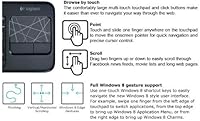
The 3.5-inch touchpad is the centerpiece here, and it handles casual web browsing and two-finger scrolling without complaint. You are not going to replace a dedicated mouse for precision work — but that is not the point. From across the room, the 33-foot wireless range holds up reliably, letting you pause a video, adjust volume, or type a quick search query from the couch. The low-profile keys are quiet enough that they won't disturb anyone nearby, and the bold character printing makes them readable even at a distance. Media and hotkeys sit right where you need them. The unit is slim enough to rest comfortably on a knee or armrest, and AA batteries come included so you can use it straight out of the box.

Best For

This wireless couch keyboard was clearly designed with one scenario in mind: a PC plugged into your living room TV. That said, it fits plenty of adjacent use cases. Anyone who has tried balancing a full-size keyboard and a separate mouse on the couch will immediately appreciate having a single all-in-one unit. It works equally well in small bedrooms where desk space is limited and you want to control your PC from a chair. For light typing — search bars, usernames, short messages — it is genuinely practical. If you are running Windows and want something that works without installing anything, the K400 delivers that consistently. It is not a tool for heavy typists; it is a living room remote replacement that happens to have a real keyboard.

User Feedback

The reception from long-term buyers is telling. Setup gets praised repeatedly — people note it works within minutes, no technical knowledge required. Battery life stands out as a genuine highlight, with many users reporting that a single pair of AA batteries lasts months under regular use. On the downside, the touchpad doubles as a left-click button, which takes a brief adjustment period to feel natural. More significantly, the lack of backlighting is a real drawback for home theater setups where the lights are usually dimmed or off. Finding specific keys in a dark room is a legitimate frustration. Still, the K400 holds unusually strong ratings for a product this old, and a notable share of buyers return to purchase a second unit — which tends to say a lot.

Pros

  • Plug-and-play setup via the Unifying receiver — no drivers, no configuration, no headaches.
  • Wireless range holds strong across a typical living room, even with the PC tucked behind a TV.
  • Battery life is exceptional, with many users stretching a single pair of AA batteries across several months.
  • The all-in-one design eliminates the need to balance a separate mouse on the couch cushion.
  • Quiet membrane keys are easy on the ears in shared spaces or late-night media sessions.
  • Bold key printing improves readability from a distance, which matters more than most buyers expect.
  • The included USB extender solves the awkward port placement problem on most TV-connected PCs.
  • The K400 has remained a best-seller for over a decade, which reflects genuine, sustained buyer satisfaction.
  • Media and hotkeys work reliably across popular streaming apps and browsers without remapping.
  • Slim, lightweight build makes it comfortable to hold on a knee or rest on an armrest for extended sessions.

Cons

  • No backlighting at all — a serious limitation for dark home theater environments where most HTPC users operate.
  • The touchpad doubles as a physical click button, which feels awkward until you actively adjust your usage habits.
  • Precision cursor tasks — selecting small links, dragging windows — are genuinely frustrating on the built-in touchpad.
  • No battery level indicator means the keyboard dies without warning, often at the most inconvenient moments.
  • Official OS support stops at Windows 7, leaving Windows 10 and 11 users without documented compatibility assurance.
  • The plastic surface picks up fingerprints and shows wear quickly, especially around the touchpad and common keys.
  • Compact key layout causes occasional mistyping for users accustomed to a full-size keyboard.
  • Losing the Unifying receiver is a costly and frustrating problem, with no easy or cheap replacement path.
  • No customization software means hotkeys cannot be remapped for users with non-standard workflow needs.
  • Touchpad surface can develop a sticky or rough texture over extended daily use, affecting both feel and tracking.

Ratings

The scores below for the Logitech K400 Wireless Touch Keyboard were generated by our AI system after processing thousands of verified global buyer reviews, with spam, incentivized, and bot-generated feedback actively filtered out. The analysis covers more than a decade of real-world usage data, giving these ratings an unusual depth compared to newer products. Both the strengths that keep buyers coming back and the frustrations that show up repeatedly in honest reviews are reflected transparently in every score.

Ease of Setup
94%
Buyers consistently describe the setup as one of the fastest they have experienced with any peripheral. The Unifying receiver plugs in, the keyboard powers on, and it simply works — no software downloads, no pairing menus, no troubleshooting. For living room users who just want to get back to watching, that immediacy is genuinely appreciated.
A small number of users on less common Windows configurations reported needing to try different USB ports before the receiver was recognized. This is rare, but it does come up often enough to be worth noting for anyone with an older or more unusual PC setup.
Wireless Reliability
91%
The 2.4 GHz connection holds up well across typical living room distances, and very few reviewers report dropouts or lag during casual use. Users who have positioned their PC behind a TV cabinet note the signal still reaches the couch without issue, which matters more than the spec sheet range number.
In environments with significant wireless interference — dense apartment buildings, for example — a handful of users notice occasional micro-stutters. It is not a widespread complaint, but buyers in congested wireless environments should keep it in mind.
Touchpad Usability
68%
32%
For its intended role — scrolling through Netflix menus, clicking on streaming links, or navigating a browser from across the room — the 3.5-inch touchpad is genuinely functional. Two-finger scrolling works reliably, and the surface tracks movement cleanly for low-demand tasks that define most HTPC use sessions.
The touchpad doubles as a physical click button, which creates an inconsistent feel that takes real adjustment. Precision tasks like selecting small text or dragging windows are frustrating compared to a dedicated mouse, and buyers who expected mouse-level accuracy are the most vocal source of disappointment in user reviews.
Typing Comfort
74%
26%
The low-profile keys have a soft, quiet action that works well for short bursts of typing — searching for a show title, entering a password, or filling in a form. The bold character printing genuinely helps when reading from a distance, and the key spacing is reasonable for a compact layout.
Extended typing sessions reveal the limits of the membrane key feel, which lacks tactile feedback for fast typists. The compact size also means some keys are repositioned or smaller than a standard layout, leading to occasional errors for users who type without looking at the keyboard.
Battery Life
88%
Battery performance is one of the most consistently praised aspects of this HTPC keyboard across years of reviews. Many buyers report getting several months out of a single pair of AA batteries under regular media-room use, which reduces the maintenance burden significantly compared to rechargeable alternatives.
There is no battery level indicator on the device itself or via software notification, so the keyboard tends to die without warning. A few users mention this caught them off guard mid-session, which is a minor but recurring annoyance that a simple LED indicator could easily solve.
Build Quality
72%
28%
For its price tier, the K400 feels solid enough for daily couch use. The chassis does not flex noticeably under normal typing pressure, and the overall construction has held up for multiple years for the majority of long-term buyers who leave feedback about durability.
The plastic finish shows fingerprints and surface wear over time, particularly around the touchpad edges and the most-used keys. A few buyers also report that the touchpad surface develops a slight stickiness after extended use, which affects both feel and tracking accuracy.
Portability & Form Factor
83%
At just under an inch thick and weighing around 12 ounces, the K400 sits comfortably on a knee or armrest without feeling cumbersome. Its footprint is compact enough to tuck into a couch cushion or store on a shelf without taking up noticeable space.
The width — nearly 14 inches — is still a stretch for one-handed use, which some buyers hoped for when purchasing a couch keyboard. Users with smaller hands in particular mention that navigating the touchpad while holding the keyboard at the same time requires an awkward grip.
Backlighting
31%
69%
There is essentially nothing to say positively here from a backlighting standpoint — the absence of it is a deliberate design choice that keeps the cost down and battery life high. Buyers who primarily use it in well-lit rooms report no real issue with key visibility day-to-day.
The lack of any backlighting is the single most common complaint from home theater users, who almost universally operate in dim or fully dark rooms. Finding specific keys by feel alone is difficult on a compact layout, and this one omission makes the K400 a noticeably poor fit for its core HTPC audience in dark environments.
Value for Money
86%
Considering that this keyboard replaces both a wireless keyboard and a separate mouse for living room use, the mid-range price represents solid value for most buyers. Its longevity on the market without a price increase adds to the perception of fair, stable pricing from Logitech.
Competing options at similar price points have started to offer backlighting or rechargeable batteries, making the K400 feel slightly dated in its value equation. Buyers who discover these alternatives after purchase occasionally express mild regret, even if the K400 met their basic needs.
OS & Device Compatibility
79%
21%
The Unifying receiver works immediately on Windows XP, Vista, and 7 without any additional software, making it a reliable choice for older HTPC builds that buyers have not upgraded. For its target use case, the compatibility range is broad enough to cover the vast majority of living room PC setups.
The official compatibility list stops at Windows 7, and while many users report it working fine on Windows 10 and 11, Logitech does not guarantee it. Linux and macOS users flag inconsistent touchpad behavior, with some gestures not registering correctly depending on the desktop environment.
Media & Hotkey Functionality
81%
19%
The dedicated media keys — play, pause, volume, and skip — work reliably across popular media players and browsers without needing remapping. For the core job of controlling a streaming session from the couch, they hit the right spots and respond consistently.
The hotkey layout is not customizable without third-party software, which limits its usefulness for buyers who want to assign specific shortcuts to their workflow. A few users note that certain hotkeys behave differently across media applications, requiring trial and error to learn the quirks.
Receiver & Port Design
77%
23%
The inclusion of a USB extender in the box is a thoughtful touch that most buyers appreciate — TV-connected PCs often have ports in awkward or tight locations, and the extender solves that without requiring an adapter purchase. The receiver itself is small enough to leave plugged in permanently.
The Unifying receiver is easy to lose if removed, and Logitech charges a non-trivial amount for a replacement. Users who share the receiver between devices or travel with the keyboard mention it as a fragile point of failure in the overall ownership experience.
Noise Level
89%
The membrane keys produce minimal noise during typing, which is a genuine benefit in shared living spaces or bedroom setups where a mechanical keyboard would be disruptive. Multiple reviewers specifically mention being able to type late at night without waking others.
While the keys themselves are quiet, the physical click of the touchpad button produces a noticeable clack that some users find inconsistent with the otherwise quiet typing experience. In very quiet rooms, that click stands out more than expected for a device marketed around quiet operation.

Suitable for:

The Logitech K400 Wireless Touch Keyboard was built for a specific job, and if that job matches your situation, it is hard to beat at this price. It is the right pick for anyone who has a PC hooked up to their living room TV and wants to control it from the couch without juggling a separate keyboard and mouse. Home theater enthusiasts, casual streamers, and bedroom PC users will find the all-in-one form factor genuinely practical — especially in smaller spaces where desk peripherals make no sense. If your typical use involves browsing, searching, adjusting playback, or light typing from across the room, this HTPC keyboard covers all of it without overcomplicating things. It also suits buyers who simply want something that works out of the box with minimal setup fuss, particularly on older Windows machines.

Not suitable for:

If you are expecting mouse-level precision from the touchpad, the K400 will disappoint — it was designed for casual navigation, not fine cursor control, and buyers who need to do any detailed work on screen will quickly reach for a proper mouse instead. The absence of backlighting is a genuine dealbreaker for anyone who primarily uses their home theater setup in a dim or fully dark room, which, frankly, describes most HTPC users. Heavy typists will also find the compact membrane layout limiting for anything beyond short search queries or password entry. The Logitech K400 Wireless Touch Keyboard is not the right choice for Linux or macOS users either, as touchpad behavior can be inconsistent outside of Windows. And if you are building a modern Windows 10 or 11 setup and want guaranteed official compatibility, the aging support documentation may give you pause.

Specifications

  • Brand: Manufactured by Logitech, a Swiss-American peripheral brand with a long track record in wireless input devices.
  • Model Number: The official model number is 920-003070, also listed under ASIN B005DKZTMG on major retail platforms.
  • Dimensions: The keyboard measures 13.9″ wide, 5.35″ deep, and 0.94″ tall, keeping it slim enough to rest comfortably on a knee or armrest.
  • Weight: The unit weighs 12.7 ounces, light enough for extended lap or one-hand holding without noticeable fatigue.
  • Connectivity: Uses a 2.4 GHz wireless connection via Logitech's Unifying USB receiver, which requires no driver installation on supported systems.
  • Wireless Range: Rated for a 33-foot (10-meter) operating range, sufficient to cover most living room and bedroom HTPC setups with clear line of sight.
  • Touchpad: Features a 3.5-inch multi-touch touchpad that supports two-finger scrolling and basic gesture navigation for web and media use.
  • Key Type: Low-profile membrane keys with a quiet actuation feel and bold, high-contrast character printing for improved readability at a distance.
  • Special Keys: Includes a dedicated row of media keys and hotkeys for playback control, volume adjustment, and common shortcuts without additional software.
  • Backlighting: No backlighting is present on this model; all key visibility relies on ambient room lighting and the bold printed characters.
  • Battery: Powered by 2 AA batteries, which are included in the box; no rechargeable battery or charging cable is provided.
  • Included Items: The box contains the keyboard, a Unifying USB receiver, a USB extender cable, 2 AA batteries, and user documentation.
  • Compatible OS: Officially compatible with Windows XP, Windows Vista, and Windows 7; many users report functional use on Windows 10 and 11 without guaranteed support.
  • Color: Available in Black with a matte finish across the keyboard body and a smooth touchpad surface.
  • Receiver Type: Uses Logitech's Unifying receiver, which supports pairing with up to 6 compatible Logitech devices through a single USB port.
  • Launch Date: First made available on August 11, 2011, making it one of the longest-running active keyboard SKUs in Logitech's consumer lineup.
  • Market Rank: Holds a Best Sellers Rank of approximately #237 in Computer Keyboards on Amazon, reflecting consistent long-term demand.
  • Discontinuation: As of the latest available product data, this keyboard has not been discontinued by the manufacturer and remains in active production.

Related Reviews
Logitech Wireless Keyboard K360
87%
95%
Battery Life
92%
Ease of Setup
83%
Typing Comfort
90%
Wireless Connectivity
85%
Build Quality
More
Logitech K270 Wireless Keyboard
86%
91%
Battery Life
88%
Build Quality
85%
Typing Comfort
83%
Wireless Range
92%
Ease of Setup
More
Logitech MX Mechanical
81%
88%
Typing Feel & Switch Quality
91%
Noise Level
86%
Build Quality & Materials
93%
Battery Life
87%
Multi-Device Connectivity
More
Logitech K480 Wireless Bluetooth Keyboard
86%
88%
Ease of Device Switching
81%
Bluetooth Connectivity
85%
Build Quality
72%
Ergonomics and Comfort
92%
Battery Life
More
Logitech Wireless Illuminated Keyboard K800
87%
89%
Typing Experience
91%
Backlighting Performance
85%
Build Quality
80%
Wireless Connectivity
88%
Battery Life
More
Logitech K750 Wireless Solar Keyboard
84%
94%
Solar Charging Performance
88%
Typing Comfort
85%
Build Quality
78%
Wireless Connectivity
91%
Eco-Friendly Design
More
Logitech MK235
Logitech MK235
77%
93%
Value for Money
91%
Battery Life
94%
Ease of Setup
78%
Typing Experience
61%
Mouse Comfort & Ergonomics
More
Logitech MK335 Wireless Keyboard and Mouse Combo
79%
83%
Typing Noise Level
88%
Wireless Reliability
91%
Battery Life
61%
Mouse Comfort & Ergonomics
76%
Keyboard Comfort & Layout
More
Logitech MK320 Wireless Keyboard and Mouse Combo
84%
91%
Value for Money
94%
Battery Life (Keyboard)
85%
Battery Life (Mouse)
90%
Ease of Setup
88%
Wireless Range
More
Logitech MK270 Wireless Keyboard and Mouse Combo
82%
96%
Battery Endurance
89%
Wireless Reliability
92%
Value for Money
81%
Typing Comfort
59%
Mouse Ergonomics
More

FAQ

Officially, Logitech only lists Windows XP, Vista, and 7 as supported operating systems, since the K400 predates modern Windows versions. That said, a large number of users report it working perfectly fine on Windows 10 and 11 via plug-and-play — the Unifying receiver is recognized without any extra drivers. Just go in with the understanding that if something does not behave as expected, official support may be limited.

No, you do not. Plug the Unifying receiver into a USB port, put the batteries in, and the keyboard is ready to use. There is no setup wizard, no app to install, and no account to create. It is genuinely one of the most straightforward peripherals you can set up.

For living room use — scrolling through a browser, clicking on streaming links, navigating menus — it works well enough to eliminate the need for a separate mouse in most sessions. However, if you need to do anything that requires precise cursor placement, like selecting small text or working in a desktop application, you will likely find it frustrating. Think of it as a navigation aid, not a mouse replacement for detailed work.

Not directly, no. It connects via a USB Unifying receiver, which means it needs a device with a USB port running a compatible OS — typically a PC or laptop. If your smart TV runs Android TV or a similar OS and has a USB port, it may work in some cases, but that is outside the official supported use case and results will vary.

Battery life is one of the most praised aspects of this keyboard. Many users report getting anywhere from three to six months out of a single pair of AA batteries under regular media-room use. Since it comes with batteries included, you can start using it immediately and likely will not need to think about replacements for quite a while.

The original K400 design prioritized battery life and simplicity over backlit keys, which is a real trade-off for home theater users who watch in the dark. Logitech did release a follow-up model called the K400 Plus, which retains the same general concept but still does not include backlighting — so if a backlit version is a hard requirement for you, you may need to look at a different product line entirely.

Many PCs connected to TVs have their USB ports tucked away in tight, hard-to-reach spots — behind the unit, along a recessed panel, or near cables. The extender lets you plug the Unifying receiver into a short cable so it sits somewhere with better line of sight to the keyboard, which can also improve wireless reliability in tricky setups.

Yes. Logitech's Unifying receiver supports up to six compatible devices through a single USB port. If you already have a Unifying-compatible Logitech mouse or other peripheral, you can pair them together using the free Logitech Unifying Software, keeping your USB ports free.

It is workable, but the nearly 14-inch width makes true one-handed holding a bit of a stretch — literally. Most users end up resting it on their lap or a flat surface and using both hands, which works well. If you were hoping to hold it in one hand like a remote while navigating with your thumb, the size makes that awkward for most people.

Unfortunately, losing the receiver is the most common ownership headache with this keyboard. Logitech sells replacement Unifying receivers separately, but the cost adds up and the process of re-pairing is an extra step. It is worth keeping the receiver plugged in permanently if possible, or storing it somewhere safe if you ever need to remove it. Some users buy a spare receiver proactively just to avoid the hassle later.