







Overview

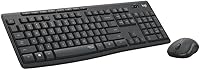
The Logitech MK295 is a wireless keyboard-and-mouse combo built for everyday desktop users who want a quieter workspace without spending a lot. Logitech's SilentTouch technology cuts typing and clicking noise by roughly 90% compared to standard keys — not total silence, but a meaningful reduction that genuinely matters in shared spaces. The full-size layout includes a dedicated numpad, which is more useful than it sounds if you spend real time in spreadsheets or accounting software. Setup takes seconds: plug in the tiny USB receiver and you're connected wirelessly up to 10 meters away. It works with Windows and Chrome OS straight out of the box.

Features & Benefits

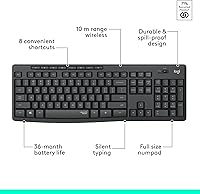
What makes this silent wireless combo stand out at its price point is how much practical functionality Logitech packed in. The keys and mouse buttons retain real tactile feedback — you still feel the click, you just don't hear much of it. The full numpad alone separates it from several pricier wireless combos that drop it to save space. Eight shortcut keys handle media playback, volume, mute, and browser controls without needing any software. The optical mouse tracks reliably on most surfaces. Battery life is genuinely impressive for average use — up to 36 months for the keyboard under normal daily conditions. The spill-resistant build and adjustable tilt legs are small details that add real durability over time.

Best For

This keyboard-and-mouse set makes the most sense for anyone working in a shared or open-plan space where clatter from a standard keyboard becomes a real issue for people nearby. It's a natural fit for students, remote workers on a budget, and anyone who has been tolerating a tangle of cables and finally wants a clean desk. The numpad makes it especially practical for bookkeepers, teachers, or anyone who handles numbers regularly. It also works well for households that split time between Windows machines and Chromebooks, since it handles both without any driver installation or configuration headaches whatsoever.

User Feedback

Among the thousands of buyers who have weighed in on this silent wireless combo, the reduced typing noise consistently comes up as the single biggest reason people are glad they bought it. That said, the feedback isn't all praise. Larger-handed users frequently mention the mouse feels slightly cramped during longer sessions, which is worth knowing before you commit. A smaller group of heavy typists find the key travel a bit shallow compared to what they're used to. On the positive side, battery longevity regularly surprises people — many report going well over a year without touching the keyboard batteries. Overall, satisfaction is solid for light-to-moderate daily use, and most buyers would recommend it.

Pros

  • SilentTouch technology noticeably reduces typing and click noise in shared spaces.
  • Full numpad is included at a price point where most competitors quietly drop it.
  • Plug-and-play setup works immediately on Windows and Chrome OS with zero drivers.
  • Keyboard battery life regularly lasts well beyond six months under normal daily use.
  • The 2.4 GHz wireless connection is stable and lag-free for everyday office tasks.
  • Spill-resistant keyboard design adds a practical layer of protection for desk use.
  • Eight shortcut keys for media and volume controls work instantly without any software.
  • Optical mouse tracks reliably on most surfaces without needing a dedicated mousepad.
  • Adjustable tilt legs let you set a comfortable typing angle with no fuss.
  • Overall value for the price is genuinely strong compared to similarly priced wireless combos.

Cons

  • The mouse is noticeably compact and causes discomfort for users with larger hands during long sessions.
  • Key travel is shallower than average, which frustrates fast or tactile-focused typists.
  • No DPI adjustment on the mouse means cursor sensitivity cannot be tuned to personal preference.
  • Shortcut keys cannot be remapped, limiting flexibility for users with non-standard workflows.
  • No battery level indicator means the first warning of low power is often a dropped connection.
  • The mouse plastic feels visibly budget-grade and shows fingerprints and wear relatively quickly.
  • Only one USB receiver is included, making it inconvenient to switch between two computers.
  • The wide full-size footprint pushes the mouse far to the right on smaller or cluttered desks.
  • Heavy daily users will see noticeably shorter battery intervals than the advertised maximum figures.
  • No macOS support at all, which catches some buyers off guard despite being listed in the specs.

Ratings

The scores below for the Logitech MK295 were generated by our AI engine after analyzing thousands of verified purchase reviews from global buyers, with spam, bot submissions, and incentivized feedback actively filtered out. The result is an honest snapshot of what real users experience day-to-day — covering everything this silent wireless combo does well and the areas where it falls short of expectations.

Noise Reduction
88%
This is the reason most people buy this keyboard-and-mouse set, and it largely delivers. Users working in open offices, shared apartments, or late at night consistently report that the reduction in click noise is immediately noticeable and genuinely appreciated by people nearby.
It is quieter, not silent — some buyers expecting near-total noise suppression are mildly surprised that rapid typing is still audible up close. In very quiet library-style environments, the remaining sound can still feel intrusive to a small share of users.
Value for Money
91%
At its price tier, the combination of wireless connectivity, a full numpad, silent keys, and long battery life is difficult to match from competing brands. Most buyers feel they received significantly more functionality than the cost would suggest, making it a go-to recommendation for budget-conscious shoppers.
A handful of users feel the mouse quality slightly undercuts the overall value, noting that the keyboard punches above its weight while the mouse feels more entry-level. For buyers who type lightly but mouse heavily, the value equation feels slightly less balanced.
Keyboard Typing Experience
79%
21%
The key layout is well-spaced and familiar, making the transition from any standard keyboard effortless. Casual typists and office workers doing emails, documents, and data entry find the experience comfortable and consistent throughout the day.
Heavy typists or anyone coming from a mechanical keyboard will notice the shallower key travel fairly quickly. The feedback is there, but it lacks the depth and resistance that fast or tactile-focused typists tend to prefer for extended writing sessions.
Mouse Comfort & Ergonomics
63%
37%
For users with average or smaller hands, the mouse is perfectly functional and comfortable for standard office tasks. The contoured shape works well for short-to-medium sessions, and the optical tracking holds up on most desk surfaces without needing a dedicated mousepad.
Users with larger hands consistently flag this as the most notable weak point of the combo. After an hour or two of continuous use, the compact profile causes noticeable strain, and several buyers have ended up pairing the keyboard with a different, larger mouse entirely.
Battery Life
93%
Battery performance is one of the most frequently praised aspects across all reviews. Keyboard users regularly report going six months or longer before needing to swap batteries under everyday office use, and mouse battery life similarly tends to outlast initial expectations by a comfortable margin.
The headline figures assume moderate daily use, and heavy users — those typing for six or more hours daily — will see shorter intervals between changes. A small number of buyers also noted the lack of a battery indicator, meaning the first sign of low power is often a sluggish connection.
Wireless Reliability
86%
The 2.4 GHz nano receiver delivers a stable connection across typical home and office distances, with no meaningful lag during regular typing or mouse movement. Users who switched from Bluetooth combos frequently mention the improved consistency as a welcome change.
In environments with heavy wireless interference — crowded offices with many competing devices or USB 3.0 ports placed directly next to the receiver — a small share of users reports occasional micro-dropouts. Moving the receiver to a different USB port typically resolves the issue.
Build Quality
72%
28%
The keyboard feels sturdier than its price suggests, with keys that do not wobble or rattle under normal use. The spill-resistant design provides a practical safety net for desk users who keep drinks nearby, and the tilt legs click firmly into position without any looseness.
The mouse housing feels noticeably more plastic and lightweight compared to the keyboard, giving the combo a slightly uneven quality feel. Some users note that the glossy sections of the mouse body attract fingerprints easily and show wear faster than expected.
Setup & Compatibility
94%
Plug-and-play setup is one area where this keyboard-and-mouse set earns near-universal praise. Users across Windows 7 through Windows 11 and various Chromebook models report immediate recognition with zero driver installation required, making it genuinely accessible for less tech-savvy buyers.
macOS users are simply not supported, which catches a small number of buyers off guard despite it being clearly stated in the specs. There is also only one USB receiver included, so users wanting to switch between two machines need to physically move it each time.
Shortcut Keys Usefulness
74%
26%
The eight dedicated shortcut keys for media controls, volume, mute, and browser access are well-positioned and work immediately without any software setup. Users who listen to music or join video calls throughout the workday find them genuinely useful for quick adjustments.
The shortcut keys cannot be remapped, which limits their usefulness for power users who would prefer to assign custom functions. A few buyers also report that the browser shortcut key behavior varies slightly depending on which browser is set as the default.
Mouse Tracking Accuracy
77%
23%
For everyday office work — scrolling, clicking, dragging files — the optical sensor performs reliably and with sufficient precision on most standard surfaces. Users working on documents and spreadsheets rarely encounter any tracking inconsistencies during normal use.
It is not a precision sensor, and graphic designers or anyone doing detailed visual work will notice its limitations fairly quickly. On glossy or reflective surfaces, tracking can become erratic, and there is no DPI adjustment available for users who want more control over cursor sensitivity.
Keyboard Layout & Numpad
89%
Having a full numpad at this price point is a genuine advantage that distinguishes this combo from many wireless alternatives that cut it to reduce size. Accountants, data-entry workers, and spreadsheet-heavy users regularly call it out as the deciding factor in their purchase.
The overall footprint is larger than some buyers anticipate, which can feel bulky on smaller desks. Users who do not regularly use the numpad may find the extra width pushes the mouse further to the right than they would like during extended typing sessions.
Portability
61%
39%
The nano USB receiver tucks away neatly and the keyboard is light enough for occasional relocation around the home. Users who move between a home desk and a kitchen table, for example, find the transition easy enough for casual portability.
At just over 1.6 pounds and nearly 20 inches wide, this is not a combo designed for travel or laptop bag use. Users who expected something more compact for carrying to coffee shops or coworking spaces are consistently underwhelmed by the physical size in practice.
Adjustability & Customization
58%
42%
The adjustable tilt legs offer two height positions, giving users a basic but functional way to set the keyboard angle to their preference. This is a small detail that adds comfort during long typing sessions and is better than nothing at this price tier.
Beyond tilt adjustment, there is very little room for personalization. No software, no RGB, no remappable keys, and no DPI settings on the mouse. For users who like to configure their peripherals, the MK295 offers essentially none of that flexibility.
Aesthetics & Desk Presence
68%
32%
The graphite colorway is understated and professional enough to blend into most home office or corporate desk setups without drawing attention. It looks clean, and the low-profile design does not dominate the workspace visually.
There is nothing particularly distinctive about the styling, and users looking for something that feels premium or polished will find it forgettable. The matte and glossy plastic mix on the mouse in particular looks noticeably budget-grade under close inspection.

Suitable for:

The Logitech MK295 is built for people who spend their days in environments where keyboard clatter genuinely bothers others — open-plan offices, shared apartments, libraries, or any workspace where a noisy typist becomes the person everyone quietly resents. Students who type notes during calls or remote workers on back-to-back video meetings will immediately appreciate how much less intrusive this keyboard-and-mouse set feels compared to a standard combo. If you regularly work with numbers — invoices, budgets, spreadsheets, data entry — the included numpad is a practical win that you will miss the moment you switch to a tenkeyless alternative at a similar price. It is also a solid choice for households that run a mix of Windows laptops and Chromebooks, since the plug-and-play setup works across all of them without any configuration. Anyone who has been tolerating a cable-cluttered desk and wants a clean, low-maintenance wireless upgrade without spending much will find this silent wireless combo hard to argue with.

Not suitable for:

If you have large hands or spend more than a few hours a day on the mouse, the compact size of the pointing device in this keyboard-and-mouse set is a real limitation worth taking seriously — not a minor caveat. Mechanical keyboard enthusiasts or fast touch-typists who rely on deep key travel and crisp tactile response will find the shallower keys unsatisfying for extended writing sessions. macOS users should look elsewhere entirely, as the MK295 does not support Apple operating systems at all. Graphic designers, video editors, or anyone who needs precise cursor control or adjustable DPI will outgrow the basic optical mouse very quickly. If you are looking for something to carry between locations regularly or slip into a laptop bag, the nearly 20-inch keyboard width makes it impractical for anything beyond a fixed desk setup. Finally, users who want to customize shortcuts, remap keys, or tune any aspect of the hardware through software will find no such option exists here.

Specifications

  • Wireless Technology: Connects via a 2.4 GHz nano USB receiver for a stable, lag-free signal without Bluetooth pairing complications.
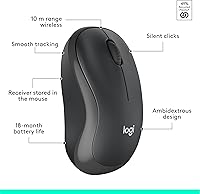
  • Wireless Range: Operates reliably at distances of up to 10 meters between the receiver and the keyboard or mouse.
  • Keyboard Battery: Runs on 2x AAA batteries with an estimated life of up to 36 months under average daily use conditions.
  • Mouse Battery: Runs on 1x AA battery with an estimated life of up to 18 months under average daily use conditions.
  • Noise Reduction: SilentTouch technology reduces keyboard and mouse click noise by approximately 90% compared to standard Logitech models.
  • Layout: Full-size keyboard with a dedicated numeric keypad on the right side for efficient data entry and navigation.
  • Shortcut Keys: Includes 8 dedicated one-touch shortcut keys for play/pause, volume up/down, mute, and internet browser access.
  • Mouse Tracking: Uses an advanced optical sensor that tracks accurately on most standard desk and tabletop surfaces without a mousepad.
  • OS Compatibility: Compatible with Windows 7, 8, 10, and 11, as well as Chrome OS; macOS is not supported.
  • Spill Resistance: The keyboard features a spill-resistant design intended to protect against minor liquid spills during everyday desk use.
  • Tilt Adjustment: Sturdy tilt legs on the underside of the keyboard offer adjustable height positioning for personalized typing comfort.
  • Dimensions: The keyboard measures 20.08″ x 6.22″ x 1.81″, making it a full-size unit suited for stationary desk use.
  • Weight: The combined keyboard and mouse set weighs approximately 1.6 pounds, keeping the overall footprint light for a full-size combo.
  • Color: Available in Graphite, a dark charcoal tone that suits most professional and home office desk environments.
  • Material: Both the keyboard and mouse are constructed from plastic, with a mix of matte and glossy surface finishes.
  • In the Box: Package includes the MK295 keyboard, MK295 mouse, one USB nano receiver, 1x AA battery, 2x AAA batteries, and user documentation.
  • Power Switches: Both the keyboard and mouse include individual on/off switches to conserve battery when the devices are not in use.
  • Connectivity Setup: Plug-and-play design requires no driver installation; the device is recognized automatically upon inserting the USB receiver.

Related Reviews

Logitech POP Mouse
Logitech POP Mouse
82%
93%
Silent Click Performance
89%
SmartWheel Scrolling
87%
Multi-Device Connectivity
91%
Battery Life
71%
Ergonomics & Hand Fit
More
Logitech ERGO K860
Logitech ERGO K860
81%
93%
Ergonomic Comfort
89%
Wrist Rest Quality
84%
Typing Feel & Accuracy
67%
Adjustment Period
81%
Build Quality & Materials
More
Logitech Pebble M350
88%
88%
Build Quality
85%
Ergonomics & Comfort
94%
Battery Life
90%
Connectivity Reliability
87%
Tracking Precision
More
Logitech X-530
Logitech X-530
75%
82%
Sound Quality
80%
Bass Performance
86%
Dialogue / Center Channel
84%
Surround Imaging
75%
Build Quality
More
Logitech Wireless Touchpad
84%
80%
Performance
85%
Ease of Use
88%
Wireless Connectivity
83%
Build Quality
82%
Ergonomics
More
Logitech B525 HD Webcam
85%
88%
Video Quality
90%
Portability
92%
Ease of Setup
85%
360-Degree Swivel
83%
Low-Light Performance
More
Logitech Zone Wired
Logitech Zone Wired
79%
88%
Microphone Clarity
91%
Call Performance
74%
Comfort & Wearability
83%
Build Quality
67%
Sound Quality for Music
More
Logitech Wireless M570 Trackball
84%
91%
Comfort & Ergonomics
88%
Precision & Control
85%
Battery Life
87%
Wireless Range & Connectivity
80%
Ease of Use
More
Logitech M535 Bluetooth Mouse
86%
91%
Portability & Size
87%
Ease of Use
88%
Battery Life
94%
Bluetooth Connectivity
82%
Button Customization
More
Logitech BRIO Stream Webcam
87%
94%
Video Quality
91%
Low Light Performance
72%
Field of View
95%
Ease of Setup
85%
Audio Quality
More

FAQ

It genuinely is quieter — most people who switch from a standard keyboard notice the difference immediately. The reduction is real and significant in shared spaces. That said, it is not silent; rapid typing is still audible up close, so do not expect library-grade quiet.

Yes, it works with Chrome OS straight out of the box. Just plug in the USB receiver and you are ready to go — no drivers, no setup menus, no compatibility issues.

Not simultaneously. There is only one USB receiver included, so to switch between two machines you would need to physically move the receiver from one USB port to the other. There is no multi-device pairing support built in.

The advertised figures — 36 months for the keyboard and 18 months for the mouse — are based on average daily use, which Logitech typically defines as around 8 hours a day. If you type heavily all day, expect shorter intervals. That said, real-world users consistently praise the battery life as lasting longer than they anticipated.

It depends on your hand size. Users with average or smaller hands generally find it fine for a full workday. If you have larger hands, the compact shape can become uncomfortable after an hour or two of continuous use, and several buyers have ended up replacing the mouse while keeping the keyboard.

No, it does not. This keyboard-and-mouse set is officially compatible with Windows and Chrome OS only. Mac users should look for a combo that explicitly lists macOS support before purchasing.

Unfortunately, no. The 8 shortcut keys are fixed to their preset functions — media controls, volume, mute, and browser access — and there is no software or utility available to reassign them. What you see is what you get.

Spill-resistant is the more accurate term. It is designed to survive minor liquid spills during normal desk use, not full submersion or a large accidental pour. If you do spill on it, tilt it to drain and let it dry thoroughly before powering it back on.

Generally, no. The optical sensor works well on most standard desk surfaces including wood, most plastics, and fabric. It can struggle on highly glossy or reflective surfaces, so if your desk has a glass or mirror-like finish, a basic mousepad is worth having.

No software is required for the core features, including the shortcut keys, which work immediately after plugging in the receiver. If you want to explore additional customization options, Logitech Options software is compatible with the MK295, but it is entirely optional and the combo functions fully without it.