




Overview
The Logitech MK235 has been quietly holding its ground as one of the most dependable budget wireless combos since 2016 — and the fact that it still ranks among the top sellers in its category says a lot. You get a full-size keyboard with a number pad, paired with a compact ambidextrous mouse, all connected through a single nano USB receiver that works wirelessly up to 33 feet away. Plug it in and you are typing within seconds — no software, no pairing rituals. The keyboard also carries a spill-resistant design and anti-fade key treatment, which gives it a practical edge for everyday desk life that pricier options do not always bother including.
Features & Benefits
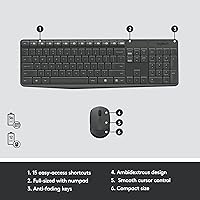
What makes this wireless combo genuinely useful day-to-day is how little you have to think about it. The 15 shortcut keys handle volume, media playback, and other common actions without needing any driver installation. The mouse's advanced optical sensor tracks accurately on most desk surfaces, and its ambidextrous shape means left-handed users are not treated as an afterthought. Perhaps most impressive is the battery situation — the keyboard can go years between changes, and the mouse holds out for around a year. One nano receiver handles both devices, keeping your USB ports tidy. Logitech has also incorporated recycled plastic into the build — a modest but appreciated step in the right direction.
Best For
This keyboard-and-mouse set hits the sweet spot for home office workers who need something dependable without overcomplicating their setup. Students will find it perfectly capable for writing papers, browsing, and general computing. Families with a shared PC will appreciate the spill-resistant keyboard — kids happen. It is also an ideal starting point for anyone finally cutting the cord from wired peripherals; the plug-and-play receiver removes every friction point that typically comes with wireless setups. If Bluetooth pairing headaches or driver installations have put you off wireless in the past, the MK235 sidesteps all of that. What it is not, however, is a fit for power users who need precision for gaming or intensive creative work.
User Feedback
Owners of this wireless combo tend to stick around long enough to leave detailed reviews, which is telling. The typing experience draws repeated praise — keys are described as quiet and responsive, comfortable enough for long working sessions. Battery longevity comes up constantly as a genuine highlight, with many noting they forget this set even needs batteries. On the flip side, people with larger hands often find the mouse a bit cramped during extended use — a fair and consistent complaint worth knowing before buying. A small number of users report occasional wireless dropouts, though the majority describe the connection as solid. Overall, the value-to-quality ratio earns it strong ratings across thousands of verified reviews.
Pros
- Exceptional keyboard battery life means you can go a very long time without ever thinking about replacements.
- Plug-and-play nano receiver means zero setup time — just plug in and start working immediately.
- Full-size layout with a dedicated number pad covers every key a typical office or student user needs.
- The spill-resistant keyboard adds real-world durability that most combos at this price skip entirely.
- Ambidextrous mouse design genuinely accommodates left-handed users, not just as an afterthought.
- Wireless range covers a full room comfortably, with no noticeable lag during normal use.
- Anti-fade key treatment keeps the legends readable even after years of heavy daily typing.
- Single nano receiver handles both devices, leaving your other USB ports free.
- Optical sensor tracks reliably on wood, fabric, and standard desk pads without hesitation.
- Quiet key action makes this wireless combo considerate in shared spaces like open offices or dorm rooms.
Cons
- The mouse runs noticeably small for medium and large hands, causing fatigue during long work sessions.
- No DPI adjustment on the mouse limits flexibility for users who switch between screen sizes or resolutions.
- Losing the nano receiver makes the entire set unusable, with no Bluetooth fallback option.
- There is no low-battery warning system, so devices can go unresponsive without any advance notice.
- Mac users lose shortcut key functionality and face keyboard layout mismatches out of the box.
- The mouse scroll wheel can develop a loose, imprecise feel after extended months of regular use.
- Shortcut keys are not remappable, restricting their usefulness for anyone with a non-standard workflow.
- The mouse's plastic finish picks up smudges and scuffs quickly, dulling the look of a clean desk setup.
- Only one color option is available, which limits compatibility with more visually considered workspace aesthetics.
- No receiver storage slot on the keyboard means the dongle is easy to misplace when moving the set.
Ratings
The Logitech MK235 has accumulated thousands of verified reviews worldwide, and the scores below reflect what real buyers consistently report after months — sometimes years — of daily use. Our AI has analyzed that global feedback, actively filtering out incentivized, bot-generated, and outlier submissions to surface what the typical owner actually experiences. Both the strengths that keep this wireless combo a bestseller and the friction points that matter to specific buyers are transparently reflected in every score.
Value for Money
Battery Life
Ease of Setup
Typing Experience
Mouse Comfort & Ergonomics
Wireless Reliability
Build Quality
Key Layout & Shortcuts
Mouse Tracking Accuracy
Portability & Storage
Compatibility
Aesthetics & Design
Sustainability & Materials
Suitable for:
The Logitech MK235 is a natural fit for anyone who needs a dependable, no-drama wireless setup for everyday computing without spending much. Home office workers who spend their days in documents, spreadsheets, and email will find everything they need here — full-size layout, number pad, quiet keys, and a connection that just works. Students setting up a desk for the first time will appreciate that there is nothing to configure and nothing to maintain. Families with a shared home PC benefit particularly from the spill-resistant keyboard, which adds a layer of forgiveness that cheaper combos often skip. It is also a smart first step for anyone moving away from wired peripherals, since the plug-and-play nano receiver removes every barrier that usually makes wireless feel complicated. Left-handed users, often underserved at this price point, will find the genuinely ambidextrous mouse a welcome inclusion.
Not suitable for:
Buyers who spend long hours at a desk doing intensive work will likely find that the Logitech MK235 hits its ceiling sooner than they would like, particularly with the mouse. People with larger hands frequently report discomfort during extended sessions — the mouse is compact by design, but that becomes a real ergonomic issue when it is your primary pointing device for six or more hours a day. Creative professionals, designers, or anyone who needs precise cursor control will also find the fixed-sensitivity optical sensor limiting. The combo is built for Windows and Chrome OS, so Mac users will run into layout friction and lose access to the shortcut keys without workarounds. Gamers should look elsewhere entirely — this keyboard-and-mouse set was never designed for fast-paced input, low-latency response, or the customization that even casual gaming demands. Anyone working in a high-interference wireless environment may also encounter occasional connectivity hiccups that a more robust 2.4 GHz or wired setup would avoid.
Specifications
- Wireless Technology: Both the keyboard and mouse connect via 2.4 GHz radio frequency through a single nano USB Unifying Receiver.
- Wireless Range: The combo maintains a reliable connection at distances of up to 33 feet from the receiver under typical conditions.
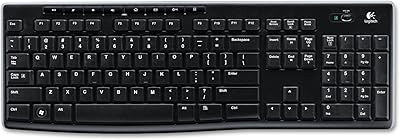
- Keyboard Layout: Full-size layout includes a dedicated number pad, standard function row, and 15 pre-assigned shortcut keys.
- Keyboard Battery: The keyboard is powered by 2 AAA batteries, rated for up to 3 years of use under standard conditions.
- Mouse Battery: The mouse runs on 1 AA battery, with an estimated battery life of up to 1 year under normal daily use.
- Mouse Sensor: The mouse uses an advanced optical sensor designed for accurate tracking on most common desk and fabric surfaces.
- Mouse Design: The compact optical mouse features a symmetrical ambidextrous shape, accommodating both right- and left-handed users.
- Spill Resistance: The keyboard carries a spill-resistant design rated to handle minor liquid exposure, though it is not fully waterproof.
- Key Treatment: Keycaps are treated with an anti-fade coating to keep legends legible through extended periods of heavy daily typing.
- Tilt Legs: The keyboard includes adjustable tilt legs to allow users to set a preferred typing angle for comfort.
- Dimensions: The keyboard measures approximately 17.15 x 5.41 x 0.81 inches, fitting standard desktop and home office desk setups.
- OS Compatibility: The combo is fully compatible with Windows 10, Windows 11, and Chrome OS without requiring any driver installation.
- Connectivity Type: Connection is handled exclusively via the included nano USB receiver — there is no Bluetooth mode available.
- Recycled Materials: The mouse body incorporates 75% certified post-consumer recycled plastic, and the keyboard shell uses 51% recycled plastic.
- Color: The combo is available in a single grey colorway with a neutral finish suited to most desk environments.
- Shortcut Keys: Fifteen function shortcut keys provide direct access to volume control, media playback, and other common system actions without software.
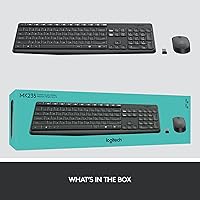
- Package Contents: The retail package includes the full-size keyboard, compact optical mouse, nano USB receiver, and required batteries.
- Manufacturer: Designed and manufactured by Logitech, a Swiss-American peripheral brand with decades of experience in input devices.
Related Reviews

Logitech Wireless Touchpad

Logitech POP Mouse

Logitech X-530

Logitech ERGO K860

Logitech Pebble M350 Wireless Mouse
Logitech B910 HD Webcam
Logitech MK370 Combo for Business
Logitech K270 Wireless Keyboard

Logitech Trackman Marble Wired Trackball Mouse
