Overview

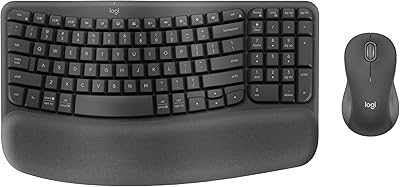
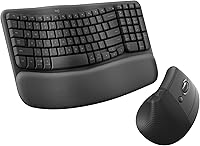
The Logitech Wave Keys & Lift Vertical Mouse Bundle arrived in late 2023 as a coordinated answer to a very real problem: spending too many hours at a desk and paying for it with sore wrists. Priced in the mid-range, it sits in a practical sweet spot — not a casual impulse buy, but nowhere near the cost of premium standalone ergonomic gear. It connects via Bluetooth or the Logi Bolt USB receiver, runs on Windows, Mac, and Linux, and ships in a subdued Graphite finish. The pitch is simple: two purpose-built peripherals, matched to work together right out of the box.
Features & Benefits

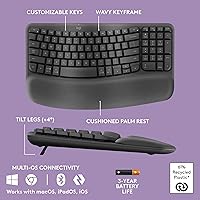
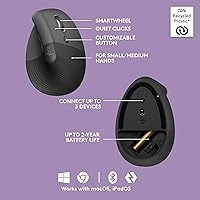
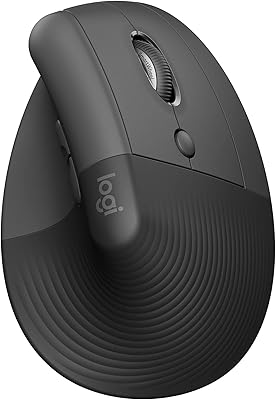
The keyboard's wave-curved key layout gently angles the rows so your hands naturally slope inward rather than lying flat — a small shift that adds up meaningfully over a long workday. An integrated memory foam palm rest softens the pressure that accumulates during extended typing sessions. On the mouse side, the 57-degree vertical grip puts your forearm in a natural handshake position, reducing the rotational strain that conventional flat mice tend to cause. An Easy-Switch button lets you jump between three paired devices without touching any settings. Both peripherals run on batteries that last for months, and whisper-quiet clicks keep things distraction-free in shared or open-plan spaces.

Best For

This ergonomic combo makes the most sense for people who spend the bulk of their workday at a keyboard — developers, writers, analysts, anyone logging serious daily hours. The Lift mouse is genuinely best suited to small to medium hands; if yours run large, it may start feeling cramped by early afternoon. Multi-device workers benefit from the one-button switching, which handles up to three connections cleanly. For buyers taking their first step into ergonomic peripherals, this keyboard-and-mouse set is a more forgiving entry point than a split keyboard or trackball. If you want a cohesive matched setup without cross-shopping compatible brands separately, this covers it well.

User Feedback

Across more than 12,000 ratings and a 4.5-star average, buyers paint a consistent picture: wrist relief and improved daily comfort are the most repeated positives, often appearing in reviews written after several weeks of use. The adjustment period is worth flagging honestly — the wave layout can feel slightly foreign for the first week or two if you are coming from a standard flat keyboard. Palm rest firmness splits opinions; some find the memory foam just right, while others prefer something denser. The Lift mouse size is the most cited limitation, specifically among users with larger hands. Battery life, by contrast, almost never draws a complaint.

Pros

  • Wave keyboard layout noticeably reduces wrist and forearm tension during long typing sessions.
  • The vertical mouse angle promotes a natural forearm position that flat mice simply cannot replicate.
  • Battery life on both devices routinely lasts several months under daily use.
  • Easy-Switch button handles up to three paired devices cleanly with a single press.
  • Whisper-quiet clicks and keystrokes make this ergonomic combo genuinely office- and household-friendly.
  • Memory foam palm rest adds meaningful wrist cushioning during extended keyboard sessions.
  • Works across Windows, macOS, and Linux without requiring driver installation for basic use.
  • Recycled plastic construction adds an eco-conscious dimension without compromising build solidity.
  • Buying the pair together removes the guesswork of sourcing two compatible ergonomic peripherals separately.
  • Logi Options+ app unlocks per-app shortcut customization for users who want deeper workflow control.

Cons

  • The Lift mouse runs small — large-handed users will feel unsupported within hours of daily use.
  • Adjusting to the wave key layout takes one to two weeks, with a real dip in typing speed during that window.
  • Palm rest firmness divides users; it cannot be replaced or adjusted if the foam density does not suit you.
  • Both devices run on disposable batteries rather than built-in rechargeable cells.
  • No battery level display means you are guessing remaining charge until the low-battery warning appears.
  • Only one color option available, limiting desk personalization for style-conscious buyers.
  • The bundled documentation is minimal, leaving Linux and advanced users to troubleshoot online.
  • The keyboard bulk increases with the attached palm rest, making bag transport noticeably less convenient.
  • Multi-device switching requires separate button presses on keyboard and mouse rather than a single synchronized action.

Ratings

The ratings below for the Logitech Wave Keys & Lift Vertical Mouse Bundle were generated by AI after systematically analyzing thousands of verified global user reviews, with spam, incentivized, and bot-pattern feedback actively filtered out. Every score reflects a genuine consensus — the real highs and the honest frustrations — so buyers can make a fully informed decision before committing to this ergonomic keyboard-and-mouse set.

Ergonomic Comfort
91%
Users who switched from flat keyboards consistently describe a noticeable reduction in wrist tension within the first few weeks of daily use. The wave key layout and vertical mouse angle together create a posture shift that feels natural rather than forced, which is rare when two peripherals are bundled together.
The comfort gains take time to materialize — several reviewers experienced mild hand fatigue during the initial adjustment period before their muscles adapted. A small group reported that the mouse angle felt awkward for tasks requiring precise cursor control, like graphic editing.
Keyboard Typing Feel
84%
The wave curvature makes the key placement feel intuitive once your hands settle into the layout, and the quiet keystrokes mean you can type through late-night sessions or open-plan offices without becoming the loudest person in the room. Key travel feels deliberate without being stiff.
Touch typists migrating from a traditional flat keyboard often hit a stumbling block in the first week — the curved rows shift muscle memory just enough to cause noticeable slowdowns. Some users also wished the keys had a slightly more tactile click response rather than the softer, quieter actuation.
Mouse Ergonomics
83%
For people with small to medium hands, the Lift mouse is a comfortable all-day companion. The 57-degree vertical angle genuinely reduces forearm pronation, and the textured grip and thumb rest make extended browsing or spreadsheet navigation much less tiring than a standard flat mouse.
Users with larger hands are the most vocal critics — the mouse body simply runs short, forcing the palm into an unsupported hover that undoes the ergonomic benefit entirely. This is the single most repeated limitation across negative reviews and is worth weighing carefully before purchasing.
Build Quality
78%
22%
Both devices feel solid and appropriately weighted for desktop use. The keyboard does not flex under firm typing pressure, and the mouse buttons show no signs of wobble or cheap actuation. For a mid-range bundle, the physical construction exceeds what buyers typically expect.
The plastic finish, while responsibly sourced with recycled content, does attract fingerprints and light surface scratches over time. A few long-term users noted that the memory foam palm rest began showing compression wear after several months of continuous heavy use.
Palm Rest Quality
71%
29%
The integrated memory foam cushion adds meaningful wrist support during long typing sessions, softening the pressure that typically builds up at the wrist-to-desk contact point. For users with mild wrist discomfort, this feature alone justifies the bundle for many reviewers.
Opinion on the palm rest firmness splits fairly evenly — one group finds it perfectly yielding, while another wants denser foam that retains its shape longer under sustained pressure. It is not removable or replaceable, so buyers who prefer a firmer rest have no adjustment option.
Battery Life
93%
Battery performance is one of the least contested aspects of this combo. Users routinely report going several months between changes on both devices under daily work conditions, which removes the low-battery anxiety that plagues rechargeable wireless peripherals.
Both devices run on disposable batteries rather than rechargeable cells, which is a minor but recurring point of frustration for environmentally conscious buyers. There is no battery level indicator beyond the low-battery warning, so the remaining charge is largely a guessing game.
Wireless Connectivity
88%
The Logi Bolt USB receiver delivers a stable, lag-free connection that holds up in crowded wireless environments like co-working spaces or busy home networks. Bluetooth pairing works reliably across Mac, Windows, and Linux without driver headaches or repeated re-pairing.
A small number of users encountered occasional micro-dropouts on Bluetooth when operating near other 2.4GHz devices, though this was not a widespread complaint. The USB receiver is compact enough to lose easily — something several reviewers flagged after misplacing it during travel.
Multi-Device Switching
86%
The Easy-Switch button handles up to three paired devices and toggles between them cleanly with a single press — a practical feature for anyone running a laptop alongside a desktop, or switching between a personal and work machine throughout the day.
The switching button on the keyboard is well-placed, but the mouse requires its own separate switching action, meaning a full device swap takes two button presses rather than one. Users who expected fully synchronized switching found this mildly inconvenient in fast-paced workflows.
Software & Customization
74%
26%
The Logi Options+ app allows remapping of function keys and mouse buttons, and lets users set per-application shortcuts that genuinely improve daily workflow once configured. The interface is clean and does not require ongoing interaction after the initial setup.
The app is optional but required to unlock the full feature set, which some buyers found unnecessary for what should be plug-and-play peripherals. A handful of Mac users reported compatibility hiccups with certain macOS versions that required app reinstallation to resolve.
Noise Level
94%
Both the keyboard and mouse operate at notably low volume. In shared spaces, the whisper-quiet clicks stand out as a genuine quality-of-life improvement — particularly for users who previously drew complaints from colleagues or housemates about noisy peripherals.
The quiet click feel is not universally loved; users who prefer tactile, audible feedback find the muted response unsatisfying and somewhat less accurate during fast input. There is no option to adjust actuation feedback, so this is a fixed characteristic buyers need to accept upfront.
Setup & Out-of-Box Experience
89%
Both devices paired quickly in testing with no driver installation required for basic use. Windows and Mac users in particular praised how little friction there was from unboxing to a fully working setup, which matters for buyers who dread peripheral configuration.
Linux users occasionally encountered Bluetooth pairing inconsistencies depending on their distribution, and the documentation bundled in the box is minimal. Users who prefer detailed printed setup guides will find themselves relying on online resources.
Value for Money
77%
23%
Buying a matched ergonomic keyboard and vertical mouse together at this price point is genuinely more cost-effective than sourcing two separately optimized peripherals. The bundle format removes the compatibility guesswork that often trips up first-time ergonomic buyers.
Buyers who already own one strong peripheral and only need the other may feel they are paying for a component they do not need. Standalone alternatives exist at lower individual price points, and for buyers on a tight budget, the bundle requires a more deliberate purchasing decision.
Aesthetic & Desk Fit
72%
28%
The Graphite colorway is understated and pairs cleanly with most desk setups without drawing attention. The low-profile keyboard design avoids the bulky, clinical look that some ergonomic peripherals carry, making it easier to justify on a shared or visible workspace.
There is currently only one color option available, which limits desk personalization. Some users noted that the Graphite finish shows dust accumulation more readily than darker matte alternatives, requiring more frequent wiping to keep things looking clean.
Portability
58%
42%
The keyboard is compact enough to fit into a large laptop bag, and the Logi Bolt receiver stays attached to the mouse during transport reasonably well. For hybrid workers who move between home and office a few days a week, portability is workable.
This combo is primarily designed for stationary desk use and it shows — the palm rest attached to the keyboard adds bulk that makes bag-packing slightly awkward. Frequent travelers who need truly compact, lightweight peripherals will find better-suited options elsewhere.

Suitable for:

The Logitech Wave Keys & Lift Vertical Mouse Bundle is built for people who spend the majority of their workday at a desk and are starting to feel the physical cost of that — stiff wrists, forearm fatigue, or early signs of repetitive strain. Remote workers and office professionals who clock six or more hours of typing daily will find the wave keyboard layout and vertical mouse angle work together in a way that genuinely shifts posture over time, rather than just promising to. It suits people with small to medium hands particularly well, since the Lift mouse is sized to fit that grip snugly rather than being a scaled-down compromise. Multi-device users will appreciate the Easy-Switch functionality, which makes toggling between a personal laptop and a work desktop feel frictionless. For anyone taking their first step into ergonomic peripherals and feeling overwhelmed by split keyboards or trackballs, this keyboard-and-mouse set offers a far gentler entry point — familiar enough to adopt quickly, but meaningfully different from a standard flat setup.

Not suitable for:

The Logitech Wave Keys & Lift Vertical Mouse Bundle is a poor match for users with large hands, and this is not a minor caveat — the Lift mouse will feel undersized by mid-afternoon, defeating the ergonomic purpose entirely. Buyers who are already committed to one strong peripheral and only need the other half of this combo will likely find the bundle format inefficient compared to targeted standalone purchases. People who rely on highly precise cursor control for tasks like photo editing or technical illustration may find the vertical mouse angle requires more adaptation than their workflow allows. Those who strongly prefer tactile, clicky key feedback will find the whisper-quiet actuation unsatisfying, and there is no way to swap it out. Frequent travelers who need a truly portable, lightweight kit will find the palm rest adds more bulk than a mobile setup can comfortably absorb. Finally, buyers who expect plug-and-play perfection on Linux should know that Bluetooth pairing can be inconsistent depending on their distribution.

Specifications

  • Keyboard Type: Wireless ergonomic keyboard with a wave-curved key layout designed to promote a more neutral wrist and forearm position during extended typing.
  • Mouse Style: Vertical ergonomic mouse set at a 57-degree angle to reduce forearm pronation and relieve pressure on the wrist during daily use.
  • Connectivity: Both devices connect via Bluetooth or the included Logi Bolt USB receiver, offering flexible pairing options across platforms.
  • OS Compatibility: Fully compatible with Windows 7 and later, macOS, and Linux operating systems without requiring additional drivers for basic functionality.
  • Multi-Device Support: Easy-Switch button enables pairing and quick toggling between up to three devices on both the keyboard and mouse independently.
  • Palm Rest: Integrated memory foam palm rest is built into the keyboard base to cushion the wrist and reduce contact pressure during long sessions.
  • Mouse Grip Target: The Lift mouse is sized and shaped specifically for small to medium hands, with a softly textured surface and dedicated thumb rest.
  • Scroll Wheel: SmartWheel technology provides smooth, controlled scrolling with adaptive resistance suited to both precise document navigation and fast page skimming.
  • Click Sound: Both keyboard switches and mouse buttons use whisper-quiet mechanisms designed to minimize noise in shared or open-plan environments.
  • Power Source: Both the keyboard and mouse are powered by standard replaceable batteries, with no built-in rechargeable cells.
  • Battery Life: Under typical daily office use, both devices deliver several months of battery life on a single set of batteries before replacement is needed.
  • Recycled Content: Post-consumer recycled plastic accounts for 61% of the plastic parts in the keyboard and 70% in the mouse, in the Graphite variant.
  • Ergonomic Certification: Both devices have been tested and certified by independent ergonomists according to established criteria for posture and strain reduction.
  • Software Support: The optional Logi Options+ app allows users to remap keys and mouse buttons and create per-application workflow shortcuts on supported operating systems.
  • Bundle Color: Available in Graphite, a dark neutral finish with subtle texture that suits most desk environments without drawing visual attention.
  • Wireless Range: Both devices operate reliably at the standard Logitech wireless range of approximately 10 meters from the receiver or paired host device.
  • Release Date: The bundle was first made available in October 2023, positioning it as a relatively recent addition to the Logitech ergonomic peripheral lineup.
  • Certifications: Products in this bundle carry relevant regional safety and compliance certifications, and are designed to meet multi-market regulatory standards.

Related Reviews
Logitech Lift Vertical Ergonomic Mouse
83%
91%
Ergonomic Comfort
74%
Build Quality
93%
Click Quietness
88%
Wireless Connectivity
96%
Battery Life
More
Logitech Wave Keys for Mac
87%
89%
Ergonomics and Comfort
94%
Bluetooth Connectivity
92%
Battery Life
87%
Ease of Use
90%
Build Quality
More
Logitech MX Vertical
79%
88%
Ergonomic Comfort
61%
Adjustment Period
83%
Build Quality
86%
Multi-Device Connectivity
91%
Battery Life
More
Logitech Wave Keys MK670 Combo
81%
88%
Ergonomic Comfort
79%
Typing Experience
83%
Mouse Performance
91%
Noise Level
86%
Wireless Reliability
More
Logitech POP Mouse
Logitech POP Mouse
82%
93%
Silent Click Performance
89%
SmartWheel Scrolling
87%
Multi-Device Connectivity
91%
Battery Life
71%
Ergonomics & Hand Fit
More
Logitech Wireless Mouse M320
86%
91%
Value for Money
88%
Wireless Connectivity
84%
Ergonomics & Comfort
92%
Battery Life
89%
Portability & Size
More
Nulea M510 Vertical Mouse
85%
91%
Ergonomics and Comfort
83%
Build Quality
88%
DPI Adjustability
90%
Wireless Performance
85%
Setup and Installation
More
Logitech Wireless Mouse M275
85%
94%
Battery Life
88%
Ergonomics/Comfort
92%
Ease of Setup
85%
Tracking Performance
83%
Build Quality
More
Logitech M510
Logitech M510
81%
91%
Ergonomic Comfort
93%
Battery Life
88%
Wireless Reliability
79%
Tracking Accuracy
74%
Build Quality
More
Logitech M325 Wireless Mouse
86%
92%
Value for Money
89%
Comfort and Ergonomics
96%
Battery Life
88%
Connectivity and Performance
84%
Build Quality
More

FAQ

Honestly, if you already own a solid peripheral you are happy with, the bundle format may not be the most efficient purchase. You would be paying for something you do not need. In that case, both the Wave Keys keyboard and the Lift mouse are available as standalone products, so it is worth comparing the individual prices against the bundle before deciding.

Most users report a noticeable adjustment period of one to two weeks, especially if they are accustomed to a flat, standard keyboard. You may experience a temporary dip in typing speed while your muscle memory recalibrates to the curved rows. The good news is that most reviewers say the adjustment is gradual and the comfort improvement on the other side makes it worthwhile.

This is probably the most important question to ask before buying this combo. The Lift mouse is genuinely sized for small to medium hands, and users with larger hands consistently report that the body runs too short for comfortable all-day use. If your hand measures roughly above 19 cm in length, you would likely be better served by a larger vertical mouse option.

Yes. The keyboard and mouse each manage their own independent device pairings, so you can absolutely have the keyboard connected to your desktop while the mouse is paired to your laptop simultaneously. They do not share a single pairing profile, which gives you more flexibility across a mixed-device desk setup.

No, both devices work as plug-and-play peripherals for basic use — you can connect them and start working without installing anything. The Logi Options+ app is optional but recommended if you want to remap buttons, set up app-specific shortcuts, or customize the SmartWheel behavior. It adds real utility but is not a requirement.

Battery life is one of the stronger points here — most users report several months of daily use before needing a swap. Both devices will signal a low-battery warning, but there is no ongoing charge level indicator, so you are largely in the dark about remaining capacity until the warning appears. Keeping a spare set of batteries nearby is a sensible habit.

It does work with Linux, but with a caveat. Windows and Mac users generally have a smooth experience, while Linux users occasionally run into Bluetooth pairing inconsistencies depending on their specific distribution. Using the Logi Bolt USB receiver instead of Bluetooth tends to be the more reliable route on Linux.

No, the memory foam palm rest is integrated into the keyboard base and cannot be detached. If you prefer a firmer or taller wrist rest, that is a genuine limitation to factor in — there is no way to swap it out or adjust the density. Some users place a third-party wrist rest just in front of the keyboard to supplement, but that requires extra desk space.

Yes, noticeably so. The whisper-quiet switches on both the keyboard and mouse are meaningfully quieter than standard membrane keyboards, and significantly quieter than mechanical ones. In practice, colleagues in adjacent desks or people in the same room rarely register the sound of typing or clicking, which is a legitimate quality-of-life benefit in open-plan or shared spaces.

Technically, Bluetooth pairing to a phone or tablet is possible since the connection protocol supports it, but the combo is designed and optimized for desktop and laptop use. There are no touch-specific features, and the full button customization through Logi Options+ only works on supported desktop operating systems. For most buyers, this is a desk peripheral, not a mobile one.