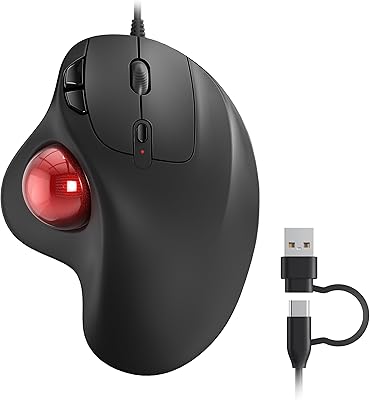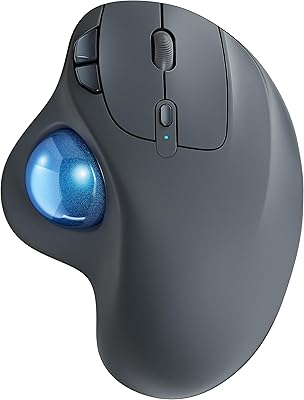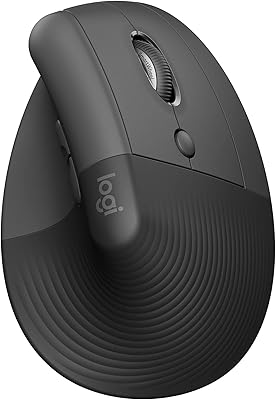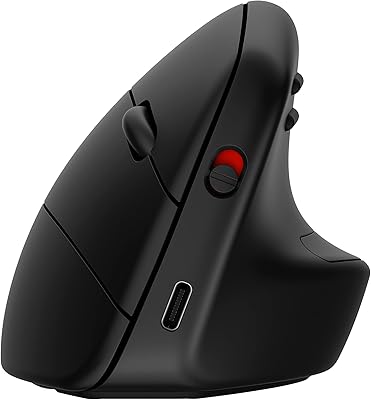

Overview

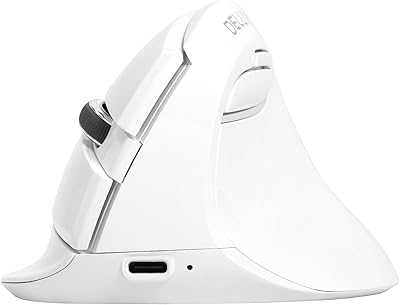
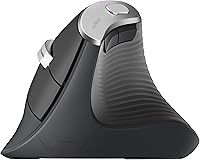
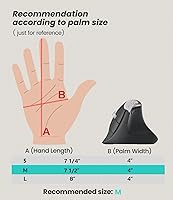
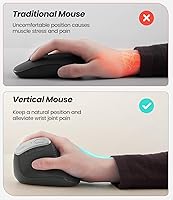
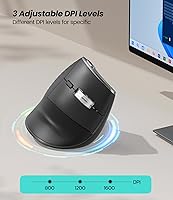
The Nulea M510 Vertical Mouse is an ergonomic, wireless option that aims to reduce wrist strain during long hours of use. With its vertical design, it encourages a more natural handshake grip that helps prevent discomfort commonly associated with traditional mice. This mouse is equipped with adjustable DPI settings of 800, 1200, and 1600, ensuring precise tracking for various tasks. The device is compatible with both Windows and macOS, making it a versatile choice for most setups, whether on a laptop or desktop.

Features & Benefits

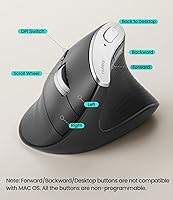
This ergonomic mouse features a vertical design that promotes a natural wrist position, significantly reducing strain on the forearm and wrist joint. Its wireless 2.4G connectivity offers the convenience of cord-free movement, while the six programmable buttons, including a useful 'Back to Desktop' key, help streamline navigation. The mouse also provides adjustable DPI settings, allowing users to customize the tracking speed for different tasks like graphic design or web browsing. Additionally, the non-slip metal scroll wheel ensures smooth scrolling during intensive use.

Best For

The Nulea M510 is ideal for office workers, professionals, or anyone who spends long hours at the computer. Its ergonomic design makes it an excellent choice for individuals suffering from wrist pain or carpal tunnel syndrome, as it encourages a more natural hand position. Whether you're looking for an affordable yet reliable wireless mouse or a functional option with customizable features, this vertical mouse meets those needs. It’s also a good option for users seeking a simple, no-fuss device that fits well in various work environments.

User Feedback

Many users have praised this vertical mouse for its ergonomic comfort, noting a reduction in wrist strain even after long hours of use. Setup is typically easy, with most finding the plug-and-play installation process quick and straightforward. However, some users mentioned that the mouse feels a bit lightweight, which could affect its durability over time. On the positive side, the adjustable DPI settings have received compliments for offering better precision, especially when working on tasks that require fine control, such as graphic design or gaming.

Pros

  • The ergonomic vertical design significantly reduces wrist and forearm strain during extended use.
  • Wireless 2.4G connectivity provides the freedom of movement without being tethered to a computer.
  • The six programmable buttons offer convenient shortcuts, including a dedicated 'Back to Desktop' key.
  • Adjustable DPI settings (800/1200/1600) allow for precise tracking across various tasks, from browsing to gaming.
  • The non-slip metal scroll wheel ensures smooth and controlled scrolling without any interruptions.
  • The simple plug-and-play setup makes it ideal for users who want a hassle-free experience on Windows and macOS.

Cons

  • The lightweight build may not appeal to users who prefer a more substantial feel in their mouse.
  • Some users noted that the mouse's durability could be a concern for long-term use, particularly with heavy daily tasks.
  • The DPI range may not be sufficient for highly detailed tasks, such as professional graphic design or high-speed gaming.
  • While generally comfortable, the vertical design might take some time to get used to for people accustomed to traditional mice.
  • The battery is not included, which could be inconvenient for those expecting it to be ready out of the box.
  • A few users found that the mouse doesn't offer advanced customization options for more complex setups or preferences.

Ratings

After analyzing a wide range of verified user feedback from multiple languages and platforms, we’ve compiled a comprehensive review of the Nulea M510 Vertical Mouse. The scores reflect the collective experiences of genuine buyers, with both the product's strengths and pain points considered. Spam, bot, and incentivized reviews were filtered out to ensure the accuracy and quality of the feedback. Whether users praised its ergonomic design or noted minor issues with its lightweight feel, the ratings offer a balanced perspective based on authentic reviews from real customers worldwide.

Ergonomics and Comfort
91%
Many users find this vertical mouse significantly reduces wrist and forearm strain, especially during long hours of use. The ergonomic design encourages a natural grip, which has led to fewer complaints about discomfort, even after extended sessions. It’s an ideal option for those looking for a comfortable alternative to traditional mice.
A few buyers have mentioned that while the ergonomic design is beneficial, it may take time to adjust to the vertical orientation. Some users noted that the grip can feel awkward at first, especially for those new to ergonomic mice.
Build Quality
83%
The mouse feels sturdy and well-made with durable materials. Users appreciate the solid construction, which seems to hold up well under regular use. The non-slip metal scroll wheel is a standout feature, offering smooth, controlled scrolling without any issues.
However, a few users have pointed out that the lightweight nature of the device could impact its long-term durability. Some feel it lacks the heft of other premium models, which could be a concern for those used to heavier, more robust mice.
DPI Adjustability
88%
The adjustable DPI settings offer great flexibility for various tasks, from casual browsing to precise graphic design work. Users appreciate being able to tailor the sensitivity to their needs, making this mouse versatile for different types of activities, including gaming and productivity work.
While most users find the DPI settings helpful, some mentioned that the range between the DPI levels feels a bit limited. A few also noted that they would prefer a finer range of adjustment for more detailed tasks, such as high-resolution design work.
Wireless Performance
90%
The 2.4G wireless connection is reliable, providing a stable, lag-free experience for most users. Many appreciate the freedom from cables, which enhances productivity and reduces desk clutter. The plug-and-play setup was another positive aspect, with users reporting no issues during installation.
However, a small number of users experienced occasional connectivity drops, particularly in areas with heavy wireless interference. While not widespread, this issue could be a deal-breaker for users who rely on a consistently stable connection for work or gaming.
Setup and Installation
85%
Setup is quick and hassle-free, with many users highlighting the easy plug-and-play installation. It works seamlessly with both Windows and macOS, and no additional software or drivers are needed. This makes it a good choice for users who prefer simplicity over complicated setups.
Some users have reported minor issues with setting up the mouse on specific platforms, particularly with certain versions of macOS. While the setup is mostly intuitive, there have been a few complaints regarding compatibility with certain devices or older operating systems.
Value for Money
92%
The Nulea M510 offers excellent value for its price, with many users noting that it delivers high-quality performance typically found in higher-end models. The ergonomic design, wireless convenience, and customizable features make it a solid choice for those looking for a budget-friendly vertical mouse.
While the value is generally praised, some users felt that the overall build quality could be slightly better for the price. A few also mentioned that the lightweight design might make it feel less premium compared to other similarly priced models.
Durability
75%
25%
Several users found that the mouse holds up well to regular daily use, with the buttons and scroll wheel remaining responsive over time. For those who primarily use it for lighter tasks, it proves to be a durable and reliable option.
However, the lightweight feel has raised concerns about long-term durability. A few users experienced issues with the buttons or the scroll wheel becoming less responsive after several months of use, leading to doubts about its longevity for heavy-duty tasks.
Weight and Feel
70%
30%
The light weight of the mouse is appreciated by some users, especially those who prefer a lighter, more nimble feel during extended use. It’s easy to move around the desk without feeling fatigued, making it suitable for quick, repetitive tasks.
Others find the light weight a bit too flimsy, particularly for users accustomed to heavier mice. The lack of substantial weight can make it feel less stable during use, and some report that it affects the overall comfort for extended sessions.
Compatibility
95%
The mouse is compatible with a wide range of devices, including Windows, macOS, laptops, and PCs. This broad compatibility is a key selling point for users who need a versatile solution for different devices. It works flawlessly across multiple platforms without needing additional software.
There are a few isolated reports where users experienced compatibility issues with certain older versions of operating systems or specific laptops. However, these instances are relatively rare, and most users don’t encounter such problems.
Customizability
87%
The six programmable buttons are a standout feature, allowing users to tailor their experience based on their specific needs. Many users take advantage of the customizability to streamline their workflow or create shortcuts for productivity tasks.
Some users felt that the lack of more advanced customization options, such as customizable software profiles, limits the potential for fine-tuning the device to their preferences. While functional, the customization options may not be sufficient for those who need more in-depth configuration.
Scroll Wheel Performance
82%
18%
The non-slip metal scroll wheel provides a smooth and responsive scrolling experience. Users appreciate its tactile feel and the precision it offers, especially when navigating through long documents or webpages.
A few users mentioned that the scroll wheel can feel slightly stiff or unresponsive at times, particularly after extended use. While generally reliable, it may not be as smooth as some higher-end mice, leading to occasional frustration.
Customer Support
78%
22%
The customer support team is responsive and helpful, with many users reporting positive experiences when reaching out for assistance. Whether for setup questions or troubleshooting, users found the support team to be attentive and quick to resolve issues.
However, a small number of users reported delays in response times or unsatisfactory solutions to certain problems. While the majority were satisfied, some felt that the support could be improved, particularly for more complex technical issues.
Long-Term Use
77%
23%
For daily office work, this device performs reliably without issues. Many users have had no problems with the mouse’s responsiveness, even after using it for long stretches of time. It’s a solid option for those who need a dependable mouse for everyday tasks.
However, the longevity of the product has been questioned by some users, who have reported performance degradation after extended use. Complaints about button responsiveness and scroll wheel issues have emerged over time, particularly for those using the mouse heavily every day.
Office Productivity
90%
This vertical mouse is highly regarded by office workers for its ergonomic design, which reduces wrist strain during long hours of use. Users report greater comfort and less fatigue compared to traditional mice, leading to improved productivity in work environments.
Despite its ergonomic benefits, some users find the transition from a standard mouse to this vertical design challenging. The adjustment period can be a bit uncomfortable for those used to more traditional devices, affecting the initial experience.

Suitable for:

The Nulea M510 Vertical Mouse is particularly well-suited for office workers, professionals, and anyone who spends long hours using a computer. Its ergonomic design offers significant relief for individuals with wrist pain or those dealing with carpal tunnel syndrome. This device is also ideal for users who need a versatile and affordable vertical mouse for general computer tasks, such as web browsing, word processing, or light gaming. With adjustable DPI settings, it appeals to those who need precision for tasks like graphic design, allowing for smooth transitions between low and high sensitivity. Additionally, the plug-and-play wireless connectivity makes it a hassle-free choice for people looking for a simple, reliable mouse that works across different platforms like Windows and macOS.

Not suitable for:

This vertical mouse may not be the best fit for users who prefer a heavier, more premium-feeling device. Those accustomed to the feel of heavier mice might find the lightweight design too flimsy, especially for extended use. Furthermore, while the adjustable DPI offers flexibility, some advanced users might find the range insufficient for highly detailed tasks or fast-paced gaming. The mouse’s lightweight build could also raise concerns about long-term durability for power users who put their devices through rigorous daily tasks. Additionally, users who require highly specialized customization or need software-driven profiles may feel limited by the absence of more advanced configuration options.

Specifications

  • Type: Vertical mouse design to reduce wrist strain with a natural handshake grip.
  • Connectivity: Wireless 2.4G connection for hassle-free, cable-free movement.
  • DPI Settings: Adjustable DPI with three settings: 800, 1200, and 1600 for customized sensitivity.
  • Buttons: Six programmable buttons for enhanced control and customization, including a 'Back to Desktop' key.
  • Scroll Wheel: Non-slip metal scroll wheel for smooth and precise scrolling.
  • Battery: Requires one AA battery (not included) for power.
  • Weight: Weighs 5.3 oz for a lightweight feel with sturdy construction.
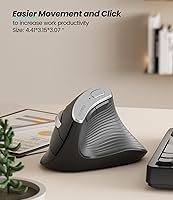
  • Dimensions: Package dimensions: 4.65 x 3.46 x 3.43 inches.
  • Compatibility: Compatible with Windows, macOS, and various laptops and desktops.
  • Ergonomic Design: Ergonomically designed to minimize wrist and forearm strain during extended use.
  • Form Factor: Designed with a vertical grip to promote a natural hand position.
  • Programmable Keys: Six programmable buttons that allow for task-specific customization.
  • Connection Range: Offers a wireless range sufficient for typical desktop setups.
  • Material: Constructed with durable materials for long-lasting performance.
  • Release Date: Released on November 8, 2023.
  • Color: Available in a grey color.
  • Plug-and-Play: Easy plug-and-play setup with no need for additional software.
  • Scroll Control: Metal scroll wheel offers precise, controlled scrolling.

FAQ

The Nulea M510 Vertical Mouse is designed with a vertical grip that encourages a natural handshake position, which helps reduce wrist and forearm strain during long hours of use. This design can significantly benefit users who suffer from discomfort or conditions like carpal tunnel syndrome.

Setting up this vertical mouse is straightforward with a plug-and-play installation. Simply connect the wireless USB receiver to your computer’s USB port, and the mouse will automatically connect. No drivers or software are needed for basic functionality.

The Nulea M510 offers three DPI settings—800, 1200, and 1600—to suit different tasks. Lower DPI is ideal for tasks that require fine control, like graphic design, while higher DPI can improve tracking speed for activities like gaming or fast navigation.

Yes, this vertical mouse is fully compatible with both Windows and macOS operating systems. It also works with a wide range of laptop and desktop setups, making it versatile for various users.

The Nulea M510 requires one AA battery to operate, which is not included in the package. The battery should provide long-lasting performance, depending on your usage patterns.

The Nulea M510 is designed to be durable with a sturdy build, but some users have noted that it feels lightweight, which might raise concerns about long-term durability, especially with heavy daily use. The metal scroll wheel, however, adds a layer of reliability.

Yes, the adjustable DPI settings make the Nulea M510 a suitable option for casual gaming, as you can customize sensitivity. However, for professional-level gaming, you might prefer a mouse with higher DPI options and additional customization features.

While the Nulea M510 is ergonomically designed, users new to vertical mice may need some time to adjust to the grip. The learning curve is generally short, but initial discomfort may occur as your hand adapts to the vertical position.

Yes, this vertical mouse is fully compatible with laptops, as well as desktop computers. It connects wirelessly via a 2.4G USB receiver, so as long as your laptop has a USB port, you can easily use it without any additional software.

While most users find the Nulea M510 comfortable and effective, a few have noted that the mouse feels lightweight, which could affect its long-term durability. Additionally, some may not be fully satisfied with the DPI settings if they need ultra-high precision for certain tasks.