Logitech Wave Keys MK670 Combo




Overview
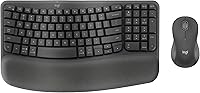
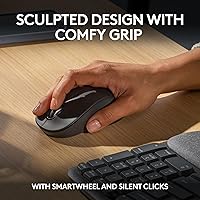
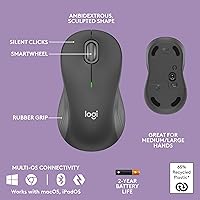
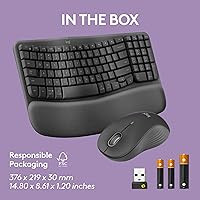
The Logitech Wave Keys MK670 Combo is a mid-range ergonomic keyboard-and-mouse pairing aimed squarely at desk workers who spend most of their day typing. It skips the number pad to keep the footprint compact, which brings the mouse closer to your body and takes some strain off the shoulder — a small adjustment with a noticeable payoff. The bundle ships with the Signature M550 L mouse, sized for medium-to-large hands, making it feel like a considered match rather than a tacked-on accessory. Both devices connect via Bluetooth or Logi Bolt, and the memory foam palm rest is the kind of comfort detail that earns its place on a busy desk.
Features & Benefits
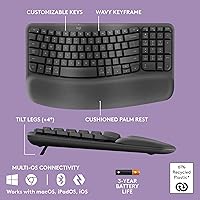
The wave-shaped key layout is the ergonomic combo's defining characteristic — the gentle curvature across the rows nudges your wrists into a more neutral angle without forcing you to completely relearn how you type. Underneath your palms, the built-in memory foam cushion takes real pressure off, especially during marathon writing or coding sessions. On the mouse side, SilentTouch technology makes clicks noticeably hushed without feeling mushy, which helps in shared or open-plan spaces. The SmartWheel is a quiet highlight too — it senses when to switch between controlled scrolling and fast-spin mode automatically. Rounding things out, the Logi Options+ app lets you remap keys and set up shortcuts that actually match your workflow.
Best For
This wireless keyboard-and-mouse set makes the most sense for remote and office workers who log long hours at a desk and are starting to feel the early signs of wrist fatigue. It's a comfortable entry into ergonomics without the steep adjustment curve of a split or vertical keyboard. People with medium-to-large hands will appreciate the M550 L's proportions — average-sized mice tend to leave bigger hands cramped by afternoon. Those who switch regularly between a Windows machine and a Mac will also benefit from its multi-OS flexibility. One caveat: if your work depends heavily on a number pad, the compact tenkeyless layout will likely feel like a daily compromise.
User Feedback
Across a large pool of verified buyers, the palm rest comfort and the mouse's quiet clicks come up repeatedly as standout positives. Setup is consistently described as fast and trouble-free, which matters for people who just want things to work. The lack of backlighting is the most common gripe — a real trade-off for anyone working in dim environments and worth factoring in before buying. Some users note an adjustment period of a few days when switching from a flat keyboard, which is normal for any wave-style board. Long-term feedback around keycap durability is generally positive, though a handful of reviewers mention legends can fade with heavy use over extended months.
Pros
- The wave-shaped key layout genuinely reduces wrist strain during long typing sessions without a dramatic adjustment period.
- Memory foam palm rest provides consistent wrist support that users notice even after a single workday.
- SilentTouch mouse clicks are remarkably quiet — a real advantage in open offices or shared home spaces.
- Both devices connect via Bluetooth or Logi Bolt, giving flexibility across multiple desks and devices.
- The M550 L mouse is well-sized for medium-to-large hands and does not cause palm fatigue over hours of use.
- SmartWheel scrolling adapts intelligently between precise and fast-spin modes without any manual switching.
- Battery life on both devices is long enough that most users go months between changes.
- Setup is fast and nearly foolproof — most buyers are up and running within a few minutes of unboxing.
- Logi Options+ app makes shortcut customization accessible without requiring any technical knowledge.
- Cross-platform compatibility across Windows, macOS, and iPadOS makes it practical for multi-device users.
Cons
- No backlighting at any level makes this a poor choice for dim or evening work environments.
- Keycap legends can visibly fade with heavy use over many months, affecting long-term usability.
- A single Logi Bolt dongle serves both devices — losing it disrupts the entire setup at once.
- There is no on-device battery indicator, so power warnings only appear through the Logi Options+ app.
- Bluetooth pairing can require re-pairing after device restarts, particularly on certain Mac configurations.
- The palm rest surface collects grime over time and is not easy to clean thoroughly.
- ChromeOS users get noticeably reduced software functionality compared to Windows and Mac.
- The mouse lacks dedicated DPI adjustment buttons, limiting usefulness for users who shift between tasks requiring very different cursor speeds.
- The scroll wheel on the mouse has been reported to loosen slightly after sustained heavy use over many months.
Ratings
The Logitech Wave Keys MK670 Combo scores below are generated by AI after analyzing thousands of verified global buyer reviews, with spam, bot activity, and incentivized feedback actively filtered out. This ergonomic combo earns a strong overall reputation, particularly among desk workers dealing with wrist fatigue, though a handful of genuine trade-offs keep it from being a universal recommendation. Both the strengths and the friction points are reflected honestly in each category score.
Ergonomic Comfort
Typing Experience
Mouse Performance
Noise Level
Wireless Reliability
Build Quality
Software & Customization
Multi-Device & OS Compatibility
Setup & Out-of-Box Experience
Battery Life
Value for Money
Portability
Design & Aesthetics
Hand & Wrist Fit
Suitable for:
The Logitech Wave Keys MK670 Combo is a strong fit for desk workers who spend the majority of their day typing and are starting to notice the physical toll that a flat, standard keyboard takes on their wrists and forearms. If you work remotely or in an office and want a practical ergonomic upgrade without committing to the steep learning curve of a split keyboard, this bundle offers a gentler on-ramp that most people adapt to within a few days. It particularly suits users with medium-to-large hands who have always found standard mice a little cramped by mid-afternoon — the M550 L mouse is proportioned to actually fit, not just function. People working across both Windows and Mac machines will also find the multi-OS support and Bluetooth flexibility genuinely useful rather than just a checkbox feature. If your priority is reducing desk noise in a shared space, the near-silent mouse clicks alone make this ergonomic combo worth serious consideration.
Not suitable for:
The Logitech Wave Keys MK670 Combo is likely the wrong choice for anyone whose daily workflow leans heavily on a number pad — accountants, data entry professionals, or anyone running spreadsheet-heavy tasks will feel that absence almost immediately. It is also a poor match for users who regularly work in low-light environments, since there is no backlighting at all; this is a deliberate design trade-off, not an oversight, but it is a genuine dealbreaker for some. Mechanical keyboard enthusiasts will find the typing feel too soft and unremarkable for their tastes, and gamers should look elsewhere entirely — this bundle was built for productivity, not performance input. Users with smaller hands may find the M550 L mouse oversized and tiring to grip across a full workday. Finally, if portability is a priority and you regularly carry your peripherals in a laptop bag, the palm rest's bulk and the combined weight make this wireless keyboard-and-mouse set a poor travel companion.
Specifications
- Form Factor: The keyboard uses a compact tenkeyless layout, omitting the number pad to reduce desk footprint and bring the mouse closer to the body.
- Dimensions: The full combo measures approximately 18.02 x 9.32 x 2.16 inches, sized for a standard desk setup rather than mobile use.
- Weight: The combined weight of the keyboard and mouse is approximately 2.53 pounds, including the integrated palm rest.
- Keyboard Connectivity: The keyboard supports both Bluetooth and Logi Bolt USB receiver connections, allowing simultaneous pairing with multiple devices.
- Mouse Model: The included mouse is the Signature M550 L, a large-format wireless mouse designed for medium-to-large hands.
- Mouse Connectivity: The Signature M550 L connects via Bluetooth or the included Logi Bolt USB receiver, matching the keyboard's dual-wireless capability.
- Palm Rest: An integrated palm rest with memory foam cushioning is built into the keyboard base to reduce wrist pressure during extended typing sessions.
- Key Layout: Keys follow a wave-shaped ergonomic profile that places rows at varying heights to encourage a more neutral wrist and forearm angle.
- Noise Reduction: The Signature M550 L uses SilentTouch technology to reduce click noise by approximately 90% compared to standard mouse switches.
- Scroll Mechanism: The mouse features SmartWheel technology that automatically switches between precise line-by-line scrolling and fast free-spin mode based on scroll speed.
- Software: The Logi Options+ app, available for Windows and macOS, enables key remapping, shortcut customization, and multi-device management.
- OS Compatibility: The combo is compatible with Windows, macOS, iPadOS, and ChromeOS, with full feature support on Windows and macOS.
- Power Source: Both devices are battery-powered; batteries are included in the box and no USB charging port or cable is required.
- Backlight: Neither the keyboard nor the mouse includes any form of backlighting or illumination.
- USB Receiver: One Logi Bolt USB receiver pairs both the keyboard and mouse simultaneously, occupying a single USB-A port on the host device.
- Wireless Range: The Logi Bolt receiver supports a reliable wireless range suitable for standard desk distances, typically up to 10 meters in unobstructed conditions.
- Multi-Device Support: Both the keyboard and mouse can pair with up to three devices via Bluetooth and switch between them using dedicated connection buttons.
- Warranty: Logitech provides a standard one-year limited hardware warranty covering manufacturing defects under normal use conditions.
Related Reviews
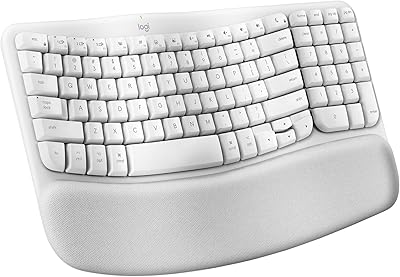
Logitech Wave Keys for Mac Ergonomic Keyboard
Logitech MX Keys Business Gen 2 Combo
Logitech Wave Keys & Lift Vertical Mouse Bundle
Logitech MK520 Wireless Keyboard Mouse Combo
Logitech POP ICON Combo
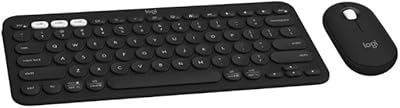
Logitech Slim Bluetooth Combo
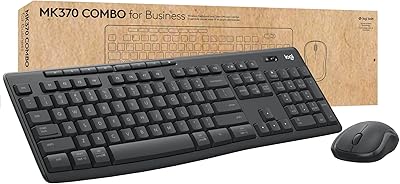
Logitech MK370 Combo for Business
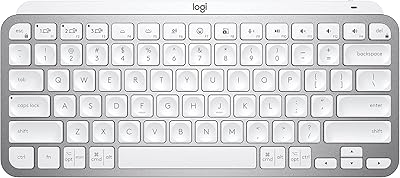
Logitech MX Keys Mini Wireless Keyboard
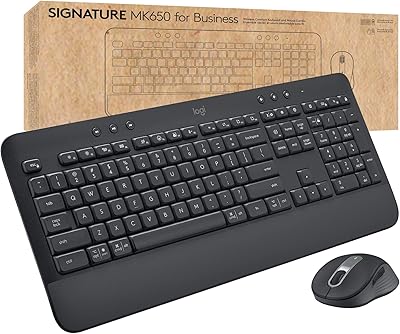
Logitech MK650 for Business