



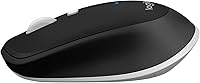

Overview

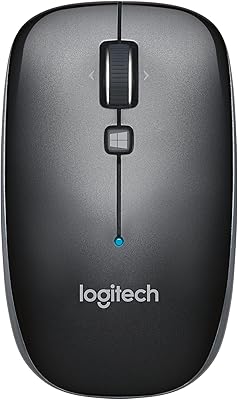
The Logitech M535 Bluetooth Mouse is a compact, wireless mouse that combines convenience and functionality. Its Bluetooth connectivity offers a wire-free experience, making it ideal for users on the go. With a sleek and lightweight design, this mouse is perfect for both laptop and desktop users. Its affordable price point, paired with dependable performance, makes it an attractive choice for those seeking a reliable mouse for everyday tasks. Whether you're working at your desk or traveling, this portable mouse offers the flexibility and simplicity you need.

Features & Benefits

This Logitech mouse boasts several practical features that enhance the user experience. Customizable buttons provide flexibility, allowing you to tailor the mouse's functions to your preferences. Its optical tracking ensures precise movement on a variety of surfaces, making it easy to use in any setting. Additionally, the long-lasting AAA battery included with the mouse reduces the hassle of frequent replacements. Bluetooth technology eliminates the need for a USB receiver, further streamlining your setup. With these features, this mouse is as functional as it is efficient.

Best For

The M535 Bluetooth mouse is well-suited for individuals who need a portable, wireless solution. It’s particularly beneficial for those who work on the go and prefer a clutter-free setup. This mouse is perfect for laptop users or anyone who needs to frequently switch between devices. Its Bluetooth connectivity makes it a great option for people who use multiple devices, such as a tablet or phone, alongside their primary computer. If you value wireless convenience and portability, this is an excellent choice for your needs.

User Feedback

The Logitech M535 Bluetooth Mouse has received positive reviews for its portability and ease of use. Many users appreciate how lightweight and compact it is, making it a great companion for travel. However, some people with larger hands find the button layout a bit cramped, which can affect comfort during extended use. On the positive side, the mouse is praised for its smooth tracking on a variety of surfaces, offering consistent performance. Overall, it delivers good value for those looking for a simple, functional, and reliable wireless mouse.

Pros

  • Compact and lightweight design makes it easy to carry in a bag or briefcase.
  • Bluetooth connectivity ensures wireless freedom without the need for USB receivers.
  • Ideal for both laptop and desktop users who need a versatile, portable mouse.
  • Customizable buttons provide personalized control for various tasks.
  • The AAA battery offers long-lasting power, reducing the need for frequent replacements.
  • Smooth optical tracking works well on a variety of surfaces, enhancing accuracy.

Cons

  • Button layout can feel cramped for users with larger hands, leading to discomfort.
  • Not as ergonomic as some larger mice, which may cause strain during long sessions.
  • No rechargeable battery option, meaning you need to replace the AAA battery periodically.
  • Tracking performance can suffer on very glossy or reflective surfaces.
  • Some users find it too small for extended use, making it less ideal for those who prefer larger mice.
  • Lack of advanced customization options compared to higher-end models.

Ratings

After analyzing verified user reviews from multiple countries and platforms, we’ve gathered a comprehensive picture of the Logitech M535 Bluetooth Mouse. Authentic feedback, excluding spam and incentivized reviews, reveals both its strong performance and areas for improvement. Users consistently highlight its portability and ease of use, while some note discomfort for those with larger hands. These insights come from a diverse range of languages and sources, providing a well-rounded view of the product's value and reliability.

Portability & Size
91%
Users frequently praise the compact design of this wireless mouse, highlighting how easy it is to carry around, whether for work or travel. Its lightweight nature makes it ideal for people who need a portable device for daily use or business trips.
However, a few users mentioned that while it is lightweight, the small size might not be comfortable for those who prefer larger devices. The compactness can be a drawback for people with larger hands, limiting comfort during prolonged usage.
Ease of Use
87%
Many buyers find this wireless mouse intuitive and easy to use, even for those who are new to Bluetooth devices. Its plug-and-play functionality means no complicated setup is required, making it a convenient option for a quick start.
That said, some users feel that the lack of a USB receiver could pose compatibility issues with older systems, particularly those that do not have Bluetooth capabilities. Others have mentioned occasional Bluetooth connectivity drops in crowded environments.
Battery Life
88%
Several users are satisfied with the battery life, which lasts for weeks on a single AAA battery. This is particularly appreciated by those who want a hassle-free experience without frequent recharges.
Despite the positive feedback, a few users expressed disappointment that the mouse doesn’t have a rechargeable battery option. Some buyers also noted that the included AAA battery could be a bit limiting in terms of long-term convenience.
Bluetooth Connectivity
94%
The Bluetooth connectivity is one of the standout features for many users, as it removes the need for a USB receiver. It pairs quickly and works seamlessly with a variety of devices, including laptops, desktops, and even tablets.
While most users enjoy the Bluetooth convenience, a handful have mentioned occasional issues with initial pairing or reconnection, particularly in environments with multiple Bluetooth devices nearby. These interruptions can be frustrating during fast-paced work or gaming sessions.
Button Customization
82%
18%
The customizable buttons are appreciated by users who value personalized control. Many enjoy adjusting the functions to suit their specific needs, enhancing productivity for tasks like browsing or media controls.
However, some users have noted that the buttons can feel a bit small and may not be ideal for those who need more tactile feedback. In addition, the limited customization options, compared to higher-end models, may disappoint those looking for more complex features.
Tracking Precision
89%
The optical tracking performs very well across a variety of surfaces, which is a common positive point among users. Whether on a desk, table, or even a couch, the mouse is accurate and responsive, making it great for both work and casual use.
Some users found that it struggles a bit on very glossy or reflective surfaces. While it works fine on most everyday surfaces, users with specific needs (e.g., using it on glass or highly reflective desks) may experience less precision.
Comfort for Large Hands
65%
35%
For people with average to smaller hands, this mouse is generally comfortable to use for extended periods. It provides a light, ergonomic feel that works well for brief daily use.
Unfortunately, those with larger hands often report discomfort, as the compact size and button layout are not ideal for a natural grip. Some users with larger hands find that it leads to hand fatigue after long sessions.
Build Quality
85%
Many users appreciate the solid build of this wireless mouse, which feels durable despite its compact size. The materials used give it a sturdy yet lightweight feel, making it both portable and reliable.
However, a few users feel that the mouse could benefit from more premium materials, as the plastic finish can feel somewhat cheap, especially with frequent handling. While it's built to last, the overall aesthetic may not appeal to those who prefer a more robust design.
Value for Money
92%
The overall consensus is that this device offers great value for money, with its combination of portability, ease of use, and reliable performance. It's a solid choice for those seeking an affordable yet efficient wireless mouse.
Some buyers have mentioned that although it's an affordable option, they feel the lack of advanced features or rechargeable battery options might make it less of a deal for tech enthusiasts looking for more high-end functionality.
Compatibility
90%
The device works across a wide range of platforms, including Windows, macOS, and even tablets. This versatility makes it ideal for users who switch between multiple devices regularly, whether for work or play.
A few users have pointed out that compatibility with older systems may require manual driver installation or might not work as seamlessly as on newer devices. This could be an issue for users with legacy hardware or operating systems.
Design & Aesthetics
80%
20%
The simple, minimalistic design is often praised for its clean and unobtrusive look. It's compact and sleek, fitting well with modern office setups and casual environments.
However, some users feel that the design could be improved with more color options or a more premium feel. While functional, the design might feel too basic or uninspired for those looking for a stylish, standout accessory.
Overall Satisfaction
88%
Many users express high satisfaction, especially those who prioritize portability, ease of use, and Bluetooth connectivity. It's a solid all-around mouse that meets the needs of most casual and professional users.
Some users, however, report mixed experiences with long-term comfort and performance on certain surfaces. While the mouse excels in portability and simplicity, it may not be the best fit for those seeking advanced features or extended ergonomic comfort.

Suitable for:

The Logitech M535 Bluetooth Mouse is an excellent choice for individuals who prioritize portability and ease of use. It's particularly well-suited for students, professionals, and frequent travelers who need a compact, wireless mouse that can easily be stowed in a bag or briefcase. Those who work across multiple devices, including laptops, desktops, or tablets, will also appreciate its seamless Bluetooth connectivity that eliminates the need for extra dongles. With a long battery life and simple setup, this wireless mouse offers great value for users who require a reliable and lightweight option without compromising performance.

Not suitable for:

While the M535 Bluetooth Mouse offers many benefits, it may not be the best fit for users with larger hands. The compact design, while perfect for portability, can feel uncomfortable for those who need a more substantial, ergonomically designed mouse for extended use. Additionally, users who prefer high-end customization options or a rechargeable battery may find this model limiting. It also struggles with precise tracking on glossy or reflective surfaces, so those needing a high-performance mouse for specialized tasks, such as professional designers or gamers, might find it lacking.

Specifications

  • Connectivity: This mouse connects wirelessly via Bluetooth, eliminating the need for a USB receiver.
  • Battery: The mouse uses a single AAA battery, which is included and offers long-lasting performance.
  • Tracking Technology: It features optical tracking technology for precise movement on most surfaces.
  • Customizable Buttons: The mouse includes customizable buttons for personalized control of various functions.
  • Dimensions: The device measures 3 x 2 x 1 inches, making it compact and portable.
  • Weight: Weighing 4 ounces, it is lightweight and easy to carry for on-the-go use.
  • Color: The mouse comes in a sleek black color, offering a simple, professional look.
  • Compatibility: It is compatible with devices that support Bluetooth, including laptops, desktops, tablets, and smartphones.
  • Form Factor: The mouse features a compact and ergonomic design, ideal for both travel and everyday use.
  • Ideal Use: It is designed primarily for laptop and desktop users, offering easy portability and wireless freedom.
  • Button Layout: The mouse offers a simple button layout, though some users with larger hands find it less comfortable.
  • Tracking Performance: Users report smooth tracking on various surfaces, making it suitable for different environments.
  • First Available: The product was first made available on August 21, 2019.
  • Power Source: Powered by an included AAA battery, it requires no charging or additional power sources.
  • Warranty: The product is covered by a standard manufacturer's warranty for reliability and support.

Related Reviews

Logitech M557 Bluetooth Mouse

82%
92%
Battery Life
88%
Setup and Installation
84%
Ergonomics and Comfort
85%
Performance and Accuracy
90%
Portability and Weight
More
Logitech MK250
Logitech MK250
75%
91%
Value for Money
78%
Bluetooth Connectivity
69%
Keyboard Typing Feel
61%
Mouse Comfort & Fit
88%
Battery Life
More
Logitech POP Mouse
Logitech POP Mouse
82%
93%
Silent Click Performance
89%
SmartWheel Scrolling
87%
Multi-Device Connectivity
91%
Battery Life
71%
Ergonomics & Hand Fit
More
Microsoft Bluetooth Ergonomic Mouse
86%
90%
Ergonomics & Comfort
93%
Battery Life
84%
Bluetooth Connectivity
88%
Tracking Performance
91%
Ease of Setup
More
ESR MagMouse Bluetooth Mouse
85%
88%
Ergonomics & Comfort
91%
Battery Life
85%
Connectivity & Versatility
82%
Build Quality
89%
Portability & Size
More
Logitech Slim Bluetooth Combo
86%
93%
Device Switching
88%
Typing Experience
82%
Build Quality
95%
Portability
85%
Battery Life
More
Logitech Wireless Mouse M320
86%
91%
Value for Money
88%
Wireless Connectivity
84%
Ergonomics & Comfort
92%
Battery Life
89%
Portability & Size
More
Logitech Wireless Mouse M275
85%
94%
Battery Life
88%
Ergonomics/Comfort
92%
Ease of Setup
85%
Tracking Performance
83%
Build Quality
More
Logitech M510
Logitech M510
81%
91%
Ergonomic Comfort
93%
Battery Life
88%
Wireless Reliability
79%
Tracking Accuracy
74%
Build Quality
More
Logitech M325 Wireless Mouse

86%
92%
Value for Money
89%
Comfort and Ergonomics
96%
Battery Life
88%
Connectivity and Performance
84%
Build Quality
More

FAQ

To set up this mouse, simply insert the included AAA battery, turn it on, and pair it with your device via Bluetooth. Make sure Bluetooth is enabled on your laptop or desktop, then select the mouse from the list of available devices to complete the pairing.

Yes, this device is compatible with both Windows and Mac computers. It uses Bluetooth for wireless connectivity, so as long as your computer supports Bluetooth, it will work seamlessly.

The mouse uses a single AAA battery, which provides long-lasting performance. On average, the battery can last for several months depending on usage, with some users reporting up to six months of use before needing a replacement.

This wireless mouse uses optical tracking, which works well on most flat and smooth surfaces like desks and mouse pads. However, users have found it struggles on highly glossy or reflective surfaces.

The mouse includes customizable buttons that can be mapped to different functions via your computer's settings or compatible software. You can easily assign tasks such as copy/paste, back/forward navigation, or even application shortcuts.

Yes, the compact size and Bluetooth connectivity make it an excellent choice for travel. It’s lightweight, doesn’t require a USB receiver, and fits easily into your bag or laptop case.

Yes, this mouse can work with many tablets and smartphones that support Bluetooth. It’s particularly convenient for users who need to control their device wirelessly for productivity or entertainment.

While the M535 is designed for portability, some users find the smaller size and button layout a bit uncomfortable for long sessions, especially if they have larger hands. If you need a mouse for hours of use, you might want to consider a more ergonomically designed option.

Some users report that the button layout feels cramped for larger hands, making it difficult to use for long periods. Additionally, the lack of a rechargeable battery and the small size might be limiting for those seeking a more durable, long-term solution.

Yes, the M535 is compatible with multiple devices that support Bluetooth, so you can easily switch between your laptop, desktop, and tablet without needing to reconnect or use a USB receiver.