


Overview
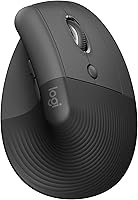
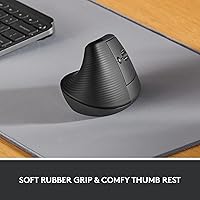
The Logitech Lift Vertical Ergonomic Mouse arrived at a moment when a lot of desk workers started paying real attention to how their hands feel after eight hours of clicking. Unlike a standard flat mouse that keeps your forearm rotated downward all day, this vertical mouse holds your hand at a 57-degree upright angle — closer to a natural handshake position. It's a mid-range pick from a brand that has a long track record with peripherals, designed specifically for right-handed users with small to medium hands. Don't expect a high-DPI powerhouse; this is built around comfort and daily usability, not precision gaming performance.
Features & Benefits
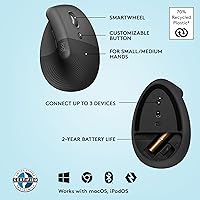
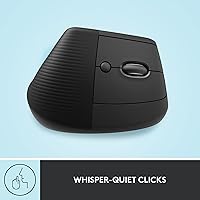
The upright grip is the headline, but a few supporting details make the Lift ergo mouse practical for real office use. The whisper-quiet clicks are genuinely muted — useful if you work in a shared space or take calls while navigating. Connectivity is flexible: pair via Bluetooth or plug in the Logi Bolt USB receiver depending on your setup. Four buttons are remappable through Logi Options+ software, and the SmartWheel adapts between smooth fast scrolling and more controlled, line-by-line movement. Battery life is rated at up to 24 months on a single AA, which means this is essentially a set-it-and-forget-it situation for most users.
Best For
This vertical mouse is a strong fit for full-time desk workers — remote or office-based — who spend the majority of their workday navigating documents, spreadsheets, or browser tabs. It's particularly worth considering if you've noticed wrist fatigue creeping in after long sessions, or if a doctor or physio has suggested reducing forearm pronation. People making their first move into ergonomic peripherals will find Logitech's ergonomic mouse less extreme than some alternatives. It also handles Mac and Windows without any friction, which matters for people who switch between machines. Quiet work environments are an obvious fit given the muted click design.
User Feedback
The most consistent praise across long-form reviews centers on wrist comfort improvement — many users report noticeably less tension after a few weeks of regular use. That said, nearly everyone flags an adjustment period of one to two weeks before the grip starts feeling intuitive rather than awkward. Build quality reads as solid but heavily plastic, which some find underwhelming at this price point. Left-handed users should know upfront: this is strictly a right-hand-only design with no left-handed variant in this line. The scroll wheel draws repeated compliments. On the downside, power users occasionally find the DPI range too limited for fast, wide-monitor workflows.
Pros
- The upright 57-degree grip meaningfully reduces forearm tension during long desk sessions.
- Whisper-quiet clicks make this vertical mouse a considerate choice in shared or silent workspaces.
- Rated battery life of up to 24 months means you rarely think about swapping cells.
- Bluetooth and USB receiver options give genuine flexibility across different desk and laptop setups.
- The SmartWheel handles both fast document skimming and precise line-by-line scrolling well.
- Logi Options+ makes button remapping straightforward without requiring technical know-how.
- Works out of the box on Windows, macOS, iPadOS, and Chrome OS with no driver installation.
- Light enough at 4.4 ounces to travel in a laptop bag without adding noticeable weight.
- A trusted brand with proven ergonomic credentials backs the design and long-term reliability.
Cons
- Expect an adjustment period of one to two weeks before the grip starts feeling instinctive.
- The all-plastic exterior feels underwhelming for the price when handled next to competing options.
- DPI range is too limited for users working across multiple large or high-resolution monitors.
- Left-handed users are entirely excluded with no southpaw variant available in this series.
- Button remapping through Logi Options+ is unavailable on Chrome OS, limiting customization there.
- Bluetooth occasionally drops on wake from sleep, which disrupts workflow until the connection resets.
- Users with large hands will find the body size cramped during extended use.
- No built-in rechargeable battery may feel outdated to users accustomed to USB-C peripheral charging.
Ratings
The Logitech Lift Vertical Ergonomic Mouse has been evaluated using AI-driven analysis of thousands of verified global user reviews, with spam, bot submissions, and incentivized feedback actively filtered out. Scores reflect real-world daily use patterns across home offices, corporate desks, and hybrid setups. Both the standout strengths and the genuine frustrations buyers have reported are transparently captured below.
Ergonomic Comfort
Build Quality
Click Quietness
Wireless Connectivity
Battery Life
Scrolling Performance
Software & Customization
DPI & Tracking Precision
Hand Size Fit
Cross-Platform Compatibility
Value for Money
Setup & Ease of Use
Portability
Suitable for:
The Logitech Lift Vertical Ergonomic Mouse is a practical choice for right-handed desk workers who spend the bulk of their day navigating documents, spreadsheets, or browser-heavy workflows. If you've started noticing forearm tension or wrist fatigue after long sessions, the 57-degree upright grip addresses that discomfort by keeping your hand in a more natural position rather than flat against the desk. Remote workers and office professionals who share quiet spaces will find the muted click mechanism particularly well-suited to their environment. It also works well for anyone making their first move into ergonomic peripherals — the learning curve exists, but it's gentler here than with more extreme vertical designs. Mac and Windows users who switch between machines will appreciate the dual wireless options and broad OS compatibility that require virtually no configuration effort.
Not suitable for:
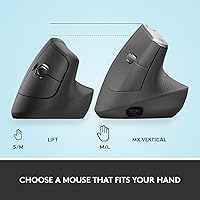
There are some clear situations where this vertical mouse is the wrong call. Left-handed users have no option here — the design is strictly right-hand only with no mirrored variant in this product line. If you have large hands, the fit tends to feel cramped over time, and Logitech's own MX Vertical would be a more appropriate size. Power users who work across multiple large monitors or do fast-paced creative work will likely find the DPI ceiling frustrating, since the sensor range is tuned for standard office navigation rather than wide, high-resolution display sweeps. Buyers expecting premium hardware materials at this price point may also feel let down by the plastic-forward construction. And if you're committed to a rechargeable USB-C ecosystem for your peripherals, the AA battery requirement — however infrequent — will feel like an inconsistency in your setup.
Specifications
- Brand: Manufactured by Logitech under the Lift Ergo series, model number 910-006466.
- Grip Angle: The mouse holds the hand at a 57-degree vertical angle to promote a natural handshake-like forearm posture.
- Hand Orientation: Designed exclusively for right-handed users; no left-handed variant exists in this product line.
- Target Hand Size: Sized and shaped for small to medium right hands; large hands may find the body cramped during extended use.
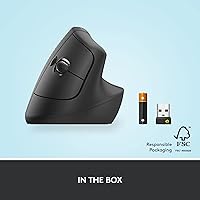
- Connectivity: Supports both Bluetooth wireless pairing and the Logi Bolt USB receiver for flexible connection options.
- Buttons: Features 4 physical buttons, all remappable via the optional Logi Options+ desktop software.
- Scroll Wheel: Equipped with a SmartWheel that supports both controlled line-by-line scrolling and fast free-spinning navigation.
- Click Mechanism: Uses a whisper-quiet dampened click design that significantly reduces audible noise compared to standard mouse switches.
- Tracking: Optical sensor provides reliable cursor tracking across standard desk surfaces without requiring a specialist mousepad.
- Battery: Powered by a single AA battery with a rated lifespan of up to 24 months under typical daily use conditions.
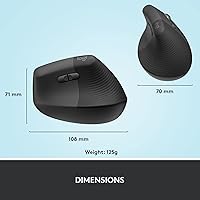
- Weight: The mouse weighs 4.4 ounces, making it light enough for comfortable daily handling and occasional travel.
- Dimensions: Body measures approximately 4.3″ in length and 2.7″ in width, with a taller vertical profile than a standard flat mouse.
- Compatible OS: Officially supports Windows 10, Windows 11, macOS 10.15 and later, iPadOS 14 and later, and Chrome OS.
- Software: Logi Options+ is optional companion software that enables button remapping and scroll customization on Windows and macOS.
- Wireless Range: Operates reliably at a typical wireless range of up to 10 meters from the connected device under standard conditions.
- Power Source: Battery-powered only; there is no built-in rechargeable cell or USB-C charging capability in this model.
- Certification: The ergonomic design has been developed, tested, and certified according to criteria established by professional ergonomists.
- Date Released: First made available for purchase on April 19, 2022, and remains an active product in the Logitech lineup.
Related Reviews
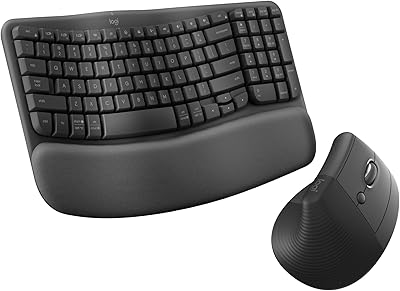
Logitech Wave Keys & Lift Vertical Mouse Bundle

Woddlffy RAAVEE Ergonomic Vertical Wireless Mouse
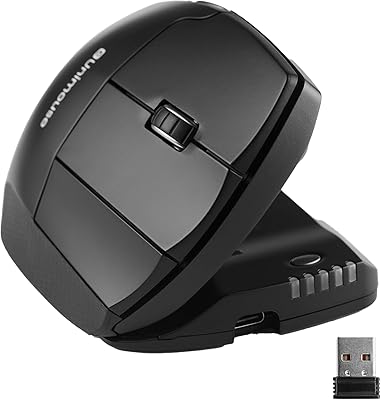
Contour Unimouse Ergonomic Vertical Mouse

seenda Ergonomic Vertical Wireless Mouse

Lekvey XC-05 Vertical Wireless Mouse

Acer OMR241 Ergonomic Vertical Mouse
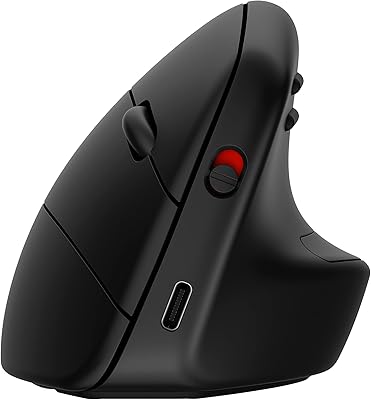
HP 920 Ergonomic Vertical Mouse

UGREEN Vertical Wireless Ergonomic Mouse

Logitech MX Vertical