Overview

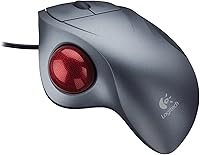
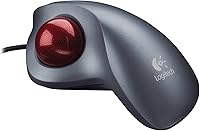
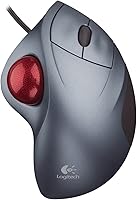
The Logitech Trackman Wheel Optical Trackball Mouse is one of those rare peripherals that has outlasted entire generations of competing hardware — still in production, still respected, and still earning new converts more than two decades after its 2001 launch. Worth flagging immediately: this is right-hand only, so left-handed users should move on now. The premise takes real adjustment: the device stays anchored on your desk while your thumb rolls the large ball to drive the cursor, eliminating the arm sweeping a conventional mouse demands. That stationary design resonates strongly with people fatigued by repetitive wrist and elbow motion. It sits at the premium end of the trackball segment, and buyers who find it have usually already decided this input style is worth exploring.
Features & Benefits

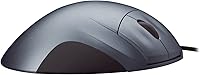
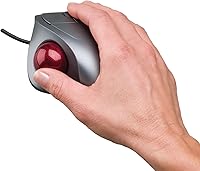
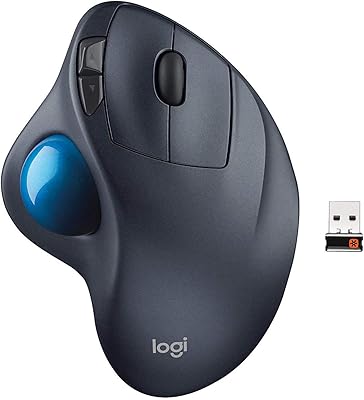
Optical tracking brings a genuine upgrade over older mechanical trackballs — the ball reads cleanly across a wide range of movement speeds without the debris buildup that plagued roller-based predecessors. The shell is sculpted for right-hand ergonomics, cradling the palm in a way that reduces wrist pronation noticeably compared to a flat conventional mouse. At 14.4 ounces, this ergonomic input device is genuinely hefty; it plants itself on the desk and stays put mid-use, which adds a confident sense of control. Scroll wheel and button placement feel intuitive once acclimatized. Dual USB and PS/2 connectivity makes it practical for legacy workstations and KVM switch setups. Logitech has maintained driver support and parts availability, which matters for a peripheral many owners have relied on for well over a decade.

Best For

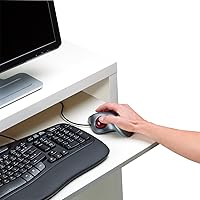
This trackball mouse was practically built for people managing repetitive strain injury or chronic wrist and shoulder discomfort — removing mouse travel eliminates a surprising amount of cumulative daily joint load. Professionals squeezed into tight workstations appreciate not needing open desk real estate just to navigate. CAD drafters, medical imaging reviewers, and others whose work demands steady, precise cursor placement have long gravitated toward stationary trackballs for this reason. IT administrators running PS/2-dependent legacy systems will find the dual connectivity genuinely useful rather than a quirky footnote. One point worth repeating clearly: this is a right-handed device with no ambidextrous or mirrored variant available. If you mouse with your left hand, this ergonomic input device simply was not designed with you in mind.

User Feedback

Long-term owners discuss the Trackman Wheel with almost stubborn loyalty — many report running the same unit for five or even ten years with no meaningful performance drop. Consistent praise focuses on all-day comfort and the freedom from needing a mouse pad or wide arm clearance. The criticism, however, is equally consistent: transitioning from a conventional mouse is genuinely hard at first. Budget a week or two of real frustration before muscle memory catches up. Ball socket cleaning comes up repeatedly in feedback — dust and debris accumulate in the housing and visibly affect tracking, so periodic maintenance is not optional. Scroll wheel feel and button longevity generally hold up well, though scattered reports of scroll stiffness after years of heavy daily use do surface among the longest-term owners.

Pros

  • Dramatically reduces wrist and forearm strain compared to traditional mouse use during long work sessions.
  • Completely stationary footprint means no mouse pad and no cleared desk space required.
  • Optical tracking delivers clean, reliable precision without the maintenance headaches of older mechanical trackballs.
  • Heavy 14.4-ounce build keeps the Trackman Wheel planted firmly — no accidental shifting mid-use.
  • Dual USB and PS/2 connectivity makes it compatible with both modern systems and legacy workstations.
  • Logitech has maintained production and driver support for over two decades, a genuinely rare commitment.
  • Right-hand ergonomic contour fits naturally for extended sessions without the fatigue of a flat, symmetric design.
  • Many owners report the same unit running reliably for five to ten years with minimal degradation.
  • Compact desk presence makes it a practical choice for professionals working in physically constrained environments.

Cons

  • Steep learning curve — expect one to two weeks of reduced productivity while building new muscle memory.
  • Right-hand only with no left-handed or ambidextrous variant; a complete non-starter for southpaw users.
  • Ball socket accumulates dust and debris noticeably, requiring regular manual cleaning to maintain tracking quality.
  • Premium pricing is a real commitment for buyers who are not yet certain trackballs suit their workflow.
  • Not well suited to fast-paced gaming or any task requiring rapid, wide-range cursor sweeps.
  • Scroll wheel can develop stiffness after years of very heavy daily use, based on long-term owner reports.
  • Switching frequently between this and a conventional mouse on other systems can slow re-adaptation each time.
  • No wireless option available, which may be a drawback for users with cable-managed or minimalist desk setups.

Ratings

Our AI-driven scoring for the Logitech Trackman Wheel Optical Trackball Mouse was built by analyzing thousands of verified global user reviews, with spam, incentivized, and bot-generated submissions actively filtered out before any scores were calculated. The ratings below reflect a transparent synthesis of what real long-term owners consistently praised and where they ran into genuine frustrations. Both the highs and the pain points are represented here without softening either side.
Ergonomic Comfort
91%
Users dealing with wrist strain, carpal tunnel symptoms, or shoulder fatigue report this as the most impactful change they made to their workstation. The right-hand contour keeps the wrist in a neutral, un-pronated position across full workdays in a way that a flat conventional mouse simply cannot replicate.
The comfort benefit takes time to materialize — during the first week or two, many users actually report increased hand fatigue as unfamiliar thumb muscles adapt. People with very large hands have also noted that the contour can feel slightly cramped during extended sessions.
Tracking Precision
83%
The optical sensor handles the thumb-controlled ball cleanly across varied movement speeds, and users who do detailed work — CAD drafting, image editing, or spreadsheet navigation — praise the deliberate, controlled feel it gives for precise cursor placement. It reads reliably without needing any surface at all.
Once debris builds up in the ball socket, tracking quality degrades noticeably, and users who skip regular cleaning report erratic or stuttering cursor behavior. The precision ceiling also feels lower than a high-end optical mouse for tasks involving very rapid, wide-range cursor sweeps.
Build Quality
88%
The heavy 14.4-ounce construction feels deliberately engineered rather than incidental — it plants firmly on the desk and does not shift during use, which owners of cheaper plastic peripherals find immediately impressive. Many buyers report running the same unit for five to ten years without structural degradation.
The scroll wheel is the component most frequently flagged as the first to show wear, with some long-term users noting increased resistance or occasional skipping after years of heavy daily use. The silver plastic finish can also show scratching and yellowing over time under harsh desk lighting.
Learning Curve
47%
53%
Users who commit to the adjustment period consistently describe the transition as ultimately worthwhile, and those who work in stationary-input professional environments — such as radiology suites or control rooms — tend to acclimate faster due to task familiarity with precision pointing.
This is one of the most commented-on friction points across all feedback: switching from a conventional mouse takes days to weeks of real productivity loss, and some users never fully adapt. Thumb control for fine cursor movements is a genuinely new motor skill, and it does not develop overnight regardless of how motivated the buyer is.
Desk Space Efficiency
93%
The fixed footprint is one of the most practically celebrated aspects among users with crowded desks, dual-monitor setups, or small home office corners — the device occupies exactly its own 9.7 × 7.9-inch outline and never demands more. No mouse pad is needed, and no surrounding clearance is required.
The device is physically large relative to compact or travel mice, which makes it impractical for laptop use on the go or in tight public spaces like airplane trays. Users who occasionally work away from their primary desk consistently mention needing a backup input device for mobile scenarios.
Connectivity & Compatibility
86%
The dual USB and PS/2 interface is genuinely useful beyond nostalgia — IT professionals managing legacy hardware, KVM switch users, and government or institutional buyers with standardized older equipment all cite this as a meaningful practical advantage that most modern peripherals have abandoned.
There is no wireless or Bluetooth option, which is a real limitation for users who prefer cable-free desks or need to connect to smart TVs and media setups from a distance. As USB-A ports become less common on thinner laptops, the absence of USB-C native support is also starting to be mentioned.
Maintenance Requirements
58%
42%
The ball removal and cleaning process is straightforward once learned — the access hole is purpose-built, and most users describe a full cleaning routine as taking under five minutes. Regular cleaners report that consistent maintenance keeps the tracking performance close to out-of-box quality for years.
Dust and skin-oil buildup in the socket is essentially inevitable with regular use, and many buyers are caught off guard by how frequently cleaning is actually needed — sometimes every one to two weeks under heavy daily use. Users who neglect this report a noticeable and frustrating degradation in tracking responsiveness over time.
Button Layout & Usability
76%
24%
The primary left and right click buttons are well-positioned for the right-hand grip, and the scroll wheel sits naturally in reach without requiring a shift in hand posture. Office workers who primarily navigate documents, spreadsheets, and browsers find the layout comfortable and logically arranged.
Users coming from mice with multiple programmable side buttons or tilt-scroll wheels tend to find the layout relatively minimal. The lack of readily accessible extra buttons limits workflow efficiency for power users who rely on back-forward shortcuts or application-specific macros in their daily computing.
Long-Term Durability
89%
Few peripherals in this category generate as many multi-year ownership stories as the Trackman Wheel — it is common to find buyers who have used the same unit as their daily driver for seven or more years. The core mechanism and primary buttons tend to outlast the typical product lifecycle expectations of the category.
Scroll wheel wear is the most consistent long-term complaint, with stiffness or click-skip behavior surfacing after sustained heavy use. Replacement parts are not consumer-serviceable in a straightforward way, meaning that when the scroll wheel eventually degrades, most users end up replacing the entire device.
Value for Money
69%
31%
For buyers who fully adapt to the format and use this trackball daily for years, the cost-per-day calculation ends up being highly favorable — the device genuinely delivers on its longevity promise. Users who come from cheaper trackballs that failed within a year are especially positive about the perceived value after extended ownership.
At its premium price point, the initial outlay is a hard sell for buyers who are not yet certain that the trackball format suits them — there is no inexpensive way to trial it first. Users who abandoned the device during the learning curve without ever adapting consistently rate it as poor value, since the price does not account for the real risk of non-adoption.
Software & Driver Support
62%
38%
For most users, the device works plug-and-play via USB with no software installation needed, which is a genuine convenience advantage for corporate IT environments with restricted software installation policies or for users who simply prefer not to install manufacturer utilities.
Advanced customization options through Logitech's current software suite are limited for this aging model, and some users on recent operating system versions have reported inconsistent driver recognition. Buyers expecting deep button remapping or sensitivity tuning comparable to modern gaming peripherals will find the software experience underwhelming.
Wrist & RSI Relief
87%
Among users who purchased specifically for repetitive strain relief, the feedback is strongly positive once the adaptation period is cleared — the elimination of wrist and forearm lateral movement addresses the root mechanical cause of many common office-related strain complaints. Several long-term users describe it as the single most impactful ergonomic change they made.
The thumb bears a significantly higher workload than it does with a conventional mouse, and a minority of users report developing new thumb fatigue or soreness after transitioning — particularly during the learning curve when thumb control is less efficient. Those with pre-existing thumb joint issues should approach with caution.
Gaming Suitability
31%
69%
For turn-based, strategy, or low-intensity point-and-click gaming, the precision of the optical trackball is functional and some niche users appreciate the relaxed, stationary input style for casual play sessions at their workstation.
For any genre requiring fast, fluid, or wide-range cursor movement — which covers most mainstream gaming — this ergonomic input device is fundamentally mismatched. Response characteristics and the physical limits of thumb-based ball control make it non-competitive for action, FPS, or real-time strategy gaming, and this is not a fixable limitation.

Suitable for:

The Logitech Trackman Wheel Optical Trackball Mouse was made for a specific kind of user, and those users tend to love it unreservedly. If you are dealing with repetitive strain injury, chronic wrist pain, or shoulder fatigue from long daily computing sessions, this ergonomic input device removes the primary source of stress: continuous arm and wrist movement across a mouse pad. Professionals in cramped workstations — think dual-monitor trading desks, medical imaging suites, or tightly packed control rooms — will appreciate that it occupies a fixed footprint and never needs room to roam. CAD drafters and radiologists who depend on steady, deliberate cursor control rather than fast, sweeping gestures tend to adapt quickly and rarely go back. IT administrators and retro-computing enthusiasts supporting PS/2-based legacy systems will find the dual-interface connectivity genuinely practical rather than a novelty. If you already know you want to try a stationary trackball and you work right-handed, this is one of the most proven options available.
Not suitable for:

The Logitech Trackman Wheel Optical Trackball Mouse has a hard dealbreaker that comes before any other consideration: it is right-hand only, full stop, with no mirrored or ambidextrous version available. Left-handed users should stop reading here and look elsewhere. Beyond handedness, anyone expecting to pick this up and be productive within an hour is going to be frustrated — the adjustment from a conventional mouse typically takes days to weeks of real, committed use before the thumb develops reliable muscle memory. Gamers who need rapid, wide-range cursor travel for twitch-based titles will find this format fundamentally mismatched to those demands. Users who frequently switch between multiple computers using different input devices may also find the constant context-switching slows re-adaptation. Finally, the price sits firmly at the premium end of the segment, which is a harder sell for someone casually curious about trackballs who has not yet committed to the format.
Specifications

  • Hand Orientation: Designed exclusively for right-handed users; no left-handed or ambidextrous variant exists for this model.
  • Tracking Technology: Uses an optical sensor to track movement of the thumb-operated trackball, eliminating the need for a mouse pad or flat tracking surface.
  • Connectivity: Supports both USB and PS/2 interfaces, providing compatibility with modern computers as well as older legacy workstations.
  • Dimensions: The device measures 9.7 × 7.9 × 3.1 inches, occupying a fixed, predictable footprint on the desk at all times.
  • Weight: Weighs 14.4 ounces, giving it a substantial, planted feel that prevents unintended movement during use.
  • Scroll Wheel: Includes a scroll wheel positioned for use during normal right-hand grip without requiring a change in hand position.
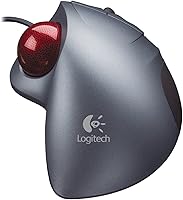
  • Color: Available in a silver finish consistent with Logitech's hardware aesthetic from this product generation.
  • Manufacturer: Designed and manufactured by Logitech, a company with an extensive history in ergonomic and professional input devices.
  • Model Number: Official model number is 904353-0403, useful for identifying compatible accessories or sourcing replacement parts.
  • First Available: This device was first made available in August 2001, making it one of the longer-running trackball models still in active production.
  • Discontinued: As of the latest available product data, this model has not been discontinued by the manufacturer.
  • Category Rank: Holds a Best Sellers Rank of #58 in the Computer Trackballs category on Amazon, reflecting sustained market demand.
  • National Stock No.: Carries National Stock Numbers 7025-01-501-0424 and 7025-01-627-9912, indicating procurement use in government or institutional settings.
  • Ergonomic Design: The shell is contoured specifically to support a natural right-hand resting position, reducing wrist pronation during extended computing sessions.
  • Ball Operation: The trackball is manipulated with the thumb while the rest of the hand and the device body remain stationary on the desk.

Related Reviews
Logitech Trackman Marble Trackball
86%
91%
Ergonomics & Comfort
88%
Precision & Tracking
85%
Ease of Use
94%
Build Quality
90%
Value for Money
More
Logitech Ergo M575S
Logitech Ergo M575S
79%
93%
Ergonomic Comfort
78%
Trackball Precision
61%
Learning Curve
88%
Click Noise Level
91%
Battery Life
More
Logitech MX Ergo S
Logitech MX Ergo S
81%
91%
Ergonomic Comfort
88%
Trackball Precision
93%
Battery Life
86%
Click Noise Reduction
79%
Software & Customization
More
Logitech POP Mouse
Logitech POP Mouse
82%
93%
Silent Click Performance
89%
SmartWheel Scrolling
87%
Multi-Device Connectivity
91%
Battery Life
71%
Ergonomics & Hand Fit
More
Logitech Wireless Mouse M217
81%
91%
Value for Money
94%
Battery Life
92%
Ease of Setup
88%
Portability
85%
Tracking Accuracy
More
Logitech M535 Bluetooth Mouse
75%
93%
Portability
78%
Bluetooth Connectivity
89%
Battery Life
63%
Ergonomics & Comfort
71%
Tracking Performance
More
Logitech M570 Wireless Trackball
77%
91%
Ergonomic Comfort
88%
Wireless Reliability
93%
Battery Life
84%
Build Quality
61%
Scroll Wheel Quality
More
Logitech Wireless Mouse M275
85%
94%
Battery Life
88%
Ergonomics/Comfort
92%
Ease of Setup
85%
Tracking Performance
83%
Build Quality
More
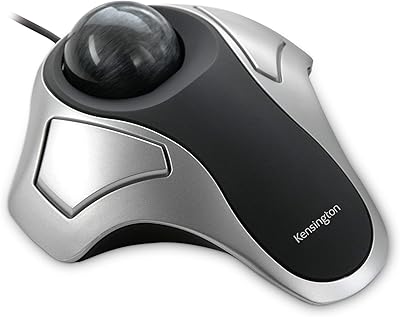
Kensington Expert Mouse Optical Trackball
80%
91%
Cursor Precision
86%
Ergonomic Comfort
84%
Build Quality
71%
Scroll Ring Usability
53%
Customization Software
More
Kensington Orbit Trackball Mouse
77%
83%
Ergonomic Comfort
76%
Tracking Accuracy
61%
Scroll Ring Usability
88%
Build Quality & Durability
57%
Button Layout & Customization
More

FAQ

Yes, the Trackman Wheel works as a plug-and-play USB device on current versions of Windows and macOS without requiring additional drivers for basic functionality. For advanced button customization, you would need to check whether Logitech's current software supports this older model, as driver compatibility can vary across major OS updates.

No. This ergonomic input device is molded specifically for right-handed use, and there is no mirrored or ambidextrous version of this model available. Left-handed users would find the shape uncomfortable and the button layout awkward. It is worth looking at other trackball options that offer symmetrical or left-handed designs.

Most people report an adjustment period of roughly one to two weeks before the Trackman Wheel starts to feel natural. The first few days can feel genuinely frustrating, especially with precise clicking tasks. Give yourself time and resist the urge to switch back immediately — the muscle memory does develop, and most committed users say the transition was worth it.

Pop the ball out from the underside of the device — there is a removal hole designed for this. Use a dry or lightly dampened cloth to wipe the ball itself, then use a cotton swab to clean the three small contact points inside the socket where dust and skin oils tend to collect. Doing this every few weeks keeps tracking smooth and consistent.

Yes, the dual USB and PS/2 connectivity makes this a practical choice for KVM switch configurations. The PS/2 interface in particular is common in older KVM setups, and having both options on a single device gives you flexibility depending on how your switch is wired.

It is not well suited to fast-paced gaming, particularly genres that require rapid, wide cursor sweeps like first-person shooters or real-time strategy games. The thumb-operated stationary format simply was not designed for that kind of input. For precision-based or turn-based gaming it can work, but competitive gamers will likely find it limiting.

Many users report meaningful relief from wrist and forearm discomfort after switching to this trackball format, since arm movement is eliminated almost entirely. That said, no input device is a medical treatment, and results vary depending on the source and severity of your symptoms. If you have a diagnosed condition, it is worth discussing ergonomic options with a health professional alongside trying new hardware.

Logitech does offer software support for many of its devices, but the degree of customization available for this specific model through their current SetPoint or Options software may be limited given the device's age. Basic functionality works without any software at all via plug-and-play, which is how most users run it day to day.

The difference is significant. With a conventional mouse you need a clear, open area to move around in — typically at least the size of a standard mouse pad. This trackball mouse sits in one fixed spot and never moves, so the space it occupies is exactly its own footprint: 9.7 × 7.9 inches. For cluttered or small desks, that is a real practical advantage.

According to the product listing, this model has not been discontinued by Logitech, which is a remarkable fact given it was first released in 2001. That said, availability can fluctuate, so if you find a listing it is worth confirming it is fulfilled by a reputable seller. The longevity of this product in the market speaks to the durability and sustained demand it has maintained over the years.

Where to Buy