Logitech Pebble Mouse 2 M350s








Overview
The Logitech Pebble Mouse 2 M350s is the follow-up to Logitech's popular original Pebble, and it arrives with a few meaningful upgrades worth a fresh look. Where the first generation kept things simple, this Bluetooth mouse adds multi-device switching and button customization — practical additions rather than spec padding. The flat, rounded form factor fits easily into a bag pocket or laptop sleeve, and the body uses at least 58% post-consumer recycled plastic. At its price point, it sits comfortably in the budget-to-mid-range wireless category, competing less on raw performance and more on portability, quiet operation, and cross-platform convenience.
Features & Benefits
The standout addition in this slim travel mouse is the Easy-Switch button, which lets you pair and cycle between up to three devices — a laptop, tablet, and desktop — without re-pairing each time. Switching is fast enough to feel useful in a real workflow. The Silent Touch Technology genuinely muffles clicks to a degree that makes a noticeable difference in quiet rooms; it's not just marketing. The middle button can be remapped via the Logi Options+ app to trigger shortcuts for common tasks. Battery life is rated at two years from a single AA cell, and the auto-sleep mode helps stretch that claim closer to reality.
Best For
This Bluetooth mouse is a strong pick for anyone juggling multiple devices throughout the day — someone who starts work on a desktop, shifts to a MacBook, then picks up an iPad, all without dealing with extra dongles or re-pairing. It's also well-suited for library regulars, students, or open-office workers where click noise is genuinely a concern. The flat shape and sub-3-ounce weight make it a practical travel companion. One caveat: because the form is symmetrical rather than contoured, left-handed users can use it, but those who prefer an ergonomic grip or extended work sessions may find it less comfortable over time.
User Feedback
Among verified buyers, the most consistent praise focuses on how genuinely quiet the clicks are and how painless it is to pair across different devices. Many note the battery life holds up well in practice, though a few acknowledge they replaced the AA well before the two-year mark with heavy daily use. The scroll wheel draws mild criticism from some users — a handful describe it as slightly stiff or lacking precision on smooth surfaces without a mousepad. Left-handed users generally report no major issues given the rounded shape, but comfort fatigue during long sessions does come up. Compared to the original Pebble M350, most upgraders consider the multi-device switching alone worth the change.
Pros
- Silent clicks are genuinely quiet enough for libraries, open offices, and late-night work without disturbing others.
- Connects to up to three devices and switches between them in seconds with a dedicated button.
- At under 3 ounces, this Bluetooth mouse is among the lightest and flattest options available at its price.
- Single AA battery lasts well over a year for most moderate users, eliminating charging anxiety entirely.
- Works across Windows, macOS, iPadOS, ChromeOS, and Linux without drivers or dongles.
- The symmetrical design functions equally well for left- and right-handed users.
- The middle button can be remapped via the Logi Options+ app for useful daily shortcuts.
- Compact enough to fit in a coat pocket or small bag without a dedicated case.
- Build quality holds up to daily commuting and bag-in-bag-out use without obvious wear.
- Solid value for the feature set — multi-device switching alone is rarely available at this price tier.
Cons
- The scroll wheel feels stiff and imprecise compared to competing mice in a similar price range.
- Sensor tracking becomes unreliable on glossy desks or dark surfaces without a mousepad.
- Long daily sessions can cause hand fatigue due to the flat, contourless shape.
- Bluetooth reconnection after idle periods sometimes requires a manual button press rather than waking automatically.
- Android tablet compatibility is inconsistent, with some users reporting lag or dropped connections.
- The Logi Options+ app requires a download and account setup, which frustrates users expecting instant plug-and-play customization.
- Heavy daily users may need to replace the battery within a year, falling short of the two-year claim.
- No carrying pouch or case is included despite the product being marketed toward travel use.
Ratings
The Logitech Pebble Mouse 2 M350s earns a strong overall standing across thousands of verified global purchases, and the scores below were generated by AI after systematically analyzing real buyer reviews while actively filtering out incentivized, bot, and spam submissions. The result is an honest picture that captures both the aspects users genuinely love and the friction points that push some buyers toward alternatives. Nothing has been smoothed over — the weaknesses are as visible as the strengths.
Portability
Click Noise Reduction
Multi-Device Switching
Battery Life
Build Quality
Ergonomics & Comfort
Sensor & Tracking Accuracy
Scroll Wheel Feel
Software & Customization
Cross-Platform Compatibility
Setup & Pairing Ease
Value for Money
Aesthetics & Design
Packaging & Unboxing
Suitable for:
The Logitech Pebble Mouse 2 M350s is built around a specific kind of user, and for that user it genuinely delivers. If your daily setup involves switching between two or three devices — say, a work laptop, a personal MacBook, and an iPad — the single-button device switching removes a real daily irritation without requiring dongles or manual re-pairing. Students and professionals who spend time in libraries, shared coworking spaces, or open-plan offices will appreciate how unobtrusive the click sound is in practice; it is quiet enough that neighbors rarely notice. Travelers packing light will find this slim travel mouse easy to slip into any bag without adding meaningful weight or bulk. It also suits anyone who prefers a AA battery over a rechargeable cell — no hunting for cables, no checking charge levels, just a fresh battery when the old one eventually runs out. Left-handed users can use it without adaptation issues given the fully symmetrical shape, which is a genuine differentiator in this category.
Not suitable for:
The Logitech Pebble Mouse 2 M350s has a clearly defined sweet spot, and buyers outside that sweet spot tend to walk away disappointed. If you spend five or more hours a day at a mouse-driven workstation, the flat symmetrical shape will likely cause hand fatigue before long — there is simply no contoured palm support or thumb rest to lean on during marathon sessions. Precision-focused users, including graphic designers, photo editors, or anyone relying on pixel-level cursor control, may find the optical sensor inconsistent, particularly on dark or glossy surfaces without a mousepad underneath. The scroll wheel is serviceable but noticeably below the standard of mice at a slightly higher price, so if smooth, well-weighted scrolling matters to you, this will feel like a compromise. Buyers who need a Bluetooth mouse primarily for an Android tablet should also temper expectations, as real-world connection stability on Android appears less reliable than on Apple or Windows platforms. Finally, those who prefer the satisfying click feedback of a traditional mouse may find the silent mechanism too muted to trust.
Specifications
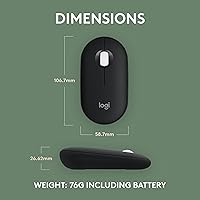
- Dimensions: The mouse measures 4.2 x 2.31 x 1.05 inches (106.7 x 58.7 x 26.7 mm), keeping it compact enough to fit in most laptop sleeves and coat pockets.
- Weight: At 2.68 oz (76 g) without the battery, it is one of the lighter wireless mice in its category, making it practical for daily commutes and travel.
- Connectivity: Supports Bluetooth 5.1 for wireless pairing and also works with a Logi Bolt USB receiver for environments where Bluetooth is restricted or unstable.
- Multi-Device: Pairs with up to three devices simultaneously and switches between them using the dedicated Easy-Switch button on the underside of the mouse.
- OS Compatibility: Officially compatible with Windows, macOS, iPadOS, ChromeOS, Linux, and Android, though Android connection stability may vary by device and OS version.
- Sensor Type: Uses an optical sensor suitable for standard office surfaces and mouse pads; performance can degrade on glossy, dark, or highly reflective surfaces.
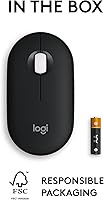
- Battery Type: Powered by a single AA battery, which is included in the box, so the mouse is ready to use immediately after unboxing.
- Battery Life: Logitech rates battery life at up to 24 months under typical use conditions, assisted by an automatic sleep mode that activates during periods of inactivity.
- Click Noise: Silent Touch Technology reduces audible click noise by approximately 90% compared to a standard non-silent mouse, according to Logitech internal testing.
- Customizable Button: The middle scroll button can be remapped to custom shortcuts and app-specific functions using the free Logi Options+ software application.
- Body Material: The plastic housing incorporates a minimum of 58% certified post-consumer recycled plastic content across the body components.
- Form Factor: Symmetrical, ambidextrous pebble-shaped design with no contoured palm rest or thumb groove, making it functional for both left- and right-handed users.
- Power Saving: An auto-sleep mode activates automatically after a period of inactivity to extend battery life, and the mouse wakes quickly on movement or click.
- Color Options: Available in multiple colorways including Black, White, Rose, Teal, and Lavender, depending on regional availability at time of purchase.
- Software: Optional Logi Options+ app is available for Windows and macOS and enables button remapping, device management, and app-specific shortcut assignment.
- Warranty: Covered by Logitech's standard 1-year limited hardware warranty against manufacturing defects from the date of original purchase.
- In The Box: Package includes the mouse, one AA battery pre-installed or included separately, and documentation; no USB receiver is included unless specified in the variant listing.
- BSR Ranking: Ranked #36 in the Computer Mice category on Amazon at time of review, with a 4.6 out of 5 rating across 1,883 verified ratings.
Related Reviews
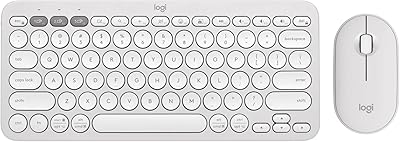
Logitech Pebble 2 Combo Wireless Keyboard Mouse
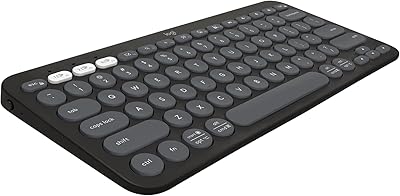
Logitech Pebble Keys 2 K380s

Logitech POP Mouse

Logitech Pebble M350 Wireless Mouse
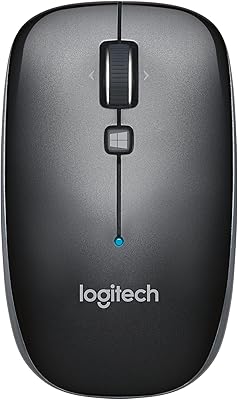
Logitech M557 Bluetooth Mouse

Logitech M275 Wireless Mouse

Logitech M217 Wireless Mouse

Logitech M510
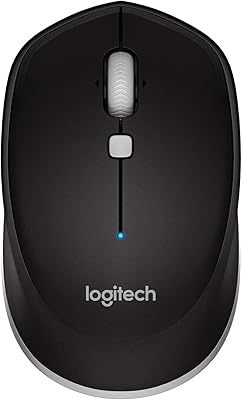
Logitech M535 Bluetooth Mouse
