Overview
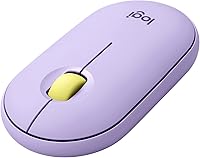
The Logitech Pebble M350 Wireless Mouse is Logitech's answer for users who want something quiet, portable, and genuinely nice to look at without overspending. It sits comfortably in the mid-range and offers dual connectivity — Bluetooth or a 2.4 GHz USB nano-receiver — which is a real advantage at this price point. The Lavender Lemonade colorway reflects a broader push into lifestyle-oriented design, appealing to people who care how their desk setup looks. With a 4.7-star rating from over 20,000 buyers, this slim wireless mouse has built a strong track record, though it is worth being upfront: it is a daily productivity tool, not a precision or gaming device.
Features & Benefits
The most immediately noticeable thing about the Pebble M350 is how quiet it is. The silent click mechanism makes a real difference in shared offices, libraries, or anywhere you would normally feel self-conscious about mouse noise. Connectivity is handled well: the Bluetooth option pairs quickly with laptops, tablets, and Chromebooks, while the nano-receiver acts as a reliable fallback when wireless signals get finicky. Battery life is where this Logitech mouse genuinely impresses — a single AA cell can last up to 20 months under typical use. Weighing just 3.53 oz and measuring about 4.21 inches long, it slips into any bag without a second thought, covering Windows, macOS, Chrome OS, iPadOS, and Linux without extra drivers.
Best For
This slim wireless mouse hits a sweet spot for a specific kind of user: someone who moves between devices throughout the day and cannot afford connection hassles. Remote workers toggling between a laptop and an iPad, students who carry their gear everywhere, and commuters who want something that actually fits in a bag pocket — all of them are natural fits. It is also a solid pick for open-plan office workers who do not want their clicking to distract everyone around them. Chromebook and iPad users in particular will appreciate that pairing works cleanly without driver installations, extra software, or any real setup friction.
User Feedback
Across thousands of reviews, a few consistent themes emerge. Buyers frequently highlight the quiet clicks and battery longevity as standouts, and many mention how painless the initial setup is regardless of which connectivity method they choose. On the critical side, people with larger hands tend to find the low, flat profile uncomfortable during longer sessions — the shape suits fingertip or claw grip more than a full palm rest. The scroll wheel draws mixed opinions; some find it precise, others describe it as slightly stiff. A smaller but notable group of buyers also point out that the Lavender Lemonade shade looks more muted in person than the product photos suggest.
Pros
- Silent clicks make a real difference in quiet offices, shared workspaces, and late-night home sessions.
- Dual Bluetooth and USB nano-receiver connectivity covers almost every device pairing situation without fuss.
- Battery life is exceptional — a single AA cell can realistically last well over a year of regular use.
- At 3.53 oz, this slim wireless mouse is light enough to forget it is in your bag.
- Works out of the box on Windows, macOS, Chrome OS, iPadOS, and Linux without driver installations.
- Plug-and-play USB receiver is a dependable fallback when Bluetooth connections act up.
- The design stands out in a category full of generic black peripherals, with several color options available.
- Pairing is quick and straightforward regardless of which connectivity method you choose.
- Highly rated by a large pool of verified buyers, giving the overall score genuine credibility.
Cons
- No side buttons limits its appeal for power users who rely on shortcuts or browser navigation.
- The low profile can cause hand fatigue during extended sessions, especially for larger hands.
- Scroll wheel feel is inconsistent — some users find it stiff or imprecise compared to pricier alternatives.
- Only one device can be connected at a time; there is no multi-device toggle button like some rivals offer.
- The Lavender Lemonade color looks more muted in person than it does in marketing photos.
- Palm-grip users may find the flat shell uncomfortable after more than an hour or two of continuous use.
- No onboard DPI adjustment button means you are locked into a fixed sensitivity setting.
- Optical sensor performance is adequate but unremarkable on glossy or highly reflective surfaces.
Ratings
The scores below reflect an AI-driven analysis of verified global buyer reviews for the Logitech Pebble M350 Wireless Mouse, with spam, incentivized submissions, and bot activity actively filtered out before scoring. Each category was evaluated against real-world usage patterns reported by thousands of buyers across different regions, devices, and work environments. Both the standout strengths and the recurring frustrations are reflected transparently in every score.
Noise Level
Battery Life
Connectivity Reliability
Ergonomics & Comfort
Portability
Build Quality
Scroll Wheel Feel
OS & Device Compatibility
Design & Aesthetics
Setup & Ease of Use
Value for Money
Cursor Tracking
Button Layout
Suitable for:
The Logitech Pebble M350 Wireless Mouse is a strong match for anyone whose daily routine involves moving between devices, working in shared spaces, or simply wanting a peripheral that does not look like an afterthought on their desk. Remote workers who hop between a laptop and an iPad throughout the day will appreciate the dual connectivity options — no re-pairing headaches, no dongle conflicts. Students who carry everything in one bag benefit from how light and compact this slim wireless mouse is; it adds almost nothing to a loaded backpack. Office workers in open-plan environments will find the silent clicking a genuine quality-of-life improvement, especially during calls or focused work blocks. Chromebook and iPad users in particular tend to struggle finding mice with clean out-of-the-box support across those platforms, and the Pebble M350 handles both without any driver installation. If aesthetics matter to you and you want your setup to feel intentional rather than cobbled together, the color options here go further than most mice in this price range.
Not suitable for:
The Logitech Pebble M350 Wireless Mouse is not the right tool for every buyer, and being honest about that saves a lot of frustration. If you have larger hands or rely on a full palm-grip posture, the flat, low-profile shell will likely cause discomfort during long sessions — this shape suits fingertip and claw grips far better. Anyone who depends on side buttons for browser navigation, application shortcuts, or productivity macros will find this mouse lacking entirely; there are simply none. Gamers or users who need adjustable DPI, high polling rates, or precision tracking for creative work should look elsewhere — this is a light productivity tool, not a performance peripheral. If you spend six or more hours a day at a computer doing intensive tasks, the ergonomic limitations of such a slim form factor will become apparent over time. Finally, buyers sensitive to color accuracy should know that the Lavender Lemonade finish looks noticeably different under real-world lighting compared to product photography.
Specifications
- Dimensions: The mouse measures 4.21 x 2.32 x 1.04 inches, making it notably flat and compact compared to most full-size mice.
- Weight: At 3.53 oz without the battery, this slim wireless mouse is light enough to carry daily without adding meaningful bag weight.
- Connectivity: Supports both Bluetooth and a 2.4 GHz USB nano-receiver, giving users two reliable wireless connection methods.
- Battery: Runs on a single AA battery (included in the box) with a rated lifespan of up to 20 months under typical usage conditions.
- Sensor Type: Uses an optical sensor suitable for everyday productivity tasks on standard desk surfaces and most mouse pads.
- Click Mechanism: Both primary buttons use a silent click mechanism that significantly reduces audible noise compared to standard mechanical switches.
- OS Compatibility: Works natively with Windows, macOS, Chrome OS, iPadOS, and Linux without requiring additional driver software for basic operation.
- Hardware Support: Compatible with PCs, Macs, Chromebooks, iPads, and Linux-based machines across a broad range of device generations.
- Color Options: Available in multiple colorways including Lavender Lemonade, with other variants offered separately under the same Pebble M350 series.
- Model Number: The official model number is 910-006659, part of Logitech's Pebble M350 series.
- Power Source: Battery-powered only; there is no rechargeable battery or USB charging port on this model.
- Scroll Wheel: Features a single physical scroll wheel positioned centrally between the two main buttons for vertical scrolling.
- Side Buttons: This model includes no programmable side buttons, offering only left-click, right-click, and scroll wheel as physical inputs.
- Receiver Storage: The USB nano-receiver can be stored inside the battery compartment when not in use, reducing the risk of losing it during travel.
- BSR Ranking: Ranked #705 in the Computer Mice category on Amazon, reflecting consistent long-term sales performance.
- User Rating: Holds a 4.7 out of 5 star average rating based on over 20,000 verified customer ratings.
- Release Date: First made available in October 2022, positioning it as a relatively recent entry in the Pebble product line.
- Manufacturer: Designed and manufactured by Logitech, a Swiss company with decades of experience producing consumer peripherals.
Related Reviews
Logitech Pebble 2 Combo Wireless Keyboard Mouse

Logitech M217 Wireless Mouse

Logitech M320 Wireless Mouse

Logitech M510

Logitech M275 Wireless Mouse
Logitech M325 Wireless Mouse
Logitech Pebble Mouse 2 M350s
Logitech M325 Wireless Mouse
Logitech M705 Marathon Wireless Mouse