
Overview
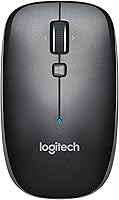
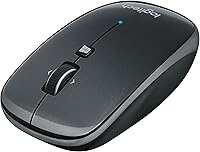
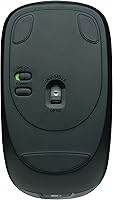
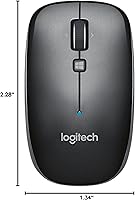
The Logitech M557 Bluetooth Mouse is a mid-range peripheral built for everyday use across multiple devices and operating systems. It pairs natively over Bluetooth with Windows, macOS, Chrome OS, and Android — no USB receiver required. Logitech has phased it out of active production, but the M557 remains widely available through major retailers and still holds up well in daily use. At its core, this wireless mouse features a wireless-only design with optical tracking — capable for browsing, document work, and general computing, but not built for gaming or high-precision tasks.
Features & Benefits
The biggest draw of this Bluetooth mouse is straightforward: it connects over Bluetooth with no USB dongle involved, which is a genuine relief on a port-limited laptop. Battery life is where it quietly impresses — a single AAA battery lasts up to 12 months, meaning replacements are rarely something you think about. At just 2.16 oz and under 4 inches long, the M557 slips into any bag without adding bulk. Pairing across Windows, macOS, Chrome OS, and Android works without extra software, and the optical sensor handles everyday cursor duties reliably and consistently.
Best For
This wireless mouse is a natural fit for remote workers and students who regularly hop between devices throughout the day. If you use a Mac at home and a Windows machine at the office, or pair your laptop with a tablet on the road, the M557 handles those transitions without any fuss. Travelers and minimalists will appreciate the compact build and the fact that there's no USB receiver to track down. It's a solid first Bluetooth mouse for anyone making the jump from wired. That said, if you have larger hands or prefer a sculpted, chunky grip, you may find this one underwhelming over time.
User Feedback
With nearly 5,000 ratings and a 4.6-star average, the overall reception for this Bluetooth mouse is hard to argue with. Buyers frequently highlight its reliable pairing and consistent connection as key strengths — the kind of day-to-day dependability that keeps a product's reputation intact years after launch. The battery life claims also hold up in real-world use, with owners regularly reporting they go well over a year before needing a replacement. On the downside, two criticisms keep surfacing: the scroll wheel feels stiffer than expected to some users, and people with larger hands find the compact body uncomfortable after long sessions. A handful of users also report pairing hiccups on older Bluetooth hardware.
Pros
- No USB dongle required — Bluetooth connects directly, freeing up your laptop ports completely.
- Battery life is genuinely impressive, with a single AAA cell lasting close to or beyond 12 months.
- Weighing just 2.16 oz, this wireless mouse is one of the lightest options in its class.
- Works out of the box with Windows, macOS, Chrome OS, and Android — no driver installation needed.
- Reliable Bluetooth pairing is the most consistently praised trait across nearly 5,000 user ratings.
- A 4.6-star average rating signals durable, long-term satisfaction from a large and diverse buyer base.
- Compact enough to fit in any laptop bag pocket without taking up meaningful space.
- Ideal for cross-platform users who need one mouse that works on all their devices without friction.
- Battery is included in the box, so you can start using it immediately after pairing.
- Logitech build quality means day-to-day durability is not something most users ever worry about.
Cons
- The scroll wheel feels noticeably stiffer than what you get on comparable Logitech models at higher price points.
- Compact size can cause hand fatigue for users with larger hands during multi-hour work sessions.
- Older Bluetooth hardware and legacy stacks can trigger pairing instability that is difficult to troubleshoot.
- No multi-device pairing support — you cannot switch between two connected devices with a button press.
- Optical sensor lacks adjustable DPI settings, limiting flexibility for users who prefer custom cursor speeds.
- No dedicated software support or customizable buttons for users who want programmable shortcuts.
- Only available in a single gray colorway, which limits personalization options.
- As a phased-out model, long-term availability through official retail channels may gradually narrow over time.
- Right-leaning shape is not ideal for left-handed users who need a truly symmetrical design.
- No USB-C or rechargeable battery option — a disposable AAA is the only power source.
Ratings
The scores below were generated by AI after analyzing thousands of verified global user reviews for the Logitech M557 Bluetooth Mouse, with spam, incentivized, and bot-flagged submissions actively filtered out before scoring. Each category reflects both the genuine strengths buyers celebrate and the real friction points they run into — nothing is glossed over. The result is an honest, balanced picture of where this wireless mouse earns its reputation and where it falls short of expectations.
Bluetooth Connectivity
Battery Life
Cross-Platform Compatibility
Portability
Ergonomics & Comfort
Scroll Wheel Feel
Build Quality
Ease of Setup
Click Accuracy & Response
Value for Money
Software & Customization
Noise Level
Long-Term Reliability
Suitable for:
The Logitech M557 Bluetooth Mouse is a strong pick for anyone who works across multiple devices and platforms on a daily basis. Remote workers and students who toggle between a Windows laptop and a macOS machine — or add an Android tablet into the mix — will appreciate how cleanly the M557 handles cross-platform pairing without any additional software or hardware. Travelers and commuters who count every ounce in their bag will find this wireless mouse easy to justify: it weighs next to nothing and skips the USB dongle entirely, which is one less thing to lose. People making their first move away from a wired mouse will also find it an approachable, low-friction entry point into Bluetooth peripherals. If your primary needs are document editing, web browsing, spreadsheet work, or general productivity, this wireless mouse covers all of it without overcomplicating things.
Not suitable for:
The Logitech M557 Bluetooth Mouse is not the right tool for every desk. Gamers or anyone who needs precise, high-sensitivity tracking should look elsewhere — the optical sensor is built for general productivity, not fast-paced or precision-dependent tasks. People with larger hands will likely find the compact form factor uncomfortable during extended sessions; the body is on the smaller side, and there is no way around that. The scroll wheel has also drawn consistent criticism for feeling stiffer than expected, which can be noticeable if you do a lot of scrolling through long documents or web pages. Users still running older hardware with legacy Bluetooth stacks should be aware that pairing issues have been reported in that specific scenario. Finally, buyers who want Logitech's multi-device switching or advanced customization features will need to step up to a different model in the lineup.
Specifications
- Brand: Manufactured by Logitech, a Swiss company with a long-standing reputation in computer peripherals.
- Model: The M557 is part of Logitech's core Bluetooth mouse lineup, identified by model number 910-003971.
- Connectivity: Connects via Bluetooth wireless technology — no USB receiver or dongle is required.
- Compatible OS: Works natively with Windows 10 and 11, macOS, Chrome OS, and Android devices with Bluetooth support.
- Sensor Type: Uses an optical movement detection sensor suitable for everyday navigation on most standard desk surfaces.
- Battery: Powered by a single AAA battery, which is included in the box at purchase.
- Battery Life: Logitech rates the battery life at up to 12 months under typical everyday usage conditions.
- Weight: The mouse weighs 2.16 oz, making it one of the lighter options available in its category.
- Dimensions: Measures 3.93 inches long, 2.28 inches wide, and 1.34 inches tall — a compact, travel-friendly footprint.
- Color: Available in a single gray colorway with no additional color variants offered for this model.
- Power Source: Entirely battery-powered with no rechargeable or wired option available.
- Wireless Standard: Uses the 802.11abg wireless standard for its Bluetooth radio communication.
- Form Factor: Features a compact, slightly right-leaning shape that accommodates most grip styles for general productivity use.
- Scroll Wheel: Includes a standard center scroll wheel; user feedback indicates it has a firmer resistance than premium-tier alternatives.
- Release Date: First made available in April 2014, giving it a well-established track record in the market.
- Availability Status: Production has been phased out by Logitech, but the M557 remains available through major retail channels.
- Best Sellers Rank: Holds a ranking of number 1,232 in the Computer Mice category on Amazon at the time of this review.
- User Rating: Carries a 4.6 out of 5 star average rating based on approximately 4,948 customer ratings on Amazon.
Related Reviews
Logitech M535 Bluetooth Mouse

Logitech MK250

Logitech POP Mouse

Logitech M275 Wireless Mouse

Logitech M510

Logitech M320 Wireless Mouse
Kovess 4-Mode Silent Wireless Mouse
Macally Wireless Bluetooth Mouse

Logitech M217 Wireless Mouse