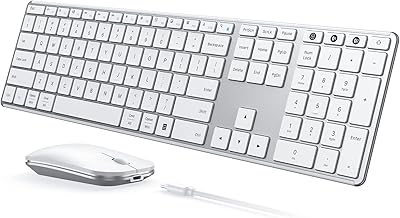
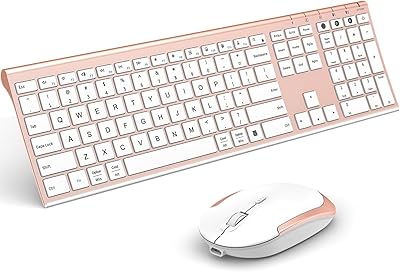
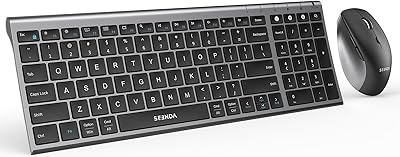
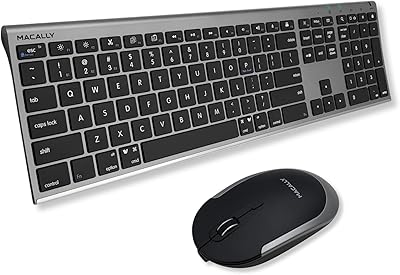
Overview

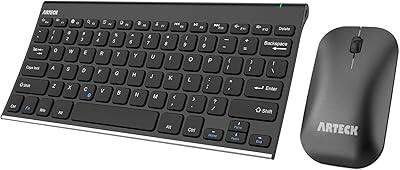
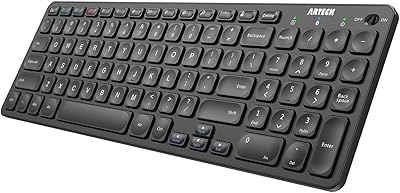
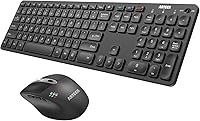
The Arteck HB305-3 Bluetooth Keyboard and Mouse Combo is a practical, no-frills peripheral set built for people who regularly bounce between multiple devices without wanting to pay a premium for the privilege. Arteck has carved out a solid niche in affordable wireless accessories, and this combo fits squarely in that tradition — a full-size keyboard paired with a rechargeable mouse, both connecting via Bluetooth to keep your desk cable-free. USB-C charging on both units is a small but meaningful touch that many rivals at this price point still skip. It works across Windows, macOS, iOS, iPadOS, and Android, making it genuinely useful in mixed-device households.
Features & Benefits

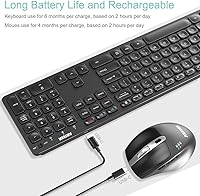
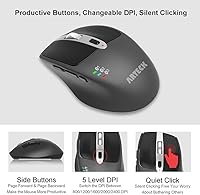
The standout capability here is pairing with three Bluetooth devices at once and hopping between them using a dedicated key — handy when you are drafting on a laptop, then need to reply to a message on your phone, then switch back to your iPad without re-pairing anything. The mouse brings seven buttons into the mix, including two side buttons for browser navigation and a window-switch button that some users find surprisingly useful day-to-day. DPI adjustment runs from 800 up to 2400, giving you enough range for both precise work and general browsing. Battery life is estimated at roughly six months for the keyboard and four for the mouse with moderate daily use.

Best For

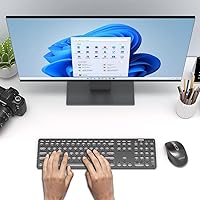
This keyboard-mouse combo is a natural fit for anyone managing two or three devices at their desk — remote workers flipping between a work laptop and a personal iPad, students who need a full-size keyboard for serious typing on a tablet, or home setups where different family members all use different devices. It is also a solid pick for iPad users who want a desktop-style experience without committing to Apple ecosystem pricing. If you are coming from wired peripherals and just want a cleaner, quieter desk without a complicated setup, this Arteck set covers that need without requiring much thought or investment.

User Feedback

Buyers tend to appreciate the key feel and how straightforward the multi-device switching is — most report it works reliably without constant re-pairing headaches. Battery longevity also draws consistent praise, with many users noting they rarely think about charging either device. On the flip side, some reviewers flag occasional Bluetooth connection drops, particularly when waking a device from sleep, and a handful note the build feels more plastic than sturdy. The ergonomic mouse label is a bit generous — it is comfortable enough for average use but not shaped for extended sessions. Compared to pricier Logitech options, the wireless combo earns its keep on value for money rather than premium build quality.

Pros

  • Connects to three Bluetooth devices at once and switches between them with a single keypress.
  • USB-C charging on both units means one cable on your desk handles everything.
  • Full-size keyboard layout with numpad makes data entry and document work comfortable.
  • Broad compatibility across Windows, macOS, iOS, iPadOS, and Android covers almost any setup.
  • Battery life is genuinely long — most users go weeks between charges under normal use.
  • Seven-button mouse with side navigation keys adds real utility for browser-heavy workflows.
  • Adjustable DPI from 800 to 2400 gives enough range for both precision tasks and wide-monitor sweeping.
  • The wireless combo includes a 24-month warranty, which is reassuring at this price point.
  • Initial pairing is quick and the setup process does not require any software installation.
  • Compact enough to fit in a laptop bag without adding significant weight or bulk.

Cons

  • Bluetooth connection occasionally drops after a device wakes from sleep, requiring a manual reconnect.
  • The ergonomic mouse label overpromises — extended sessions can still cause wrist discomfort.
  • Plastic build shows wear and occasional cracking for some users within the first year.
  • Battery life estimates assume light use; heavy users will see noticeably shorter cycles.
  • No companion software means you cannot remap buttons or fine-tune DPI behavior.
  • Key legends on the keyboard have been reported to fade with heavy daily use over time.
  • The mouse scroll wheel feels loose or inconsistent for some buyers after prolonged use.
  • Android shortcut key behavior is inconsistent compared to the Windows and iPadOS experience.
  • No battery level indicator on the keyboard, so low charge often goes unnoticed until it causes issues.
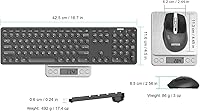
  • At over 17 inches long, the keyboard is too wide for genuinely compact travel or small desk setups.

Ratings

The scores below are generated by AI after analyzing hundreds of verified global user reviews for the Arteck HB305-3 Bluetooth Keyboard and Mouse Combo, with spam, bot-submitted, and incentivized feedback actively filtered out. This wireless combo earns consistent praise for its multi-device flexibility and battery endurance, but real buyers also surface some recurring concerns around build durability and mouse comfort that are worth knowing before you buy. Both the strengths and the friction points are reflected transparently in every category below.

Multi-Device Switching
86%
Users consistently call out the three-device Bluetooth switching as one of the most practical features in this price bracket. Switching from a laptop to an iPad mid-task with a single keypress is exactly the kind of workflow improvement that earns repeat mentions in reviews, especially from remote workers and students.
A recurring complaint involves the combo losing its paired connection after a device wakes from sleep, forcing a manual reconnect. This does not happen to everyone, but it appears often enough across reviews to be considered a real reliability concern rather than a one-off issue.
Keyboard Typing Experience
82%
18%
The full-size layout is one of the more appreciated aspects here — buyers who moved from a cramped laptop keyboard or compact Bluetooth board note the adjustment was immediate and comfortable. Key travel feels adequate for a membrane board at this price, and the typing noise stays relatively quiet.
Long-session typists occasionally note the keys feel slightly soft or mushy compared to higher-end boards, and a few users found the key legends starting to fade after several months of heavy daily use. It is not a dealbreaker, but it is a sign of the material compromises made at this price.
Mouse Comfort & Ergonomics
63%
37%
For casual daily use — browsing, light document work, occasional spreadsheet navigation — most users find the mouse perfectly acceptable. The natural right-hand curve does reduce wrist strain compared to a flat travel mouse, and the size suits average to slightly larger hands reasonably well.
The ergonomic label on this mouse is generous. Users with larger hands or those logging long editing sessions report discomfort after extended use, and the shape is clearly designed to a budget. Several reviewers specifically noted it does not compare favorably to purpose-built ergonomic mice even at slightly higher price points.
Battery Life
88%
Battery longevity is a standout for this combo. Many buyers report weeks or even months of use before needing to charge, and the USB-C connection on both units means one cable handles everything — a small but meaningful quality-of-life detail that saves frustration.
The manufacturer's six-month keyboard and four-month mouse estimates are based on just two hours of use per day, which does not reflect most desk workers' real usage. Power users running longer sessions report notably shorter cycles, so treat those numbers as a ceiling rather than a guarantee.
Build Quality & Materials
61%
39%
For the price, the combo does not feel entirely cheap out of the box — the keyboard has a reasonable footprint and sits flat without flex, and the mouse buttons have an acceptable click feel that does not rattle or feel hollow. First impressions are generally positive.
Extended ownership tells a different story. Multiple reviewers mention the plastic casing developing minor cracks or showing wear around high-contact areas within six to twelve months. The mouse scroll wheel also receives a few notes about feeling loose or inconsistent after prolonged use.
Mouse Button Functionality
74%
26%
The two side buttons for page back and forward navigation are genuinely handy for browser-heavy workflows, and buyers who use them regularly tend to wonder how they managed without them. The window-switch button is a nice touch that some users build into their daily routine without thinking about it.
Not everyone finds the extra buttons useful — users who work primarily in non-browser applications like spreadsheets or design tools rarely engage the side buttons and consider them wasted real estate. The DPI toggle button placement is also occasionally hit accidentally during normal use.
DPI & Cursor Control
71%
29%
Having five DPI steps from 800 up to 2400 gives users meaningful flexibility — lower settings work well on a crowded multi-window tablet screen, while higher settings suit wide monitor setups where you want to cover distance quickly. The indicator feedback when switching DPI is subtle but functional.
The DPI range tops out at 2400, which falls short of what photo editors or users with high-resolution displays often prefer. There is also no software companion app to customize button behavior or fine-tune sensitivity, which limits how far you can tailor the mouse to a specific workflow.
Bluetooth Pairing & Stability
67%
33%
Initial pairing across multiple devices is generally described as painless and quick. Most users report that day-to-day switching between a laptop and iPad, for example, works without any deliberate reconnection steps once the devices are registered.
Connection drops after sleep mode are the most common complaint in this category, affecting a meaningful percentage of reviewers. A few buyers also note intermittent lag spikes during heavy Bluetooth traffic in crowded wireless environments like open offices or apartment buildings.
OS & Device Compatibility
84%
The cross-platform support is broad and mostly lives up to the promise. Users on Windows, macOS, and iPadOS all report functional pairing with minimal fuss, and the keyboard correctly maps most shortcuts across operating systems without major remapping headaches.
A small but consistent group of reviewers flags issues with Android-specific shortcut keys not behaving as expected, and a few iPad users note that some function-row shortcuts do not respond correctly without extra configuration. It works across platforms but not always perfectly.
Value for Money
91%
This is where the combo earns its strongest marks. At its price point, getting multi-device Bluetooth switching, USB-C charging, a seven-button mouse, and broad OS support in a single package is hard to argue against. Buyers consistently describe it as exceeding expectations relative to what they paid.
The value framing only holds if your expectations are calibrated to the price. Buyers who compared it directly to Logitech options in a higher price tier almost universally preferred the build and feel of those alternatives, suggesting this combo is excellent for its bracket but not a replacement for a premium set.
Setup & Out-of-Box Experience
83%
The pairing process is quick enough that most users had both devices connected to at least one Bluetooth host within a few minutes of opening the box. The included welcome guide is brief but covers the essentials without assuming any technical knowledge.
The guide does not do enough to explain the multi-device pairing flow for all three slots, and a handful of buyers reported confusion about switching modes until they found supplementary instructions online. A clearer quick-start card would resolve this without much effort from Arteck.
Keyboard Layout & Key Spacing
79%
21%
The full-size layout with a dedicated numpad is a genuine asset for anyone doing data entry or working with spreadsheets regularly. Key spacing feels natural coming from a standard desktop keyboard, and touch typists rarely report an adjustment period.
The layout sacrifices some function-key customization that power users might miss, and a few international buyers note that the key legends do not match their regional keyboard settings cleanly. The numpad is also on the smaller side, which can slow down users accustomed to wider desktop boards.
Portability & Form Factor
72%
28%
The combo is light enough to slip into a laptop bag without adding meaningful bulk, and the flat profile of the keyboard keeps it from taking up awkward space. Users who carry both devices between home and an office mention it holds up well to being packed and unpacked daily.
At nearly 17.5 inches long, the keyboard is still a stretch for genuinely compact travel setups. Buyers who needed something that fits in a small daypack or briefcase side pocket found the dimensions less convenient than expected and wished for a tenkeyless option in the same product line.
Charging & Cable Convenience
87%
USB-C charging on both the keyboard and the mouse is one of the cleaner details in this combo. Being able to use the same cable already on your desk — the same one you use for your phone or earbuds — removes a small but real source of daily friction that older peripheral sets still impose.
Neither device charges particularly fast, and there is no pass-through charging or battery status indicator on the keyboard itself. A few buyers noted they had no way to know the keyboard was running low until it started misbehaving, which is a minor but addressable design oversight.

Suitable for:

The Arteck HB305-3 Bluetooth Keyboard and Mouse Combo is a strong match for anyone who regularly juggles two or three devices at their desk and does not want to pay a premium to do it cleanly. Remote workers who hop between a work laptop, a personal iPad, and a smartphone will find the three-device switching genuinely useful in practice — not just on paper. Students who want a full-size typing experience on an iPad without committing to Apple's own accessories will get real value here, especially given the broad OS compatibility across Windows, macOS, iOS, and Android. It also suits home setups where different family members share a desk but use different devices, since the pairing process is simple enough that switching ownership between users is not a production. If you are coming from a wired setup and just want a cleaner desk without a complicated or expensive transition, this wireless combo delivers that without asking much of you.

Not suitable for:

The Arteck HB305-3 Bluetooth Keyboard and Mouse Combo is not the right call if build longevity or premium feel matters to you. Buyers who spend long hours at the keyboard — writers, coders, or data entry workers clocking six-plus hours daily — will likely find the membrane keys and plastic construction underwhelming within a few months. The mouse, despite its ergonomic label, is not shaped for extended sessions and falls noticeably short if you have wrist or hand fatigue concerns. Left-handed users are also out of luck, as the mouse is designed exclusively for right-hand use with no ambidextrous option in this set. If your workflow depends on fast, precise cursor work — photo editing, video timeline scrubbing, or CAD-adjacent tasks — the DPI ceiling and lack of customization software will frustrate you. And if you have already used a Logitech MX Keys or similar mid-to-high-end alternative, the step down in typing feel and reliability will be noticeable enough to bother you.
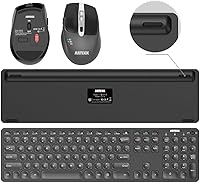
Specifications

  • Keyboard Model: The keyboard unit is the Arteck HB305-3, a full-size wireless Bluetooth keyboard with a dedicated numpad and multi-device switching keys.
  • Mouse Model: The included mouse is the Arteck MB167, a 7-button Bluetooth mouse designed for right-handed use with an ergonomic contoured shape.
  • Connectivity: Both devices connect via Bluetooth and support pairing with up to 3 devices simultaneously, switchable via a dedicated key on the keyboard.
  • OS Compatibility: Compatible with Windows, macOS, iOS, iPadOS, and Android, covering all four major operating systems that support Bluetooth input devices.
  • Mouse DPI Range: The mouse offers five adjustable DPI levels: 800, 1200, 1600, 2000, and 2400, selectable via a dedicated DPI button on the top of the mouse.
  • Mouse Buttons: The mouse features 7 buttons total: left click, right click, scroll wheel click, DPI toggle, two side buttons for back and forward navigation, and a window-switch button.
  • Keyboard Battery: The keyboard is powered by a built-in rechargeable lithium-ion battery rated for approximately 6 months of use based on 2 hours of daily operation.
  • Mouse Battery: The mouse uses a built-in rechargeable lithium-ion battery rated for approximately 4 months of use based on 2 hours of daily operation.
  • Charging Port: Both the keyboard and mouse charge via USB-C, and a USB-C charging cable is included in the box.
  • Package Dimensions: The full package measures 17.44 x 7.44 x 1.65 inches, reflecting the full-size keyboard footprint including the numpad section.
  • Item Weight: The combined package weight is 1.68 pounds, making it light enough for transport between home and office in a standard laptop bag.
  • Warranty: Arteck provides a 24-month manufacturer warranty on this combo, along with customer service support for the duration of that period.
  • Included in Box: The package includes the HB305-3 keyboard, MB167 mouse, one USB-C charging cable, and a printed welcome and setup guide.
  • Battery Type: Both devices use internal lithium-ion batteries; no disposable AA or AAA batteries are required at any point during use.
  • Mouse Handedness: The MB167 mouse is designed exclusively for right-handed users and does not have an ambidextrous or left-handed variant in this combo.
  • Seller Rating: This combo holds a 4.2 out of 5 star rating based on 927 verified ratings on Amazon as of the time of review.
  • Market Ranking: It ranks at number 183 in the Computer Keyboard and Mouse Combos category on Amazon, reflecting strong sustained sales volume.
  • Release Date: The combo was first made available for purchase on March 23, 2023, and is manufactured and sold by Arteck.

Related Reviews

Arteck Bluetooth Keyboard and Mouse Combo
84%
89%
Battery Life
92%
Ergonomics and Comfort
67%
Bluetooth Connectivity
83%
Build Quality
90%
Portability and Design
More
seenda SKM64-3 Wireless Bluetooth Keyboard and Mouse Combo
87%
94%
Battery Life
90%
Connectivity and Compatibility
87%
Typing Experience
89%
Ergonomics and Comfort
85%
Design and Build Quality
More
ASLDPUO Bluetooth Keyboard and Mouse Combo
86%
92%
Value for Money
90%
Connectivity & Compatibility
85%
Ergonomics & Comfort
88%
Battery Life
84%
Design & Portability
More
VssoPlor Bluetooth Keyboard Mouse Combo
78%
88%
Value for Money
83%
Multi-Device Switching
79%
Typing Feel
66%
Bluetooth Stability
71%
Build Quality
More
seenda COE401 Bluetooth Keyboard and Mouse Combo
82%
83%
Multi-Device Switching
88%
Typing Experience
86%
Build Quality
91%
Battery Life
74%
Mouse Performance
More
seenda COE200 Bluetooth Keyboard and Mouse Combo
80%
88%
Wireless Connectivity
86%
Multi-Device Switching
83%
Typing Comfort & Wrist Rest
63%
Mouse Ergonomics
91%
Noise Level
More
Macally Premium Bluetooth Keyboard and Mouse Combo
87%
88%
Ease of Use
83%
Ergonomics/Comfort
90%
Design & Aesthetics
87%
Typing Experience
85%
Battery Life
More
ULSOU KM599 Bluetooth Keyboard and Mouse Combo for Mac
85%
89%
Typing Experience
94%
Battery Life
88%
Connectivity (Bluetooth Pairing)
72%
Mouse Performance (DPI Adjustment)
90%
Portability and Design
More
Arteck HB305-2 Bluetooth Keyboard
81%
88%
Multi-Device Switching
83%
Typing Experience
79%
Battery Life
61%
Build Quality
72%
Bluetooth Connectivity Stability
More
Logitech MK250
Logitech MK250
75%
91%
Value for Money
78%
Bluetooth Connectivity
69%
Keyboard Typing Feel
61%
Mouse Comfort & Fit
88%
Battery Life
More

FAQ

Yes, the keyboard and mouse each hold three Bluetooth pairings simultaneously — you set them up once and then switch between saved devices with a single keypress. You do not need to go through the pairing process again each time. That said, some users report needing to manually reconnect after a device wakes from sleep, so it is not entirely frictionless in every situation.

The Arteck HB305-3 Bluetooth Keyboard and Mouse Combo does work with iPads running iPadOS, and most standard shortcuts like copy, paste, and home screen navigation respond correctly. A small number of users have noted that some function-row keys behave differently than expected on iPadOS compared to Windows or macOS, but for general typing and productivity use it performs well without any configuration.
Arteck's estimates of 6 months for the keyboard and 4 months for the mouse are based on just 2 hours of use per day, so your mileage will vary considerably. Most moderate users — around 4 to 6 hours daily — report charging every 6 to 10 weeks for the keyboard and slightly more often for the mouse. Heavy users should expect shorter cycles and plan to charge both units every few weeks.

Honestly, it sits somewhere in the middle. The mouse has a gentle contoured shape that is more comfortable than a completely flat travel mouse, and most buyers find it fine for a few hours of daily use. However, it is not designed to the level of a purpose-built ergonomic mouse — users with wrist sensitivity or those working 8-hour days may still experience discomfort. Think of it as ergonomic-leaning rather than medically ergonomic.

Unfortunately, no. The MB167 mouse is shaped for right-handed use only, with side buttons positioned on the left side of the mouse body. There is no left-handed or ambidextrous version available in this combo, so left-handed users would need to source a separate mouse.

Each device — the keyboard and the mouse — maintains its own independent Bluetooth connections. In practice, most users keep them synced to the same active device, but they can technically be pointed at different paired devices. For most workflows you will want both on the same device at once, and the switching keys on the keyboard make that simple.

No software installation is required. Both devices pair directly over Bluetooth and are recognized as standard input devices by Windows, macOS, iPadOS, and Android without any drivers or companion apps. The trade-off is that there is no software available to remap buttons or customize DPI behavior beyond the physical toggle on the mouse.

This is a minor but real limitation — there is no battery level indicator or LED warning light on the keyboard itself. The mouse does have a low-battery indicator light, but the keyboard will typically just start behaving erratically or dropping keystrokes when it needs a charge. It is worth building a habit of charging it every month or two rather than waiting for a warning that may not come.

It works with Android tablets including Samsung Galaxy devices. Android compatibility is listed as supported, and most users report successful pairing without issues. The main caveat is that some Android-specific shortcut keys and function mappings may not behave as expected depending on your Android version and device, so core functionality is solid but edge-case shortcuts may need workarounds.

The box includes the keyboard, the mouse, one USB-C charging cable, and a printed welcome guide. You do not need to supply your own cable, which is a practical touch. Both devices charge via the same USB-C connector, so the single included cable handles both — though you can only charge one at a time unless you have a spare USB-C cable handy.