
Overview

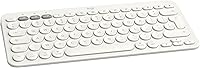
The Logitech K380 Bluetooth Keyboard for Mac is a compact, Mac-native wireless keyboard aimed squarely at Apple ecosystem users who want a capable, portable typing solution without paying Apple's premium. What sets it apart from most Bluetooth keyboards is its ability to pair with three devices simultaneously and switch between them with a single button press — a genuinely useful feature if you work across a MacBook and iPad daily. It sits at a mid-range price point where buyers rightfully expect solid build quality, reliable connectivity, and thoughtful platform integration. This Logitech keyboard delivers on most of those expectations without unnecessary excess.

Features & Benefits

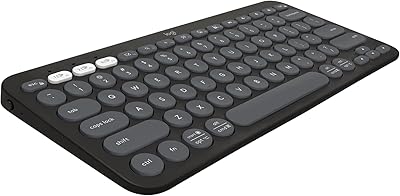
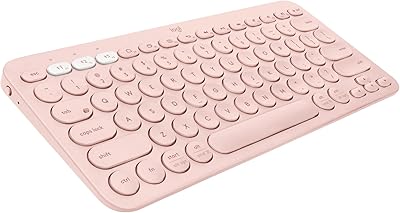
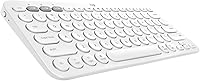
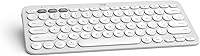
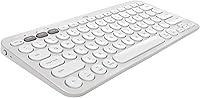
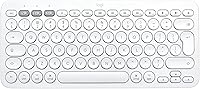
The K380 for Mac ships with a dedicated Mac function row — keys mapped to Mission Control, Spotlight, and screen brightness controls — so you are not hunting through System Preferences to reconfigure anything. The three Easy-Switch buttons let you hop between a MacBook, an iPad, and a phone in about a second. Battery life is genuinely impressive: two AA batteries power this compact Bluetooth keyboard for up to 24 months under typical use, meaning you are unlikely to think about replacing them more than once a year. At just 14.1 ounces and under an inch thick, it slips into a bag without adding meaningful weight.

Best For

This Logitech keyboard makes most sense for people living inside the Apple ecosystem — specifically anyone who regularly types on both a MacBook and an iPad and does not want to juggle two keyboards or constantly re-pair a single one. It is also a natural fit for minimalist desk setups where a compact, cable-free keyboard keeps the workspace clean. Students and remote workers who move between locations will appreciate how light and portable it is. That said, if you work primarily at a fixed desk and need a numeric keypad, or if you heavily favor deep key travel, this keyboard may leave you wanting more.

User Feedback

Buyers who have used the K380 for Mac consistently praise the multi-device switching reliability and how the battery life holds up to Logitech's advertised claims — two promises that do not always survive contact with real-world use. The typing experience is noticeably quiet, which earns points in shared offices or libraries. Where opinions split is on the keys themselves: touch-typists accustomed to mechanical boards often find the low-profile scissor switches too shallow and flat. Some users have also reported occasional Bluetooth dropouts, though the majority describe the connection as stable. Compared to the Apple Magic Keyboard, this compact Bluetooth keyboard costs less and adds multi-device support, but gives up the refined key feel that Apple loyalists tend to prefer.

Pros

  • Switches between three paired Bluetooth devices in about one second — genuinely useful for MacBook and iPad users.
  • Battery life regularly matches the advertised 24-month claim, which almost no rechargeable keyboard can rival.
  • The Mac-optimized function row works out of the box with no driver installation or key remapping required.
  • At 14.1 ounces and under an inch thick, this Logitech keyboard is easy to carry without adding bulk to a bag.
  • Keystroke noise is low enough for shared offices, libraries, and open-plan workspaces without drawing attention.
  • Compatible with iOS, iPadOS, Android, and Chrome OS — useful even if your device mix extends beyond just Apple hardware.
  • Rounded, well-spaced keycaps make shorter typing sessions comfortable and reduce the risk of accidental key presses.
  • The included AA batteries mean you can replace them anywhere in the world without hunting for a proprietary charger.
  • Mid-range price gives Apple ecosystem users a capable, branded alternative without paying a premium for features they may not need.

Cons

  • Key travel is shallow and flat, which frustrates touch-typists and anyone coming from a mechanical keyboard background.
  • No numeric keypad makes the K380 for Mac impractical for regular spreadsheet work or data-heavy tasks.
  • Occasional Bluetooth dropout reports suggest the connection is not completely bulletproof, particularly when switching between devices.
  • No USB-C or built-in rechargeable battery means managing and replacing AA cells over time.
  • The off-white color shows smudges and oils from hands more readily than darker keyboard options.
  • No backlighting makes typing in dim environments noticeably harder compared to competing keyboards in a similar price range.
  • Plastic construction feels functional rather than premium, which some buyers notice given the mid-range asking price.
  • Long typing sessions on the scissor switches can feel less satisfying than alternatives, even non-mechanical ones, due to limited tactile feedback.

Ratings

The Logitech K380 Bluetooth Keyboard for Mac has been scored by our AI after analyzing thousands of verified global purchases, actively filtering out incentivized reviews, duplicate submissions, and bot-generated feedback. Scores for this compact Bluetooth keyboard reflect both its genuine strengths and the real frustrations that surface across long-term users — nothing is glossed over. Whether this Logitech keyboard earns a place on your desk depends heavily on how you work, and the category breakdowns below are designed to make that call easier.

Multi-Device Switching
93%
The Easy-Switch system is the single most praised feature across user feedback. Buyers who toggle daily between a MacBook and iPad report that the transition is nearly instant and stays reliable across weeks of use without re-pairing.
A small number of users report that switching occasionally misfires or requires a second button press, particularly when one of the paired devices has gone into deep sleep. It is a minor friction point but worth noting for power users.
Battery Life
91%
Battery longevity is one of the few areas where this keyboard actually meets its marketing promises in real-world use. Many buyers report going well over a year without touching the batteries, which is meaningful compared to rechargeable keyboards that need topping up weekly.
Because the keyboard uses AA batteries rather than a built-in rechargeable cell, some users find the battery replacement process mildly inconvenient — especially those who have grown accustomed to USB-C charging on all their other devices.
Mac Layout & Compatibility
89%
The Mac-native function row is a genuine day-to-day convenience. Keys mapped to Mission Control, Spotlight, and screen brightness work immediately on macOS without any software installation, which is something buyers coming from generic Bluetooth keyboards notice and appreciate right away.
The Mac-specific layout becomes a liability when connecting to non-Apple devices. On Windows or Android, several function keys lose their intended purpose, and remapping them requires additional software effort that not all users are willing to invest.
Portability
88%
At under 15 ounces and barely over half an inch thick, the K380 for Mac disappears into a bag without any meaningful added weight. Students and hybrid workers who carry it between home, office, and coffee shops consistently call it the best part of the experience.
The compact tenkeyless layout, while ideal for travel, removes the numeric keypad entirely. Users who process financial data or work heavily in spreadsheets find this a real daily limitation rather than a manageable trade-off.
Typing Experience
67%
33%
For casual typing — emails, notes, short writing sessions — the low-profile scissor switches feel adequate and comfortable. The rounded keycaps are well-spaced and reduce accidental key strikes, which newer typists and tablet users tend to appreciate.
Touch-typists and anyone coming from a mechanical keyboard background consistently flag the shallow key travel as a fatigue point during long sessions. The feedback feels flat and lacks the tactile response that confident fast typists rely on, which is the most common criticism across all user cohorts.
Noise Level
86%
The scissor switches produce a soft, muted click that blends into quiet environments without drawing attention. Office workers and library users repeatedly highlight how unobtrusive the typing sound is compared to louder membrane or mechanical alternatives.
The quiet keystroke profile, while socially considerate, also contributes to that flat, underfeedback feel that some users find unsatisfying. It is a trade-off inherent to the design rather than a manufacturing defect.
Bluetooth Stability
74%
26%
The majority of long-term users describe the Bluetooth connection as reliably stable for daily work. Auto-reconnection when waking a paired device works consistently enough that most people stop thinking about it after the first week.
A notable minority of users report intermittent dropout events, particularly in environments with heavy Bluetooth congestion such as open offices or co-working spaces. The issue is not universal but appears frequently enough to be a real pattern rather than isolated incidents.
Build Quality
71%
29%
The keyboard feels solid for its weight class and has held up well for many buyers across a year or more of daily portability. The structural rigidity is sufficient for desk use and light travel without flex or rattle in normal conditions.
The all-plastic construction does not feel premium at the mid-range price point, and the off-white finish shows finger oils and smudges faster than darker colorways. Buyers who handle their peripherals roughly or carry them without a case have noted surface scratching over time.
Value for Money
78%
22%
Compared to Apple's own keyboard, this compact Bluetooth keyboard delivers strong multi-device functionality at a noticeably lower outlay. For buyers who prioritize device-switching versatility and long battery life over refined typing feel, the math works in its favor.
Buyers who ultimately want the best possible typing experience at this price tier may find that comparable non-Apple mechanical options offer more for similar money. The value calculation depends entirely on how much weight the buyer places on multi-device Bluetooth pairing.
Setup & Ease of Use
92%
Pairing is fast and driver-free. Most users are typing within two minutes of opening the box, and the Easy-Switch buttons require no explanation — they are labeled clearly and behave exactly as expected from the first press.
There is no companion app or advanced configuration tool, which means users who want to remap keys or adjust function-row behavior are left to macOS system settings or third-party utilities. Not a dealbreaker, but the lack of software support limits customization.
Cross-Platform Versatility
76%
24%
The ability to connect to Android, Chrome OS, and iOS alongside Mac devices gives this Logitech keyboard an edge over strictly Mac-locked alternatives. Users who carry both Apple and non-Apple devices find genuine utility in having one keyboard cover everything.
Cross-platform use is functional but imperfect. Non-Apple operating systems do not always interpret the Mac-mapped function row correctly, which creates a minor but persistent friction for users who genuinely split their time across ecosystems.
Aesthetics & Design
73%
27%
The off-white colorway and rounded key profile are clearly designed to complement Apple hardware, and for buyers building a cohesive white desk setup, it integrates naturally. The slim, minimal silhouette avoids the boxy look of many competing keyboards.
Color choice is limited for this Mac variant, and the off-white finish is particularly prone to yellowing or staining over extended use if not kept clean. Users who prefer a darker, smudge-resistant surface will need to look elsewhere.
Ergonomics
62%
38%
The flat, lightweight profile works well for short to moderate typing sessions and suits users who keep the keyboard on a flat desk or lap. The key spacing reduces cramping during casual use, particularly on an iPad stand setup.
There is no tilt adjustment, wrist rest, or any ergonomic angle customization, which becomes a real issue for buyers logging four or more hours of typing daily. For extended work sessions, the completely flat profile can strain the wrists noticeably over time.
Backlighting
22%
78%
The absence of backlighting is a non-issue for users who work in well-lit environments or have strong key-position memory. In those scenarios, it simply never comes up as a limitation.
There is no backlight whatsoever on this model, which puts it at a practical disadvantage for anyone who types in dim rooms, on evening flights, or in low-light home office setups. At the mid-range price tier, this omission is harder to justify than it might be on a budget keyboard.

Suitable for:

The Logitech K380 Bluetooth Keyboard for Mac is a strong fit for anyone who regularly works across multiple Apple devices and wants a single keyboard to handle all of them without friction. iPad power users who pair a tablet with a MacBook for writing or note-taking will find the three-device switching genuinely practical rather than just a spec-sheet bullet point. Students who move between dorms, libraries, and cafes benefit from the low weight and compact footprint — it adds almost nothing to a bag but meaningfully improves typing comfort over a built-in laptop keyboard. Anyone building a clean, minimal desk setup will appreciate how this Logitech keyboard removes one cable and one piece of clutter without requiring a large investment. The Mac-native function row is also a quiet but real advantage for users who rely on Spotlight, Mission Control, or media controls throughout the day.

Not suitable for:

The Logitech K380 Bluetooth Keyboard for Mac is not the right tool for writers or coders who log heavy hours at a fixed desk and have strong preferences around key feel. The low-profile scissor switches feel shallow compared to even entry-level mechanical keyboards, and for anyone who types quickly across long stretches, that lack of depth becomes noticeable and fatiguing. There is no numeric keypad, which is a practical dealbreaker for accountants, data entry professionals, or anyone who works with spreadsheets and numbers regularly. Buyers who prefer a rechargeable keyboard will also find the AA battery requirement a minor but genuine inconvenience over time. If your budget can stretch to Apple's own Magic Keyboard and you only ever need to type on a single Mac, that device offers a more refined typing experience with tighter system integration — this compact Bluetooth keyboard earns its place through versatility, not raw typing performance.

Specifications

  • Brand: Manufactured by Logitech, a Swiss-American company with a long track record in peripheral hardware.
  • Model: K380 for Mac, model number 920-009729, part of Logitech's multi-device keyboard lineup.
  • Dimensions: The keyboard measures 10.9 × 4.9 × 0.6 inches, making it compact enough for travel bags and minimal desk setups.
  • Weight: At 14.1 ounces, this is a lightweight keyboard that adds minimal bulk to a carry bag.
  • Connectivity: Connects via Bluetooth and can maintain pairings with up to three devices simultaneously.
  • Multi-Device Switch: Three dedicated Easy-Switch buttons allow instant toggling between paired devices with a single keypress.
  • Battery: Powered by two AA batteries (included in the box), with a rated battery life of up to 24 months under typical use.
  • Key Layout: Tenkeyless Mac-optimized layout with a dedicated function row mapped to macOS shortcuts including Mission Control and Spotlight.
  • Switch Type: Uses low-profile scissor-mechanism switches, designed for quiet operation and a compact keyboard profile.
  • Compatible OS: Works with macOS 10.15 or later, iOS 11 or later, iPadOS 13.4 or later, Android 7 or later, and Chrome OS.
  • Color: Available in Off White for the Mac variant, with a clean finish designed to complement Apple hardware aesthetics.
  • Power Source: Battery-powered only; there is no USB charging port or built-in rechargeable battery.
  • Wireless Range: Operates over a standard Bluetooth wireless range of up to 10 meters (approximately 33 feet) in open conditions.
  • Platform: Designed primarily for MacBook, iPad, and iPhone use, but also functional on Android and Chrome OS devices.
  • First Available: This keyboard model was first listed for sale in July 2020 and remains an active product in Logitech's lineup.
  • ASIN: Amazon Standard Identification Number for this product is B0876MVKQC.

Related Reviews
OMOTON Bluetooth Keyboard for Mac
77%
91%
Value for Money
88%
Mac Compatibility
67%
Bluetooth Reliability
78%
Multi-Device Switching
74%
Typing Experience
More
Logitech K480 Multi-Device Bluetooth Keyboard
79%
93%
Multi-Device Switching
91%
Cross-Platform Compatibility
88%
Battery Life
84%
Built-In Device Cradle
72%
Typing Comfort
More
Logitech K480 Bluetooth Multi-Device Keyboard
77%
94%
Device Switching
58%
Typing Feel
91%
Battery Life
89%
Multi-Device Compatibility
71%
Device Cradle
More
Logitech Pebble Keys 2 K380s
85%
93%
Multi-Device Switching
88%
Typing Comfort
91%
Portability & Form Factor
94%
Battery Life
89%
Key Noise Level
More
ULSOU KM599 Wireless Keyboard and Mouse Combo
78%
88%
Value for Money
79%
Keyboard Typing Feel
72%
Mouse Performance
74%
Bluetooth Connectivity
68%
Battery Life
More
Logitech MK250
Logitech MK250
75%
91%
Value for Money
78%
Bluetooth Connectivity
69%
Keyboard Typing Feel
61%
Mouse Comfort & Fit
88%
Battery Life
More
Logitech K380 Pebble Bluetooth Keyboard
80%
93%
Multi-Device Switching
84%
Bluetooth Reliability
74%
Typing Experience
91%
Portability
81%
Build Quality
More
Logitech POP ICON Keys Wireless Keyboard
81%
91%
Multi-Device Switching
93%
Aesthetic Design
88%
Key Noise Level
74%
Typing Comfort
83%
Build Quality
More
ProtoArc KM100-A Bluetooth Keyboard and Mouse Combo

75%
91%
Value for Money
83%
Typing Experience
88%
Multi-Device Connectivity
74%
Backlighting
68%
Build Quality
More
iClever BK20 Bluetooth Keyboard
80%
83%
Bluetooth Connectivity
78%
Typing Experience
62%
Build Quality
81%
Battery Life
86%
Numeric Keypad Usability
More

FAQ

No drivers or software needed. The Logitech K380 Bluetooth Keyboard for Mac pairs via Bluetooth like any standard keyboard, and the Mac-specific function row works immediately with macOS without any additional setup. Just pair it, and keys like Mission Control and Spotlight are ready to go.

You can have all three device slots paired and saved at the same time. Switching between them is just a matter of pressing the corresponding Easy-Switch button — there is no re-pairing process involved. Most users find the switch takes about a second or less.

Battery life is one area where this Logitech keyboard tends to meet expectations rather than disappoint. Many users report getting close to the advertised 24 months before needing to replace them, though heavier daily use will naturally shorten that. The two included AA batteries get you started right out of the box.

Not exactly. The K380 for Mac has a competent scissor-switch feel that works well for casual and moderate typing, but the Apple Magic Keyboard has slightly better key refinement and a more premium feel underfoot. If typing quality is your top priority and you only need one device paired, the Magic Keyboard has an edge — but this compact Bluetooth keyboard wins on multi-device flexibility and battery convenience.

Yes, it works with iPhone running iOS 11 or later. You can use one of the three device slots for your iPhone, which is handy for replying to messages without picking up your phone.

No, there is no backlighting on this model. If you frequently type in dim environments, that is worth factoring into your decision — some competing keyboards at a similar price do offer backlit keys.

Generally yes. The keyboard will reconnect automatically to a previously paired device when you press a key or the Easy-Switch button. Occasional dropouts have been reported by some users, but most describe the connection as reliable in daily use.

The box includes two AA batteries pre-installed, and a small user documentation card. There is no carrying case, USB dongle, or charging cable — it uses Bluetooth natively and runs on standard AA batteries.

Yes. While the keyboard is designed and labeled for Mac, it pairs with Android 7 or later and Chrome OS devices too. On Windows, most keys will work, but some function row keys may not map correctly without remapping software since the layout is Mac-specific.

It is built to be portable rather than rugged. The plastic construction feels solid for everyday commuting and desk use, but it is not designed to withstand drops or heavy abuse. For a travel keyboard at this size and weight, it holds up well under normal conditions.

Where to Buy