Overview

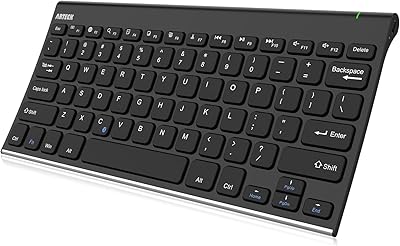
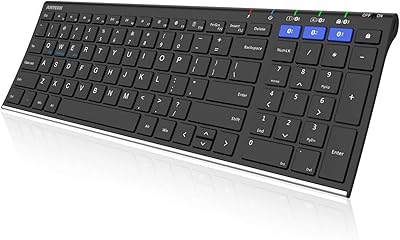
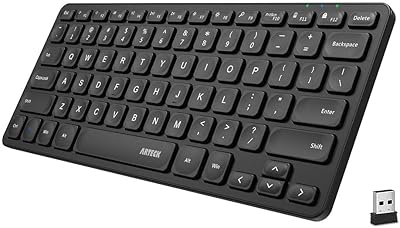
The Arteck HB305-2 Bluetooth Keyboard is a slim, budget-friendly option that punches above its price point by offering genuine multi-device support across all major operating systems. At under a quarter-inch thick, it slides into a bag without a second thought — yet the key layout is full-size, which is not something you take for granted at this price. It pairs with up to three devices simultaneously and switches between them with a single keystroke. A USB-C rechargeable battery and a 24-month warranty round out a package that is hard to argue with for anyone who needs a reliable, no-fuss wireless keyboard without spending much.

Features & Benefits

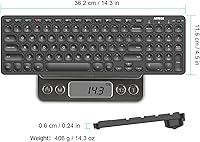
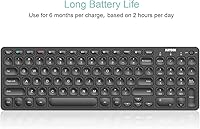
The three-device pairing is the headline feature here, and it works exactly as advertised — press one dedicated key and the keyboard hops to your next paired device instantly. The full-size layout, complete with media hotkeys, means you are not squinting at cramped keys or hunting for volume controls. The rechargeable battery is rated for around six months of use, though that figure assumes roughly two hours of typing per day, so heavy users should temper expectations slightly. At 14.3 x 4.5 inches and barely over a pound, this compact Bluetooth keyboard fits neatly in a slim sleeve, and the USB-C charging port means you are unlikely to be caught without the right cable.

Best For

This wireless keyboard makes most sense for tablet-first users — people who primarily work on an iPad or Android tablet and want a physical keyboard without adding bulk. Students and remote workers who rotate between a laptop, tablet, and phone throughout the day will appreciate the instant device switching. It is also a practical pick for travelers who refuse to lug around a full-size keyboard but still need proper key spacing for real writing sessions. Anyone running a mixed Windows and Apple setup will find the broad OS compatibility a genuine convenience. On a tight budget, this is one of the more sensible options at this price range.

User Feedback

Buyers consistently point to the easy initial setup and the feel of the keys as standout positives — for a keyboard at this price, the typing experience tends to surprise people. Battery longevity also earns consistent praise, though a handful of users note that heavy daily use will shorten real-world runtime noticeably. On the downside, the plastic build feels light, and some reviewers describe it as less rigid than expected — flex under pressure is a recurring minor complaint. A small number of users also report occasional Bluetooth reconnection hiccups, particularly when switching between iOS and Windows devices. Overall sentiment skews positive, with most buyers feeling the value holds up well.

Pros

  • Pairs with up to three devices simultaneously and switches between them with a single keypress.
  • Full-size key spacing means no relearning required — muscle memory transfers immediately.
  • USB-C charging keeps things simple; no proprietary cables to track down.
  • Broad compatibility covers Windows, macOS, iOS, iPadOS, and Android without driver installation.
  • Initial Bluetooth pairing is fast and straightforward across all supported platforms.
  • The slim, lightweight profile fits in most slim-sleeve bags without dedicated keyboard storage.
  • A 24-month warranty offers real peace of mind for a budget-tier peripheral.
  • Media hotkeys reduce the need to switch to a mouse during music or video playback.
  • This wireless keyboard holds its charge well under moderate daily use, with charging events being infrequent.
  • Understated black design fits most desk setups without looking out of place.

Cons

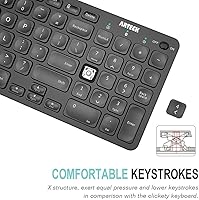
  • The plastic build flexes under firm typing pressure, which undermines confidence during intensive sessions.
  • Battery life figures assume only two hours of use per day — heavy typists will recharge far more often.
  • Bluetooth reconnection after idle periods can lag, particularly when toggling between iOS and Windows.
  • No battery level indicator means the keyboard tends to die without any prior warning.
  • Shallow key travel divides opinion and may cause fatigue for users who type with force.
  • Function key behavior is inconsistent across operating systems and may require workarounds.
  • The surface finish attracts fingerprints and shows wear marks with regular handling over time.
  • Customer support response times have been reported as inconsistent depending on the buyer's region.
  • There is no numpad, which limits usability for data entry or spreadsheet-heavy workflows.
  • The included documentation is minimal, leaving users who hit setup issues without much guidance.

Ratings

The scores below for the Arteck HB305-2 Bluetooth Keyboard were generated by our AI engine after systematically analyzing verified global buyer reviews, with spam, bot submissions, and incentivized feedback actively filtered out. The result is an honest, balanced picture that reflects what real users consistently praise — and where they run into frustration. Both the strengths and the sticking points are represented transparently so you can make a genuinely informed decision.

Multi-Device Switching
88%
Users who rotate between an iPad, a work laptop, and a personal phone throughout the day report that the one-key device switching is fast and reliable in most scenarios. The ability to pair three devices at once genuinely reduces the friction of juggling multiple screens on a single desk.
A recurring minority complaint involves switching hiccups specifically when toggling between iOS and Windows devices, where the keyboard occasionally needs a second press or a brief manual reconnect. It is not a dealbreaker, but it surfaces just often enough to be worth noting.
Typing Experience
83%
For a keyboard at this price point, buyers are frequently surprised by how comfortable the keys feel during extended sessions. The full-size layout means touch typists do not have to relearn finger placement, and the media hotkeys reduce the need to reach for a mouse mid-task.
Key travel is on the shallower side, which divides opinion — some users adapt quickly, while others who prefer a deeper, more tactile keystroke find the feedback a little flat after prolonged use. It is not an issue for casual typists but can be fatiguing for heavy daily writers.
Battery Life
79%
21%
Most buyers report going weeks or even a couple of months between charges under normal daily use, which is genuinely impressive for a wireless keyboard at this price. The USB-C charging port means topping it up is straightforward and cable-hunting is rarely an issue.
The six-month battery claim is based on a strict two-hours-per-day usage baseline, and heavier users will fall well short of that figure. Several reviewers note that the battery performance, while still solid, should not be taken at face value without understanding that caveat.
Build Quality
61%
39%
The keyboard is light and slim enough to slip into most bags without adding meaningful weight, and for everyday light use at a desk or coffee shop it holds up adequately. At this price tier, the construction is functional and gets the job done for most buyers.
The all-plastic chassis is the most frequently cited disappointment in user reviews — flex under pressure is a common observation, and the overall feel does not inspire confidence for those who type with any force. A few buyers describe it as feeling fragile compared to competitors in adjacent price brackets.
Bluetooth Connectivity Stability
72%
28%
Initial pairing across all supported operating systems is consistently described as quick and straightforward, with most users reporting no issues getting the keyboard recognized by Windows, macOS, or iPadOS on the first attempt. Day-to-day stability is rated positively by the clear majority of verified buyers.
Bluetooth dropout complaints, while not dominant, appear in a consistent enough cluster to warrant attention — particularly on Android devices and older Windows machines. The reconnection after a period of inactivity can sometimes take longer than expected, which proves irritating during fast-paced work sessions.
Portability & Form Factor
91%
At just over a pound and barely a quarter-inch thick, this wireless keyboard is one of the easier ones to carry without dedicating a special compartment. Travelers and students who move between locations daily consistently highlight the slim profile as one of the primary reasons they chose it.
The very slim profile is a double-edged consideration — while it makes carrying easy, it also contributes to the flex and light build feel that some buyers find underwhelming. Those who want something that feels substantial in hand may find it a little too insubstantial.
OS Compatibility
86%
Broad compatibility across Windows, macOS, iOS, iPadOS, and Android is one of the more practical advantages here, especially for users who do not live exclusively in one ecosystem. The keyboard adapts its function keys adequately across platforms without requiring driver installation.
A small number of users report that certain shortcut keys behave unexpectedly when switching between operating systems, requiring manual remapping or simply going unused. Full key function parity across all five supported OS platforms is not guaranteed out of the box.
Value for Money
89%
Relative to what is offered — three-device pairing, full-size layout, USB-C charging, and a two-year warranty — buyers broadly agree that this compact Bluetooth keyboard represents strong value at its price point. It competes favorably against pricier alternatives on core functionality.
The value perception does take a hit for buyers who prioritize build quality and typing feel above all else, as there are competitors at a modest premium that address those weaknesses meaningfully. The value story is strongest for buyers who genuinely need multi-device support first.
Setup & Ease of Use
93%
First-time wireless keyboard users specifically call out how painless the pairing process is across all three device slots. There is no software to install and no manual to decode — the keyboard is typically up and running within a couple of minutes on any supported device.
The welcome guide included in the box is minimal, and while most users do not need it, those who run into Bluetooth conflicts or want to understand the function key shortcuts across different OS modes may find the documentation lacking.
Key Layout & Spacing
81%
19%
The full-size key spacing is a meaningful advantage over the shrunken layouts common on competing travel keyboards, and touch typists appreciate that muscle memory transfers directly without an adjustment period. Media hotkeys add practical day-to-day convenience for music and video users.
Number row and symbol key placement follows a standard layout that some users on macOS find slightly awkward after switching from Apple keyboards, and the lack of a numpad is worth flagging for those who handle spreadsheets or data entry regularly.
Charging & Power Management
84%
The shift to USB-C is a genuine quality-of-life improvement — buyers frequently mention that they no longer need to carry a dedicated proprietary cable, as USB-C is already in most bags. The auto-sleep function works reliably to conserve power when the keyboard is left idle.
There is no battery indicator light or on-screen notification on most paired devices, which means users often do not know the battery is critically low until the keyboard stops responding. A low-battery warning mechanism would meaningfully reduce frustration.
Aesthetics & Design
77%
23%
The slim black profile is clean and understated enough to pair with most desk setups without looking out of place. Buyers working in professional or minimalist environments appreciate that it does not draw attention to itself.
The finish attracts fingerprints and light smudges quite readily, and the plastic surface can show wear marks over time with regular handling. For users who care about how their desk setup looks after a few months of use, this is worth keeping in mind.
Warranty & After-Sales Support
74%
26%
A 24-month warranty is a notable inclusion at this price level and provides meaningful peace of mind for buyers who are skeptical about budget peripheral longevity. Several users confirm that warranty claims were handled without significant friction.
A handful of reviews mention delays in customer service response times, and the support experience appears to be inconsistent depending on region. The warranty is a strong selling point on paper, but execution is not universally praised in practice.

Suitable for:

The Arteck HB305-2 Bluetooth Keyboard is purpose-built for people who work across multiple devices and do not want to pay a premium to do it. Students who carry a tablet to class and then come home to a laptop will find the three-device switching genuinely useful in daily practice rather than just on a spec sheet. Remote workers who keep a phone, a personal iPad, and a work computer on the same desk will appreciate being able to hop between all three without unplugging or re-pairing anything. Travelers and commuters who need a real full-size typing experience on the road — without the bulk of a laptop — are also a strong fit, since the slim profile disappears into virtually any bag. Anyone operating across both Windows and Apple devices will find the broad OS compatibility a practical advantage rather than a marketing claim.
Not suitable for:

Buyers who prioritize tactile typing feel and a rigid, premium build should approach the Arteck HB305-2 Bluetooth Keyboard with measured expectations. The plastic chassis is functional, but it flexes noticeably under firm typing pressure, which is a recurring frustration for touch typists who put real force into their keystrokes. Writers or coders who spend four or more hours a day at a keyboard may find the shallow key travel fatiguing over time, and the battery life estimate of six months is tied to a modest two-hour daily usage assumption that heavy users will not realistically hit. Those who rely on a numpad for data entry or spreadsheet work will also need to look elsewhere, as this is a compact layout without one. If Bluetooth reliability is non-negotiable — for example in fast-paced professional environments where a dropped connection mid-presentation is unacceptable — the occasional reconnection hiccups reported by some users may be a genuine dealbreaker.
Specifications

  • Connectivity: Connects via Bluetooth to up to 3 devices simultaneously, with dedicated hotkeys for instant one-key switching between paired devices.
  • Compatible OS: Fully compatible with Windows, macOS, iOS, iPadOS, and Android without requiring any driver installation.
  • Key Layout: Full-size key layout with dedicated media hotkeys for playback, volume, and system controls.
  • Dimensions: Measures 14.3″ x 4.5″ x 0.24″, making it one of the slimmer full-size keyboards in its category.
  • Weight: Weighs approximately 14.3 oz (just over 1 lb), light enough for daily bag carry without noticeable added bulk.
  • Battery Type: Built-in rechargeable lithium-ion battery rated for up to 6 months of use based on 2 hours of daily typing.
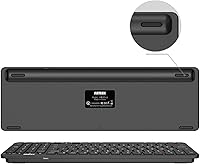
  • Charging Port: Charges via USB-C, compatible with most modern charging cables and adapters already in circulation.
  • Material: Housing is constructed from plastic, keeping the overall weight low while maintaining a slim, modern profile.
  • Color: Available in black with a clean, understated finish suited to most desk and travel environments.
  • Style: Modern slim profile designed to complement both tablet-focused and traditional desktop or laptop setups.
  • Warranty: Covered by a 24-month manufacturer warranty with customer support included.
  • Package Contents: Box includes the keyboard, a USB-C charging cable, and a printed welcome guide.
  • Item Model: Model number HB305-2, part of the Arteck multi-device keyboard lineup released in April 2023.
  • Manufacturer: Made by Arteck, a brand focused on affordable wireless peripherals for consumer and business use.
  • BSR Ranking: Holds a Best Sellers Rank of #123 in Tablet Keyboards and #898 in Computer Keyboards on Amazon.

Related Reviews

Arteck HB305-3 Bluetooth Keyboard and Mouse Combo
78%
86%
Multi-Device Switching
82%
Keyboard Typing Experience
63%
Mouse Comfort & Ergonomics
88%
Battery Life
61%
Build Quality & Materials
More
Arteck Bluetooth Keyboard HB086
86%
93%
Portability & Size
94%
Battery Life
83%
Ergonomics & Comfort
90%
Ease of Use & Setup
88%
Multi-Device Compatibility
More
Arteck HB193 Bluetooth Keyboard
81%
88%
Multi-Device Switching
84%
Build Quality
71%
Typing Experience
86%
Battery Life
91%
Layout & Key Coverage
More
Arteck Universal Wave Bluetooth Keyboard
75%
78%
Typing Comfort
83%
Multi-Device Switching
63%
Bluetooth Connection Stability
67%
Palm Rest Quality
81%
Key Feel & Travel
More
Arteck Bluetooth Keyboard and Mouse Combo
84%
89%
Battery Life
92%
Ergonomics and Comfort
67%
Bluetooth Connectivity
83%
Build Quality
90%
Portability and Design
More
Logitech Pebble Keys 2 K380s
85%
93%
Multi-Device Switching
88%
Typing Comfort
91%
Portability & Form Factor
94%
Battery Life
89%
Key Noise Level
More
HUO JI Wireless Keyboard Multi-Device Bluetooth 2.4G Dual Mode
85%
91%
Device Switching Ease
93%
Connectivity & Compatibility
85%
Build Quality
88%
Battery Life
89%
Ergonomics & Typing Comfort
More
Alondy Single Din Car Radio Bluetooth with 2.2″ Touchscreen
83%
89%
Ease of Setup
85%
Bluetooth Connectivity
78%
Sound Quality
70%
Display Usability
74%
FM Radio Reception
More
Hosyond TDA7498E 2.1 Channel Bluetooth Amplifier Board 160W×2+220W
73%
88%
Value for Money
76%
Power Output & Headroom
83%
Bluetooth Connectivity
79%
Build & Component Quality
62%
Thermal Management
More
ProtoArc K90-A Bluetooth Keyboard
85%
88%
Typing Experience
91%
Multi-device Connectivity
94%
Portability & Size
87%
Battery Life & Efficiency
85%
Backlighting Functionality
More

FAQ

Each of the three Bluetooth channels has a dedicated key on the keyboard — typically labeled BT1, BT2, and BT3. Just press the key for the device you want and the keyboard switches over in a second or two. No re-pairing needed once each device is set up.

Yes, the Arteck HB305-2 Bluetooth Keyboard is specifically designed for mixed-OS households. You can have an iPad on one channel and a Windows machine on another, and switch between them freely. Function key behavior may differ slightly per platform, but core typing works on both without any configuration.
The six-month figure is based on about two hours of typing per day, so if you type more heavily, expect to charge more often. In practice, moderate users report going a month or two between charges, which is still a strong result for a keyboard at this price. There is no battery indicator, so it is worth charging it before a long trip rather than waiting for it to die.

It depends on your preference for key feel. The keys are full-size and well-spaced, which helps, but the key travel is fairly shallow. Most casual and moderate typists adapt quickly, while people who type hard or fast for hours at a stretch sometimes find it tiring over time.

Yes, Android is one of the supported platforms. Pairing follows the same standard Bluetooth process — put the keyboard in pairing mode, find it in your device's Bluetooth settings, and connect. Most Android users report no issues with basic typing, though some advanced shortcut keys may not map perfectly to every Android skin.

This keyboard is designed for computers, tablets, and smartphones running standard operating systems. Smart TVs and gaming consoles can sometimes pair with generic Bluetooth keyboards, but compatibility is not guaranteed and is not officially supported by Arteck for this model.

Plug the included USB-C cable into the charging port on the keyboard and connect the other end to any standard USB power source. A full charge from empty typically takes a couple of hours. The keyboard can usually still be used while charging if you need to keep working.

No, this compact Bluetooth keyboard does not have a backlit key option. If you frequently type in low-light environments, that is worth factoring into your decision, as dark-room typing relies entirely on touch familiarity with the layout.

The most common fix is simply turning the keyboard off and back on, which usually prompts it to reconnect. If a specific device pairing is acting up, you can clear that channel and re-pair from scratch in your device's Bluetooth settings. Persistent dropout issues are uncommon but have been reported more frequently on certain Android versions.

It is slim and light enough to slide into most laptop sleeves or thin bags, which makes it a practical travel companion. That said, the plastic build is not particularly rigid — it is worth putting it in a pouch rather than loose in a bag with heavier items to avoid scuffs or stress on the frame over time.