Overview

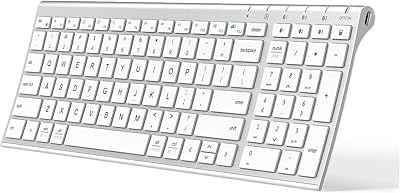
The OMOTON Bluetooth Keyboard for Mac is a full-size wireless keyboard that punches well above its price bracket — especially for anyone who finds Apple's own offering too expensive for what it delivers. The aluminum finish sits naturally alongside MacBook and iMac hardware, so it doesn't look out of place on a clean desk. What really sets this Mac keyboard apart at this price is three-device Bluetooth switching, a feature you'd typically expect to pay significantly more for. Students, home users, and light office workers will find it a practical, no-fuss upgrade worth considering.

Features & Benefits

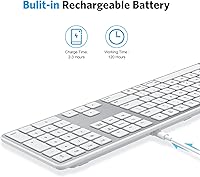
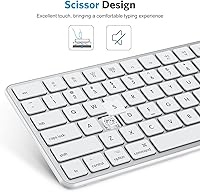
The standout here is the full-size numeric keypad — something Apple's own wireless keyboard skips entirely, and something that genuinely matters if you're entering data or working with spreadsheets daily. The macOS shortcut row covers brightness, volume, and Mission Control, so you're not hunting through menus for basic controls. Battery life is legitimately impressive: rated up to 120 hours on a charge that takes only an hour or two. The scissor-switch keys feel responsive without being noisy, and auto-sleep kicks in after 20 minutes of inactivity to preserve battery without any hassle.

Best For

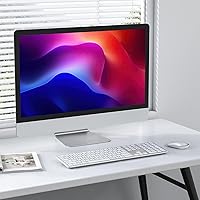
This Mac keyboard makes the most sense for users who need a numeric keypad but aren't willing to pay a steep premium for Apple's Magic Keyboard with Numeric Keypad. It's also a strong pick for anyone juggling multiple Apple devices — switching between a MacBook, iMac, and iPad is handled with a quick Fn combo rather than re-pairing each time. The slim aluminum profile keeps desk setups looking clean. That said, heavy typists or anyone craving mechanical key feedback will likely want to look elsewhere — this Bluetooth keyboard is built for comfortable, everyday light-to-moderate use.

User Feedback

With over 1,200 ratings averaging 4.1 stars, the OMOTON wireless keyboard earns generally positive marks — but not without caveats. Buyers frequently praise how painlessly it pairs with Mac devices and how natural the key travel and layout feel day-to-day, with battery life drawing consistent compliments as well. On the flip side, a recurring issue involves Bluetooth dropouts, particularly when switching between devices or waking from sleep. Some buyers also noted that a few key labels don't map perfectly to macOS functions. For the price, most users consider these trade-offs acceptable, but they're worth knowing before you buy.

Pros

  • Full-size numeric keypad included — a rare find in affordable Mac wireless keyboards.
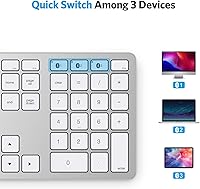
  • Three-device Bluetooth switching lets you hop between a MacBook, iMac, and iPad without re-pairing.
  • Battery life regularly delivers weeks of daily use on a single charge.
  • macOS shortcut row works out of the box — brightness, volume, and media keys need no configuration.
  • Initial pairing is fast and frustration-free for almost all Mac users.
  • Silver aluminum finish looks clean and cohesive alongside Apple hardware.
  • Auto-sleep mode helps preserve battery life during idle periods without any manual intervention.
  • Scissor-switch keys offer comfortable key travel for light to moderate typists.
  • At roughly 1.5 pounds, this Mac keyboard is easy to move between rooms or carry in a bag.
  • Competitive pricing makes it accessible for students and budget-conscious home office setups.

Cons

  • Bluetooth dropouts reported by multiple buyers, especially when waking from sleep or switching devices.
  • Key legends don't always map accurately to macOS functions, which can confuse new users.
  • The aluminum finish is painted plastic up close, not true anodized metal — it shows over time.
  • Keycap wobble and surface shine appear in long-term feedback after heavy daily use.
  • Switching between paired devices involves a brief connection lag that disrupts fast workflows.
  • Function key labeling becomes harder to read under dim or low-contrast lighting conditions.
  • The full-size width can feel oversized on smaller desks or cramped workspaces.
  • Battery capacity has been reported to degrade noticeably after extended months of regular use.
  • Sparse documentation makes troubleshooting multi-device pairing issues harder than it should be.

Ratings

The scores below were generated by our AI after analyzing thousands of verified purchase reviews for the OMOTON Bluetooth Keyboard for Mac worldwide, with spam, bot activity, and incentivized feedback actively filtered out. Both the genuine strengths and real frustrations buyers have reported are reflected transparently in each category. No score has been inflated — what you see is an honest distillation of how real users experience this keyboard day to day.

Value for Money
91%
For buyers coming from overpriced accessories, the price-to-feature ratio here genuinely surprises. A full-size layout, three-device switching, and a rechargeable battery at this cost level is hard to argue with. Most reviewers felt they got considerably more than they expected.
A small number of buyers felt the build quality didn't quite justify even the modest cost after extended use, particularly if keys started feeling loose after several months. Expectations need to be calibrated accordingly — this is a budget pick, not a long-term workhorse.
Mac Compatibility
88%
The macOS-dedicated shortcut row is one of the most appreciated aspects — brightness, volume, Mission Control, and media controls all work without any driver installation. For everyday Mac users, it simply connects and behaves exactly as expected right out of the box.
A handful of buyers noted that certain key legends don't perfectly align with their macOS version's actual functions, which creates minor confusion. Users on older macOS builds occasionally reported that a few shortcut keys behaved inconsistently until a system update resolved things.
Bluetooth Reliability
67%
33%
Initial pairing is consistently described as quick and painless across MacBook, iMac, and iPad setups. For users who stay connected to a single device throughout the day, the connection holds steady and rarely causes interruptions during normal typing sessions.
Bluetooth dropouts are the single most repeated complaint across reviews. The issue tends to surface when waking the keyboard from sleep or switching between paired devices, and some buyers found it persistent enough to require re-pairing entirely. It's a real weak point that deserves honest mention.
Multi-Device Switching
78%
22%
Having three independent Bluetooth channels accessible via a simple Fn key combo is genuinely useful for anyone working across a MacBook, an iPad, and a desktop Mac simultaneously. Several users specifically called this feature out as the reason they chose this keyboard over single-device alternatives.
The switching process isn't always instant — there's a brief lag before the new device registers the connection, which some users found disruptive during fast-paced workflows. A few reviewers also noted the labeled Bluetooth buttons are small and easy to miss without looking down.
Typing Experience
74%
26%
The scissor-switch keys offer a satisfying amount of travel for a slim wireless keyboard, and the feedback is noticeably better than many keyboards at this price. Light typists and students reported comfortable extended sessions without significant finger fatigue.
Heavy typists or anyone accustomed to mechanical keyboards will likely find the key feel underwhelming. A few buyers mentioned that the keys can feel slightly mushy under rapid input, and the overall tactile response flattens noticeably compared to higher-end scissor-switch designs.
Battery Life
89%
The claimed 120-hour battery rating holds up well in real-world use, with many buyers reporting weeks of daily use before needing a charge. The fast 1–2 hour recharge time means downtime is minimal even when the battery does run low.
Battery drain appears faster when the auto-sleep feature is disabled or when the keyboard is actively switching between multiple connected devices throughout the day. A small number of users reported the battery capacity degraded noticeably after six to twelve months of regular use.
Build Quality
63%
37%
The aluminum-finish casing gives a solid first impression and sits visually well alongside Apple hardware. At this price point, the overall construction feels more premium than the cost would suggest, and the slim profile adds to the perception of quality.
Underneath the surface-level polish, some buyers noticed flex in the keyboard body when pressing harder on the edges, and a few reported that keycaps developed a slight wobble after extended use. It's built to a budget, and the materials reflect that with longer-term use.
Numeric Keypad Usability
83%
Having a dedicated numeric keypad on a Mac wireless keyboard at this price is genuinely uncommon, and buyers who use spreadsheets or do regular data entry noticed a real improvement in their workflow. The keypad keys are well-spaced and accurately sized for comfortable use.
The overall keyboard length that the numeric keypad requires can feel wide for smaller desks or those used to compact layouts. A few users also noted the keypad area has slightly less consistent key response than the main typing area.
Ease of Setup
92%
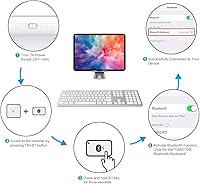
Nearly every reviewer praised how straightforward the initial pairing process is — turn it on, hold the Bluetooth button, and it shows up in macOS within seconds. No software, no drivers, no complicated steps. For less tech-savvy buyers, this is a meaningful advantage.
A subset of users encountered difficulty when attempting to pair the keyboard across multiple devices for the first time, particularly when resetting a channel that had already been assigned. The manual instructions were described as sparse and not particularly helpful in these edge cases.
Design & Aesthetics
81%
19%
The silver aluminum finish blends naturally into Apple-centric desk setups without drawing attention to itself. It looks clean and uncluttered, which resonated strongly with minimalist buyers who wanted their accessories to feel cohesive with their Mac hardware.
Up close, the aluminum finish is more of a painted plastic texture than true anodized aluminum, which becomes apparent when placed directly next to genuine Apple hardware. Some buyers felt slightly misled by product images that made the finish appear more premium than it actually is.
Key Labeling & Legend Accuracy
61%
39%
For the most commonly used keys — letters, numbers, and standard shortcuts — labeling is clear and easy to read from a normal sitting distance. The font size on keycaps is adequate for most users under standard desk lighting conditions.
macOS-specific function labels on the shortcut row don't always match what the key actually triggers, particularly on newer macOS versions. Some buyers also found the legend contrast low under dim lighting, making the keyboard harder to use in darker environments.
Portability
72%
28%
At 1.48 pounds and with a slim profile, the OMOTON wireless keyboard is light enough to toss in a bag for travel or move between rooms without hassle. The rechargeable battery eliminates the need to carry spare AA batteries, which frequent travelers appreciated.
The full-size layout with numeric keypad makes it wider than compact travel keyboards, so it doesn't fit neatly into smaller laptop bags. Users looking for a truly portable solution may find the width a compromise, especially on crowded airplane tray tables.
Noise Level
79%
21%
The scissor-switch mechanism keeps typing noise to a moderate level — quiet enough for shared office or library environments without feeling completely silent or artificial. Several reviewers who work in open-plan spaces noted their colleagues didn't find it disruptive.
It's not whisper-quiet by any stretch, and in very quiet environments — late-night sessions in a shared bedroom, for instance — the click can be noticeable. Buyers who prioritize near-silent typing should look at membrane-style keyboards instead.
Durability & Longevity
58%
42%
The 5-million keystroke rating suggests the keyboard is built to outlast its first year with moderate daily use, and many short-term reviewers reported no physical deterioration within the first few months. For light to moderate typists, it holds up adequately.
Longer-term feedback tells a more mixed story — buyers using the keyboard heavily for over a year reported keycap shine, increased key wobble, and Bluetooth issues that worsened over time. It's not a keyboard designed for indefinite daily heavy use, and the price reflects that reality.

Suitable for:

The OMOTON Bluetooth Keyboard for Mac is a well-matched choice for students, home users, and light office workers who want a Mac-native wireless keyboard without paying a steep premium for Apple's own accessories. If you regularly work across multiple Apple devices — say, a MacBook during the day and an iMac at your desk in the evening — the three-device Bluetooth switching makes that transition genuinely painless. Data-entry users and anyone who works with spreadsheets will especially appreciate having a dedicated numeric keypad, which is surprisingly hard to find in Mac-compatible wireless keyboards at this price. The slim silver profile fits naturally into minimalist desk setups, and the macOS shortcut row means you won't lose access to brightness, volume, or media controls that Mac users rely on constantly. For anyone whose main priority is getting a dependable, good-looking keyboard that just works with macOS right out of the box, this hits the mark.

Not suitable for:

The OMOTON Bluetooth Keyboard for Mac is not the right tool for heavy professional typists, power users, or anyone who depends on a rock-solid wireless connection throughout the day. If you've built your workflow around mechanical keyboards and expect deep, satisfying tactile feedback, the scissor-switch feel here will likely disappoint. Bluetooth dropout issues reported by a meaningful share of real buyers make this a risky choice for anyone doing live presentations, remote meetings, or time-sensitive work where a dropped connection isn't just annoying — it's a genuine problem. The build quality, while acceptable out of the box, shows wear over time with heavier use, so buyers expecting a keyboard to last three or more years of daily professional workloads should invest in something built to that standard. If longevity and flawless connectivity are non-negotiable, this Bluetooth keyboard isn't the one to bet on.

Specifications

  • Brand: Manufactured by OMOTON, a brand focused on Mac-compatible accessories.
  • Connectivity: Wireless Bluetooth connection with a reliable range of up to 33ft (10m).
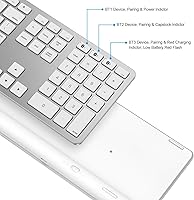
  • Bluetooth Channels: Supports 3 independent Bluetooth channels, switchable via Fn + dedicated Bluetooth button.
  • OS Compatibility: Designed for macOS 11.3 and above, including MacBook, MacBook Air, MacBook Pro, iMac, iMac Pro, Mac Pro, and Mac Mini.
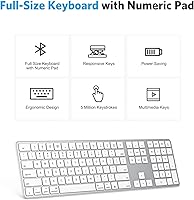
  • Layout: Full-size keyboard with a dedicated numeric keypad and a macOS-specific function shortcut row.
  • Key Mechanism: Scissor-switch design rated for up to 5 million keystrokes for extended everyday durability.
  • Special Keys: Includes a full macOS shortcut row covering brightness, volume, media playback, Home, Mission Control, and more.
  • Battery: Built-in rechargeable lithium polymer battery rated for up to 120 hours of continuous use per charge.
  • Charge Time: Reaches a full charge in approximately 1 to 2 hours via USB cable.
  • Auto-Sleep: Automatically enters sleep mode after 20 minutes of inactivity; any keypress instantly wakes it.
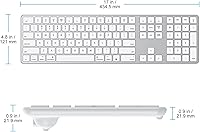
  • Dimensions: Measures 12.6 x 7.09 x 1.57 inches, offering a slim and desk-friendly footprint.
  • Weight: Weighs 1.48 pounds, light enough to reposition easily or carry in a laptop bag.
  • Material: Casing features an aluminum-finish body in a Silver colorway designed to complement Apple hardware aesthetics.
  • Color: Available in Silver, matching the standard Apple MacBook and iMac hardware palette.
  • Item Model: Official model number is OMOTON Bluetooth Keyboard for Mac, with ASIN B08CK6MXTD on Amazon.
  • Battery Type: Uses 1 built-in lithium polymer battery; no replaceable or disposable batteries required.
  • First Available: This product was first made available for purchase on July 8, 2020.
  • BSR Ranking: Ranked #389 in the Computer Keyboards category on Amazon based on sales performance.

Related Reviews
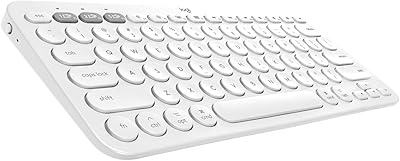
Logitech K380 Multi-Device Bluetooth Keyboard for Mac
88%
88%
Typing Comfort
85%
Bluetooth Connectivity
92%
Portability
94%
Battery Life
82%
Build Quality
More
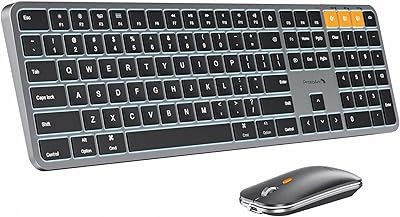
ULSOU KM599 Wireless Keyboard and Mouse Combo
78%
88%
Value for Money
79%
Keyboard Typing Feel
72%
Mouse Performance
74%
Bluetooth Connectivity
68%
Battery Life
More
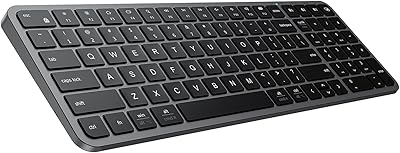
ProtoArc KM100-A Bluetooth Keyboard and Mouse Combo
75%
91%
Value for Money
83%
Typing Experience
88%
Multi-Device Connectivity
74%
Backlighting
68%
Build Quality
More
Links9+ Wireless Bluetooth Keyboard
86%
89%
Typing Comfort
85%
Build Quality
78%
Connectivity Stability
90%
Battery Life
91%
Design & Aesthetics
More
Arteck Bluetooth Keyboard HB086
86%
93%
Portability & Size
94%
Battery Life
83%
Ergonomics & Comfort
90%
Ease of Use & Setup
88%
Multi-Device Compatibility
More
ProtoArc K90-A Bluetooth Keyboard
85%
88%
Typing Experience
91%
Multi-device Connectivity
94%
Portability & Size
87%
Battery Life & Efficiency
85%
Backlighting Functionality
More
iClever BK20 Bluetooth Keyboard
80%
83%
Bluetooth Connectivity
78%
Typing Experience
62%
Build Quality
81%
Battery Life
86%
Numeric Keypad Usability
More
iClever BK10 Bluetooth Keyboard
79%
83%
Typing Feel
78%
Multi-Device Switching
61%
Battery Life
71%
Build Quality
67%
Key Stability & Longevity
More
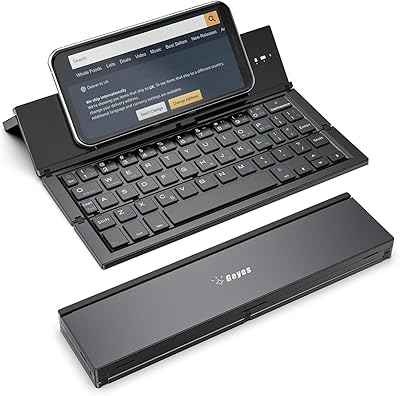
iClever BK50 Compact Bluetooth Keyboard
79%
83%
Typing Experience
91%
Portability
88%
Multi-Device Switching
78%
Battery Life
82%
Build Quality
More
Macally Backlit Mac Keyboard
87%
91%
Backlighting Performance
85%
Key Typing Experience
88%
Build Quality and Durability
90%
MacOS Shortcut Keys
92%
Compatibility with Mac Devices
More

FAQ

Yes, the OMOTON Bluetooth Keyboard for Mac is designed for macOS 11.3 and above, so it covers recent macOS releases including Ventura and Sonoma. If you're running an older macOS version, some shortcut keys on the function row may not map correctly, so it's worth checking your current system version before buying.

Once you've paired a device to one of the three Bluetooth channels, switching is as simple as pressing Fn plus the corresponding Bluetooth button (labeled 1, 2, or 3 on the keyboard). There's a brief moment while the new device registers the connection, but most users find the process straightforward after the first couple of tries.

It works with iPads running a compatible iPadOS version, and technically it can pair with other Bluetooth devices too. That said, the function row is optimized for macOS, so some shortcut keys may not perform as expected on iOS or non-Apple platforms. For iPad use specifically, most keys work fine but treat the macOS-specific shortcuts as a bonus rather than a guarantee.

Bluetooth dropouts are the most commonly reported issue with this keyboard, particularly after waking from sleep. If it happens, try turning the keyboard off and back on, or forget the device in your Mac's Bluetooth settings and re-pair from scratch. Keeping the keyboard within a reasonable distance from your Mac (well under the 33ft maximum) also helps maintain a more stable connection in day-to-day use.

Yes, a USB charging cable is included in the box. Charging takes about one to two hours, and the built-in battery is rated for up to 120 hours of use — so in practice, most users charge it every few weeks rather than daily.

The scissor-switch mechanism keeps noise at a moderate level — noticeably quieter than a mechanical keyboard, but not completely silent. In most shared office environments or libraries it won't draw complaints, but if you share a very quiet bedroom or need near-silent typing, you might want to look at membrane-style keyboards instead.

No software or driver installation is needed — the macOS shortcut row works out of the box once the keyboard is paired. Brightness, volume, media playback, and Mission Control all respond as expected on supported macOS versions without any additional configuration.

For light to moderate daily use, the keyboard holds up well within the first year. However, longer-term feedback from buyers suggests that heavier typists may notice keycap shine, slight wobble, and some Bluetooth degradation after 12 or more months of intensive use. If you type heavily all day every day, it's worth setting your expectations accordingly — this is a budget-tier accessory, not a professional-grade keyboard built to last indefinitely.

Technically it can pair with Windows devices via Bluetooth, but the keyboard is specifically designed around macOS — so the function row shortcuts won't work correctly on Windows, and the key labeling is Mac-centric. It will function as a basic Bluetooth keyboard on Windows, but you'll lose most of the added value that makes it appealing for Mac users.

Yes, the numeric keypad is full-sized and well-spaced, making it comfortable for data entry and spreadsheet work. The overall keyboard dimensions are 12.6 x 7.09 inches, which is comparable to a standard desktop keyboard — so if you're switching from a typical office keyboard, the layout will feel familiar right away.

Where to Buy