Overview

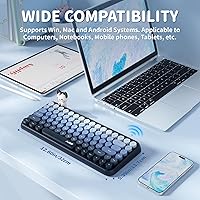
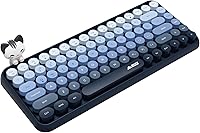
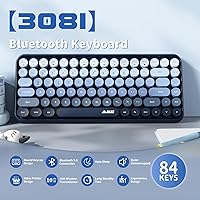
The FELICON 308i Wireless Bluetooth Keyboard enters a crowded budget keyboard market with a clear identity: it is built for people who care as much about how their desk looks as how their keyboard performs. The retro typewriter aesthetic, with its round gradient keycaps, stands out immediately against the sea of flat chiclet designs. What really sets it apart from comparable options is the magnetic cat figurine — a small but genuinely thoughtful touch that lets you personalize your setup. With over 3,800 ratings and a top-1000 ranking in Computer Keyboards, buyer interest is real. Just know going in: this is a style-first keyboard at a price that honestly reflects that priority.
Features & Benefits

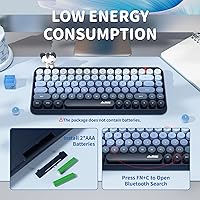
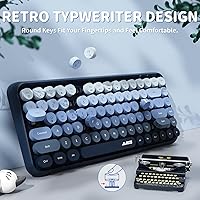
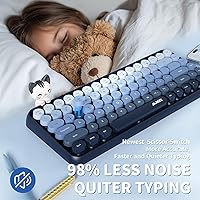
The round gradient keycaps are the first thing you notice — they have a slightly raised, domed profile that feels different under your fingers compared to standard flat keys, though the underlying membrane mechanism means actuation is soft rather than crisp. Bluetooth 5.0 handles up to three paired devices, and the FN+Q/W/E shortcut switching works reliably without needing to re-pair each time. The 84-key compact layout keeps a full function row intact while trimming the footprint noticeably. An auto-sleep timer kicks in after 15 minutes idle, helping stretch battery life during typical workdays. The low-noise key design genuinely mutes sharper click sounds, making this a comfortable choice for shared environments or late-night sessions.

Best For

This retro Bluetooth keyboard is a natural fit for students, remote workers, and anyone building a curated desk aesthetic who also needs real daily functionality. iPad and tablet users will appreciate the multi-device Bluetooth pairing — jumping between a tablet, laptop, and phone without fumbling with cables is genuinely useful. It also makes a strong gift choice for teens or young adults who want something more personal than a generic black keyboard. Lighter typists who do not need the tactile feedback of mechanical switches will find it comfortable for note-taking, browsing, and general correspondence. At roughly 1.7 pounds, it is portable and compact enough for a bag without feeling flimsy.

User Feedback

Buyers consistently praise the visual design — the gradient keycaps photograph well and the cat figurine tends to get specific callouts for being a genuinely charming addition rather than cheap packaging filler. The 4.3-star average across thousands of reviews suggests broad satisfaction, but the most common criticism is predictable: heavy typists or anyone accustomed to mechanical keyboards find the membrane actuation underwhelming. A handful of users mention occasional Bluetooth dropout when switching devices, though most describe the connection as stable day to day. Battery life appears solid in practice, with most buyers reporting weeks of normal use before recharging. Overall, the consensus is that this aesthetic wireless keyboard holds up well for what it is actually designed to do.

Pros

  • The gradient round keycaps look genuinely striking and stand out from standard flat keyboard designs.
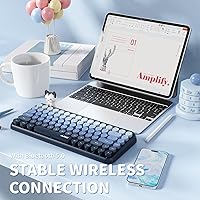
  • Bluetooth 5.0 multi-device support lets you switch between three paired devices without re-pairing each time.
  • The compact 84-key layout saves meaningful desk space while keeping the full function row intact.
  • Low-noise key technology makes this retro Bluetooth keyboard practical for libraries, offices, and shared spaces.
  • The magnetic cat figurine is a real design differentiator — removable, charming, and easy to mix and match.
  • Auto-sleep mode kicks in after 15 minutes idle, helping stretch battery life across full workweeks.
  • Compatible with Windows, macOS, iOS, and Android, so it works across virtually any device you own.
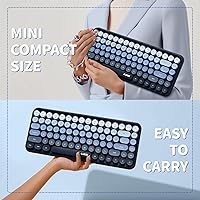
  • At under 1.7 pounds, it is light and compact enough to toss in a bag for travel or commuting.
  • Over 3,800 buyer ratings with a 4.3-star average suggests consistent satisfaction across a large real-world sample.
  • Makes a genuinely thoughtful and practical gift for teens or young adults who care about desk aesthetics.

Cons

  • Membrane key actuation feels soft and imprecise — heavy or fast typists will notice the lack of feedback quickly.
  • Some users report occasional Bluetooth dropout when switching between paired devices, which can interrupt workflow.
  • The plastic construction, while lightweight, does not feel particularly premium in hand at any angle.
  • No dedicated numpad means this aesthetic wireless keyboard is a poor fit for spreadsheet-heavy or data-entry work.
  • Battery life in real-world use is not well-documented beyond the auto-sleep spec, leaving longevity somewhat uncertain.
  • The retro round keycap profile may require a short adjustment period for touch-typists used to flat chiclet keys.
  • No wired connection option means you are entirely dependent on Bluetooth, which can be limiting in connectivity-restricted environments.
  • The cat figurine, while charming, is a small plastic accessory and may not hold up well with repeated handling over time.

Ratings

The scores below are generated by AI after analyzing thousands of verified global buyer reviews for the FELICON 308i Wireless Bluetooth Keyboard, with spam, bot-submitted, and incentivized feedback actively filtered out. Each category reflects real-world usage patterns reported by students, remote workers, and desk-setup enthusiasts who purchased and used this keyboard daily. Both the genuine strengths and the recurring frustrations are represented transparently here.

Visual Design
93%
The gradient round keycaps are consistently the first thing buyers mention, with many describing the color transitions as even better in person than in product photos. The retro typewriter silhouette stands out sharply on a desk and photographs well, which matters a lot to the aesthetic-driven buyers this keyboard is built for.
A small number of users feel the gradient colors look slightly less refined under certain lighting conditions, appearing more washed out than vibrant. The overall plastic construction, while visually attractive, can show fingerprints and smudges more readily than matte or textured finishes.
Typing Feel
61%
39%
For casual typists handling notes, browsing, or light correspondence, the membrane switches feel comfortable enough during normal sessions. The round keycap profile gives fingers a slightly different resting position than flat keys, which some users find reduces finger fatigue during shorter typing bursts.
Anyone accustomed to mechanical keyboards will find the actuation soft, mushy, and lacking the crisp tactile feedback they rely on. Heavy typists and writers logging long daily sessions report noticeable fatigue and reduced accuracy compared to what they experience on mid-range mechanical alternatives.
Bluetooth Stability
78%
22%
For the vast majority of buyers, the Bluetooth 5.0 connection holds steady throughout a normal workday without requiring reconnection or manual intervention. Users switching between a MacBook and iPad report the device-pairing shortcuts working reliably once the initial setup is complete.
A recurring minority of reviews mention intermittent dropout when switching between paired devices, particularly when all three slots are actively in use. Some Android users report slightly less consistent reconnection compared to iOS and macOS, which can be a frustration in fast-paced multitasking setups.
Noise Level
84%
The low-noise key design genuinely delivers quieter typing than most budget membrane keyboards, making it a practical choice for shared apartments, library study sessions, or late-night work without disturbing others nearby. Buyers who specifically purchased it for quiet environments consistently confirm it meets that expectation.
It is not silent, and buyers expecting near-inaudible performance similar to premium silent switches may find the residual keystroke sound more noticeable than anticipated. The sound profile is softer but still present, especially on harder desk surfaces that amplify vibration.
Multi-Device Pairing
76%
24%
The three-device Bluetooth pairing via FN shortcut keys works well for buyers juggling a laptop, tablet, and phone throughout the day. The setup process is straightforward, and once all three devices are paired, switching between them takes only a second or two without navigating any menus.
The keyboard does not always reconnect automatically when waking devices from sleep, requiring a manual shortcut press to re-establish the link. Users with more than three devices in rotation find the three-slot limit restrictive, and there is no app or software to manage or rename paired connections.
Build Quality
66%
34%
For the price tier, the keyboard feels reasonably solid during normal desktop use, with minimal flex across the main typing area. The keycaps are seated consistently and do not wobble noticeably, which gives the keyboard a more put-together feel than some direct competitors at a similar price.
The all-plastic chassis feels lightweight in a way that reads as slightly hollow rather than portable, and the base lacks rubber feet substantial enough to prevent minor sliding on smooth desk surfaces. Long-term durability is a question mark, as the plastic construction does not inspire confidence for buyers expecting several years of daily use.
Magnetic Cat Figurine
88%
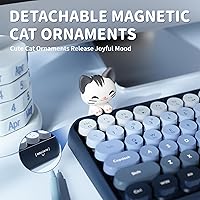
The cat figurine has become one of the most talked-about features in buyer reviews, with many people specifically calling it out as the detail that made the keyboard feel like a gift worth giving. It attaches securely via magnet, holds its position during normal use, and adds a personalized touch that no comparable budget keyboard offers.
The figurine is a small plastic accessory and a handful of buyers report that it can detach accidentally when the keyboard is moved or transported in a bag. It is a decorative element rather than a durable one, and buyers hoping to keep it pristine long-term should expect minor wear with regular handling.
Portability
82%
18%
At under 1.7 pounds and with a compact footprint, this retro Bluetooth keyboard fits comfortably in a standard backpack or tote bag alongside a laptop and tablet. Commuters and students who carry their setup between classrooms, coffee shops, and home consistently rate the form factor as a practical advantage.
The lack of a protective carrying case or sleeve in the package means the gradient keycaps are exposed to scratches during transport unless the buyer sources their own solution. The package dimensions also suggest the keyboard is slightly thicker than ultra-slim travel competitors, which matters in tightly packed bags.
Battery Life
71%
29%
The auto-sleep feature after 15 minutes of inactivity meaningfully extends real-world battery life, and most buyers describe going weeks between battery changes under typical daily use patterns. For students and remote workers who do not type continuously for hours, the battery demands feel manageable.
FELICON does not publish a specific rated battery life figure, which leaves buyers without a clear benchmark and makes planning for travel or extended trips harder. A small segment of reviewers report faster battery drain than expected, though it is unclear whether this reflects heavier use patterns or individual unit variance.
Key Layout & Shortcuts
79%
21%
Retaining a full function row within an 84-key compact layout is a smart trade-off that most buyers appreciate, since it keeps multimedia shortcuts and system keys accessible without requiring a full-size footprint. The FN key combinations for homepage, email, and media controls work consistently across Windows and macOS.
The absence of a dedicated numpad is a genuine limitation for anyone doing spreadsheet work, accounting, or data entry. A few users also note that certain FN shortcut behaviors differ between operating systems in ways that are not well-documented in the included instructions.
Value for Money
83%
Buyers who approach this aesthetic wireless keyboard as a style-first purchase with practical Bluetooth functionality tend to feel the price-to-experience ratio is fair and even generous. The inclusion of the magnetic cat figurine, multi-device Bluetooth, and distinctive keycap design at this price point makes the package feel well-considered.
Buyers who prioritize typing performance over aesthetics tend to feel the value calculation does not work in their favor, since similarly priced boards offer better key feel. The perception of value drops notably among users who were expecting a mechanical-like experience and received a standard membrane one.
Compatibility
86%
Cross-platform support covering Windows, macOS, iOS, and Android means the keyboard handles virtually any device a student or remote worker is likely to own. Buyers who use it across an iPhone, iPad, and Windows laptop report consistent recognition without needing to install drivers or configure settings manually.
Some Android users note that a few FN shortcut keys do not map correctly to Android system functions, which reduces the utility of the multimedia shortcut layer on that platform. There is no dedicated software client to remap keys or customize shortcuts beyond the factory layout.
Setup & Ease of Use
87%
First-time Bluetooth keyboard users consistently describe the pairing process as intuitive and quick, with most completing initial setup in under two minutes. The LED indicators clearly signal which pairing mode is active, reducing guesswork during the initial three-device setup.
The included instruction documentation is minimal and does not clearly explain all FN shortcut combinations, which means some buyers discover features by accident rather than by design. Users switching from wired keyboards occasionally report a short learning curve adjusting to the auto-sleep reconnection behavior.

Suitable for:

The FELICON 308i Wireless Bluetooth Keyboard is a strong match for students, creatives, and desk-setup enthusiasts who want their workspace to reflect their personality without spending a lot. If you spend most of your day doing light typing — notes, emails, browsing, homework — and you want a keyboard that looks genuinely distinctive on camera or in a shared study space, this one delivers that without compromise. iPad and tablet users will find the multi-device Bluetooth pairing particularly useful, since hopping between a tablet and a laptop is handled cleanly with a simple shortcut. It also works well as a gift for teens or young adults who care about aesthetics; the retro keycap design and the magnetic cat figurine make it feel considered rather than generic. Remote workers in open-plan homes or shared apartments will appreciate the low-noise key design for late-night sessions or calls.
Not suitable for:

The FELICON 308i Wireless Bluetooth Keyboard is not the right tool for anyone who types heavily, professionally, or demands a crisp, tactile keystroke response. Writers, coders, or data-entry workers who log hours of continuous typing daily will likely find the soft membrane actuation fatiguing and unsatisfying compared to even entry-level mechanical keyboards. If Bluetooth reliability is non-negotiable for your workflow — say, you are switching between devices constantly in a professional setting — the occasional dropout that some users have reported could become a real frustration. This keyboard is also not ideal for users who need a full-size layout with a dedicated numpad, since the compact 84-key design omits it entirely. Buyers coming from mechanical keyboards at any price should temper expectations; the typing experience is a clear step down in feedback and precision.
Specifications

  • Brand & Model: Manufactured by FELICON under the model designation 308i.
  • Key Count: Features an 84-key compact QWERTY layout that retains a full function row.
  • Connectivity: Uses Bluetooth 5.0 wireless technology with a reliable range of up to 10 meters.
  • Multi-Device: Supports simultaneous pairing with up to three devices, switchable via FN+Q, FN+W, and FN+E shortcuts.
  • Compatibility: Works with Windows, macOS, iOS, and Android operating systems and devices.
  • Keycap Design: Round, domed gradient-colored keycaps styled after retro typewriter layouts with smooth color transitions.
  • Key Switch Type: Membrane key switches with built-in noise-reduction technology to minimize keystroke sound.
  • Special Accessory: Includes a removable magnetic cat figurine that attaches directly to the keyboard surface.
  • Power Source: Battery powered; no wired connection option is available.
  • Auto-Sleep: Enters power-saving sleep mode automatically after 15 minutes of inactivity, waking with any keypress.
  • Dimensions: Package measures 14.57 x 5.91 x 1.85 inches, reflecting the compact footprint of the keyboard itself.
  • Weight: Weighs 1.69 pounds, making it light enough for regular transport in a bag or backpack.
  • Material: Primary construction uses plastic for both the keyboard chassis and keycap shells.
  • Noise Feature: Low-noise key technology is built into the switches to reduce audible click and clatter during typing.
  • Recommended Use: Designed for office, home, multimedia, and everyday light typing applications.

Related Reviews

Links9+ Retro Typewriter Wireless Keyboard
74%
91%
Design & Aesthetics
62%
Typing Feel
76%
Wireless Connectivity
58%
Build Quality
83%
Value for Money
More
Rii RT518S Wireless Keyboard
75%
78%
Trackpad Responsiveness
83%
Dual-Mode Connectivity
61%
Build Quality
67%
Backlight Quality
81%
Battery Life
More
Logitech K480 Multi-Device Bluetooth Keyboard
79%
93%
Multi-Device Switching
91%
Cross-Platform Compatibility
88%
Battery Life
84%
Built-In Device Cradle
72%
Typing Comfort
More
Kenkor K08 Portable Bluetooth Keyboard
75%
91%
Portability & Form Factor
63%
Typing Experience
74%
Battery Life
82%
Dual-Device Switching
86%
Value for Money
More
Keychron B1 Pro Wireless Bluetooth Keyboard
86%
88%
Overall Performance
91%
Typing Experience
93%
Battery Life
89%
Portability & Size
84%
Build Quality
More
Keychron K4 Bluetooth Wireless Mechanical Keyboard
86%
91%
Build Quality
88%
Battery Life
85%
Typing Experience
90%
Connectivity & Versatility
82%
RGB Backlighting
More
TECKNET TK-KB041 Wireless Keyboard
80%
91%
Value for Money
78%
Typing Feel & Key Response
93%
Noise Level
82%
Multi-Device Switching
63%
Build Quality & Materials
More
UBOTIE Retro 84-Key Wireless Bluetooth Keyboard
78%
93%
Design & Aesthetics
58%
Typing Experience
86%
Multi-Device Connectivity
63%
Battery Life
79%
Value for Money
More
AUSDOM S4B Wireless Keyboard
80%
81%
Typing Comfort
88%
Noise Level
83%
Multi-Device Switching
86%
Battery Life
79%
Connectivity Reliability
More
Lenovo Multi-Device Wireless Keyboard ZG38C05810
83%
88%
Multi-Device Switching
83%
Typing Feel & Key Response
92%
Portability & Form Factor
76%
Battery Life
91%
USB-C Charging Convenience
More

FAQ

You use FN+Q, FN+W, or FN+E to jump between your three paired devices. Each shortcut corresponds to one saved Bluetooth slot, so as long as all three devices are powered on and in range, switching is nearly instant and you do not need to re-pair each time.

Yes, it connects to iPads over Bluetooth 5.0 just like any other Bluetooth keyboard. It is recognized as a standard external keyboard by iPadOS, so you get access to the function shortcuts and the full 84-key layout without needing any extra apps or drivers.

Not really, and it is worth being upfront about that. The FELICON 308i Wireless Bluetooth Keyboard uses membrane switches, which feel softer and less tactile than mechanical ones. If you are used to typing on a mechanical board and value that crisp, defined keystroke feedback, this keyboard will feel noticeably different. For light daily typing it is comfortable, but heavy typists should set expectations accordingly.
Yes. The cat figurine attaches magnetically to the keyboard, so you can pull it off, move it around, or leave it off entirely. It is a design accessory, not a fixed part of the keyboard, and it does not affect the keyboard function in any way.

FELICON does not publish a specific battery life figure in hours, which is a fair criticism. The auto-sleep feature kicks in after 15 minutes of inactivity and helps extend battery life meaningfully. Based on buyer feedback, most users report weeks of typical use before needing to replace or recharge, but heavy daily users may see shorter intervals.

Yes, it is noticeably quieter than a standard membrane keyboard. The low-noise key technology damps most of the clatter you would normally get from budget boards. It will not be completely silent, but it is well-suited for shared study spaces, open offices, or late-night typing without disturbing others nearby.

It does. The keyboard pairs with Android devices over Bluetooth 5.0 just as it does with Windows, macOS, and iOS. Standard key inputs work as expected, though some function-row shortcuts may behave differently depending on your specific Android version.

The rated range is 10 meters, which covers most home or office setups without issue. In real-world use, walls and interference can reduce that somewhat, but for typical desk or couch use within the same room, the connection holds well.

It tends to land really well as a gift for that age group. The gradient keycap design and the cat figurine make it feel personal and considered rather than just another generic peripheral. It is practical enough for daily schoolwork and visually distinctive enough to get noticed on a desk or in a photo.

Turn the keyboard on and press FN+Q (or W or E for slots 2 and 3) to enter pairing mode for that slot. The LED indicator will flash to signal it is discoverable. Open Bluetooth settings on your device, find the keyboard in the list, and connect. Once paired, that device is remembered in that slot for future use.