

Overview

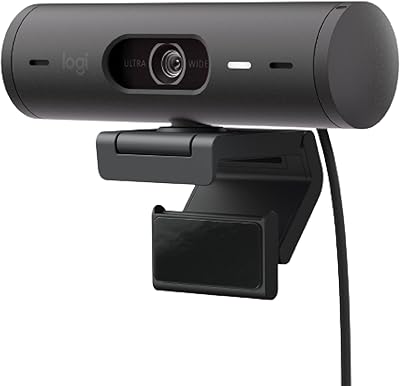
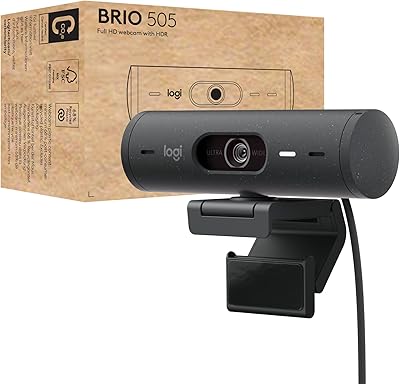
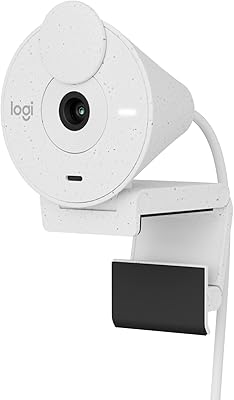
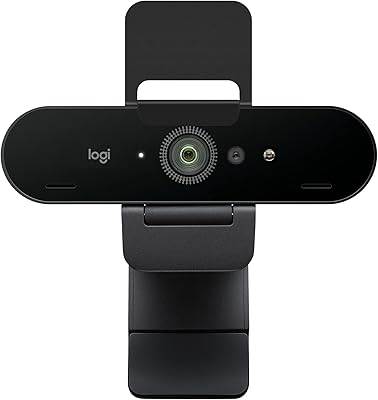
The Logitech Brio 500 Full HD Webcam delivers exceptional 1080p video quality with built-in mics, making it a strong choice for remote communication. This compact and user-friendly camera is ideal for video conferencing, streaming, and content creation. Equipped with an integrated privacy shutter, it ensures your security between calls. Offering a high-quality alternative to basic webcams, this model offers a seamless experience for anyone needing clear video and crisp audio in online meetings or broadcasts.

Features & Benefits

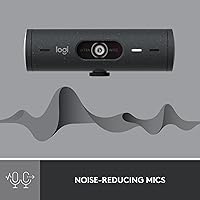
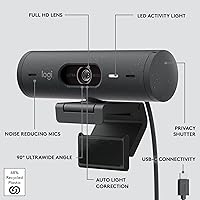
This webcam boasts several standout features to enhance your video calls and content. Its auto light correction adapts to various lighting conditions, ensuring you're always clearly visible. The RightSight auto-framing keeps you centered, even when you move. Additionally, the dual noise-reducing mics filter out background noise, improving audio clarity in noisy environments. With a wide 90-degree field of view and the Logi Tune software, you can adjust settings for a customized experience that suits your needs.

Best For

The Logitech Brio 500 is perfect for a variety of users. It’s especially well-suited for remote workers and professionals who need a reliable webcam for daily video calls. Streamers and content creators will appreciate the clear, sharp video and audio quality, while those who prefer a simple plug-and-play setup will find it easy to integrate into their systems. The inclusion of USB-C connectivity also makes it ideal for users who value fast, efficient connections.

User Feedback

User feedback for this webcam has been mostly positive. Many praise its sharp image quality, particularly the auto-light correction feature, which ensures clear visuals in varying lighting conditions. The privacy shutter is a favorite among users who value security between meetings. However, some users mention occasional issues with autofocus in dynamic settings, though this doesn’t seem to be a widespread problem. Overall, the webcam is regarded as a great value for its price, offering impressive features for everyday use.

Pros

  • This webcam delivers sharp 1080p Full HD video quality, making it ideal for professional video calls and streaming.
  • Auto light correction ensures clear video even in low-light environments, improving the quality of virtual meetings.
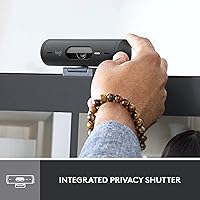
  • The integrated privacy shutter is a highly appreciated feature for users concerned about security during off-hours.
  • With a wide 90-degree field of view, this device is perfect for group video calls or presentations.
  • Setup is straightforward thanks to its plug-and-play USB-C connectivity, making it easy for anyone to use.
  • Dual noise-reducing microphones provide clear, crisp audio even in noisy environments, enhancing communication.

Cons

  • Some users have experienced occasional autofocus issues when moving around or in dynamic environments.
  • While the camera excels in most lighting conditions, very low light can still cause a reduction in image clarity.
  • The build quality is not as rugged as some might expect, making it less suitable for frequent travel or rough handling.
  • The USB-C port may require adapters for users with older devices that don't support this connection.
  • Some buyers report that the camera tends to overexpose in extremely bright lighting situations.
  • The auto-framing feature works well, but may occasionally struggle with maintaining focus in fast-paced video calls.

Ratings

The Logitech Brio 500 Full HD Webcam has received a solid overall response from users across various platforms and languages. Our analysis, which filtered out spam, bot-generated, and incentivized reviews, shows that this webcam stands out for its image quality and ease of use. While it excels in many areas, some users noted minor concerns with autofocus performance in dynamic settings. The following scores reflect a broad range of authentic feedback, highlighting both strengths and occasional pain points.

Video Quality
89%
Many users have praised the sharp, clear image quality of this webcam, especially in well-lit environments. The 1080p Full HD resolution ensures crisp visuals during video calls, making it ideal for professional settings or content creation. Users find the quality excellent for everyday use, from video conferencing to streaming.
However, some users report that the image quality can degrade in lower-light conditions, despite the auto light correction. Additionally, there are occasional complaints about blurry or pixelated images when the webcam is used in more dynamic, fast-moving settings.
Auto Light Correction
91%
The auto light correction feature is highly appreciated by users, especially those who work in varying lighting conditions. It adjusts seamlessly, ensuring consistent video quality, whether in bright or dim environments. This is a key benefit for remote workers and streamers who often find themselves adjusting to different lighting setups.
A few users, however, feel that the auto light correction can sometimes be too aggressive, leading to overexposure in certain lighting. Some also mentioned that it struggles in extremely low-light conditions, despite the claims of adaptability.
Audio Clarity
87%
The dual noise-reducing microphones offer clear audio, even in noisy environments, which is particularly valuable for users in bustling offices or households. Many users report that voice clarity is strong during video calls, ensuring that communication is clear without much distortion or background noise.
Some users feel that the microphones could perform better in environments with multiple voices or loud background noise. A few reports also mention that the audio sometimes sounds tinny or muffled, especially in larger rooms or spaces with echoes.
Ease of Setup
93%
Setting up this webcam is a breeze. Many users note that it works seamlessly with USB-C connectivity, making installation quick and hassle-free. The plug-and-play functionality is appreciated, as it requires no complex software installations or settings adjustments, which is perfect for those who need a reliable webcam without any technical fuss.
A small number of users did mention that the webcam doesn't work as smoothly with certain older systems or operating systems. Some reported compatibility issues when trying to use the device with non-USB-C ports, requiring additional adapters for full functionality.
Build Quality
85%
The compact and sturdy design of this webcam makes it a durable option for both travel and office use. It has a solid, premium feel that many users appreciate. The built-in privacy shutter is also a feature that adds to the sense of security and quality.
However, there are some concerns about the plastic body, with a few users feeling that it could have been more robust. While it holds up well in most conditions, some buyers report that the webcam feels slightly flimsy if it's frequently adjusted or moved around.
Privacy Shutter Functionality
90%
The integrated privacy shutter is a major highlight for many users who value security. It allows users to physically block the camera when not in use, giving peace of mind, especially for those working from home or attending sensitive meetings. The mechanism is smooth and easy to operate.
A few users have reported that the shutter feels a bit stiff when opening or closing, making it less convenient to use quickly. Additionally, some have found that the shutter doesn't fully cover the lens, leaving a slight gap.
Software Customization (Logi Tune)
80%
20%
Logi Tune software provides great customization options, allowing users to tweak settings like auto-framing, brightness, and more. It’s easy to use and offers a decent level of control over the webcam’s performance, which is ideal for those who want to fine-tune their setup for professional meetings or streaming.
Some users feel the software lacks more advanced features and that the interface could be more intuitive. A few have also reported occasional glitches or software crashes, which impact the overall experience.
Field of View (90°)
88%
The wide 90-degree field of view is perfect for group meetings or streaming, providing a clear view of more people or a broader background. Users find this feature especially useful for conference calls and content creation where capturing multiple people or large areas is necessary.
Some users feel that the wide field of view can distort the image, especially when close to the webcam. This can create a slight fisheye effect, which isn't ideal for all users, particularly those who need a more natural-looking perspective.
Compatibility with Video Tools
95%
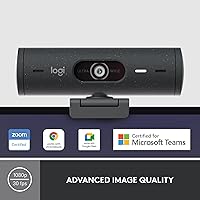
This webcam works seamlessly with major video conferencing tools like Microsoft Teams, Zoom, and Google Meet. Users appreciate that they can jump right into meetings without needing to fiddle with settings or configurations. It's a hassle-free experience that makes it ideal for professionals who rely on these tools daily.
While it works well with most tools, some users have experienced minor lag or disconnection issues when using it with less common platforms or third-party video software. These issues tend to be rare but can be frustrating for those using specialized apps.
Autofocus Performance
70%
30%
When it works properly, the autofocus feature is convenient and allows users to maintain focus during meetings or while streaming without needing to manually adjust. This is especially useful for creators who move around frequently or need to shift focus between multiple objects.
Unfortunately, the autofocus doesn't always perform reliably. Some users have reported that the camera struggles to focus properly during dynamic movements or when objects are in and out of the frame. This leads to blurry video at times, which is a significant drawback for many.
Price vs Features
92%
This webcam offers a great balance of price and performance. Many users feel that they’re getting excellent value, with features like auto-light correction, noise-reducing microphones, and a built-in privacy shutter, all at a competitive price point. It’s an affordable option for anyone seeking professional-grade video quality.
A few users feel that the price is slightly high compared to some competitors offering similar features. However, most agree that the added benefits, like the auto-light correction and privacy shutter, justify the cost.
Portability/Size
86%
The compact and lightweight design of this webcam makes it ideal for portability. Users find it easy to pack up and take with them on the go, whether they’re traveling for work or moving between home and office setups. Its small footprint means it won't clutter your desk.
While the size is convenient for portability, some users feel that the small design sacrifices stability when positioned on certain types of monitors or setups. It may not feel as sturdy as larger, bulkier webcams when adjusted frequently.

Suitable for:

The Logitech Brio 500 Full HD Webcam is an excellent choice for remote workers, content creators, and anyone who frequently engages in video calls. Its 1080p Full HD resolution and reliable auto light correction make it ideal for professional use, ensuring clear visuals in varying lighting conditions. The webcam’s 90-degree field of view and dual noise-reducing microphones are perfect for streamers and presenters, allowing for high-quality group video calls or content creation. Users who need an easy-to-setup, plug-and-play device will appreciate the straightforward USB-C connectivity. The integrated privacy shutter is also a standout feature for those who prioritize security during online meetings.

Not suitable for:

However, this webcam may not be the best choice for users in dynamic, fast-moving environments, as some have reported issues with autofocus performance. People who require a more durable, robust build may find it lacking, especially if they need a webcam that can withstand frequent adjustments or rough handling. Additionally, while the auto light correction works well in most cases, some users have experienced problems in extremely low-light settings. Those who primarily use webcams with older systems or non-USB-C ports may also find the connectivity limitations a challenge without additional adapters.

Specifications

  • Resolution: Provides 1080p Full HD video for clear and sharp video calls, streaming, and content creation.
  • Field of View: Offers a 90-degree field of view, making it suitable for group meetings and presentations.
  • Microphone: Equipped with dual noise-reducing microphones for improved audio clarity, even in noisy environments.
  • Connectivity: Connects via USB-C, offering fast and stable data transfer and power delivery.
  • Auto Light Correction: Uses RightLight 4 technology to automatically adjust to different lighting conditions, ensuring well-lit video.
  • Auto-Framing: Includes RightSight auto-framing to keep you centered and in focus during video calls.
  • Privacy Shutter: Features an integrated privacy shutter to cover the lens when the webcam is not in use.
  • Software: Compatible with Logi Tune software for custom settings and firmware updates.
  • Compatibility: Works with major video conferencing tools including Microsoft Teams, Zoom, and Google Meet.
  • Dimensions: Measures 3.15 x 3.15 x 11 inches, compact for easy placement and portability.
  • Weight: Weighs 6.4 ounces, making it lightweight and portable for travel or home office use.
  • Color: Comes in a sleek graphite color, matching most modern workspaces.
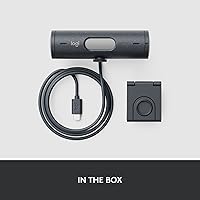
  • Mounting Options: Includes a tripod thread and adjustable clip, offering versatile mounting on various devices.
  • Video Streaming: Supports smooth 1080p video streaming, ideal for professional-level content creation.
  • Power Source: Powered via USB-C, requiring no external power adapter or batteries.
  • Software Features: Logi Tune software enables users to adjust camera settings such as brightness, contrast, and field of view.

FAQ

The Logitech Brio 500 Full HD Webcam offers 1080p video quality, built-in dual microphones, a wide 90-degree field of view, and auto light correction for various lighting conditions. It's designed for video conferencing, streaming, and content creation, with a convenient integrated privacy shutter for added security.

Setting up this webcam is simple: just plug it into a USB-C port on your computer, and it's ready to use. It works with popular video conferencing software like Zoom, Microsoft Teams, and Google Meet, requiring no additional drivers or software for basic use.

The webcam connects via USB-C, so it requires a device that supports this type of port. If your computer only has USB-A ports, you'll need a USB-C to USB-A adapter. It works well with both Windows and Mac operating systems.

The RightLight 4 auto-light correction adjusts the webcam’s exposure based on your environment's lighting. It ensures that your face remains well-lit and visible, even in low-light settings, which is ideal for video calls and streaming in darker rooms.

Yes, this webcam has a 90-degree field of view, which is wide enough for group meetings or presentations. It captures more people in the frame without needing to adjust the camera position frequently, making it great for team calls.

Yes, the webcam includes an integrated privacy shutter, which users can manually slide over the lens when not in use. This is a key feature for security-conscious users, ensuring that the camera cannot accidentally be accessed when not needed.

This webcam is equipped with dual noise-reducing microphones that enhance audio clarity. These microphones help filter out background noise, making it ideal for calls in noisy environments.

RightSight auto-framing automatically adjusts the camera to keep you centered in the frame during video calls. It helps ensure that you're always in focus, even if you move around or shift positions, which is particularly useful for dynamic presentations.

Some users have reported occasional autofocus issues, especially in fast-moving or dynamic environments. However, this typically occurs under specific conditions, and many users find it performs well in most standard setups.

The installation is straightforward, requiring only a simple plug-and-play connection via USB-C. It’s compatible with most video conferencing apps, and you don’t need any additional software unless you want to customize settings with the Logi Tune software.