




Overview
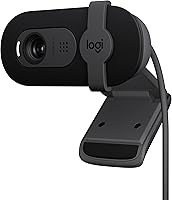
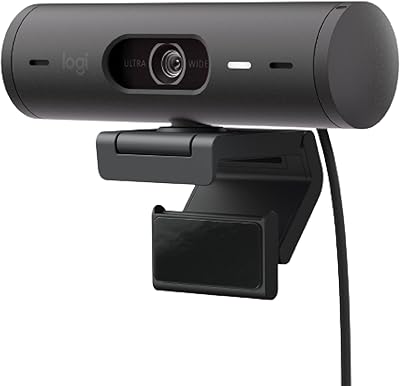
The Logitech Brio 101 enters the market as a straightforward solution for those who need better video than a standard laptop lens without the high price tag of professional setups. Built with a focus on sustainability, this 1080p webcam uses a high percentage of recycled plastics, giving it a lightweight yet durable feel on your monitor. Setup is about as simple as it gets; just plug the USB-A cable into your PC or Mac and you are ready to go. While it is clearly a budget-friendly peripheral, it feels far more substantial than the flimsy off-brand alternatives flooding the market. It effectively bridges the gap between grainy, low-resolution built-in cameras and the complex, high-end gear used by professional streamers.
Features & Benefits
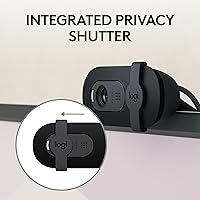
Moving up to Full HD 1080p resolution provides a noticeable jump in clarity compared to older 720p models, making you look much sharper during professional calls. One standout feature is the RightLight 2 technology, which handles difficult lighting conditions like a bright window or a dim corner by automatically adjusting exposure. Privacy is handled via a physical, integrated slider that offers a satisfyingly tactile way to ensure the lens is blocked when not in use. This Logitech camera also includes a decent omni-directional microphone that does a fair job of picking up your voice while minimizing background hum. It integrates with almost every major platform, meaning you can jump between Zoom and Microsoft Teams without worrying about software compatibility issues or manual driver installations.
Best For
This Logitech camera is a prime choice for remote employees who need a dependable tool for daily check-ins but do not want to navigate complicated settings. It also suits students who require a consistent connection for virtual classrooms where clear visibility is often a requirement. Because it prioritizes simplicity and privacy over deep customization, it appeals to casual users who just want things to work right out of the box. If you are a budget-conscious buyer looking for a reputable brand name under thirty dollars, this 1080p webcam hits that sweet spot of value and performance. It avoids the excessive complexity of high-end models, making it an ideal reliable backup or a primary camera for anyone who values a hassle-free user experience.
User Feedback
Real-world users frequently highlight how quickly they can get this budget-friendly peripheral running, often praising the natural color accuracy of the image. However, it is important to note the fixed-focus lens, which means you need to stay at a consistent distance from the screen to remain sharp. Desktop users particularly appreciate the five-foot cable length, as it provides enough slack to reach towers tucked under a desk. On the downside, some people with exceptionally thin laptop bezels have mentioned that the mounting clip tension feels a bit loose or slightly overlaps the screen area. Despite these minor quirks, the consensus points toward a very positive experience for anyone seeking a reliable daily driver that does the basics well without any unnecessary frills or technical hurdles.
Pros
- Provides a clear 1080p image that far outshines the grainy video from standard 720p laptop cameras.
- The integrated privacy shutter is easy to slide and offers instant physical security when you are off-camera.
- RightLight 2 technology does a great job of balancing exposure in rooms with tricky backlighting or dim corners.
- Setting up this budget-friendly peripheral is effortless since it works immediately without any manual driver installation.
- The five-foot cable is long enough to reach PC towers located on the floor or route through a monitor arm.
- This 1080p webcam has a narrow field of view which is perfect for cropping out messy home backgrounds.
- Color accuracy is surprisingly natural out of the box, requiring very little adjustment to look professional.
- Its lightweight and compact design makes it easy to pack in a laptop bag for travel or remote work.
Cons
- The fixed-focus lens means the picture will become blurry if you move too close or too far from the screen.
- At 30fps, the video can look slightly choppy during fast movements compared to more expensive 60fps alternatives.
- The mounting clip can feel a bit loose or unstable on laptops with exceptionally thin screen bezels.
- This budget-friendly peripheral lacks an onboard tripod mount, limiting your placement options to the top of a monitor.
- The built-in microphone tends to pick up quite a bit of ambient noise in busy household environments.
- Having the USB-A cable permanently attached means you cannot replace it if the wiring gets frayed or damaged.
- A 58-degree field of view is quite restrictive if you need to fit more than one person in the frame.
- Plastic construction feels slightly less premium and durable than the metal housings found on high-end models.
Ratings
After processing thousands of verified global buyer reports, our AI has distilled the real-world performance of the Logitech Brio 101 into these detailed benchmarks. By filtering out incentivized noise and spam, we provide a transparent look at how this budget-friendly peripheral handles daily office life. This scoring reflects both the reliable strengths and the specific trade-offs reported by actual users in diverse environments.
Video Resolution
Low-Light Compensation
Privacy Security
Ease of Setup
Focus Reliability
Microphone Clarity
Mounting Stability
Cable Utility
Color Accuracy
Build Quality
Field of View
Software Integration
Value for Money
Suitable for:
The Logitech Brio 101 is an excellent fit for office workers and students who need a reliable, set-and-forget upgrade for their daily video calls. It excels in typical home office environments where lighting might be inconsistent, thanks to its effective auto-exposure capabilities. Because of its simple plug-and-play nature, it is ideal for those who are not particularly tech-savvy and just want a better picture than their laptop provides. Remote employees will appreciate the built-in privacy shutter for peace of mind between meetings. It is also a smart choice for budget-conscious buyers who want a trusted brand name without spending over thirty dollars.
Not suitable for:
This Logitech camera is likely to disappoint power users, such as professional streamers or content creators, who require high frame rates and manual control. Because the Logitech Brio 101 features a fixed-focus lens, it is not appropriate for anyone who needs to show close-up details of products or documents during a presentation. Those working in loud, open-plan offices might find the built-in microphone lacking compared to a dedicated headset or a higher-end noise-canceling setup. It is also not the best choice for group conference rooms since the 58-degree field of view is too narrow to capture multiple people. If you frequently need to use the camera at varying distances from your monitor, you should look for a model with autofocus instead.
Specifications
- Max Resolution: This camera supports Full HD 1080p video at 30fps.
- Field of View: The lens provides a 58-degree diagonal field of view.
- Focus Type: The hardware uses a fixed-focus lens set for standard desk distances.
- Light Correction: RightLight 2 technology automatically adjusts exposure in uneven lighting.
- Audio Input: It features a single integrated omni-directional microphone for voice capture.
- Connectivity: The device connects via an attached USB-A cable.
- Cable Length: The attached cable measures 5′ (1.5 m) in total length.
- Privacy Protection: An integrated manual slider is built-in to physically block the lens.
- Dimensions: The unit measures approximately 1.26 x 2.87 x 2.62″ including the clip.
- Weight: The total weight of the device is 4.6 oz.
- Sustainable Materials: The plastic parts are made from at least 77% post-consumer recycled material.
- Software Support: Users can manage firmware and settings through the Logi Options+ app.
Related Reviews
Logitech BRIO Stream Webcam
Logitech Brio 4K Pro Webcam
Logitech Brio 500 Full HD Webcam
Logitech Brio 505
Logitech Brio 501

Logitech Wireless Touchpad

Logitech ERGO K860

Logitech POP Mouse
