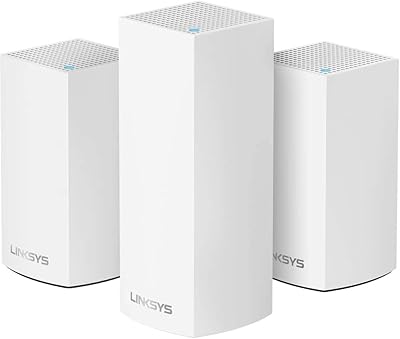
Overview

The Linksys Velop Pro 6E 2-Pack Mesh Router is a premium WiFi 6E system built for larger homes that have outgrown a single router. Two nodes cover up to 6,000 square feet — a genuine whole-home solution for sprawling layouts, multi-story houses, or homes where walls and distance kill signal. Released in 2023, it arrives at a meaningful moment: WiFi 6E opens the 6 GHz band for the first time, adding real-world breathing room that older standards simply cannot offer. That said, if you are working with a smaller apartment or a modest device count, this mesh system is likely more hardware than you will ever need.

Features & Benefits

What sets the Velop Pro 6E apart from earlier mesh systems is the combination of Cognitive Mesh technology and true WiFi 6E support. This feature quietly monitors your network in the background, automatically shifting devices to less congested channels and adjusting signal distribution without user intervention. The 6 GHz band, accessed through wide 160 MHz channels, gives newer laptops, phones, and tablets a dedicated fast lane that simply did not exist on WiFi 6 hardware. Tri-band architecture means the nodes use a separate channel to talk to each other, so your devices are not competing with the backhaul for bandwidth. Setup takes about ten minutes through the Linksys app, which also handles guest networks, parental controls, and remote management.

Best For

This WiFi 6E router kit makes the most sense for homeowners dealing with dead zones across 2,500 to 6,000 square feet — think multi-story houses, open ranch layouts, or properties where the garage and backyard still need reliable coverage. It is equally well-suited to bandwidth-heavy households running simultaneous 4K streams, competitive online gaming, and video calls across different rooms at the same time. Families benefit from built-in parental controls and guest network isolation, both of which come at no subscription cost. If you have recently upgraded to a WiFi 6E-capable phone or laptop, this mesh system gives that hardware a network fast enough to keep pace. Simpler setups will not need it.

User Feedback

With a 3.9-star average across more than 540 ratings, the Velop Pro 6E earns its keep for most buyers without being universally loved. Reviewers consistently praise the quick app-guided setup and how reliably the signal holds across large floor plans once the nodes are positioned correctly. The Linksys app also receives genuine appreciation for its clean layout. Where opinions diverge is firmware reliability — a noticeable share of users report connectivity drops after updates, typically resolved with a restart but frustrating nonetheless. Long-term reliability and customer support responsiveness come up as recurring concerns. Real-world speeds fall short of the theoretical maximum, though most buyers report consistent, strong performance under genuine household load.

Pros

  • Two-node coverage reliably blankets multi-story homes without the sharp signal drop-off typical of single routers.
  • App-guided setup takes most users under fifteen minutes, even without any networking background.
  • The 6 GHz band gives WiFi 6E-capable devices a noticeably less congested, faster connection.
  • Cognitive Mesh self-optimization reduces the need for manual channel adjustments or regular reboots.
  • Built-in parental controls and guest network access require no monthly subscription fee.
  • Tri-band architecture keeps node-to-node backhaul traffic separate, so your devices are not competing with the mesh itself.
  • The compact tower design fits neatly on a shelf without looking like IT equipment.
  • Supports simultaneous 4K streaming, cloud gaming, and video conferencing across a large household without obvious slowdowns.
  • Remote network management through the app works reliably for checking devices or rebooting nodes while away from home.

Cons

  • Firmware updates have triggered connectivity drops and speed degradation for a notable share of real-world owners.
  • Real-world speeds fall well short of the advertised 5.4 Gbps theoretical maximum under typical household conditions.
  • Homes with thick concrete or brick walls may find two nodes insufficient for complete coverage, requiring a costly third node.
  • The Linksys app lacks advanced controls like per-device QoS prioritization or detailed traffic analytics.
  • Customer support response times are flagged as slow in multiple buyer reviews, compounding frustration during hardware issues.
  • Parental control features are too basic for parents who need per-app blocking or detailed usage reporting.
  • Devices occasionally cling to a weaker node rather than handing off to a nearer one automatically.
  • Buyers without any WiFi 6E-capable devices will see limited speed improvement over a good WiFi 6 system at lower cost.
  • No bandwidth throttling or auto-expiry options are available for guest networks.

Ratings

The Linksys Velop Pro 6E 2-Pack Mesh Router earned its scores after our AI systems processed hundreds of verified global buyer reviews, actively filtering out incentivized, bot-generated, and duplicate submissions to surface what real owners actually experience day to day. The result is an honest, weighted breakdown that reflects both where this WiFi 6E router kit genuinely delivers and where it falls short of its premium positioning. Strengths and frustrations are weighted equally — no category is inflated to flatter the product.

Network Coverage
88%
Most owners report that two nodes comfortably blanket a two-story home without noticeable drop-off between floors or in far corners. Reviewers with open-plan layouts and attached garages were particularly satisfied, noting that signal remained stable at the edges of the coverage area rather than degrading sharply.
A smaller subset of buyers in homes with thick concrete walls or irregular floor plans found the two-node kit insufficient for full coverage, requiring a third node at extra cost. Coverage claims assume ideal placement, and real-world results in older construction can fall meaningfully short of the 6,000 square foot figure.
WiFi Speed Performance
79%
21%
On WiFi 6E-capable devices, buyers consistently report noticeably faster throughput compared to their previous routers, especially for large file transfers and 4K streaming. The 6 GHz band keeps newer phones and laptops on a less congested channel, which translates into lower latency during video calls and responsive cloud gaming sessions.
Real-world speeds land well below the theoretical 5.4 Gbps ceiling — most users report practical throughput in the hundreds of megabits range under normal household load. Older devices that cannot access the 6 GHz band see more modest improvement, which matters in mixed-device households where not every gadget is WiFi 6E ready.
Setup & Installation
91%
The Linksys app-guided setup is one of the most consistently praised aspects across buyer reviews. Most users describe getting both nodes online and named within ten to fifteen minutes, with clear prompts that avoid technical jargon — a genuine relief for buyers replacing aging hardware without a networking background.
A minority of reviewers encountered issues during initial pairing, particularly when transitioning from a different mesh ecosystem, where lingering app account conflicts caused delays. ISP modem compatibility occasionally required manual configuration steps that the app alone could not resolve.
App & Remote Management
83%
Buyers appreciate that the Linksys app handles guest network creation, basic parental controls, and real-time device monitoring from a single interface without requiring a paid subscription tier. Remote access works reliably for the majority, letting users check connected devices or reboot a node while away from home.
Power users find the app too shallow for serious network customization — advanced QoS controls, detailed traffic analytics, and VLAN support are absent or buried. Some reviewers also flagged that app updates occasionally break features that previously worked fine, requiring reinstallation or a cache reset.
Firmware & Software Stability
61%
39%
When the firmware runs without issue, the mesh system operates quietly in the background with no user intervention needed. Cognitive Mesh self-optimization does appear to reduce the manual channel-tweaking that plagued older router setups, and most users go weeks without needing to restart a node.
Firmware reliability is the most frequently cited frustration in negative reviews. A meaningful share of owners report connectivity drops, node disconnections, or speed degradation appearing after an automatic firmware update, with fixes requiring a full factory reset. This pattern creates real anxiety around update notifications for owners who depend on stable uptime.
Signal Consistency & Roaming
81%
19%
Band steering and node handoff work well enough that most users move room to room without manually switching networks or experiencing obvious lag spikes. Streaming video sessions and video calls generally survive the transition between nodes in the same continuous session.
Roaming performance is not on par with the smoothest enterprise-grade mesh systems. A subset of reviewers notes that devices sometimes cling to a weaker node rather than handing off to the nearer one, requiring a manual disconnect to trigger a better connection.
Device Capacity Handling
77%
23%
Households running 40 to 60 simultaneous devices — a mix of smart home sensors, laptops, phones, and streaming sticks — report stable performance with no obvious slowdowns attributable to device count alone. The mesh system handles the mix without requiring manual band assignment in most cases.
The 200-plus device claim is a theoretical ceiling that few home environments will approach. In practice, buyers with unusually large smart home installations occasionally report instability that correlates with device count spikes, suggesting the real comfortable ceiling is lower than advertised.
Value for Money
67%
33%
For a two-node WiFi 6E system with self-optimizing mesh technology, the price sits competitively within the premium tier. Buyers who needed whole-home coverage and had WiFi 6E devices to take advantage of it generally felt the investment was justified, especially given the no-subscription app feature set.
Buyers comparing this to competing systems at similar price points sometimes feel outmaneuvered by rivals offering better long-term firmware support or more granular controls. Those upgrading from WiFi 5 without any WiFi 6E devices yet may find the practical speed difference underwhelming relative to what they paid.
Build Quality & Design
82%
18%
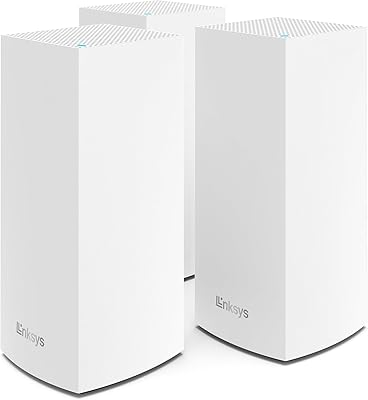
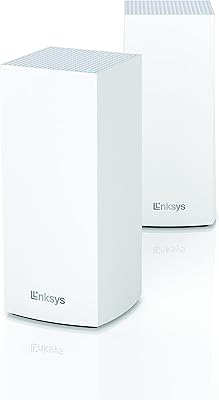
The cylindrical white towers are compact enough to place on a shelf without drawing attention, and the build feels solid rather than plasticky. Reviewers appreciate that the design blends into modern home interiors without looking like networking equipment.
There are no visible status LEDs beyond a basic indicator light, which some users find limiting when diagnosing connection problems without the app. Ventilation is passive, and a handful of reviewers in warmer climates noted nodes running noticeably warm during sustained heavy use.
Parental Controls
72%
28%
Built-in parental controls allow schedule-based internet access limits and basic content filtering without a monthly subscription, which reviewers with school-age children found genuinely useful compared to competitors that paywall those features.
The controls are functional but not granular — parents wanting per-app blocking, detailed browsing history, or age-specific filtering profiles will find the toolset too basic. It covers the fundamentals but does not match dedicated parental control platforms in depth or reporting capability.
Guest Network Features
78%
22%
Creating an isolated guest network takes under two minutes in the app, and the separation from the main network gives homeowners confidence that visitors cannot accidentally access local devices like NAS drives or smart home hubs.
Guest network customization is limited to basic on/off and password settings. There is no bandwidth throttling for guests or time-based automatic expiry, which are features buyers coming from more advanced routers may expect at this price point.
Gaming & Low-Latency Use
74%
26%
Console and PC gamers report solid ping stability during extended online sessions when connected to the 6 GHz or 5 GHz bands, with fewer mid-session spikes than their previous single-router setups produced. Cloud gaming platforms in particular benefit from the more consistent connection.
Without dedicated QoS gaming prioritization controls in the app, there is no way to guarantee gaming traffic gets priority during peak household usage. Results vary depending on how many devices are active simultaneously, and competitive gamers may find a wired connection more reliable for tournament play.
Long-Term Reliability
63%
37%
Many buyers report months of trouble-free operation after the initial setup period, with the Cognitive Mesh technology living up to its promise of hands-off maintenance during stable firmware cycles. Units purchased in the first year of release are still operational for most owners.
The pattern of post-firmware-update instability introduces real uncertainty about the system holding up over a two-to-three year horizon. Customer support responsiveness is flagged in multiple reviews as slow to resolve hardware-related issues, which compounds frustration when problems do surface.
ISP & Modem Compatibility
71%
29%
The system works out of the box with most major ISP-provided modems and gateway hardware. Buyers using standard cable or fiber setups rarely report handshake issues between their modem and the primary node.
Users with ISPs that require specific modem configurations, such as bridge mode on combination modem-router units, occasionally hit compatibility walls that the setup guide does not address clearly. Getting help from both Linksys and the ISP at the same time adds friction during troubleshooting.

Suitable for:

The Linksys Velop Pro 6E 2-Pack Mesh Router is purpose-built for homeowners who have genuinely outgrown a single router — specifically those dealing with dead zones, inconsistent speeds, or a growing pile of connected devices across 2,500 to 6,000 square feet of living space. If your household runs simultaneous 4K streams in the living room, video calls in the home office, and cloud gaming in a bedroom at the same time, this mesh system has the bandwidth headroom to handle all of it without one activity noticeably dragging down the others. Families benefit from built-in parental controls and guest network isolation that do not require a paid subscription, which is a genuinely practical advantage over competing systems that paywall those features. Early adopters who have already upgraded to WiFi 6E-capable phones or laptops will see the most tangible speed improvement, since those devices can actually access the less congested 6 GHz band. Anyone replacing a five-year-old single router who wants an app-managed, low-maintenance upgrade will find the setup process refreshingly straightforward.

Not suitable for:

The Linksys Velop Pro 6E 2-Pack Mesh Router is a poor fit for anyone living in a smaller apartment or a home under 1,500 square feet — the hardware is simply more than the space requires, and a capable single router would serve those users better at a fraction of the cost. Budget-conscious buyers should also weigh the investment carefully if most of their devices are older WiFi 5 hardware, since those gadgets cannot access the 6 GHz band and will see only incremental improvement over a well-positioned WiFi 6 router. Power users who expect deep network customization — detailed QoS controls, VLAN support, or granular traffic management — will find the Linksys app too shallow for their needs, as it prioritizes simplicity over advanced configuration. Buyers who have had negative experiences with firmware-related instability on other Linksys products should note that this is a recurring theme in real user feedback and factor that into their decision. Finally, anyone who needs rock-solid, zero-downtime uptime for a home server or critical work infrastructure may want to consider a system with a stronger firmware track record before committing.
Specifications

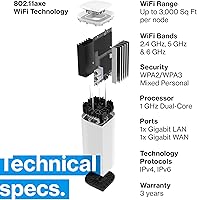
  • WiFi Standard: This mesh system uses the 802.11ax (WiFi 6E) standard, which is the first generation to access the 6 GHz radio band in addition to 2.4 GHz and 5 GHz.
  • Frequency Bands: Tri-band operation covers 2.4 GHz, 5 GHz, and 6 GHz simultaneously, allowing the system to dedicate bands to backhaul and client devices independently.
  • Max Throughput: Combined theoretical throughput is rated at 5.4 Gbps (AXE5400), distributed across all three bands under ideal conditions.
  • Coverage Area: The two-node kit is rated to cover up to 6,000 square feet, making it appropriate for 2-to-4 bedroom homes or multi-story layouts.
  • Channel Width: The 6 GHz band supports 160 MHz channel widths, which enables higher sustained speeds on compatible WiFi 6E client devices.
  • Connected Devices: The system is rated to support more than 200 simultaneously connected devices across the mesh network.
  • Node Dimensions: Each node measures 3.7 x 3.7 x 7.41 inches, with a compact cylindrical tower profile designed for shelf or surface placement.
  • Node Weight: Each individual node weighs 5.26 pounds, giving the units a solid, stable footprint without requiring mounting hardware.
  • Setup Method: Initial configuration and ongoing management are handled through the free Linksys app, available for both iOS and Android devices.
  • Security Features: Built-in security includes network-level internet security filtering, guest network isolation, and parental controls with schedule-based access management.
  • Special Technology: Cognitive Mesh technology continuously monitors network conditions and automatically adjusts channel selection and signal distribution to reduce congestion.
  • Compatible Devices: The system is designed to work with gaming consoles, personal computers, smart televisions, printers, and IP security cameras, among other networked devices.
  • Connectivity Ports: Each node includes Ethernet ports for wired device connections, with one port on the primary node used for the upstream modem connection.
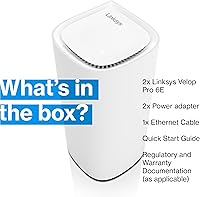
  • Included Contents: Each 2-pack ships with two power adapters, one Ethernet cable, a quick installation guide, and warranty documentation.
  • Color & Finish: Both nodes are finished in white with a smooth matte exterior that blends into modern home interiors without visible branding on the main body.
  • WiFi Protocols: The system is backward compatible with 802.11a, 802.11b, 802.11g, 802.11n, and 802.11ac devices in addition to the primary 802.11ax standard.
  • Release Year: The Velop Pro 6E was first made available in May 2023, representing Linksys's entry into the tri-band WiFi 6E mesh segment for residential use.
  • Manufacturer: Designed and sold by Linksys, a networking hardware brand with a long history in consumer and small-business router products.

Related Reviews
Linksys Atlas MX2000 2-Pack Mesh Router
82%
88%
WiFi Coverage & Range
91%
Setup & Ease of Use
83%
Network Speed & Throughput
86%
Device Load Handling
77%
Latency & Gaming Performance
More
Wyze Mesh Router Pro Wi-Fi 6E Router
73%
91%
Setup & Ease of Use
78%
Wi-Fi Speed & Throughput
72%
Coverage & Range
66%
Connection Stability
69%
6 GHz Band Performance
More
Linksys MR8300 Mesh WiFi Router
84%
88%
Wi-Fi Performance
81%
Ease of Setup
90%
Coverage Area
85%
Device Support
89%
Gaming Performance
More
Linksys MR6350 Dual-Band Mesh WiFi Router
74%
91%
Ease of Setup
62%
WiFi Coverage
84%
Connection Stability
71%
Real-World Speed
68%
App Experience
More
Linksys Velop MX12600 Tri-Band Mesh WiFi System

80%
83%
Coverage & Range
78%
Network Speed
86%
Device Handling
91%
Setup Experience
67%
App Quality
More
Linksys AX2200 WiFi 6 Mesh Router
84%
88%
WiFi Speed & Performance
91%
Ease of Setup
85%
Coverage & Range
72%
Reliability in Large Homes
90%
App Functionality & Control
More
Linksys Velop WHW0203 Mesh Wi-Fi System
85%
94%
Coverage Reliability
91%
Setup & Installation
89%
Connection Speed
88%
App Interface
86%
Device Capacity
More
Linksys Velop Mesh Home WiFi System WHW0101
85%
88%
Performance for Streaming & Gaming
94%
Ease of Setup
85%
WiFi Coverage (Up to 1,500 sq. ft.)
87%
Device Support (10+ Devices)
91%
App Experience & Management
More
Linksys MX8000 Velop Mesh WiFi Router 2-Pack
75%
86%
Coverage & Range
74%
WiFi Speed Performance
83%
Multi-Device Handling
91%
Setup & Installation
78%
App Experience
More
Linksys LN3121 WiFi 6 Mesh Router
73%
91%
Ease of Setup
74%
WiFi Coverage
78%
Connection Speed
82%
Multi-Device Performance
83%
Network Stability
More

FAQ

Not necessarily, but you will get the most tangible speed improvement if at least some of your devices support WiFi 6E. Older WiFi 5 and WiFi 6 devices will still connect and work reliably on the 2.4 GHz and 5 GHz bands — they just cannot access the faster 6 GHz channel that newer hardware unlocks. Think of the 6 GHz band as a bonus lane that grows more useful as your device lineup modernizes over time.

It is genuinely one of the easier setups in this category. The Linksys app walks you through each step with plain-language prompts, and most users have both nodes active and named within ten to fifteen minutes. You will need to know your ISP login credentials if your modem requires them, but beyond that, the app handles the rest without requiring you to touch any router settings manually.

For most two-story homes in that size range with standard wood-frame construction, two nodes placed thoughtfully — one near the modem and one on the upper floor — should provide solid coverage throughout. Homes with thick concrete walls, multiple levels, or unusual layouts may find performance uneven at the edges, and a third node can be added to expand the mesh if needed.

Yes, the Velop Pro 6E is designed to be expandable. You can add compatible Linksys Velop nodes to the existing mesh through the app, which makes it practical to start with the two-pack and extend coverage to a detached garage, basement, or backyard later without replacing the whole system.

It works with the vast majority of ISP-provided modems and gateways from major cable and fiber providers. The one situation that sometimes causes friction is when your ISP gives you a combination modem-router unit — in that case, you may need to enable bridge mode on the ISP device first, which your ISP can walk you through. Standard standalone cable modems connect without any special configuration.

No — parental controls, including schedule-based internet cutoffs and basic content filtering, are included in the free Linksys app without any recurring fees. This is a genuine advantage over some competing mesh systems that lock those features behind a paid plan. The trade-off is that the controls are functional but not highly granular compared to dedicated parental control platforms.

In practice, you do not interact with it at all — that is the point. The system monitors signal quality, congestion, and channel conditions across the mesh in the background and makes adjustments automatically. If the 6 GHz band becomes crowded, it redistributes traffic. You will not see a settings panel for it; you just notice that the network tends to stay stable without you rebooting it every week.

Devices connected to the offline node will lose their connection until it comes back online, since this system does not offer a self-healing mesh topology where traffic automatically reroutes through the remaining node. It is worth placing nodes in locations with reliable power access and keeping them on a surge protector to reduce the chance of unexpected outages.

Linksys has released multiple firmware updates since the 2023 launch, and some buyers report that stability has improved over time. That said, firmware-related connectivity drops remain the most commonly cited frustration in recent reviews, and it is still a known risk to factor in. Disabling automatic updates and applying them manually during low-traffic periods is a workaround some experienced users recommend.

Yes, the Linksys app supports remote management as long as the nodes remain powered and connected to your modem. You can check which devices are online, reboot individual nodes, adjust guest network access, or make parental control changes from anywhere with a phone data connection. Most reviewers report that remote access functions reliably in day-to-day use.