

Overview

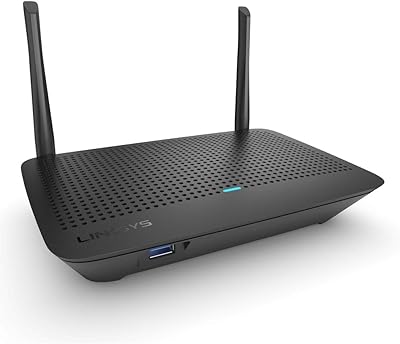
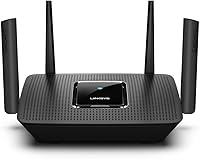
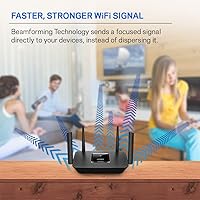
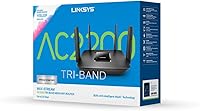
The Linksys MR8300 Tri-Band Mesh WiFi Router occupies an interesting middle ground — it's not quite a full mesh system, but it's more capable than a standard single-band router. Launched in early 2019, it was designed with future scalability in mind, and for most medium-sized households, it still delivers. The AC2200 tri-band architecture means it splits traffic across three radio bands instead of two, which in practical terms reduces congestion when multiple devices are active at once. Its deeper value comes from Velop ecosystem compatibility — if your coverage needs grow, you can add nodes without starting over. Just don't expect it to blanket a large two-story home on its own.

Features & Benefits

Three radio bands sound like a marketing number until you realize what the MR8300 actually does: it dedicates one of its 5 GHz bands purely as a backhaul channel, keeping device connections clean and fast. Setting it up takes about ten minutes through the Linksys app, which walks you through each step over Bluetooth — no logging into admin pages or decoding technical jargon. The guest network feature is genuinely useful; hand out a separate password to visitors without ever exposing your main network. Parental controls let you schedule internet access by device, which parents of younger kids will appreciate. Four Gigabit Ethernet ports round things out for wired devices, and the 18-month warranty adds real peace of mind.

Best For

This tri-band router is a solid fit for anyone living in a single-floor home or apartment in the 1,500 to 2,000 square foot range. If your household regularly has 10 to 20 devices connected — phones, laptops, a smart TV, maybe a gaming console — it handles that load without issue. It's especially appealing if you're thinking about building out a Linksys Velop mesh system down the road, since this router slots in as the master node rather than becoming obsolete. Families who want basic content scheduling for kids will get that without a subscription fee. For 4K streaming or casual gaming it holds up well, but if you need Wi-Fi 6 speeds, newer options at a similar price deserve a look.

User Feedback

With over 5,700 ratings averaging 4.4 stars, this Linksys mesh router has earned a broadly positive reputation. The most consistent praise centers on how painless the initial setup is and how stable the connection stays day-to-day once everything is running. On the other side, buyers in multi-story homes or spaces exceeding 1,800 square feet often report that coverage gets spotty toward the edges — a real limitation worth acknowledging. There are also recurring questions about long-term firmware support, with some users feeling updates have slowed for the MR8300 over time. Warranty claims generally go smoothly, though a handful of reviewers mention slower-than-expected customer service response times. Overall, most buyers feel they got solid value.

Pros

  • App-based setup is genuinely easy — most users report being fully connected in under fifteen minutes.
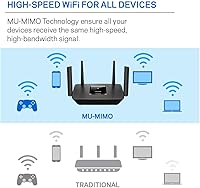
  • Tri-band architecture distributes device traffic across three bands, reducing congestion during busy household hours.
  • Built-in guest network lets visitors get online without ever touching your main network credentials.
  • Parental controls are functional and completely free — no recurring subscription required to schedule or restrict device access.
  • Four Gigabit Ethernet ports handle wired desktops, gaming consoles, or a dedicated backhaul connection reliably.
  • Acts as a Velop mesh master node, giving you a clear and cost-effective path to expand coverage later.
  • The 18-month Amazon-exclusive warranty adds genuine value over the standard one-year coverage most routers ship with.
  • Delivers consistent 4K streaming and casual gaming performance across 10 to 20 simultaneous connected devices.

Cons

  • Coverage weakens noticeably in multi-story homes or spaces where walls and building materials impede the signal.
  • Firmware updates have grown infrequent, raising legitimate questions about ongoing security patch support.
  • Wi-Fi 6 routers are now available at comparable prices, offering meaningfully faster speeds and better long-term relevance.
  • The app-centric setup experience limits advanced users who want manual control over DNS, QoS, or routing rules.
  • Buyers outside the Linksys Velop ecosystem lose the router's strongest differentiator with no real substitute benefit.
  • Some buyers report slower-than-expected customer service response times when initiating warranty replacement claims.
  • Physical footprint at 7.3 x 10.1 x 6.3 inches is bulkier than many newer compact mesh alternatives.
  • AC2200 speeds, while adequate today, may feel limiting as household device counts and bandwidth demands continue growing.

Ratings

Our scores for the Linksys MR8300 Tri-Band Mesh WiFi Router are generated by AI after analyzing thousands of verified purchase reviews worldwide, with spam, bot submissions, and incentivized feedback actively filtered out before any category is scored. Each rating reflects the honest spread of real buyer experiences — the genuine strengths alongside the friction points that surface over months of daily use. Nothing is smoothed over: where users have run into consistent problems, the scores reflect that directly.

Ease of Setup
89%
The Linksys app makes installation genuinely approachable — Bluetooth-assisted discovery finds the router automatically, and the guided walkthrough covers everything from modem connection to network naming without a single admin page or IP address in sight. Most households report being fully online in under fifteen minutes, which is a strong result for a tri-band router at this level.
A small number of users report Bluetooth pairing hiccups that required restarting the app or the router to resolve. The app-first approach also means anyone who prefers a traditional browser-based admin interface will feel constrained, as there is no straightforward path to manual configuration for power users.
Wi-Fi Coverage
72%
28%
In single-story homes up to around 1,800 square feet, coverage is consistently solid — devices in far corners and through interior walls typically maintain a reliable, usable signal. Buyers in compact apartments and ranch-style homes frequently cite coverage as one of the strongest aspects of their experience with this router.
Multi-story households are where coverage complaints concentrate — upper floors and distant bedrooms in two-story homes regularly see weaker signal, and concrete or brick construction makes the problem noticeably worse. The 2,000 sq ft rating assumes favorable conditions; real-world range falls short in homes with dense walls or irregular floor plans.
Connection Stability
84%
Day-to-day stability is a recurring strength in buyer feedback — connections hold consistently during video calls, 4K streams, and extended gaming sessions without unexpected drops. The tri-band design helps by distributing traffic more evenly, reducing the kind of congestion that causes stutters on dual-band routers under household load.
A subset of long-term owners reports intermittent disconnections appearing months into use, often requiring a router restart to clear — a symptom some attribute to aging firmware rather than hardware failure. These cases are not universal, but they appear with enough frequency in the review pool to be worth noting before buying.
Throughput & Speed
76%
24%
For households running 4K streams on multiple TVs simultaneously, joining video calls, and browsing on a mix of phones and laptops, the AC2200 combined throughput delivers without obvious bottlenecks in typical use. Wired devices connected via the Gigabit Ethernet ports perform especially well, making the MR8300 a capable wired hub as much as a wireless one.
Where the speed story weakens is against current Wi-Fi 6 hardware at comparable price points — newer routers offer faster peak speeds, better performance in dense device environments, and a longer relevance window. Heavy multi-room streamers or households planning for future bandwidth growth will notice the generational gap over time.
Multi-Device Performance
81%
19%
Running 15 or more devices simultaneously — phones, smart TVs, a laptop or two, and a gaming console — is where the tri-band layout earns its keep. By directing different device categories to separate bands, the router avoids the traffic pile-ups that plague dual-band alternatives during busy household evenings.
Users pushing toward and beyond 20 active devices, particularly in households with multiple concurrent 4K streams, occasionally report slower Wi-Fi on lower-priority devices. Band steering is automatic and not manually configurable, which can frustrate buyers who want precise control over which device connects to which band.
Mesh Expandability
87%
Buyers who start with this router and later find they need more coverage have a clear, cost-effective path: add Velop satellite nodes and the whole system merges into one unified network with a single SSID and password. This forward-compatible quality is something most standalone routers from competing brands simply do not offer at this price.
The Velop ecosystem lock-in is a double-edged sword — expanding coverage means committing to Linksys hardware, which may not suit buyers who prefer mixing brands or want flexibility to change platforms later. Velop nodes add meaningful cost, so the full mesh upgrade path carries a significant additional investment for multi-story homes.
App Experience
83%
The Linksys app is widely appreciated for its clean, approachable interface that makes everyday network management accessible without any technical background. Checking connected devices, renaming the network, toggling guest access, or adjusting parental schedules are all handled through a logical layout that even first-time router owners navigate with confidence.
The app's simplicity is a deliberate tradeoff that limits access to advanced settings — network professionals who want to configure VLANs, custom DNS servers, or detailed QoS rules will hit a hard wall quickly. Occasional reports of the app losing its connection to the router mid-session are a minor but recurring annoyance in longer-term reviews.
Parental Controls
74%
26%
For families wanting basic internet time management without a monthly subscription, the built-in controls do the job well. Setting a bedtime schedule for a child's tablet — cutting off access at a specific time without affecting every other device on the network — is exactly the kind of practical, no-cost use case these tools handle reliably.
Content filtering is where the parental controls fall noticeably short — there is no URL-based blocking or category-level content control, so parents hoping to restrict specific website types will need a separate DNS service to fill that gap. The controls function as scheduling tools more than true family safety tools, which limits their usefulness for households with older, more internet-savvy kids.
Guest Network
86%
The guest network is cleanly isolated from the main home network — visitors get internet access while your printers, shared drives, smart home devices, and personal computers remain completely invisible to them. It takes under a minute to enable through the app, and toggling it off when guests leave is just as quick.
The guest network lacks customization depth — there is no option to set bandwidth limits for guest users or create time-limited access windows, which would be genuinely useful in shared housing or small home office scenarios. For most families this is a minor limitation, but it is a missed feature compared to some competing routers at a similar price.
Wired Connectivity
82%
18%
Four Gigabit Ethernet ports give the MR8300 enough wired capacity to connect a desktop workstation, a gaming console, a smart TV, and still leave a port available for a network switch if needed. Wired speeds are consistent at full Gigabit rates, which matters for anyone pushing large files across a home network or wanting the lowest possible latency for online gaming.
With one port reserved for the WAN uplink to the modem, only three ports remain for wired clients — a modest allocation for a home office with multiple wired machines plus entertainment devices competing for connections. There is also no USB port for attaching a shared storage drive or printer, which some competing routers in this category include as standard.
Value for Money
77%
23%
At its price point, this tri-band router bundles tri-band Wi-Fi, Velop mesh compatibility, parental controls, guest networking, four Gigabit ports, and an extended 18-month warranty into one package — a combination that would cost more to replicate with budget-tier alternatives. For buyers already planning a Velop ecosystem, the value proposition strengthens considerably as a long-term platform investment.
The value calculation has grown harder to justify as Wi-Fi 6 routers continue to fall in price — buyers can now find Wi-Fi 6 hardware with broader coverage, better long-term firmware prospects, and faster speeds at comparable or only slightly higher cost. For anyone not tied to the Velop ecosystem, the MR8300 faces genuinely stiff competition in its price bracket.
Firmware & Updates
61%
39%
When firmware updates do arrive, they have historically addressed stability improvements and security patches that meaningfully extend the router's effective lifespan. The over-the-air delivery through the app means users never need to manually download files or navigate admin pages — updates apply in the background with minimal disruption to daily use.
Update frequency for this router has slowed considerably since its 2019 launch, and long-term owners increasingly question whether Linksys is still actively maintaining the firmware. Security-conscious buyers and those expecting regular feature improvements will find this trajectory concerning when compared to newer hardware that remains in active development cycles.
Build Quality
79%
21%
The MR8300 has a solid, grounded feel — it is not lightweight plastic that flexes under your hand, and the matte black finish resists fingerprints reasonably well. At 1.59 pounds, it has enough heft to stay in place without slipping, and nothing about the construction suggests corners were cut to hit the price point.
At 7.3 x 10.1 x 6.3 inches, it is a noticeably large unit that needs open shelf space for optimal airflow — not ideal for small apartments where router placement options are limited. There are no external antennas, which some buyers associate with stronger signal range, even though internal antenna arrays can perform comparably when well-engineered.
Warranty & Support
73%
27%
The 18-month Amazon-exclusive warranty genuinely extends buyer protection six months beyond the standard one-year window, covering the period when most router issues tend to surface in real-world use. For buyers purchasing through Amazon who want built-in peace of mind without paying for a separate protection plan, this extended coverage is a tangible advantage.
Customer service response times are a recurring complaint in the review pool — some users report multi-day waits when initiating warranty claims, which undermines the value of having that extended coverage. The support experience appears inconsistent, with some buyers describing smooth resolutions and others detailing frustrating, drawn-out back-and-forth exchanges.

Suitable for:

The Linksys MR8300 Tri-Band Mesh WiFi Router is a strong match for households in the 1,500 to 2,000 square foot range — think a two-bedroom apartment, a compact ranch home, or a small townhouse on a single floor — where one capable router can realistically cover the whole space. Families with 10 to 20 connected devices, including phones, tablets, smart TVs, and a gaming console or two, will find that the tri-band architecture keeps traffic well-managed without noticeable slowdowns during peak usage. Parents who want guardrails on kids' internet time without subscribing to a third-party filtering service will appreciate the built-in scheduling and parental controls. It's also a smart pick for anyone already invested in the Linksys Velop ecosystem or planning to expand into it — this router functions as the master node, giving you a clear upgrade path without replacing hardware. Those who prioritize a painless, app-guided setup experience over deep technical customization will feel right at home here.

Not suitable for:

The Linksys MR8300 Tri-Band Mesh WiFi Router is not the right call for anyone needing to cover a large multi-story home or any floor plan well above 2,000 square feet — real-world range tends to disappoint in those settings, especially where concrete walls, multiple floors, or dense construction are involved. Anyone who has recently priced out Wi-Fi 6 routers will notice that the competitive landscape has shifted considerably since 2019, and buyers who run bandwidth-heavy workloads or stream in several rooms at once should seriously weigh whether the AC2200 standard still meets their needs. Power users who want granular manual control — custom DNS, advanced QoS rules, or VLAN segmentation — will find the app-first interface too restrictive compared to more configurable alternatives. If you have no interest in ever building out a Velop mesh system, one of the strongest arguments for choosing this router over cheaper competitors simply disappears. Those expecting frequent firmware updates or fast-turnaround customer support should also calibrate their expectations before buying.

Specifications

  • Wi-Fi Standard: Operates on 802.11ac (Wi-Fi 5), the generation prior to Wi-Fi 6, offering broad compatibility with virtually all modern wireless devices.
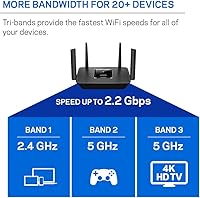
  • Frequency Bands: Tri-band configuration covers one 2.4 GHz band and two independent 5 GHz bands for distributed traffic management across connected devices.
  • Combined Speed: Maximum combined wireless throughput is 2.2 Gbps (AC2200) across all three radio bands operating simultaneously.
  • 2.4 GHz Band: The 2.4 GHz band delivers up to 400 Mbps, best suited for lower-bandwidth devices such as smart home sensors, e-readers, and older smartphones.
  • 5 GHz Band 1: The first 5 GHz band reaches speeds up to 867 Mbps and handles higher-demand client devices such as laptops and streaming sticks.
  • 5 GHz Band 2: The second 5 GHz band also tops out at 867 Mbps and can be dedicated to wireless backhaul when paired with Linksys Velop satellite nodes.
  • Coverage Area: Rated for up to 2,000 sq ft of single-router Wi-Fi coverage under typical household conditions, though real-world range varies with building materials and layout.
  • Device Support: Supports 20 or more simultaneous wireless connections without significant throughput degradation under normal mixed-use conditions.
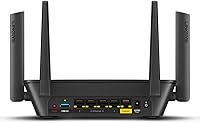
  • LAN Ports: Four Gigabit Ethernet ports on the rear panel support wired connections for desktops, gaming consoles, smart TVs, or a wired backhaul setup.
  • WAN Port: One dedicated Gigabit Ethernet WAN port connects the router to a separate cable, DSL, or fiber modem from any internet service provider.
  • Setup Method: Initial configuration is handled through the Linksys app on Android 4.4 or higher, or iOS 9 and above, using a Bluetooth-assisted discovery process.
  • Special Features: Includes a dedicated guest network with a separate password, device-level parental controls with scheduling, and WPS for quick wireless client pairing.
  • Mesh Compatibility: Functions as the master node in a Linksys Velop mesh system, allowing compatible Velop satellite nodes to extend coverage as a unified network.
  • Dimensions: Measures 7.3 x 10.1 x 6.3 inches (L x W x H), a mid-sized footprint that benefits from open shelf or elevated placement for optimal signal distribution.
  • Weight: Unit weighs 1.59 pounds without the power adapter, making it straightforward to reposition during initial placement testing.
  • Power Input: Accepts both 120V and 240V power input, making it compatible with North American outlets and usable internationally with an appropriate plug adapter.
  • Firmware OS: Runs on ZyNOS firmware, which manages Linksys app integration, automatic over-the-air updates, and core network functions.
  • Warranty: Includes an 18-month warranty exclusively through Amazon, six months longer than the standard 12-month coverage available through other retail channels.

Related Reviews
Linksys WHW0302 Tri-Band Mesh Wi-Fi System
75%
88%
Coverage & Dead Zone Elimination
91%
Setup Experience
73%
Real-World Speed Performance
86%
Multi-Device Stability
69%
App & Remote Management
More
ASUS ZenWiFi BT6 WiFi 7 Mesh Router
78%
83%
Wireless Performance
79%
Coverage & Range
74%
Setup & Ease of Use
81%
Build Quality & Design
86%
Security Features
More
ASUS ZenWiFi BT8 WiFi 7 Mesh Router

77%
83%
Wireless Performance
71%
Coverage & Range
54%
Firmware Reliability
88%
Setup Experience
67%
App & Management
More
Linksys MR6350 Dual-Band Mesh WiFi Router
74%
91%
Ease of Setup
62%
WiFi Coverage
84%
Connection Stability
71%
Real-World Speed
68%
App Experience
More
Linksys AX2200 WiFi 6 Router
76%
88%
Value for Money
92%
Setup & Ease of Use
66%
WiFi Coverage
78%
Multi-Device Performance
76%
Gaming & Streaming
More
Cudy WR11000 WiFi 7 Tri-Band Router
74%
88%
Value for Money
76%
Wireless Performance
91%
Wired Port Quality
84%
Setup & Ease of Use
79%
Mobile App Experience
More
Linksys MX8000 Velop Mesh WiFi Router 2-Pack
75%
86%
Coverage & Range
74%
WiFi Speed Performance
83%
Multi-Device Handling
91%
Setup & Installation
78%
App Experience
More
Linksys LN3121 WiFi 6 Mesh Router
73%
91%
Ease of Setup
74%
WiFi Coverage
78%
Connection Speed
82%
Multi-Device Performance
83%
Network Stability
More
ASUS RT-BE92U WiFi 7 Router
81%
88%
Wireless Performance
83%
Coverage & Range
84%
Setup & Initial Configuration
91%
Network Security (AiProtection)
86%
Latency & Gaming Performance
More
Ubiquiti AmpliFi Alien WiFi 6 Mesh Router
72%
83%
Wireless Performance
78%
Coverage & Range
86%
Device Handling Capacity
51%
Setup & Ease of Use
48%
Companion App Quality
More

FAQ

It's genuinely approachable for most people. You download the Linksys app, connect the router to your modem with the included Ethernet cable, and follow the step-by-step walkthrough — the app uses Bluetooth to find the router automatically, so there's no need to type in IP addresses or navigate a browser-based admin panel. The majority of users report being fully online within ten to fifteen minutes.

On a single floor at that size, coverage is generally reliable. Two floors introduce more variables — signal has to travel through ceilings and potentially thick insulation or concrete, which can cause noticeable drop-off in rooms directly above or far from the router. If the MR8300 is placed centrally on the lower floor, the upper floor will often see weaker but functional signal; for consistent whole-home coverage across multiple stories, adding a Velop satellite node upstairs is the more reliable solution.

It works with any modem that has a standard Ethernet output, regardless of your internet provider — cable, DSL, or fiber all work fine. The router does not have a built-in modem, so you will continue using whatever modem your provider supplied or one you purchased separately. Just plug the modem's Ethernet cable into the WAN port on the router and you're set.

Yes, and this is one of the most practical reasons to choose the Linksys MR8300 Tri-Band Mesh WiFi Router over a generic standalone unit. It acts as the master node in a Velop mesh system, so compatible Velop satellites simply connect to it and extend the same network — same password, same network name, no separate SSIDs to manage. You get a unified system that grows with your coverage needs without starting from scratch.

The controls are device-based, meaning you assign restrictions to a specific phone, tablet, or laptop rather than to a user account. Through the Linksys app, you can set internet access schedules so a device loses connectivity at a chosen time — useful for winding down screen time without cutting off the whole household. There's no subscription fee, and adjustments take only a minute or two once you're familiar with the app. It's not as granular as a dedicated filtering service, but for everyday household scheduling it works well.

Yes, completely. Guests connect to a separate network with its own password, and while they can access the internet normally, they cannot see or interact with any devices on your main home network — printers, shared drives, smart home hubs, and other devices all remain private. Enabling it takes about thirty seconds in the app and can be toggled off just as quickly when it's no longer needed.

For most households, this tri-band router still handles everyday tasks — streaming, video calls, casual gaming, smart home devices — without obvious limitations. The honest caveat is longevity: if you're buying with a five-plus-year horizon and have newer Wi-Fi 6 capable devices, the performance gap will become more relevant over time. At its current price point, it competes against entry-level Wi-Fi 6 hardware, so it's worth comparing a few current alternatives before deciding.

There are four Gigabit Ethernet ports on the back. One of those is used for the WAN connection to your modem, which leaves three ports available for wired devices like a desktop PC, gaming console, or smart TV. If three wired connections aren't enough, you can attach an unmanaged Ethernet switch to one of the free LAN ports to add more.

If you purchased through Amazon, you have an 18-month window to submit a claim — longer than the standard coverage. Start by contacting Linksys support through their website or via the app, and have your Amazon order number and the router's serial number ready to speed things up. Some buyers have noted that response times can vary, so reaching out early and keeping a record of your correspondence is a practical precaution.

No. Once the router is configured, it runs independently and your internet connection stays active whether or not the app is installed. The app is needed for initial setup and for making ongoing changes — adjusting parental controls, updating the guest network password, or checking connected devices. If you never need to tweak settings, feel free to remove it; the router keeps doing its job just fine.