Overview

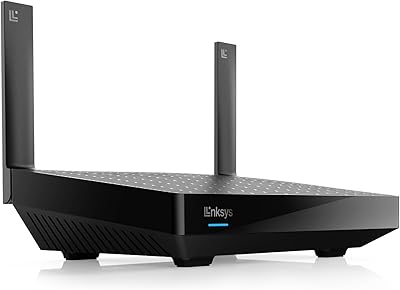
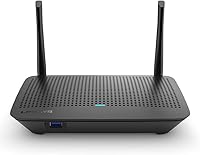
The Linksys MR6350 Dual-Band Mesh WiFi Router sits in an interesting spot — capable enough for a one-bedroom apartment or compact home, yet simple enough that you won't need a YouTube tutorial to get it running. WiFi 5 (802.11ac) still holds up well for most households today; it's not bleeding-edge, but for everyday streaming and browsing, it delivers. Setup runs through the Linksys app, which walks you through the process step by step — no browser dashboard required. One important clarification upfront: this is a single router unit, not a full mesh kit, though it is built to expand within the Linksys ecosystem if your needs grow. Real-world speeds will fall short of the advertised ceiling, as they always do, but for a modest space, it's more than adequate.

Features & Benefits

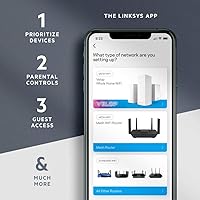
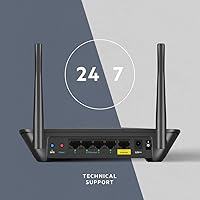
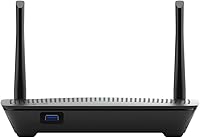
This dual-band router splits traffic across two frequencies — the 2.4 GHz band for farther-reaching, lower-demand connections like smart home devices, and the 5 GHz band for bandwidth-hungry tasks like 4K streaming or video calls. The Intelligent Mesh Technology dynamically routes your devices to whichever band performs best, which in practice means fewer dropped connections as you move around the house. Managing everything happens through the Linksys app — you can set up a guest network, apply parental controls, or check connected devices without touching a browser settings page. There's also a USB 3.0 port on the back, handy for sharing a printer or plugging in a storage drive across your local network.

Best For

The MR6350 is a natural fit for renters or anyone in a smaller home who wants reliable, consistent WiFi without the cost of a full multi-node mesh system. Families will appreciate the parental controls and guest network features — both are genuinely straightforward to configure and easy to adjust on the fly. If your household streams 4K on multiple screens or juggles video calls alongside regular browsing, this dual-band router handles that load comfortably. It also makes a solid upgrade for anyone still running an older single-band or ISP-supplied router. And if your coverage needs grow down the road, compatible Linksys nodes can be added without starting from scratch.

User Feedback

Across hundreds of reviews, a few consistent themes emerge. Most buyers praise how quickly the setup process goes — many report being connected within ten minutes of unboxing, with the app drawing particular credit for keeping things clear. The compact design gets favorable mentions too, especially from users tight on shelf space. On the flip side, range limitations are the most common complaint; buyers in larger homes or multi-floor layouts often find coverage falls short of spec-sheet claims. A handful of users report occasional app hiccups, though these tend to surface around firmware updates rather than as a persistent issue. The broader debate in reviews centers on whether WiFi 5 is still worth buying at all, with some wishing they had stretched their budget for WiFi 6 capability — a fair consideration if you plan to keep this router for several years.

Pros

  • App-based setup is genuinely quick and painless, even for first-time router owners.
  • The dual-band design automatically sorts devices across frequencies for a more balanced connection.
  • Guest network and parental controls are accessible without logging into any browser dashboard.
  • Built-in mesh compatibility means you can expand coverage later by adding Linksys nodes.
  • The compact footprint fits neatly on a shelf or desk without dominating the space.
  • A USB 3.0 port lets you share a printer or external drive across your local network.
  • Alexa integration allows hands-free management of WiFi access and connected devices.
  • Stable day-to-day performance is a recurring theme among long-term owners.
  • Included Ethernet cable and power adapter mean you have everything needed out of the box.
  • The MR6350 offers genuinely useful household features at a price point that won't strain most budgets.

Cons

  • Coverage falls noticeably short in larger homes or multi-floor layouts despite advertised range claims.
  • WiFi 5 is aging, and buyers planning to keep this router long-term may feel the limitation sooner than expected.
  • The Linksys app has a history of occasional bugs, particularly around firmware update periods.
  • No WiFi 6 support means newer devices won't reach their full speed potential on this network.
  • Customer support experiences vary widely, with some users reporting slow or unhelpful resolution times.
  • Advanced users will find the lack of granular QoS and routing controls frustrating.
  • Real-world throughput is noticeably lower than the headline speed figure suggests.
  • Thick walls or open-plan homes with interference sources can further reduce effective coverage area.
  • App-dependent management is a convenience for most, but a drawback if the app has outages or login issues.
  • No tri-band option means heavy multi-device households may start to notice congestion during peak usage.

Ratings

The scores below for the Linksys MR6350 Dual-Band Mesh WiFi Router were generated by our AI system after analyzing thousands of verified global buyer reviews, with spam, bot submissions, and incentivized feedback actively filtered out before any scoring was applied. Both the genuine strengths and the recurring frustrations are reflected transparently — no category has been inflated to flatter the product. Whether this dual-band router earns a recommendation depends heavily on your home size and expectations, and these scores are designed to help you make that call clearly.

Ease of Setup
91%
The app-guided setup is one of the most consistently praised aspects across thousands of reviews. Buyers with no prior router configuration experience report being fully connected within ten to fifteen minutes of unboxing, with the step-by-step Linksys app removing virtually all of the guesswork that traditionally frustrates first-time router owners.
A small but notable portion of users encounter app login or syncing issues during initial setup, particularly on older smartphones. When problems do occur at this stage, the troubleshooting options within the app feel limited, and reaching support to resolve them adds unwanted time to what should be a quick process.
WiFi Coverage
62%
38%
For compact apartments, studios, and smaller single-floor homes, this Linksys mesh router delivers consistent coverage without noticeable dead zones. Users in appropriately sized spaces report strong signal strength throughout, with smooth handoffs between rooms and reliable connectivity near the edges of the rated coverage area.
Buyers in larger homes, multi-story layouts, or spaces with thick concrete or brick walls frequently report signal drop-off well before the advertised coverage boundary. This is the single most common complaint across long-term reviews, and it is a real limitation rather than an edge case — the MR6350 is simply not built for sprawling floor plans.
Connection Stability
84%
Day-to-day connection reliability is a recurring strength in user feedback, with many owners reporting months of uninterrupted performance across multiple devices. Households that stream 4K video, run video calls, and browse simultaneously on different devices generally report no significant drops or bandwidth fights between connected devices.
A smaller but consistent group of users describes intermittent disconnections, typically appearing after firmware updates rather than during normal operation. These issues tend to resolve after a router restart, but the unpredictability is frustrating for households that depend on always-on connectivity for remote work or smart home devices.
Real-World Speed
71%
29%
For the typical mix of streaming, browsing, and light gaming in a smaller household, the actual throughput delivered by this dual-band router is more than adequate. Users transitioning from older ISP-supplied routers or aging single-band devices consistently describe a noticeable and satisfying improvement in everyday speed.
The advertised ceiling of 1.3 Gbps is a combined theoretical figure, and real-world speeds — especially on the 2.4 GHz band or at a distance — fall considerably short of that number. Users with high-speed fiber plans in particular may feel the router becomes a bottleneck, especially when multiple devices are competing for bandwidth simultaneously.
App Experience
68%
32%
The Linksys app makes otherwise complex tasks — toggling the guest network, pausing a child's device, or checking what is connected — accessible to users who would never navigate a traditional browser-based admin panel. The interface is clean and logically laid out, and most routine management tasks take only a few taps.
The app draws a recurring stream of criticism for instability around firmware update periods, with some users reporting being temporarily locked out of their network settings. A handful of reviewers also note that the app occasionally fails to reflect real-time network changes, requiring a force-close and relaunch to display accurate information.
Parental Controls
78%
22%
Families appreciate how straightforward it is to set device-level schedules and pause internet access for specific users through the app. For households with school-age children, the ability to cut off access at bedtime or during homework hours without any technical expertise is a practical and well-received feature.
The controls lack the granularity that more demanding parents might want — there is no deep content filtering, detailed usage reporting, or per-app blocking. Parents looking for robust monitoring tools beyond basic scheduling and pausing may find the feature set underwhelming compared to dedicated parental control solutions.
Guest Network
82%
18%
The guest network works reliably and is genuinely easy to enable, keeping visitor devices fully isolated from the main household network. Users who regularly have guests or operate a small home-based business appreciate the clean separation it provides without requiring any additional hardware or configuration.
Customization options for the guest network are fairly basic — you can set a separate password and toggle it on or off, but there is no bandwidth throttling or time-limited access control available. For hosts who want tighter management over guest usage, the feature covers the basics but nothing beyond them.
Value for Money
79%
21%
Positioned at a mid-range price point, this dual-band router delivers a feature set — mesh expandability, guest network, parental controls, USB sharing, and Alexa integration — that justifies its cost for buyers in smaller homes. Compared to similarly priced alternatives from other brands, the overall package is competitive and well-rounded.
The WiFi 5 standard is increasingly hard to justify at this price as WiFi 6 routers continue to drop in cost. Buyers who plan to use their router for several years and already own newer WiFi 6 devices may find the long-term value proposition weakened by the technology gap, even if the day-one performance feels adequate.
Build Quality
74%
26%
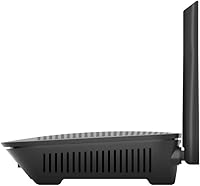
The physical construction feels solid and purposeful for its price tier, and the compact footprint makes it easy to tuck onto a shelf or media unit without it looking out of place. The retractable antenna design contributes to a tidy appearance that users in living spaces specifically call out as a plus.
The plastic casing can show scuffs and marks over time, and a few long-term owners note that the unit runs warm under sustained heavy loads. While no widespread hardware failure patterns appear in the review data, the materials do not inspire the same confidence as premium-tier routers at higher price points.
Alexa Integration
69%
31%
For Alexa households, the voice control integration works as advertised — pausing a device or toggling network access without picking up a phone is a convenient quality-of-life addition. Users who are already embedded in the Amazon smart home ecosystem find it fits naturally into their existing routines.
The range of Alexa-compatible commands is narrower than many users expect, covering basic access management but not the more nuanced controls available in the app. Buyers who are not already Alexa users will find this feature adds little practical value, and it does not compensate for the app's occasional instability.
USB Port Utility
66%
34%
The USB 3.0 port adds genuine utility for users who want a simple way to share files across a home network without investing in a dedicated NAS device. Plugging in an external drive and accessing it from multiple computers is a straightforward process that casual users find works reliably for basic file sharing.
Transfer speeds over the shared USB connection are not fast enough for power users who need to move large files regularly, and setting up printer sharing requires more manual steps than most buyers anticipate. The feature covers light use cases well but falls short for anyone with more demanding shared storage needs.
Mesh Expandability
76%
24%
The ability to add compatible Linksys nodes to extend coverage is a meaningful future-proofing element for buyers who start in a smaller space but anticipate moving or expanding. Users already in the Linksys ecosystem find that adding additional nodes integrates smoothly without needing to reconfigure their entire network from scratch.
Expanding the network requires purchasing additional Linksys-branded hardware, which locks buyers into the ecosystem and limits flexibility. Some users also report that the performance gains from adding a second node are less dramatic than expected if the primary router is already struggling with range, rather than just extending a strong existing signal.
Long-Term Reliability
77%
23%
The majority of owners who have used this router for a year or more describe consistent and dependable performance without hardware-related issues. The overall long-term reliability track record across reviews is reassuring, particularly for buyers who dislike dealing with router replacements or ongoing troubleshooting.
Firmware updates are the most common trigger for temporary instability, and a subset of longer-term owners describe a gradual increase in the frequency of restarts needed to maintain performance. While not a widespread hardware failure pattern, it does suggest that performance can soften somewhat over an extended ownership period.
Customer Support
57%
43%
Users who have had straightforward warranty replacements or minor technical issues generally report that Linksys support resolved their situation adequately. For common problems with well-documented solutions, the support documentation and community forums provide useful self-service options that bypass the need for direct contact.
Direct customer support experiences are notably inconsistent, with a meaningful share of reviewers describing long wait times, unhelpful responses, or difficulty reaching a knowledgeable representative. The variance in support quality is one of the more polarizing aspects of the overall ownership experience and a recurring theme in lower-star reviews.

Suitable for:

The Linksys MR6350 Dual-Band Mesh WiFi Router is a strong pick for anyone living in a studio, one-bedroom apartment, or compact single-floor home who wants reliable WiFi without the hassle of configuring a traditional router. It's especially well-suited to renters who don't want to invest heavily in networking gear but still expect stable connections for 4K streaming, video calls, and a dozen or so connected devices at once. Families with younger children will find real value in the built-in parental controls and guest network, both of which are easy enough to manage that you don't need any technical background. If you're currently running an outdated ISP-supplied router or an old single-band device and notice dead spots or sluggish speeds, this dual-band router offers a meaningful and low-friction upgrade. It also makes practical sense for anyone already invested in the Linksys ecosystem who wants to extend coverage affordably without replacing existing gear.

Not suitable for:

The Linksys MR6350 Dual-Band Mesh WiFi Router is not the right tool for larger homes, multi-story layouts, or anyone expecting whole-home coverage from a single unit — the real-world range simply won't stretch that far. Power users who demand the latest WiFi 6 speeds, lower latency for competitive gaming, or advanced QoS controls will find this router too limited for their needs. It runs on WiFi 5, which is still serviceable today but increasingly looks like a short-term solution if you're planning to keep your router for five or more years as more WiFi 6 and 6E devices enter the market. Households with a dense mix of modern devices — smart TVs, multiple gaming consoles, home security cameras, and laptops all running simultaneously — may start to feel the ceiling of what this dual-band router can comfortably handle. And if you work from home and rely on rock-solid, low-latency connections for large file transfers or video production workflows, a more capable router with stronger QoS features would serve you better.

Specifications

  • WiFi Standard: This router operates on the 802.11ac (WiFi 5) standard, which remains capable for most everyday household tasks including streaming, browsing, and video calls.
  • Frequency Bands: It broadcasts on two bands simultaneously — 2.4 GHz for broader coverage and lower-demand devices, and 5 GHz for faster, shorter-range connections.
  • Max Speed: Combined theoretical throughput reaches up to 1.3 Gbps (AC1300), though real-world speeds will vary based on distance, interference, and the number of active devices.
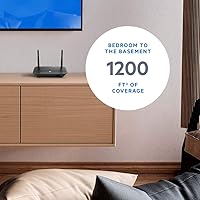
  • Coverage Area: Linksys rates this router for spaces up to approximately 1,200 sq. ft., making it best suited to apartments, studios, and compact single-floor homes.
  • Device Support: The router is designed to handle 12 or more connected devices simultaneously without significant performance degradation under typical household loads.
  • USB Port: A single USB 3.0 port on the unit allows users to connect an external hard drive or printer for shared local network access.
  • Connectivity: The router supports both wired Ethernet and wireless Wi-Fi connections, providing flexibility for desktop setups alongside wireless devices.
  • Antenna Type: Retractable internal antennas keep the physical profile clean and compact without the need for external protruding antenna arms.
  • Setup Method: Initial configuration and ongoing management are handled through the Linksys mobile app, available for both iOS and Android devices.
  • Voice Control: The router is compatible with Amazon Alexa, allowing users to manage network access and connected devices using voice commands.
  • Special Features: Built-in features include a dedicated Guest Mode network, WPS quick-connect support, and parental controls for managing device-level access.
  • Mesh Expandability: While sold as a standalone unit, it is fully compatible with the broader Linksys Mesh ecosystem, allowing additional nodes to be added for expanded coverage.
  • Dimensions: The unit measures 5.9 x 8.07 x 5.4 inches, making it compact enough to sit unobtrusively on a shelf or media console.
  • Weight: At approximately 1 pound, the router is lightweight and easy to reposition during setup or when changing its placement in the home.
  • Power Input: The router operates at 240 Volts AC, and a compatible power adapter is included in the box.
  • In the Box: Purchase includes the router unit, one Ethernet cable, a power adapter, a quick start guide, and warranty and regulatory documentation.
  • Model Number: The official model designation is MR6350, also marketed under the Linksys AC1200 series product line.
  • First Available: This model was first listed for sale in May 2020, establishing it as a mature product with a well-documented track record in the market.

Related Reviews
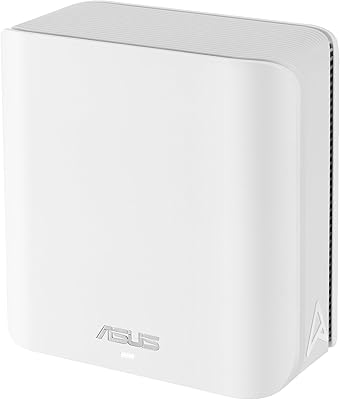
ASUS ZenWiFi BD4 Dual-Band WiFi 7 Mesh Router
86%
93%
Wi-Fi Performance
89%
Setup & Installation
91%
Security Features
88%
Gaming & Streaming Performance
84%
Value for Money
More
Linksys EA2700 Dual-Band Router
82%
84%
Wireless Performance
78%
Signal Coverage
88%
Setup & Installation
90%
Wired Connectivity
81%
Reliability
More
Linksys MR8300 Mesh WiFi Router
84%
88%
Wi-Fi Performance
81%
Ease of Setup
90%
Coverage Area
85%
Device Support
89%
Gaming Performance
More
Linksys AX2200 WiFi 6 Mesh Router
84%
88%
WiFi Speed & Performance
91%
Ease of Setup
85%
Coverage & Range
72%
Reliability in Large Homes
90%
App Functionality & Control
More
Linksys MX8000 Velop Mesh WiFi Router 2-Pack
75%
86%
Coverage & Range
74%
WiFi Speed Performance
83%
Multi-Device Handling
91%
Setup & Installation
78%
App Experience
More
Linksys LN3121 WiFi 6 Mesh Router
73%
91%
Ease of Setup
74%
WiFi Coverage
78%
Connection Speed
82%
Multi-Device Performance
83%
Network Stability
More
NETGEAR WAX202 WiFi 6 Dual-Band Router
84%
88%
WiFi Performance
93%
Setup & Installation
85%
App Usability
89%
Speed & Coverage
90%
Device Connectivity
More
Linksys RE6350 AC1200 Dual-Band WiFi Extender
86%
91%
Setup & Installation
88%
Wi-Fi Performance
89%
Coverage Area
85%
Dual-Band Performance
84%
Streaming & Gaming
More
Linksys WRT1900AC Dual-Band Wi-Fi Router
77%
84%
Wireless Range
91%
Wired Performance
93%
Firmware Flexibility
58%
Stock Firmware Stability
88%
Build Quality
More
Linksys WHW0302 Tri-Band Mesh Wi-Fi System
75%
88%
Coverage & Dead Zone Elimination
91%
Setup Experience
73%
Real-World Speed Performance
86%
Multi-Device Stability
69%
App & Remote Management
More

FAQ

It is a single router unit, not a multi-node mesh kit. That said, it uses Linksys Intelligent Mesh Technology internally to optimize how it handles traffic, and it is fully compatible with other Linksys Mesh nodes if you want to expand coverage later. Think of it as a mesh-ready router rather than a mesh system out of the box.

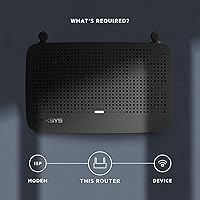
It is genuinely one of the easier routers to get up and running. You download the Linksys app, plug the router into your modem, and follow the step-by-step prompts — most people report being connected within ten to fifteen minutes. No browser configuration or technical knowledge required.

Probably not reliably. The coverage rating is designed for smaller, open-plan spaces, and a two-story home with multiple rooms and thick walls will likely produce dead spots. If your home is larger than around 1,200 sq. ft. or has multiple floors, you would be better served by a full mesh system with two or more nodes.

Yes, the Linksys MR6350 Dual-Band Mesh WiFi Router works as a standard wireless router connected to any ISP-provided modem or modem-router combo. Just make sure to put the ISP device into bridge mode if it also broadcasts WiFi, to avoid network conflicts.

WiFi 5 handles the majority of real-world tasks — 4K streaming, video calls, standard web browsing — without issue. If you plan to keep this router for five or more years, or you already own several WiFi 6 devices, it is worth considering the upgrade. For most households right now, WiFi 5 remains a practical and capable choice.

You can plug in an external hard drive to create a basic network-attached storage setup, letting everyone on your network access the files. It also supports sharing a USB printer across the network so multiple devices can print without a direct connection.

Parental controls are managed through the Linksys app and let you pause internet access for specific devices, set schedules, and restrict certain types of content. It is straightforward enough that a non-technical parent can configure it without needing to dig into complicated settings menus.

Yes, the guest network runs independently from your primary network, so guests can access the internet without being able to see or interact with your personal devices, shared drives, or smart home gadgets. It is a simple toggle to enable in the app.

Long-term feedback is generally positive, with many owners reporting consistent and stable performance over time. The most common issue that surfaces over longer ownership periods is occasional app instability during firmware updates rather than hardware problems with the router itself.

Yes, once you link the router to your Alexa account during setup, you can use voice commands to do things like pause Wi-Fi for specific devices or manage access without opening the app. The app is still needed for initial setup and more detailed configuration, but day-to-day controls work hands-free with Alexa.

Where to Buy