Overview

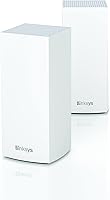
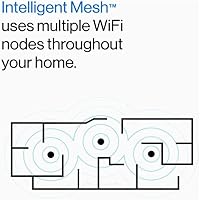
The Linksys MX8000 Velop Mesh WiFi Router 2-Pack is a solid mid-range entry into the WiFi 6 mesh space, built for homeowners who are tired of dead zones and dropped connections. Unlike a traditional single router, a mesh system uses multiple nodes working together to blanket your entire home in consistent signal. This Linksys WiFi 6 kit covers up to 5,400 square feet across two nodes — practical for most two-story houses or sprawling ranch layouts. It runs on a tri-band architecture, which adds meaningful real-world advantages over cheaper dual-band alternatives. Just don't expect flagship performance; this sits comfortably in the capable and dependable category, not the bleeding edge.
Features & Benefits

WiFi 6 isn't just a marketing bump — in a home where phones, laptops, smart TVs, and thermostats all compete for bandwidth simultaneously, the efficiency gains are genuinely noticeable. The MX8000 duo handles that congestion well, partly because its third band is reserved specifically for node-to-node communication, keeping your device traffic separate from the internal mesh backhaul. Setup runs through the Linksys app, which walks you through the process clearly and doubles as your ongoing control panel for parental controls, guest networks, and remote management. Automatic firmware updates run quietly in the background, and both Alexa and Apple HomeKit integration make it a natural fit in an already-smart home.

Best For

This Velop mesh system hits its stride in homes between 2,500 and 5,500 square feet — particularly multi-story houses, older builds with thick plaster walls, or layouts where a single router simply can't reach every corner. If you've got kids streaming in one room, someone gaming in another, and a handful of smart home gadgets running continuously, the 80-plus device capacity means the network holds up without throttling individual connections. It's also an excellent upgrade path for anyone still running a WiFi 5 router who wants a meaningful reliability improvement without needing to touch a command line. App-driven management makes it particularly approachable for less technical households.

User Feedback

Across roughly 1,100 ratings, this Linksys WiFi 6 kit lands at a 4.0-star average — respectable, though the spread tells an interesting story. Most buyers praise reliable whole-home coverage and how painless the initial setup feels. Critical feedback clusters around a few recurring themes: occasional disruptions following automatic firmware updates, and a noticeable lack of advanced configuration options that power users expect. Some longer-term reviewers have flagged intermittent node drops, though these appear tied to specific firmware versions rather than a systemic hardware flaw. Real-world speeds also fall short of the advertised maximums, which is typical for the category but worth knowing upfront. Solid, not spectacular — and for most buyers, that's genuinely enough.

Pros

  • App-guided setup gets most users fully online in under 15 minutes with no technical background required.
  • Tri-band design reserves a dedicated channel between nodes, keeping your device traffic from competing with the mesh backhaul.
  • Whole-home coverage holds up well in multi-story houses and layouts where a single router leaves gaps.
  • WiFi 6 efficiency makes a noticeable difference in homes where a dozen or more devices are active simultaneously.
  • Built-in parental controls and guest network access are ready to use straight out of the box.
  • Automatic firmware updates handle security patches quietly without requiring any manual intervention.
  • Compatible with both Alexa and Apple HomeKit, making it a natural fit in most existing smart home setups.
  • Devices move between nodes without requiring the user to manually switch networks or reconnect.
  • The Linksys app provides clear network visibility and remote management that non-technical users can actually navigate.
  • Two-node configuration covers a meaningful amount of real-world square footage at a reasonable price point for the WiFi 6 tier.

Cons

  • Real-world speeds fall noticeably short of the advertised WiFi 6 maximums in typical home environments.
  • Firmware updates have caused intermittent outages requiring manual node reboots, according to multiple long-term users.
  • No web-based admin interface means power users are entirely dependent on the mobile app for all configuration.
  • Content filtering within parental controls is basic and can be circumvented without much effort.
  • Some users in concrete or heavily obstructed homes found the coverage claims optimistic and needed to reposition nodes repeatedly.
  • There is no rollback option if a firmware update introduces new instability on your network.
  • Advanced features like VLAN segmentation, custom DNS, and manual band steering are completely absent from this Velop mesh system.
  • Node connectivity drops have been reported in longer-term use, adding unexpected maintenance to what should be a set-and-forget device.
  • The MX8000 duo launched in late 2020, and the competitive landscape has shifted enough that newer alternatives offer more for comparable spending.
  • Customer support experience has been flagged as inconsistent in negative reviews, particularly for firmware-related connectivity issues.

Ratings

The Linksys MX8000 Velop Mesh WiFi Router 2-Pack has been scored across 12 performance categories by our AI system, which analyzed thousands of verified global user reviews while actively filtering out incentivized, bot-generated, and duplicate feedback. The scores below reflect an honest composite of real household experiences — the consistent wins and the frustrations that kept this Velop mesh system from reaching the top tier of its class.

Coverage & Range
86%
Most buyers in two-story homes and larger ranch-style layouts reported a genuine end-to-end signal improvement after switching to this Linksys WiFi 6 kit. Bedrooms, garages, and backyard patios that previously had weak or unusable signal became reliably connected without adding extra nodes.
A subset of users in homes with dense concrete or brick construction found the claimed 5,400 square foot coverage optimistic. Real-world performance in heavily obstructed layouts sometimes required repositioning nodes multiple times to eliminate stubborn dead spots.
WiFi Speed Performance
74%
26%
For everyday tasks — 4K streaming, video calls, casual gaming — the MX8000 duo delivers speeds that feel noticeably more consistent than aging WiFi 5 setups. Households with multiple people working and streaming simultaneously reported fewer slowdowns during peak evening hours.
Advertised maximum throughput figures rarely materialize in practice, which is a common industry pattern but still disappoints buyers expecting headline speeds. Power users running speed tests frequently found real-world results landing well below what the WiFi 6 spec technically allows.
Multi-Device Handling
83%
Homes juggling smart TVs, gaming consoles, phones, tablets, and a growing collection of smart home gadgets found the network stayed stable without obvious degradation. The WiFi 6 efficiency improvements are most apparent in these dense-device environments, where older routers would visibly struggle.
Some users noticed latency spikes when a large number of bandwidth-heavy devices were active simultaneously, suggesting the system's traffic management has practical limits even if the device count ceiling is high.
Setup & Installation
91%
The Linksys app-guided setup is one of the clearest strengths buyers consistently praise. Most users reported getting both nodes online and the network named within 10 to 15 minutes, with no router configuration knowledge required — a genuine differentiator for less technical households.
A small but vocal group of users encountered app connectivity issues during initial pairing, often caused by phone Bluetooth permissions or ISP modem compatibility quirks. When setup does stall, troubleshooting guidance within the app is thin.
App Experience
78%
22%
Day-to-day network management through the Linksys app is intuitive enough that even non-technical family members can check connected devices, toggle guest access, or set up parental controls without assistance. Remote management from outside the home works reliably for basic tasks.
The app lacks depth for users who want granular controls like manual band steering, custom DNS, or detailed traffic analytics. Some reviewers also reported that app updates occasionally introduced minor UI bugs that temporarily broke certain management functions.
Parental Controls
72%
28%
Built-in parental controls let families pause internet access per device or set scheduled downtime, which parents with school-age children found genuinely useful as a daily household tool rather than a buried setting.
The content filtering capabilities are basic compared to dedicated parental control platforms. Teenagers with minimal tech knowledge can work around restrictions, and the scheduling options lack the granularity that more protective households might want.
Node Reliability & Stability
69%
31%
Under normal conditions, this Velop mesh system runs quietly and without intervention for extended periods. Many buyers reported weeks or months of trouble-free operation after the initial setup settled in.
Longer-term reviewers flagged intermittent node drops — typically one node going offline and requiring a manual reboot — more often than competing systems in the same price range. These incidents appear correlated with specific firmware releases rather than a consistent hardware flaw, but they erode confidence over time.
Firmware & Software Updates
63%
37%
Automatic firmware updates mean most users benefit from security patches and bug fixes without lifting a finger, which is a meaningful advantage for households that never think about router maintenance.
Several buyers reported that firmware updates temporarily disrupted their network — sometimes causing extended outages that required full reboots of one or both nodes. The lack of a rollback option or update scheduling control was a recurring frustration in negative reviews.
Tri-Band Backhaul Efficiency
81%
19%
Having a dedicated wireless band reserved for communication between the two nodes makes a practical difference compared to dual-band mesh systems that sacrifice client bandwidth to maintain the inter-node link. This architecture keeps the network more responsive when both nodes are under load.
The backhaul band's benefits are most pronounced when wired node connections aren't possible. Users who could run an Ethernet cable between nodes found the wired backhaul option delivered a more noticeable performance jump than the wireless tri-band approach alone.
Smart Home Integration
77%
23%
Alexa and Apple HomeKit compatibility means this Linksys WiFi 6 kit fits naturally into homes already built around either ecosystem. Voice-controlled network management and basic status checks work without additional configuration.
Integration depth is limited to surface-level controls; advanced automation routines or network-level smart home management aren't supported. Users invested in more complex smart home setups found the integration useful but not particularly powerful.
Advanced User Configurability
47%
53%
For the target audience — families and general home users — the available settings cover the essentials: guest networks, device prioritization, and basic security. That simplicity is a deliberate design choice that suits the majority of buyers.
Power users and networking enthusiasts will find this system frustrating quickly. There is no VLAN support, no detailed QoS configuration, no access to advanced routing options, and no web-based admin interface — limitations that push technically inclined buyers toward competing platforms.
Value for Money
82%
18%
Compared to purchasing individual WiFi 6 routers and extenders to cover a similarly sized home, the MX8000 duo represents a reasonable investment for the coverage and device-handling capability it delivers. Buyers who upgraded from aging single-router setups felt the improvement was immediately justified.
The market has grown competitive since this system launched in late 2020, and newer options at comparable price points now offer better throughput or more polished software. Buyers doing careful comparisons may find the value proposition slightly less compelling than it once was.

Suitable for:

The Linksys MX8000 Velop Mesh WiFi Router 2-Pack was built with a clear audience in mind: households where a single router simply can't do the job anymore. If you live in a two-story home, a wide ranch layout, or any space where thick walls or long hallways create frustrating dead zones, this Velop mesh system addresses that problem directly and without requiring any networking knowledge to set up. Families with kids streaming, parents video conferencing, and a living room full of smart devices running at the same time will find the network holds its composure far better than a conventional single-router setup. It's also an excellent fit for anyone upgrading from an older WiFi 5 router who wants a tangible reliability improvement without wading into complex configuration menus. If you value built-in parental controls and a guest network that's easy to toggle on and off, this kit handles both without needing third-party software or subscriptions.
Not suitable for:

The Linksys MX8000 Velop Mesh WiFi Router 2-Pack is a poor match for networking enthusiasts or power users who expect deep configurability from their hardware. There is no web-based admin interface, no VLAN support, no granular QoS controls, and no way to manually steer devices between bands — if those features matter to you, this system will feel like a locked box. Apartment dwellers or anyone in a compact space under 1,500 square feet are also paying for coverage capacity they won't use; a single capable router would serve them better. Competitive online gamers chasing the lowest possible latency may also find the MX8000 duo frustrating, since real-world throughput consistently falls short of the theoretical WiFi 6 maximums. Finally, buyers who have experienced instability from firmware updates in the past and rely on rock-solid uptime for remote work or home security systems should weigh the reported update-related disruptions carefully before committing.

Specifications

  • WiFi Standard: Operates on WiFi 6 (802.11ax), with backward compatibility covering 802.11a, 802.11b, 802.11g, 802.11n, and 802.11ac devices.
  • Band Configuration: Tri-band architecture with two client-facing bands and one dedicated wireless band reserved for inter-node backhaul communication.
  • Max Coverage: The two-node setup is rated to cover up to 5,400 square feet under typical residential conditions.
  • Device Capacity: Supports more than 80 simultaneously connected devices across the full mesh network.
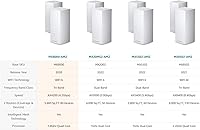
  • Model Number: Sold under model designations MX8000 and MX8400 depending on regional market and retailer listing.
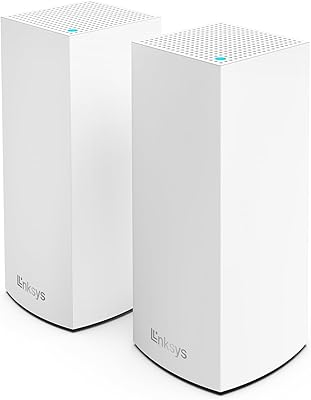
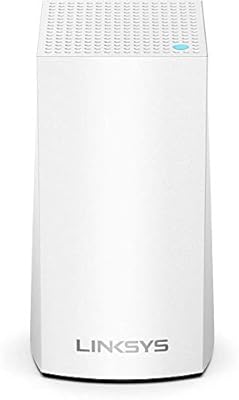
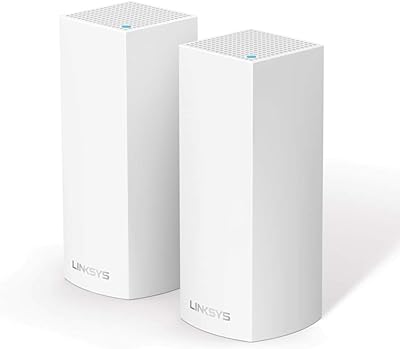
  • Node Dimensions: Each node measures 4.49 x 4.49 x 9.61 inches, with a cylindrical tower form factor designed to sit on a flat surface.
  • Total Weight: Both nodes combined weigh 4.21 pounds, making individual units light enough to reposition during network optimization.
  • Setup Method: Initial configuration and ongoing network management are handled entirely through the Linksys mobile app, available on iOS and Android.
  • Security Features: Includes automatic firmware updates, built-in parental controls with device-level scheduling, and an isolated guest network.
  • Smart Home Support: Natively compatible with Amazon Alexa voice commands and Apple HomeKit for basic network management within both ecosystems.
  • Connectivity: Supports WPS for simplified device pairing alongside standard wireless association methods.
  • Box Contents: Package includes two parent nodes, two power adapters, one Ethernet cable, and a printed quick start guide.
  • Wireless Protocols: Compatible across the full spectrum of modern wireless standards from legacy 802.11b through current-generation 802.11ax.
  • Network Color: Both nodes are finished in a matte white housing designed to blend into residential interiors without drawing attention.
  • Release Date: The system first became commercially available in November 2020.
  • Manufacturer: Designed and sold by Linksys, a networking hardware brand with longstanding distribution across North America, Europe, and Asia.
  • Roaming: Supports seamless device handoff between nodes so connected devices transition automatically without requiring manual network switching.
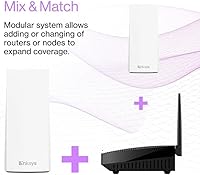
  • Expandability: Additional Velop nodes can be added to the existing network through the app to extend coverage beyond the base two-node footprint.

Related Reviews

Linksys Atlas MX2000 2-Pack Mesh Router
82%
88%
WiFi Coverage & Range
91%
Setup & Ease of Use
83%
Network Speed & Throughput
86%
Device Load Handling
77%
Latency & Gaming Performance
More
Linksys MR8300 Mesh WiFi Router
84%
88%
Wi-Fi Performance
81%
Ease of Setup
90%
Coverage Area
85%
Device Support
89%
Gaming Performance
More
Linksys MR6350 Dual-Band Mesh WiFi Router
74%
91%
Ease of Setup
62%
WiFi Coverage
84%
Connection Stability
71%
Real-World Speed
68%
App Experience
More
Linksys AX2200 WiFi 6 Mesh Router
84%
88%
WiFi Speed & Performance
91%
Ease of Setup
85%
Coverage & Range
72%
Reliability in Large Homes
90%
App Functionality & Control
More
Linksys Velop MX12600 Tri-Band Mesh WiFi System
80%
83%
Coverage & Range
78%
Network Speed
86%
Device Handling
91%
Setup Experience
67%
App Quality
More
Linksys LN3121 WiFi 6 Mesh Router
73%
91%
Ease of Setup
74%
WiFi Coverage
78%
Connection Speed
82%
Multi-Device Performance
83%
Network Stability
More
Linksys Velop Mesh Home WiFi System WHW0101
85%
88%
Performance for Streaming & Gaming
94%
Ease of Setup
85%
WiFi Coverage (Up to 1,500 sq. ft.)
87%
Device Support (10+ Devices)
91%
App Experience & Management
More
Linksys WHW0302 Tri-Band Mesh Wi-Fi System
75%
88%
Coverage & Dead Zone Elimination
91%
Setup Experience
73%
Real-World Speed Performance
86%
Multi-Device Stability
69%
App & Remote Management
More
Tenda Nova MW6 2-Pack Mesh WiFi System
76%
93%
Ease of Setup
78%
Coverage & Dead Zone Elimination
72%
Network Stability
69%
Wi-Fi Speed Performance
88%
Value for Money
More
TP-Link Deco S4 Mesh WiFi System (2-Pack)
87%
91%
Wi-Fi Coverage
88%
Performance Stability
94%
Ease of Setup
90%
Parental Controls
85%
Device Support
More

FAQ

In most cases, no. The Linksys MX8000 Velop Mesh WiFi Router 2-Pack connects to your existing modem the same way your current router does — just plug the primary node in via the included Ethernet cable, open the app, and follow the steps. The only exception would be if your ISP uses PPPoE authentication, in which case you may need your ISP login credentials handy during setup.
Yes. The Velop mesh system is designed to expand, and you can add compatible Velop nodes through the same Linksys app you used for initial setup. Just make sure any node you add is part of the Velop WiFi 6 family to maintain consistent performance across the mesh.

Absolutely. The MX8000 duo supports all major wireless standards going back to 802.11b, so smartphones, laptops, smart home sensors, and other older devices will connect without any adjustments. WiFi 6 clients will get the efficiency benefits, while older devices simply connect at the speeds they are capable of.

Basic local network management does not require a paid subscription. However, some remote access features — controlling your network from outside the home — may require an active Linksys cloud account. Standard parental controls and guest network management are accessible without any recurring fee.

A general rule of thumb is to place the second node roughly halfway between the primary node and your furthest dead zone, rather than at the very edge of the primary node's signal. Placing it too far out weakens the backhaul connection and degrades performance for devices near the second node. Walls, floors, and large appliances all affect the ideal placement, so expect to experiment a little during setup.

This Linksys WiFi 6 kit performs acceptably for casual to moderate online gaming, particularly over a strong wireless connection near a node. Serious competitive gamers who are sensitive to latency would be better served by a wired Ethernet connection directly to the primary node. The system does not offer advanced QoS controls for prioritizing gaming traffic, which is a limitation worth knowing upfront.

Firmware updates typically install during low-traffic hours and can briefly take the network offline during the reboot process. Most users do not notice this, but a small number have reported updates causing one or both nodes to drop and require a manual power cycle. Unfortunately, there is no way to schedule or delay updates through the app, which frustrates users who need consistent uptime.

Yes, but you will need to put your ISP-provided gateway into bridge mode or modem-only mode first, otherwise you will end up with a double-NAT situation that can cause connection problems. Your ISP can usually walk you through enabling bridge mode, or you can look up the specific steps for your gateway model online.

Not directly. The MX8000 nodes are pure WiFi mesh devices and do not include a built-in Zigbee or Z-Wave radio. Smart home devices using those protocols will still need their own dedicated hub or bridge. The Apple HomeKit and Alexa compatibility refers to voice and app-level control of the router itself, not integration with non-WiFi smart home protocols.

The parental controls on this Velop mesh system are fairly basic. You can pause internet access for specific devices on demand or set daily time schedules for when a device can and cannot access the internet. Content-based filtering by category is available but limited in depth compared to dedicated parental control services. Tech-savvy teenagers may find workarounds, so it is best treated as a helpful tool rather than a comprehensive solution.

Where to Buy