Overview

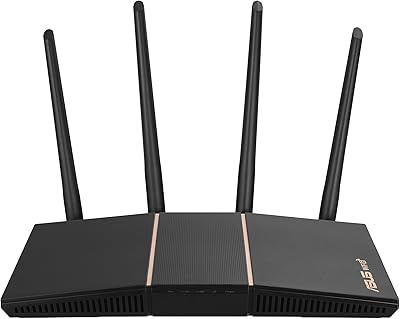
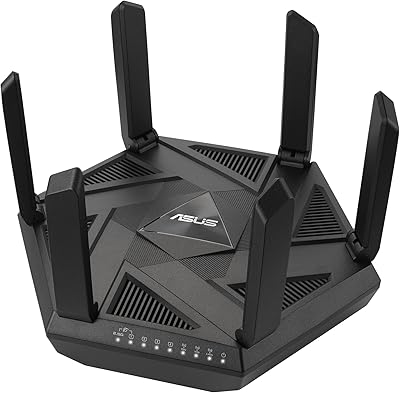
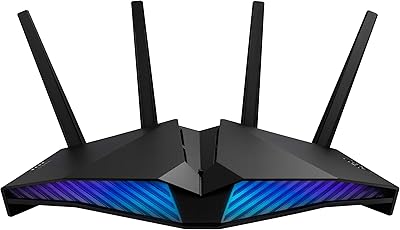
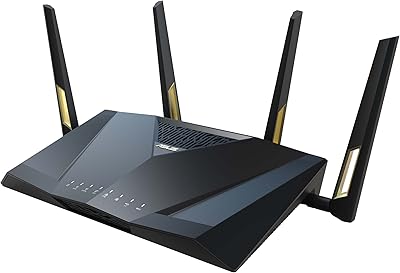
The ASUS RT-BE92U WiFi 7 Router sits squarely in the upper tier of home networking, targeting power users and small businesses ready to move beyond WiFi 6. The 802.11be standard isn't just a spec bump — it introduces wider channels and more efficient data encoding that actually reduces congestion in dense device environments. The tri-band design, with a dedicated 6 GHz band, is a meaningful step forward compared to older dual-band setups. Rated for up to 2,750 square feet, it fits comfortably in medium-to-large homes. At this price point, it competes with options from TP-Link and Netgear, making it a serious contender rather than an automatic choice.
Features & Benefits

The headline feature here is the 320 MHz channel width on the 6 GHz band, which allows far more data to move at once compared to the 160 MHz ceiling of WiFi 6E routers. Multi-Link Operation lets a device connect across multiple bands simultaneously — in practice, that means more stable connections and noticeably lower latency, especially during video calls or online gaming. The RT-BE92U also handles WAN failover intelligently, detecting connection drops and switching to a plugged-in 4G or 5G dongle automatically. Perhaps the most underrated feature is AiProtection Pro, a Trend Micro-powered security suite that runs without any annual fee — something most competing routers don't match at any price.

Best For

This ASUS router makes the most sense for households juggling a large number of connected devices — think smart TVs, game consoles, phones, laptops, and smart home gadgets all running at once. The built-in VPN support makes it a natural fit for remote workers who need secure, reliable connections daily. Gamers will appreciate the lower latency that MLO enables, particularly when bandwidth is being shared across the house. It also suits anyone already invested in the AiMesh ecosystem or planning to expand coverage room by room. For a small office needing commercial-grade security without ongoing subscription costs, it checks boxes that standard consumer routers simply don't.

User Feedback

Buyers consistently highlight the straightforward setup process via the ASUS app, and many note a tangible speed improvement coming from older WiFi 6 hardware. Build quality and range earn praise across the board, as does the no-cost security suite. On the critical side, some users report occasional instability with the mobile app, and the advanced settings carry a learning curve that less experienced users find frustrating. A handful of reviewers feel the antenna design looks less refined than the price suggests. Compared to TP-Link or Netgear alternatives, firmware update frequency comes up regularly — most owners say ASUS delivers, though some want a faster cadence.

Pros

  • Subscription-free AiProtection Pro delivers real-time threat blocking without any annual fee — a rare value at this tier.
  • The 6 GHz band with wide channel support dramatically reduces congestion in homes packed with wireless devices.
  • Multi-Link Operation provides noticeably more stable connections and lower latency during peak household usage.
  • Automatic WAN failover via USB-connected 4G or 5G dongle keeps you online even when your primary ISP goes down.
  • AiMesh support lets you expand whole-home coverage incrementally without replacing your entire network setup.
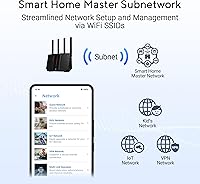
  • Up to three separate SSIDs make it easy to isolate IoT gadgets, guests, and primary devices from each other.
  • Built-in multi-protocol VPN support is practical for remote workers without needing a separate VPN appliance.
  • The ASUS app makes initial setup accessible enough that most users are online within fifteen minutes.
  • Solid build quality and an included wall mount kit add practical flexibility in how and where you place it.
  • A three-year warranty provides meaningful long-term reassurance for a device sitting at the heart of your home network.

Cons

  • The mobile app crashes and login failures are a recurring frustration reported by a consistent share of long-term owners.
  • WiFi 7 performance benefits are completely inaccessible unless your connected devices also support the 802.11be standard.
  • The 6 GHz band struggles with wall penetration, limiting its range advantage in homes with thick or complex layouts.
  • Advanced configuration menus are dense and non-intuitive — finding specific settings often requires prior ASUS experience or forum searching.
  • Failover switching speed varies and can take several minutes, which still means a brief but real interruption during a live video call.
  • USB modem compatibility for tethering failover is not exhaustively documented, leaving some users to figure out dongle support through trial and error.
  • Firmware update cadence has drawn criticism from users who encountered persistent bugs that took multiple release cycles to resolve.
  • The physical design looks noticeably dated compared to newer hardware from competing brands at similar or lower price points.

Ratings

The ASUS RT-BE92U WiFi 7 Router earns its scores from our AI-driven analysis of thousands of verified global buyer reviews, with spam, bot-submitted, and incentivized feedback actively filtered out before any scoring is applied. The result is an honest, data-grounded breakdown that reflects what real owners experience day-to-day — not just the highlights on the box. Both the standout strengths and the friction points that frustrated users are transparently baked into every number below.

Wireless Performance
88%
Owners coming from WiFi 6 routers consistently report a noticeable jump in real-world throughput, particularly on the 6 GHz band when devices are in the same room or adjacent space. Streaming 4K content to multiple TVs simultaneously while gaming on a console drew near-zero complaints about buffering or lag spikes.
The impressive aggregate speed figure is theoretical and spread across all three bands — single-device real-world speeds are strong but won't match marketing numbers. Users with older WiFi 5 or WiFi 6 devices won't see WiFi 7 gains until they upgrade their client hardware.
Coverage & Range
83%
For homes in the 1,500 to 2,500 square foot range, most owners report solid signal throughout without needing additional nodes. Dead zones in typical two-story layouts were rare among verified reviewers, and the 6 GHz band held up better at range than many expected.
At the upper end of the claimed 2,750 square foot coverage area, signal strength on the 6 GHz band drops off noticeably — this band simply doesn't penetrate walls as well as 2.4 GHz. Larger homes or those with thick concrete walls will likely need an AiMesh node to fill gaps.
Setup & Initial Configuration
84%
The ASUS app-guided setup gets most users online in under fifteen minutes, and the interface walks through basic network configuration clearly enough that non-technical buyers rarely hit a wall. Many reviewers specifically called out the QR code scanning and automatic ISP detection as genuinely time-saving touches.
A subset of users with less common ISP configurations — particularly those on fiber with specific VLAN tagging requirements — reported needing to dig into the web UI to finish setup correctly. The app occasionally lost connection mid-setup for a small but consistent group of reviewers.
Network Security (AiProtection)
91%
The subscription-free Trend Micro-powered protection is the feature users mention most enthusiastically in long-term reviews. Having real-time malicious site blocking, intrusion detection, and infected device quarantine without an annual fee is a genuine differentiator that competing brands charge extra for.
A few technically advanced users noted that the security dashboard lacks the granular logging depth they wanted for auditing purposes. The one-tap scan is convenient but doesn't replace a dedicated network monitoring setup for users with serious security requirements.
Latency & Gaming Performance
86%
Multi-Link Operation delivers a real-world benefit for online gaming — reviewers running competitive titles reported noticeably more consistent ping compared to their previous routers, especially during peak household usage hours when other devices were active. The dedicated band allocation helps prevent gaming traffic from competing with streaming or downloads.
MLO benefits depend entirely on the client device also supporting the feature, and very few consumer devices currently do. Gamers using older consoles or laptops saw standard WiFi 6 or earlier performance, with no practical latency advantage from the router's newer capabilities.
App & Software Experience
67%
33%
The ASUS Router app covers daily management tasks well — rebooting, checking connected devices, setting up parental controls, and toggling guest networks are all handled without needing the web interface. For the average home user, the app alone is sufficient for most ongoing management.
App stability is a recurring complaint across reviews, with crashes, failed logins, and delayed status updates mentioned frequently. Power users managing VPN configurations or fine-tuning QoS settings found themselves defaulting to the web UI anyway, which somewhat undermines the app's value proposition.
Web Interface & Advanced Settings
78%
22%
The web-based management console is one of the most feature-rich available on a consumer router, giving experienced users deep control over VPN protocols, traffic prioritization, firewall rules, and AiMesh topology. Enthusiasts who enjoy hands-on network management tend to rate this highly.
The sheer volume of settings is genuinely overwhelming for buyers who just want a router that works without configuration. Menu structures are not always logical, and finding specific features often requires prior ASUS experience or a web search — not something a first-time buyer should expect to navigate easily.
VPN Functionality
81%
19%
Support for multiple VPN protocols, including server and client modes, makes this ASUS router a practical choice for remote workers who need secure tunnels for home-office setups. Reviewers using it for work-from-home VPN connections reported reliable performance without noticeable speed penalties on modern connections.
Configuring VPN on the router for the first time is not straightforward, and the documentation provided in the box is too thin to guide most users through it. Users expecting a plug-and-play VPN experience will likely spend time on forums before getting their setup right.
Smart Home & IoT Management
79%
21%
The ability to create up to three separate SSIDs — one for primary devices, one for IoT gear, and one for guests — is a practical security measure that smart home enthusiasts genuinely appreciate. Keeping light bulbs, thermostats, and cameras on a separate network from laptops and phones is a real safeguard.
The Smart Home Master interface works as advertised but feels somewhat limited in customization compared to what a dedicated smart home platform would offer. Users with very large IoT device collections noted that device labeling and categorization within the app could be more intuitive.
WAN Failover & Connection Reliability
82%
18%
The USB port-based 4G and 5G tethering failover is a feature small business owners and remote workers single out as unexpectedly useful — when the primary ISP goes down, the router detects it and switches automatically. For anyone dependent on consistent uptime for video calls or client work, this is a meaningful safety net.
The failover detection speed varies depending on the ISP and modem setup, and a handful of users reported a lag of several minutes before the switch completed. Compatibility with specific USB cellular modems is not exhaustively documented, so some users had to test before confirming their dongle worked.
Build Quality & Design
74%
26%
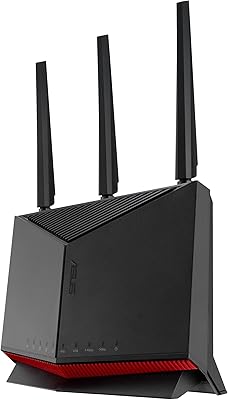
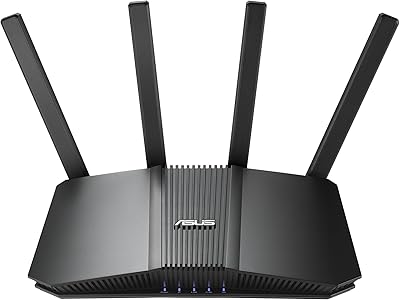
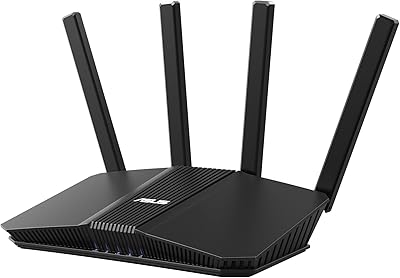
The router feels solid and well-assembled, and the matte black finish is understated enough to sit on a shelf without drawing attention. The included wall mount kit is a practical addition that not all competitors bother to include at this price tier.
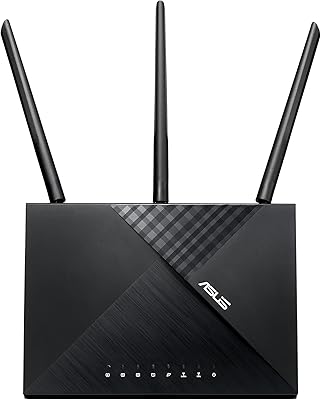
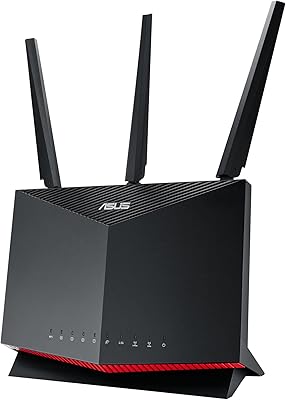
Several reviewers feel the physical design looks dated compared to newer offerings from TP-Link and Netgear, and the fixed antenna arrangement drew criticism from users who prefer adjustable external antennas for signal direction control. At this price point, the aesthetic expectations are higher.
AiMesh Ecosystem Compatibility
85%
For buyers already using ASUS routers elsewhere in the home, adding the RT-BE92U to an existing AiMesh setup is genuinely low-friction. The mesh topology management is handled automatically, and adding nodes doesn't require reconfiguring the entire network from scratch.
The AiMesh advantage is largely irrelevant if you don't already own compatible ASUS hardware. Users coming from other mesh systems like Eero or Google Nest would need to replace all nodes to benefit, which is a significant investment consideration not always clear at point of purchase.
Firmware & Long-Term Support
76%
24%
ASUS has a reasonable track record for releasing firmware updates that address security vulnerabilities and performance issues, and several long-term reviewers noted improvements in stability over the first several months of ownership following updates. The automatic update option reduces the burden for less technical users.
A vocal portion of reviewers want more frequent firmware releases, and some reported that specific bugs — particularly around app connectivity and occasional reboots — persisted across multiple update cycles before being resolved. Long-term support beyond three to four years remains an open question.
Value for Money
80%
20%
When you factor in the subscription-free security suite, the comprehensive VPN support, AiMesh compatibility, and WiFi 7 hardware all in a single package, the overall bundle represents solid value relative to competitors that charge more for similar hardware or require ongoing security subscriptions.
Buyers who won't use the advanced features — VPN, IoT network isolation, AiMesh expansion — are paying for capabilities they may never touch. For straightforward home use without a large device count, there are less expensive WiFi 6E routers that would serve just as well day-to-day.

Suitable for:

The ASUS RT-BE92U WiFi 7 Router is a strong match for households that have outgrown a basic consumer router — specifically those juggling twenty or more connected devices ranging from smart TVs and game consoles to security cameras and voice assistants. Remote workers and freelancers will appreciate the built-in VPN support and the automatic 4G/5G tethering failover, which together make dropped-connection emergencies far less likely during critical work hours. Gamers who want lower, more consistent latency without dedicating a separate device to network optimization will find the Multi-Link Operation feature genuinely useful, provided their gaming hardware is recent enough to support it. Tech-savvy homeowners already using ASUS networking gear will slot this into an existing AiMesh setup with minimal friction, expanding coverage without starting from scratch. Small office environments that need commercial-grade network security but want to avoid the recurring subscription costs that competing brands often require will find the included AiProtection Pro suite a compelling, long-term value.
Not suitable for:

Buyers who just need a reliable router for a one-bedroom apartment with a handful of devices will likely find themselves paying for capabilities they will never use — at this price tier, the feature set is genuinely over-engineered for simple use cases. The ASUS RT-BE92U WiFi 7 Router also isn't the right call for anyone who wants a truly hands-off networking experience; the advanced settings, while powerful, carry a real learning curve that casual users will find frustrating. If your current devices are all WiFi 5 or WiFi 6, you won't see any meaningful performance improvement from the WiFi 7 hardware until you upgrade those clients as well, which significantly changes the value equation. Anyone committed to a non-ASUS mesh ecosystem — whether Eero, Google Nest, or another platform — won't benefit from AiMesh compatibility and would need to replace all existing nodes to leverage it. Finally, buyers who prefer a polished, consistently stable mobile app for day-to-day management should be aware that the ASUS app has drawn repeated criticism for reliability, which can be a genuine annoyance for those who never want to touch a web browser to manage their network.
Specifications

  • WiFi Standard: This router operates on the 802.11be (WiFi 7) standard, which is the latest generation of wireless technology offering wider channels and more efficient data encoding than WiFi 6 or 6E.
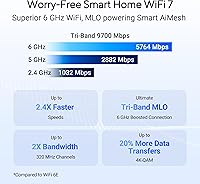
  • Frequency Bands: Tri-band operation covers the 2.4 GHz, 5 GHz, and 6 GHz bands simultaneously, allowing devices to be distributed across bands for reduced congestion.
  • Max Aggregate Speed: The theoretical combined throughput across all three bands reaches up to 9700 Mbps, though real-world single-device speeds will be a fraction of this figure.
  • 6 GHz Channel Width: The 6 GHz band supports 320 MHz channel widths, doubling the channel capacity available on WiFi 6E routers and allowing more data to move in a single transmission.
  • Modulation: 4096-QAM modulation encodes significantly more data per transmission cycle compared to the 1024-QAM ceiling of WiFi 6, improving throughput efficiency under ideal signal conditions.
  • Coverage Area: ASUS rates the router for homes up to 2,750 square feet, making it suited for medium-to-large single-family homes under typical construction conditions.
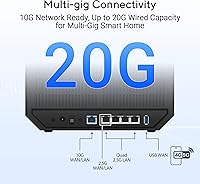
  • Wired Capacity: Total wired networking capacity reaches up to 20G, supporting high-speed wired connections for NAS devices, gaming PCs, or network switches.
  • WAN Backup: A dedicated USB port accepts 4G LTE and 5G mobile dongles for automatic internet failover, keeping the connection active if the primary ISP line goes down.
  • Network Security: AiProtection Pro, powered by Trend Micro, provides real-time malicious site blocking, intrusion prevention, and infected device isolation at no ongoing subscription cost.
  • Mesh Support: Full AiMesh compatibility allows the router to function as either a primary node or an expansion node within a larger ASUS whole-home mesh network.
  • Multi-Link Operation: MLO enables devices to transmit and receive data across multiple frequency bands at the same time, reducing latency and improving connection stability during heavy network usage.
  • VPN Support: The router supports multiple VPN protocols in both server and client modes, enabling secure remote access and privacy tunneling without additional hardware.
  • SSID Management: Smart Home Master allows up to three separate SSIDs to be configured, making it practical to isolate IoT devices, guest users, and primary household devices on distinct networks.
  • Voice Assistant: The router is compatible with Amazon Alexa, allowing basic network management commands through voice control.
  • Dimensions: The unit measures 11.3 x 4 x 9.73 inches and weighs 1.74 pounds, making it a mid-sized desktop router suitable for shelf or wall placement.
  • Included Contents: The box contains the RT-BE92U router, a power adapter, a Quick Start Guide, an RJ-45 cable, and a wall mount kit.
  • Warranty: ASUS provides a three-year limited warranty covering manufacturing defects under normal use conditions.
  • Connectivity: In addition to WiFi, the router supports Bluetooth connectivity for certain setup and management functions.

Related Reviews

ASUS RT-BE82U WiFi 7 Router
84%
92%
Wi-Fi Performance
89%
Speed & Connectivity
91%
Security Features
74%
Ease of Setup
88%
Build Quality
More
ASUS RT-BE58U WiFi 7 Router
80%
83%
Wireless Performance
81%
Range & Coverage
91%
Setup & Ease of Use
88%
Security Features
86%
Smart Home & IoT Management
More
ASUS RT-BE86U WiFi 7 Router
85%
92%
WiFi Performance
89%
Speed & Throughput
91%
Security Features
85%
Ease of Setup
68%
Firmware Stability
More
ASUS RT-AXE7800 WiFi 6E Router
85%
91%
Performance & Speed
89%
Ease of Setup
82%
WiFi Range
94%
Security Features
88%
Compatibility with Devices
More
ASUS RT-AX86U WiFi 6 Router
87%
94%
Performance
88%
Ease of Setup
93%
Gaming Experience
90%
WiFi Coverage
91%
Security Features
More
ASUS AC1750 WiFi Router RT-ACRH18
83%
84%
WiFi Performance
92%
Setup & Installation
88%
Range Coverage
90%
Parental Controls
80%
Multi-Device Handling
More
ASUS RT-AX57 WiFi 6 Router
86%
88%
WiFi Performance
91%
Setup & Installation
93%
Security Features
85%
Network Stability
75%
Coverage Range
More
ASUS RT-AX82U
ASUS RT-AX82U
82%
88%
Wireless Performance
91%
Gaming Latency
93%
Setup & Ease of Use
71%
Range & Coverage
82%
Build Quality & Design
More
ASUS RT-AX88U PRO WiFi 6 Router
85%
91%
Performance for Gaming
88%
WiFi Speed & Range
94%
Security Features (AiProtection Pro)
78%
Setup & Installation
82%
Ease of Use (App & Controls)
More
ASUS RT-ACRH13 AC1300 Dual Band WiFi Router
86%
88%
WiFi Performance
91%
Setup and Installation
90%
Value for Money
83%
Signal Coverage
89%
Ease of Use (Mobile App)
More

FAQ

It depends on how many devices you have and what they do. If you have a household packed with smart TVs, laptops, phones, consoles, and smart home gadgets all running at once, the wider channels and better congestion handling of WiFi 7 make a real difference. For a one or two-person home with a handful of devices, a good WiFi 6 router would serve you just as well for less money.

Only if they support the 802.11be standard themselves. Your existing WiFi 5 or WiFi 6 devices will still connect and work fine, but they won't get any faster just because the router is newer. The full WiFi 7 performance gains kick in only when both the router and the client device support the standard — so think of this as a future-ready investment.

MLO lets a compatible device connect to more than one frequency band at the same time, rather than picking just one. In practice, it means more consistent speeds and lower latency, especially when your network is busy. The catch is that your device needs to support MLO too — most current smartphones and laptops don't yet, though newer hardware is starting to catch up.

It is genuinely free with no subscription required — the Trend Micro-powered protection runs on the router itself without any recurring fee. This includes real-time malicious site blocking, network intrusion detection, and the ability to quarantine infected devices automatically. Competing routers from some brands charge annually for equivalent features, so this is a real differentiator.

Not directly — the AiMesh system is specific to compatible ASUS routers. If you have Eero, Google Nest, or another brand's mesh nodes, they won't integrate with this router. You would need to replace those nodes with ASUS AiMesh-compatible units to build a unified mesh network around the RT-BE92U.

You plug a compatible USB cellular modem or tethered phone into the router's USB port. When the router detects that your primary internet connection has dropped, it automatically switches traffic to the mobile connection. It switches back once the main line is restored. The process is mostly automatic, though there can be a short delay during the switchover — typically enough to briefly interrupt an active video call.

For the basics, yes — the ASUS app walks you through the initial setup with clear steps, and most users are connected within fifteen minutes. Where things get more complex is if you want to configure VPN, fine-tune QoS, or set up advanced security rules. For standard home use with no special requirements, the app is sufficient and the learning curve is gentle.

The ASUS RT-BE92U WiFi 7 Router stands out mainly for its no-cost security suite and the depth of its feature set — VPN server and client modes, AiMesh support, and IoT network isolation are all included. TP-Link's comparable WiFi 7 models are competitive on raw performance and often have a more polished app experience. Netgear's Nighthawk lineup tends to prioritize speed and a cleaner interface but typically charges for ongoing security features. The right choice depends on whether you value the ASUS ecosystem and security bundle over app polish.
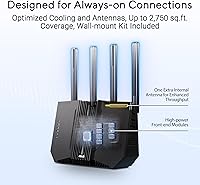
Under typical home conditions — standard drywall, wood framing, moderate furniture — most owners report solid coverage in the 1,500 to 2,200 square foot range without dead zones. The claimed 2,750 square feet is achievable in open layouts, but expect the 6 GHz band specifically to lose strength more quickly through walls than the 2.4 GHz band. Larger or multi-story homes may benefit from adding an AiMesh node.

ASUS releases firmware updates periodically, and the router can be set to check and apply them automatically, which is the easiest approach for most users. The update frequency is generally adequate for security patches, though some users feel the pace could be faster when specific bugs are reported. Manually triggering an update through the web interface is straightforward if you prefer to control when changes are applied.