


Overview

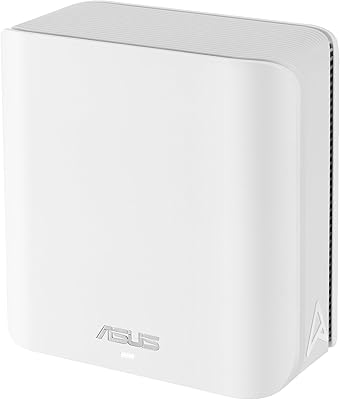
The ASUS ZenWiFi BT8 WiFi 7 Mesh Router is ASUS's answer to the growing demand for next-generation home networking in a single, approachable node. Released in early 2025, it represents a meaningful step beyond WiFi 6E — not just faster theoretical speeds, but smarter band management and lower latency across more connected devices. The 3,000 sq. ft. coverage claim is plausible for open, single-floor homes, though real-world results vary. With a 3.7 out of 5 from over 150 buyers, this is a router worth examining honestly. The feature set is strong for a mid-to-premium purchase, but early-adopter caveats apply.

Features & Benefits

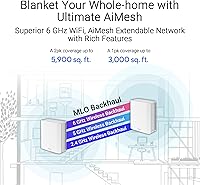
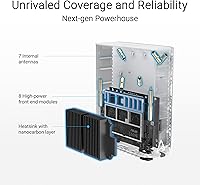
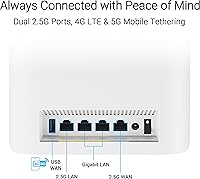
The headline spec is tri-band WiFi 7, which means the BT8 operates across three frequency bands simultaneously — including the less congested 6 GHz channel capable of pushing well over 8,600 Mbps under ideal conditions. What makes WiFi 7 genuinely different is Multi-Link Operation, which lets devices bond multiple bands at once, reducing dropped packets and jitter during video calls or gaming sessions. Seven internal antennas and eight high-power front-end modules help the signal reach further without the usual dead-zone frustration. The dual 2.5G Ethernet ports are a highlight — useful for wired backhaul or plugging in a NAS. AiProtection Pro handles network security at a commercial level with no recurring fee attached, and USB-based 4G/5G tethering provides a real backup internet option if your ISP goes down.

Best For

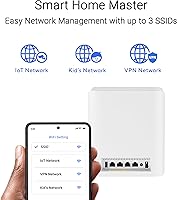
This ZenWiFi mesh node fits best in a specific kind of home — one with an open floor plan, roughly 2,000 to 3,000 square feet, where a single well-placed node can reach every corner. It's a natural fit for early WiFi 7 adopters who've already upgraded their phones, laptops, or gaming rigs to support the new standard; without compatible devices, the speed gains are limited. Remote workers will appreciate the built-in VPN support and the security layer that doesn't require a separate subscription. Existing ASUS router households can fold the BT8 into an AiMesh setup without scrapping working hardware. Families managing kids and smart home gadgets will find the Smart Home Master SSIDs and parental controls genuinely useful day to day.

User Feedback

Buyers who've lived with the BT8 for a few months tell a nuanced story. Setup is consistently praised as fast and straightforward, and those upgrading from older routers report a noticeable real-world speed difference. The dual 2.5G ports earn repeated mentions as a standout at this price tier. That said, the 3.7 rating reflects some legitimate friction: firmware updates have caused connectivity drops for a portion of users, and the ASUS Router app, while feature-rich, has drawn complaints about occasional crashes and inconsistency. A few buyers in larger, multi-story homes found single-node coverage lacking. These are patterns you'd expect from a product still early in its lifecycle — but they're worth factoring in before buying.

Pros

  • WiFi 7 with Multi-Link Operation reduces latency noticeably during gaming and video calls compared to older standards.
  • Dual 2.5G Ethernet ports stand out at this price tier, supporting fast wired backhaul or a high-speed NAS connection.
  • AiProtection Pro delivers commercial-grade network security with no recurring subscription cost.
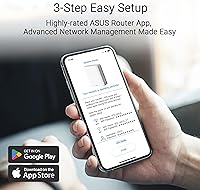
  • Setup is fast and approachable — most buyers report being online within minutes of unboxing.
  • 4G and 5G USB tethering provides a genuine internet failover option when your ISP goes down.
  • The BT8 integrates into existing ASUS AiMesh networks, letting you expand coverage without scrapping current hardware.
  • Smart Home Master SSIDs make it easy to separate IoT devices and apply parental controls without diving into complex settings.
  • The 6 GHz band offers a noticeably less congested channel for compatible devices in dense wireless environments.

Cons

  • Firmware updates have caused connectivity drops for a portion of users, which is a real reliability concern.
  • Single-node coverage can fall short in multi-story homes or layouts with thick interior walls.
  • The ASUS Router app, while feature-rich, has a history of crashing or behaving inconsistently for some users.
  • WiFi 7 speed gains are only realized with compatible client devices — most households won't see the full benefit yet.
  • At a mid-to-premium price point, buying a second node to fix coverage gaps adds up quickly.
  • The 3.7 out of 5 average rating suggests a meaningful portion of buyers have encountered issues beyond minor complaints.
  • No wired WAN port beyond the 2.5G options, which may limit flexibility for users with specific ISP equipment.
  • USB dongle tethering, while useful, requires sourcing a compatible modem separately — it is not included in the box.

Ratings

The ASUS ZenWiFi BT8 WiFi 7 Mesh Router scores here reflect AI analysis of verified global buyer reviews, with spam, incentivized, and bot-flagged submissions actively filtered out before scoring. Ratings are derived from patterns across hundreds of real ownership experiences, balancing genuine praise against documented pain points without smoothing over either. Where the BT8 earns strong marks, it earns them; where it struggles, those friction points are reflected honestly in the numbers below.

Wireless Performance
83%
Buyers upgrading from WiFi 6 routers consistently describe a tangible improvement in throughput, particularly in households with multiple simultaneous streams. The 6 GHz band, when accessed by compatible devices, handles 4K streaming and large file transfers without the stuttering that plagued older hardware.
The headline 14 Gbps aggregate figure is a laboratory ceiling that most real-world homes will never approach. Users with predominantly WiFi 5 or WiFi 6 devices report underwhelming speed gains, since the biggest improvements are gated behind WiFi 7-compatible hardware that many households don't yet own.
Coverage & Range
71%
29%
In open single-story homes around 2,000 square feet, the BT8 handles coverage reliably with consistent signal quality across rooms. The seven internal antennas and front-end modules do a credible job pushing signal into corners that cheaper single-node routers typically miss.
Multi-story homes and layouts with dense walls expose the limits of a single node at this size. A meaningful portion of reviewers in larger or more complex floor plans report dead zones, and the 3,000 sq. ft. claim reads as optimistic for anything other than an ideal open layout.
Firmware Reliability
54%
46%
When the firmware is stable, day-to-day performance is consistent and the router requires very little intervention. Several users noted weeks of trouble-free operation between updates, which speaks to the underlying hardware being sound.
Firmware updates have been the single most cited source of frustration among buyers, with a recurring pattern of connectivity drops appearing shortly after patches are applied. The issue is documented enough across reviews that cautious users now wait for community confirmation before applying any new firmware release.
Setup Experience
88%
The guided setup through the ASUS Router app is one of the more praised aspects of owning this router, with most buyers reporting they were fully connected in under fifteen minutes. Even users with limited networking experience found the initial configuration approachable and clearly explained.
Advanced features like AiMesh pairing, custom VPN configuration, or VLAN-based device segmentation require considerably more time and comfort with the app's deeper menus. A few users noted confusion when trying to migrate settings from an older ASUS router.
App & Management
67%
33%
The ASUS Router app offers genuine depth — traffic monitoring, parental controls, VPN management, and AiProtection settings are all accessible from a single interface, which power users appreciate. The feature breadth genuinely exceeds what many competing apps provide at this tier.
Depth comes with a cost in polish: the app has a documented history of sluggish loading, occasional crashes, and UI inconsistencies that frustrate users who just want quick access to basic settings. Stability has improved over time but remains a recurring complaint in recent reviews.
Network Security
91%
AiProtection Pro stands out as a meaningful inclusion — real-time malware blocking, intrusion prevention, and infected device quarantine are active without any subscription fee. Buyers coming from routers that charge monthly for equivalent protection consistently flag this as a strong differentiator.
While the protection layer itself is robust, the security dashboard inside the app can be slow to reflect live threat data, which creates minor uncertainty about whether alerts are current. Advanced users looking for highly granular firewall rule customization may find the controls somewhat simplified.
Latency & Gaming
79%
21%
Multi-Link Operation makes a practical difference for gaming households — bonding multiple bands simultaneously means fewer dropped packets and more consistent ping times during peak usage hours when other family members are streaming or video calling.
The full benefit of MLO-driven latency reduction requires both the router and the client device to support WiFi 7, which limits the real-world impact for most households right now. Gamers on older consoles or WiFi 5 adapters will see only modest improvements over a well-configured WiFi 6 setup.
Value for Money
69%
31%
Taken as a package — WiFi 7 hardware, no-subscription security, dual 2.5G ports, and 4G/5G tethering support — the BT8 represents a genuinely competitive mid-to-premium offering relative to what other brands charge for similar feature sets. Buyers who use AiProtection Pro and the tethering capability find the overall value proposition strong.
For households where most devices are WiFi 6 or older, a meaningful portion of what you are paying for sits unused, making the investment harder to justify over a cheaper and more mature WiFi 6E alternative. The firmware reliability issues also introduce a hidden cost in time spent troubleshooting.
Wired Connectivity
86%
The dual 2.5G Ethernet ports are repeatedly praised as punching above the product's weight class — having two high-speed wired ports enables proper wired backhaul for a second mesh node, or simultaneous connections for a NAS and a gaming PC without a separate switch.
Two ports is the entirety of the wired offering, which will feel limited for users with a rack of wired devices expecting additional gigabit ports. There is no dedicated WAN port, meaning one of the 2.5G ports is consumed by the modem connection in a typical setup, leaving only one free.
Parental Controls
77%
23%
Smart Home Master SSIDs make it practical to keep IoT gadgets on a separate network without needing to manually configure VLANs, which is a real convenience for families. Time scheduling and device-level filtering work reliably for everyday parental control needs.
The controls are functional rather than sophisticated — parents who want detailed content category filtering or per-app blocking will find the feature set falls short of dedicated family safety platforms. Reporting and usage history visibility is also limited compared to what some competing routers offer.
Mobile Tethering
74%
26%
The ability to plug in a USB 4G or 5G dongle and have the BT8 automatically fail over to mobile internet is a practical feature that remote workers and home office users in areas with unreliable fixed broadband genuinely value. When it works, the failover is largely transparent to connected devices.
The dongle is not included, and ASUS's compatibility list for supported modems is not exhaustive, meaning buyers need to research before purchasing a separate dongle. Setup of tethering is less intuitive than the primary internet configuration, with some users needing multiple attempts.
AiMesh Integration
82%
18%
For households that already own compatible ASUS routers, folding the BT8 into an existing AiMesh network is a smooth process that extends coverage without requiring a full hardware replacement. The roaming handoff between nodes is reliable for most everyday use cases.
AiMesh compatibility is locked to ASUS hardware, so users with non-ASUS routers cannot participate in the mesh ecosystem without additional investment. Some users also report that the mesh management interface inside the app is less intuitive than the standalone router configuration screens.
Build & Design
78%
22%
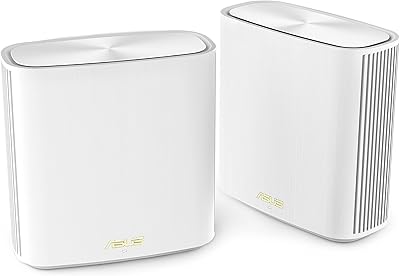
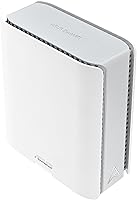
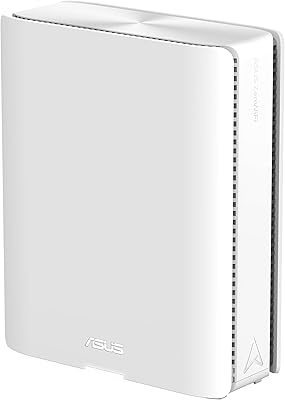
The BT8 has a clean, understated white form factor that sits comfortably on a shelf or media unit without drawing attention to itself. At under two pounds, it is easy to reposition during initial placement testing to find the best coverage spot in the home.
The all-white plastic finish shows dust readily and can feel less premium to the touch than some competitors in this price range that use textured or matte finishes. There are no status indicator options beyond the basic LED, which some users find insufficient for quick health-check visibility.
Heat Management
73%
27%
Under typical mixed household loads — streaming, browsing, a few smart home devices — the BT8 runs at an acceptable temperature without becoming a concern. Ventilation slots are positioned effectively enough for normal desk or shelf placement.
Under sustained heavy loads, particularly during extended wired backhaul transfers or high-bandwidth WiFi 7 sessions, the chassis becomes noticeably warm. A small number of reviewers have linked heat buildup in confined spaces to intermittent disconnections, though this appears to be an edge case rather than a systemic issue.

Suitable for:

The ASUS ZenWiFi BT8 WiFi 7 Mesh Router is a strong match for homeowners in single-story houses between 2,000 and 3,000 square feet who want one capable node rather than a multi-unit mesh sprawl. If you've recently picked up a WiFi 7-compatible laptop, phone, or gaming console, this is the kind of router that will actually let that hardware perform as intended — older devices will still connect fine, but they won't unlock the full benefit. Remote workers and small home offices will appreciate the built-in VPN support and AiProtection Pro security, which would cost extra on many competing platforms. Existing ASUS users are in a particularly good position here, since the BT8 slots into an AiMesh network alongside compatible routers already in the home. Families juggling kids' devices, streaming TVs, and a growing collection of smart home gadgets will find the IoT segmentation and parental control tools practical and easy enough to actually use.

Not suitable for:

Buyers living in multi-story homes or sprawling open-plan spaces over 3,000 square feet should think carefully before committing to a single-node purchase — real-world coverage in those environments often falls short of the advertised figure, and adding a second node brings the total cost up noticeably. The ASUS ZenWiFi BT8 WiFi 7 Mesh Router is also not the right pick for anyone who needs a rock-solid, fire-and-forget setup with zero tolerance for firmware hiccups; early adopter friction is real here, and a handful of users have experienced connectivity issues following software updates. If your current devices are all WiFi 5 or WiFi 6, the performance ceiling this router offers goes largely untapped, which makes the investment harder to justify against cheaper alternatives. Anyone deeply uncomfortable with mobile app-dependent router management may find the experience inconsistent, as the ASUS Router app has drawn criticism for occasional instability. Budget-conscious buyers who simply need reliable coverage without advanced features will likely find better value elsewhere in the market.

Specifications

  • WiFi Standard: The BT8 operates on WiFi 7 (802.11be), and is backward compatible with WiFi 6E, WiFi 6, WiFi 5, WiFi 4, and older 802.11a/b/g devices.
  • Frequency Bands: Tri-band architecture covers 2.4 GHz, 5 GHz, and 6 GHz simultaneously for flexible device distribution across the network.
  • Max Throughput: Aggregate wireless throughput reaches up to 14 Gbps across all three bands under ideal laboratory conditions.
  • 2.4 GHz Speed: The 2.4 GHz band delivers up to 688 Mbps, suited for lower-bandwidth smart home devices and extended-range connections.
  • 5 GHz Speed: The 5 GHz band supports up to 4,323 Mbps, providing a strong mid-range channel for everyday streaming and browsing.
  • 6 GHz Speed: The 6 GHz band reaches up to 8,643 Mbps, offering the fastest and least congested channel for compatible WiFi 7 devices.
  • Coverage Area: ASUS rates the single-node BT8 for up to 3,000 sq. ft., most reliably achieved in open, single-story home layouts.
  • Ethernet Ports: Two 2.5G Ethernet ports support wired backhaul, high-speed NAS connections, or a direct link to a gaming PC or workstation.
  • Antennas: Seven internal antennas work alongside eight high-power front-end modules to maximize signal strength and reduce dead zones.
  • Security: AiProtection Pro provides real-time network threat detection and intrusion prevention with no ongoing subscription fee required.
  • Parental Controls: Smart Home Master SSIDs allow families to segment IoT devices and apply per-device or per-profile parental control rules easily.
  • Mobile Tethering: A USB port supports 4G LTE and 5G modem dongles, enabling mobile broadband as a primary or failover internet source.
  • Mesh Compatibility: The BT8 is fully compatible with the ASUS AiMesh ecosystem, allowing it to pair with other supported ASUS routers to extend coverage.
  • Multi-Link Operation: WiFi 7 MLO technology allows client devices to transmit and receive data across multiple bands simultaneously, reducing latency and packet loss.
  • Dimensions: The unit measures 7.32 × 2.83 × 6.26 inches, making it compact enough to sit discreetly on a shelf or entertainment unit.
  • Weight: At 1.88 pounds, the BT8 is lightweight and easy to reposition during initial placement and coverage testing.
  • In the Box: The package includes the BT8 node, a power adapter, a quick start guide, an RJ45 cable, and a warranty card.
  • Release Date: The BT8 became available in January 2025, placing it among the earliest consumer WiFi 7 mesh nodes to reach the market.

Related Reviews
ASUS ZenWiFi BD5 Outdoor WiFi 7 Router
83%
88%
Wireless Performance
91%
Build Quality & Durability
93%
Weather Resistance
89%
Temperature Range & Climate Versatility
86%
Installation & Mounting
More
ASUS ZenWiFi BT6 Tri-Band WiFi 7 Mesh Router
83%
91%
WiFi Performance
88%
Security Features (AiProtection Pro)
84%
Mesh Network Expansion
75%
Setup and Installation
89%
Build Quality
More
ASUS ZenWiFi BD4 Dual-Band WiFi 7 Mesh Router
86%
93%
Wi-Fi Performance
89%
Setup & Installation
91%
Security Features
88%
Gaming & Streaming Performance
84%
Value for Money
More
ASUS ZenWiFi BQ16 Pro WiFi 7 Mesh Router
77%
91%
Wireless Performance
78%
Coverage & Range
86%
Setup & App Experience
63%
Firmware Stability
88%
10G Port Utility
More
ASUS RT-BE86U BE6800 Dual-Band WiFi 7 Router
77%
83%
Wireless Performance
91%
Wired Connectivity
77%
Setup & Ease of Use
58%
Mobile App Experience
62%
Firmware Stability
More
ASUS RT-BE82U WiFi 7 Dual-Band Router
84%
88%
Wireless Performance
93%
Wired Connectivity
82%
Setup & Ease of Use
74%
Firmware & Software
86%
AiMesh Integration
More
ASUS RT-BE58U WiFi 7 Router
80%
83%
Wireless Performance
81%
Range & Coverage
91%
Setup & Ease of Use
88%
Security Features
86%
Smart Home & IoT Management
More
ASUS ZenWiFi XD6 Mesh WiFi 6 System
86%
93%
Wi-Fi Coverage
85%
Ease of Setup
89%
Performance and Speed
80%
App Experience
91%
Parental Controls
More
TP-Link Deco BE23 WiFi 7 Mesh Router
82%
93%
Value for Money
91%
Setup & Ease of Use
84%
Wi-Fi Speed Performance
82%
Coverage & Signal Range
89%
Wired Port Quality
More
ASUS RT-BE92U WiFi 7 Router
81%
88%
Wireless Performance
83%
Coverage & Range
84%
Setup & Initial Configuration
91%
Network Security (AiProtection)
86%
Latency & Gaming Performance
More

FAQ

For most households today, WiFi 6 or 6E handles daily tasks just fine. Where the BT8 starts to make practical sense is if you have several newer devices — recent Android flagships, the latest MacBooks, or current-gen gaming handhelds — that already support WiFi 7. The real benefit isn't just raw speed; it's lower latency and more reliable connections when many devices are active at once. If your gear is mostly WiFi 5 or 6, you won't notice much difference yet.

It depends heavily on the layout. In a single-story, open-plan home with the node centrally placed, coverage at that range is realistic. Add a second floor, thick concrete or brick walls, or a long narrow floor plan, and you'll likely hit dead spots. A number of real-world buyers in larger or multi-story homes found the single-pack fell short and ended up adding a second node.

You can use the BT8 as a standalone router connected to any modem, regardless of brand. However, the AiMesh feature — which lets you expand coverage by pairing nodes — only works with compatible ASUS routers. If you want a mesh setup, the rest of your nodes need to be ASUS AiMesh-compatible models.

You plug a compatible USB mobile broadband dongle into the router's USB port, and the BT8 can use that cellular connection as either a primary or backup internet source. The dongle itself is not included — you'll need to source one separately and confirm it's on ASUS's compatibility list. It's a genuinely useful feature for areas with unreliable fixed broadband or as a failsafe during outages.

AiProtection Pro is included at no extra cost on the ASUS ZenWiFi BT8 WiFi 7 Mesh Router and does not require a subscription to maintain. It is powered by Trend Micro's threat intelligence and covers malware blocking, intrusion prevention, and infected device detection. Some competing mesh systems charge a monthly or annual fee for equivalent security features, so this is a genuine value-add here.

The app gives you solid control over the network — parental controls, traffic monitoring, VPN setup, and more — and many users find it straightforward once they've learned the layout. That said, it has a reputation for occasional crashes or sluggish loading, and a few firmware updates have temporarily destabilized connections for some users. It's not a dealbreaker, but if you want a completely polished app experience, it doesn't quite match the consistency of some competitors.

The BT8's WiFi 7 speeds are only meaningful if your internet plan and modem can actually deliver high throughput. On a standard 300–500 Mbps plan, you won't notice much difference over a good WiFi 6 router in terms of internet speed. Where the BT8 adds value regardless of your ISP plan is in local network performance — large file transfers between devices, wired NAS speeds, and reducing wireless congestion in device-heavy homes.

Yes, and it's one of the more practical features on this router. The Smart Home Master SSID system lets you group devices — for example, putting all your IoT gadgets on an isolated network and giving your kids' devices a profile with time limits or content filtering. It is not the most advanced parental control system on the market, but for most families it's more than sufficient and easier to configure than manually setting up VLANs.

Setup is generally praised as one of the smoother aspects of the BT8 experience. You connect it to your modem, download the ASUS Router app, and follow the guided steps — most users report being up and running in under fifteen minutes. Advanced features like VPN, AiMesh pairing, or custom DNS require a bit more digging into the interface, but the initial setup is accessible even without a networking background.

Firmware updates can be set to install automatically or handled manually through the app. The bugs worth knowing about are real — a subset of users have experienced brief connectivity drops immediately following updates. The practical workaround most experienced users suggest is disabling automatic updates and waiting a week or two after a new firmware release to see if other users report issues before applying it yourself. ASUS does push patches when problems surface, so most issues get resolved, but the timing can be frustrating.

Where to Buy