Overview

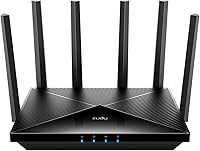
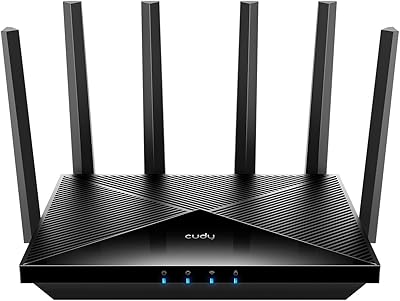
The Cudy WR11000 WiFi 7 Tri-Band Router arrived in late 2024 as one of the more affordable entry points into the WiFi 7 generation without spending flagship money. Cudy isn't a household name the way TP-Link or ASUS are, but this Shenzhen-based brand has built a reputation for delivering capable networking hardware at approachable prices. The flat, low-profile chassis houses six external high-gain antennas and covers all three bands — 2.4GHz, 5GHz, and 6GHz — simultaneously. For buyers who want genuine WiFi 7 hardware without overpaying, the positioning here is genuinely hard to ignore.
Features & Benefits

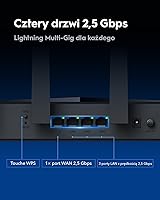
The headline aggregate speed is mostly a theoretical ceiling, but the real story is in the four 2.5G wired ports. Most routers at this price still ship with standard gigabit ethernet, so having four multi-gig ports means you can connect a NAS, a gaming rig, and your ISP modem without any bottleneck at the physical layer. Built-in VPN server and client support is another practical win, letting your whole network tunnel through a VPN without touching individual devices. The Cudy APP handles QoS, remote access, and mesh expansion through a single mobile interface, keeping daily management relatively painless.

Best For

This tri-band router makes the most sense for people upgrading from WiFi 5 or an older WiFi 6 setup who want real headroom for the next few years. Multi-device households — simultaneous 4K streams, active gaming sessions, and a handful of smart home gadgets — will appreciate the band separation. The multiple 2.5G ports also make it a smart pick for small home offices needing fast wired connections without buying a separate switch. Existing Cudy owners can fold it into a mesh network with minimal effort. One honest caveat: few consumer devices currently support 6GHz, so that particular headroom is genuinely future-facing rather than immediately useful.

User Feedback

With just over 150 ratings and a 4.1-star average, the feedback picture is still forming — the router only launched in December 2024, so draw your own conclusions accordingly. Early signals are encouraging: buyers tend to praise easy initial setup, the app experience, and the port density for the price. Criticism, where it appears, centers on questions about long-term firmware reliability and whether wireless range holds up consistently in larger homes. A few reviewers flag that 6GHz gains depend entirely on owning compatible client devices, which most households don't yet have. Treat the current ratings as a promising early snapshot rather than a fully settled verdict.

Pros

  • Four 2.5G wired ports at this price tier is genuinely rare and eliminates the need for a separate multi-gig switch.
  • Built-in VPN server and client covers the whole network without touching individual devices.
  • WiFi 7 hardware at a mid-range price gives meaningful future-proofing headroom for upcoming client devices.
  • Initial setup is fast and accessible — most users report being online within minutes using the mobile app.
  • Tri-band architecture keeps high-demand devices from competing on a single congested frequency.
  • Cudy Mesh support lets existing Cudy hardware owners expand coverage without starting from scratch.
  • The flat, low-profile design fits unobtrusively on a desk or shelf without dominating the room.
  • QoS controls are accessible enough for non-technical users to reduce lag during peak household usage.

Cons

  • Firmware maturity is limited given the December 2024 launch, and long-term update cadence is unproven.
  • 6GHz band delivers no real benefit today for households whose devices do not yet support WiFi 7 on that frequency.
  • Wireless range in larger homes with thick walls falls short of what premium-tier competitors provide.
  • VPN configuration for less common providers is poorly documented and requires manual setup.
  • Mesh expansion is locked to Cudy-only hardware, reducing flexibility if you want to mix brands later.
  • The mobile app lacks the polish and depth of TP-Link or ASUS equivalents at a comparable price point.
  • The router runs noticeably warm under sustained heavy load, raising unanswered long-term thermal questions.
  • Brand support and warranty experience is harder to predict than with established networking names.

Ratings

The Cudy WR11000 WiFi 7 Tri-Band Router has been scored by our AI system after processing verified buyer reviews from multiple global markets, with spam, bot-submitted, and incentivized feedback actively filtered out. Scores reflect the honest consensus of real-world users — strengths and frustrations alike — so you get a clear picture of what this tri-band router actually delivers day to day.

Value for Money
88%
For a WiFi 7 router with multi-gig wired ports and tri-band coverage, buyers consistently flag that the Cudy WR11000 undercuts most direct competitors by a meaningful margin. Users upgrading from mid-range WiFi 5 or WiFi 6 hardware feel they are getting noticeably future-proof specs without the premium price tag that brands like ASUS or TP-Link typically command.
A handful of reviewers note that the savings feel less compelling once you factor in uncertainty around long-term firmware support from a lesser-known brand. If Cudy's software development lags over time, the hardware value equation starts to look shakier than the launch-day price suggests.
Wireless Performance
76%
24%
On the 5GHz band, most users report a genuine and noticeable step up from their previous routers — sustained throughput for 4K streaming and large file transfers held up well in typical home environments. The tri-band architecture means the router can intelligently offload high-demand devices rather than funneling everything through a single congested band.
The 6GHz band, while technically impressive on paper, delivers limited real-world benefit for most households right now simply because very few consumer devices support WiFi 7 on that frequency yet. Some reviewers also mention that range on 6GHz drops off noticeably through walls, which is expected physics but still worth knowing before assuming whole-home coverage.
Wired Port Quality
91%
Four 2.5G WAN/LAN ports is genuinely rare at this price tier, and buyers who run NAS drives, gaming PCs, or a multi-gig ISP connection absolutely notice the difference. Being able to connect multiple high-bandwidth wired devices simultaneously without a separate switch is the feature most frequently cited in positive reviews.
There is no 10G port for users who want a dedicated uplink to a high-speed managed switch or a next-gen ISP service delivering above 2.5 Gbps. For most home users this is irrelevant, but it is a ceiling that power users running small office setups should keep in mind.
Setup & Ease of Use
84%
Initial setup is one of the most consistently praised aspects across early reviews — users describe getting online within minutes using the Cudy APP without touching a web interface. The guided onboarding process handles band configuration and basic QoS without requiring any networking knowledge from the user.
Some users report minor confusion when trying to configure the VPN client for less common providers, as the in-app documentation is thin in places. A few reviewers also note that advanced settings still require digging into the web admin panel rather than being fully accessible through the app.
Mobile App Experience
79%
21%
The Cudy APP covers the core day-to-day management tasks well — checking connected devices, adjusting QoS priorities, and toggling remote access all work reliably from a smartphone. Users who have no interest in logging into a web dashboard will find the app handles the most common network management tasks without friction.
The app's design feels a step behind the polished interfaces of TP-Link's Tether or ASUS's router app, and a few users flag occasional sync delays when making changes remotely. Parental control features accessible through the app are fairly basic compared to what competing brands offer at a similar price.
VPN Functionality
73%
27%
Having both VPN server and client built directly into the router is a meaningful convenience for households or small offices that rely on a VPN for privacy or remote access. Users who previously had to install VPN software on every individual device appreciate being able to route the whole network through a single configuration.
Compatibility with certain commercial VPN providers requires manual configuration that is not well-documented, and OpenVPN speeds through the router are noticeably capped compared to running a dedicated VPN client on a PC. Users expecting high-throughput VPN tunneling for large file transfers may find the performance underwhelming.
Mesh & Network Expansion
71%
29%
For households already using other Cudy hardware, the mesh pairing process is straightforward and adds whole-home coverage without requiring a new ecosystem investment. The Cudy Mesh system lets you manage all nodes from a single app view, which simplifies monitoring for non-technical users.
The mesh functionality is only compatible with other Cudy devices, which limits flexibility for buyers who want to mix in a node from another brand. Users who do not already own Cudy extenders or access points are essentially locked into expanding within that ecosystem, which is a notable constraint.
Range & Coverage
67%
33%
In medium-sized homes with typical construction, the six external antennas provide solid coverage across most of the living space on the 2.4GHz and 5GHz bands. Users in open floor plan environments report consistent signal across two floors without needing any additional hardware.
In larger homes, particularly those with thick concrete or brick walls, coverage starts to drop off more quickly than some users expect from a six-antenna design. A recurring theme in critical reviews is that 5GHz range does not quite match what premium-tier competitors deliver at the edges of a sprawling house.
Build Quality & Design
72%
28%
The flat, low-profile body with six antennas gives the router a purposeful, sturdy feel that fits unobtrusively on a shelf or desk without dominating the room. The chassis feels solid rather than hollow or flimsy, which matters for buyers who leave networking hardware running continuously.
The all-black plastic finish is prone to showing dust and fingerprints, and the design lacks any kind of passive ventilation grille that inspires long-term thermal confidence. Under heavy sustained load, the body gets noticeably warm to the touch, which a few users flag as a minor but persistent concern.
Firmware & Software Stability
63%
37%
Out of the box, the firmware behaves reliably for standard use cases — most users report no unexpected reboots or connectivity drops during the first weeks of use. Cudy does push firmware updates through the app, which at least signals that the company is actively supporting the product post-launch.
Given that this router only launched in late 2024, the firmware maturity is still limited and long-term update cadence is unknown. A small but consistent group of reviewers mention intermittent bugs, particularly around VPN configuration persistence after reboots, that suggest the software still needs refinement.
QoS & Traffic Management
74%
26%
The built-in QoS controls are accessible enough for non-technical users who just want to prioritize gaming or video calls above background downloads. Users in busy households with multiple simultaneous streams report that enabling QoS measurably reduces lag spikes during peak usage windows.
The QoS options are fairly coarse compared to what more advanced routers offer — you can prioritize by device or application category, but granular bandwidth allocation per device is not well-supported. Power users looking for per-connection traffic shaping will likely hit the ceiling of what the app exposes fairly quickly.
WPS & Connectivity Options
78%
22%
WPS works reliably for quickly adding smart home devices and older peripherals that lack a slick app-based pairing process. The combination of WPS, remote access, and multi-band support covers the practical connection needs of most typical home setups without requiring any manual configuration.
WPS remains a security liability in networked environments, and the router does not prominently warn users about the risks of leaving it enabled permanently. Users with a security-conscious setup should remember to disable WPS after initial device pairing.
Heat & Long-Term Reliability
61%
39%
Under typical daily loads — browsing, streaming, and some background downloads — the router operates quietly and without notable issues over the short review period available so far. No pattern of hardware failure has emerged in the early review pool, which is at least a neutral signal.
The router runs warmer than average under sustained heavy load, and with fewer than six months of widespread user data available, long-term thermal reliability simply cannot be confirmed yet. Buyers should treat this as a launch-era product where the durability track record is still being written.
Brand Trust & Support
58%
42%
Cudy has an established product catalog in the networking category and provides a functional support channel for firmware and technical queries. Users who have dealt with Cudy support describe response times as reasonable rather than exceptional, which is fair for a mid-tier brand.
Cudy does not carry the brand recognition or documented long-term support history of TP-Link or ASUS, and buyers paying for multi-year reliability need to factor in that uncertainty. If firmware development slows or stops a year or two post-launch, the router's more advanced features could degrade or become unsupported.

Suitable for:

The Cudy WR11000 WiFi 7 Tri-Band Router is a strong fit for value-conscious home users who are ready to leave WiFi 5 or early WiFi 6 hardware behind and want a router that will stay relevant for the next several years without a painful outlay. If your household juggles multiple heavy-bandwidth activities at once — a gaming PC, a couple of 4K streams, a security camera system, and a work-from-home laptop all running simultaneously — the tri-band architecture and capable 5GHz performance handle that kind of congestion noticeably better than a single-band or older dual-band setup. The four multi-gig wired ports make it particularly appealing for anyone running a NAS drive or a desktop gaming rig, since you get fast wired connections across multiple devices without adding a separate switch to your setup. Small home offices that rely on a network-wide VPN will also appreciate the built-in VPN server and client, which removes the need to configure software on every individual machine. And if you already own other Cudy networking hardware, the mesh compatibility makes this a logical and affordable centerpiece for a whole-home coverage expansion.

Not suitable for:

Buyers who prioritize long-term brand trust and documented firmware support history should think carefully before committing to the Cudy WR11000 WiFi 7 Tri-Band Router, since Cudy simply does not have the established track record of TP-Link or ASUS when it comes to multi-year software maintenance. If you live in a large home with thick concrete or masonry walls, the wireless range at the edges of your space may disappoint — this router is better suited to medium-sized homes with relatively open floor plans than sprawling multi-floor properties. Anyone expecting to unlock meaningful performance from the 6GHz band right away will be frustrated, as the reality is that very few consumer devices on the market today are capable of connecting to it. Power users who need granular per-connection traffic management, robust parental controls, or high-throughput VPN tunneling will also hit the ceiling of what this hardware exposes fairly quickly. Finally, if you want to mix nodes from different brands in a mesh setup, the Cudy-only mesh compatibility is a hard constraint that limits your future flexibility.

Specifications

  • WiFi Standard: This router operates on the 802.11be (WiFi 7) standard, which also maintains backward compatibility with 802.11a, 802.11n, 802.11ac, and 802.11ax devices.
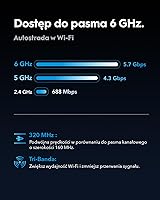
  • Frequency Bands: Tri-band coverage spans three simultaneous frequencies: 2.4GHz for legacy and IoT devices, 5GHz for mainstream clients, and 6GHz for next-generation WiFi 7 hardware.
  • Aggregate Speed: Combined theoretical throughput across all three bands reaches up to 11000 Mbps, with the 6GHz band contributing the largest share of that ceiling.
  • 6GHz Band Speed: The 6GHz band supports a maximum theoretical throughput of 5760 Mbps under ideal conditions using WiFi 7 compatible client devices.
  • 5GHz Band Speed: The 5GHz band delivers up to 4320 Mbps, making it the primary workhorse band for most current laptops, phones, and streaming devices.
  • 2.4GHz Band Speed: The 2.4GHz band provides up to 688 Mbps, suited for smart home devices, IoT sensors, and other low-bandwidth peripherals that prioritize range over speed.
  • Wired Ports: Four 2.5G WAN/LAN combo ports allow multi-gigabit wired connections for ISP modems, NAS drives, gaming PCs, or any combination of those simultaneously.
  • Antennas: Six external high-gain antennas are fixed to the chassis and designed to maximize signal spread across multiple directions for broader indoor coverage.
  • VPN Support: Both VPN server and VPN client modes are supported natively, enabling whole-network VPN routing without requiring software installation on individual connected devices.
  • Mesh Compatibility: The router is compatible with the Cudy Mesh system, allowing it to pair with other Cudy networking nodes to extend whole-home wireless coverage.
  • Mobile App: The Cudy APP is available for both iOS and Android and provides remote access, device management, QoS configuration, and basic network monitoring from a smartphone.
  • Special Features: Additional networking features include Quality of Service (QoS) prioritization, WPS quick-connect, and remote access management through the mobile application.
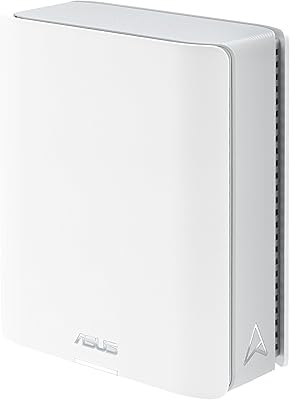
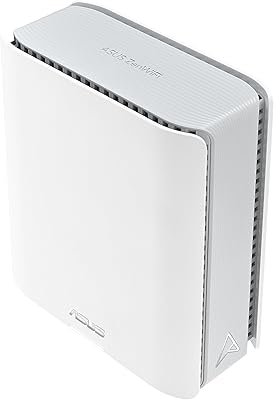
  • Dimensions: The unit measures 9.96 × 6 × 1.9 inches, giving it a flat, low-profile footprint that sits comfortably on a shelf or desk without taking up excessive vertical space.
  • Weight: At 1.42 pounds, the router is lightweight enough for straightforward wall-mounting or repositioning without requiring special hardware support.
  • Color: The router ships in a single color option — matte black — which suits most home and office environments without drawing attention.
  • Manufacturer: The WR11000 is designed and manufactured by Shenzhen Cudy Technology Co., Ltd., a Chinese networking hardware company with a catalog spanning routers, modems, and wireless adapters.
  • Launch Date: The product was first made available in December 2024, making it a relatively recent addition to the consumer WiFi 7 router market.
  • Stream Count: The router supports up to 6 simultaneous spatial streams distributed across its three bands, which contributes to its ability to handle multiple devices concurrently.

Related Reviews

NETGEAR Nighthawk RS280S WiFi 7 Tri-Band Router
80%
88%
Wireless Speed & Performance
71%
Wi-Fi Coverage & Range
83%
Setup & Ease of Use
62%
Modem Compatibility
86%
Wired Port Performance
More
ASUS RT-BE92U WiFi 7 Router
81%
88%
Wireless Performance
83%
Coverage & Range
84%
Setup & Initial Configuration
91%
Network Security (AiProtection)
86%
Latency & Gaming Performance
More
ASUS ZenWiFi BT6 Tri-Band WiFi 7 Mesh Router
83%
91%
WiFi Performance
88%
Security Features (AiProtection Pro)
84%
Mesh Network Expansion
75%
Setup and Installation
89%
Build Quality
More
ASUS ZenWiFi BT8 WiFi 7 Mesh Router
77%
83%
Wireless Performance
71%
Coverage & Range
54%
Firmware Reliability
88%
Setup Experience
67%
App & Management
More
GL.iNet GL-BE9300 Flint 3 Tri-Band WiFi 7 Router
86%
94%
WiFi Performance
88%
VPN Performance
92%
Range & Coverage
85%
Ease of Setup
90%
Security Features
More
Cudy WR6500 WiFi 7 Dual-Band Router
75%
88%
Value for Money
76%
Wireless Performance
84%
Setup & Installation
67%
Range & Coverage
91%
Wired Connection Quality
More
Ubiquiti AmpliFi Alien WiFi 6 Mesh Router
72%
83%
Wireless Performance
78%
Coverage & Range
86%
Device Handling Capacity
51%
Setup & Ease of Use
48%
Companion App Quality
More
NETGEAR Nighthawk X6 AC3000 Tri-Band WiFi Router
84%
88%
Performance
76%
Setup and Installation
91%
Signal Strength and Range
79%
Usability (App & Interface)
85%
Compatibility with Devices
More
ASUS ZenWiFi BD4 Dual-Band WiFi 7 Mesh Router

86%
93%
Wi-Fi Performance
89%
Setup & Installation
91%
Security Features
88%
Gaming & Streaming Performance
84%
Value for Money
More
NETGEAR Orbi 970 WiFi 7 Mesh Router
77%
88%
Wireless Performance
83%
Coverage & Range
51%
Value for Money
74%
Setup & Installation
62%
Network Stability
More

FAQ

Not at all. The router is fully backward compatible, so your existing phones, laptops, and smart home gadgets will connect just as they always have. You will see the most benefit from the WiFi 7 features only once you start adding WiFi 7 capable client devices over time, but current hardware works without any changes.

Yes, all four 2.5G ports can operate simultaneously. You can connect your ISP modem to one, a NAS drive to another, and wired gaming PCs or a network switch to the remaining two — all running at multi-gig speeds at the same time.

Honestly, for most households today, the 6GHz band sits largely idle because very few consumer devices currently support WiFi 7 on that frequency. It is genuinely future-facing hardware — you are paying for headroom rather than immediate performance gains on that particular band. The 5GHz band is where most real-world improvements will be felt today.

You configure the VPN client directly on the router through the web admin panel or app, and once it is set up, every device on your network automatically routes through the VPN without needing any software on individual phones or computers. It supports common protocols including OpenVPN and WireGuard, though throughput speed is limited compared to running a VPN natively on a dedicated device.

No — the Cudy Mesh system only works with other Cudy hardware. If you want to expand coverage by adding nodes, those nodes need to be Cudy-branded devices as well. This is a meaningful constraint if you already own mesh nodes from TP-Link, ASUS, or another brand.

Setup is genuinely beginner-friendly. You download the Cudy APP, follow the guided steps, and most users report being fully online within ten to fifteen minutes without ever opening a web browser or touching advanced settings. The app handles the most common configuration tasks automatically.

Absolutely — a standard gigabit fiber or cable connection is well within the capability of any single port on this router. The 2.5G ports become particularly relevant if your ISP delivers speeds above 1 Gbps, which is increasingly common with newer multi-gig broadband tiers.

It competes closely on hardware specs — arguably offering more wired port density than some rivals at the same tier — but where it trails is in brand track record and software polish. TP-Link and ASUS have longer firmware support histories and more refined apps. If brand confidence and long-term software reliability are top priorities, the established names have an edge; if raw specs per dollar matter more, this router holds its own.

Under sustained heavy load — large downloads, active VPN tunneling, or multiple simultaneous 4K streams — the chassis does get noticeably warm. It is not unusual for a router of this class to run warm, but it is worth placing it in an open, ventilated spot rather than inside a closed cabinet to avoid any heat buildup over long periods.

Cudy is an established hardware maker with a real product catalog and an active firmware update process, but it does not have the same depth of documented long-term support history as the category leaders. The router is new enough that its ongoing update cadence is still being established. For most buyers this will be fine, but if you are the kind of person who keeps a router for five or more years and expects regular security patches throughout, it is a fair question mark worth keeping in mind.

Where to Buy