Overview

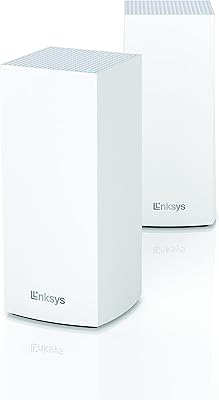
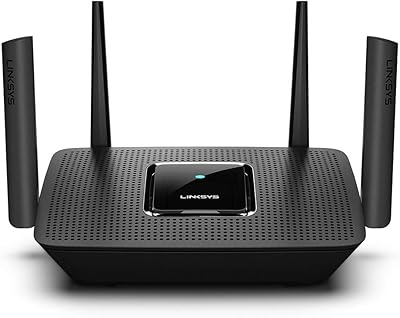
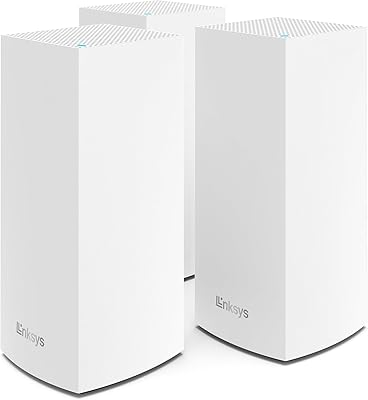
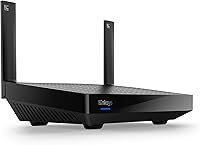
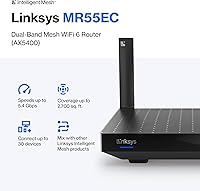
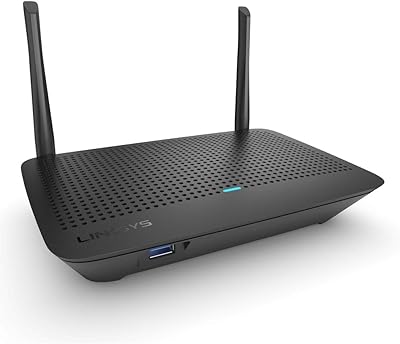
The Linksys Hydra Pro 6 WiFi 6 Mesh Router is built for households that have outgrown a single aging router — too many devices, too many dead corners, not enough signal to go around. It targets mid-sized homes up to around 2,700 square feet and handles 30-plus connected devices without much trouble. WiFi 6 is the real draw here: it manages congestion better than older standards, so when multiple people are streaming, gaming, or on calls simultaneously, the network holds up noticeably better. One thing to be upfront about — this is a single-node unit. You can scale it later by adding nodes, but it ships as a standalone device in a compact, cylindrical black enclosure that fits neatly on a shelf or desk.
Features & Benefits

The hardware here leans into WiFi 6's biggest practical advantages. OFDMA and MU-MIMO technology lets the router handle multiple device requests at once rather than in rapid sequence — that's the real reason things feel less choppy when several people are online together, not just raw speed. The 5 GHz band handles demanding tasks like 4K streaming and large downloads, while the 2.4 GHz band extends reach for lighter devices like smart home sensors. Linksys's Intelligent Mesh means adding a second node later requires no reconfiguration — a genuine plus if you ever want to grow the network. Guest Mode keeps visitor traffic isolated, and long-term firmware support keeps the hardware from feeling obsolete after a couple of years.

Best For

This mesh router makes the most sense for homeowners dealing with inconsistent coverage in medium-sized spaces — a two-story house, a sprawling apartment, or a home with a detached office. If you're running a mix of smart TVs, game consoles, laptops, phones, and smart home gadgets and the old router just can't keep everything happy, this WiFi 6 unit is a meaningful step up. It also suits remote workers and students who depend on a steady, low-latency connection for video calls and large uploads throughout the day. And if you ever want to expand coverage, the mesh architecture gives you a clear path without replacing everything. It's less ideal for very large properties that clearly need multiple nodes from day one.

User Feedback

With a 4.3-star average across several hundred ratings, the Hydra Pro 6 earns its marks mainly on ease of setup and genuine speed gains for users coming from older AC-standard routers. The Linksys app draws consistent praise for making initial configuration straightforward, even for less tech-savvy buyers. On the critical side, a fair number of reviewers note that real-world coverage near the edges of the advertised range can fall short — particularly in homes with thick walls or multiple floors. App connectivity hiccups and occasional firmware update prompts come up as recurring minor annoyances. Those adding this unit to an existing Linksys mesh setup report the pairing process goes smoothly. Gaming and 4K streaming results are generally positive, though outcomes vary by ISP speed and home layout.

Pros

  • WiFi 6 technology handles multiple simultaneous users far better than older AC routers, especially during peak household hours.
  • Setup is genuinely straightforward through the Linksys app, even for users with minimal networking experience.
  • The Hydra Pro 6 manages 30-plus connected devices without the network visibly choking under pressure.
  • Guest Mode keeps visitor traffic separated from your personal devices and smart home gear automatically.
  • Compact cylindrical design fits on a shelf or side table without looking like a piece of lab equipment.
  • Linksys Intelligent Mesh means expanding coverage later only requires adding a node, not starting over.
  • Firmware updates are backed by the manufacturer long-term, which matters for security and compatibility down the road.
  • Real-world speed improvements over aging routers are noticeable, particularly on the 5 GHz band for streaming and gaming.
  • WPS support makes onboarding simpler devices quick without going through the full app flow.
  • Users already in the Linksys ecosystem report that adding this mesh router to an existing setup is a smooth, low-effort process.

Cons

  • Actual coverage in homes with thick walls or multiple floors often falls short of the marketed square footage claim.
  • A single node will not realistically blanket large or irregularly shaped homes without purchasing additional units.
  • The Linksys app has a track record of occasional disconnection issues and poorly timed firmware update prompts.
  • No tri-band option means heavy backhaul traffic and client traffic share the same radio resources.
  • Advanced users looking for granular controls like detailed QoS rules or VLAN configuration will find the settings menu thin.
  • There is no dedicated wireless backhaul channel, which can reduce efficiency when nodes are eventually added.
  • The mobile-only management approach is limiting for users who prefer a full browser-based admin interface.
  • At peak theoretical speeds, real-world throughput will always land well below the numbers on the box, which can feel misleading.
  • Buyers comparing against competing mesh kits at a similar price point may get more nodes and coverage for the same spend.
  • Occasional user reports suggest the unit can run warm during sustained heavy use, which is worth monitoring in enclosed spaces.

Ratings

The scores below for the Linksys Hydra Pro 6 WiFi 6 Mesh Router were generated by our AI review engine after analyzing verified global buyer feedback, with spam, bot-submitted, and incentivized reviews actively filtered out before scoring. Each category reflects the honest distribution of real user experiences — not just the highlights — so both the strengths and the friction points are represented transparently. Where buyers consistently agreed, scores trend higher; where opinions diverged or recurring complaints surfaced, that tension is visible in both the number and the explanation.

Wireless Performance
83%
Users upgrading from older AC routers consistently report a meaningful jump in day-to-day speed, particularly on the 5 GHz band during streaming and large file transfers. The WiFi 6 efficiency improvements are most noticeable in households where multiple people are online simultaneously — video calls hold steady, buffering drops noticeably.
A portion of reviewers point out that real-world throughput falls well short of the theoretical maximums, which is expected but still disappoints buyers who took the headline numbers literally. Performance also dips when devices are located at the far edges of the coverage zone.
Coverage Reliability
71%
29%
In open-plan homes and single-story layouts under 2,000 square feet, this WiFi 6 unit delivers consistent signal with few dead spots. Users in ranch-style homes and mid-sized apartments report strong coverage throughout without needing to reposition the router after initial placement.
Multi-story homes and spaces with thick masonry walls frequently expose the single-node limitation. Several buyers report weaker-than-expected signal in back bedrooms or garages even in homes nominally within the covered range, making the 2,700 square foot claim feel optimistic for complex layouts.
Multi-Device Handling
86%
Households running 20 or more devices simultaneously — a mix of smart TVs, phones, tablets, gaming consoles, and smart home sensors — generally find the Hydra Pro 6 manages the load without obvious congestion. OFDMA technology keeps things moving during peak evening hours when everyone is online at once.
A smaller share of users with very high device counts, particularly those running dense smart home ecosystems above 30 devices, report occasional instability or devices temporarily dropping off the network. It handles the advertised capacity, but headroom beyond that is limited.
Setup Experience
89%
The Linksys app-guided setup process earns consistent praise from buyers across all technical experience levels. Most users report the router is broadcasting a working network within 15 to 20 minutes of unboxing, with clear prompts and minimal jargon throughout the process.
A recurring minority of reviewers encounter the app failing to locate the router during initial setup, requiring a restart of both the app and the device before it connects properly. WPS onboarding works well as a fallback, but the occasional first-run app glitch creates unnecessary friction.
App & Management
67%
33%
For everyday tasks — checking connected devices, enabling Guest Mode, or running a speed test — the Linksys app covers the basics cleanly. Most casual users find everything they need within a tap or two, without hunting through nested menus.
Power users find the app frustratingly thin on advanced controls; there is no meaningful QoS customization, no VLAN support, and no browser-based interface as an alternative. Firmware update notifications appearing at inconvenient times and occasional app-to-router disconnections are the most frequently flagged annoyances.
Gaming Performance
78%
22%
Console and PC gamers in medium-sized households report satisfying results, with stable ping and minimal lag during online sessions. The 5 GHz band handles competitive gaming traffic well when other household members are not saturating the connection simultaneously.
Dedicated gaming router buyers will find this mesh router lacks features like prioritized gaming traffic lanes or built-in VPN gaming tools. Latency performance, while solid, is not class-leading compared to routers specifically engineered for low-latency gaming workloads.
Streaming Quality
81%
19%
4K streaming on multiple TVs simultaneously is where this WiFi 6 unit tends to impress users coming from older hardware. Reviewers running two or three 4K streams alongside general browsing traffic report far fewer buffering interruptions compared to their previous routers.
At the coverage boundaries of a larger home, streaming quality becomes less consistent, with occasional resolution drops on smart TVs located in more distant rooms. This is less a hardware fault and more a function of using a single node to cover a wide area.
Mesh Expandability
84%
Buyers who already own Linksys Velop or other Hydra nodes find the pairing process straightforward and reliable. The Intelligent Mesh architecture means the network absorbs a new node without requiring a full reconfiguration, which is a genuine convenience for incremental home upgrades.
Expandability is a future promise rather than an out-of-the-box experience, and the cost of additional nodes adds up quickly. Buyers who need whole-home coverage from day one would likely be better served financially by purchasing a multi-node kit upfront.
Build & Design
77%
23%
The compact cylindrical shape is one of the more discreet router designs on the market — it blends into a bookshelf or side table without looking like a piece of networking equipment. The all-black finish reads as clean and modern in most home settings.
The enclosure offers no ventilation slots visible to the user, and a small number of buyers note the unit runs noticeably warm during sustained heavy use. Placement inside enclosed cabinets or entertainment centers is not advisable based on user-reported heat buildup.
Security Features
74%
26%
Guest Mode works reliably and is easy to toggle through the app, giving households a practical way to keep visitor devices off the main network. Manufacturer-backed firmware updates provide a baseline of ongoing security patching that many competing routers at this tier do not guarantee.
Beyond Guest Mode and firmware updates, the security feature set is fairly bare — there is no built-in malware filtering, no parental controls baked into the base subscription, and no traffic monitoring dashboard. Users wanting proactive network security will need to look at third-party solutions or a router upgrade.
Value for Money
76%
24%
As a single-node WiFi 6 unit, the Hydra Pro 6 sits at a reasonable price point for the performance it delivers in appropriately sized homes. For buyers replacing a several-year-old router who do not need a full mesh kit, the cost-to-performance ratio feels fair.
When compared directly against competitively priced multi-node mesh kits available at similar price points, the single-unit nature of this router starts to look less compelling. Buyers who end up purchasing a second node to fill coverage gaps will have spent considerably more than if they had started with a bundled kit.
Remote Work Reliability
82%
18%
Work-from-home users and students report that video calls on platforms like Zoom and Teams stay stable throughout the day, even when other household members are streaming or gaming on the same network. The consistent 5 GHz performance is the key driver of this experience.
In larger homes where the router is centrally placed but a home office is at the far end of the house, connection stability during calls becomes less predictable. Adding a node closer to the office resolves the issue, but requires additional investment.
Firmware & Longevity
79%
21%
The manufacturer commitment to guaranteed firmware updates gives this router a longer useful lifespan than many competitors that quietly abandon update support after a couple of years. Security-conscious buyers appreciate knowing the hardware will stay patched against emerging vulnerabilities.
Firmware update notifications have been flagged by multiple users as poorly timed, occasionally prompting a router restart during active use without adequate warning. The update process itself works, but the delivery mechanism through the app could be significantly more user-friendly.
Compatibility
88%
Full backward compatibility with WiFi 5 and WiFi 4 devices means households with a mix of older and newer hardware can upgrade the router without immediately replacing every device. Smart home products, older laptops, and legacy consoles all connect without issue.
Buyers with entirely WiFi 6-capable device lineups will get the most out of the hardware, but mixed households — which are the norm — will see uneven benefits across their device fleet. This is an inherent limitation of the standard, not a flaw in the router specifically.

Suitable for:

The Linksys Hydra Pro 6 WiFi 6 Mesh Router is a strong fit for households in the 1,500 to 2,700 square foot range that are struggling with dead zones or sluggish connections from an older AC-era router. If your home has a growing collection of connected devices — smart TVs, gaming consoles, laptops, tablets, phones, and smart home gadgets all competing for bandwidth — this WiFi 6 unit handles that kind of load noticeably better than its predecessors. Remote workers and students will appreciate the more stable, lower-latency connection during video calls and large file transfers, where consistency matters more than peak speed. It also suits buyers who want a mesh-ready foundation without committing to a full multi-node kit upfront, since the Linksys Intelligent Mesh architecture lets you add nodes later as your needs grow. Overall, this is a practical upgrade for anyone who has simply outgrown a single conventional router and wants something that will stay relevant for several years.
Not suitable for:

The Linksys Hydra Pro 6 WiFi 6 Mesh Router is not the right call for larger homes, sprawling floor plans, or multi-story houses where a single node simply cannot push consistent signal to every corner regardless of how capable the hardware is. Buyers expecting a complete whole-home mesh system out of the box will find this a single unit, not a multi-node kit, and that distinction matters at scale. Power users who demand tri-band performance, dedicated backhaul, or advanced network controls like detailed QoS settings or VLAN support will find the feature set relatively limited compared to higher-end alternatives. Those who prioritize a desktop-grade management interface over a mobile app may also find the Linksys app experience frustrating, given the occasional connectivity hiccups reported by real users. And if your internet plan tops out at very high speeds and you want to extract every bit of that performance, this mid-range unit may leave some headroom on the table.

Specifications

  • WiFi Standard: This router operates on the 802.11ax (WiFi 6) standard, with backward compatibility for 802.11ac and 802.11n devices.
  • Frequency Bands: Dual-band design covers both the 2.4 GHz band for range and compatibility, and the 5 GHz band for higher-throughput applications.
  • Max Throughput: Combined theoretical wireless speeds reach up to 574 Mbps on 2.4 GHz and 4804 Mbps on 5 GHz under ideal conditions.
  • Coverage Area: Linksys rates this single-node unit for homes up to approximately 2,700 square feet, though real-world results vary by layout and construction.
  • Device Capacity: The router is designed to support 30 or more simultaneously connected devices across both bands without significant performance degradation.
  • Stream Config: Six-stream configuration (1x1 on 2.4 GHz and 5x5 on 5 GHz) enables robust multi-device handling through MU-MIMO technology.
  • Key Technologies: OFDMA and MU-MIMO support allow simultaneous data delivery to multiple clients, reducing network congestion during peak usage periods.
  • Mesh Support: Compatible with Linksys Intelligent Mesh, allowing additional Linksys nodes to be added later without reconfiguring the existing network.
  • Special Features: Includes Guest Mode for isolated visitor network access and WPS for simplified button-press device onboarding.
  • Connectivity Ports: The unit connects to a modem or gateway via Ethernet and provides wireless connectivity to all client devices on the network.
  • Dimensions: Physical footprint measures 2.3 x 2.25 x 9.4 inches in a compact cylindrical form factor suitable for shelf or desktop placement.
  • Weight: The unit weighs 2.4 pounds, making it light enough to reposition easily during initial setup or placement adjustments.
  • Color & Design: Available in black with a minimal cylindrical enclosure designed to blend into home environments without drawing attention.
  • In the Box: Package includes the router unit, a power adapter, one Ethernet cable, a quick installation guide, and warranty documentation.
  • Model Number: The official model identifier is MR55EC-AMZ, which distinguishes this Amazon-specific variant from other regional configurations.
  • Firmware Updates: Linksys provides guaranteed long-term firmware updates for this unit, covering security patches and ongoing compatibility improvements.
  • Management App: The router is configured and managed through the Linksys mobile app, available for both iOS and Android devices.
  • Release Date: This unit was first made available for purchase in March 2022, placing it firmly in the current generation of WiFi 6 hardware.
  • Manufacturer: Designed and supported by Linksys, a networking brand with a long track record in consumer and small-office router hardware.
  • Warranty: Warranty documentation is included in the box; buyers should verify specific coverage terms with Linksys directly for their region.

Related Reviews

Linksys AX2200 WiFi 6 Mesh Router
84%
88%
WiFi Speed & Performance
91%
Ease of Setup
85%
Coverage & Range
72%
Reliability in Large Homes
90%
App Functionality & Control
More
Linksys LN3121 WiFi 6 Mesh Router
73%
91%
Ease of Setup
74%
WiFi Coverage
78%
Connection Speed
82%
Multi-Device Performance
83%
Network Stability
More
Linksys MX8000 Velop Mesh WiFi Router 2-Pack
75%
86%
Coverage & Range
74%
WiFi Speed Performance
83%
Multi-Device Handling
91%
Setup & Installation
78%
App Experience
More
Linksys MR8300 Mesh WiFi Router
84%
88%
Wi-Fi Performance
81%
Ease of Setup
90%
Coverage Area
85%
Device Support
89%
Gaming Performance
More
Linksys MR7350 WiFi 6 Router
76%
91%
Setup & Onboarding
78%
WiFi Speed & Throughput
67%
Coverage & Range
83%
Device Handling & Congestion
72%
App & Remote Management
More
Linksys MR20EC WiFi 6 Mesh Router
74%
78%
Wireless Performance
63%
Coverage & Range
91%
Setup & Installation
69%
App & Remote Management
82%
Device Handling & Congestion
More
Tenda RX12 Pro AX3000 WiFi 6 Router
77%
88%
Value for Money
91%
Setup & Ease of Use
83%
WiFi Speed & Performance
71%
Coverage & Range
79%
VPN Support
More
Linksys Velop MX12600 Tri-Band Mesh WiFi System
80%
83%
Coverage & Range
78%
Network Speed
86%
Device Handling
91%
Setup Experience
67%
App Quality
More
Linksys MR6350 Dual-Band Mesh WiFi Router
74%
91%
Ease of Setup
62%
WiFi Coverage
84%
Connection Stability
71%
Real-World Speed
68%
App Experience
More
Reyee RG-R6 AX3200 Mesh WiFi 6 System (1-Pack)
71%
88%
Value for Money
91%
Setup & Ease of Use
76%
WiFi Coverage
79%
Network Speed & Throughput
82%
Multi-Device Performance
More

FAQ

Yes, setup is handled through the Linksys mobile app, which walks you through the process step by step. Most users report having the network running within 15 to 20 minutes. You do not need to touch any complicated configuration screens.

It can, but with some caveats. In an open floor plan with minimal obstructions, coverage holds up well across that range. In homes with multiple floors, thick concrete or brick walls, or long hallways, you may find signal weakening at the edges. The marketed figure is a ceiling, not a guarantee.

Yes, the Hydra Pro 6 works with virtually any ISP. You simply connect it to your existing modem or gateway via Ethernet, and the app handles the rest. There are no ISP-specific restrictions built into the hardware.

Absolutely. It is fully backward compatible with WiFi 5 (802.11ac) and WiFi 4 (802.11n) devices. Those older devices will connect as they always have; they just will not benefit from the WiFi 6 efficiency improvements until you upgrade them.

Yes, and this is one of the stronger selling points of this mesh router. The Linksys Intelligent Mesh architecture means you can add compatible Linksys nodes to extend coverage without starting the network setup over from scratch.

It holds up well for gaming households. The 5 GHz band delivers solid, lower-latency performance for consoles and PCs, and the OFDMA technology helps keep things stable when other household members are streaming or browsing at the same time. It is not a dedicated gaming router, but real-world results from users are generally positive.

Guest Mode creates a separate, isolated network for visitors. Guests can connect to the internet without being able to see or access any devices on your main home network. You set it up through the Linksys app in just a few taps.

A small number of users have noted that the unit runs warm after hours of heavy usage. This is not unusual for routers of this class, but it is worth placing it somewhere with reasonable airflow rather than inside a closed cabinet or entertainment unit.

This is a single mesh-capable node, not a pre-packaged multi-node kit. A full mesh system ships with two or three units designed to work together from day one, covering much larger spaces. This unit gives you the mesh-ready hardware and Linksys app experience but only provides coverage by itself until you add more nodes.

No. The core router functionality, including the Linksys app, network management, and Guest Mode, works without any subscription. Linksys does offer optional premium services, but they are not required for standard home use.

Where to Buy