

Overview

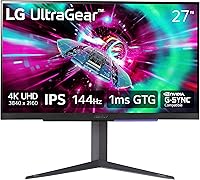
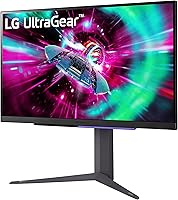
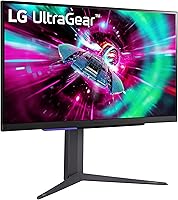
The LG 27GR93U 27″ UltraGear 4K Gaming Monitor sits in a competitive corner of the market — 27-inch displays promising 4K resolution at genuinely high refresh rates — and for the right buyer, it largely delivers on that promise. This UltraGear monitor targets PC gamers and console players who won't sacrifice sharpness for speed. LG chose an IPS panel here, which brings accurate colors and wide viewing angles that VA alternatives can't match, though you trade away some contrast depth in return. The stand supports tilt, height, and pivot adjustment, offering more desk flexibility than most competitors at this size. One honest caveat upfront: a 3.4-star average across 461 ratings signals real friction for some buyers, and that's worth unpacking.

Features & Benefits

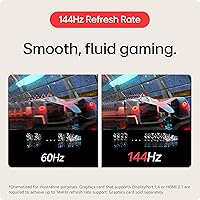
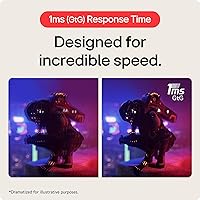
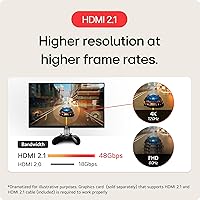
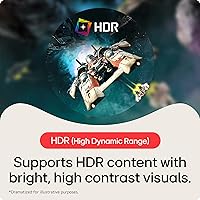
The standout spec here is HDMI 2.1, and it matters more than it sounds. Most monitors in this class still ship with HDMI 2.0, which caps 4K at 60Hz. With HDMI 2.1, the 27GR93U delivers 4K at 120Hz on PS5 and Xbox Series X, no tricks needed. Via DisplayPort on PC, the refresh climbs to 144Hz alongside a 1ms GtG response that keeps motion sharp during fast-paced play. Both NVIDIA G-SYNC Compatible and AMD FreeSync Premium are on board, so switching GPU brands won't leave you scrambling. Color coverage reaches DCI-P3 95%, strong for an IPS at this price. The HDR400 certification, though, deserves tempered expectations — 400 nits of peak brightness is entry-level HDR, not the dramatic effect you'd get from a proper HDR1000 panel.

Best For

If you're a PS5 or Xbox Series X owner who wants native 4K at 120Hz without committing to a TV, this 4K gaming display is one of the most practical options in its size class. The HDMI 2.1 port does the heavy lifting, and the IPS color accuracy makes it genuinely usable as a work monitor during the day — not just a gaming screen. PC gamers with a capable GPU will appreciate the 144Hz ceiling and adaptive sync coverage across both major platforms. This UltraGear monitor also suits anyone who values desk flexibility; the ergonomic stand adjustment means you're never locked into a fixed viewing position. If you want one display to handle PC, console, and productivity without compromise, this is a strong candidate.

User Feedback

The 3.4-star average deserves a closer look before you write off or blindly trust this display. Buyers who praise it consistently highlight out-of-box color accuracy, the rock-solid build of the adjustable stand, and reliable performance from the HDMI 2.1 connection when paired with a PS5 or Xbox. Criticism clusters around two areas: backlight uniformity issues on some units — uneven glow near the edges — and an OSD interface that several users found clunky to navigate. A handful also flagged compatibility hiccups with certain GPU driver versions. None of these are universal dealbreakers, but if you're sensitive to backlight consistency or running a niche GPU setup, they're worth factoring in. The polarized rating split points to use-case mismatch as much as any fundamental product flaw.

Pros

  • HDMI 2.1 enables true 4K at 120Hz on PS5 and Xbox Series X — a genuine rarity at 27 inches.
  • The IPS panel delivers accurate, vibrant color straight out of the box with minimal calibration needed.
  • 144Hz via DisplayPort gives PC gamers a competitive refresh rate without dropping to 1080p.
  • Both NVIDIA G-SYNC Compatible and AMD FreeSync Premium are supported, covering all major GPU setups.
  • DCI-P3 95% color coverage makes this UltraGear monitor a capable choice for light creative work.
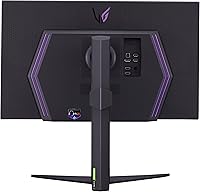
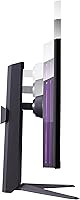
  • The adjustable stand — tilt, height, and pivot — gives you far more flexibility than most gaming monitors offer.
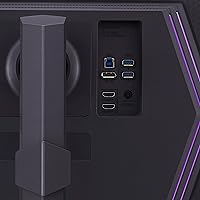
  • Three USB 3.0 ports turn the 27GR93U into a functional desktop hub, reducing cable clutter meaningfully.
  • Matte anti-glare coating handles ambient light well, keeping the image readable in brighter rooms.
  • The 4-pole headphone output with DTS:X spatial audio adds practical value for headset users.

Cons

  • HDR400 delivers only modest HDR impact — do not expect the dramatic contrast of higher-tier HDR panels.
  • Some units have reported noticeable backlight inconsistency, particularly along screen edges.
  • The OSD menu interface is clunky and slow to navigate compared to competitors at a similar price.
  • Certain GPU driver versions have triggered compatibility issues, requiring workarounds to resolve.
  • At 14.1 pounds, this 4K gaming display is heavier than average and less convenient to reposition frequently.
  • The stand base occupies more desk real estate than slim or clamp-mount alternatives.
  • No built-in speakers, which means adding external audio is essential for casual non-headset use.
  • The 3.4-star average rating suggests quality control inconsistency that a premium price tag should not carry.

Ratings

The scores below reflect AI-driven analysis of verified global user reviews for the LG 27GR93U 27″ UltraGear 4K Gaming Monitor, with spam, bot-generated, and incentivized feedback actively filtered out before scoring. This UltraGear monitor earned strong marks in areas where real buyers consistently agreed, and lower scores where recurring frustrations surfaced across multiple independent reviewers. Both the highlights and the pain points are represented transparently — no category has been softened to protect the overall impression.

4K Image Clarity
91%
At 27 inches, 4K resolution produces a pixel density that makes everything from game textures to spreadsheet text look exceptionally sharp. Users switching from 1440p displays consistently noted the visible upgrade in fine detail, particularly in open-world games and desktop productivity.
A handful of users noted that pushing native 4K at high refresh rates demands a powerful GPU, and those running mid-range cards occasionally found themselves dialing back resolution to maintain frame rates — a limitation of the hardware pairing, not the panel itself.
HDMI 2.1 Performance
88%
Console gamers praised the HDMI 2.1 port reliably delivering 4K at 120Hz on PS5 and Xbox Series X without needing any unusual settings changes. The connection held stable during extended sessions, and several reviewers specifically called it one of the few monitors that actually delivers what console marketing promises.
A small number of users reported needing to use specific HDMI cable grades to unlock full bandwidth — standard cables included in some console boxes didn't always perform reliably. The monitor has only one HDMI 2.1 port, so multi-console users will need a switch or manual cable swapping.
Color Accuracy
86%
The IPS panel's DCI-P3 95% coverage meant colors looked rich and well-balanced right out of the box, with minimal need for manual calibration for most users. Graphic design hobbyists and streamers who reviewed the 27GR93U noted that skin tones and saturated game palettes both reproduced naturally without oversaturation.
While accurate, the panel doesn't reach the color volume of OLED displays, and users coming from high-end VA monitors occasionally found the peak luminance underwhelming in bright scenes. A few reviewers noted slight color shift at extreme viewing angles, though this was mild compared to typical IPS behavior.
HDR Experience
47%
53%
For users with modest HDR expectations — primarily those switching from non-HDR displays — the DisplayHDR 400 certification provided a mild but noticeable improvement in highlight rendering during sunny outdoor game environments. Enabling it costs nothing and does add some dynamic range for compatible titles.
At 400 nits peak brightness, the HDR performance consistently drew criticism from buyers who expected anything close to a TV-grade HDR experience. Compared to monitors with HDR600 or higher ratings, the impact is underwhelming — dark scenes stay flat and highlights don't pop, which frustrated users who purchased specifically for HDR gaming.
Refresh Rate & Smoothness
83%
PC gamers using the DisplayPort connection praised how fluid 144Hz felt in competitive shooters and racing games, with adaptive sync eliminating tearing cleanly across both NVIDIA and AMD setups. The transition from 60Hz panels was described by multiple users as immediately and meaningfully noticeable.
The 144Hz ceiling is only achievable via DisplayPort at full 4K — HDMI 2.1 tops out at 120Hz, which some PC users found limiting if they preferred using HDMI for audio passthrough. A small subset of users also reported occasional sync inconsistencies with older GPU driver versions.
Response Time
81%
19%
The 1ms GtG rating held up well in real use, with competitive players noting that fast-moving objects remained sharp without obvious ghosting trails during intense gameplay. For an IPS panel, this is genuinely impressive — it matches what many TN panels used to offer while maintaining far better color quality.
Users running pixel-perfect motion tests in dark game scenes occasionally spotted mild inverse ghosting artifacts at certain overdrive settings, a common IPS trade-off when pushing response times aggressively. Casual players won't notice, but frame-rate-obsessed competitive gamers may want to test overdrive settings carefully.
Adaptive Sync
84%
Having both G-SYNC Compatible and FreeSync Premium on a single display is practically useful — buyers didn't have to think twice about which GPU brand they were pairing with this 4K gaming display. Adaptive sync engaged consistently across tested frame rate ranges and noticeably reduced stutter in GPU-limited scenarios.
A few users on AMD setups reported that FreeSync Premium occasionally disengaged unexpectedly after driver updates, requiring a settings toggle to restore. NVIDIA users generally had a smoother experience, likely because the G-SYNC Compatible validation process is more rigorous and was tested specifically against this panel.
Stand & Ergonomics
79%
21%
The fully adjustable stand earned consistent praise from users who work long hours at their desks — being able to raise the panel height, tilt the screen back, and even pivot to portrait mode made it genuinely versatile across different body types and desk configurations. The build felt solid, not wobbly.
The stand base occupies a relatively wide desk footprint, which annoyed users with compact workspaces who would have preferred a VESA arm solution from day one. A few reviewers also noted that the cable management routing through the stand arm was tight and made certain cable configurations awkward.
OSD & Controls
41%
59%
The monitor's on-screen display covers all the settings you'd expect — refresh rate confirmation, input selection, color presets, and overdrive levels — giving users access to meaningful customization without requiring third-party software. Game Mode presets are accessible quickly from the main menu.
The OSD navigation was one of the most consistently criticized aspects of this 4K gaming display, with users describing the joystick control as unresponsive and the menu hierarchy as unintuitive. Basic tasks like switching inputs or adjusting brightness took longer than expected, and several reviewers compared it unfavorably to competitors in the same price range.
Build Quality
76%
24%
The overall chassis felt well-assembled, and the stand in particular received praise for not flexing or wobbling during typing or desk movement — something cheaper monitors often fail at. The matte finish on the panel body resisted fingerprints reasonably well in daily use.
The monitor body itself is constructed from plastic throughout, and while it doesn't feel flimsy, it lacks the premium tactile quality some buyers expected given the price. A few users reported minor cosmetic inconsistencies on bezels or stand joins that fell short of expectations for a display in this tier.
USB Hub Utility
73%
27%
Having three USB 3.0 ports on the back of the monitor genuinely simplified desk setups for users who wanted to connect mice, keyboards, and external drives without running cables directly to their PC tower. It reduced visible cable clutter and made peripheral hot-swapping noticeably more convenient.
The USB hub requires a data connection to the host PC to function, which some users didn't anticipate at first setup. The port placement on the rear panel was also described as slightly awkward to reach without moving the monitor, particularly for users who frequently plug and unplug USB drives.
Backlight Uniformity
52%
48%
When units performed well, the backlight produced even, consistent illumination across dark desktop backgrounds and moody game scenes. Users who received panels with good uniformity rarely mentioned it as an issue, suggesting the design is capable of hitting acceptable standards.
A meaningful portion of negative reviews specifically flagged backlight bleed or clouding near screen corners and edges — particularly visible on dark or black content. This variance in unit quality was one of the primary drivers of the monitor's lower overall rating and should be a key checkpoint during any return window inspection.
Console Compatibility
85%
Beyond the PS5 and Xbox Series X, the monitor handled previous-generation console connections and even Nintendo Switch (via dock) without issues, making it a flexible single-display solution for multi-console households. Auto-detection of input sources when powering on a console worked reliably for most users.
Users connecting older consoles via HDMI 2.0 or earlier could only access lower resolutions and refresh rates, which isn't a flaw but caught a few buyers off-guard who assumed all HDMI ports would offer equivalent performance. The absence of a second HDMI port remains a real limitation for multi-device setups.
Value for Money
63%
37%
For buyers who fully utilize the HDMI 2.1 port and need 4K at high refresh rates across both PC and console, the 27GR93U delivers a feature set that would cost significantly more from competing brands. The IPS color accuracy and ergonomic stand add genuine value that budget alternatives in this resolution class don't offer.
The middling HDR performance, inconsistent backlight uniformity across units, and clunky OSD collectively made a segment of buyers feel the price wasn't fully justified — especially when competing options with better quality control exist nearby in the market. Users who don't need HDMI 2.1 specifically may find better overall value elsewhere.

Suitable for:

The LG 27GR93U 27″ UltraGear 4K Gaming Monitor is purpose-built for people who refuse to choose between sharpness and speed. Console gamers with a PS5 or Xbox Series X will get the most immediate value — the HDMI 2.1 port delivers native 4K at 120Hz, something most monitors in this size class still can't offer. PC gamers running a mid-to-high-end GPU will find the 144Hz ceiling via DisplayPort and 1ms IPS response genuinely competitive without sacrificing color quality. The IPS panel also makes this a credible dual-use display for anyone who spends half their day in creative apps or productivity work, where color accuracy matters as much as refresh rate. If your desk setup demands flexibility, the height, tilt, and pivot stand adjustments are a practical bonus that many buyers in this category overlook until they're stuck with a fixed-angle display.

Not suitable for:

Buyers chasing a serious HDR experience should look elsewhere — the 27GR93U's VESA DisplayHDR 400 certification is an entry-level standard, and at 400 nits of peak brightness, the visual impact of HDR content is modest at best compared to panels certified at HDR600 or higher. Anyone sensitive to backlight consistency should also proceed carefully, as a meaningful portion of user reports flag uneven illumination near screen edges on some units. This 4K gaming display is not ideal for buyers on compact desks who need a slim, low-profile stand with minimal footprint — the ergonomic stand, while functional, has a larger physical presence than basic fixed stands. If you're planning to use this purely as a cinematic display for films and HDR streaming, the color volume limitations will leave you underwhelmed. Budget-focused buyers who primarily play older or less demanding titles may find the full spec sheet overkill for their actual needs, with the price reflecting capabilities they won't fully use.

Specifications

  • Panel Type: The display uses an IPS (In-Plane Switching) panel, offering wide viewing angles and accurate color reproduction compared to VA or TN alternatives.
  • Screen Size: The active display area measures 27 inches diagonally, providing ample screen real estate without requiring an oversized desk footprint.
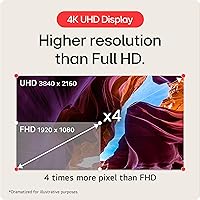
  • Resolution: Native resolution is 3840x2160 (4K UHD), delivering approximately 163 pixels per inch for sharp, detailed imagery at typical desk viewing distances.
  • Refresh Rate: Supports up to 144Hz via DisplayPort on PC and up to 120Hz via HDMI 2.1 when connected to compatible next-gen gaming consoles.
  • Response Time: Rated at 1ms GtG (Gray-to-Gray), minimizing motion blur and ghosting during fast-paced gaming sequences on the IPS panel.
  • HDR Support: Certified to VESA DisplayHDR 400, representing entry-level HDR with a peak brightness of approximately 400 nits — functional but not cinematic in impact.
  • Color Gamut: Covers approximately 95% of the DCI-P3 color space (typical), producing rich, accurate color suitable for both gaming and light creative work.
  • Sync Technology: Supports both NVIDIA G-SYNC Compatible and AMD FreeSync Premium, enabling adaptive sync across the two dominant GPU ecosystems without tearing or stutter.
  • Connectivity: Includes one HDMI 2.1 port, one DisplayPort, and three USB 3.0 ports, providing broad compatibility with modern PCs, consoles, and peripherals.
  • Audio Output: Features a 4-pole 3.5mm headphone output with DTS:X spatial audio processing, designed for headset users seeking positional audio without a separate DAC.
  • Aspect Ratio: Standard 16:9 widescreen aspect ratio, compatible with all major gaming platforms, streaming services, and productivity applications without letterboxing.
  • Screen Surface: Matte anti-glare coating reduces reflections from ambient light sources, making the display more practical in moderately lit office or living room environments.
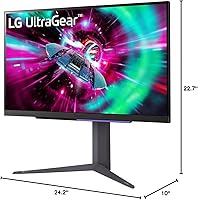
  • Ergonomics: The stand supports tilt, height, and pivot adjustments, allowing users to customize viewing angle and orientation for both landscape and portrait use.
  • Dimensions: Assembled monitor measures approximately 10 x 24.2 x 22.7 inches (D x W x H), accounting for the full ergonomic stand at a mid-height position.
  • Weight: The complete unit including stand weighs 14.1 pounds, which is within the typical range for a 27-inch monitor with a full ergonomic stand assembly.
  • Power Source: Powered via standard AC connection; no external power brick is required as the power supply is integrated into the monitor chassis.
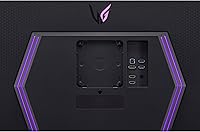
  • VESA Compatibility: The panel supports standard VESA mount patterns, allowing users to remove the included stand and attach a third-party monitor arm or wall mount.
  • First Available: The model was first listed for sale in May 2023, placing it within the current generation of HDMI 2.1-equipped gaming monitors designed for 4K console and PC use.

Related Reviews
LG 27GN950-B 27-inch UltraGear Gaming Monitor
79%
93%
Image Quality
61%
HDR Performance
89%
Gaming Performance
91%
Color Accuracy
54%
GPU Requirements
More
LG 27GN750-B UltraGear 27” Gaming Monitor
86%
91%
Display Quality
94%
Performance for Gaming
80%
Ease of Setup
87%
Build Quality
82%
Ergonomics & Adjustability
More
LG 27GS75Q-B 27-inch QHD Gaming Monitor
82%
91%
Refresh Rate & Motion Performance
88%
Image Sharpness & Resolution
83%
Color Accuracy & Gamut
57%
HDR Performance
86%
Response Time & Ghosting
More
LG 27GR95QE-B 27″ Ultragear OLED Gaming Monitor
86%
94%
Display Quality
92%
Gaming Performance
89%
Color Accuracy
85%
Build Quality
90%
Ergonomics/Adjustability
More
LG 27GP700-B 27” UltraGear FHD Gaming Monitor
87%
94%
Performance (Gaming)
91%
Display Quality
88%
Ease of Setup
89%
Design & Aesthetics
90%
Color Accuracy (for Creators)
More
LG 34GP63A-B 34-Inch Curved Gaming Monitor
79%
93%
Gaming Immersion
91%
Refresh Rate Performance
88%
Contrast & Black Depth
83%
Color Accuracy
86%
Input Lag & Responsiveness
More
LG 27GR83Q-B 27-inch QHD Gaming Monitor
80%
93%
Motion Clarity & Refresh Rate
89%
Image & Color Quality
58%
HDR Performance
84%
Build Quality & Materials
88%
Ergonomic Stand
More
LG 27GN800-B 27-inch QHD Gaming Monitor
77%
88%
Image Quality
86%
Motion Performance
91%
Adaptive Sync
41%
Ergonomics & Stand
87%
Value for Money
More
LG 27GS60QC-B 27″ Curved Gaming Monitor
78%
91%
Motion & Refresh Performance
88%
Image Clarity & Sharpness
84%
Contrast & Black Levels
77%
Color Accuracy & Gamut
52%
HDR Performance
More
LG 27GP850-B 27-Inch QHD Gaming Monitor
78%
91%
Image Quality
93%
Motion Performance
88%
Color Accuracy
54%
HDR Performance
89%
Refresh Rate & Sync
More

FAQ

Yes, and this is one of the 27GR93U's strongest selling points. The HDMI 2.1 port supports the full 4K 120Hz bandwidth that the PS5 and Xbox Series X output, so you don't need any workarounds or resolution compromises. Just make sure your HDMI cable is rated for 2.1 speeds — the one included may vary, so using a certified Ultra High Speed HDMI cable is a safe move.

Honest answer: it's closer to a checkbox at this certification level. DisplayHDR 400 means a peak brightness of around 400 nits, which produces a mild improvement in highlight rendering but nothing dramatic. If you're used to OLED or high-end mini-LED panels with HDR1000 ratings, this will feel underwhelming. For casual use it's fine, but don't buy this 4K gaming display specifically for its HDR performance.

It works well with both. The 27GR93U carries official NVIDIA G-SYNC Compatible validation, meaning it's been tested and approved to run without screen tearing on NVIDIA cards. AMD FreeSync Premium is also supported. Whichever GPU you're running, adaptive sync should work without any manual configuration beyond enabling it in your graphics driver settings.

The stand in particular gets consistent praise from real users — it feels solid and the height and pivot adjustments move smoothly without wobble. The monitor body is plastic, as expected at this size and price tier, but it doesn't feel cheap. The overall impression is a well-assembled unit rather than something that rattles or flexes under normal handling.

The 3.4-star average is worth understanding rather than ignoring. The most common complaints center on two issues: backlight inconsistency (uneven brightness near the corners or edges on some units) and a clunky OSD menu that can be frustrating to navigate. Some users also reported minor driver compatibility issues. These aren't universal problems, but they do appear frequently enough to suggest some variance in unit quality. If backlight uniformity is something you're sensitive to, inspect your unit carefully within the return window.

Yes — the stand supports a full 90-degree pivot, so rotating to portrait orientation is straightforward. At 4K resolution, portrait mode gives you a very tall, sharp canvas that works well for long documents, code editors, or web pages. The IPS panel also holds color and brightness well at the side angles you'd view from in pivot mode.

No, there are no built-in speakers. If you don't use a headset, you'll need external speakers or a soundbar. The monitor does include a 4-pole headphone jack with DTS:X processing, which is genuinely useful for headset users, but for open-room audio you're on your own.

It handles daily use well, mostly thanks to the IPS panel's color accuracy and the 4K resolution that makes text exceptionally crisp. Web browsing, video calls, and document editing all benefit from the sharpness. The three USB 3.0 ports also make it a convenient hub for mice, keyboards, and drives, which reduces desk cable clutter during work hours.

You need an Ultra High Speed HDMI cable — also called HDMI 2.1 cable — rated for 48Gbps bandwidth. Standard HDMI cables (2.0 or older) will physically plug in but won't carry the bandwidth needed for 4K at 120Hz. Some bundles include a compatible cable, but it's worth confirming or picking up a certified one separately to avoid frustration at setup.

The matte anti-glare coating handles moderate ambient light reasonably well. Direct sunlight hitting the screen will still cause some diffused glow, but in a typical office or living room setup with overhead lighting, reflections are not a major issue. It's meaningfully better in this regard than glossy panels, which would make bright-room gaming noticeably harder.