


Overview

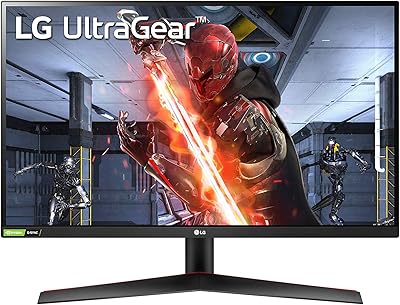
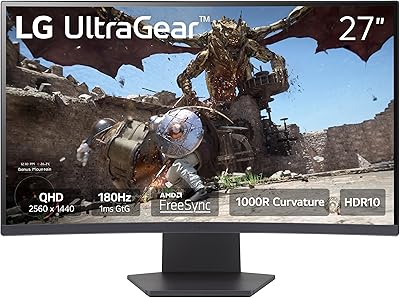
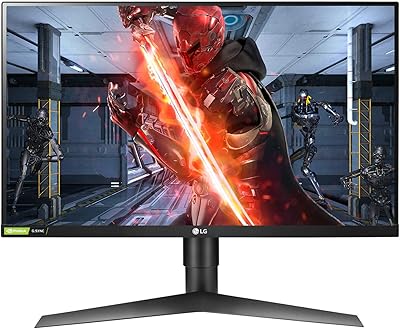
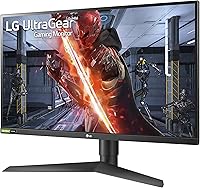
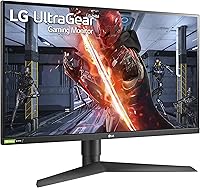
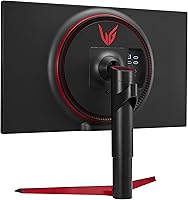
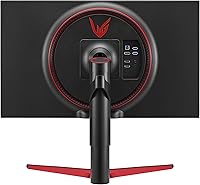
The LG 27GN750-B 27-inch Gaming Monitor sits squarely in LG's UltraGear line, designed around one clear priority: competitive performance over visual fidelity. A 27-inch FHD IPS panel at 240Hz refresh rate signals its intent right away — this is a speed-first display, not a cinematic one. Priced accessibly within the mid-range, it punches above its class by including a fully ergonomic stand with tilt, height, and pivot adjustments, a feature often omitted at this price point. The 3-side borderless bezel keeps the aesthetic sharp and makes it a natural fit for multi-monitor arrangements.

Features & Benefits

Running at 240Hz with 1ms response, the LG UltraGear 27GN750-B handles fast motion the way competitive players actually need it to — without the ghosting or smearing that slower panels leave behind. G-SYNC Compatible certification ensures tear-free frames when paired with a supported NVIDIA GPU, though it's worth noting this is software-level compatibility, not full hardware G-SYNC, so AMD users shouldn't count on the same benefit. The IPS panel delivers noticeably wider viewing angles and truer colors than TN displays at equivalent speeds. HDR 10 support is present but modest — real-world impact is subtle, not transformative. Three built-in USB ports are a practical touch that keeps peripheral clutter off your desk.

Best For

This competitive gaming display is the right pick for a specific type of gamer: one who plays fast-paced titles like CS2, Valorant, or Apex Legends and knows that raw frame rate matters more than pixel count. It's a strong match for NVIDIA GPU owners who want the tangible benefits of G-SYNC Compatible adaptive sync without paying premium display prices. Gamers jumping from 60Hz or even 144Hz will notice the difference immediately — the motion is visibly more fluid. The thin bezels also make it a practical choice for dual or triple-monitor setups. And if you'd otherwise spend extra on an aftermarket monitor arm, the included stand with full height and pivot adjustment makes that unnecessary.

User Feedback

In the real world, competitive players repeatedly praise how the 240Hz panel performs in shooters — the fluidity in tracking moving targets is something you feel rather than just measure. Out-of-box color is frequently described as respectable for a gaming IPS, which is a pleasant surprise at this tier. On the downside, some buyers who sit close find that FHD at 27 inches shows its limits — text and textures can look soft compared to a 1440p panel. A portion of reviewers also flag minor backlight bleed, so panel quality isn't perfectly consistent across units. HDR reactions tend to be neutral rather than enthusiastic. The stand, however, earns consistent praise for its sturdiness and ease of adjustment.

Pros

  • The 240Hz refresh rate produces visibly fluid motion that genuinely changes how fast-paced games feel to play.
  • 1ms IPS response time keeps ghosting and trailing nearly invisible even in the most hectic competitive scenarios.
  • G-SYNC Compatible support removes screen tearing for NVIDIA GPU owners without requiring expensive hardware certification.
  • IPS panel technology delivers noticeably better color and wider viewing angles than TN displays running at comparable speeds.
  • The included ergonomic stand with height, tilt, and pivot adjustment is a genuine value-add that rivals often skip at this price.
  • Three built-in USB ports simplify desk cable management without requiring a separate hub.
  • A 3-side borderless bezel integrates cleanly and consistently into multi-monitor arrangements.
  • Out-of-box color accuracy is solid for a gaming-oriented display, requiring little to no manual adjustment.
  • Mid-range pricing makes real 240Hz IPS performance accessible without pushing into flagship monitor territory.

Cons

  • FHD resolution across a 27-inch panel produces noticeably softer imagery for users who sit close to their screen.
  • HDR 10 delivers only marginal real-world improvements and is unlikely to impress anyone familiar with proper HDR displays.
  • G-SYNC Compatible is software-certified and offers no adaptive sync advantage for AMD GPU users.
  • Some units arrive with minor backlight bleed, suggesting quality control is not perfectly consistent across the production run.
  • There are no built-in speakers, so separate audio output is required for any desktop sound setup.
  • 1080p resolution may feel like a limitation sooner than expected as GPU performance scales and 1440p panels become more affordable.
  • 400-nit peak brightness can feel insufficient in rooms with strong ambient light or bright window glare.
  • Despite the IPS panel, this display is not suited for color-critical or content-creation work of any professional standard.

Ratings

The scores below for the LG 27GN750-B 27-inch Gaming Monitor were generated by our AI rating engine after analyzing thousands of verified global buyer reviews, with incentivized submissions, duplicate accounts, and bot-generated feedback actively filtered out before any scoring was applied. Each category reflects an honest synthesis of real-world user experiences, giving equal weight to genuine enthusiasm and recurring pain points so buyers can make a fully informed decision.

Gaming Performance
93%
In competitive shooters, the 240Hz panel produces motion that feels physically more immediate than 144Hz displays — crosshair tracking during fast engagements in CS2 or Valorant responds with a fluidity that experienced players notice within the first session. Paired with 1ms response time, the display holds up in the most demanding ranked scenarios without perceptible lag.
Reaching the full 240Hz requires a DisplayPort connection and a GPU capable of sustaining high frame rates — HDMI tops out at 144Hz, which catches some buyers off guard post-setup. Players running mid-tier graphics cards may not hit frame rates where 240Hz produces a meaningful real-world advantage over a 165Hz alternative.
Image Clarity
67%
33%
For a 1080p gaming panel, out-of-box color reproduction is solid — in-game environments and skin tones look natural without manual calibration, and the IPS technology keeps color consistency reasonable across slightly off-center viewing positions during shared desk use.
At 27 inches, 1080p pixel density is genuinely limiting for players who sit within arm's reach — fine textures lose crispness, and desktop text looks noticeably softer than on a 1440p panel at comparable sizing. Buyers accustomed to higher-resolution displays will feel the downgrade immediately in everyday non-gaming use.
Motion Handling
91%
Ghost trails and pixel smear are nearly absent even during rapid 180-degree turns or tracking fast-moving targets — the panel holds clean edges in motion scenarios that expose ghosting on slower IPS displays. Competitive players consistently rank this as one of the display's most convincing real-world strengths.
A smaller subset of users report perceiving minor inverse ghosting — faint dark halos trailing bright objects — when overdrive is set to its highest mode. Dialing the response time overdrive back one step through the OSD resolves this for most, but it requires a manual adjustment that is not immediately obvious to first-time users.
Adaptive Sync
78%
22%
For NVIDIA GPU owners on DisplayPort, G-SYNC Compatible removes screen tearing reliably during GPU-intensive sequences — frame pacing stays consistent even when output drops below the panel's peak, which stabilizes gameplay in heavier titles without requiring premium G-SYNC hardware pricing.
G-SYNC Compatible is software-certified rather than hardware-implemented, meaning it does not behave identically to a dedicated G-SYNC module in all conditions. AMD GPU users receive no certified adaptive sync benefit here, and some NVIDIA users report needing to manually enable the feature through the NVIDIA control panel rather than having it activate automatically.
HDR Performance
53%
47%
HDR 10 delivers a subtle improvement in highlight detail and shadow recovery in supported games and streaming content — the toggle is easy to activate, and for casual viewing the incremental lift in dark scene clarity is genuinely present, if modest.
A 400-nit brightness ceiling prevents this panel from producing the contrast depth that makes HDR feel impactful — experienced buyers consistently describe the effect as underwhelming. Enabling HDR in Windows also desaturates SDR desktop content, making it impractical for full-time use and limiting the feature's real-world utility to select gaming sessions only.
Color Accuracy
77%
23%
The IPS panel covers approximately 99% of the sRGB color space with respectable out-of-box consistency — for gaming, video streaming, and general daily use, most buyers report no need for manual calibration after unboxing. Color-critical casual tasks look clean without any extra setup.
DCI-P3 coverage is limited, ruling this display out for photo editing or color-grading workflows where wide gamut accuracy is non-negotiable. Buyers who do run a calibration profile will find noticeable deviation in saturated greens and some secondary hues that only targeted profiling can correct to a professional standard.
Build Quality
82%
18%
The chassis feels solid during stand adjustments with no audible creaking — the rear panel finish resists everyday scuffs well, and the overall rigidity is meaningfully better than budget-tier monitors that flex under light pressure. Most buyers report the display arrives without cosmetic damage.
A noticeable portion of buyers report backlight bleed at the panel edges, most visible during dark loading screens or cinematic cutscenes in a dim room. The variation suggests manufacturing tolerances are not perfectly consistent across production runs, meaning some units are appreciably better than others in this specific area.
Ergonomics & Stand
86%
Height, tilt, and full 90-degree pivot adjustments are all supported out of the box — an ergonomic combination that genuinely eliminates the need for an aftermarket arm in most standard desk setups. Height adjustment in particular moves smoothly and holds position reliably through long sessions without any drift.
The stand base has a wider footprint than average, which constrains space on smaller desks more than competing stands at this tier. Left-right swivel adjustment is absent entirely — repositioning the screen horizontally requires lifting the whole unit, which becomes frustrating in tighter workspace configurations or shared desk setups.
Connectivity
79%
21%
Two HDMI 2.0 ports and one DisplayPort 1.4 cover simultaneous PC and console connections without needing a separate switch. The three integrated USB 3.0 ports are genuinely useful for keyboard, mouse, or headset receivers at desk level, reducing the need to reach around to a tower during daily use.
The USB hub is inactive until the upstream USB cable is connected to the host PC — an easy-to-miss setup step that generates disproportionate confusion in early buyer reviews. HDMI bandwidth also caps the connected experience for console users at 120Hz maximum, even in supported titles, which disappoints those expecting parity with the panel's headline refresh rate.
Brightness
68%
32%
In a controlled indoor gaming environment with neutral ambient lighting, 400 nits is adequate for comfortable extended play — perceived contrast holds up well in SDR gaming content, and the matte screen coating reduces direct specular reflections from desk lamps and nearby light sources.
In rooms with large windows or strong overhead lighting, 400 nits feels insufficient — glare degrades perceived contrast noticeably, and the matte coating alone cannot compensate for the brightness ceiling. Compared to premium monitors pushing 600 nits or higher, the gap becomes apparent on bright afternoons when calibrated monitors maintain image quality and this one begins to wash out.
Bezel & Aesthetics
83%
The 3-side borderless design keeps visual interruption minimal in dual-monitor arrangements — the transition between panels looks cleaner than most alternatives at this price point, and the slim side and top bezels give the display a modern, purposeful profile that fits gaming desk aesthetics well.
The bottom bezel is visibly thicker than the other three sides, creating an asymmetry that is more noticeable when the monitor is mounted at eye level or paired with a second display. For single-panel use, the imbalance is a minor cosmetic issue, but it becomes more apparent when symmetry across the full display array is the design goal.
Value for Money
84%
At its mid-range price point, the LG UltraGear 27GN750-B bundles 240Hz IPS performance, G-SYNC Compatible support, and a fully adjustable ergonomic stand — a combination that typically requires a higher spend from competing brands. For competitive gamers focused on raw frame-rate performance, the price-to-capability ratio is genuinely strong.
As 1440p 165Hz monitors continue to approach similar pricing, the FHD resolution becomes a harder sell for buyers who use the display for anything beyond fast-paced competitive gaming. Those who prioritize a balance of sharpness and smoothness may find the cost-to-versatility trade-off less convincing compared to spending marginally more for a higher-resolution panel.
Setup Experience
81%
19%
The stand assembles tool-free in under five minutes, and a rear joystick control makes navigating the OSD menu intuitive from the first session. Cable routing channels keep the desk tidy immediately after setup without requiring any aftermarket cable management accessories.
Achieving 240Hz requires manually selecting the refresh rate under Windows display settings after installation — it does not switch automatically, and this step is frequently missed by first-time gaming monitor buyers. G-SYNC Compatible activation is also buried in secondary OSD menus, adding a few confusing extra steps before the display performs as expected.
Viewing Angles
80%
20%
IPS panel technology delivers noticeably better off-axis consistency than TN alternatives — color shift and contrast drop-off are minimal when viewing from positions slightly to the side, which keeps co-op viewing and split-desk arrangements comfortable without requiring center positioning at all times.
Color uniformity at extreme angles beyond roughly 45 degrees deteriorates more than premium IPS or OLED panels, which is apparent in side-by-side comparisons during co-viewing scenarios. A slight warmth shift also creeps into the panel corners under solid-color test screens, indicating that edge-to-edge uniformity is adequate but not class-leading.

Suitable for:

The LG 27GN750-B 27-inch Gaming Monitor was built with a specific type of gamer in mind, and for that audience it genuinely delivers. Competitive FPS players — the kind who grind ranked matches in CS2, Valorant, or Apex Legends — will immediately feel the benefit of the 240Hz refresh rate in how smoothly targets track across the screen. If your GPU is from NVIDIA's lineup, G-SYNC Compatible support tightens the experience further, eliminating the tearing that can throw off aim at critical moments. Gamers upgrading from 60Hz or 144Hz will notice the difference right away without needing a side-by-side comparison to confirm it. The 3-side borderless design and consistent form factor make it a natural choice for anyone building a dual or triple-monitor workstation. And if you would otherwise spend extra on an aftermarket monitor arm, the included stand with genuine height, tilt, and pivot adjustability removes that added cost entirely.

Not suitable for:

The LG 27GN750-B 27-inch Gaming Monitor is a poor fit for anyone who sits close to their screen and expects sharp, detailed imagery across both games and everyday desktop use. At 27 inches with a 1080p resolution, pixel density runs noticeably lower than a 1440p panel of the same size, meaning textures and fine text can look soft to a trained eye at close viewing distances. Creative professionals in photo editing, video production, or graphic design should look elsewhere — the color volume and dynamic range here are calibrated around gaming adequacy, not studio-grade accuracy. AMD GPU owners should also temper expectations around adaptive sync, since G-SYNC Compatible is a software-based certification and does not carry the same reliability as a native FreeSync panel. HDR 10 is listed as a feature, but real-world results are underwhelming enough that it should carry no weight in the decision. If image quality is your primary concern over responsiveness, this competitive gaming display simply was not designed with you in mind.

Specifications

  • Screen Size: The display measures 27 inches diagonally, housed in a 3-side virtually borderless chassis designed for multi-monitor configurations.
  • Resolution: Native resolution is 1920x1080 FHD, prioritizing high frame-rate output over pixel density compared to a 1440p panel at the same screen size.
  • Panel Type: An IPS panel delivers wider viewing angles and more accurate color reproduction than TN displays running at equivalent refresh rates.
  • Refresh Rate: The display operates at a native 240Hz, producing noticeably fluid on-screen motion in fast-paced competitive gaming scenarios.
  • Response Time: Rated at 1ms gray-to-gray (GtG), the panel reduces trailing and ghosting to near-imperceptible levels during rapid movement.
  • Adaptive Sync: NVIDIA G-SYNC Compatible certification enables tear-free gameplay when connected via DisplayPort to a supported NVIDIA GPU.
  • HDR Support: HDR 10 is supported, though the 400-nit peak brightness constrains the contrast improvement achievable in HDR-enabled content.
  • Brightness: Peak luminance is rated at 400 candelas per square meter, suitable for moderately lit rooms but potentially limiting under strong ambient light.
  • Color Coverage: The IPS panel covers approximately 99% of the sRGB color space, providing solid out-of-box color accuracy for a gaming-focused display.
  • Video Inputs: Connectivity includes two HDMI 2.0 ports and one DisplayPort 1.4; the full 240Hz refresh rate is only achievable via the DisplayPort connection.
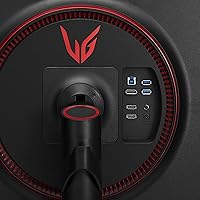
  • USB Hub: A built-in USB 3.0 hub offers one upstream port and two downstream ports, providing three total USB connections directly from the monitor body.
  • Aspect Ratio: The panel uses a standard 16:9 widescreen ratio, compatible with all major PC gaming resolutions and current-generation console outputs.
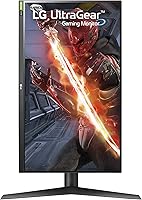
  • Stand Adjustments: The included stand supports tilt, height, and 90-degree pivot adjustments, covering ergonomic needs without requiring a separate monitor arm.
  • VESA Compatibility: A 100x100mm VESA mounting pattern is accessible beneath a rear cover for users preferring a third-party arm or wall-mount solution.
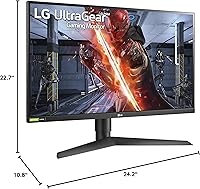
  • Dimensions: Fully assembled with the stand attached, the unit measures 24.2 x 22.7 x 10.8 inches and weighs 12.98 pounds.

Related Reviews

LG 34GP63A-B 34-Inch Curved Gaming Monitor

79%
93%
Gaming Immersion
91%
Refresh Rate Performance
88%
Contrast & Black Depth
83%
Color Accuracy
86%
Input Lag & Responsiveness
More
LG 27GX790A-B 27-inch OLED Gaming Monitor
80%
94%
Motion Clarity
92%
Image Quality
88%
HDR Performance
89%
Connectivity
86%
Ergonomics & Stand
More
LG 27GS75Q-B 27-inch QHD Gaming Monitor
82%
91%
Refresh Rate & Motion Performance
88%
Image Sharpness & Resolution
83%
Color Accuracy & Gamut
57%
HDR Performance
86%
Response Time & Ghosting
More
LG 27GN800-B 27-inch QHD Gaming Monitor
77%
88%
Image Quality
86%
Motion Performance
91%
Adaptive Sync
41%
Ergonomics & Stand
87%
Value for Money
More
LG 27GP850-B 27-Inch QHD Gaming Monitor
78%
91%
Image Quality
93%
Motion Performance
88%
Color Accuracy
54%
HDR Performance
89%
Refresh Rate & Sync
More
LG 27GS60QC-B 27″ Curved Gaming Monitor
78%
91%
Motion & Refresh Performance
88%
Image Clarity & Sharpness
84%
Contrast & Black Levels
77%
Color Accuracy & Gamut
52%
HDR Performance
More
LG 27GR83Q-B 27-inch QHD Gaming Monitor
80%
93%
Motion Clarity & Refresh Rate
89%
Image & Color Quality
58%
HDR Performance
84%
Build Quality & Materials
88%
Ergonomic Stand
More
LG 27GL650F-B 27-Inch Full HD IPS Gaming Monitor
85%
92%
Display Quality
89%
Gaming Performance
85%
Build Quality
91%
Ergonomics & Adjustability
90%
Value for Money
More
LG 27MK600M 27-inch IPS Monitor
75%
83%
Image Quality
71%
Color Accuracy
78%
Panel Uniformity
74%
Refresh Rate & Smoothness
62%
Response Time
More
LG 27GN950-B 27-inch UltraGear Gaming Monitor
79%
93%
Image Quality
61%
HDR Performance
89%
Gaming Performance
91%
Color Accuracy
54%
GPU Requirements
More

FAQ

The LG 27GN750-B 27-inch Gaming Monitor carries NVIDIA G-SYNC Compatible certification, which is validated specifically for NVIDIA GPUs over DisplayPort. AMD Radeon cards can still drive the display at its full 240Hz, but there is no AMD FreeSync certification here, so certified adaptive sync behavior is not guaranteed on the AMD side. If you are on an AMD GPU and adaptive sync matters to you, this is worth factoring into your decision.

That depends on how close you sit and what you are doing. Competitive gamers deliberately choose 1080p because it is far easier for a GPU to sustain 200-plus frames per second at lower resolution. If you sit within arm's reach of a 27-inch panel, text and fine textures will look softer than on a 1440p display. For gaming at a normal desk distance, the vast majority of players find it completely workable.

LG typically includes a DisplayPort cable and a power cable alongside the stand hardware. An HDMI cable is generally not included, so if you plan to use an HDMI connection, have one ready. Using DisplayPort is the better choice anyway since it is the only way to unlock the full 240Hz refresh rate.

No. The HDMI 2.0 ports on this display cap at 144Hz for a 1080p signal. To reach 240Hz, you must connect via DisplayPort 1.4. If your graphics card only offers HDMI outputs, you will need an adapter or a GPU with a DisplayPort output to take full advantage of the panel.

It is perceptible, though less dramatic than the step from 60Hz to 144Hz. In fast-paced shooters, mouse and crosshair movement feels more immediate and connected. Many players who game at 240Hz find it difficult to return to 144Hz afterward without noticing the difference. Whether that margin justifies the cost depends on how seriously you take competitive performance.

No, there are no built-in speakers. You will need headphones or external speakers connected to your PC or audio interface. This is common among gaming monitors at this tier, where audio hardware is often omitted to keep the cost focused on display performance.

For most people, probably not. HDR 10 at 400 nits does nudge highlights and shadow detail slightly in supported games, but the improvement is subtle rather than striking. Many users find that enabling HDR in Windows washes out SDR content like your desktop and browser, which makes the trade-off frustrating for everyday use. Turning it on only for specific HDR-supported titles is the more practical approach.

The included stand is genuinely capable for this price range. It adjusts for height, tilt, and pivots a full 90 degrees into portrait mode, which covers what most users actually need. If you specifically want to free up desk space or prefer a floating-arm aesthetic, the 100x100mm VESA pattern is there for you. But most buyers will not need to spend extra on an arm.

There is some unit-to-unit variation, which is typical of IPS panels generally. A noticeable portion of buyers report mild bleed along the edges or corners, most visible against a fully black screen in a dark room. It is not universal, but if you are sensitive to it, test the display with a dark background as soon as it arrives and within the return window.

Yes, both consoles connect via HDMI without any compatibility issues. The catch is that HDMI 2.0 limits you to 120Hz maximum at 1080p, which current consoles can support in select titles. The 240Hz capability is only accessible via DisplayPort from a PC, so console users will not reach the panel's top refresh rate.

Where to Buy