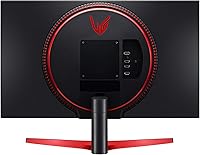
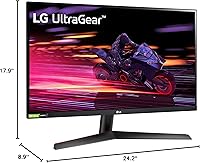
Overview

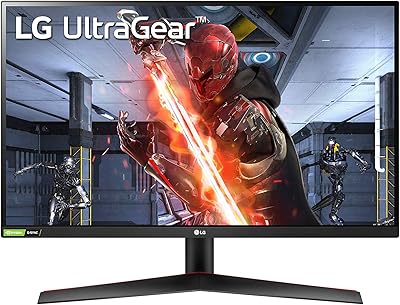
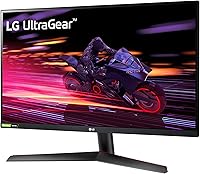
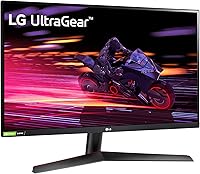
The LG 27GP700-B 27-inch FHD IPS Gaming Monitor sits in a competitive spot — a 240Hz IPS display priced for gamers who want fast motion and decent color without spending big. When it launched in 2021, panels like this were still a meaningful step up from the 144Hz mainstream; it holds up well even now. The real talking point upfront is resolution: 1080p on a 27-inch screen is a legitimate trade-off. Text and fine detail are softer than you'd get on a 1440p panel the same size. With over 1,400 buyer ratings averaging 4.6 stars, real-world satisfaction is clearly high — but informed buyers should go in with realistic expectations about pixel density.

Features & Benefits

At 240Hz with a 1ms GtG response time, this 240Hz IPS panel handles fast-paced games the way you'd want — motion stays sharp through quick camera swipes and input lag is minimal enough that competitive players won't feel held back. Unlike TN panels at similar speeds, the IPS technology means colors stay consistent whether you're sitting dead center or at an angle, which matters if you share your setup. Supporting both NVIDIA G-SYNC and AMD FreeSync Premium means you're not locked into one GPU brand. The 99% sRGB color coverage is a nice bonus for anyone doing light photo work between sessions. Two HDMI ports and a small USB hub round out a practical, if modest, port selection.

Best For

This LG UltraGear monitor makes the most sense for competitive FPS players and esports enthusiasts who care more about frame rate than pixel-perfect sharpness. If you're coming from a 60Hz or 144Hz panel, the jump to 240Hz is noticeable in fast-paced shooters — it's one of those changes you feel before you consciously register it. The dual HDMI inputs make it easy to connect both a PC and a console without swapping cables, and the 27-inch footprint fits most standard desks without dominating the space. Anyone chasing IPS color quality at high refresh rates without stepping up to a 1440p price tag will find this a reasonable, capable pick.

User Feedback

Most buyers praise the out-of-box color accuracy and how clean motion looks in games — those points come up consistently across reviews of the 27GP700-B. The slim bezels also get frequent mentions from people running dual-monitor setups. On the critical side, a recurring complaint is that 1080p on a 27-inch panel looks noticeably soft up close, especially when reading small text or browsing. The tilt-only stand gets flagged too — there's no height or swivel adjustment, so if ergonomics matter to you, budget for a monitor arm. Long-term reliability reports are mostly positive, with few mentions of backlight issues. Some users suggest lowering the default brightness and adjusting sharpness straight out of the box.

Pros

  • 240Hz refresh rate delivers noticeably smoother motion in fast-paced games compared to 60Hz or 144Hz panels.
  • IPS technology provides accurate colors and wide viewing angles that TN panels at similar prices cannot match.
  • Compatible with both NVIDIA G-SYNC and AMD FreeSync Premium, covering the full range of popular GPU brands.
  • Out-of-box color accuracy is strong for the price — most buyers report usable results without manual calibration.
  • Slim three-side bezels make this 240Hz IPS panel a natural fit for dual or triple-monitor configurations.
  • Dual HDMI ports allow straightforward switching between a gaming PC and a console on the same desk.
  • Matte anti-glare coating keeps reflections manageable in typical room lighting conditions.
  • Long-term reliability reports from buyers are mostly positive, with few mentions of panel defects or degradation.
  • Compact, lightweight build makes it easy to reposition or transport without much hassle.

Cons

  • 1080p across a 27-inch screen produces soft pixel density that becomes noticeable at typical desktop viewing distances.
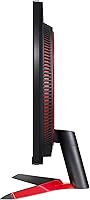
  • The included stand only tilts — no height, swivel, or pivot adjustment is available without a separate monitor arm.
  • HDR 10 is listed as a feature, but real-world HDR performance is too limited to be considered a genuine benefit.
  • No DisplayPort input is included, which creates compatibility issues for some GPU configurations and multi-monitor setups.
  • The built-in USB hub offers only one USB 2.0 and one USB 3.0 port — barely sufficient for a well-equipped desk.
  • Default brightness ships too high out of the box; buyers consistently recommend dialing it down immediately after setup.
  • Some users report minor ghosting artifacts that require manual overdrive tuning to reduce effectively.
  • Released in 2021, the 27GP700-B now faces newer competitors offering 1440p resolution at comparable price points.

Ratings

The LG 27GP700-B 27-inch FHD IPS Gaming Monitor has been analyzed by our AI rating system across thousands of verified global buyer reviews, with spam, bot activity, and incentivized feedback actively filtered out to ensure the scores reflect genuine ownership experience. The results capture a clear picture: this panel earns strong marks for gaming performance and sync flexibility, while its 1080p resolution and tilt-only stand draw consistent criticism that the scores honestly reflect. Both strengths and documented pain points are transparently represented across each rating category below.

Gaming Performance
91%
In fast-paced FPS titles like Valorant or CS2, the 240Hz refresh rate makes a tangible difference — enemies stutter less, movement feels more fluid, and reactions feel more precise. Buyers who upgraded from 144Hz setups consistently report the jump was noticeable during competitive play, not just in benchmark tests.
The gains are primarily felt in competitive, high-frame-rate genres; slower-paced RPGs and strategy games do not extract much benefit from 240Hz. Users coming from higher-resolution panels sometimes find that the 1080p image quality slightly undermines an otherwise clean gaming experience at this screen size.
Image Quality
78%
22%
For gaming, the IPS panel produces punchy, well-saturated colors right out of the box, and the matte coating keeps things clean without washing colors out in bright rooms. Side-by-side with a TN panel at the same refresh rate, the color and contrast difference is immediately visible and meaningful.
The 1080p resolution at 27 inches is the persistent weak point — fine detail in textures, UI elements, and web browsing looks noticeably softer than on a same-size 1440p display. Buyers who care about crisp desktop visuals as much as in-game smoothness should weigh this trade-off carefully before purchasing.
Response Time
93%
The 1ms GtG response time is one of the strongest aspects here — ghosting is barely perceptible during fast camera movements, and the IPS panel avoids the overshoot artifacts that plague poorly tuned overdrive settings on competing monitors. Competitive players consistently cite motion clarity as a genuine standout.
Like most IPS panels at this speed, some users notice very faint trailing in dark-to-dark transitions if overdrive is pushed too aggressively. It is a minor issue easily managed through the on-screen display settings, but buyers sensitive to inverse ghosting should test the default overdrive setting first.
Color Accuracy
82%
18%
Covering 99% of the sRGB color space, this 240Hz IPS panel produces colors that are noticeably more accurate and vibrant than TN panels typically found at this refresh rate. Light photo editing and casual creative work look respectable without any manual calibration, which is a real day-to-day convenience.
Colors are solid within sRGB boundaries, but the HDR 10 implementation is too limited to meaningfully expand the effective gamut in practice. Content creators who need Adobe RGB or DCI-P3 coverage for professional work will find this panel underwhelming beyond standard sRGB use cases.
Value for Money
84%
For a 240Hz IPS panel with G-SYNC and FreeSync compatibility, the pricing is genuinely competitive. Buyers repeatedly describe it as one of the more honest options in the mid-range gaming monitor space — you get real competitive-grade specs without paying a premium for resolution you may not actually need.
As 1440p monitors at 144Hz have dropped in price, the value calculus has tightened noticeably. Buyers who spend significant time at their desk outside of gaming sometimes feel the 1080p compromise was not the most future-proof investment once the initial excitement of 240Hz settled in.
Build Quality
73%
27%
The overall construction feels solid for the price — the panel housing has minimal flex, and the matte plastic finish resists fingerprints reasonably well. The ultra-thin bezel contributes to a premium appearance that reads as more expensive than the actual price tag would suggest.
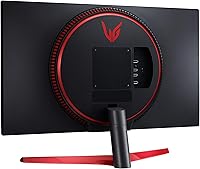
The stand base feels lightweight and can wobble slightly if bumped, which is a recurring complaint among buyers with active or shared desk environments. The all-plastic construction, while functional, lacks the premium feel of higher-tier gaming monitors that incorporate metal accents or reinforced hinge mechanisms.
Ergonomics & Stand
52%
48%
The stand holds the panel securely and allows for a modest degree of tilt, covering the most basic ergonomic adjustment most users make. The monitor is VESA-compatible, so users who already own a monitor arm can bypass the factory stand entirely without needing any additional hardware.
The absence of height, swivel, or pivot adjustment is a genuine limitation that typically becomes frustrating within the first few days of daily use. Buyers who need to raise the display to eye level or adjust positioning for their posture consistently report reaching for an aftermarket arm almost immediately.
Connectivity
67%
33%
Dual HDMI inputs are a practical advantage for users who keep both a PC and a console on the same desk — no cable swapping required between sessions. The USB hub adds a convenient spot for plugging in a controller receiver, thumb drive, or headset dongle without reaching behind a tower.
The absence of a DisplayPort input is a notable gap for PC gamers who prefer it for high-refresh-rate connections or multi-monitor signal chaining. The USB hub is minimal at just two ports total, and buyers with peripheral-heavy setups quickly exhaust the available connections at the monitor itself.
HDR Performance
44%
56%
HDR 10 support does produce a visible bump in brightness and contrast range on HDR-enabled content versus straight SDR output. For users unfamiliar with high-end HDR displays, the improvement in dark scenes and highlights is at least noticeable in supported games and streaming platforms.
Experienced users who have seen proper HDR on premium panels will find the performance here genuinely disappointing — without local dimming or adequate peak brightness, HDR mode falls far short of immersive. Several buyers recommend leaving the monitor in SDR mode for a cleaner, more consistent overall picture.
Pixel Density
61%
39%
At a normal gaming distance of around 2 to 3 feet, most users report that 1080p at 27 inches is workable, and the fast refresh rate does a reasonable job masking the resolution gap when motion is constant and action is heavy.
Sitting closer than 2 feet, or switching between gaming and desk tasks, makes the low pixel density harder to ignore. Reading standard-size text, browsing web content, or working in spreadsheets on this panel at 27 inches produces a noticeably softer result than a 1440p screen of the same size.
Viewing Angles
86%
The IPS panel delivers wide, consistent viewing angles that hold up well even when viewed from roughly 45 degrees off-axis — colors stay accurate and contrast does not shift in the way VA or TN panels do. This makes it practical for shared viewing or setups where the monitor sits off-center.
Minor IPS glow is noticeable at extreme angles or in dark rooms when displaying very dark content, which is a characteristic of IPS technology rather than a unique flaw in this unit. It is rarely disruptive during typical gaming but becomes more visible during dark cinematic scenes viewed from off-center positions.
Setup & Calibration
79%
21%
Assembly is straightforward — most buyers complete the initial physical setup in under ten minutes without needing instructions. Factory color calibration is reliably decent for an IPS panel at this price, and the on-screen display menu is easy to navigate for basic adjustments like brightness and contrast.
The OSD menu layout has drawn criticism for being slightly unintuitive when accessing deeper settings such as overdrive modes or input labeling. Default sharpness and brightness levels are commonly reported as set too high out of the box, requiring a few manual tweaks before the image looks its best.
Multi-Monitor Design
88%
The three-side borderless bezel is a standout physical feature — when placed alongside a second monitor, the gap between screens is minimal and the visual continuity is noticeably better than bezeled alternatives at the same price. Buyers running dual setups consistently highlight how polished the pairing looks.
The bottom bezel is thicker than the other three sides, creating a visible asymmetry when paired with a monitor that has a uniformly thin border all around. The tilt-only stand also makes precise edge-height alignment in a multi-monitor array harder to achieve without dedicated monitor arms on both displays.
Long-Term Reliability
81%
19%
Across buyer feedback spanning multiple years of ownership, this 240Hz IPS panel holds up well — there are few reports of backlight degradation, color shift, or pixel failures after extended daily use. The overall impression is of a panel that does not noticeably decline over typical ownership periods.
A small number of users report backlight bleed in corners appearing or worsening after the first year of use, though this appears to be unit-level variance rather than a systemic manufacturing defect. LG warranty support receives mixed reviews, with some buyers citing slow response times when filing claims.
Sync Performance
89%
With both G-SYNC Compatible and FreeSync Premium certifications active, screen tearing is effectively eliminated across a wide variable refresh rate range, and the experience is smooth regardless of whether the system runs AMD or NVIDIA. Buyers frequently note that adaptive sync works reliably without complex driver configuration.
G-SYNC Compatible certification means solid performance but without the dedicated hardware module found in pricier monitors, so there is no low framerate compensation below the FreeSync range floor. Users consistently dropping below roughly 48fps during demanding titles may see intermittent tearing reappear at the lower end.

Suitable for:

The LG 27GP700-B 27-inch FHD IPS Gaming Monitor is a strong fit for competitive PC gamers who prioritize high frame rates over maximum image resolution — particularly those playing fast-paced FPS titles where 240Hz makes a tangible, immediate difference. Players upgrading from a 60Hz or 144Hz display will feel the improvement right away, and the IPS panel ensures that speed does not come at the cost of washed-out colors or narrow viewing angles. The dual HDMI inputs make it a practical choice for anyone who switches between a desktop PC and a console on the same desk. Budget-conscious buyers who want genuine IPS color quality with a clean borderless aesthetic, without committing to a 1440p price point, will find this panel punches above its weight. It also covers casual creative tasks reasonably well, with 99% sRGB coverage handling light photo work without needing a dedicated content-creation display.

Not suitable for:

This 240Hz IPS panel is not the right pick for anyone who sits close to their screen or is sensitive to pixel density — at 27 inches with a 1080p resolution, text and fine UI detail can look noticeably soft compared to a 1440p or higher-resolution alternative at the same size. Serious content creators who depend on accurate color output for professional work should look elsewhere, since the HDR 10 implementation here is basic and does not deliver true HDR performance. The stand is a real ergonomic limitation: it tilts, but offers no height, swivel, or pivot adjustment, which becomes frustrating during long work or gaming sessions without an aftermarket monitor arm. Users who need a DisplayPort connection will also need to rethink their cable setup, as the port selection is HDMI-only. If upgrading to 1440p resolution is already on your near-term roadmap, it may be worth stretching the budget now rather than treating this as a stepping stone.

Specifications

  • Screen Size: The display measures 27 inches diagonally, appropriate for a standard single or dual-monitor desktop setup.
  • Resolution: Native resolution is 1920 x 1080 pixels (Full HD), delivering standard 1080p output across the full panel.
  • Panel Type: Uses an IPS (In-Plane Switching) panel, offering wider viewing angles and more accurate color than TN alternatives at comparable refresh rates.
  • Refresh Rate: Supports a maximum refresh rate of 240Hz, enabling up to 240 frames per second for noticeably smoother motion during fast-paced gaming.
  • Response Time: Rated at 1ms GtG (gray-to-gray), reducing motion blur and minimizing ghosting artifacts during high-speed gameplay.
  • Sync Technology: Certified NVIDIA G-SYNC Compatible and AMD FreeSync Premium, providing adaptive sync support across a wide range of GPU configurations.
  • Color Gamut: Covers 99% of the sRGB color space, producing accurate and vibrant colors suitable for gaming and casual photo or content work.
  • HDR Support: Includes HDR 10 compatibility at an entry level; it does not feature local dimming or the peak brightness required for a true HDR experience.
  • Aspect Ratio: Standard 16:9 widescreen ratio, compatible with all common resolutions and mainstream gaming and video content formats.
  • Screen Surface: Finished with a matte anti-glare coating that diffuses ambient reflections and reduces eye strain in normally lit rooms.
  • Bezel Design: Three sides of the display feature a virtually borderless bezel, keeping the visual footprint clean and enabling tighter multi-monitor arrangements.
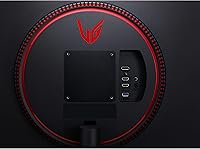
  • HDMI Ports: Equipped with two HDMI inputs, allowing two separate devices — such as a gaming PC and a console — to remain connected simultaneously.
  • USB Ports: Includes one USB 3.0 and one USB 2.0 downstream port for connecting peripherals directly through the monitor.
  • Stand Adjustment: The factory stand supports tilt adjustment only; no height, swivel, or pivot range is available without a third-party VESA-compatible monitor arm.
  • VESA Mounting: Compatible with standard VESA mounting patterns, allowing the panel to be used with aftermarket arms or wall mounts.
  • Weight: The monitor with stand weighs approximately 10.6 pounds, manageable for single-person setup and occasional repositioning.
  • Dimensions: Overall dimensions with stand measure 24.2 x 8.9 x 17.9 inches (W x D x H), fitting comfortably on most standard-depth desks.
  • Power Source: Powered via a standard AC connection with no external power brick required for operation.

Related Reviews
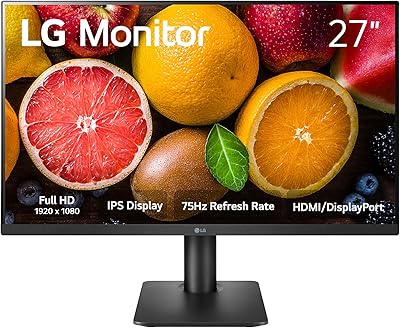
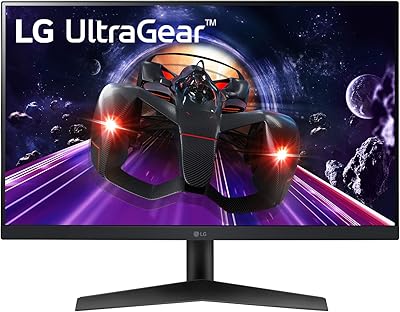
LG 27MP450 27-inch FHD IPS Monitor
77%
78%
Image Quality
71%
Color Accuracy
67%
Gaming Performance
84%
Ergonomics & Stand
83%
Eye Comfort
More
LG 24GN60R-B 24-inch FHD Gaming Monitor
71%
88%
Value for Money
84%
Gaming Performance
81%
Image Quality
51%
HDR Performance
43%
Stand & Ergonomics
More
LG 27GL650F-B 27-Inch Full HD IPS Gaming Monitor
85%
92%
Display Quality
89%
Gaming Performance
85%
Build Quality
91%
Ergonomics & Adjustability
90%
Value for Money
More
LG 27MS550-B 27-inch IPS Monitor
76%
83%
Display Clarity
79%
Color Accuracy
91%
Ergonomics & Stand
77%
Refresh Rate & Smoothness
72%
Response Time
More
LG 24MP400-B 24-inch IPS Monitor
71%
83%
Image Quality
91%
Value for Money
79%
Eye Comfort
64%
Gaming Performance
67%
Build Quality
More
LG 27GX790A-B 27-inch OLED Gaming Monitor
80%
94%
Motion Clarity
92%
Image Quality
88%
HDR Performance
89%
Connectivity
86%
Ergonomics & Stand
More
LG 27GS75Q-B 27-inch QHD Gaming Monitor
82%
91%
Refresh Rate & Motion Performance
88%
Image Sharpness & Resolution
83%
Color Accuracy & Gamut
57%
HDR Performance
86%
Response Time & Ghosting
More
LG 24BK430H-B 24-Inch FHD IPS Monitor

82%
91%
Display Quality
88%
Value for Money
94%
Eye Comfort
68%
Build Quality
87%
Ease of Setup
More
LG 34GP63A-B 34-Inch Curved Gaming Monitor
79%
93%
Gaming Immersion
91%
Refresh Rate Performance
88%
Contrast & Black Depth
83%
Color Accuracy
86%
Input Lag & Responsiveness
More
LG 27GN800-B 27-inch QHD Gaming Monitor
77%
88%
Image Quality
86%
Motion Performance
91%
Adaptive Sync
41%
Ergonomics & Stand
87%
Value for Money
More

FAQ

The LG 27GP700-B 27-inch FHD IPS Gaming Monitor is built around the trade-off that competitive gamers care more about frame rate than pixel density. At a typical gaming distance of around 2 to 3 feet, 1080p is workable for most people. That said, if you sit close to your display or spend a lot of time reading text, browsing, or doing detail-heavy work, the softness compared to a 1440p panel at the same size is noticeable. For pure gaming — especially fast-paced titles — most users find it perfectly fine.

Yes, this 240Hz IPS panel supports both NVIDIA G-SYNC Compatible and AMD FreeSync Premium, so you get adaptive sync and tear-free performance regardless of which GPU brand powers your rig. You do not need to buy separate versions for different systems — one monitor covers both ecosystems.

Yes, and the dual HDMI inputs make it convenient since you can leave both a console and a PC connected at the same time. Consoles output at up to 1080p 120Hz over HDMI 2.1, which this monitor handles well. The full 240Hz is a feature reserved for PC use through a compatible graphics card, not available via console output.

The stand tilts — roughly -5 to 15 degrees — and that is about it. There is no height adjustment, no swivel, and no pivot. If you happen to be at an ergonomically comfortable eye level with the monitor as-is, it is not a crisis. But if you need to raise, lower, or rotate the display for your posture, you will want a VESA arm. It is not an unusual limitation at this price point, but it is worth budgeting for if ergonomics matter to you.

The honest answer is: it depends on what you play and how seriously you play it. The most dramatic refresh rate upgrade is always the first one — going from 60Hz to 144Hz. The step from 144Hz to 240Hz is a real but subtler improvement, most noticeable in fast first-person shooters where reaction time and motion clarity matter. If you play competitively, the 27GP700-B gives you a genuine edge. If you mainly play slower-paced RPGs or strategy games, the difference is less compelling.

Quite limited, to be direct. HDR 10 is technically supported, but this panel lacks local dimming and does not reach the brightness levels needed to make HDR look genuinely impactful. You may see a slight contrast boost in HDR-enabled content, but it is nowhere near the effect you would get from a proper HDR display. Think of it as a checkbox feature rather than a meaningful buying reason.

For most users, it is ready to go right away — IPS panels generally come with decent factory calibration, and this one is no exception. The most common tweak buyers mention is dropping the default brightness, which ships set noticeably high. Some users also reduce sharpness slightly for a more natural image. Beyond those small adjustments, the colors are usable for both gaming and casual creative work without further effort.

No, there is no DisplayPort — the video inputs are HDMI only, with two ports available. For 1080p at 240Hz, HDMI 2.0 handles the bandwidth without issue, so this does not create a technical problem for most users. If your workflow or multi-monitor chain specifically requires DisplayPort, that is a compatibility issue worth checking before purchasing.

Long-term buyer feedback is largely reassuring. There are no widespread reports of backlight bleed worsening over time, dead pixels appearing, or color shift after extended use. Running the display at moderate brightness rather than maximum helps preserve the panel over the long term, which is good practice for any monitor regardless of brand.

No, there are no integrated speakers on this panel. You will need external speakers or a headset for audio, which is standard across gaming monitors in this class. Most gaming setups already rely on headsets or desktop speakers anyway, so this is rarely a practical issue for the target audience.