Overview

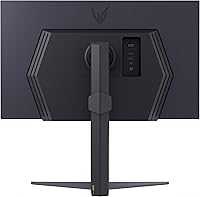
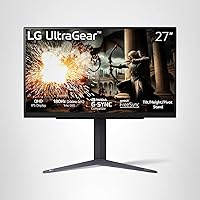
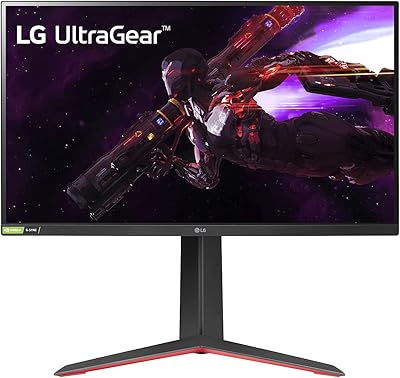
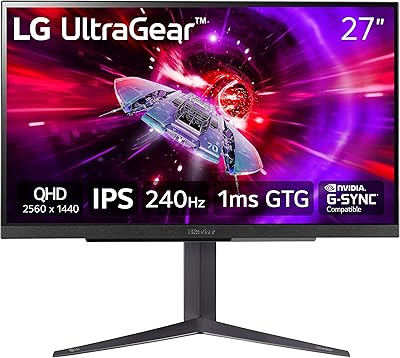
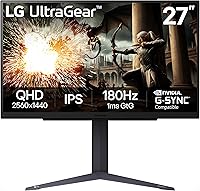
The LG 27GS75Q-B 27-inch QHD Gaming Monitor lands squarely in the mid-range sweet spot — a 27-inch IPS panel running at 2560x1440 that balances sharpness and performance without asking you to spend flagship money. LG's UltraGear line has earned a solid reputation over the years, and this entry keeps that tradition intact. What genuinely sets it apart from cheaper options at this size is the adjustable stand — tilt, height, and pivot all included out of the box, which is not a given at this price tier. It's not an OLED, it's not ultra-wide, and it doesn't pretend to be. Think of it as a well-built, capable all-rounder that covers the essentials without overreaching.
Features & Benefits

At its core, this UltraGear monitor is built around speed. The native 180Hz refresh rate — which can be pushed further via overclock — makes fast-paced shooters and strategy games feel noticeably smoother than a typical 144Hz display. The 1ms MBR response time keeps motion blur tight during rapid action, something TN panel users switching to IPS will appreciate especially. Color accuracy is strong for this tier, covering nearly all of sRGB, and HDR10 support adds some depth to compatible content — though don't expect the contrast punch of a proper HDR panel. Both NVIDIA and AMD users get certified sync support, which eliminates screen tearing without any manual configuration required.

Best For

This 27-inch QHD display makes the most sense for a few specific types of buyers. If you're grinding ranked matches in a competitive FPS or RTS, the high refresh rate paired with QHD resolution gives you both clarity and speed that 1080p simply can't match. It's also a natural upgrade for anyone moving up from 1080p who isn't ready for 4K and the GPU demands that come with it. Mixed households running both NVIDIA and AMD cards will appreciate the universal sync compatibility without needing to think twice about it. Light creative work — casual photo editing or color grading on the side — is also viable given the strong color coverage. One screen, a lot of use cases.

User Feedback

With just over a hundred ratings so far the picture is still forming, but early buyers are largely positive, landing the LG 27GS75Q-B at 4.4 stars. The most consistent praise centers on image sharpness and how fluid gameplay feels coming from a 1080p setup, with several buyers also calling out the stand quality as a genuine highlight. Setup gets mentioned as refreshingly straightforward. On the critical side, HDR performance draws some measured disappointment — users expecting dramatic HDR contrast may find it more of a subtle boost than a visual transformation. A handful of buyers also note the lack of USB-C as a minor inconvenience. Nothing deal-breaking, but worth factoring in if you're comparing closely priced alternatives.

Pros

  • Sharp 1440p image quality makes a noticeable and immediate difference for anyone upgrading from a 1080p display.
  • High refresh rate keeps fast-paced competitive games smooth and responsive without requiring a flagship GPU.
  • IPS panel delivers accurate colors and wide viewing angles that budget TN alternatives simply cannot match.
  • Both NVIDIA and AMD sync technologies are fully certified, covering virtually any GPU setup without compromise.
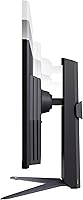
  • The included stand supports height, tilt, and pivot adjustments — a genuine value add at this price tier.
  • Matte screen coating handles ambient light well, reducing glare in bright room environments.
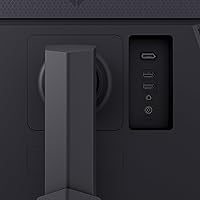
  • Dual HDMI ports make it easy to connect a PC and a console simultaneously without swapping cables.
  • Early buyers consistently highlight easy out-of-box setup and quick assembly as a positive experience.
  • Near-full sRGB coverage makes this 27-inch QHD display viable for casual creative work alongside gaming.
  • Borderless three-side design keeps the aesthetic clean and integrates well into multi-monitor configurations.

Cons

  • HDR10 support lacks the brightness and local dimming needed to deliver a genuinely impactful HDR experience.
  • No USB-C port limits single-cable laptop connectivity, which is an increasingly common desk setup requirement.
  • MBR mode reduces panel brightness noticeably, making it less practical in darker gaming environments.
  • OSD navigation relies on a rear joystick that some users find awkward to operate without looking away from the screen.
  • Default factory settings benefit from manual calibration before extended use, adding a small setup overhead.
  • Overclocking to the maximum refresh rate requires DisplayPort — HDMI users cannot access the full ceiling.
  • The review pool remains relatively small, so long-term reliability data is still limited compared to older models.
  • Backlight hum at low brightness settings has been reported by a small but consistent group of early buyers.
  • No built-in USB hub means peripheral-heavy desk setups will require a separate hub or dock.
  • Aggressive overdrive settings can introduce mild inverse ghosting, requiring manual tuning to find the optimal balance.

Ratings

The LG 27GS75Q-B 27-inch QHD Gaming Monitor earns a strong overall standing in its category, and the scores below reflect that — generated by our AI engine after analyzing verified global buyer reviews, with spam, bot submissions, and incentivized feedback actively filtered out. Across categories ranging from motion performance to ergonomics, both consistent strengths and honest pain points are surfaced exactly as real users reported them.
Refresh Rate & Motion Performance
91%
Buyers who game competitively — especially in fast-paced shooters — repeatedly call out how noticeably fluid the display feels compared to their previous 144Hz or 60Hz setups. The ability to push beyond the native ceiling via overclock gives enthusiasts a little extra headroom without needing to buy up.
A small number of users note that extracting the maximum overclocked rate requires manual configuration in the OSD, which can frustrate less experienced buyers. A few also report that hitting the top overclock requires a DisplayPort connection, making HDMI users feel slightly shortchanged.
Image Sharpness & Resolution
88%
The jump from 1080p to 1440p at this screen size is the single most praised aspect across early reviews. Text is crisper, in-game details are more defined, and the overall sense of visual clarity comes up repeatedly — especially from buyers who had been on budget 24-inch 1080p panels.
Users coming from higher-end 4K displays may find the resolution underwhelming, and pixel density at 27 inches is good but not exceptional compared to smaller QHD screens. A few note that the improvement is most visible in slower-paced or open-world games rather than fast, minimalist competitive titles.
Color Accuracy & Gamut
83%
For a gaming-oriented IPS panel in this price range, color reproduction is genuinely respectable. Buyers doing casual photo editing or graphic work on the side report that colors look natural and consistent, and the near-full sRGB coverage means content rarely looks washed out or oversaturated.
Color accuracy out of the box varies slightly by unit, and some users recommend spending a few minutes calibrating before heavy use. The panel is not factory-calibrated to a professional standard, so those needing delta-E precision for serious creative work will likely want a dedicated display instead.
HDR Performance
57%
43%
HDR10 support does add a subtle layer of depth in compatible games and streaming content, and casual users who have not owned a true HDR display tend to find it a pleasant bonus. Enabling it in supported titles does produce a slightly richer look in bright, outdoor scenes.
Anyone expecting the kind of HDR contrast and peak brightness found on OLED or Mini-LED panels will be disappointed — and this is probably the most common source of critical feedback. The monitor lacks local dimming and the peak brightness is not high enough to make HDR feel transformative rather than marginal.
Response Time & Ghosting
86%
In fast-paced gaming sessions, blur and ghosting stay well controlled, which is a genuine achievement for an IPS panel at this tier. Competitive players switching from TN monitors are often surprised by how little they sacrifice in motion clarity, especially with MBR mode active.
MBR mode reduces brightness noticeably, which some users find distracting in darker game environments. A handful of reviewers also observe mild inverse ghosting when overdrive is pushed to its highest setting, suggesting the sweet spot requires a bit of manual tuning rather than relying on defaults.
Ergonomics & Stand Quality
89%
The fully adjustable stand is one of the most mentioned positives in early reviews, and for good reason — height, tilt, and pivot adjustments all feel solid and well-built rather than cheap or wobbly. Buyers setting up a multi-monitor workstation particularly appreciate being able to dial in the exact angle they need.
The stand base has a moderate footprint that some users with smaller desks find slightly intrusive. Pivot rotation works well in practice but getting the cable management right when the display is rotated to portrait mode requires a bit of patience on initial setup.
Build Quality & Materials
82%
18%
The three-side borderless design looks noticeably cleaner than older-generation LG monitors, and the overall chassis feels sturdy without being excessively heavy. The matte screen coating is well-applied, reducing glare effectively in bright room conditions.
The rear panel and some internal components have a plasticky feel that is fairly standard for this price tier but does not convey premium build quality. A small number of buyers have noted minor flex in the bezel when pressing the display surface, which is not a defect but a reminder of the material choices made at this price point.
Connectivity & Port Selection
71%
29%
Having two HDMI ports alongside DisplayPort is a practical setup for users running a PC and a console simultaneously, and the ports are positioned in a way that keeps cable routing relatively tidy. Both sync protocols are supported regardless of which port you use.
The absence of USB-C is a recurring complaint, particularly from users who want to connect a laptop with a single cable. There is no built-in USB hub either, which means desk setups requiring peripheral connectivity through the monitor will need a separate solution.
OSD & Software Controls
68%
32%
The gaming-specific OSD presets — including FPS and RTS modes — are genuinely useful for quickly shifting settings between game genres without digging through menus. Most buyers find the initial setup intuitive enough to complete without consulting the manual.
The OSD navigation relies on a joystick button at the back of the panel that some users find awkward to locate blindly, particularly for small adjustments. The gaming GUI menus are functional but not the most refined in the category, and a few users report that saved settings occasionally reset after a power cycle.
Sync & Tear-Free Performance
92%
The dual-certification approach covering both major GPU ecosystems is consistently praised, especially in households where members use different graphics cards. Tear-free performance in variable framerate scenarios works reliably without requiring per-game configuration on either platform.
A small number of NVIDIA users note that getting G-SYNC Compatible mode to activate required toggling the setting manually in the NVIDIA control panel rather than it enabling automatically. This is a minor friction point but worth flagging for buyers who expect plug-and-play behavior straight out of the box.
Value for Money
87%
Buyers who cross-shopped this UltraGear monitor against similarly priced alternatives frequently conclude that the combination of IPS quality, high refresh rate, and included ergonomic stand is hard to beat at this price point. The feature set checks most of the boxes competitive gamers actually need.
Deals and price drops on older QHD monitors from rival brands occasionally undercut this display by a meaningful margin, and price-sensitive buyers should monitor availability. At full asking price, the lack of USB-C and modest HDR leave a small gap between what this display offers and what the next tier up provides.
Setup & Out-of-Box Experience
84%
Assembly is quick and tool-free, and most buyers report having the display up and running within ten minutes of opening the box. The included cables and clear instructions make the initial experience feel considered rather than an afterthought.
The default color and brightness settings are not optimized for all environments and benefit from some adjustment before extended use. The driver CD included in some regional packages is essentially obsolete, and a few international buyers noted that sourcing updated firmware required navigating LG's support site.
Viewing Angles
81%
19%
The IPS panel holds color and contrast well across a wide horizontal and vertical range, which matters in shared gaming setups or when a second person is watching alongside. Color shift at extreme angles is minimal compared to what TN panel users typically experience.
Very wide off-axis viewing does introduce a slight drop in perceived contrast, which becomes noticeable primarily in dark scenes or when the display is positioned above or below eye level. This is a characteristic of the panel type rather than a flaw unique to this monitor.
Noise & Heat
90%
The display runs fanless and silent, which is the expected standard but worth confirming given that some budget gaming monitors have introduced subtle electrical hum in practice. Heat output during extended sessions stays well within acceptable levels without causing discomfort.
A small number of users have reported a faint backlight buzz at very low brightness settings, which may be noticeable in completely quiet environments. This is not a universal experience based on current feedback, but it comes up often enough to mention for buyers who are particularly sensitive to coil whine or display noise.

Suitable for:

The LG 27GS75Q-B 27-inch QHD Gaming Monitor is a strong fit for PC gamers who want a meaningful step up from 1080p without committing to the GPU demands of a 4K display. If your library leans toward competitive shooters, strategy games, or any fast-paced titles where a high refresh rate genuinely changes how the game feels, this display delivers that experience with solid image quality rather than trading one for the other. It also works well in mixed-use households where one machine connects to both an NVIDIA and an AMD GPU setup at different times, since both sync ecosystems are fully supported without workarounds. Buyers who spend time on light creative tasks alongside gaming — casual photo editing, color grading a short video — will find the near-full sRGB coverage more than adequate for that kind of work. The included ergonomic stand makes it a practical choice for anyone building a clean desk setup or pairing it with a second display, since height and pivot adjustments come included rather than requiring a separate arm purchase.
Not suitable for:

If your priority is a truly immersive HDR experience or the deep blacks that only an OLED panel can deliver, the LG 27GS75Q-B 27-inch QHD Gaming Monitor will leave you underwhelmed — the HDR10 support here is a modest enhancement rather than a feature you will actively seek out. Buyers expecting to connect a modern laptop via a single USB-C cable will also need to look elsewhere, since that port is absent entirely, which is a real limitation as single-cable desk setups become more common. Anyone coming from a high-end 4K display will likely find the resolution step-down more noticeable than satisfying, and the pixel density at 27 inches does not rival smaller QHD screens in sheer sharpness. Dedicated professional color graders or photographers who require factory-calibrated accuracy and wide color space beyond sRGB should consider a purpose-built display instead. Finally, buyers sensitive to coil whine or display noise may want to audition a unit in person, as a small but notable segment of early owners has reported faint backlight hum at lower brightness settings.
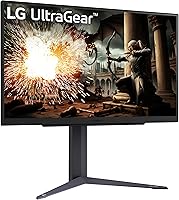
Specifications

  • Screen Size: The display measures 27 inches diagonally, offering a viewing area large enough for immersive gaming without requiring an unusually deep desk.
  • Resolution: Native resolution is 2560x1440 (QHD), delivering noticeably sharper detail than 1080p at this screen size without the GPU demands of 4K.
  • Panel Type: An IPS (In-Plane Switching) panel is used, providing wide viewing angles and more accurate color reproduction than TN alternatives at a comparable price.
  • Refresh Rate: The monitor runs natively at 180Hz and supports an overclocked mode reaching 200Hz via DisplayPort for users who want maximum motion fluidity.
  • Response Time: Rated at 1ms MBR (Motion Blur Reduction), which keeps fast on-screen movement sharp, though MBR mode does reduce peak brightness when active.
  • Sync Technology: Officially validated as both NVIDIA G-SYNC Compatible and AMD FreeSync certified, covering tear-free performance across both major GPU platforms.
  • HDR Support: HDR10 is supported, offering a modest improvement in color depth and contrast in compatible content, though the panel does not feature local dimming or high peak brightness.
  • Color Gamut: Covers approximately 99% of the sRGB color space, making it suitable for everyday gaming and light creative tasks requiring consistent color accuracy.
  • Aspect Ratio: Standard 16:9 widescreen aspect ratio, compatible with the vast majority of games, applications, and video content without letterboxing.
  • Screen Surface: Matte anti-glare coating is applied to the panel surface, reducing reflections in brightly lit rooms and during extended gaming sessions.
  • Connectivity: Port selection includes two HDMI inputs and one DisplayPort output, allowing simultaneous connection of a PC and a console or a second source device.
  • Stand Adjustments: The included stand supports tilt, height, and pivot adjustments, providing ergonomic flexibility that is not universally available at this price tier.
  • Dimensions: With the stand attached, the monitor measures approximately 24.2″ wide, 22.7″ tall, and 10″ deep, fitting most standard desk setups comfortably.
  • Weight: The complete unit including stand weighs 13.2 pounds, making repositioning manageable for a single person during setup or desk rearrangement.
  • VESA Compatibility: The display supports standard VESA mounting, allowing users to replace the included stand with a third-party monitor arm if preferred.
  • Release Date: This model was first made available in September 2024, making it a relatively recent addition to LG's UltraGear gaming monitor lineup.
  • Power Input: The monitor uses an external power adapter with a standard AC input, consistent with most consumer-grade displays in this category.
  • OSD Controls: On-screen display navigation is handled via a rear-mounted joystick button, with preset gaming modes including FPS and RTS profile options.

Related Reviews

LG 27GP850-B Ultragear Gaming Monitor 27-Inch QHD
87%
94%
Gaming Performance
89%
Color Accuracy
82%
Build Quality
88%
Ergonomics & Adjustability
85%
Ease of Setup
More
LG 27GR83Q-B 27-inch QHD Gaming Monitor
80%
93%
Motion Clarity & Refresh Rate
89%
Image & Color Quality
58%
HDR Performance
84%
Build Quality & Materials
88%
Ergonomic Stand
More
LG 27GS60QC-B 27″ Curved Gaming Monitor
78%
91%
Motion & Refresh Performance
88%
Image Clarity & Sharpness
84%
Contrast & Black Levels
77%
Color Accuracy & Gamut
52%
HDR Performance
More
LG 27GN800-B 27-inch QHD Gaming Monitor
77%
88%
Image Quality
86%
Motion Performance
91%
Adaptive Sync
41%
Ergonomics & Stand
87%
Value for Money
More
LG 27GX790A-B 27-inch OLED Gaming Monitor
80%
94%
Motion Clarity
92%
Image Quality
88%
HDR Performance
89%
Connectivity
86%
Ergonomics & Stand
More
LG 34GP63A-B 34-Inch Curved Gaming Monitor
79%
93%
Gaming Immersion
91%
Refresh Rate Performance
88%
Contrast & Black Depth
83%
Color Accuracy
86%
Input Lag & Responsiveness
More
LG UltraGear 32″ QHD Gaming Monitor
80%
91%
Gaming Performance
84%
Image Quality
54%
HDR Experience
88%
Ergonomics & Stand
79%
Build Quality
More
LG 27GL650F-B 27-Inch Full HD IPS Gaming Monitor
85%
92%
Display Quality
89%
Gaming Performance
85%
Build Quality
91%
Ergonomics & Adjustability
90%
Value for Money
More
memzuoix 27-inch QHD 165Hz Gaming Monitor
70%
88%
Image Clarity
84%
Refresh Rate Performance
91%
Value for Money
82%
Adaptive Sync (FreeSync/G-Sync)
77%
Color Accuracy
More
LG 27MK600M 27-inch IPS Monitor
75%
83%
Image Quality
71%
Color Accuracy
78%
Panel Uniformity
74%
Refresh Rate & Smoothness
62%
Response Time
More

FAQ

At 1440p and 180Hz, you will want a reasonably capable mid-range or better GPU to push frame rates high enough to take advantage of the display. Cards like the RTX 3060 or RX 6700 XT are comfortable starting points. That said, the FreeSync and G-SYNC Compatible support means even if your GPU fluctuates below the peak rate, you will still get tear-free output within the variable sync range.

Yes, both consoles connect via HDMI and the monitor has two HDMI ports, so the physical connection is straightforward. Keep in mind that current-generation consoles typically cap output at 120Hz at 1080p or 4K rather than 1440p at high frame rates, so you may not be using the panel to its full potential for console gaming specifically.

Overclocking to 200Hz requires a DisplayPort connection and needs to be enabled manually in the OSD. Most users who try it report stable results, but as with any overclock, individual panel variance means it is not guaranteed for every unit. Starting at the native 180Hz and testing the overclock once you are set up is a sensible approach.

Honest answer: it is a subtle improvement rather than a dramatic one. HDR10 support adds a bit more depth and color range in compatible games and streaming apps, but the panel does not have local dimming or high peak brightness, so you will not get the contrast pop of a proper HDR display. If HDR is a priority for you, this monitor is not the right choice — treat it here as a bonus rather than a headline feature.

Yes, the stand pivots to a full 90-degree portrait orientation, which is useful for coding, reading long documents, or running a vertical secondary display alongside a primary screen. Getting cables to sit cleanly in portrait mode takes a few extra minutes of routing, but the mechanical pivot itself works reliably.

It will. The LG 27GS75Q-B 27-inch QHD Gaming Monitor holds dual certification for both platforms, so whichever device you connect, adaptive sync should activate automatically within the supported frequency range. You do not need to change any monitor settings when switching sources.
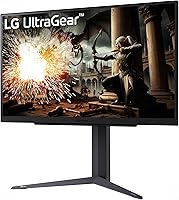
LG typically includes a DisplayPort cable and a power cable in the box for this model, though regional packaging can vary slightly. It is worth confirming what is included when yours arrives, as some buyers have noted that HDMI cables are not always included and may need to be purchased separately.

It works well in a dual-purpose setup. The IPS panel and near-full sRGB coverage mean text and colors look accurate during productivity work, and the ergonomic stand makes it easy to set a comfortable working height. The matte coating also helps in typical office lighting conditions. The main thing missing for a pure office setup is USB-C connectivity, which some modern laptops rely on.

There is no fan — this is a passive display like most monitors in its category. The vast majority of users report completely silent operation. A small number of early buyers have mentioned faint backlight hum at very low brightness settings, so if you work in a very quiet environment and tend to run your display dim, it is worth keeping that in mind.

Yes, the panel is VESA mount compatible, so removing the included stand and attaching an aftermarket arm is straightforward. If you are planning to do this anyway, note that the included stand is actually quite good for this price tier — height, tilt, and pivot are all adjustable — so it is worth trying it before committing to an arm purchase.

Where to Buy