Overview

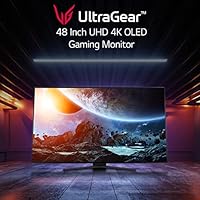
The LG 48GQ900-B 48-inch OLED Gaming Monitor occupies an odd but compelling niche — too large for most desks to call it a typical monitor, yet designed with the precision and input specs that no consumer TV can match. At 48 inches, it sits in a category of its own, appealing to gamers and enthusiasts who want big-screen immersion without the input lag and feature compromises of a television. OLED technology gives it a fundamental edge over IPS and VA LCD panels at this size: the contrast is real and absolute, not the product of local dimming zones. LG introduced this panel in mid-2022, and it quickly became a reference point for premium large-format gaming displays.

Features & Benefits

The most immediately impressive aspect of this 48-inch OLED panel is what happens in dark scenes — blacks are genuinely black, not a shade of dark grey. That comes from the panel's per-pixel light control, which also drives the 1.5M:1 contrast ratio. The native 120Hz refresh rate keeps motion fluid, and with a GtG response time under one millisecond, ghosting simply is not a concern. HDMI 2.1 means PS5 and Xbox Series X owners get the full 4K 120Hz signal without workarounds. Color coverage hits 99% of DCI-P3, making HDR content genuinely rich rather than artificially boosted. Adaptive sync works across both NVIDIA and AMD GPUs, and the built-in 20W stereo speakers handle casual sessions adequately.

Best For

This large-format gaming display makes the most sense for console gamers who want to extract everything their PS5 or Xbox Series X can output — HDMI 2.1 at 4K 120Hz is the hardware ceiling right now, and this panel handles it natively. PC gamers who care more about image quality and contrast depth than pushing 240Hz will also find it rewarding. It works well as a dual-purpose screen too: the color accuracy is solid enough for light creative work, and the sheer size makes movie watching genuinely cinematic. That said, 48 inches demands real desk depth and a comfortable viewing distance — this is not a panel for cramped workspaces.

User Feedback

Owners consistently describe the black level performance as the kind of thing that makes going back to an LCD feel impossible. That said, burn-in is the topic that comes up most often in critical reviews, and it deserves an honest answer: static interface elements — health bars, minimaps, notification icons — can cause long-term image retention on OLED panels with heavy daily use. The glossy surface is another practical issue; the anti-glare treatment helps somewhat, but in a bright room it reflects noticeably. The stand earns consistent complaints about its limited adjustability at this price point. Speaker quality gets mixed marks — functional, but not a reason to skip a dedicated audio setup.

Pros

  • OLED panel technology delivers absolute black levels and contrast that LCD displays at this size simply cannot replicate.
  • HDMI 2.1 support allows PS5 and Xbox Series X to run at their full 4K 120Hz output without any signal compromises.
  • Sub-millisecond GtG response time keeps motion sharp and ghosting-free even in fast-paced games.
  • Near-complete DCI-P3 color coverage makes HDR content and color-accurate work look genuinely rich.
  • Adaptive sync compatibility spans both NVIDIA and AMD GPUs, giving flexibility across different PC builds.
  • The 48-inch screen size creates an immersive, cinema-like experience that a standard 27-inch or 32-inch monitor cannot approach.
  • Built-in 20W stereo speakers with DTS HP:X processing are adequate for casual gaming without external audio gear.
  • The panel doubles effectively as a home theater screen, handling movies and streaming content with strong visual performance.
  • Wide 178-degree viewing angles mean image quality holds up even when not sitting directly center.

Cons

  • OLED burn-in is a real long-term risk for users who game many hours daily with static on-screen elements.
  • The included stand offers minimal ergonomic adjustment, which is a notable oversight at this price level.
  • The glossy panel surface reflects ambient light meaningfully in bright or window-facing rooms.
  • At 48 inches, the panel demands significant desk depth and a thoughtful viewing distance — small setups will struggle.
  • The 120Hz native refresh rate (138Hz overclocked) will feel limiting to competitive gamers used to 165Hz or higher.
  • Built-in speaker quality is functional but not a substitute for even a basic external audio setup.
  • At 37 pounds, repositioning or mounting the display is a two-person job and adds to overall setup complexity.
  • Only one USB 2.0 port is included, which is sparse for a large desktop display used as a central hub.

Ratings

The scores below for the LG 48GQ900-B 48-inch OLED Gaming Monitor were generated by our AI rating engine after systematically analyzing verified global buyer reviews, actively filtering out incentivized, bot-submitted, and outlier feedback to surface what real owners actually experience. Both the genuine strengths and the recurring frustrations are reflected transparently in every category — no padding, no spin.

Image Quality
96%
Owners consistently describe the picture quality as the single most impactful upgrade they have made to their gaming setup. The OLED panel's per-pixel lighting produces blacks that LCD displays at this size simply cannot approach, and the 99% DCI-P3 color coverage makes HDR game content look genuinely vivid rather than artificially boosted.
A small number of users note that very bright scenes can expose the inherent brightness ceiling of OLED panels compared to high-end mini-LED competitors, which can sustain higher peak luminance over large areas for longer durations.
Contrast & Black Levels
98%
This is the category where the OLED panel technology creates the largest measurable gap versus the competition. Reviewers who upgraded from IPS or VA monitors describe the difference in dark scenes — in games like horror titles or space environments — as genuinely transformative, not incremental.
The only practical limitation is that absolute brightness in sustained, full-screen white scenes is lower than premium LCD alternatives, which matters in very bright office-style environments but rarely affects gaming or cinematic content.
Response Time & Motion Clarity
93%
The sub-millisecond GtG response time means that fast-moving content — racing games, first-person shooters, action titles — stays sharp with no visible trailing or smearing. Users switching from 60Hz LCD panels consistently mention how clean and controlled motion looks at 120Hz on this display.
At 120Hz native, competitive PC gamers accustomed to 165Hz or 240Hz panels may feel a ceiling during fast-paced multiplayer, though the 138Hz overclock mode partially addresses this for those running PC hardware capable of pushing past 120 frames per second.
Console Compatibility
94%
HDMI 2.1 support is fully implemented and works exactly as PS5 and Xbox Series X owners need it to — 4K at 120Hz with no compression artifacts or signal workarounds required. Multiple owners confirmed clean setup with both consoles within minutes of unboxing, with variable refresh rate enabled automatically.
There is only one HDMI 2.1 port, so users running two current-generation consoles simultaneously need an external switch, which adds a small layer of inconvenience and potential signal latency depending on the switcher quality.
Color Accuracy
91%
The 48-inch OLED panel covers 99% of DCI-P3 out of the box with factory calibration that is competitive for a display in this category. Hybrid users who split time between gaming and color-sensitive photo or video work find it performs credibly without significant additional calibration effort.
Professional colorists working to strict broadcast or print standards will still want a dedicated calibration tool and profiling workflow, as factory accuracy varies unit to unit and the glossy surface complicates measurement in uncontrolled lighting conditions.
Build Quality & Design
74%
26%
The panel itself is well-constructed with a clean, minimal aesthetic that fits most desk setups without drawing attention. The bezels are slim, the rear finish is tidy, and the overall physical build feels appropriately substantial for a display at this tier.
The included stand is widely criticized as underwhelming — height, swivel, and pivot adjustability are limited for a 48-inch panel at this price point. At 37 pounds, any repositioning is also cumbersome, and most serious owners end up investing in a compatible VESA arm separately.
Ergonomics & Adjustability
58%
42%
The VESA 300×200mm mount pattern at least gives owners a practical path to a proper third-party arm or wall mount, and those who make that investment report a significantly improved experience in terms of positioning flexibility and desk space reclaimed.
Out of the box, the stand's adjustment range is genuinely poor for a premium display — many buyers find they cannot get the screen to a comfortable eye-level position without raising their entire desk setup or adding risers. For a display at this price tier, this is a recurring and justified complaint.
Glare & Reflection Handling
61%
39%
In a controlled or dim gaming environment, the panel's anti-glare treatment performs adequately and the OLED surface looks stunning — contrast and saturation benefit visibly from reduced ambient light, which is how most dedicated gaming spaces are configured anyway.
In bright rooms with windows or overhead lighting, the glossy panel surface reflects noticeably, and the anti-glare coating does not fully compensate. Multiple owners in naturally lit home offices report this as a daily annoyance that the product description undersells.
HDR Performance
88%
HDR 10 support on an OLED panel with genuine black levels produces a high dynamic range experience that is meaningfully better than HDR on most LCD monitors of comparable size — the contrast range is real rather than simulated through local dimming zones. Games and films with HDR grading show clear, visible benefit.
The panel supports HDR 10 but not Dolby Vision or HDR 10+, which limits the metadata-driven tone mapping available from some premium streaming services and Blu-ray titles. For most gaming use cases this is not a dealbreaker, but home theater enthusiasts may notice the ceiling.
Gaming Feature Set
89%
Between HDMI 2.1, variable refresh rate support for both major GPU platforms, the 138Hz overclock mode, and a proper gaming-tuned OSD with black stabilizer and crosshair overlay options, the LG UltraGear OLED covers the practical feature checklist that serious gamers need without requiring external software.
The OSD navigation using physical buttons on the rear panel is fiddly on a display this size — reaching around a 48-inch screen to adjust settings is awkward, and some users report the button layout is not intuitive enough for quick in-session adjustments.
Built-in Audio
62%
38%
The 20W stereo speakers are usable for casual gaming sessions and light media consumption — they produce adequate volume for a medium room and the DTS HP:X headphone processing via the 4-pole output is a genuinely useful addition for headset users who want virtual surround without a separate DAC.
Audio quality from the built-in speakers is consistently described as thin and lacking bass — functional but not satisfying for immersive gaming or cinematic content. Most users purchasing at this price tier already own dedicated audio gear, making the speakers a rarely-used fallback.
PC Connectivity
69%
31%
DisplayPort input handles the 138Hz overclock mode cleanly for PC users, and the USB 2.0 port at least provides a basic peripheral connection point for mouse or keyboard without reaching behind a tower.
A single USB 2.0 port is sparse for a 48-inch display positioned as a central desktop hub — no USB-C, no USB 3.0 hub functionality, and no power delivery. Buyers expecting the kind of connectivity suite found on premium ultrawide monitors will be disappointed by how little is here.
Burn-in Risk Management
66%
34%
LG includes a pixel-refresher cycle, screen-saver tools, and logo luminance adjustment features that give attentive owners practical tools to manage OLED wear over time. Casual to moderate users gaming a few hours daily and varying their content report no visible retention issues after extended ownership.
Heavy daily users — especially those running games with persistent static HUD elements or leaving the display on static desktop content for hours — face a real long-term burn-in risk that no software mitigation fully eliminates. This is an inherent OLED technology trade-off, not a flaw specific to LG.
Value for Money
72%
28%
For buyers who specifically want a 48-inch OLED panel with HDMI 2.1 and proper gaming-monitor input handling, the competitive set is genuinely limited — alternatives at this size and spec level from other brands are priced similarly or higher. Within its niche, the value proposition holds.
At this price tier, the stand quality, limited USB connectivity, and absence of Dolby Vision support are harder to overlook. Buyers comparing it against a premium OLED TV of equivalent size — which may offer richer smart features and similar panel performance — will find the value argument requires careful examination of their specific priorities.
Setup & Out-of-Box Experience
81%
19%
Physical assembly is straightforward for a display this size, and PS5 or Xbox Series X users in particular report a quick and clean initial setup experience — plug in HDMI 2.1, enable 4K 120Hz on the console, and the display responds correctly without requiring OSD adjustments.
PC setup is slightly more involved for users wanting to enable variable refresh rate or the 138Hz overclock, requiring DisplayPort rather than HDMI and specific driver settings on the GPU side. The OSD controls are functional but not the most intuitive to navigate during initial configuration.

Suitable for:

The LG 48GQ900-B 48-inch OLED Gaming Monitor was built for a specific kind of buyer, and if you fit that profile, it is genuinely hard to beat at this size. Console gamers with a PS5 or Xbox Series X will get the most out of it — HDMI 2.1 delivers a true 4K 120Hz signal with no compromises, which is exactly what those consoles were designed to output. PC enthusiasts who care more about image quality and contrast depth than chasing the highest possible refresh rate will also find this 48-inch OLED panel deeply satisfying, especially in HDR-enabled titles where the per-pixel lighting makes a visible difference. It also works well as a dual-purpose display for anyone who wants one screen for gaming, streaming, and occasional creative work — the 99% DCI-P3 color coverage is broad enough to support color-sensitive tasks. If you have the desk space and sit at a reasonable distance, the large-format gaming display experience here is closer to a personal cinema than a traditional monitor setup.
Not suitable for:

There are real and practical reasons this panel will disappoint certain buyers, and they are worth taking seriously before committing. Anyone worried about OLED burn-in — and that concern is legitimate, not theoretical — should think carefully if their gaming habits involve long daily sessions with static HUD overlays, persistent UI elements, or desktop work with fixed taskbars on screen. The glossy panel surface is another honest limitation: in a bright room with windows or overhead lighting, reflections are noticeable and the anti-glare coating only partially mitigates the problem. Buyers who need strong ergonomic adjustability from their stand will find the included hardware underwhelming for a display at this price tier — height, tilt, and swivel options are limited, so a VESA arm becomes a near-necessity. Competitive PC gamers who prioritize refresh rates above 144Hz will also want to look elsewhere, since this large-format gaming display tops out at 138Hz overclocked and is oriented around image quality rather than raw speed. Finally, anyone short on desk depth or accustomed to sitting close to their screen may find 48 inches simply too large for comfortable use at a typical desk distance.

Specifications

  • Screen Size: The panel measures 48 inches diagonally, placing it firmly between a conventional desktop monitor and a mid-size consumer television.
  • Panel Type: Uses an OLED panel, which produces light and color at the individual pixel level, enabling true black reproduction without backlight bleed.
  • Resolution: Native resolution is 3840×2160 (4K UHD), delivering sharp detail across the full 48-inch surface at typical desktop viewing distances.
  • Refresh Rate: Runs at 120Hz natively with an overclocked mode available at 138Hz for PC users who want a modest additional headroom above the console ceiling.
  • Response Time: Rated at 0.1ms GtG (gray-to-gray), which in practice means motion clarity is not a limiting factor for even fast-paced gaming content.
  • Contrast Ratio: Specified at 1.5M:1, a figure made possible by OLED pixel-level shutoff rather than the zone-based local dimming used in LCD displays.
  • Color Coverage: Covers 99% of the DCI-P3 color space (typical), which supports accurate rendering of HDR game content and color-critical media production work.
  • HDR Support: Compatible with HDR 10, enabling tone-mapped high dynamic range content from supported games, streaming services, and Blu-ray sources.
  • Connectivity: Includes HDMI 2.1 input, which supports uncompressed 4K at 120Hz — a requirement for getting the full output of current-generation gaming consoles.
  • Adaptive Sync: Certified as NVIDIA G-SYNC Compatible and supports AMD FreeSync, allowing variable refresh rate operation across the two major PC GPU platforms.
  • Viewing Angle: Rated at 178 degrees both horizontally and vertically, with OLED panel technology maintaining color and contrast accuracy well off-center.
  • Built-in Audio: Equipped with a 20W stereo speaker system and a 4-pole headphone output with DTS HP:X virtual surround processing support.
  • VESA Mount: Supports VESA 300×200mm wall or arm mounting, which is strongly recommended given the stand's limited ergonomic range.
  • Dimensions: The assembled unit with stand measures approximately 42.2×25.9×7.3 inches (width × height × depth), requiring substantial desk footprint.
  • Weight: Weighs 37 pounds with the stand attached, making single-person repositioning or mounting difficult and ideally a two-person task.
  • USB Ports: Includes one USB 2.0 port, which is minimal for a display of this size and price tier used as a central desktop hub.
  • Aspect Ratio: Standard 16:9 widescreen aspect ratio, compatible with all major gaming, streaming, and productivity content formats without cropping or letterboxing.
  • Power Input: Rated for 240V input, and as with all OLED displays, energy consumption varies significantly based on content brightness and screen usage patterns.

Related Reviews

LG 27GX790A-B 27-inch OLED Gaming Monitor
80%
94%
Motion Clarity
92%
Image Quality
88%
HDR Performance
89%
Connectivity
86%
Ergonomics & Stand
More
LG 45GX950A-B 45-inch OLED Gaming Monitor
81%
96%
Image Quality
93%
Refresh Rate & Responsiveness
94%
Resolution & Pixel Density
88%
HDR Performance
78%
Dual Mode Functionality
More
LG 24GQ50F-B 24-inch Gaming Monitor

79%
92%
Refresh Rate Performance
83%
Motion Clarity
88%
Sync & Tear-Free Gaming
61%
Color Accuracy
91%
Value for Money
More
LG 27GR95QE-B 27″ Ultragear OLED Gaming Monitor
86%
94%
Display Quality
92%
Gaming Performance
89%
Color Accuracy
85%
Build Quality
90%
Ergonomics/Adjustability
More
LG 32GS95UE 32-inch OLED Gaming Monitor
80%
96%
Image Quality
94%
Motion Performance
91%
HDR Experience
83%
Dual Mode Utility
67%
Value for Money
More
LG 27GS75Q-B 27-inch QHD Gaming Monitor
82%
91%
Refresh Rate & Motion Performance
88%
Image Sharpness & Resolution
83%
Color Accuracy & Gamut
57%
HDR Performance
86%
Response Time & Ghosting
More
LG 34GP63A-B 34-Inch Curved Gaming Monitor
79%
93%
Gaming Immersion
91%
Refresh Rate Performance
88%
Contrast & Black Depth
83%
Color Accuracy
86%
Input Lag & Responsiveness
More
LG 39GX90SA-W 39-inch OLED Curved Gaming Monitor
77%
94%
Picture Quality
91%
Gaming Performance
88%
Immersion & Curvature
86%
HDR Experience
79%
webOS Smart Features
More
LG UltraGear 32″ QHD Gaming Monitor
80%
91%
Gaming Performance
84%
Image Quality
54%
HDR Experience
88%
Ergonomics & Stand
79%
Build Quality
More
LG 27GR83Q-B 27-inch QHD Gaming Monitor
80%
93%
Motion Clarity & Refresh Rate
89%
Image & Color Quality
58%
HDR Performance
84%
Build Quality & Materials
88%
Ergonomic Stand
More

FAQ

Yes, provided you use an HDMI 2.1 cable — which should be included with your PS5 — and enable 4K 120Hz output in the console settings. The panel has a native HDMI 2.1 port, so there are no adapters or workarounds needed. Just make sure the PS5 game you are playing actually supports 120Hz output, as not all titles do.

It is a real consideration, not just a theoretical one. OLED panels can develop permanent image retention over time if the same static elements — health bars, minimaps, navigation overlays — sit in the same position for hundreds of hours. LG includes pixel-refresher and screen-saver tools that help reduce accumulation, and casual to moderate gaming sessions carry much lower risk than eight-plus hours daily. If your gaming habits are heavy and involve a lot of static UI, it is a factor worth weighing seriously before buying an OLED panel.

Honestly, only partially. The glossy OLED surface reflects ambient light more noticeably than a matte-coated LCD would, and the anti-glare treatment does not fully compensate in bright environments. If your gaming space gets significant natural light during the hours you use it, you will likely notice reflections. Positioning the display away from direct window light or using blackout curtains makes a meaningful practical difference.

It can work well for productivity and creative tasks, particularly given the wide DCI-P3 color coverage and sharp 4K resolution at this size. Text rendering on OLED at 4K is crisp and comfortable. The main caution for work use is burn-in risk from static desktop elements like taskbars, docked application icons, and persistent browser toolbars — those sit in fixed positions for hours at a time. Using a screensaver, enabling the pixel-refresh cycle, and occasionally shifting your desktop layout can help reduce the risk.

Yes — it carries NVIDIA G-SYNC Compatible certification, meaning it will run variable refresh rate through NVIDIA cards without tearing or significant stuttering, even though it is not a full hardware G-SYNC panel. AMD FreeSync is also supported. Either way, adaptive sync works within the 48-to-120Hz range on this display.

The stand is functional but limited. It handles basic tilt and positioning, but height adjustment and swivel range are minimal for a 48-inch display at this price tier. A lot of owners end up picking up a heavy-duty VESA arm — the panel uses a 300×200mm VESA pattern — which also makes it easier to position the screen at the right eye level and distance for comfortable viewing.

The panel itself is related to consumer OLED TV technology, but the key differences are around input handling. This large-format gaming display is designed for low input lag, has native HDMI 2.1 with proper 4K 120Hz signaling, supports variable refresh rate natively, and handles desktop-class color calibration better than most consumer TVs. TVs in this size range also tend to add image processing that introduces latency. If gaming performance and PC connectivity matter to you, this panel is meaningfully better suited than a TV of equivalent size.

The native 120Hz rate is the stable, warranted operating point and perfectly adequate for current console and most PC gaming. The 138Hz overclock mode is available for PC users via DisplayPort signal and offers a small buffer above the console ceiling — useful if you are playing PC titles that push frame rates past 120. The difference between 120Hz and 138Hz is subtle and most users will not notice it in daily use.

They are fine as a backup or for occasional casual use — 20W stereo is enough to fill a medium-sized room at reasonable volume. But if audio quality matters to you at all, a dedicated soundbar, headset, or desktop speakers will noticeably outperform the built-in solution. The 4-pole headphone output with DTS HP:X processing is actually more useful day-to-day than the speakers for most serious gaming sessions.

At 48 inches and 4K resolution, a distance of roughly 3 to 4 feet tends to work well — close enough to appreciate the resolution and immersion, far enough that you are not constantly moving your head to track the full screen. If you currently sit very close to a 27-inch monitor, this panel will require rethinking your desk layout entirely. Getting the distance right makes a large difference in how comfortable and natural the experience feels.

Where to Buy