Overview

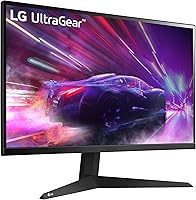
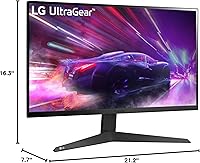
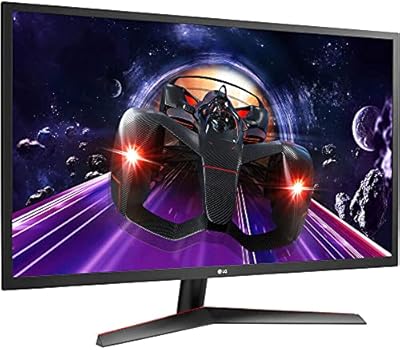
The LG 24GQ50F-B 24-inch Gaming Monitor is LG's most accessible entry point into the Ultragear lineup, and two years on from its 2022 launch, it still holds up as a solid pick in the competitive mid-range space. The 23.8-inch Full HD panel sits inside a near-borderless chassis that looks cleaner on a desk than its price tag would suggest. This is not a 4K display, and there is no HDR to speak of — but that is not the point. Nearly 460 buyers have given it a 4.6-star rating, which tells you most people buying it know exactly what they are getting and are happy with the trade-offs.
Features & Benefits

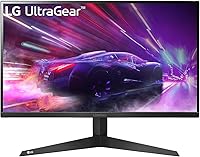
The headline number here is 165Hz refresh rate, which makes a genuine difference when you are playing fast-paced shooters — motion looks fluid rather than choppy in a way you can actually feel after a few minutes of play. Paired with 1ms Motion Blur Reduction, moving objects stay sharp rather than streaking across the screen. AMD FreeSync Premium handles sync duties cleanly, so if you are on a Radeon GPU or a mid-range card that supports FreeSync, screen tearing essentially disappears. The three-side borderless design is a nice touch for multi-monitor rigs, and VESA mount support means you are not stuck with the included stand. LG's OnScreen Control app lets you manage picture settings from your desktop without touching a single OSD menu button.

Best For

This 24-inch gaming display punches above its weight for anyone coming from a standard 60Hz or 75Hz screen — the jump to 165Hz is noticeable from the first session. It suits esports-focused gamers playing titles like Valorant, CS2, or Apex Legends, where fluid motion matters far more than 4K resolution. AMD GPU users in particular get the most out of FreeSync Premium without needing to spend extra on a G-Sync-certified panel. Students and home-office workers who game occasionally will appreciate the dual-purpose nature of the matte panel in varied lighting. And if you are planning a multi-monitor setup, the slim bezels on three sides make this LG Ultragear an easy screen to pair without distracting gaps between displays.

User Feedback

Most buyers are satisfied, with the smooth high-refresh experience earning consistent praise from people who compare it directly to slower panels they owned before. Color reproduction gets decent marks — not IPS-level, but more than acceptable for gaming and general use. Two recurring criticisms are worth knowing upfront. The stand only tilts — no height adjustment, no swivel — which can be frustrating if you sit taller or prefer a specific viewing angle. There is also a trade-off between Motion Blur Reduction and peak brightness; you cannot run both at maximum simultaneously, so low-light gaming sessions may require adjusting. Out-of-box calibration is praised, though, with many users noting the 24GQ50F-B needed little tuning before it looked solid.

Pros

  • The jump to 165Hz is immediately noticeable, especially coming from a standard 60Hz panel.
  • AMD FreeSync Premium works reliably and eliminates screen tearing for compatible GPU users.
  • Out-of-box calibration is solid — most buyers report needing little to no adjustment before gaming.
  • The three-side near-borderless design looks clean and pairs well in a multi-monitor setup.
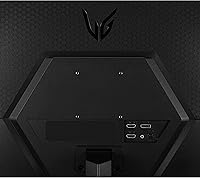
  • VESA 75x75mm support gives you flexibility to wall-mount or use a third-party arm.
  • The matte anti-glare surface handles ambient light well in mixed-use rooms.
  • OnScreen Control software makes adjusting picture settings quick without navigating the OSD.
  • At this price tier, the overall build quality and brand reliability from LG hold up well.
  • The compact 23.8-inch footprint works well on smaller desks without feeling cramped.

Cons

  • The stand only tilts — no height adjustment or swivel, which becomes noticeable during longer sessions.
  • Color vibrancy falls short of IPS panels, which matters if you use the display for anything beyond gaming.
  • Motion Blur Reduction and maximum brightness cannot run at the same time, forcing a trade-off in dark environments.
  • No HDR support limits the visual depth available in games and media designed for high dynamic range.
  • NVIDIA users on G-Sync-only setups will not get the full benefit of the built-in sync technology.
  • 1080p resolution may feel limiting if you are coming from a higher-res display or plan to upgrade your GPU soon.
  • Only tilt adjustment means ergonomic comfort depends heavily on your desk height and chair setup.
  • Connectivity options are functional but not exceptional for users who need multiple input sources.

Ratings

The scores below for the LG 24GQ50F-B 24-inch Gaming Monitor were produced by our AI rating system after analyzing verified global buyer reviews, with spam, bot activity, and incentivized submissions actively filtered out. Each category reflects the honest consensus of real users across a wide range of setups and use cases. Both the standout strengths and the genuine frustrations are captured here without softening the edges.
Refresh Rate Performance
92%
Buyers upgrading from 60Hz or 75Hz panels consistently describe the 165Hz experience as one of the most immediately impactful upgrades they have made. In fast-paced games like CS2 and Apex Legends, motion feels genuinely fluid rather than choppy, and most users say the difference is obvious within minutes of play.
A small number of users note that hitting 165Hz consistently requires a capable GPU, and mid-range cards can struggle to maintain that frame rate in more demanding titles. At lower frame rates, the high refresh rate advantage diminishes noticeably.
Motion Clarity
83%
The 1ms Motion Blur Reduction setting keeps fast-moving objects sharp during intense gameplay, which esports players in particular appreciate for tracking targets in hectic scenes. Most users find it works as described and report less ghosting compared to slower panels they owned previously.
The trade-off is that MBR and maximum brightness cannot be active at the same time, which frustrates users who game in darker rooms and want both benefits simultaneously. This limitation comes up often enough in reviews that it is clearly a meaningful pain point for a segment of buyers.
Sync & Tear-Free Gaming
88%
AMD FreeSync Premium works reliably on this display, and buyers with Radeon GPUs report screen tearing is essentially eliminated during normal gameplay sessions. The implementation feels polished for the price tier, with no significant stutter or flicker complaints from FreeSync users.
NVIDIA GPU owners get a more inconsistent experience since G-Sync compatibility is not officially certified, and some report that adaptive sync does not engage as reliably. Buyers on NVIDIA hardware should test this carefully before committing.
Color Accuracy
61%
39%
For gaming and general desktop use, most buyers find the colors acceptable and report the out-of-box calibration requires little adjustment. The matte coating helps the image look consistent across different lighting conditions in real home environments.
Anyone familiar with IPS panels will notice the color vibrancy and saturation fall short, and viewing angles are narrower than what an IPS display offers. Creative work like photo editing or video color grading is genuinely compromised on this panel, and several reviewers flag this directly.
Value for Money
91%
Across hundreds of reviews, the recurring theme is that this LG Ultragear delivers a level of gaming performance that feels disproportionately good for what it costs. Buyers who compare it against similarly priced competitors consistently rate it as one of the better options available at this price point.
The value equation weakens slightly if you factor in the cost of a third-party monitor arm to compensate for the limited stand, which some users find is a near-necessity. For buyers who need IPS color or HDR, spending more elsewhere makes more sense than trying to stretch what this panel can do.
Ergonomics & Stand
44%
56%
The stand is physically stable and does not wobble during use, which buyers appreciate given that an unstable base is a common complaint on budget monitors. For users whose desk and chair height naturally align with the default panel position, the stand is perfectly functional.
Tilt-only adjustment is the most recurring complaint across all reviews, with taller users and those who prefer a lower or higher viewing angle finding the stand genuinely limiting over longer sessions. This is not a minor gripe — it comes up frequently enough to be a real deciding factor for buyers who sit at non-standard desk heights.
Build Quality
78%
22%
The chassis feels solid for the price, and the near-borderless three-side design looks noticeably cleaner than older budget monitors with thick bezels. Most buyers report no flex or creaking in normal use, and LG's brand consistency at this tier earns some trust.
The plastic finish picks up fingerprints and minor scuffs over time, and the back panel is not particularly premium-looking up close. A few buyers mention the stand base feels lightweight, though most agree it does not affect daily stability.
Setup & Ease of Use
86%
Assembly is quick and tool-free, and buyers consistently mention the display is ready to use with minimal configuration out of the box. LG's OnScreen Control software is a genuine convenience, letting users tweak picture settings from their desktop rather than cycling through on-monitor buttons.
A small number of users find the physical OSD button placement awkward to navigate when the software is not installed or available. The initial driver and software setup can be mildly confusing for less tech-savvy buyers who are new to gaming monitors.
Multi-Monitor Compatibility
84%
The virtually borderless design on three sides makes this 24-inch gaming display a natural fit as a secondary screen, with the gap between panels looking clean and unobtrusive in side-by-side configurations. Buyers specifically building dual-monitor setups mention this as a key reason they chose this model.
The VESA mount is 75x75mm rather than the more common 100x100mm, which limits compatibility with some older or cheaper third-party arms. Buyers should verify their intended arm supports 75x75mm before purchasing.
Connectivity
72%
28%
Three built-in USB 3.0 ports add practical convenience for connecting peripherals directly at the display, which is a welcome feature at this price level. Most buyers find the port selection covers their daily needs without requiring a separate hub.
The lack of USB-C and the absence of a robust array of video inputs beyond the basics can feel limiting for buyers who want more flexibility in how they connect laptops or consoles. Display input options are functional but unremarkable for the category.
Brightness & Visibility
68%
32%
In normal gaming and office lighting conditions, the brightness level is sufficient and the matte coating reduces distracting reflections effectively. Buyers using the display in moderately lit rooms report no issues with screen readability during day or evening sessions.
Maximum brightness is not high enough for very bright rooms or direct sunlight environments, and the constraint of not being able to run MBR at peak brightness compounds this issue. Users who work near windows or in well-lit offices may find the image washes out more than they would like.
Gaming UI & Software
79%
21%
The dedicated Gaming UI mode and OnScreen Control software give players quick access to crosshair overlays, frame rate counters, and picture mode presets without interrupting gameplay. Buyers who take the time to set it up find it genuinely useful during longer play sessions.
Some users report the software can feel slightly clunky on initial install, and a handful mention it does not always launch reliably at startup on certain Windows configurations. The feature set is solid but not as polished as the software suites on higher-end gaming monitors.
Out-of-Box Calibration
85%
A notable number of buyers mention they were pleasantly surprised by how usable the default picture settings were without any manual adjustment, which is not always the case at this price tier. For gaming purposes especially, the default calibration holds up well across different genres and lighting conditions.
Users doing any productivity or color-sensitive work will likely want to manually adjust gamma and color temperature, as the defaults are tuned more for gaming than general accuracy. There is no included calibration profile or ICC file, which more discerning buyers will notice.
Noise & Heat
88%
The monitor runs quietly with no coil whine reported by the vast majority of buyers, and heat output during extended gaming sessions stays manageable without any ventilation concerns. This is consistent feedback across reviews and reflects well on LG's component quality at this tier.
A small number of buyers report faint backlight buzzing in very quiet environments at specific brightness settings, though this appears to be limited to a minority of units rather than a systematic issue. Normal use in a typical room environment is unlikely to surface this problem.

Suitable for:

The LG 24GQ50F-B 24-inch Gaming Monitor is a strong fit for budget-conscious gamers who are ready to leave 60Hz behind and want a meaningful upgrade without spending a lot. If you play fast-paced competitive titles like Valorant, CS2, or Apex Legends, the high refresh rate will make a tangible difference in how smooth and responsive the game feels. AMD GPU owners benefit especially here, since FreeSync Premium works natively and cleanly without any premium sync tax. Students or hybrid workers who use their setup for both productivity and evening gaming sessions will find the matte panel handles varied lighting well, and the slim bezels make it a natural fit as a secondary screen in a dual-monitor arrangement. Anyone who values wall-mounting flexibility will also appreciate the VESA support, which gives you options beyond the basic tilt-only stand.
Not suitable for:

The LG 24GQ50F-B 24-inch Gaming Monitor is the wrong choice if color accuracy or image depth is a priority for you. Creative professionals, photographers, or anyone editing video will quickly feel the limitations of this panel compared to a proper IPS display — the color vibrancy simply is not in the same league. There is no HDR support, so if you want that extra contrast range for cinematic single-player games or media consumption, you will need to look elsewhere. Taller users or anyone who likes to fine-tune their monitor height will find the tilt-only stand genuinely limiting over long sessions, and a third-party arm adds cost. NVIDIA GPU users on G-Sync-exclusive setups may also not get the full benefit of the sync technology this display is built around.
Specifications

  • Screen Size: The panel measures 23.8 inches diagonally, marketed as a 24-inch class display.
  • Resolution: Native resolution is 1920x1080 Full HD, delivering a standard 1080p image across the 16:9 aspect ratio panel.
  • Refresh Rate: The display supports a maximum refresh rate of 165Hz, enabling noticeably smoother motion compared to standard 60Hz or 75Hz panels.
  • Response Time: 1ms Motion Blur Reduction (MBR) is available to minimize ghosting on fast-moving objects during gameplay.
  • Sync Technology: AMD FreeSync Premium is supported, providing adaptive sync to eliminate screen tearing for compatible AMD and select other GPUs.
  • Panel Surface: The screen uses a matte anti-glare coating that reduces reflections in brightly lit or mixed-lighting environments.
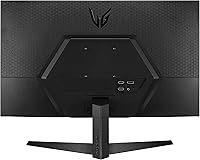
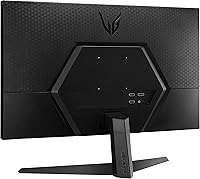
  • VESA Mount: The monitor supports VESA 75x75mm wall mounting, making it compatible with most standard monitor arms and wall brackets.
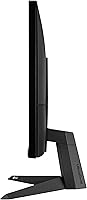
  • Stand Adjustment: The included stand supports tilt adjustment only; height, swivel, and pivot adjustments are not available without a third-party arm.
  • USB Ports: Three USB 3.0 ports are built into the monitor, providing convenient connectivity for peripherals at the display.
  • Dimensions: With the stand attached, the monitor measures approximately 21.2 x 16.3 x 7.7 inches (W x H x D).
  • Weight: The unit weighs approximately 11.43 pounds with the stand included.
  • HDR Support: This monitor does not support HDR; it is a standard dynamic range display intended for 1080p gaming and general use.
  • Aspect Ratio: The panel uses a standard 16:9 widescreen aspect ratio, compatible with virtually all modern games and content formats.
  • Bezel Design: Three sides of the panel feature a virtually borderless design, making it well-suited for side-by-side multi-monitor configurations.
  • Software: LG OnScreen Control software is included, allowing users to adjust monitor settings directly from their desktop without using the physical OSD buttons.
  • Color: The monitor is available in black and is part of LG's Ultragear gaming series.
  • Voltage: The monitor operates at 240 volts; buyers outside compatible regions should verify local voltage requirements before purchasing.
  • Model Number: The official model number is 24GQ50F-B, first made available in April 2022.

Related Reviews
LG 24GN60R-B 24-inch FHD Gaming Monitor

71%
88%
Value for Money
84%
Gaming Performance
81%
Image Quality
51%
HDR Performance
43%
Stand & Ergonomics
More
LG 27GS75Q-B 27-inch QHD Gaming Monitor
82%
91%
Refresh Rate & Motion Performance
88%
Image Sharpness & Resolution
83%
Color Accuracy & Gamut
57%
HDR Performance
86%
Response Time & Ghosting
More
LG 24BK430H-B 24-Inch FHD IPS Monitor
82%
91%
Display Quality
88%
Value for Money
94%
Eye Comfort
68%
Build Quality
87%
Ease of Setup
More
LG 34GP63A-B 34-Inch Curved Gaming Monitor
79%
93%
Gaming Immersion
91%
Refresh Rate Performance
88%
Contrast & Black Depth
83%
Color Accuracy
86%
Input Lag & Responsiveness
More
LG 27GX790A-B 27-inch OLED Gaming Monitor
80%
94%
Motion Clarity
92%
Image Quality
88%
HDR Performance
89%
Connectivity
86%
Ergonomics & Stand
More
LG 24MP400-B 24-inch IPS Monitor
71%
83%
Image Quality
91%
Value for Money
79%
Eye Comfort
64%
Gaming Performance
67%
Build Quality
More
LG 27GS60QC-B 27″ Curved Gaming Monitor
78%
91%
Motion & Refresh Performance
88%
Image Clarity & Sharpness
84%
Contrast & Black Levels
77%
Color Accuracy & Gamut
52%
HDR Performance
More
LG 45GX950A-B 45-inch OLED Gaming Monitor
81%
96%
Image Quality
93%
Refresh Rate & Responsiveness
94%
Resolution & Pixel Density
88%
HDR Performance
78%
Dual Mode Functionality
More
LG 24MP60G-B 24-inch Full HD IPS Monitor
84%
88%
Display Quality
85%
Gaming Performance
91%
Design & Aesthetics
90%
Color Accuracy
82%
Ease of Setup
More
LG UltraGear 32″ QHD Gaming Monitor
80%
91%
Gaming Performance
84%
Image Quality
54%
HDR Experience
88%
Ergonomics & Stand
79%
Build Quality
More

FAQ

It will work as a display with any GPU that has compatible video outputs, but AMD FreeSync Premium is the supported sync technology here. NVIDIA cards do support FreeSync on many monitors through their Adaptive Sync compatibility, but results can vary by GPU model, so it is worth checking your specific card before buying if sync performance matters to you.

Yes, the 24GQ50F-B supports VESA 75x75mm mounting, so it is compatible with most standard monitor arms and wall mounts. This is actually a good option if you find the tilt-only stand limiting, since an arm gives you full height, tilt, and swivel control.

For competitive gaming — especially fast-paced shooters — 1080p at 165Hz is a genuinely smart choice. Higher frame rates are easier to achieve at 1080p, which means smoother gameplay on mid-range GPUs. If you prioritize visual detail in slow-paced RPGs or cinematic games over frame rate, a higher resolution panel might serve you better.

No, this monitor does not have HDR support. It is a standard dynamic range display, so content that relies on HDR for richer contrast and highlights will not look any different than on a non-HDR setting. For most competitive gamers this is not a dealbreaker, but it is worth knowing if you watch a lot of HDR video or play HDR-heavy titles.

165Hz refers to how many frames per second the panel can display, while 1ms MBR is a backlight strobing technique that sharpens fast-moving objects by reducing perceived blur. The catch is that MBR and maximum brightness cannot run at the same time, so in darker gaming environments you may need to choose between sharper motion and a brighter image.

Very straightforward. The stand attaches with minimal tools, and most buyers report that the default picture settings are usable right away without digging into menus. If you do want to fine-tune things, LG's OnScreen Control software lets you make adjustments from your desktop rather than cycling through on-monitor buttons.

It works well in that role. The near-borderless design on three sides keeps the gap between displays visually clean, and the compact 24-inch footprint fits comfortably alongside a primary screen. Just keep in mind it is a 1080p panel, so if your main monitor is higher resolution, there will be a visible difference in sharpness between the two.

Honestly, it is a noticeable step below a good IPS panel in terms of color vibrancy and viewing angles. For gaming and everyday use it looks fine, and the matte coating helps in mixed lighting, but if you do any photo editing, graphic design, or color-sensitive work, you would be better served by an IPS display. Most buyers who game primarily are happy with it.

You will need a VESA-compatible wall mount bracket or arm, which is sold separately, but the monitor itself has the 75x75mm mounting holes already built in. It is a fairly common standard, so compatible mounts are widely available and usually affordable.

The stand is reasonably solid for everyday use and does not wobble excessively. The main limitation is not stability but adjustability — you can only tilt it, with no height or swivel options. If your desk and chair setup naturally put your eyes at the right level, this will not bother you, but taller users in particular tend to find it awkward over long sessions.

Where to Buy