



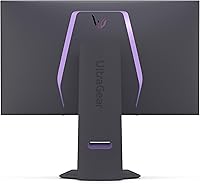
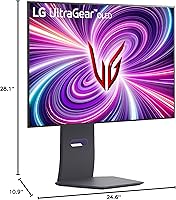
Overview

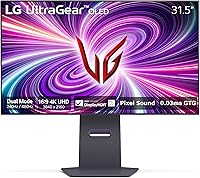
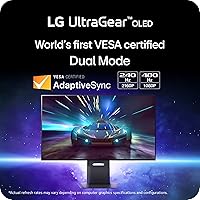
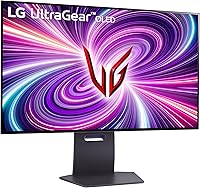
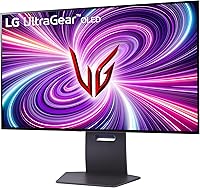
The LG 32GS95UE 32-inch OLED Gaming Monitor represents a genuine technical milestone — a 32-inch panel delivering 4K resolution at 240Hz, a combination that simply did not exist at this screen size until recently. What makes it more than a spec-sheet achievement is the Dual Mode feature, which lets you flip between 4K/240Hz and 1080p/480Hz depending on whether you are deep in a story-driven RPG or grinding ranked matches. The matte screen and fully adjustable stand — tilt, height, swivel — are small but meaningful touches for long sessions. That said, the price is firmly premium, and this monitor is built for enthusiasts who demand the best, not casual buyers on a budget.

Features & Benefits

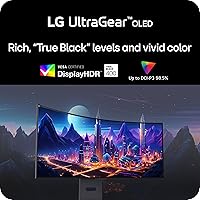
What separates OLED from IPS or VA panels is simple: each pixel generates its own light, so blacks are genuinely black — not dark gray. The DisplayHDR True Black 400 certification reflects this by requiring true zero-backlight output, unlike standard HDR tiers that rely on local dimming alone. The 0.03ms GtG response time makes motion in fast shooters look crisp rather than smeared. Dual Mode is practically useful — drop to 1080p/480Hz for competitive titles without needing a second monitor. Both NVIDIA G-SYNC Compatible and AMD FreeSync Premium Pro are covered, so GPU compatibility is a non-issue. The built-in Pixel Sound feature, which projects audio from behind the panel, is a curious bonus — fine for casual sessions, but not a speaker replacement.

Best For

The 32GS95UE rewards a specific type of buyer. If you are running a high-end GPU — an RTX 4080, 4090, or RX 7900 series card — and genuinely want to push 4K past 100fps, this 32-inch OLED panel has the hardware to back it up. It also works well as a single display for everything: HDR gaming, streaming content with accurate blacks, and competitive play via Dual Mode. The HDMI 2.1 port makes it a natural fit for PS5 or Xbox Series X users alongside a PC. Where it falls short is as an office-focused display — if burn-in anxiety is a real concern for you, or if an ultra-wide layout is what you need, look elsewhere.

User Feedback

Sitting at 4.1 out of 5 across roughly 200 ratings, this LG OLED gaming monitor earns broadly positive marks, though the feedback is usefully split. Image quality draws the most consistent praise — owners describe the blacks and contrast as a clear step above prior displays. The most recurring concern is burn-in, a legitimate worry with any OLED panel. LG includes pixel-care tools like refresh cycles and logo detection to help, but it remains a real trade-off worth researching before buying. Pixel Sound divides opinion — some find it surprisingly workable for casual use, most ignore it entirely. The price itself sparks debate: buyers who feel the specs justify the cost versus those who question long-term OLED durability at this investment level.

Pros

  • 4K at 240Hz on a 32-inch OLED panel is a rare combination that delivers both visual richness and competitive-grade speed.
  • True black levels and a 1,500,000:1 contrast ratio make dark scenes in games and films look dramatically better than on LCD displays.
  • Dual Mode lets you switch to 1080p/480Hz for competitive titles without needing a second monitor.
  • The 0.03ms GtG response time virtually eliminates motion blur and ghosting in fast-action games.
  • Compatible with both NVIDIA G-SYNC and AMD FreeSync Premium Pro, so GPU brand is not a limiting factor.
  • HDMI 2.1 support means PS5 and Xbox Series X users get full 4K/120Hz without any bandwidth bottleneck.
  • The matte screen coating reduces glare effectively in typical room lighting conditions.
  • A fully adjustable stand — tilt, height, and swivel — makes ergonomic setup straightforward out of the box.
  • Three USB 3.0 ports add real desk convenience for peripherals and accessories.
  • DisplayHDR True Black 400 certification reflects genuine HDR capability, not a marketing label applied to a backlit LCD.

Cons

  • OLED burn-in remains a legitimate long-term risk, particularly for users who display static elements for many hours daily.
  • The price point is steep enough that buyers without a flagship-tier GPU will not get full value from the panel.
  • Pixel Sound is a novelty at best — do not expect it to replace even a modest pair of desktop speakers.
  • At 19.84 pounds, the monitor is heavier than many competitors, which can make desk repositioning more awkward.
  • The 32-inch 16:9 format offers no ultra-wide option, which is a real limitation for productivity-focused multitaskers.
  • Around 200 ratings is a relatively small sample size, meaning long-term reliability data is still limited compared to older models.
  • LG's pixel-care tools help mitigate burn-in risk but require users to actively engage with settings rather than working automatically in all cases.
  • High ambient brightness scenarios may expose the limits of an OLED panel compared to high-nit Mini-LED alternatives.

Ratings

The scores below were generated by our AI engine after analyzing verified global buyer reviews for the LG 32GS95UE 32-inch OLED Gaming Monitor, with spam, bot-submitted, and incentivized feedback actively filtered out. Each category reflects the honest distribution of real user sentiment — strengths are credited where they are earned, and recurring pain points are not softened or omitted. The result is a transparent picture of where this panel genuinely excels and where buyers have expressed legitimate reservations.

Image Quality
96%
Owners consistently describe the visual experience as a step above anything they have used before, with blacks that look genuinely black rather than washed-out gray. Dark game environments, cinematic cutscenes, and HDR content all benefit from the OLED panel's ability to switch individual pixels off completely, producing contrast that LCD alternatives simply cannot replicate.
A small number of users noted that very bright, uniform white screens — such as a blank document or a bright web page — can reveal a subtle brightness uniformity variance across the panel. This is a known characteristic of OLED technology rather than a defect, but it can be noticeable in non-gaming content.
Motion Performance
94%
Competitive gamers specifically call out how clean fast-moving objects look compared to their previous IPS or VA monitors — there is no trailing blur behind moving characters or projectiles. The 0.03ms response time is not just a marketing figure here; in practice, the panel transitions fast enough that even slow-motion video replays reveal no ghosting.
A handful of users coming from high-end IPS displays noted a brief adjustment period when noticing the slightly different motion rendering of OLED. This is subjective and minor, but worth knowing if you are particularly sensitive to changes in how motion looks between panel technologies.
HDR Experience
91%
The DisplayHDR True Black 400 certification carries real weight here — unlike standard HDR400 on LCD panels, this rating reflects genuine zero-backlight capability, which means shadow detail in games like Cyberpunk 2077 or Alan Wake 2 looks genuinely layered rather than crushed. Buyers upgrading from standard monitors frequently describe the HDR experience as the biggest single improvement.
Peak brightness in HDR tops out at 400 nits for sustained output, which is noticeably lower than premium Mini-LED competitors that can hit 1000 nits or more in specular highlights. In very bright rooms, some users felt the HDR punch was less dramatic than expected compared to high-brightness LCD-based rivals.
Dual Mode Utility
83%
Gamers who switch between story-driven titles and competitive multiplayer genuinely use Dual Mode rather than treating it as a novelty. Dropping to 1080p/480Hz for a fast-paced shooter session and returning to 4K for an immersive RPG without touching any PC settings is a practical quality-of-life feature that owners mention appreciating more over time.
Switching modes requires navigating the on-screen display menu rather than a dedicated hardware button, which some users find slightly disruptive mid-session. A few buyers also noted that the 1080p image looks slightly soft on a 32-inch panel compared to a native 1080p display, as expected with pixel scaling.
Value for Money
67%
33%
Buyers who own high-end GPUs and actively use both the 4K resolution and the competitive frame rate modes tend to feel the price is justified by the technology on offer — there is genuinely no cheaper way to get OLED quality at this size and speed combination. For those using this as a single display for gaming, streaming, and console play, the versatility adds perceived value.
Users who primarily game at lower frame rates or who do not own a flagship-tier GPU frequently feel the cost is difficult to justify, particularly given OLED burn-in uncertainty over a multi-year ownership period. The price gap versus capable Mini-LED alternatives is wide enough that several buyers flagged it as a significant barrier.
Build Quality
84%
The overall construction feels premium in hand — the stand is solid without any noticeable wobble at standard desk heights, and the rear panel finish has the kind of considered industrial design you expect from a flagship product. Buyers rarely mention build quality as a concern, which is itself a positive signal.
At nearly 20 pounds, the monitor is heavier than expected for a panel of this size, which a few users mentioned when repositioning the display or transporting it. The weight is partly a function of the stand design, but it does mean that mounting on lighter VESA arms requires checking weight capacity first.
Stand & Ergonomics
81%
19%
The tilt, height, and swivel adjustments cover most ergonomic scenarios without requiring an aftermarket arm — for users sitting at a fixed desk position, the included stand handles positioning well out of the box. Height travel in particular is generous enough that users across different chair heights report finding a comfortable viewing angle.
The stand footprint is fairly wide, which can crowd smaller desks when combined with a keyboard, mouse, and other peripherals. There is no pivot rotation for portrait mode, which is a minor limitation for the small number of buyers who rotate monitors for coding or vertical content viewing.
Connectivity
82%
18%
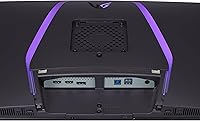
The inclusion of HDMI 2.1 is genuinely appreciated by users running a PS5 or Xbox Series X alongside a PC — there is no need for an adapter or a resolution/refresh rate compromise. The three USB 3.0 ports also draw frequent praise as a useful hub for keyboards, headsets, and drives without adding desktop clutter.
Some users noted the absence of a USB-C port as a missed opportunity, particularly for laptop users or those wanting to connect modern peripherals with a single cable. The port placement on the rear panel was mentioned as slightly awkward for frequent cable swapping.
Refresh Rate & Sync
93%
Having both G-SYNC Compatible validation and AMD FreeSync Premium Pro certification means buyers do not need to worry about adaptive sync regardless of whether they are on Team Green or Team Red. In practice, variable refresh rate operation on this panel is smooth at both ends of the frame rate range, with no noticeable flicker or judder at lower fps.
A small number of users reported needing to manually enable adaptive sync through the monitor OSD rather than having it activate automatically, which caused initial confusion. This is a setup issue rather than a performance flaw, but a quick-start guide callout would help first-time buyers.
Audio (Pixel Sound)
47%
53%
A portion of users express genuine surprise at how acceptable the Pixel Sound system is for casual background gaming or watching content when headphones are not available. For a late-night session where waking others is a concern and a headset feels like too much effort, it serves as a workable fallback.
The majority of buyers dismiss Pixel Sound as a novelty after the first week and revert to speakers or headphones permanently. Bass response is essentially absent, and volume at the high end remains modest — anyone using this monitor in a room with any ambient noise will find the audio inadequate for proper gaming immersion.
OLED Burn-in Risk
62%
38%
LG's built-in pixel-care tools — including automatic refresh cycles, logo luminance adjustment, and screensaver triggers — do provide meaningful protection for users who configure them properly. For pure gaming use where screen content changes constantly, most owners report no visible retention issues after extended ownership periods.
Burn-in anxiety is the single most recurring concern across user reviews, and it is not unfounded — OLED panels do carry inherent long-term risk with static elements, and LG's warranty terms on burn-in are narrower than some buyers expect. Users who intend to leave the monitor in use for desktop work with a fixed taskbar are taking a measurable risk.
Setup & Software
74%
26%
Physical setup is straightforward — the stand assembly is tool-free and clearly designed, and most users report having the monitor up and running within fifteen minutes of opening the box. The OSD menu is logically organized by gaming monitor standards and covers most common adjustments without requiring deep navigation.
LG's companion software experience on PC draws mixed reviews, with some users preferring to manage all settings directly from the OSD rather than installing additional software. Dual Mode switching in particular requires OSD access each time, and a few users wished for a physical shortcut button to speed up the transition.
Console Compatibility
88%
PS5 and Xbox Series X users consistently report a smooth, full-bandwidth 4K/120Hz experience through the HDMI 2.1 port with no additional configuration needed. The monitor also auto-detects console input well, and the low input lag at 120Hz makes a tangible difference in game feel compared to typical TV lag.
Console users who want to take advantage of refresh rates above 120Hz will find that current-generation consoles simply do not support it — the 240Hz capability is PC-exclusive for now. Some PS5 users also noted that HDR calibration requires manual adjustment through the monitor OSD to match LG's optimal settings.
Matte Screen Coating
78%
22%
Buyers in rooms with overhead lighting or windows appreciate the anti-glare matte coating significantly — it removes the need to reposition the monitor or draw blinds every time ambient light changes. For everyday use in a typical home office or gaming room setup, the coating handles real-world lighting conditions reliably.
Compared to glossy OLED panels, the matte coating introduces a very slight haze over the image that some color-sensitive users notice when viewing content side by side. It is a minor trade-off and most buyers agree the practical glare reduction is worth it, but buyers in dark, fully controlled environments may prefer a glossy finish.

Suitable for:

The LG 32GS95UE 32-inch OLED Gaming Monitor is purpose-built for enthusiast PC gamers who have the GPU horsepower — think RTX 4080, 4090, or RX 7900-class cards — to actually take advantage of 4K at 240Hz. If you regularly switch between graphically demanding single-player titles and fast-paced competitive multiplayer, the Dual Mode feature means you are not forced to choose one experience over the other. It also appeals strongly to hybrid setups: the HDMI 2.1 port supports full-bandwidth 4K/120Hz from a PS5 or Xbox Series X, so console and PC gamers sharing one desk will not feel shortchanged. HDR-focused content consumers will appreciate that the OLED panel delivers true black levels rather than the backlight-glow compromise common on LCD alternatives. If you want a single display that handles immersive gaming, HDR streaming, and competitive play without constantly second-guessing whether your monitor is holding you back, this 32-inch OLED panel is a very strong fit.

Not suitable for:

Buyers who primarily use their monitor for office work, spreadsheets, or static-content productivity should think carefully before committing to the 32GS95UE. OLED panels carry a real, if manageable, burn-in risk when displaying persistent static elements — taskbars, browser chrome, or fixed desktop widgets — for extended daily hours, and no pixel-care feature fully eliminates that concern over several years of heavy office use. The standard 16:9 aspect ratio will also disappoint anyone who has grown accustomed to an ultra-wide format for multitasking. Budget-conscious buyers or those upgrading from a mid-range 1080p monitor may find the price hard to rationalize unless they already own a GPU capable of driving 4K at high frame rates — without one, much of what you are paying for goes unused. Anyone prioritizing strict factory color calibration for professional photo or video work will want to verify whether this panel meets their specific accuracy standards before purchasing, as it is optimized around gaming rather than studio-grade color workflows.

Specifications

  • Screen Size: The panel measures 32 inches diagonally, offering a large viewing area well-suited to immersive gaming at typical desk distances.
  • Panel Type: Uses an OLED panel where each pixel produces its own light and can switch off completely, enabling true blacks without a backlight.
  • Resolution: Native resolution is 3840x2160 (4K UHD), delivering sharp detail across the full 32-inch surface at standard viewing distances.
  • Refresh Rate: Supports up to 240Hz at full 4K resolution, and up to 480Hz in Dual Mode when switched to 1080p Full HD output.
  • Response Time: Rated at 0.03ms GtG (gray-to-gray), which is among the fastest available on any consumer monitor panel type.
  • HDR Certification: Carries DisplayHDR True Black 400 certification, which requires genuine zero-backlight black output rather than dimming approximations used in standard HDR tiers.
  • Contrast Ratio: Native contrast ratio is rated at 1,500,000:1, a figure made possible by OLED pixel-level light control rather than panel-level dimming zones.
  • Aspect Ratio: Standard 16:9 widescreen aspect ratio, consistent with most gaming content, console output, and streaming media.
  • Screen Surface: Matte anti-glare coating reduces reflections from ambient light sources, improving visibility in typical indoor environments.
  • Sync Support: Officially validated as NVIDIA G-SYNC Compatible and certified for AMD FreeSync Premium Pro, covering both major GPU ecosystems.
  • Video Ports: Includes one HDMI 2.1 port and one DisplayPort connection, with HDMI 2.1 supporting full 4K/120Hz bandwidth for current-generation consoles.
  • USB Ports: Features three USB 3.0 ports for connecting peripherals such as headsets, keyboards, or storage devices directly to the monitor.
  • Audio: Equipped with Pixel Sound technology, which drives sound waves from behind the OLED panel itself rather than from conventional rear or bottom-mounted speakers.
  • Stand Adjustments: The included stand supports tilt, height, and swivel adjustments, allowing ergonomic positioning without requiring a separate monitor arm.
  • Dimensions: With stand attached, the monitor measures approximately 28.1 x 24.6 x 10.9 inches (width x height x depth).
  • Weight: Complete unit with stand weighs 19.84 pounds, which is heavier than many slim-panel competitors and worth factoring in for desk or VESA mounting plans.
  • Dual Mode: A VESA-certified Dual Mode feature allows the display to switch between 4K/240Hz and 1080p/480Hz output modes via the on-screen menu.
  • Power Source: Powered by a standard AC connection; no external power brick is required as power regulation is handled internally.

Related Reviews

LG 27GX790A-B 27-inch OLED Gaming Monitor
80%
94%
Motion Clarity
92%
Image Quality
88%
HDR Performance
89%
Connectivity
86%
Ergonomics & Stand
More
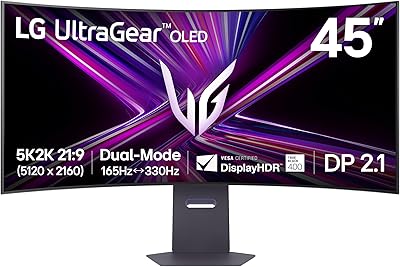
LG 45GX950A-B 45-inch OLED Gaming Monitor
81%
96%
Image Quality
93%
Refresh Rate & Responsiveness
94%
Resolution & Pixel Density
88%
HDR Performance
78%
Dual Mode Functionality
More
LG 39GS95QE Ultragear OLED Curved Gaming Monitor 39-inch
88%
95%
Display Quality
94%
Gaming Performance
89%
Build Quality
87%
Connectivity Options
91%
Immersion (Curvature)
More
LG 45GS95QE Ultragear OLED Curved Gaming Monitor 45-Inch
89%
96%
Display Quality
94%
Gaming Performance
88%
Build Quality
67%
Brightness in Bright Environments
98%
Response Time
More
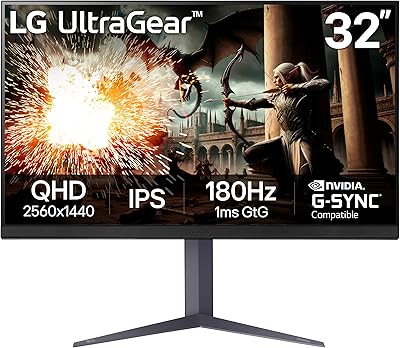
LG UltraGear 32″ QHD Gaming Monitor
80%
91%
Gaming Performance
84%
Image Quality
54%
HDR Experience
88%
Ergonomics & Stand
79%
Build Quality
More
LG 39GX90SA-W 39-inch OLED Curved Gaming Monitor
77%
94%
Picture Quality
91%
Gaming Performance
88%
Immersion & Curvature
86%
HDR Experience
79%
webOS Smart Features
More
LG 34GX90SA-W 34-inch Ultragear OLED Gaming Monitor
89%
97%
Display Quality
94%
Color Accuracy
96%
Refresh Rate Performance
95%
Input Lag/Responsiveness
91%
HDR Performance
More
LG 34GS95QE 34-inch Ultragear OLED Curved Gaming Monitor
89%
96%
Display Quality
93%
Gaming Performance
91%
Immersion & Design
85%
Color Accuracy
88%
Ease of Setup
More
GIGABYTE AORUS FO32U2 32-inch QD OLED Gaming Monitor
88%
95%
Display Quality
92%
Gaming Performance (Refresh Rate & Response Time)
88%
OLED Burn-In Protection
94%
Color Accuracy & Gamut
89%
Ergonomics & Stand Adjustability
More
LG 32GQ750-B 32-inch 4K Gaming Monitor
77%
91%
Image Clarity
86%
Refresh Rate & Smoothness
88%
HDMI 2.1 Compatibility
83%
Contrast & Black Levels
67%
Motion Clarity
More

FAQ

Not strictly, but you will get the most out of it with a high-end GPU. At 4K resolution, even powerful cards like the RTX 4070 Ti will not consistently hit 240fps in demanding titles. That said, the 32GS95UE still delivers a beautiful 4K image at lower frame rates, and you can always use Dual Mode to drop to 1080p/480Hz when chasing frame rates in competitive games.

You switch between modes through the monitor's on-screen display menu. In 4K/240Hz mode the full panel resolution is active, while 1080p/480Hz mode effectively scales the output for a faster, lower-resolution image. It is genuinely useful if you play both story-driven games and fast-paced competitive titles on the same setup, saving you the cost and desk space of a second monitor.

Burn-in is a real consideration with any OLED display, and it would be dishonest to dismiss the concern entirely. That said, LG includes pixel-care tools such as automatic pixel refresh cycles, logo luminance reduction, and screen saver triggers to reduce static-image stress on the panel. For gaming use — where content is constantly changing — the risk is considerably lower than it would be for someone displaying a static desktop or taskbar for eight-plus hours daily.

Yes, and it works well. The HDMI 2.1 port supports the full 48Gbps bandwidth needed for 4K/120Hz from current-generation consoles without any compression or downgrade. It is one of the more practical aspects of this panel for people who use both a gaming PC and a console at the same desk.

Honestly, it sits somewhere in between. The audio quality is better than you might expect from a screen-integrated system, and some users find it fine for casual gaming or background content. But it does not replace dedicated speakers or a headset for serious gaming sessions. Think of it as a convenient fallback rather than a selling point.

Matte coatings reduce glare significantly in rooms with windows or bright overhead lighting, which is a real practical advantage for most home setups. The trade-off is a very slight softening of the image compared to a glossy surface, though at 4K the sharpness is still excellent. If your gaming space is well-controlled for light, a glossy panel might look marginally more vivid, but for typical environments the matte finish is the smarter choice.

Any modern mid-range or better GPU — including cards like the RTX 3070 or RX 6700 XT — can push 480fps in lighter competitive titles at 1080p. The frame rate you actually achieve in-game depends on the title and your settings, but 480Hz is a much more accessible target than 240fps at 4K.

Yes, the monitor supports VESA mounting, which is useful if you prefer a monitor arm over the included stand or want to free up desk space. Check the VESA pattern specifications against your arm of choice before purchasing, as patterns vary between monitor sizes.

The core difference comes down to black levels and response time versus peak brightness. This 32-inch OLED panel produces true blacks and near-instant pixel response that Mini-LED cannot match, but some high-end Mini-LED displays can hit higher peak nit levels in HDR highlights. If absolute brightness matters more to you than contrast depth and motion clarity, a premium Mini-LED is worth comparing directly. For most gaming scenarios, the OLED advantage in contrast and response is the more noticeable difference.

The included stand is solid and covers tilt, height, and swivel adjustments, which covers most ergonomic needs without extra hardware. At nearly 20 pounds, the monitor has some heft, but the stand handles it without wobble under normal desk conditions. A monitor arm is optional rather than necessary unless you have specific dual-monitor or space-saving requirements.

Where to Buy