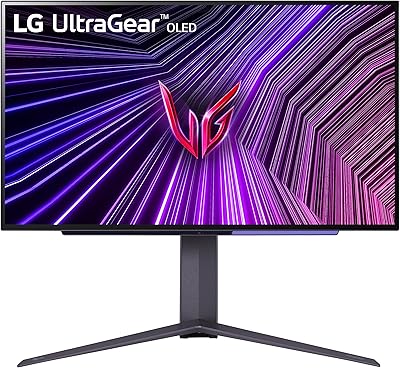
LG 27GX790A-B 27-inch OLED Gaming Monitor
LG 27GX790A-B 27-inch OLED Gaming Monitor — image 1
LG 27GX790A-B 27-inch OLED Gaming Monitor — image 2
LG 27GX790A-B 27-inch OLED Gaming Monitor — image 3

LG 27GX790A-B 27-inch OLED Gaming Monitor — image 4
LG 27GX790A-B 27-inch OLED Gaming Monitor — image 5
LG 27GX790A-B 27-inch OLED Gaming Monitor — image 6
LG 27GX790A-B 27-inch OLED Gaming Monitor — image 7
LG 27GX790A-B 27-inch OLED Gaming Monitor — image 8
LG 27GX790A-B 27-inch OLED Gaming Monitor — image 9
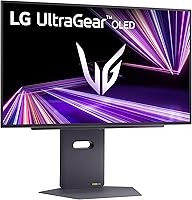
LG 27GX790A-B 27-inch OLED Gaming Monitor — image 10
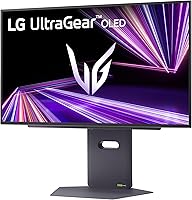
LG 27GX790A-B 27-inch OLED Gaming Monitor — image 11
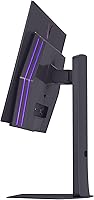
LG 27GX790A-B 27-inch OLED Gaming Monitor — image 12

LG 27GX790A-B 27-inch OLED Gaming Monitor — image 13
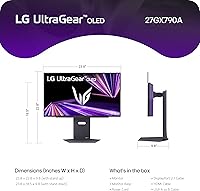
LG 27GX790A-B 27-inch OLED Gaming Monitor — image 14
LG 27GX790A-B 27-inch OLED Gaming Monitor — image 15
LG 27GX790A-B 27-inch OLED Gaming Monitor — image 16
LG 27GX790A-B 27-inch OLED Gaming Monitor — image 17
80%
20%

Overview

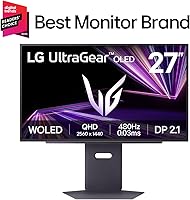
The LG 27GX790A-B 27-inch OLED Gaming Monitor arrived in late 2024 as one of the most aggressively specced panels in LG's Ultragear lineup, pushing the 480Hz refresh rate ceiling onto an OLED display — a combination that was genuinely rare at launch. It sits firmly in premium territory, aimed at serious competitive players and enthusiasts who have already maxed out what a typical IPS or VA screen can offer. OLED brings real advantages: true per-pixel lighting, exceptional contrast, and color depth that IPS simply cannot match. But it also carries known trade-offs, and burn-in risk is worth weighing honestly before committing at this price.

Features & Benefits

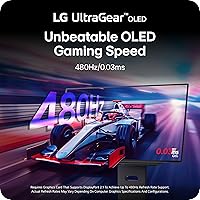
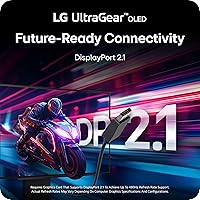
The headline spec here is 480Hz at 1440p, and unlike monitors that throttle resolution to hit high refresh rates, DisplayPort 2.1 handles the full bandwidth without compromise. In fast-paced shooters, the gap between 240Hz and 480Hz is subtle but real — you notice it most when tracking targets through erratic movement. The OLED panel itself delivers a 1.5 million-to-one contrast ratio, which means dark scenes show genuine shadow detail rather than grey murk. Dual HDMI 2.1 ports and a USB 3.0 hub make this panel practical for multi-device setups, while the fully adjustable stand — height, tilt, swivel, pivot — is a genuine quality-of-life addition that many competing screens skip entirely.

Best For

This Ultragear OLED makes the most sense for competitive FPS players who treat frame rate as a tactical advantage, not a preference. You also need the GPU to back it up — an RTX 4080 or RX 7900 XTX can push close to 480 frames per second in titles like CS2 or Valorant at 1440p, but mid-range cards will cap out well below that ceiling. Gamers upgrading from 1080p 144Hz displays will notice the sharpest jump in both resolution and motion response. Console players gain flexibility through the dual HDMI 2.1 ports. If you have already ruled out ultrawide, this delivers the best 16:9 OLED experience currently available at 27 inches.

User Feedback

With roughly 95 ratings and a 4.2-star average, the 480Hz LG panel earns clear approval without being universally beloved. Buyers are consistent about what wins them over: motion clarity in fast games, color richness — tied directly to that near-98.5% DCI-P3 coverage — and a stand that feels built for real adjustment rather than token ergonomics. Criticism clusters around two areas: the cost, with several buyers questioning whether 480Hz is a meaningful step up from 240Hz OLED in practice, and burn-in concerns that linger even among satisfied owners. A handful note the default color temperature runs slightly warm, though most correct it through basic display settings without much trouble.

Pros

  • 480Hz refresh rate at 1440p is among the highest available on any OLED panel right now.
  • OLED contrast performance makes dark scenes and shadow detail genuinely excellent, not just adequate.
  • DisplayPort 2.1 delivers full bandwidth for 480Hz without resolution or color compromises.
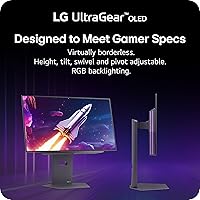
  • The fully adjustable stand — height, tilt, swivel, pivot — is more complete than most competing screens offer.
  • Dual HDMI 2.1 ports make this Ultragear OLED a practical pick for mixed PC and console setups.
  • Near-98.5% DCI-P3 color coverage holds up well for casual creative work, not just gaming.
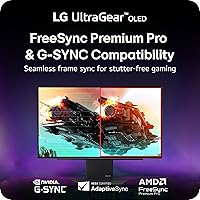
  • G-Sync and FreeSync Premium Pro support means it pairs cleanly with both AMD and NVIDIA GPUs.
  • The 0.03ms response time eliminates ghosting even in the most chaotic, fast-moving game scenarios.
  • Built-in USB 3.0 hub reduces desk cable clutter without requiring a separate hub.
  • DisplayHDR True Black 400 certification delivers noticeably punchy HDR highlights on a panel that already handles blacks well.

Cons

  • You need a high-end GPU to get close to 480fps at 1440p — mid-range cards will fall well short.
  • OLED burn-in risk is real and relevant if you play games with static HUD elements for long sessions.
  • The price premium over 240Hz OLED alternatives is steep for a refresh rate difference many buyers may not perceive.
  • Out-of-box color temperature skews slightly warm and benefits from manual calibration.
  • At 20.5 pounds, the 480Hz LG panel is heavier than average and less convenient to reposition.
  • No built-in speakers, which means you are dependent on the headphone jack or a separate audio solution.
  • The 27-inch 16:9 format leaves no flexibility for buyers who might prefer ultrawide at this budget.
  • Early firmware or driver quirks have been flagged by a subset of buyers, requiring updates after unboxing.
  • Static brightness on OLED can feel limited in very bright room environments compared to high-nit mini-LED panels.
  • The burn-in warranty coverage from LG is limited in scope, which makes long-term peace of mind harder to guarantee.

Ratings

Our AI rating system analyzed verified global buyer reviews of the LG 27GX790A-B 27-inch OLED Gaming Monitor, actively filtering out incentivized, duplicate, and bot-flagged submissions to surface what real users actually experience. The scores below reflect the full picture — consistent praise and recurring frustrations alike — so you can make a genuinely informed decision rather than wade through marketing noise.

Motion Clarity
94%
Competitive players consistently describe target tracking as noticeably cleaner than what they experienced on 240Hz IPS panels. In fast-paced shooters like Valorant and CS2, ghosting is essentially absent, and panning shots across detailed environments remain sharp without any smearing.
The real-world advantage of 480Hz over 240Hz OLED is context-dependent — buyers with less trained eyes in slower-paced titles report the difference is hard to feel. You also need a top-tier GPU to actually sustain the frame rates that make 480Hz meaningful.
Image Quality
92%
The OLED panel's contrast performance draws consistent praise from buyers coming from IPS or VA displays — dark dungeon scenes and nighttime environments show genuine shadow detail rather than grey mush. Near-full DCI-P3 color coverage makes games with rich art direction look noticeably more vivid and saturated.
Out-of-the-box color temperature skews slightly warm, which means whites look off until you calibrate. Some buyers also note that peak brightness, while solid for an OLED, falls short of high-nit mini-LED panels in well-lit rooms.
HDR Performance
88%
DisplayHDR True Black 400 certification carries real weight on an OLED panel because the black floor is genuine, not approximated by local dimming. Buyers report that HDR highlights in supported titles pop convincingly against backgrounds that stay truly dark.
The 400-nit peak brightness ceiling means specular highlights do not reach the intensity of higher-tier HDR monitors, which matters in very bright indoor environments. HDR implementation in some games also requires manual activation through the OSD, which a few buyers found unintuitive.
Connectivity
89%
The combination of DisplayPort 2.1 and two HDMI 2.1 ports makes this one of the more versatile panels at this size, letting users keep a PC, a PS5, and an Xbox Series X all connected without cable-swapping. The USB 3.0 hub adds practical desk utility without requiring a separate hub for peripherals.
There is no USB-C or Thunderbolt port, which limits options for laptop users who prefer single-cable connectivity. Buyers who need more than three USB-A downstream ports will still need an external hub.
Ergonomics & Stand
86%
Height, tilt, swivel, and pivot adjustments are all present and feel mechanically solid — reviewers specifically call out the stand quality as better than expected at this size, which is not always the case with gaming monitors. Pivot support means portrait-mode use for coding or reading vertical content is genuinely practical.
The stand adds meaningful bulk and weight, making desk repositioning cumbersome for users who rearrange frequently. A small number of buyers reported slight wobble on the stand at its maximum height extension, particularly when using mechanical keyboards nearby.
Value for Money
67%
33%
Buyers who game competitively for hours daily and own hardware capable of leveraging 480Hz generally feel the investment is justified by the combined OLED quality and refresh rate ceiling. For that specific use case, there are few alternatives that deliver both at this panel size.
A notable portion of reviewers question whether the premium over a 240Hz OLED alternative is rational given how rarely most users sustain 480fps in practice. Buyers coming from mid-range setups consistently flag that the full value proposition requires an expensive GPU upgrade to unlock.
Color Accuracy
83%
The near-full DCI-P3 gamut means colors in both games and casual photo editing are consistently rich and natural-looking once the monitor is calibrated. Several buyers with photography side interests noted that this Ultragear OLED performs adequately for color-sensitive work without needing a separate display.
Factory calibration is not tight enough for professional color work out of the box, with the warm color temperature being the most common complaint. Users doing serious creative work would benefit from a hardware colorimeter calibration, which adds cost and effort.
Build Quality
81%
19%
The chassis and rear panel feel premium and well-constructed, with no flex or creaking reported during stand adjustments. The slim bezel design holds up well in person and the matte screen coating does not attract fingerprints the way glossy panels do.
At 20.5 pounds, the overall unit is heavier than buyers sometimes expect, and the build does not feel dramatically more premium than competing panels at a lower price point. A small number of users noted that the RGB backlighting housing on the rear felt slightly cheaper than the rest of the monitor.
Burn-in Risk
58%
42%
For users who play varied content across different games and use the built-in pixel-shift and screensaver features, real-world burn-in risk over a typical gaming session length appears manageable. LG includes protective features specifically designed to extend OLED longevity.
Buyers who play titles with persistent static HUDs — strategy games, MMORPGs, or battle royale games with fixed minimap overlays — raise legitimate burn-in concerns that LG's warranty does not fully cover. This is an inherent OLED trade-off that the 480Hz LG panel does not escape.
Gaming Features
84%
Dynamic Action Sync for input lag reduction, a real-time FPS counter, Black Stabilizer for dark scene visibility, and a crosshair overlay collectively make this 27-inch OLED monitor well-equipped for competitive play beyond just the refresh rate spec. Buyers who use these features regularly find them genuinely useful rather than gimmicky.
The OSD menu for accessing and configuring these features is not the most intuitive, and a handful of reviewers found the menu navigation sluggish compared to competing monitors. Some features like Black Stabilizer can create an unnatural look if pushed too high.
Audio
61%
39%
The 4-pole headphone jack with DTS Headphone:X support gives users a convenient single-cable connection for headsets that combine audio output and microphone input. Spatial audio processing provides noticeable directional cues in supported games when tested with compatible headphones.
There are no built-in speakers, which is a dealbreaker for buyers who occasionally want audio without a headset attached. The DTS spatial processing is useful but not a substitute for dedicated DAC/amp hardware for audiophile-grade gaming audio.
Setup & Out-of-Box Experience
76%
24%
Stand assembly is straightforward and does not require tools, which buyers consistently appreciate given the monitor's weight. Firmware updates from LG have addressed the majority of early driver and HDR mode quirks that appeared at launch.
Some buyers report needing to apply a firmware update shortly after unboxing to resolve input detection and HDR behavior issues, which adds friction to the initial setup. The included cable selection is basic and does not include a DisplayPort 2.1 cable, requiring a separate purchase to achieve full 480Hz.
G-Sync & FreeSync
87%
Dual sync compatibility means buyers do not need to think about GPU brand compatibility before purchasing — NVIDIA and AMD users both get tear-free variable refresh rate operation without compromises. In practice, VRR performance is consistently described as rock-solid across a wide frame rate range.
G-Sync Compatible certification means it operates without an official NVIDIA G-Sync module, so edge-case behavior at frame rate extremes can occasionally differ from a fully validated G-Sync panel. Most users never encounter issues, but those pushing the panel to its absolute limits may notice marginal differences.

Suitable for:

The LG 27GX790A-B 27-inch OLED Gaming Monitor is purpose-built for competitive PC gamers who genuinely push hardware to its limits — think ranked FPS players who treat every millisecond of input lag as a liability. If you own an RTX 4080, RTX 4090, or an RX 7900 XTX, you have the GPU headroom to actually approach 480fps in esports titles at 1440p, which means you would be using this panel as intended rather than paying for headroom you cannot reach. Players upgrading from a 1080p 144Hz IPS monitor will feel the biggest jump — both the resolution gain and the motion clarity improvement are immediately obvious. This 27-inch OLED monitor also serves dual-purpose setups well, since the two HDMI 2.1 ports let you plug in a PS5 or Xbox Series X alongside a gaming PC without any adapters or trade-offs. Content creators who game on the side will also appreciate the near-full DCI-P3 color coverage, which holds up well for photo and video work even if that is not the primary pitch.

Not suitable for:

The LG 27GX790A-B 27-inch OLED Gaming Monitor is a harder sell for anyone who does not game competitively or who runs a mid-range GPU that tops out well below 480fps at 1440p — in that case, you would be absorbing the premium cost without unlocking the core advantage. Buyers concerned about long-term panel health should think carefully: OLED burn-in is a real risk with static HUD elements in games like strategy titles, battle royale interfaces, or anything with persistent on-screen overlays, and no warranty fully covers it. This panel is also not the right fit for office or productivity-first environments where a wide color-accurate display at a moderate refresh rate would serve better for far less money. Users who prefer ultrawide or larger screen real estate should look elsewhere, as the 16:9 27-inch format is a deliberate trade-off here. Budget-conscious buyers or those coming from a perfectly capable 240Hz OLED will likely find the incremental gains harder to justify at this price point.

Specifications

  • Panel Type: Uses an OLED panel, providing per-pixel light control for true blacks and no backlight bleed.
  • Screen Size: 27-inch chassis with a 26.5″ viewable display area in a 16:9 aspect ratio.
  • Resolution: Native resolution of 2560x1440 (QHD Wide 1440p) for sharp detail at a 27-inch panel size.
  • Refresh Rate: Supports up to 480Hz refresh rate when connected via DisplayPort 2.1 at full QHD resolution.
  • Response Time: Rated at 0.03ms response time, effectively eliminating ghosting in fast-moving content.
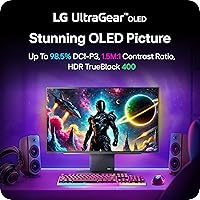
  • Contrast Ratio: Native contrast ratio of 1,500,000:1, made possible by OLED per-pixel illumination.
  • HDR Standard: Certified DisplayHDR True Black 400, supporting peak brightness and genuine black-level performance in HDR content.
  • Color Coverage: Covers 98.5% of the DCI-P3 color space, suitable for both gaming and basic color-sensitive work.
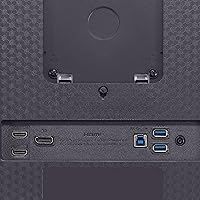
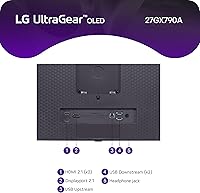
  • Connectivity: Includes one DisplayPort 2.1 and two HDMI 2.1 ports for flexible PC and console connections.
  • USB Hub: Integrated USB 3.0 hub with one upstream and three downstream ports for peripheral connectivity.
  • Sync Technology: Compatible with both AMD FreeSync Premium Pro and NVIDIA G-Sync for tear-free performance across GPU brands.
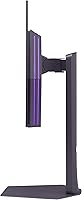
  • Stand Adjustments: The included stand supports height, tilt, swivel, and pivot adjustments for comprehensive ergonomic positioning.
  • Audio Output: Features a 4-pole headphone jack combining stereo audio and microphone input, with DTS Headphone:X spatial audio support.
  • Dimensions: Measures 9.8 x 23.8 x 22.8 inches (depth x width x height) with the stand attached.
  • Weight: Complete unit with stand weighs 20.5 pounds, which is above average for a 27-inch panel.
  • Surface Finish: Matte screen surface reduces glare and reflections in typical ambient lighting conditions.
  • Availability: First became available in November 2024 as part of LG's Ultragear gaming monitor lineup.

Related Reviews
LG 27GR95QE-B 27″ Ultragear OLED Gaming Monitor
86%
94%
Display Quality
92%
Gaming Performance
89%
Color Accuracy
85%
Build Quality
90%
Ergonomics/Adjustability
More
LG 34GP63A-B 34-Inch Curved Gaming Monitor
79%
93%
Gaming Immersion
91%
Refresh Rate Performance
88%
Contrast & Black Depth
83%
Color Accuracy
86%
Input Lag & Responsiveness
More
LG 27GS75Q-B 27-inch QHD Gaming Monitor

82%
91%
Refresh Rate & Motion Performance
88%
Image Sharpness & Resolution
83%
Color Accuracy & Gamut
57%
HDR Performance
86%
Response Time & Ghosting
More
LG 27GS60QC-B 27″ Curved Gaming Monitor
78%
91%
Motion & Refresh Performance
88%
Image Clarity & Sharpness
84%
Contrast & Black Levels
77%
Color Accuracy & Gamut
52%
HDR Performance
More
LG 45GX950A-B 45-inch OLED Gaming Monitor
81%
96%
Image Quality
93%
Refresh Rate & Responsiveness
94%
Resolution & Pixel Density
88%
HDR Performance
78%
Dual Mode Functionality
More
LG 27GP850-B 27-Inch QHD Gaming Monitor
78%
91%
Image Quality
93%
Motion Performance
88%
Color Accuracy
54%
HDR Performance
89%
Refresh Rate & Sync
More
LG 27GN800-B 27-inch QHD Gaming Monitor
77%
88%
Image Quality
86%
Motion Performance
91%
Adaptive Sync
41%
Ergonomics & Stand
87%
Value for Money
More
LG 27GR83Q-B 27-inch QHD Gaming Monitor
80%
93%
Motion Clarity & Refresh Rate
89%
Image & Color Quality
58%
HDR Performance
84%
Build Quality & Materials
88%
Ergonomic Stand
More
LG 27GL650F-B 27-Inch Full HD IPS Gaming Monitor
85%
92%
Display Quality
89%
Gaming Performance
85%
Build Quality
91%
Ergonomics & Adjustability
90%
Value for Money
More
LG 27MK600M 27-inch IPS Monitor
75%
83%
Image Quality
71%
Color Accuracy
78%
Panel Uniformity
74%
Refresh Rate & Smoothness
62%
Response Time
More

FAQ

Yes, you do. To run the full 2560x1440 resolution at 480Hz, DisplayPort 2.1 is required because older DP 1.4 cables cannot carry that amount of bandwidth without compromising resolution or color depth. Make sure your graphics card also has a DP 2.1 output — current-generation cards from both NVIDIA and AMD do, but older ones may not.

Burn-in is a legitimate consideration with any OLED panel, and it would be dishonest to dismiss it. If you play the same game for many hours daily with a persistent static HUD — think strategy games, battle royale overlays, or anything with a fixed minimap — the risk increases over time. For fast-paced competitive play with varied on-screen content, the risk is much lower in practice. Using the built-in screen saver and pixel-shift features LG provides helps, but this is still worth factoring into your decision at this price.

Yes, that is one of the practical strengths of this setup. The two HDMI 2.1 ports let you keep both a console and a PC connected simultaneously, switching inputs through the on-screen menu rather than unplugging anything. Both ports support the bandwidth needed for 4K 120Hz on console or 1440p high-refresh gaming.

Realistically, you need something in the RTX 4080, RTX 4090, or RX 7900 XTX tier to approach 480fps in competitive esports titles at 1440p. In games like CS2, Valorant, or Apex Legends with optimized settings, top-end cards can hit that ceiling. Mid-range cards like an RTX 4060 or RX 7600 will benefit from the OLED quality but will top out well below 480fps in most titles.

Honestly, it depends on the person and the game. In controlled testing and for highly trained competitive players, there is a perceptible improvement in motion clarity and target tracking smoothness. For casual or even semi-competitive players, the jump from 240Hz to 480Hz is harder to feel than the jump from 144Hz to 240Hz was. Most buyers who are satisfied with this monitor praise the overall OLED experience as much as the raw refresh rate number.

It will work, but you will not reach 480Hz at full 1440p. Over DP 1.4, the monitor can run at lower refresh rates or use Display Stream Compression to hit higher rates with some trade-offs. For the full experience this panel was designed for, a GPU with DisplayPort 2.1 output is the right pairing.

Most users find the colors vibrant and usable straight out of the box, but the default color temperature tends to run slightly warm, which can make whites look a little yellow. A quick trip into the display settings to adjust color temperature to a neutral preset — or a basic manual calibration — resolves this without much effort. For serious color work, a hardware calibrator would give you the most precise results.

The stand is functional and genuinely adjustable, so most users do not need a VESA mount. It supports height, tilt, swivel, and pivot, which covers the typical range of positioning needs. The footprint is not unusually large for a 27-inch gaming monitor. That said, if you prefer to free up desk space or use a monitor arm, the panel does support VESA mounting.

A small number of early buyers noted minor firmware quirks at launch, including some HDR mode behavior and input detection oddities. LG has issued firmware updates since the November 2024 release that address most reported issues. It is worth checking for and applying any available firmware update shortly after unboxing before drawing conclusions about the panel's behavior.

The OLED panel still delivers a noticeably better visual experience in single-player games — the contrast and color depth make atmospheric scenes genuinely more immersive than what IPS panels produce. However, the 480Hz refresh rate and 0.03ms response time are largely wasted on slow-paced titles. If competitive response time is not your priority, you could get a very similar OLED visual experience from a 240Hz OLED panel at a lower price and still walk away satisfied.

Where to Buy