Overview

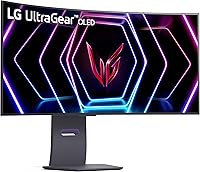
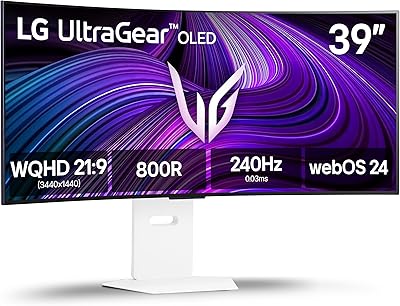
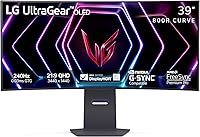
The LG 39GS95QE 39-Inch Curved OLED Gaming Monitor occupies a specific, well-defined niche: it's built for gamers who refuse to choose between competitive performance and cinematic immersion. At 39 inches with an 800R curved screen, it lands in a sweet spot — noticeably larger than the 34-inch ultrawides most people are used to, without the desk-dominating footprint of a 45-inch panel. LG's UltraGear line has long pushed IPS and nano IPS panels, but OLED changes the calculus entirely: every pixel generates its own light, meaning blacks are truly black, not dark gray. That said, this ultrawide OLED monitor demands a serious setup — both a deep desk and a powerful GPU capable of pushing 3440x1440 at high frame rates.
Features & Benefits

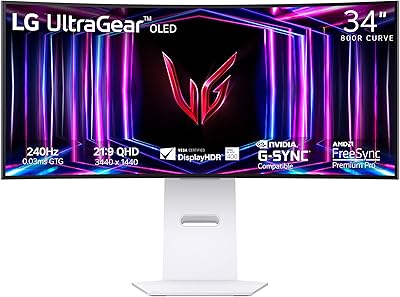
What makes this curved gaming display stand out technically starts with the OLED panel itself. When you're playing a dark horror game or a space sim, the difference between true self-emissive blacks and the backlit glow-bleed of an IPS panel is immediately obvious. The 240Hz refresh rate on a 39-inch OLED is genuinely rare; most OLED monitors top out at 144Hz or push higher refresh only at smaller sizes. Combined with a 0.03ms response time, fast-moving objects stay crisp with virtually no trailing artifacts. Both NVIDIA G-SYNC Compatible and AMD FreeSync Premium Pro certification means you're covered regardless of GPU brand, and HDMI 2.1 makes this a legitimate option for PS5 and Xbox Series X owners. The adjustable stand — tilt, height, and swivel — is a practical bonus on a panel this size.

Best For

The LG 39GS95QE is the right monitor if you fall into a fairly specific category of buyer. High-end GPU owners — think RTX 4070 Ti or better — will get the most out of it, since running 3440x1440 at 240Hz requires real horsepower. Console players connecting a PS5 or Xbox Series X via HDMI 2.1 will also find it an excellent fit, enjoying high refresh rates on a large, vibrant screen. Content creators who spend time in video editing or color-grading apps will appreciate the wide color gamut and the spacious 21:9 canvas. If you're upgrading from a 27-inch 1440p flat screen or a mid-range 34-inch IPS ultrawide, the jump in both size and image quality will be immediately apparent.

User Feedback

With roughly 290 ratings and a 4.2 out of 5 average, buyer sentiment skews positive but not without reservations. The most consistent praise centers on out-of-the-box accuracy and the sheer visual shock of moving from an LCD to OLED — several reviewers describe it as not being able to go back. On the other side, burn-in is the elephant in the room. LG does include pixel-refreshing and screen-protection features, but if you're a single-game player or leave static HUD elements on screen for extended sessions, it's a legitimate concern worth researching. Some buyers also flag that the OSD menu feels overcomplicated, and a few note the panel's peak brightness can struggle in sunlit rooms compared to mini-LED alternatives.

Pros

  • OLED self-emissive pixels produce truly black blacks that no LCD panel at this size can match.
  • 240Hz on a 39-inch OLED is a rare combination that covers both competitive and cinematic gaming.
  • The 0.03ms response time virtually eliminates ghosting, even in fast-paced shooters and racing titles.
  • Dual sync support means you are covered whether you run an NVIDIA or AMD GPU, now or in the future.
  • HDMI 2.1 makes this curved gaming display a strong option for next-gen console setups, not just PC.
  • Out-of-the-box color accuracy is strong enough for light creative work without manual calibration.
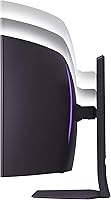
  • The 800R curve at 39 inches creates a genuinely immersive field of view without feeling excessive.
  • The stand offers tilt, height, and swivel adjustments — a practical necessity on a panel this large.
  • The matte screen surface reduces distracting reflections without visibly dulling the OLED image quality.
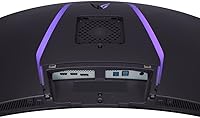
  • Three USB 3.0 ports add desk-level hub convenience without needing a separate peripheral.

Cons

  • Burn-in remains a real long-term risk, especially for players who log heavy hours on static-HUD games.
  • Peak brightness lags behind mini-LED competitors, making HDR highlights less punchy in bright rooms.
  • Driving 3440x1440 at 240Hz demands top-tier GPU hardware that many buyers may not currently own.
  • The OSD menu is reported by multiple users to be cluttered and unintuitive to navigate.
  • At nearly 23 pounds, repositioning or adjusting the monitor solo is awkward and mildly frustrating.
  • The price tier puts it out of reach for budget-conscious buyers who could get 80 percent of the experience for less.
  • Ultrawide 21:9 compatibility is inconsistent in older games, occasionally resulting in black bars or stretched visuals.
  • The LG OnScreen Control software has drawn complaints about stability and usability on certain PC configurations.

Ratings

The scores below for the LG 39GS95QE 39-Inch Curved OLED Gaming Monitor were generated by our AI system after analyzing verified purchase reviews from global buyers, with spam, bot activity, and incentivized feedback actively filtered out. This ultrawide OLED monitor earned strong marks in several areas but also drew consistent criticism in others, and both sides are reflected honestly in the ratings and commentary that follow.
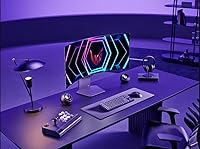
Image Quality
96%
This is the category that convinces most buyers the purchase was worth it. The self-emissive OLED pixels produce blacks that simply have no comparison on any LCD panel at this size, and dark gaming environments — caves, space, night scenes — look genuinely cinematic rather than washed out. Color accuracy out of the box impressed a wide range of buyers, including those doing light creative work.
A small number of users noted that very bright, white-heavy content like spreadsheets or document editing can look slightly less vivid than on a high-nit mini-LED panel. This is an inherent OLED trade-off rather than a defect, but buyers expecting blinding HDR highlights should calibrate expectations accordingly.
Contrast & Black Levels
98%
The 1.5M:1 contrast ratio is not just a spec on paper — users consistently report that switching from IPS to this curved gaming display is one of the most visually jarring upgrades they have experienced. Horror games, space sims, and dark cinematic cutscenes look dramatically more immersive because shadow detail is rendered with precision rather than backlit gray haze.
The exceptional contrast performance is most noticeable in darker content and controlled lighting environments. In a brightly lit room during the day, the advantage narrows, and a handful of buyers who game primarily in daylight felt the contrast benefit was less transformative than expected without also controlling ambient light.
Refresh Rate & Smoothness
93%
240Hz on a 39-inch OLED is a genuinely rare specification, and buyers who own the GPU hardware to drive it report buttery smooth gameplay that feels noticeably different from 144Hz in fast-paced shooters and racing titles. Even users who cannot max out frame rates benefit from variable refresh rate through the dual sync support, keeping motion smooth across a wide frame rate range.
Reaching the full 240Hz ceiling demands a very high-end GPU, and a portion of buyers acknowledged post-purchase that their existing hardware was a bottleneck. The monitor itself is not at fault, but it means many real-world users are experiencing the panel at well below its rated peak, which affects perceived value for money on this specific feature.
Response Time & Motion Clarity
94%
The 0.03ms GtG response time translates directly into real-world sharpness during fast movement — tracking enemies in FPS games or watching cars slide through corners in racing titles shows virtually zero trailing or ghosting. Buyers who upgraded from even fast IPS panels noticed the improvement immediately, particularly in titles with rapid camera movement.
A small subset of users reported very minor inverse ghosting artifacts in specific color transitions, which can occasionally appear at the highest overdrive settings. Adjusting the response time setting in the OSD resolves this for most users, but it adds a configuration step that less technically experienced buyers may not know to take.
HDR Performance
78%
22%
DisplayHDR True Black 400 is a meaningful certification for an OLED panel because it validates deep black performance rather than just peak brightness, and the result in practice is that dark HDR content looks genuinely impressive. Users watching HDR-mastered films and playing HDR-enabled games in dim or controlled light consistently praised the depth and realism of the image.
Peak brightness is the ceiling here, and buyers who compared this monitor against high-end mini-LED panels found it clearly outgunned in specular highlights — bright explosions, sunlit outdoor scenes, and HDR window glare effects simply do not punch as hard. For buyers who game or watch content in well-lit rooms, this limits the practical HDR impact.
Gaming Performance
92%
The combination of 240Hz, near-zero response time, and dual sync compatibility creates a competitive gaming experience that sits at the top of what consumer monitors can currently offer. FPS players reported a tangible advantage in target tracking smoothness, and the wide 21:9 field of view in supported titles adds a genuine peripheral awareness benefit.
Not all games support 21:9 natively, and buyers who play older titles or specific competitive esports games occasionally encountered black bars or stretched visuals requiring workarounds. This is a genre and game-specific limitation rather than a monitor flaw, but it is worth researching for your specific game library before purchasing.
Build Quality & Design
88%
The physical construction of the LG 39GS95QE drew consistent praise in user feedback, with buyers noting the panel feels solidly built and the stand does not wobble or flex noticeably even after repositioning. The clean, understated aesthetic fits both gaming setups and productivity-focused desks without looking aggressively styled.
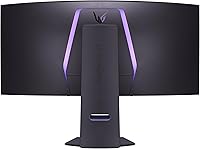
A few users noted the plastic finish on the rear of the monitor picks up scratches and scuffs more easily than expected during setup and installation. At this price tier, some buyers felt the materials on the back panel did not fully match the premium positioning of the product.
Ergonomics & Stand
83%
Having tilt, height, and swivel adjustment on a monitor this large is more valuable than it might seem — large curved panels are notoriously difficult to position optimally, and buyers appreciated that they could dial in the angle and height without purchasing a separate arm. The height adjustment range was noted as generous enough to accommodate both seated and standing desk configurations.
At nearly 23 pounds, physically moving or repositioning the assembled monitor is a two-person task for most users, and even small adjustments can feel cumbersome solo. A few buyers also wished the stand included a cable management channel, as the rear port layout combined with the panel weight makes cable routing awkward.
Connectivity
86%
The HDMI 2.1 port is a genuine differentiator that makes this curved gaming display viable for both PC and next-gen console use without compromise. The three USB 3.0 downstream ports were consistently praised by buyers who use the monitor as a hub for keyboards, headsets, and other peripherals, reducing cable clutter on the desk.
Some users noted the absence of a USB-C port as a missed opportunity at this price tier, particularly for laptop users who would benefit from single-cable connectivity. The number of display inputs is adequate but not especially generous, which matters for buyers who switch frequently between multiple source devices.
OSD & Software
61%
39%
The OSD provides access to a comprehensive range of settings including picture modes, sync toggles, and input management, giving technically experienced users a solid degree of control over the display output. The physical controls for navigating menus are responsive and located accessibly on the rear of the panel.
The OSD menu structure was one of the most consistently criticized aspects in buyer feedback — users described it as unintuitive and time-consuming to navigate, especially when trying to configure PBP mode or toggle HDR settings mid-session. LG's OnScreen Control desktop software also received complaints about stability issues on certain Windows configurations.
Burn-in Risk & Longevity
67%
33%
LG includes multiple pixel protection features — automatic screen savers, pixel refreshing cycles, and logo detection — that actively work to mitigate burn-in risk during normal, varied use. Buyers who play a broad range of content and observe reasonable daily usage habits reported no visible burn-in concerns after extended ownership periods.
Burn-in anxiety is the single most common hesitation raised in the review pool, and for buyers who heavily play games with persistent static HUD elements — like MMOs, strategy games, or titles with fixed minimaps — the risk is real and should not be dismissed. At this price point, the prospect of panel degradation over two to three years is a legitimate concern that factors into long-term value.
Brightness
72%
28%
In dim or moderately lit gaming environments, the brightness level is more than adequate, and the OLED panel's ability to selectively dim pixels means the effective perceived brightness in mixed dark-and-light scenes feels balanced and natural. Buyers who game in the evenings or in controlled-light setups reported no brightness complaints.
In sun-facing or brightly lit rooms, the peak brightness ceiling becomes a practical limitation, and several buyers specifically noted they had to reposition or shade their setup to avoid glare washing out the image. Compared to mini-LED competitors at a similar price, the maximum luminance is noticeably lower in sustained full-screen bright scenarios.
Value for Money
74%
26%
For buyers who have the hardware to fully exploit 240Hz at 3440x1440 and who prioritize OLED image quality over raw brightness, the price is justifiable as the cost of entry into a genuinely rare combination of panel technology and performance specifications. Users who upgraded from mid-range monitors felt the experiential jump was large enough to rationalize the cost.
For buyers who cannot yet drive the panel at its full capability, or who do not have a deep desk setup to accommodate it comfortably, the value equation weakens considerably. The price tier demands that nearly everything about your existing setup — GPU, desk, room lighting — be aligned for the investment to make sense.
Setup & Installation
81%
19%
Most buyers reported that the physical assembly of the stand and panel was straightforward, with the stand attaching securely without requiring tools. The packaging was praised for protecting the panel adequately during shipping, with very few reports of damage on arrival despite the size of the unit.
The monitor's weight makes unboxing and initial positioning a two-person job for most buyers, and several users recommended having a helper available for the initial setup rather than attempting it solo. A small number of buyers also noted that the initial driver and software installation for OnScreen Control required troubleshooting to complete cleanly.

Suitable for:

The LG 39GS95QE 39-Inch Curved OLED Gaming Monitor is purpose-built for PC gamers who have invested in a high-end GPU and want a display that can actually keep pace with it. If you own an RTX 4070 Ti or better and play a mix of fast-paced competitive titles and visually rich single-player games, this curved gaming display lets you do both without compromise. Console players with a PS5 or Xbox Series X will also find genuine value here, since the HDMI 2.1 port allows those consoles to run at their highest supported refresh rates on a large, vibrant screen. Content creators who split time between gaming and color-sensitive work in a 21:9 layout will appreciate the OLED color accuracy and the wide workspace. Buyers upgrading from a 27-inch flat 1440p monitor or a mid-tier IPS ultrawide will notice an immediate and dramatic improvement in both image depth and immersion.
Not suitable for:

The LG 39GS95QE 39-Inch Curved OLED Gaming Monitor is a poor fit for anyone without the GPU muscle to drive 3440x1440 at meaningful frame rates — pairing it with a mid-range card means paying a premium price for performance you cannot access. Gamers who primarily play static or slow-paced titles with persistent HUD elements, such as MMOs or strategy games, should take burn-in risk seriously; LG includes mitigation tools, but they do not eliminate the concern entirely. This ultrawide OLED monitor also struggles in bright, sun-facing rooms where its peak brightness falls short of what high-nit mini-LED panels can achieve, making it a weaker choice for daytime use in well-lit spaces. Buyers on tighter budgets or those without a desk deep enough to comfortably accommodate a 39-inch curved panel at the right viewing distance will find better value elsewhere. Anyone looking strictly for a productivity monitor with no gaming use case is overpaying for features they will never use.

Specifications

  • Screen Size: The panel measures 39 inches diagonally, positioning it between the common 34-inch and 45-inch ultrawide form factors.
  • Panel Type: Uses an OLED panel where each pixel generates its own light, enabling true blacks and a contrast ratio of 1.5M:1.
  • Resolution: Native resolution is 3440x1440 (WQHD) at a 21:9 aspect ratio, delivering a wide, immersive field of view.
  • Refresh Rate: Supports a maximum refresh rate of 240Hz, enabling exceptionally smooth motion in fast-paced games.
  • Response Time: Rated at 0.03ms GtG (gray-to-gray), which in practice means near-zero ghosting or trailing in motion-heavy content.
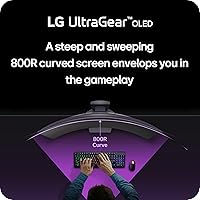
  • Curvature: The screen uses an 800R curve radius, one of the steeper curves available, designed to match the natural arc of human peripheral vision.
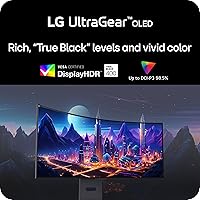
  • HDR Support: Certified DisplayHDR True Black 400, a standard specific to OLED that validates deep black levels rather than just peak brightness thresholds.
  • Sync Technology: Officially validated as both NVIDIA G-SYNC Compatible and AMD FreeSync Premium Pro, supporting variable refresh rate on both GPU ecosystems.
  • HDMI Version: Includes HDMI 2.1 connectivity, which provides enough bandwidth for high-resolution, high-refresh-rate input from current-generation consoles and PCs.
  • USB Ports: Equipped with three USB 3.0 downstream ports, allowing peripherals to be connected directly to the monitor as a hub.
  • Stand Adjustments: The included stand supports tilt, height, and swivel adjustments, giving users meaningful control over ergonomic positioning.
  • Screen Surface: The panel uses a matte anti-glare coating, which reduces reflections in ambient-lit environments without significantly dulling the OLED image.
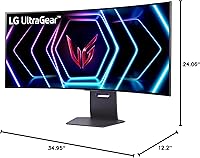
  • Dimensions: With the stand attached, the monitor measures 34.95 inches wide, 24.06 inches tall, and 12.2 inches deep.
  • Weight: The full unit including the stand weighs 22.9 pounds, which is typical for a large curved monitor of this size and panel type.
  • Color: Available in black, with a clean industrial aesthetic consistent with LG's UltraGear gaming lineup.
  • Power Source: Powered via standard AC connection; no external power brick is required as the power supply is integrated into the monitor chassis.

Related Reviews

LG 39GX90SA-W 39-inch OLED Curved Gaming Monitor
77%
94%
Picture Quality
91%
Gaming Performance
88%
Immersion & Curvature
86%
HDR Experience
79%
webOS Smart Features
More
LG 45GS95QE Ultragear OLED Curved Gaming Monitor 45-Inch
89%
96%
Display Quality
94%
Gaming Performance
88%
Build Quality
67%
Brightness in Bright Environments
98%
Response Time
More
LG 34GS95QE 34-inch OLED Curved Gaming Monitor
81%
96%
Image Quality
94%
Motion Clarity
97%
Contrast & Black Levels
91%
Refresh Rate Performance
88%
Immersion & Curve
More
LG 32GS95UE 32-inch OLED Gaming Monitor
80%
96%
Image Quality
94%
Motion Performance
91%
HDR Experience
83%
Dual Mode Utility
67%
Value for Money
More
LG 27GX790A-B 27-inch OLED Gaming Monitor
80%
94%
Motion Clarity
92%
Image Quality
88%
HDR Performance
89%
Connectivity
86%
Ergonomics & Stand
More
LG 45GR65DC-B 45-Inch Curved Ultrawide Gaming Monitor
76%
96%
Immersion & Field of View
88%
Gaming Performance
74%
HDR Quality
83%
Color Accuracy
81%
Build Quality
More
LG 34GX90SA-W 34-inch OLED Curved Gaming Monitor
81%
94%
Picture Quality
91%
Gaming Performance
88%
Immersion & Curvature
83%
Smart Platform (webOS)
93%
Contrast & Black Levels
More
LG 45GX950A-B 45-inch OLED Gaming Monitor
81%
96%
Image Quality
93%
Refresh Rate & Responsiveness
94%
Resolution & Pixel Density
88%
HDR Performance
78%
Dual Mode Functionality
More
MSI MPG 341CQPX 34-inch Curved OLED Gaming Monitor
83%
94%
Display Quality
92%
Gaming Performance (240Hz)
89%
Color Accuracy
85%
Ease of Setup
80%
Software (Gaming Intelligence App)
More
Alienware AW3423DW 34-inch QD-OLED Gaming Monitor
83%
97%
Image Quality
94%
Motion Performance
96%
Contrast & Black Levels
89%
Color Accuracy
91%
Refresh Rate & Sync
More

FAQ

You can absolutely run this ultrawide OLED monitor with a mid-range GPU, but you will not be using it to its full potential. Pushing 3440x1440 at or near 240Hz in demanding titles requires a card in the RTX 4070 Ti class or higher. With a mid-range card, you may be capped at 80 to 120fps in heavier games, which is still smooth, but you are paying a premium for headroom you are not reaching. For lighter or older titles, a mid-range card handles things just fine.

Burn-in is a real consideration with any OLED display, and it would be dishonest to dismiss the concern entirely. LG does include built-in mitigation features such as pixel refreshing cycles and screen protection tools, and these help extend panel longevity in normal use. The risk increases significantly if you regularly leave static elements on screen for many hours — think persistent HUD overlays in MMOs or strategy games, or leaving a paused screen sitting for long periods. For most gamers who play varied content and take reasonable breaks, the practical risk is low, but it is a factor worth weighing before purchasing.

Yes, and it is actually a strong pairing. The HDMI 2.1 port provides the bandwidth needed for the PS5 and Xbox Series X to run at their highest supported refresh rates on this display. Just make sure you are connecting via the HDMI 2.1 port specifically, not a standard HDMI port, to get full performance.

At 39 inches with an 800R curve, you ideally want a desk that is at least 30 to 32 inches deep so you can sit far enough back for comfortable viewing. If your desk is shallow and you are sitting close, the curve will feel overwhelming rather than immersive. Most standard gaming desks in the 60-inch width range handle the footprint fine, but depth is the more important measurement to check before buying.

The LG 39GS95QE 39-Inch Curved OLED Gaming Monitor handles HDR very differently from mini-LED panels. OLED wins decisively on black levels and contrast — shadows in dark scenes look genuinely dark, not backlit gray. However, mini-LED panels can hit significantly higher peak brightness, which makes specular highlights and HDR content look more punchy in well-lit rooms. If you watch or play in a bright environment, mini-LED has an edge in peak luminance. In a dim or controlled-light room, OLED's contrast advantage becomes the more visually impactful factor.
There is a small trade-off. Matte coatings do slightly soften the perceived saturation and sharpness compared to a glossy surface, and OLED panels with glossy finishes can look more vivid side by side. That said, the matte finish on this curved gaming display does a good job controlling reflections, which matters in mixed-lighting setups. Most users find the trade-off very acceptable in real-world use.

Yes, the LG 39GS95QE supports both PBP (Picture by Picture) and PIP (Picture in Picture) modes, which let you display input from two devices simultaneously. This is useful if you want a console feed alongside a PC desktop, for example. The OSD menu is where you configure these modes, and a few users have noted it takes some patience to navigate.

The included stand is genuinely functional and offers more adjustment range than most monitors in this category — you get height, tilt, and swivel, which covers the majority of ergonomic needs. If you want to free up desk space or need a very specific viewing angle, a VESA mount arm is compatible, but it is not a necessity out of the box the way it is with some monitors that ship with fixed-tilt-only stands.

The wide 21:9 canvas and accurate OLED color reproduction make this a capable productivity and creative display. Video editors and colorists will appreciate the contrast and color depth for reviewing footage. The main limitation for strict professional creative use is the absence of factory calibration data and the fact that OLED panels can have some brightness non-uniformity at very high white-level content. For casual to semi-professional creative work alongside gaming, it handles both roles well.

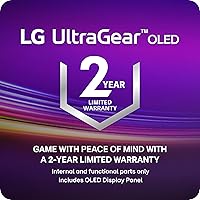
LG typically covers UltraGear monitors with a 3-year limited warranty in the US market, which includes coverage against panel defects. It is worth confirming the specific terms at purchase, as warranty conditions can vary by region and retailer. LG also has a dedicated business support line for monitor products if issues arise during the coverage period.

Where to Buy