Overview

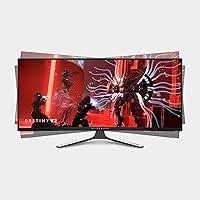
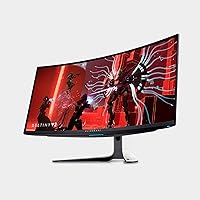
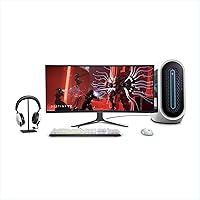
The Alienware AW3423DW 34-inch QD-OLED Gaming Monitor is Alienware's most ambitious ultrawide to date, targeting serious gamers and creative professionals who refuse to compromise between speed and image quality. Its 34-inch 1800R curved panel with 3440x1440 resolution puts it squarely in premium territory, competing against WOLED rivals and high-end IPS ultrawides. What makes this QD-OLED ultrawide stand out is its rare ability to function credibly as both a high-refresh gaming display and a color-critical creative tool. That said, prospective buyers should go in with clear eyes: the desk footprint is substantial, and burn-in risk, while manageable, is a real consideration worth understanding before you commit.
Features & Benefits

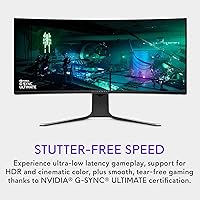
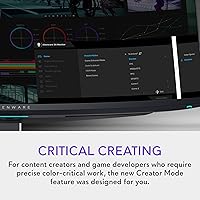
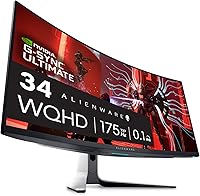
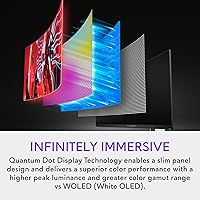
Where this QD-OLED ultrawide earns its premium badge is in the panel itself. Quantum Dot technology layered over an OLED substrate delivers noticeably brighter highlights than a standard WOLED panel — the difference shows up clearly in HDR content, where specular highlights genuinely pop rather than just glow. At 175Hz with 0.1ms GtG, fast-paced gameplay feels unnervingly sharp; ghosting simply is not a concern. Pair that with NVIDIA G-SYNC ULTIMATE certification and you get clean, tear-free output across a wide variable refresh range. The Creator Mode, offering both DCI-P3 and sRGB presets with gamma control, is a practical daily-use tool for anyone editing photos or video alongside gaming.

Best For

This Alienware curved monitor is best suited to people who spend serious time in immersive single-player titles — the kind of games where contrast depth and cinematic color actually shift the atmosphere. Think dark fantasy RPGs or atmospheric horror, where true OLED blacks create a sense of depth IPS panels simply cannot match. It works equally well for competitive players who want speed without sacrificing color accuracy, and content creators doing video grading or photo editing will find the wide color gamut genuinely useful day-to-day. One practical note: an RTX 3080-class GPU or better is really necessary to push this panel to its potential at 3440x1440 resolution.

User Feedback

Owners of the AW3423DW consistently point to picture quality and deep black levels as the immediate stand-out, with many describing the first power-on as a genuine revelation after years on IPS or VA panels. The stand build quality and cable management system draw repeated praise. On the flip side, burn-in anxiety is real and widely discussed — though most long-term owners report no issues, and Alienware's 3-year burn-in warranty provides meaningful peace of mind. Some users notice automatic brightness limiting during extended bright HDR scenes, and a small number flag occasional fan noise under heavy load. Overall sentiment remains strongly positive.

Pros

  • True OLED blacks deliver contrast that IPS and VA panels cannot come close to matching in dark gaming scenes.
  • The QD-OLED panel produces noticeably brighter, more saturated highlights than standard WOLED displays.
  • At 175Hz with 0.1ms GtG response, motion clarity in fast-paced games is about as clean as current display tech offers.
  • NVIDIA G-SYNC ULTIMATE certification ensures tear-free, stutter-free output across a wide refresh range.
  • Creator Mode with DCI-P3 and sRGB presets makes this Alienware curved monitor a credible tool for color-sensitive work.
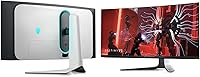
  • The stand is sturdy and fully adjustable — height, tilt, and swivel — with genuinely useful cable management built in.
  • Five USB 3.0 ports make the AW3423DW a practical desktop hub, not just a display.
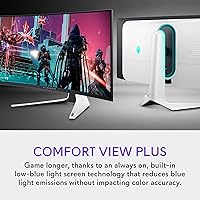
  • The matte anti-glare coating reduces reflections without significantly washing out OLED color, a real daily comfort advantage.
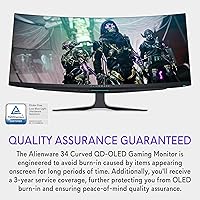
  • Alienware backs the panel with a 3-year burn-in warranty, which meaningfully reduces the financial risk of OLED ownership.
  • Owners consistently describe the first power-on as a visual revelation, particularly those upgrading from IPS or VA panels.

Cons

  • Automatic brightness limiting can visibly dim very bright HDR scenes during extended viewing, which some users find jarring.
  • The internal ventilation fan is audible under heavy HDR load — noticeable in a quiet room.
  • At 21:9 ultrawide, the physical footprint demands a wide, deep desk that not all setups can spare.
  • QD-OLED panels can exhibit slight color fringing or uniformity shifts toward extreme viewing angles.
  • Long-term burn-in risk, while low with normal usage habits, remains a genuine concern for static-content-heavy workflows.
  • Driving 3440x1440 at 175Hz demands a high-end GPU; mid-range cards will leave the display's performance largely untapped.
  • The AlienFX RGB lighting, while well-executed, adds to the overall cost without contributing anything to image performance.
  • At this price tier, some buyers may reasonably expect a built-in KVM switch or USB-C with full power delivery, neither of which is present.

Ratings

The scores below reflect an AI-powered analysis of verified global owner reviews for the Alienware AW3423DW 34-inch QD-OLED Gaming Monitor, with spam, incentivized submissions, and bot activity actively filtered out to protect accuracy. Each category score is derived from recurring sentiment patterns across thousands of real buyer experiences — not editorial opinion — so both the standout strengths and the genuine frustrations are represented honestly.

Image Quality
97%
Owners consistently describe the picture quality as the single most impactful upgrade they have ever experienced from a display. The combination of absolute OLED blacks, Quantum Dot color volume, and 1,000,000:1 native contrast makes dark gaming scenes and HDR films look fundamentally different from anything an IPS or VA panel can produce.
A small number of users note slight color fringing near high-contrast edges, particularly visible on pure white text against dark backgrounds — a known QD-OLED optical characteristic rather than a defect, but perceptible to critical eyes.
Motion Performance
94%
At 175Hz with a verified 0.1ms GtG response, fast-paced competitive titles feel exceptionally clean on the AW3423DW. Players switching from 144Hz IPS monitors report that the combined effect of higher refresh and zero visible ghosting makes a noticeable difference in tracking moving targets.
A handful of users running AMD GPUs report that without native FreeSync certification, adaptive sync behavior can occasionally be inconsistent at the very low end of the refresh range, which is a minor but real limitation for non-NVIDIA users.
Contrast & Black Levels
96%
This is where OLED technology is simply unmatched, and owners of this Alienware curved monitor say so repeatedly. Horror games, space exploration titles, and dark cinematics take on a depth that feels genuinely immersive — shadows are not dark grey, they are actually black.
Automatic brightness limiting (ABL) activates when large portions of the screen become very bright simultaneously, which can cause perceptible dimming during full-screen HDR cutscenes or bright gameplay environments. It does not affect dark content but is noticeable in the wrong scene types.
Color Accuracy
89%
The Creator Mode presets for DCI-P3 and sRGB are well-calibrated out of the box, and photo editors and video colorists report being able to do credible client work directly on this panel without immediate hardware calibration. The wide color gamut coverage is genuinely competitive with dedicated professional displays.
For the most demanding professional color work, a hardware calibration pass is still recommended, as factory calibration has some unit-to-unit variance. A few users also note that the vivid default game modes can look oversaturated if carried over into productivity tasks.
Refresh Rate & Sync
91%
G-SYNC ULTIMATE integration is thorough — users with NVIDIA GPUs report that variable refresh feels completely transparent during gameplay, with no tearing or stuttering even during sudden frame rate drops. The 175Hz ceiling provides meaningful headroom over the more common 144Hz class.
Squeezing consistent high frame rates out of demanding titles at 3440x1440 requires a genuinely powerful GPU, and owners with mid-range cards frequently comment that they cannot regularly access the upper refresh range, which diminishes the value of the spec in practice.
Build Quality
86%
The stand receives consistent praise for feeling substantial and premium — no wobble, smooth height and swivel adjustments, and a base that does not creep across the desk. The overall chassis finish matches the premium positioning of the product without feeling fragile.
At 21.8 pounds, the assembled unit is heavy enough that repositioning it solo is awkward, and a couple of users mention that the plastic on the rear housing, while well-finished, feels slightly inconsistent with the metal stand quality.
Ergonomics
83%
Height, tilt, and swivel adjustments cover a wide enough range that most seating setups can find a comfortable position, and the centralized OSD joystick on the rear is consistently praised for making settings changes intuitive and quick compared to button-based navigation.
The monitor does not offer a portrait rotation mode, which is expected for an ultrawide but still a limitation for users who want maximum flexibility. Some users with smaller desks also note that the stand footprint is wider than anticipated.
HDR Performance
82%
18%
In supported titles and content, HDR on this QD-OLED ultrawide genuinely transforms the viewing experience — specular highlights like sunlight on water or muzzle flashes in dark environments have a punch that SDR simply cannot replicate. The wide color volume contributed by the Quantum Dot layer pushes HDR well beyond what WOLED achieves at comparable brightness.
ABL behavior under sustained peak HDR loads is the most cited frustration, with brightness visibly stepping down during prolonged bright scenes. Peak sustained brightness also trails high-nit mini-LED competitors, which matters in very well-lit rooms.
Burn-in Risk
71%
29%
Most long-term owners — including those who have used the panel daily for over a year — report zero visible image retention with normal mixed-use habits. Alienware's 3-year burn-in warranty is a genuine safety net that meaningfully changes the risk calculus for prospective buyers.
Users who run the monitor almost exclusively on productivity tasks with static UI elements, or who play games with persistent static HUDs at maximum brightness for many hours daily, do report measurable retention risk over time. The risk is manageable but not zero, and it requires conscious usage habits.
Fan & Acoustics
67%
33%
During typical gaming sessions at standard brightness and standard dynamic range content, the internal ventilation is quiet enough that the vast majority of users do not consciously notice it. Light desktop use and browsing are entirely silent in practice.
Under sustained peak HDR brightness, the internal fan becomes audible — reviewers in quiet rooms describe it as a low hum that intrudes during cinematic moments or quiet game sections. It is not loud, but for a premium display at this price, any fan noise at all surprises some buyers.
Connectivity
78%
22%
Five USB 3.0 ports make the AW3423DW a practical peripheral hub, and owners appreciate being able to route their keyboard, mouse, headset, and drives through the monitor rather than reaching for the PC. The port selection covers the most common daily use cases without requiring a separate hub.
The absence of USB-C with full power delivery is a recurring complaint, particularly from users with laptops or those who want a single-cable connection from a portable device. A built-in KVM switch would also have been welcome at this price point, and its omission is noted more than once.
Cable Management
81%
19%
The integrated cable routing channels in the stand are well-designed and genuinely functional — users consistently mention that the back of their desk looks clean without additional effort, which is a small quality-of-life detail that adds up over daily use.
The cable routing works best with thinner display cables, and users running multiple thick cables simultaneously find the channels get cramped. Once cables are routed and the stand is positioned, re-routing is tedious enough that some users just stop bothering.
Software & OSD
74%
26%
The joystick-based OSD navigation is fast and logically organized once you know the layout, and AlienFX lighting customization through the Alienware software works reliably for users already in the Dell ecosystem. Creator Mode switching is particularly smooth for those who toggle between gaming and creative profiles throughout the day.
Users outside the Alienware ecosystem find the companion software heavier than necessary for what it does, and initial setup of custom profiles has a learning curve that feels disproportionate for a display-level feature. A small number of users report that the software occasionally fails to retain custom profiles after a system restart.
Value for Money
73%
27%
For buyers who fully utilize the combination of high refresh, OLED image quality, and wide color gamut in a single panel, the price-to-capability ratio is justifiable — replacing a high-end gaming monitor and a color-accurate creative display with one screen has a real cost logic to it.
At this tier, buyers are paying a significant premium, and those who primarily game at lower frame rates or do not leverage Creator Mode regularly will likely feel they are funding features they do not use. Competing WOLED options have closed the performance gap enough to make the decision less straightforward than it once was.
Setup & Out-of-Box Experience
84%
Assembly is straightforward — the stand clicks together without tools and the display attaches securely in one step. Out-of-box calibration in Creator Mode is accurate enough for most users to start working immediately, and the packaging is protective enough that damage-in-transit complaints are rare.
The initial driver and software installation process is longer than most users expect for a monitor, and those unfamiliar with G-SYNC or HDR setup may spend time troubleshooting before getting the display performing at its best. A clearer quick-start guide for display settings would help.

Suitable for:

The Alienware AW3423DW 34-inch QD-OLED Gaming Monitor is purpose-built for gamers and creators who want a single display that genuinely handles both worlds without obvious compromise. If you spend your evenings lost in atmospheric single-player titles — RPGs, open-world adventures, horror games — the OLED contrast depth and color richness will change how those games feel in a way that is hard to overstate. Competitive players who also care about color accuracy will find this QD-OLED ultrawide unusually capable, since the 175Hz refresh and near-instant response time keep things sharp in fast-paced multiplayer while the wide color gamut stays useful for everything else. Content creators doing photo editing, color grading, or video production who want to work and game on the same screen will appreciate the dedicated Creator Mode with switchable DCI-P3 and sRGB presets. You do need a powerful GPU — an RTX 3080 or equivalent is a reasonable starting point — to consistently drive 3440x1440 at high frame rates, so this display rewards an already capable system.
Not suitable for:

The Alienware AW3423DW 34-inch QD-OLED Gaming Monitor is a harder sell for buyers on tighter desk setups, since the 21:9 ultrawide footprint is genuinely large and some compact workspaces simply cannot accommodate it comfortably. Anyone still running a mid-range GPU will find themselves unable to push this panel to its potential — spending premium money on a 175Hz display and running it at 60–90Hz consistently is a frustrating mismatch. Buyers who primarily work in spreadsheets, documents, or bright white-background productivity apps all day should think carefully: static bright content over long hours is the most common trigger for OLED image retention, and while the risk is manageable with sensible habits, it is not zero. People who prefer a truly flat panel for precise creative work may also find the 1800R curve slightly disorienting when working close to the screen for extended periods. Finally, if peak brightness in a sun-lit room is your top priority, OLED panels including this one will disappoint compared to high-nit mini-LED alternatives.
Specifications

  • Panel Type: The display uses a Quantum Dot OLED (QD-OLED) panel, which layers quantum dot technology over an OLED substrate to achieve higher peak brightness and wider color volume than traditional WOLED designs.
  • Screen Size: The panel measures 34.18 inches diagonally, presented in a 21:9 ultrawide aspect ratio with an 1800R curvature radius.
  • Resolution: Native resolution is 3440x1440 pixels (UWQHD), delivering a pixel pitch of approximately 0.23mm for sharp detail across the wide panel.
  • Refresh Rate: The panel supports a maximum refresh rate of 175Hz, enabling smooth, high-frame-rate gameplay when paired with a sufficiently powerful GPU.
  • Response Time: Gray-to-gray response time is rated at a true 0.1ms GtG, effectively eliminating motion blur and ghosting in fast-paced content.
  • Sync Technology: The monitor carries NVIDIA G-SYNC ULTIMATE certification, providing adaptive sync, HDR tone mapping support, and variable refresh rate across its operational range.
  • Contrast Ratio: Native contrast ratio is 1,000,000:1, a characteristic of OLED technology that produces absolute blacks by turning off individual pixels completely.
  • Color Depth: The panel renders up to 1.07 billion colors, supporting 10-bit color output for smooth gradients and accurate color transitions.
  • Color Gamut: Creator Mode offers selectable native DCI-P3 and sRGB color space presets with adjustable gamma, making the display suitable for color-critical production work.
  • Surface: The screen uses a matte anti-glare coating to reduce ambient light reflections while preserving the OLED panel's color output in lit environments.
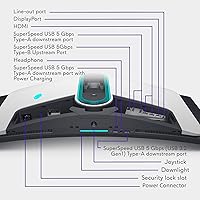
  • Connectivity: The monitor includes 5 USB 3.0 ports alongside standard display inputs (DisplayPort and HDMI), functioning as a desktop hub for peripherals.
  • Ergonomics: The stand supports height adjustment, tilt, and swivel, allowing flexible positioning for a wide range of seating setups and desk configurations.
  • Lighting: AlienFX stadium-loop OLED RGB lighting runs along the rear of the monitor, with customizable colors controllable through Alienware's software ecosystem.
  • OSD Controls: A centralized joystick on the rear panel provides single-hand navigation of all on-screen display settings, including input selection and color mode switching.
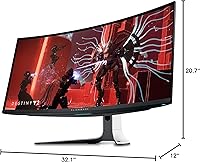
  • Dimensions: With the stand attached, the monitor measures approximately 32.1 inches wide, 20.7 inches tall, and 12 inches deep.
  • Weight: The complete unit with stand weighs 21.8 pounds, which is typical for a large ultrawide display with a full ergonomic stand.
  • Operating Temp: The monitor is rated for operation between 0°C and 40°C (32°F to 104°F) at 10–90% non-condensing relative humidity.
  • Manufacturer: The AW3423DW is designed and sold by Alienware, a subsidiary of Dell Technologies, and is manufactured under Dell's quality and warranty programs.
  • Warranty: Alienware includes a 3-year limited hardware warranty that specifically covers OLED burn-in, providing meaningful long-term protection for this panel type.
  • Voltage: The monitor operates at up to 240V AC, and is compatible with standard power infrastructure in both North American and international markets with appropriate adapters.

Related Reviews

Alienware AW3425DWM 34-inch Curved Gaming Monitor
82%
91%
Image Clarity & Sharpness
89%
Refresh Rate & Motion Performance
93%
Ultrawide Immersion
84%
Color Accuracy & Vibrancy
62%
HDR Performance
More
Alienware AW2725DF 27-inch OLED Gaming Monitor
89%
96%
Display Quality
94%
Gaming Performance
92%
Color Accuracy
90%
Build Quality
88%
Ease of Setup
More
MSI MAG 271QPX 27-inch QD-OLED Gaming Monitor
80%
94%
Image Quality
96%
Motion Clarity
88%
HDR Performance
93%
Refresh Rate & Smoothness
81%
Connectivity & Ports
More
Samsung 34-inch Odyssey G85SB Curved Gaming Monitor
79%
94%
Image Quality
91%
Refresh Rate & Responsiveness
93%
Panel Technology
58%
Burn-In Risk
88%
Ultrawide Format
More
LG 34GS95QE 34-inch Ultragear OLED Curved Gaming Monitor
89%
96%
Display Quality
93%
Gaming Performance
91%
Immersion & Design
85%
Color Accuracy
88%
Ease of Setup
More
Samsung Odyssey G81SF 27-inch Gaming Monitor
80%
96%
Image Quality
97%
Contrast & Black Levels
89%
Refresh Rate & Motion Clarity
88%
Glare Resistance & Matte Coating
91%
HDR Performance
More
GIGABYTE AORUS FO32U2 32-inch Gaming Monitor
80%
96%
Panel Image Quality
93%
Motion & Response Performance
91%
HDR Performance
92%
Color Accuracy
67%
Burn-in & Longevity Risk
More
LG 34GX90SA-W 34-inch Ultragear OLED Gaming Monitor
89%
97%
Display Quality
94%
Color Accuracy
96%
Refresh Rate Performance
95%
Input Lag/Responsiveness
91%
HDR Performance
More
MSI MPG 341CQPX 34-inch Curved OLED Gaming Monitor
83%
94%
Display Quality
92%
Gaming Performance (240Hz)
89%
Color Accuracy
85%
Ease of Setup
80%
Software (Gaming Intelligence App)
More
ASUS ROG Swift PG27UCDM 27-inch Gaming Monitor
82%
96%
Image Quality
97%
Black Levels & Contrast
93%
Gaming Performance
91%
Color Accuracy
88%
Text Clarity
More

FAQ

Burn-in is a genuine characteristic of OLED technology, not a myth, but in normal mixed-use conditions it tends to develop very slowly if at all. Alienware addresses this directly by including a 3-year burn-in warranty, meaning if your panel develops visible permanent image retention under normal use within that period, you have a covered claim. The bigger practical risk is using the display for static-heavy content — think spreadsheets with fixed toolbars or a persistent HUD in a game — for many hours every day over years. Sensible habits like using the built-in pixel refresh feature and avoiding maximum brightness for extended static sessions go a long way.

To consistently hit high frame rates at 3440x1440 resolution, you really want at least an RTX 3080 or AMD RX 6800 XT class card. Anything below that tier will struggle to sustain 100Hz or above in demanding titles, which means you would be leaving the panel's 175Hz capability largely unused. If your current GPU is a generation or two behind, it is worth factoring an upgrade into the total cost of ownership before purchasing.

Standard WOLED panels add a white sub-pixel to boost overall brightness, which can slightly dilute color saturation at higher luminance levels. QD-OLED instead uses a quantum dot layer to convert blue OLED light into red and green, producing more saturated, higher-volume color without the white sub-pixel compromise. In practice, the AW3423DW tends to show more vivid, punchy colors in HDR content compared to WOLED alternatives, though the gap in peak brightness between the two has narrowed with newer panel generations.

G-SYNC ULTIMATE is an NVIDIA-specific certification, but the monitor will still function with AMD GPUs via DisplayPort — you just lose the G-SYNC variable refresh benefits. AMD FreeSync is not officially certified on this panel, so with a Radeon card you may experience some limitations in adaptive sync behavior. If you are on an AMD build, the monitor is still a capable display, but an NVIDIA GPU is the better match for getting full value from the sync technology.

For most users sitting 60–90cm from the screen, the 1800R curve feels natural and reduces the need to move your eyes to the far edges of the panel. Some users find it slightly disorienting for precise geometric work, like technical drawing or architectural software, where perfectly straight horizontal lines are important. For general productivity, browsing, and media consumption it is comfortable, and for gaming it actively helps with peripheral immersion.

Under typical desktop use and standard dynamic range content, the ventilation system is quiet enough that most people will not notice it. The fan becomes more audible when the monitor is handling sustained bright HDR content that pushes the panel's peak luminance, which generates more heat. In a quiet room during an HDR gaming session, some users do pick it up. It is not loud by any measure, but it is worth knowing it exists if you are sensitive to ambient electronics noise.

Out of the box, the Creator Mode presets are well-tuned and will satisfy most users without additional calibration. For casual gaming and general media, the default game modes are more than adequate. If you are doing professional color work — grading footage for client delivery or retouching photos for print — a hardware calibration with a colorimeter is always worthwhile, as no monitor ships perfectly dialed in for every workflow.

ABL is a protection mechanism built into OLED panels that reduces peak brightness when large portions of the screen display very bright content simultaneously, preventing excessive heat and extending panel life. You will notice it most in scenes with large expanses of white or very bright sky, where the image may dim slightly compared to a small bright highlight. For gaming and film content it is rarely intrusive, but users who regularly view content with sustained full-screen brightness — certain sports broadcasts or desktop wallpapers, for example — may find it more noticeable.

The stand is one of the more positively reviewed aspects of this Alienware curved monitor — it feels solid, adjusts smoothly, and the integrated cable management keeps the back of your desk tidy. If you prefer a monitor arm, the display is VESA compatible, which gives you flexibility for multi-monitor setups or specific ergonomic positioning needs. Just be aware the monitor weighs nearly 22 pounds without the stand, so confirm your arm is rated for that load before purchasing.

It is excellent for movies and streaming, particularly content with HDR metadata. The combination of true OLED blacks, wide color gamut, and the immersive 21:9 aspect ratio is genuinely cinematic for widescreen films. The main practical note is that most streaming platforms cap HDR quality based on subscription tier and browser support, so you may need to use a dedicated media player or ensure your setup supports full HDR pass-through to get the best out of it.

Where to Buy