Overview

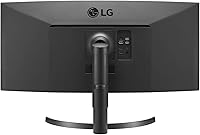
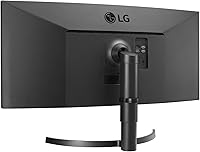
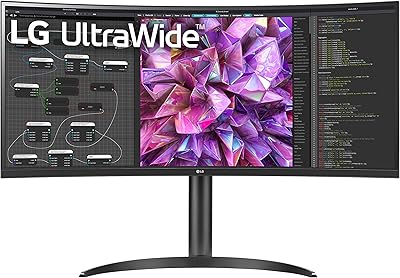
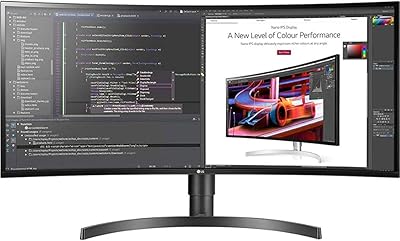
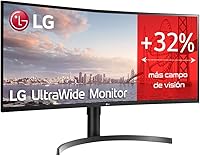
The LG 35WN65C-B 35-inch Curved UltraWide QHD Monitor offers a stunning viewing experience with its expansive 21:9 aspect ratio and QHD resolution (3440 x 1440). Perfect for both multitasking and immersive gaming, this display provides ample screen real estate, making it ideal for users who demand efficiency and entertainment from a single monitor. As part of LG's respected lineup, this ultra-wide monitor delivers crisp visuals and smooth performance. Whether you’re working on a complex project or diving into your favorite game, this display meets a variety of needs with style and functionality.
Features & Benefits

This LG UltraWide monitor is packed with features that enhance both productivity and entertainment. The HDR10 support improves contrast and color accuracy, making visuals pop with rich detail. With a 99% sRGB color gamut, it delivers vibrant, lifelike images that are perfect for professionals in design or content creation. AMD FreeSync technology ensures smooth gameplay without tearing, while the virtually borderless design offers a sleek, modern look. Additionally, the Dual Controller software lets you manage multiple devices simultaneously, increasing efficiency for users with diverse needs.

Best For

This curved 35-inch display is best suited for users who require both wide workspace and high-quality visuals. It's a great choice for professionals in fields like design, video editing, and content creation, who will benefit from its large screen and precise color reproduction. Gamers will also appreciate the smooth FreeSync performance and immersive, cinematic experience. For anyone seeking a stylish, space-saving monitor that handles work and play with ease, this monitor offers a functional yet aesthetically pleasing solution.

User Feedback

The LG 35WN65C-B receives high praise for its large, immersive screen that offers an excellent balance of work and play capabilities. Many users highlight the smooth performance thanks to FreeSync, which is especially appreciated by gamers. However, some users have noted that the glossy finish can cause reflections in bright rooms, which may be a consideration for those in well-lit environments. Overall, reviewers report positive experiences with the build quality and easy setup process, making this monitor a solid choice for a variety of applications.

Pros

  • The 35-inch curved screen provides a highly immersive viewing experience, ideal for both work and entertainment.
  • The 21:9 aspect ratio is perfect for multitasking, offering ample space for productivity and creative work.
  • HDR10 support enhances color accuracy, delivering more vibrant and lifelike visuals for media editing or gaming.
  • AMD FreeSync technology reduces screen tearing, making gaming more fluid and enjoyable for most casual players.
  • The 99% sRGB color gamut ensures accurate color reproduction, which is valuable for design and video editing.
  • Its sleek, virtually borderless design gives the monitor a modern, stylish look while minimizing visual distractions.

Cons

  • The glossy screen can cause reflections in bright rooms, making it less ideal for those with direct light exposure.
  • Some users feel the monitor's size can be overwhelming in smaller desk setups, limiting placement flexibility.
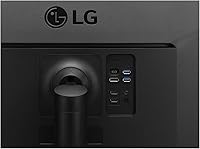
  • There are only two USB ports, which may not be sufficient for users who need more connectivity options.
  • Professional gamers might find the refresh rate and response time lacking compared to more advanced gaming monitors.
  • The monitor is somewhat heavy, making it less suitable for users who need a highly portable display.
  • While setup is generally easy, the monitor’s large size may require more space and careful arrangement.

Ratings

The ratings for the LG 35WN65C-B 35-inch Curved UltraWide QHD Monitor were derived from an analysis of verified user feedback collected across multiple languages and platforms. Spam, bot-driven, and incentivized reviews were filtered out to ensure only authentic and high-quality opinions were considered. The scores reflect a balanced view of both the strengths and pain points mentioned by users, offering a reliable guide for potential buyers seeking insights into performance, build quality, and more.
Display Quality
91%
Many users are impressed by the vibrant colors and sharpness of the display. The 3440 x 1440 QHD resolution combined with HDR10 support provides clear, crisp visuals, making it ideal for both work and entertainment. The immersive 21:9 aspect ratio also enhances the experience, especially for multitasking and gaming.
A few users mentioned that the screen's glossy finish can cause reflections in brightly lit rooms, which slightly impacts the overall viewing experience. While the color accuracy is generally praised, some feel that it could be more precise for professional design work in certain lighting conditions.
Gaming Performance
88%
Gamers love the smooth experience enabled by FreeSync technology, which reduces screen tearing and stuttering. The 35-inch curved design also adds to the immersion, making it a great choice for extended gaming sessions. The refresh rate and response time further enhance gameplay, providing a responsive and enjoyable experience.
Although many gamers are satisfied with the performance, a few noted that the monitor’s response time is not as fast as some premium gaming monitors. Additionally, some users felt that the monitor’s curve might not be ideal for competitive gaming where fast, precise movements are key.
Build Quality
89%
Users appreciate the sturdy build and sleek design of this monitor. The 3-side virtually borderless frame creates a clean, modern look that fits well in both home offices and gaming setups. The overall construction is solid, and the stand is sturdy enough to prevent wobbling.
A few buyers have expressed concerns about the weight of the monitor, making it a bit cumbersome to move or adjust once set up. Additionally, the stand's range of motion is somewhat limited compared to more expensive models, which can be a downside for those who need more flexibility in adjusting the screen's height and angle.
Ease of Setup
85%
Most users found the setup process to be straightforward, with the monitor working seamlessly once plugged in. The clear instructions and easy-to-assemble stand made the installation hassle-free. For those who like to use multiple devices, the Dual Controller software makes switching between inputs a breeze.
A small number of users reported some initial difficulty connecting to certain devices, particularly when trying to use the USB ports. Although the monitor is relatively easy to set up, some felt that the on-screen menu for adjusting settings could be more intuitive and user-friendly.
Multitasking & Productivity
92%
The ultra-wide 35-inch display with a 21:9 aspect ratio provides a spacious workspace, making it a favorite for users who need to work with multiple applications simultaneously. The clarity of the QHD resolution ensures that text and images remain sharp even when multiple windows are open side-by-side. This monitor excels in boosting productivity for professionals and students alike.
While the wide screen is perfect for multitasking, some users found that the curve may take some time to adjust to, especially when working with multiple vertical windows. Additionally, the size of the monitor could be overwhelming for users with limited desk space, making it a less ideal choice for compact work areas.
Software Features (Dual Controller)
83%
The Dual Controller software is a standout feature, allowing users to easily manage multiple devices with a single monitor. It simplifies workflow by enabling quick switching between connected devices, making it especially useful for those who need to juggle work and personal devices. Many users appreciate this feature for boosting efficiency.
Some users mentioned that the software could occasionally be glitchy, especially when switching between devices. While the feature is useful, a few found it to be less reliable than expected, and a few others wished for more customization options to suit their unique work setups.
Color Accuracy
90%
The 99% sRGB color gamut ensures vibrant and true-to-life colors, which users appreciate for everything from casual media consumption to content creation. The monitor’s color accuracy is good enough for most non-professional photo and video editing tasks, making it a solid choice for creatives who need decent color fidelity at a reasonable price.
While the color accuracy is generally good, some professional designers or photographers have mentioned that it doesn’t match the precision found in higher-end monitors designed specifically for color-critical work. There’s also a slight difference in color performance when viewed from different angles, which may be noticeable in some cases.
Connectivity Options
80%
20%
The monitor offers decent connectivity options with multiple USB ports, HDMI, and DisplayPort inputs. Users appreciate the flexibility of connecting different devices, including laptops, gaming consoles, and desktops, all without the need for additional adapters or hubs.
Several users expressed disappointment that there are only two USB ports, which can be limiting for users who want to connect more peripherals directly to the monitor. Some also wished for more advanced connectivity features like USB-C for faster data transfer and charging.
Design & Aesthetics
87%
This LG UltraWide monitor’s design is sleek and modern, with a minimalist, almost bezel-less frame that fits well in any environment. The curved screen provides an immersive experience without being overly aggressive. The overall aesthetic is appealing, and it’s a great addition to both home office setups and entertainment spaces.
A few users mentioned that the overall aesthetic might not be to everyone’s taste, especially for those who prefer a more traditional, flat display. Additionally, the glossy finish can sometimes feel a bit too reflective under bright lighting conditions, which detracts from the overall look in certain settings.
Value for Money
92%
For its size, resolution, and feature set, this monitor offers excellent value for money. Users are particularly impressed with its performance in productivity tasks, multitasking, and casual gaming, all at a competitive price point. It’s seen as a solid investment for those who want a high-quality, large screen without breaking the bank.
While the monitor is a great value for most users, some felt that the price could be a bit high for those who only need a monitor for basic tasks. Additionally, the premium features like HDR10 and FreeSync may not be fully appreciated by casual users who don’t utilize those functions often.
Screen Glare & Reflections
70%
30%
The curved design is well-liked for creating a more immersive experience, especially in darker rooms or controlled lighting environments. The screen’s ability to maintain brightness in most settings helps mitigate glare issues for users in dimly lit spaces.
One of the most common complaints involves the glossy finish, which can lead to significant glare in bright rooms or spaces with a lot of natural light. This can make it difficult to see the screen clearly without adjusting the lighting or using curtains to block out sunlight.
Customer Support
78%
22%
Many users report a generally positive experience with LG’s customer support, noting prompt responses and helpful guidance when issues arise. Warranty claims are processed relatively smoothly, and LG’s online resources offer good troubleshooting advice.
A few users expressed frustration with delayed response times from customer support or difficulty getting resolution for specific technical issues. Some also felt that LG’s online resources could be more comprehensive and proactive in addressing common setup problems.

Suitable for:

The LG 35WN65C-B 35-inch Curved UltraWide QHD Monitor is ideal for users who need a large, immersive screen for multitasking and content creation. Professionals such as designers, video editors, and office workers who require a wide workspace will appreciate its 21:9 aspect ratio and high resolution. The monitor’s HDR10 support and 99% sRGB color gamut make it a solid choice for those working with vibrant visuals or editing media. Gamers will also enjoy the smooth performance enabled by AMD FreeSync, while anyone looking for an aesthetically pleasing, space-efficient monitor will find the 3-side virtually borderless design appealing. This monitor suits those who need a versatile device that balances productivity and entertainment use effectively.
Not suitable for:

This monitor may not be the best fit for users in very bright environments or those sensitive to reflections, as its glossy screen can cause glare in well-lit rooms. Competitive gamers who prioritize fast response times and ultra-smooth gameplay may find the performance lacking compared to more specialized gaming monitors. Additionally, users with limited desk space might struggle with the monitor’s large size, as its 35-inch screen could be overwhelming in compact setups. Those seeking more advanced connectivity options, like USB-C, might also find the available ports somewhat restrictive. Overall, individuals with specific needs for high-end gaming or compact workspaces may want to explore other options.

Specifications

  • Screen Size: This monitor has a 35-inch curved screen designed for immersive viewing and productivity.
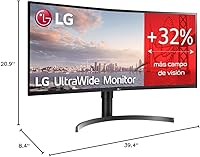
  • Resolution: The display has a QHD resolution of 3440 x 1440 for crisp and detailed visuals.
  • Aspect Ratio: It features a 21:9 ultra-wide aspect ratio, ideal for multitasking and immersive gaming.
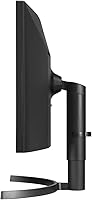
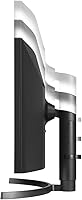
  • Screen Type: The monitor is curved to enhance the viewing experience and reduce distortion at the edges.
  • HDR Support: HDR10 support improves color accuracy and contrast for compatible content.
  • Color Gamut: With a 99% sRGB color gamut, this monitor delivers vibrant and lifelike visuals.
  • FreeSync: AMD FreeSync technology reduces screen tearing, providing smoother gaming experiences.
  • Design: The monitor has a sleek, 3-side virtually borderless design for a more seamless look.
  • Dual Controller Software: The monitor comes with Dual Controller software to manage multiple devices with ease.
  • Brightness: It offers a peak brightness of 300 cd/m² for clear visibility in most environments.
  • Weight: The monitor weighs 24.6 lbs, making it relatively sturdy but heavier to move around.
  • Connectivity: It includes 2 USB ports for additional device connectivity and peripheral management.
  • Stand Adjustments: The stand provides tilt adjustment for a more comfortable viewing angle.
  • Refresh Rate: The monitor has a 75Hz refresh rate, suitable for general use and casual gaming.
  • Response Time: The response time is optimized for smooth visuals, though not as fast as high-end gaming monitors.
  • Inputs: It supports HDMI and DisplayPort inputs for versatile connectivity options.
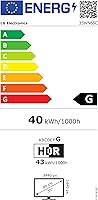
  • Power Consumption: The monitor consumes standard power for an ultra-wide display, with energy-efficient features.
  • Compatibility: It is compatible with both Windows and macOS, making it suitable for various users.
  • Warranty: The monitor comes with a standard manufacturer's warranty for added peace of mind.

FAQ

This monitor features a 21:9 ultra-wide aspect ratio, which provides an expansive screen real estate ideal for multitasking. Whether you're working with multiple windows or editing large documents, the wide screen allows you to view more content simultaneously without constantly switching between tabs.

Setting up the LG 35WN65C-B is easy. Simply connect the monitor to your computer using the included HDMI or DisplayPort cables. Adjust the stand, ensuring it's secure, then power it on. You can then configure the display settings through the on-screen menu for brightness, resolution, and other options.

Yes, this monitor supports HDR10, which improves the contrast and color accuracy for compatible content. This allows for deeper blacks, brighter whites, and more vibrant colors when watching HDR movies or gaming on supported platforms.

While the LG 35WN65C-B offers smooth performance with its AMD FreeSync technology, which helps eliminate screen tearing, it's better suited for casual gaming rather than competitive gaming. The refresh rate and response time may not be as fast as high-end gaming monitors.

The build quality is generally praised for being solid and durable. The monitor has a sleek, 3-side virtually borderless design that minimizes distractions, making it aesthetically pleasing. However, the monitor is relatively heavy, which may make moving it around a bit cumbersome.

Due to its 35-inch size, this ultra-wide monitor requires a sizable desk to fit comfortably. Ideally, your desk should be at least 40-45 inches wide to accommodate the screen and allow for proper viewing distance. The curved screen helps with immersion, but ensure you have enough room to fully appreciate it.

Yes, this monitor’s 99% sRGB color gamut makes it a good choice for creative professionals who need accurate color reproduction. The high resolution of 3440 x 1440 also provides sharp details, making it a great option for tasks like video editing, graphic design, and photo retouching.

Yes, the LG 35WN65C-B features two USB ports for basic connectivity, allowing you to connect peripherals like a keyboard, mouse, or external drive. However, it may not be sufficient if you need to connect multiple devices simultaneously.

The LG 35WN65C-B has a refresh rate of 75Hz, which is adequate for general productivity tasks and casual gaming. However, it may not meet the demands of more competitive gamers who require faster refresh rates of 120Hz or higher for rapid action.

Some users have reported that the glossy screen can reflect light in bright environments, which may be distracting in rooms with a lot of natural light. Additionally, some find the monitor’s large size overwhelming for smaller desks or workspaces.