Overview

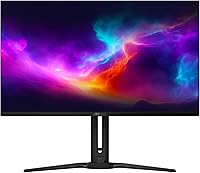
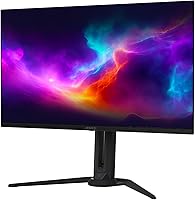
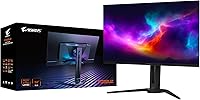
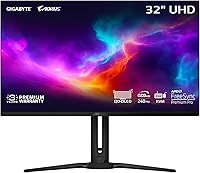
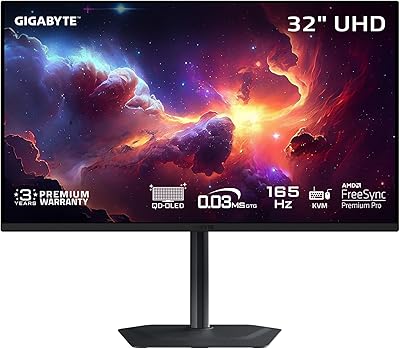
The GIGABYTE AORUS FO32U2 32-inch Gaming Monitor sits at the upper end of the display market, and it earns that position with a third-generation QD-OLED panel that represents a genuine step forward from earlier OLED implementations. Where previous generations occasionally struggled with brightness consistency, this iteration tightens up color accuracy and panel uniformity. It is built to serve competitive gamers and creative-minded users alike — the kind of person who refuses to choose between sharp visuals and fast motion handling. The included 3-year burn-in warranty is a meaningful differentiator in a segment where long-term OLED ownership anxiety is real. This is a monitor for buyers who know exactly what they need.
Features & Benefits

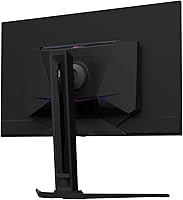
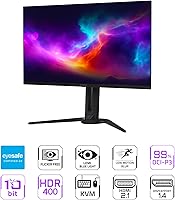
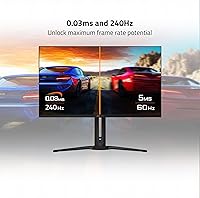
Running 4K at 240Hz is not something most monitors attempt — and even fewer pull off convincingly. The FO32U2 does it on a QD-OLED substrate, which means the speed comes paired with a 1,500,000:1 contrast ratio and 99% DCI-P3 color coverage rather than the washed-out HDR you would get from a typical fast IPS panel. The 0.03ms GtG response time keeps ghosting out of the picture in fast shooters. Gigabyte's AI-driven OLED Care system runs quietly in the background, managing pixel stress without requiring the user to dig through menus. A built-in Type-C KVM switch and height-adjustable stand round out a package that goes well beyond its spec sheet.

Best For

This 32-inch OLED display makes the most sense for a specific type of buyer. If you are running a high-end GPU capable of pushing close to 240 frames per second at 4K in your titles of choice, you will notice a real difference over a 144Hz panel. It suits people who split their day between competitive sessions and HDR content — movies, editing work, or open-world games where blacks actually need to be black. The USB-C KVM functionality makes it a practical anchor for dual-device desks. Buyers stepping up from 1440p or a first-gen OLED will find the generational improvement tangible, not just theoretical.

User Feedback

Early impressions from verified buyers are largely positive, with the panel's color quality drawing consistent praise — several owners noted that out-of-box calibration was close enough that adjustments were minimal. The overall 4.4-star rating reflects what this AORUS QD-OLED monitor does well. That said, some users flagged the on-screen display software as less intuitive than expected, and a few mentioned wishing for higher peak brightness in SDR use cases. Worth noting: the review pool is still relatively small, so these are early signals rather than settled verdicts. If you are researching this panel, third-party lab reviews should supplement buyer feedback until more long-term ownership data accumulates.

Pros

  • Third-generation QD-OLED panel delivers noticeably deeper blacks and more accurate color than older OLED or IPS alternatives.
  • Running 4K at 240Hz is a rare combination that genuinely serves both competitive gaming and high-fidelity content.
  • Out-of-box color calibration is close enough that most users will not need to spend time in menus adjusting anything.
  • The 3-year burn-in warranty reduces one of the biggest long-term ownership concerns with OLED displays.
  • VESA ClearMR 13000 certification means motion clarity claims are independently validated, not just marketing copy.
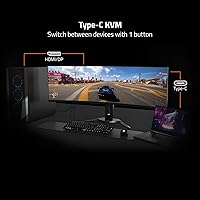
  • The built-in Type-C KVM switch is a practical feature that adds real desk flexibility for multi-device users.
  • AMD FreeSync Premium Pro support ensures smooth, tear-free performance across a wide range of frame rates.
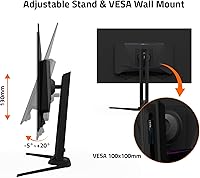
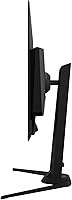
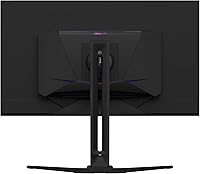
  • Height-adjustable stand covers most ergonomic preferences without requiring an aftermarket arm.
  • AI-driven burn-in protection runs quietly without forcing users to manually manage pixel-shift settings.
  • VESA DisplayHDR True Black 400 certification means HDR content actually looks the way it was intended to.

Cons

  • The OSD software interface has been flagged by early buyers as unintuitive and harder to navigate than expected.
  • Peak SDR brightness is underwhelming in well-lit rooms, which limits daytime usability without blackout curtains.
  • Realizing the full 240Hz spec at 4K demands a very high-end GPU, making this a poor match for mid-tier systems.
  • At nearly 19 pounds, repositioning or mounting the display requires more effort than lighter alternatives in this size class.
  • The review pool is still small, so long-term reliability data and panel consistency across units is not yet established.
  • There is no built-in speaker system, which means additional audio hardware is required for an all-in-one desk setup.
  • USB-C bandwidth limitations may restrict simultaneous charging and full-resolution output depending on the connected device.
  • Static content left on screen for long sessions still carries burn-in risk despite the OLED Care system being active.

Ratings

The GIGABYTE AORUS FO32U2 32-inch Gaming Monitor earns an overall positive reception from early adopters, and our AI-generated scores reflect a thorough analysis of verified global buyer reviews with spam, bot-submitted, and incentivized feedback actively filtered out. Across categories ranging from panel performance to everyday usability, both the genuine strengths and the real friction points are represented honestly — no category has been softened to protect an overall impression.
Panel Image Quality
96%
Buyers consistently describe the QD-OLED panel as a revelation compared to their previous IPS or VA displays — dark scenes in games and HDR films look genuinely different, not just marginally better. The contrast depth and color saturation hit in a way that is immediately noticeable, even to users who were skeptical of the marketing claims.
A small number of users noted that the matte coating introduces a very slight haze that glossy OLED competitors avoid, which is most visible in high-contrast desktop environments. It is a minor complaint, but buyers coming from glossy panels may notice the difference initially.
Motion & Response Performance
93%
Gamers playing fast shooters and racing titles report that ghosting is effectively absent at normal viewing distances, and the transition from a 144Hz IPS panel feels immediately tangible. The 0.03ms GtG rating holds up in practice — motion clarity in demanding scenes is one of the most praised aspects across early reviews.
A handful of buyers noted that achieving the full 240Hz spec at 4K requires a GPU investment that significantly compounds the total cost of the setup. For those running mid-range hardware, the refresh rate advantage goes partially unrealized and the monitor can feel like an over-spec for their current system.
HDR Performance
91%
The VESA DisplayHDR True Black 400 certification translates into HDR content that actually looks different rather than just slightly brighter — users playing HDR-enabled titles like Cyberpunk or watching HDR films describe genuinely deeper immersion. Black levels that switch off completely give the image a sense of depth that local-dimming LCD panels cannot replicate.
Peak brightness in HDR tops out at a level that some buyers find modest compared to high-brightness Mini-LED competitors in the same price range. In very bright rooms, the HDR impact is less dramatic, and users in sun-drenched environments may feel the luminance ceiling limits the wow factor.
Color Accuracy
92%
Out-of-box color calibration is accurate enough that most buyers — including those doing light photo editing — did not feel the need to adjust settings immediately. The 99% DCI-P3 coverage and 10-bit depth mean color-sensitive work like photo culling and video review looks credible without a separate calibration device.
For professional color grading at a production level, factory calibration alone is not sufficient, and buyers with that use case will still need a hardware colorimeter. A few reviewers also noted that default color modes can be slightly oversaturated out of the box in certain presets.
Burn-in & Longevity Risk
67%
33%
The 3-year warranty covering panel burn-in is a meaningful safety net that distinguishes this monitor from competitors offering no such coverage. The AI-based OLED Care system actively manages pixel stress in the background, which gives buyers who game across multiple titles reasonable confidence about long-term ownership.
Burn-in remains a real concern for heavy single-game players who clock thousands of hours with persistent on-screen HUDs — the warranty helps, but it does not eliminate the underlying risk. Some buyers researching this display specifically flagged this as a hesitation point, and the honest answer is that OLED ownership requires more mindfulness than an IPS panel does.
Gaming Responsiveness
89%
Competitive players report that the combination of high refresh rate and near-instant pixel response creates a setup where input lag and visual delay stop being factors they think about mid-match. FreeSync Premium Pro integration keeps frame delivery smooth even during GPU-demanding scenes where frame rates dip.
The FreeSync range works best with AMD GPUs, and Nvidia users may find VRR operation slightly less consistent depending on driver versions and game compatibility. A small number of buyers reported minor flickering in very low frame rate scenarios outside the optimal sync range.
OSD & Software Experience
58%
42%
The OSD provides access to a thorough range of display settings including Black Equalizer 2.0, crosshair overlays, and OLED Care parameters — the feature set itself is comprehensive and appreciated by enthusiast users who want granular control.
Navigation through the OSD menus is widely cited as one of the more frustrating aspects of ownership — the joystick control is functional but the menu logic is not intuitive, and locating specific settings can take longer than it should. Several buyers specifically called out the software experience as feeling unpolished relative to the premium price point.
Build Quality
78%
22%
The overall construction feels solid for a monitor in this class, and the panel itself shows no flex or wobble during normal use. The aesthetic is restrained enough to fit most desk setups without looking overtly gamer-branded.
Stand rigidity drew criticism from a portion of early buyers who found it less firm than expected given the price tier — minor vibrations from desk activity were noticeable for some users. The stand material also feels slightly plasticky compared to the premium impression the panel itself gives off.
Ergonomics & Adjustability
74%
26%
Height adjustment is available out of the box, which is more than some competitors offer at this price, and most users found a comfortable viewing angle without needing an aftermarket arm. VESA mount compatibility gives flexibility for those who prefer a full arm setup.
The stand lacks tilt range that some users wanted, and at nearly 19 pounds, repositioning the whole assembly on a desk takes effort. Buyers who prefer to frequently adjust their monitor positioning may find the setup more cumbersome than lighter alternatives.
Connectivity & I/O
84%
The inclusion of HDMI, DisplayPort, and USB-C in a single display covers all realistic connection scenarios — laptop users, desktop gamers, and console owners can all find a native input without adapters. The Type-C KVM adds genuine utility for dual-device desk setups.
USB-C bandwidth constraints mean that simultaneously charging a high-wattage laptop while running the display at full resolution may not always perform as expected depending on the host device. Buyers with more complex multi-device setups occasionally reported needing to experiment with cable configurations.
SDR Brightness
62%
38%
In dim or controlled lighting conditions, SDR brightness is adequate for comfortable extended use, and the matte panel finish helps manage reflections in moderately lit spaces. Buyers using the monitor in evening gaming sessions or darker rooms reported no complaints about visible output levels.
In bright office environments or rooms with direct sunlight, SDR peak brightness falls noticeably short of what high-brightness IPS or Mini-LED panels deliver. This is arguably the most consistent real-world limitation buyers encounter, and it is a meaningful trade-off for daytime users.
Value for Money
71%
29%
For buyers who can fully exploit the panel — a powerful GPU, HDR-enabled game library, and multi-device desk setup — the feature-to-price ratio is defensible given what third-generation QD-OLED technology still costs across all manufacturers. The burn-in warranty adds tangible long-term value that should be factored into any direct price comparison.
For buyers who cannot push near 240fps at 4K, or who primarily game on consoles capped at 120Hz, the pricing feels harder to justify when more targeted alternatives exist at a lower cost. The premium is real, and it rewards a specific kind of power user while leaving others feeling they paid for headroom they cannot reach.
Setup & Out-of-Box Experience
81%
19%
Assembly is straightforward and physical setup takes under 15 minutes for most users, with the stand attaching without tools. Color accuracy out of the box is close enough to target that casual buyers can start using the display immediately without calibration.
The OSD learning curve means getting the display fully configured to personal preference takes longer than the physical setup does. First-time OLED owners may also spend time reading through OLED Care settings before feeling confident they have the protection features properly enabled.
Compatibility & Versatility
83%
The FO32U2 handles PC gaming, console input, laptop connectivity, and light creative work without requiring mode switching or profile juggling — it adapts to different use cases with minimal friction. AMD FreeSync Premium Pro covers a wide variable refresh range that keeps the experience smooth across a broad spread of frame rates.
G-Sync compatibility is not officially certified, which matters to Nvidia-centric buyers who want guaranteed VRR behavior rather than best-effort compatibility mode. Users on Nvidia hardware reported that VRR works in most cases but lacks the reliability assurance of a certified G-Sync display.

Suitable for:

The GIGABYTE AORUS FO32U2 32-inch Gaming Monitor is built for a specific kind of buyer — one who has invested seriously in their PC hardware and wants a display that can actually keep pace. If you are running a top-tier GPU like an RTX 4080 or RX 7900 XTX and play competitively in titles where frame rate and response time genuinely matter, the combination of 4K resolution and 240Hz refresh rate will feel like a meaningful upgrade rather than a spec-sheet novelty. It also suits hybrid users who game hard in the evenings but spend daylight hours editing photos, grading footage, or consuming HDR content — the QD-OLED panel's color accuracy and contrast make it credible for all of those tasks. Dual-device desk setups benefit from the built-in KVM switch and USB-C input, which keeps cable clutter manageable when toggling between a laptop and a desktop. Anyone upgrading from a first-generation OLED or a high-quality 1440p IPS monitor will notice a real, tangible improvement in image depth and motion clarity.
Not suitable for:

The GIGABYTE AORUS FO32U2 32-inch Gaming Monitor is a poor fit for buyers whose GPU cannot consistently push high frame counts at 4K, because running this display at 1080p or 1440p to hit frame rate targets defeats its core purpose entirely. If your system is mid-range, you would be paying a significant premium for hardware you cannot fully use. OLED burn-in is also a legitimate concern worth acknowledging honestly — the 3-year warranty helps, but buyers who leave static HUD elements on screen for extended daily sessions should think carefully before committing. The peak SDR brightness, while adequate in dim environments, will disappoint anyone working in a brightly lit room or placing the monitor near a window. Budget-conscious shoppers or those who primarily use their monitor for productivity tasks like spreadsheets and document work will find far better value elsewhere — this display is optimized for visual and gaming performance, not office efficiency.
Specifications

  • Panel Type: Uses a third-generation QD-OLED panel, which improves on earlier OLED generations with better brightness consistency and color volume.
  • Screen Size: 32-inch diagonal display with a 16:9 aspect ratio and a matte screen surface finish.
  • Resolution: Native 3840x2160 (4K UHD) resolution delivers sharp pixel density across the full 32-inch panel area.
  • Refresh Rate: Supports a maximum 240Hz refresh rate, enabling ultra-smooth motion in fast-paced gaming scenarios.
  • Response Time: Rated at 0.03ms GtG, minimizing visible ghosting and pixel transition artifacts during rapid on-screen movement.
  • Contrast Ratio: Achieves a 1,500,000:1 contrast ratio, producing near-perfect blacks that are a core strength of OLED technology.
  • Color Gamut: Covers 99% of the DCI-P3 color space with 10-bit color depth, suitable for HDR content and color-sensitive creative work.
  • HDR Certification: Certified for VESA DisplayHDR True Black 400, confirming accurate HDR rendering with deep black levels rather than simulated HDR.
  • Motion Clarity: Holds VESA ClearMR 13000 certification, independently verifying that clear pixels vastly outnumber blurry pixels during motion.
  • Adaptive Sync: Compatible with AMD FreeSync Premium Pro, reducing screen tearing and stuttering especially in HDR gaming content.
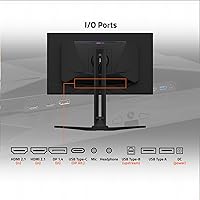
  • Connectivity: Equipped with HDMI, DisplayPort, and USB-C inputs, covering all major modern GPU and laptop output standards.
  • KVM Switch: Includes a built-in Type-C KVM switch, allowing a single keyboard and mouse setup to control two connected devices.
  • Burn-in Protection: GIGABYTE's AI-based OLED Care suite actively manages pixel usage patterns in the background to reduce long-term burn-in risk.
  • Warranty: Backed by a 3-year warranty that explicitly includes coverage for panel burn-in, though specific terms may vary by region.
  • Stand Adjustability: The included stand supports height adjustment, allowing users to position the panel ergonomically without a third-party arm.
  • Dimensions: Measures 28.27 x 24.15 x 6.24 inches with stand attached, requiring adequate desk depth for stable placement.
  • Weight: Weighs 18.8 pounds including the stand, which is worth accounting for when considering VESA mounting alternatives.
  • Screen Surface: Features a matte screen coating that reduces reflections in moderately lit environments without significantly softening image clarity.

Related Reviews
KOORUI G3221SC 32″ Curved QHD Gaming Monitor
69%
83%
Picture Quality
81%
Gaming Performance
86%
Value for Money
41%
HDR Performance
67%
Color Accuracy
More
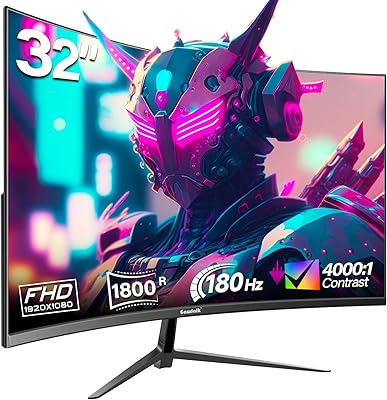
Gawfolk GF320D 32-inch Curved Gaming Monitor

72%
83%
Value for Money
76%
Image Quality
81%
Refresh Rate Performance
54%
Brightness & Visibility
79%
Contrast & Black Levels
More
Gawfolk GF320C 32-Inch Curved Gaming Monitor

75%
88%
Refresh Rate Performance
83%
Image Quality
76%
Motion Clarity
86%
Curvature & Immersion
91%
Value for Money
More
CUNPU 32-Inch Gaming Monitor QHD 165Hz
86%
93%
Display Quality
91%
Gaming Performance
85%
Build Quality
88%
Ergonomics and Adjustability
90%
Ease of Setup
More
GIGABYTE MO32U 32″ QD-OLED Gaming Monitor
81%
94%
Image Quality
91%
Gaming Performance
88%
HDR Performance
86%
Color Accuracy
93%
Motion Clarity
More
MSI MAG321CUP 32-inch 4K Gaming Monitor
76%
88%
Image Quality
83%
Refresh Rate Performance
86%
Value for Money
91%
Console Compatibility
74%
Motion Clarity
More
GIGABYTE GS27QA 27-inch QHD Gaming Monitor
78%
88%
Gaming Performance
91%
Image Clarity
79%
Color Accuracy
54%
HDR Experience
89%
Refresh Rate & Smoothness
More
KTC H32S17C 32-inch Curved Gaming Monitor
72%
91%
Value for Money
84%
Gaming Performance
76%
Picture Quality
52%
HDR Experience
67%
Color Accuracy
More
Samsung 32-Inch S39C Curved Gaming Monitor
83%
88%
Display Quality
91%
Value for Money
86%
Eye Comfort
89%
Ease of Setup
85%
Build Quality
More
AOC C32G2 32″ Curved Gaming Monitor
76%
91%
Value for Money
84%
Gaming Performance
73%
Image Quality
88%
Refresh Rate & Smoothness
83%
Curvature & Immersion
More

FAQ

Yes, realistically you do. Pushing 4K at or near 240Hz in modern titles requires a very high-end graphics card — something in the range of an RTX 4080 or RX 7900 XTX. If your GPU tops out well below that, you will spend most of your time at lower frame rates where a 240Hz panel offers diminishing returns over a 144Hz alternative. The display itself will work fine with any capable GPU, but the full benefit of the spec sheet only shows up with serious hardware behind it.

It is a legitimate concern worth thinking through honestly, even with the 3-year burn-in warranty in place. OLED panels can develop image retention over time if static elements — health bars, maps, chat overlays — are on screen for many hours daily. The AI-based OLED Care system helps manage this, but it is not a complete guarantee. If you play a wide variety of games and mix in movies and browsing, the risk is fairly low. Heavy single-game players who log thousands of hours in one title with a persistent HUD should be more cautious.

The matte coating on the FO32U2 does a good job reducing reflections in rooms with overhead lighting or windows, which is a practical advantage for daytime use. The trade-off is a very slight softening of the image compared to the glossy panels found on some competing OLED monitors — most users will not notice it in normal use, but side-by-side the glossy version can look marginally punchier. For rooms where glare control matters more than absolute pixel crispness, the matte finish is the right call.

Yes, the USB-C input supports display signal and power delivery, so connecting a MacBook is straightforward. The built-in KVM switch also means you could have your MacBook and a desktop PC both connected and switch between them without moving cables. Just confirm your MacBook model supports the required video output over USB-C or Thunderbolt to ensure full resolution and refresh rate compatibility.

The core difference comes down to contrast and black levels. An IPS panel, even a very good one, cannot produce true blacks — there is always some backlight bleed. The QD-OLED panel here delivers blacks that are genuinely off, which transforms how dark scenes, space environments, and night-time gameplay look. IPS tends to have an edge in peak SDR brightness and is less susceptible to burn-in, so it is not a clear-cut win in every scenario — but for pure image depth and HDR impact, the QD-OLED is in a different league.

The KVM switch lets you connect two computers — say a desktop and a laptop — to the monitor simultaneously, and switch the keyboard and mouse between them without unplugging anything. It is genuinely useful if you work from a laptop during the day and game on a desktop at night, or if you run a dual-PC streaming setup. It is not a feature most buyers will use, but for those who do, having it built into the display removes the need for a separate KVM device on the desk.

The stand is functional and includes height adjustment, which covers the basics for most users. It is not the most premium stand in its class — some early buyers have noted it feels less rigid than expected — but it holds the panel securely at a comfortable viewing height. If you already own a VESA-compatible arm or prefer to free up desk space, the panel supports VESA mounting. For most people, the included stand will be perfectly adequate out of the box.

AMD FreeSync Premium Pro is supported over both HDMI and DisplayPort on this display, which is helpful if you are connecting a console or a GPU that performs better through HDMI in your setup. Keep in mind that HDMI 2.1 bandwidth is required to run 4K at 240Hz over HDMI, so verify your cable and GPU output support that standard. Over DisplayPort, bandwidth is less likely to be a limiting factor for most users.

Early buyers have noted that the panel arrives reasonably well calibrated, with color accuracy that is usable for photo editing and light video work without manual adjustment. That said, if you are doing professional color grading for client deliverables, a hardware colorimeter calibration is always recommended regardless of how good the factory calibration is. For gaming and general content consumption, the factory settings should satisfy most users immediately.

Both consoles support 4K output, but neither currently outputs at 240Hz — they are capped at 120Hz for gaming. So you can connect a console via HDMI and enjoy 4K at up to 120Hz with VRR support, which still looks excellent on this panel. The 240Hz capability is effectively a PC-exclusive feature with today's console hardware. If console gaming is your primary use case, this display is not the most cost-efficient choice for that specific purpose.

Where to Buy