Overview

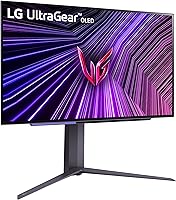
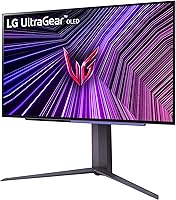
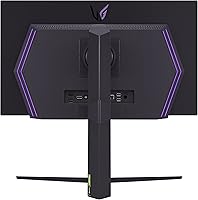
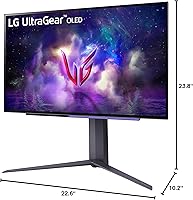
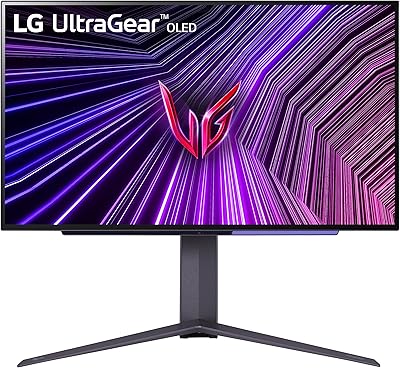
The LG 27GS95QE 27-inch OLED Gaming Monitor marks a real turning point for anyone still holding onto a traditional IPS or VA panel. OLED changes how the screen actually behaves — each pixel controls its own light rather than relying on a backlight, and that distinction shows up immediately in real use. At 27 inches and QHD resolution, the size hits a practical sweet spot: immersive without demanding you sit three feet back to read text clearly. The stand offers height, tilt, and swivel adjustments, which sounds minor until you have spent an hour gaming on a fixed-angle display. One thing worth saying upfront: OLED burn-in is a real consideration, not a myth to dismiss.
Features & Benefits

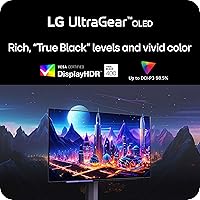
What makes this OLED gaming monitor stand out is not any single spec — it is how they work together. A 240Hz refresh rate on an OLED panel means motion looks genuinely clean, not just fast; you are not fighting pixel smear on top of the speed. The response time is so close to instantaneous that ghosting behind fast-moving objects effectively disappears. True blacks from a self-emissive display make dark game environments look dimensional rather than murky, and the DisplayHDR True Black 400 certification backs that up with industry standards. Both AMD and NVIDIA users get adaptive sync support, which matters if you ever upgrade your GPU. Three USB 3.0 ports and HDMI 2.1 round out a connectivity setup that handles both PC and modern console use without adapters.

Best For

This 27-inch QHD display is a natural fit for competitive FPS players who prioritize clear, fast motion above all else. It is equally well-suited to creators and streamers who need reliable color accuracy during the day and do not want to swap monitors when they switch to gaming at night. If you are upgrading from a 1080p setup or a standard IPS 1440p panel, the visual difference is immediately noticeable — not in a subtle way, but in a you-will-not-want-to-go-back way. The dual sync compatibility also makes this a smart long-term investment; GPU flexibility matters when you are building a rig intended to outlast your current graphics card.

User Feedback

Most owners of the LG UltraGear OLED come away impressed with out-of-box image quality — black levels and color saturation draw consistent praise, and many note that little to no calibration is needed for gaming use. Motion clarity earns frequent mention, especially from those switching from standard IPS panels. On the other side, burn-in concerns appear regularly in reviews even among users who have not experienced it yet, so it is clearly top of mind for buyers. Some report that the matte coating manages glare well but slightly softens perceived sharpness in bright rooms. Pricing versus Mini-LED alternatives comes up occasionally, though the majority who commit describe the image quality as genuinely justifying the investment.

Pros

  • Self-emissive OLED pixels deliver black levels and contrast that no backlit monitor can match.
  • Motion in fast games looks genuinely clean — trailing and smearing are effectively eliminated.
  • Out-of-box color accuracy is strong enough for both gaming and casual creative work without calibration.
  • Works seamlessly with both AMD and NVIDIA GPUs, making it future-proof across GPU upgrades.
  • HDMI 2.1 support enables full-capability connection for current-generation consoles alongside PC use.
  • The adjustable stand covers height, tilt, and swivel — a real comfort difference over long sessions.
  • Three USB 3.0 ports turn the monitor into a functional peripheral hub at the desk.
  • HDR performance in supported games is visibly more convincing than tone-mapped LCD HDR.
  • QHD resolution at 27 inches hits a pixel density that looks sharp without requiring GPU-intensive scaling.
  • Factory setup is quick, and most buyers are gaming at full capability within fifteen minutes of unboxing.

Cons

  • Burn-in risk from prolonged static content is a legitimate long-term concern, not just forum anxiety.
  • The matte coating softens perceived sharpness slightly in bright ambient lighting conditions.
  • Peak brightness in HDR mode trails behind high-nit Mini-LED rivals in very bright highlight scenes.
  • Only one DisplayPort input limits flexibility for multi-source or KVM switching setups.
  • The OSD navigation relies on physical buttons rather than a joystick, making menu adjustments tedious.
  • The stand plastic feels a step below the display quality, which is noticeable at this price tier.
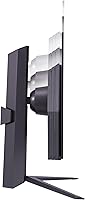
  • No portrait rotation option rules it out for vertical workflow or coding monitor configurations.
  • Achieving the full refresh rate demands a powerful GPU that not every buyer will already own.
  • Cable management routing through the stand is tighter than expected and can frustrate tidy desk setups.

Ratings

The LG 27GS95QE 27-inch OLED Gaming Monitor earns its reputation through the weight of real buyer experience — these scores are generated by AI after analyzing verified global user reviews, with spam, bot activity, and incentivized feedback actively filtered out. The result is an honest picture of where this display genuinely excels and where it asks for compromise. Both sides of that story are reflected in the ratings below.
Image Quality
96%
Buyers consistently describe the picture as transformative — especially those upgrading from IPS panels. The self-emissive OLED pixels produce colors that look vivid without appearing oversaturated, and dark scenes in games carry a depth that backlit displays simply cannot replicate.
A small number of users note that the matte coating introduces a very slight diffusion effect, which can soften perceived sharpness marginally in well-lit environments compared to glossy OLED alternatives.
Black Levels & Contrast
97%
This is the category where OLED technology is most undeniable, and owners say so clearly. Games with shadowy environments or cinematic HDR content look fundamentally different — shadow details emerge without lifting the surrounding blacks, which is something no backlit monitor can reproduce.
There are essentially no user complaints about contrast performance itself. The only related concern is that the extreme black depth makes any backlight bleed on other displays in the same room more noticeable by comparison.
Motion Clarity & Response Time
94%
Competitive gamers repeatedly comment that fast-moving objects track cleanly with no trailing or smearing — a direct consequence of OLED pixel response. Users coming from 144Hz IPS monitors describe the motion as noticeably cleaner even before accounting for the higher refresh rate.
A handful of users mention that at very high framerates with certain game engines, some minor artifacts appear during extreme motion, though this is reported infrequently and may be system-dependent rather than a panel issue.
Refresh Rate Performance
93%
Running at 240Hz on an OLED substrate feels different from the same refresh rate on an IPS panel. Users describe gameplay as looking genuinely fluid rather than just fast, particularly in shooters and racing games where frame pacing consistency matters as much as raw speed.
Reaching the full 240Hz requires a capable GPU, and some users note that the performance demand can be a surprise if they are upgrading from a 144Hz monitor without also upgrading their graphics card.
HDR Performance
88%
The DisplayHDR True Black 400 certification translates into real results that users notice immediately in HDR-enabled titles. Bright highlights contrast against absolute blacks in a way that tone-mapped LCD HDR never achieves, making supported games look closer to what developers intended.
Peak brightness in HDR mode is not class-leading for very bright scene highlights, and a few users who game in sun-lit rooms feel the display loses some HDR punch compared to high-nit Mini-LED alternatives in those specific conditions.
Adaptive Sync & Compatibility
89%
Having both AMD FreeSync Premium Pro and NVIDIA G-Sync Compatible certification on a single monitor is genuinely practical. Users who have switched GPU brands mid-ownership report that the monitor carried over without any configuration headaches, which is more valuable than it sounds.
A few users report that G-Sync Compatible mode required enabling it manually through the NVIDIA control panel rather than activating automatically, which caused brief confusion on initial setup.
Build Quality & Aesthetics
82%
18%
The thin-bezel design draws consistent praise from users who run multi-monitor setups or just prefer a clean desk aesthetic. The overall build feels appropriately premium for the price tier, with minimal flex in the panel and a stable base that does not wobble during typing.
A portion of buyers find the plastic finish on the stand feels slightly less premium than the display itself. Cable management routing also receives occasional criticism for being tighter than expected given the monitor category.
Ergonomics & Stand
81%
19%
Height, tilt, and swivel adjustability covers the practical needs of most users, and people who game for long sessions specifically mention that being able to fine-tune the angle reduces neck strain over time. The range of motion is wide enough to accommodate both seated and standing desk setups.
Some users wish for a pivot or portrait rotation option, which is absent here. A few also note that the click-resistance when adjusting height feels slightly stiff compared to competing premium stands.
Connectivity
84%
HDMI 2.1 support allows users to connect a PlayStation 5 or Xbox Series X at full capability without any workarounds, making this viable as a dual PC and console display. The three USB 3.0 ports function as a useful hub for peripherals directly at the monitor.
There is only one DisplayPort input, which limits flexibility for users running dual PC setups or KVM switches. A small number of console users also note that 4K input is not supported — the panel is native QHD.
Out-of-Box Calibration
86%
The majority of users report that the factory color calibration is accurate enough for gaming and general use without touching any settings. Creators who checked the display against calibration targets describe it as close enough for content review work straight out of the box.
Users with strict professional color accuracy requirements note that some fine-tuning of white balance is beneficial, and the on-screen display controls, while functional, are not the most intuitive to navigate during calibration.
Burn-In Risk & Longevity
61%
39%
Most owners who have used the monitor for extended periods report no visible retention or burn-in under normal gaming use. LG includes pixel-management features designed to mitigate static element wear, and users who follow basic practices — varying content and using screensavers — report no issues.
Burn-in anxiety is the single most common concern raised in buyer discussions, even among users who have not experienced it. Those who use the display for static-heavy productivity work alongside gaming express the most worry, and the long-term OLED durability question remains genuinely unresolved for many buyers.
Value for Money
74%
26%
Users who commit to this display overwhelmingly describe the image quality as justifying the premium over comparably priced IPS or Mini-LED monitors. For competitive gamers who use the monitor daily, the performance gap feels tangible rather than marginal.
The price point is a real barrier, and several buyers acknowledge considering it seriously against larger-panel Mini-LED alternatives that offer more screen real estate for similar spending. Those who game casually rather than competitively question whether the performance premium is meaningful for their use case.
Glare & Visibility in Bright Rooms
67%
33%
The matte screen coating handles diffuse ambient light reasonably well for an OLED panel, and users in moderately lit rooms report no significant glare problems during normal gaming sessions in the evening or in controlled lighting.
In bright rooms with direct sunlight, the matte coating reduces reflections but also visibly dulls the vibrancy that makes this panel exceptional in darker conditions. Several users note that the display performs best in a dim or controlled-light environment.
OSD & Software Controls
71%
29%
Core settings like brightness, contrast, and color profiles are accessible without excessive menu-diving, and the gaming-specific presets are sensibly configured for competitive use out of the box without requiring manual adjustment.
The on-screen display navigation feels dated compared to joystick-controlled OSD systems on some rival monitors. Users who want to fine-tune settings regularly describe the button-based interface as slightly tedious after the initial setup.
Setup & Installation
85%
Assembly is straightforward and takes most users under fifteen minutes. The stand attaches securely without tools, and the included documentation is clear enough that buyers do not typically report needing to consult external guides or support resources.
The monitor is on the heavier side for a 27-inch display, which a few solo buyers mention made careful single-person desk placement slightly awkward. Packaging is well-regarded and arrived without damage in the vast majority of reported cases.

Suitable for:

The LG 27GS95QE 27-inch OLED Gaming Monitor is built for people who spend serious time in front of their display and want every session to look and feel noticeably better than what they had before. Competitive gamers — particularly those who play fast-paced shooters or action titles — will feel the difference immediately, as the combination of rapid pixel response and a high refresh rate removes the visual muddiness that even good IPS panels carry. Content creators and streamers who need a single display that handles color-accurate work during the day and immersive gaming at night will find this 27-inch QHD display punches well above its weight for both tasks. It is also a strong pick for anyone upgrading from a 1080p or standard 1440p monitor who wants a genuinely meaningful step up rather than a marginal one. The HDMI 2.1 port makes it equally capable as a console gaming display, so users who split time between PC and a current-generation console can do so without compromise. Anyone who games primarily in a controlled or dimly lit environment will get the most out of what this panel is designed to deliver.

Not suitable for:

The LG 27GS95QE 27-inch OLED Gaming Monitor is a harder sell for buyers who game casually and would rarely push the hardware to a level where the performance advantages become perceptible. If your primary concern is screen size, this 27-inch format may feel limiting compared to 32-inch or ultrawide alternatives available at similar price points. Users who work with large static elements on screen for extended periods — spreadsheets, code editors, or design tools with persistent toolbars — should weigh the burn-in risk carefully, as OLED panels are genuinely more susceptible to image retention than IPS or VA alternatives under those specific conditions. People who game in bright, sun-lit rooms may find that the matte coating manages glare adequately but also subdues the vivid contrast that makes this panel exceptional in darker settings. Budget-conscious buyers comparing cost per square inch against Mini-LED alternatives may find the value proposition harder to justify if raw screen size matters more to them than pixel-level response and contrast accuracy. Finally, users who need portrait rotation or plan to run a dual-input KVM setup may find the stand and connectivity configuration too restrictive for those specific workflows.
Specifications

  • Screen Size: The display measures 27 inches diagonally, offering an immersive viewing area without requiring excessive desk depth.
  • Panel Type: Uses an OLED panel where each pixel generates its own light independently, enabling true blacks and near-instant pixel response.
  • Resolution: Native resolution is 2560x1440 (QHD), delivering noticeably sharper detail than 1080p at typical desktop viewing distances.
  • Refresh Rate: Supports a maximum refresh rate of 240Hz, allowing up to 240 unique frames to be displayed per second for smoother motion.
  • Response Time: Rated at 0.03ms GtG (gray-to-gray), which is effectively instantaneous and eliminates visible ghosting behind fast-moving objects.
  • Contrast Ratio: Native contrast ratio reaches 1,500,000:1 due to the OLED panel's ability to shut pixels off completely for absolute black.
  • HDR Certification: Certified under VESA DisplayHDR True Black 400, confirming compliance with brightness, black level, and color volume standards for HDR content.
  • Aspect Ratio: Standard 16:9 widescreen aspect ratio, compatible with all modern game engines, operating systems, and video formats without cropping.
  • Sync Technology: Supports both AMD FreeSync Premium Pro and is NVIDIA G-Sync Compatible, covering adaptive sync across all major GPU platforms.
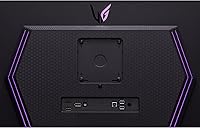
  • Connectivity: Includes one HDMI 2.1 port and one DisplayPort input, supporting high-bandwidth connections for PC and current-generation consoles.
  • USB Ports: Equipped with three USB 3.0 downstream ports, allowing peripherals such as keyboards, mice, and drives to connect directly through the monitor.
  • Screen Surface: Matte anti-glare coating reduces reflections from ambient light sources, though it introduces a slight diffusion effect at very close distances.
  • Stand Adjustments: The included stand supports height adjustment, tilt, and horizontal swivel, enabling a wide range of ergonomic positioning options.
  • Dimensions: With the stand attached, the monitor measures approximately 10.2 x 23.8 x 22.6 inches (depth x width x height).
  • Weight: The complete unit including stand weighs approximately 16.2 pounds, which is on the heavier side for a 27″ display.
  • Power Input: Operates on AC power with a rated input of 240 volts, compatible with standard international power infrastructure via an appropriate adapter.
  • VESA Compatibility: The panel supports VESA mounting, allowing the included stand to be replaced with a third-party monitor arm or wall mount bracket.
  • Color Gamut: OLED panel technology enables wide color reproduction covering the DCI-P3 color space, which benefits HDR gaming and color-sensitive creative work.

Related Reviews

LG 27GX790A-B 27-inch OLED Gaming Monitor
80%
94%
Motion Clarity
92%
Image Quality
88%
HDR Performance
89%
Connectivity
86%
Ergonomics & Stand
More
Alienware AW2725DF 27-inch OLED Gaming Monitor
89%
96%
Display Quality
94%
Gaming Performance
92%
Color Accuracy
90%
Build Quality
88%
Ease of Setup
More
Corsair XENEON 27QHD240 27-inch OLED Gaming Monitor
84%
94%
Image Quality
96%
Motion Performance
97%
Contrast & Black Levels
88%
HDR Experience
91%
Color Accuracy
More
LG 32GS95UE 32-inch OLED Gaming Monitor
80%
96%
Image Quality
94%
Motion Performance
91%
HDR Experience
83%
Dual Mode Utility
67%
Value for Money
More
LG 27GR95QE-B 27″ Ultragear OLED Gaming Monitor
86%
94%
Display Quality
92%
Gaming Performance
89%
Color Accuracy
85%
Build Quality
90%
Ergonomics/Adjustability
More
LG 27GS75Q-B 27-inch QHD Gaming Monitor
82%
91%
Refresh Rate & Motion Performance
88%
Image Sharpness & Resolution
83%
Color Accuracy & Gamut
57%
HDR Performance
86%
Response Time & Ghosting
More
LG 34GP63A-B 34-Inch Curved Gaming Monitor
79%
93%
Gaming Immersion
91%
Refresh Rate Performance
88%
Contrast & Black Depth
83%
Color Accuracy
86%
Input Lag & Responsiveness
More
Pixio PX277 OLED MAX 27-inch Gaming Monitor
87%
94%
Display Quality
91%
Gaming Performance
88%
Ease of Setup
95%
Color Accuracy
89%
Ergonomics & Adjustability
More
LG 34GX90SA-W 34-inch Ultragear OLED Gaming Monitor
89%
97%
Display Quality
94%
Color Accuracy
96%
Refresh Rate Performance
95%
Input Lag/Responsiveness
91%
HDR Performance
More
LG 27GP850-B 27-Inch QHD Gaming Monitor
78%
91%
Image Quality
93%
Motion Performance
88%
Color Accuracy
54%
HDR Performance
89%
Refresh Rate & Sync
More

FAQ

It is a real consideration rather than a myth, but the risk depends heavily on how you use the display. If you are primarily gaming with varied content, burn-in is unlikely to appear within a normal ownership period. Where the risk increases is prolonged exposure to static elements — fixed HUD overlays, taskbars, or desktop icons left on screen for hours daily. LG includes pixel-care features in the firmware to help mitigate wear, and using a screensaver or sleep timer during idle periods makes a meaningful practical difference.

Yes, the HDMI 2.1 port supports the bandwidth required for current-generation console output, so you can connect either console without any workaround or signal degradation. Keep in mind the panel is native QHD rather than 4K, so content will render at the monitor's native resolution rather than the console's maximum output. For fast-paced gaming the high refresh rate more than compensates.

It works equally well with both. The monitor carries AMD FreeSync Premium Pro certification and is also validated as NVIDIA G-Sync Compatible, meaning adaptive sync functions properly regardless of which GPU brand you own. If you switch GPU brands down the line, the monitor travels with you without any penalty.

The most immediate difference is in black levels and contrast — an IPS panel with a backlight cannot produce true blacks, which affects how dark scenes and HDR content look. The LG 27GS95QE 27-inch OLED Gaming Monitor also has a substantially faster pixel response in practice, which matters for competitive gaming. The trade-off is that IPS panels carry no burn-in risk and often reach higher peak brightness in SDR use.

To consistently hit 240 frames per second in modern titles, you will need a high-end discrete GPU — mid-range cards can reach 240Hz in less demanding or older games, but triple-A titles at QHD resolution will typically fall short without a powerful graphics card. That said, the monitor runs at any framerate up to 240Hz, and adaptive sync ensures smooth output even when framerates fluctuate below that ceiling.

The matte coating is effective at reducing glare from overhead lighting and windows, which is genuinely useful in mixed-light environments. The trade-off is a very slight softening of the image compared to a glossy OLED surface, particularly at close range. Most users adapt quickly and do not find it distracting during normal use, but if you are used to a glossy panel the difference is noticeable on first impression.

Absolutely — the QHD resolution provides enough screen real estate for multitasking, and the out-of-box color accuracy is solid enough for most creative and office applications. The main thing to keep in mind is that using static interfaces like code editors or spreadsheets for long uninterrupted stretches carries more burn-in risk than gaming does, so enabling the auto-sleep feature and varying your workflow habits is advisable.

The included stand is fully functional and covers the adjustment range most users need — height, tilt, and swivel are all there. It does not support portrait rotation, which is a limitation for some workflows. The build quality of the stand is serviceable but feels slightly less refined than the display panel itself. If you prefer a cleaner desk setup or need pivot functionality, swapping to a VESA-compatible monitor arm is straightforward.

For gaming purposes, most users find the factory calibration accurate and ready to use immediately. If you are doing color-sensitive creative work, a quick white balance adjustment can be worthwhile, and the monitor responds well to calibration. The on-screen display controls work fine but rely on physical buttons rather than a joystick, so navigating deeper menus takes a little patience.

Most buyers have the monitor assembled and running within fifteen minutes. The stand attaches without tools, and the process is well documented in the included materials. The monitor is heavier than many 27″ displays, so having a second person nearby when positioning it on the desk is helpful — not strictly necessary, but makes the process easier.

Where to Buy