Overview

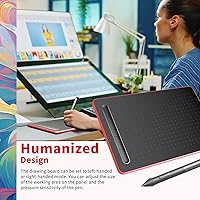
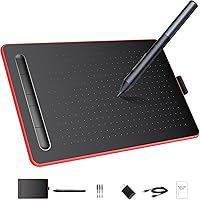
The LetSketch WP9620C Drawing Tablet enters the market as a genuinely capable option for anyone stepping into digital art without wanting to spend a lot. LetSketch is a relatively new brand, but the hardware specs here punch above what you'd typically expect at this price tier. The passive electromagnetic pen requires no battery or charging — you just pick it up and draw. The active area measures 8.26 by 5.51 inches, comfortable for most desktop setups and compact enough to slip into a bag. Left- and right-handed modes are both supported, a small but thoughtful touch that many budget tablets skip entirely.
Features & Benefits

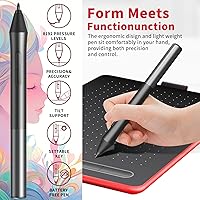
With 8192 levels of pressure sensitivity, the LetSketch pad picks up on subtle variations in how hard you press — meaning thin sketching lines and thick brush strokes both feel intentional, not accidental. The 5080 LPI resolution keeps tracking tight, and at 10mm pen reading height, lifting the pen slightly off the surface still registers accurately, which helps with hover-based tools in software like Photoshop. Seven shortcut keys split between the tablet body and the pen barrel let you bind common commands — undo, zoom, brush size — so your free hand stays busy creating rather than hunting the keyboard. Tilt support up to 60 degrees rounds things out nicely.

Best For

This drawing tablet makes the most sense for beginners and students who want to try digital illustration without a steep financial commitment. It's also a solid pick for teachers running online classes — annotating slides or demonstrating techniques in real time is straightforward, and the compact size won't crowd a desk. Android compatibility at version 6.0 and above is a genuine plus, though the experience tends to be smoother on desktop. One group to rule out: Chromebook users, since the driver simply isn't supported. Travelers and remote workers will appreciate that the whole setup weighs 1.5 pounds and barely takes up space in a bag.

User Feedback

Across 274 ratings, this graphics tablet holds a 4.0 out of 5 average — respectable for a brand that has been around less than two years. Buyers consistently praise how responsive the pen feels and how natural the pressure curve is for the price. Where things get mixed is driver installation: some users report a friction-filled setup process, particularly on older Windows versions. A handful of reviews mention the plastic build feels light — not in a premium way, but in a cost-cutting way. Android functionality works, though noticeably less reliably than the desktop experience. Overall, value for money seems strong here, provided expectations are set for a starter-tier product.

Pros

  • Passive pen needs no charging — pick it up and draw without any pre-session routine.
  • 8192 pressure levels deliver line variation that feels natural, even for detail-heavy illustration.
  • Seven programmable shortcut keys cut down on constant keyboard switching during longer sessions.
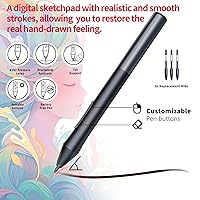
  • Three replacement nibs included out of the box — a genuinely practical long-term touch.
  • Left- and right-handed modes make this drawing tablet accessible without any hardware adjustment.
  • At 1.5 pounds and barely any thickness, it travels as easily as a notepad.
  • Broad OS support across Windows, Mac, and Android covers most users without extra setup.
  • The matte drawing surface provides enough texture to prevent the slippery feel common on cheaper tablets.
  • 60-degree tilt recognition adds real shading flexibility in apps like Photoshop and Krita.
  • Ranked in the top 150 of its Amazon category despite being a newer brand — real buyer traction.

Cons

  • Driver installation is a known friction point — some users face failed setups or unresponsive pens post-install.
  • Chromebook users are completely locked out with no workaround available.
  • Plastic body has noticeable flex and feels lightweight in a way that raises durability questions.
  • Android compatibility is unreliable for pressure-sensitive drawing — treat it as a bonus, not a feature.
  • The drawing surface shows visible wear marks over time, especially in the central pen zone.
  • No wireless connectivity — the USB cable must travel with the tablet everywhere.
  • Edge-of-surface tracking drift has been reported by a small number of users doing precision work.
  • Tilt support does not function correctly in all software, requiring manual configuration in some tools.
  • LetSketch support documentation is sparse compared to established brands like Wacom or XP-Pen.
  • Shortcut keys have a mushy tactile response that lacks the confident click of better-built alternatives.

Ratings

The LetSketch WP9620C Drawing Tablet has been evaluated by our AI rating system after analyzing verified buyer reviews from global markets, with spam, bot-generated, and incentivized feedback actively filtered out. What emerges is a nuanced picture of a budget-tier graphics tablet that genuinely over-delivers on core drawing performance while showing its price tag in a few predictable areas. Both the strengths that keep buyers satisfied and the friction points that generate complaints are transparently reflected in the scores below.
Pen Pressure Accuracy
84%
Users consistently single out the 8192-level pressure response as the standout strength of this graphics tablet. Whether sketching light hair strands or laying down bold ink lines, the pen picks up subtle hand pressure variations that feel natural and responsive — a level of control many buyers did not expect at this price point.
A minority of users report the pressure curve feeling slightly stiff at the lightest touch, requiring a deliberate adjustment in software sensitivity settings. This is manageable but adds a setup step that first-time tablet owners may find frustrating before getting the feel just right.
Value for Money
89%
For buyers entering digital art on a strict budget, this drawing tablet delivers a specification list that would have cost significantly more just a few years ago. The inclusion of three replacement nibs, a capable passive pen, and broad OS compatibility means the out-of-box value feels genuinely strong without hidden accessory costs.
The value equation holds well for beginners but starts to feel limiting for intermediate artists who quickly outgrow the active area or miss dedicated touch controls. At this tier, you are buying capability with trade-offs, and those trade-offs become more visible once skills develop.
Driver Installation & Setup
56%
44%
When the driver installs cleanly, the process is relatively quick and the tablet registers without needing a restart on most modern Windows and Mac systems. Several reviewers on Windows 10 and 11 reported a smooth plug-and-play experience right out of the box with no manual configuration.
Driver friction is one of the most consistently reported complaints across reviews. Some users on older Windows versions or specific Mac configurations experienced failed installs, unresponsive pens post-setup, or needing to manually uninstall conflicting tablet drivers from other brands. LetSketch's support documentation is limited compared to established competitors.
Build Quality & Materials
63%
37%
The tablet body feels solid enough for daily desk use, and the matte black drawing surface has a texture that mimics paper reasonably well — a detail that makes longer drawing sessions more comfortable. The pen itself has decent grip and does not feel hollow or toy-like in hand.
The overall plastic construction reads as lightweight in a cost-cutting rather than intentional way. Flexing the tablet body slightly reveals some give, and the corners can feel sharp. Users who have handled mid-range tablets from established brands will notice the difference in material quality almost immediately.
Drawing Surface Texture
76%
24%
The matte finish on the active area provides just enough friction to give the pen a slight drag that many digital artists prefer — it prevents the glassy, slippery feel that some budget tablets suffer from. Longer illustration sessions feel less fatiguing because of this surface resistance.
Over extended use, the surface texture can show visible wear marks from repeated pen strokes, particularly in the center of the working area. This does not affect performance but is cosmetically noticeable and may concern users who prefer their equipment looking pristine.
Active Area Size
71%
29%
At 8.26 by 5.51 inches, the working area is comfortably large for most beginner and intermediate tasks — sketching characters, annotating documents, or tracing references all work well within this space without constant panning. It maps cleanly to a standard widescreen monitor.
Artists who work across dual monitors or use large canvas setups in Clip Studio Paint or Illustrator will find the active area limiting. The cursor-to-hand movement ratio can feel compressed when mapped across a wide screen, requiring sensitivity adjustments that not all users think to make.
Shortcut Keys Usability
73%
27%
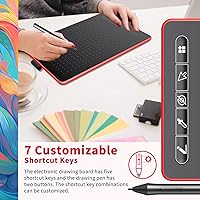
Having five programmable keys on the tablet body plus two on the pen barrel gives this graphics tablet a workflow flexibility that genuinely speeds up repetitive tasks. Binding undo, brush resize, and zoom to physical keys removes constant keyboard interruptions during a drawing session.
The physical keys have a somewhat mushy tactile response — they register reliably but lack the crisp click that makes shortcut keys feel confident to use. A few reviewers also noted the default key assignments are not intuitive and require time spent in the driver software before they feel natural.
Tilt Support
67%
33%
The 60-degree tilt recognition works as advertised in supported applications like Photoshop and Krita, allowing brush strokes to respond to pen angle — a feature that makes shading with a digital airbrush feel noticeably more like traditional media.
Tilt support is inconsistent across all software. In some popular free tools, the tilt axis either requires manual activation or does not respond at all without additional configuration. Users working outside the Adobe ecosystem may find tilt functionality unreliable in practice.
Android Compatibility
58%
42%
Connecting the LetSketch pad to an Android phone or tablet running version 6.0 or above does work, and for basic annotation and sketching apps it functions adequately. Users who primarily want to sketch on a Samsung tablet or annotate PDFs on an Android device will find it usable.
Android compatibility is notably less stable than the desktop experience. Pressure sensitivity does not always translate correctly across Android apps, and some users report the pen simply not being recognized until the device is restarted. It is a bonus feature rather than a reliable primary use case.
Pen Ergonomics
78%
22%
The passive pen is well-balanced, and the absence of a battery keeps it light enough for multi-hour drawing sessions without hand fatigue. The two side buttons sit at a natural thumb position, making them easy to activate without shifting grip.
The pen barrel is relatively slim, which suits users with smaller hands but can feel a bit thin for those accustomed to thicker styluses. There is also no pen stand or holder included, so storing it safely between sessions requires some improvisation.
Portability
86%
At 1.5 pounds and barely over a tenth of an inch thick, this drawing tablet is genuinely easy to carry. Students commuting between classes or remote workers packing a travel bag will barely notice it alongside a laptop.
The USB cable required for connectivity adds a minor logistical overhead — there is no wireless option, so traveling with it means keeping track of the cable. The cable itself is adequate but not long, which can limit desk positioning flexibility.
Software Compatibility
74%
26%
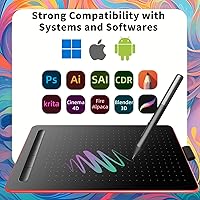
The tablet works across a wide range of drawing software including Photoshop, Illustrator, Krita, MediBang, and Paint Tool SAI. For most mainstream digital art and annotation tools, plug-in compatibility is reliable once the driver is running correctly.
Chromebook users are entirely locked out, and Linux support is not officially offered. Some niche or older illustration programs may require manual pressure sensitivity configuration since the driver does not automatically profile every application.
Cursor Tracking Precision
81%
19%
The 5080 LPI resolution translates to very tight cursor-to-pen tracking, which matters most in detail work — fine linework, precise selections, and small text annotation all benefit from this level of accuracy. Most users report the cursor following the pen tip faithfully without jitter.
At the very edges of the active area, a small number of users noted minor tracking drift — the cursor arriving slightly off from the pen tip position. This is an occasional edge-case rather than a widespread issue, but it can disrupt precision work near the tablet borders.

Suitable for:

The LetSketch WP9620C Drawing Tablet is a strong match for anyone taking their first serious steps into digital art — students picking up Procreate alternatives on a PC, hobbyists who want to sketch without committing to a professional-grade investment, or self-taught illustrators working through online courses. Online educators who annotate slides or demonstrate techniques during live classes will find the compact footprint and responsive pen genuinely useful for that workflow. Budget-conscious creators who have been putting off buying a graphics tablet because of price will appreciate that this one does not require any compromise on core drawing specs. It also makes a practical secondary tablet for a more experienced artist who wants a lightweight option for travel or a portable setup away from their main studio. Android users on version 6.0 and above get an added layer of flexibility, making it a usable option for basic mobile sketching and PDF annotation on the go.
Not suitable for:

The LetSketch WP9620C Drawing Tablet is not the right fit for professional illustrators, concept artists, or anyone whose livelihood depends on their drawing hardware holding up under daily heavy use. The plastic build and relatively untested brand history are real concerns for users who need long-term reliability and responsive manufacturer support. Anyone on a Chromebook should look elsewhere entirely — there is no driver support, and that is a hard compatibility wall with no workaround. Intermediate-to-advanced artists who work across dual monitors, use large canvas formats, or rely on multi-touch gestures will quickly find the active area and feature set constraining. Users expecting Android functionality to match their desktop experience should temper those expectations, as pressure sensitivity and pen recognition on Android remain inconsistent across different apps and devices.
Specifications

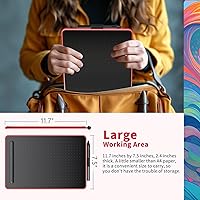
  • Active Area: The working surface measures 8.26 × 5.51 inches, providing ample space for digital sketching and annotation without taking over a desk.
  • Overall Size: The full tablet body measures 12.8 × 8.5 inches with a thickness of just 0.1 inches, making it exceptionally slim for transport.
  • Weight: The tablet weighs 1.5 pounds, light enough to carry daily in a laptop bag alongside other work or school essentials.
  • Pressure Sensitivity: The pen supports 8192 levels of pressure sensitivity, enabling fine control over line weight and brush opacity in supported drawing applications.
  • Resolution: The tablet's native resolution is 5080 LPI (lines per inch), delivering precise cursor tracking that closely follows the pen tip position.
  • Pen Technology: The included stylus uses passive electromagnetic induction, meaning it requires no battery or charging to operate.
  • Pen Reading Height: The pen is detected up to 10mm above the tablet surface, supporting hover-based interactions used in many professional drawing applications.
  • Tilt Support: The pen and tablet support tilt recognition up to 60 degrees, allowing brush angle to influence stroke appearance in compatible software.
  • Shortcut Keys: There are 5 programmable express keys on the tablet body and 2 additional programmable buttons on the pen barrel, all fully customizable via driver software.
  • Connectivity: The tablet connects to host devices via USB and is designed for plug-and-play use without additional hardware adapters required.
  • Compatible OS: The tablet officially supports Windows 7 and above, Mac OS 10.0 and above, and Android 6.0 and above via USB OTG connection.
  • Chromebook Support: The tablet is not compatible with Chromebook operating systems; no driver support is available for Chrome OS at this time.
  • Replacement Nibs: Three extra replacement nibs are stored inside the pen body, extending the useful life of the stylus without requiring a separate purchase.
  • Handedness Mode: The tablet supports both left-handed and right-handed orientations, switchable through the driver software with the default set to right-handed mode.
  • Model Number: The official model number for this tablet is WP9620C, manufactured and sold under the LetSketch brand.
  • Brand & Release: LetSketch is the manufacturing brand, and this tablet was first made available in July 2024, making it a relatively recent market entry.

Related Reviews

Artisul A801 Drawing Tablet
85%
91%
Value for Money
88%
Pen Responsiveness
93%
Portability
85%
Ease of Setup
80%
Build Quality
More
Artisul A1201 Drawing Tablet
81%
91%
Value for Money
88%
Pen Performance
93%
Active Area Size
86%
Pressure Sensitivity
63%
Driver & Software Setup
More
VEIKK S640 6x4 Drawing Tablet
80%
91%
Value for Money
86%
Pen Performance
93%
OSU! Gaming Suitability
67%
Build Quality & Durability
89%
Ease of Setup
More
HUION HS610 Graphics Drawing Tablet
77%
91%
Pen Accuracy & Pressure Sensitivity
83%
Tilt Response
88%
Active Area Size
74%
Build Quality & Durability
86%
Portability
More
Ugee S640 Drawing Tablet
79%
91%
Value for Money
84%
Pressure Sensitivity Performance
82%
Stylus Comfort & Usability
72%
Build Quality & Durability
63%
Driver & Software Setup
More
GAOMON PD1161 11.6-inch Pen Display Tablet
76%
88%
Pen Accuracy & Responsiveness
79%
Display Quality
74%
Anti-Glare Film & Screen Feel
83%
Tilt Support
67%
Express Keys & Customization
More
XENCELABS Drawing Tablet Small
88%
90%
Performance
95%
Pressure Sensitivity
92%
Portability
88%
Build Quality
85%
Usability
More
VEIKK Studio 16 Drawing Tablet
85%
91%
Display Quality
88%
Pressure Sensitivity
84%
Build Quality
93%
Color Accuracy
89%
Pen Performance
More
HUION Inspiroy H640P Drawing Tablet
80%
88%
Pen Performance
67%
Active Area Size
93%
Value for Money
79%
Build Quality & Durability
74%
Express Keys & Customization
More
GAOMON WH851 8x5 Graphics Tablet
79%
88%
Pen Accuracy & Pressure Sensitivity
83%
Wireless Performance
91%
Battery Life
59%
Driver Software & Setup
79%
Build Quality & Materials
More

FAQ

Yes, you will need to install the LetSketch driver software before the pen pressure and shortcut keys function correctly. The tablet may move the cursor without a driver in some cases, but pressure sensitivity will not work until the driver is active. Download the driver from LetSketch's official site and make sure to restart any open drawing applications after installation.

Neither — the pen is fully passive and uses electromagnetic induction from the tablet itself to power the tip. You never need to charge it or pop in a battery, which also keeps the pen light and well-balanced during long drawing sessions.

Unfortunately, no. The LetSketch WP9620C Drawing Tablet only supports Android devices running version 6.0 or above via USB OTG. Apple iOS and iPadOS are not supported, so iPhone and iPad users will need to look at a different product.
Yes, this graphics tablet is compatible with most popular free and paid drawing applications including Krita, MediBang Paint, Paint Tool SAI, and GIMP, in addition to professional tools like Photoshop and Clip Studio Paint. Just make sure the driver is installed and running in the background before launching your software.

No special version needed. The tablet supports left-handed mode natively, and you can switch the orientation through the driver settings panel. The shortcut keys and active area will flip accordingly, so the layout still makes ergonomic sense for left-handed use.

The active area is 8.26 × 5.51 inches, which is roughly the size of a small sketchbook page and comfortably larger than entry-level tablets that offer only 6 × 3.7 inches. For beginners and intermediate artists it works very well. If you regularly work on large detailed canvases or use a dual-monitor setup, you might eventually want a larger tablet, but for most everyday drawing tasks the size is genuinely practical.

It works with both Android phones and tablets as long as the device runs Android 6.0 or above and supports USB OTG. That said, the experience is more reliable on a larger Android screen where you can actually see and interact with your drawing comfortably. On a small phone display, the use case is limited mostly to annotation or signature capture.

Three spare nibs are already stored inside the pen barrel, so you do not need to order replacements right away. To swap a nib, use the nib removal tool (typically a small ring included in the box), grip the old nib, pull it out, and press a new one firmly into the tip until it clicks into place. Nibs generally last several months with regular use depending on how much pressure you apply.

This is usually a calibration issue and is straightforward to fix through the driver software. Open the LetSketch driver panel, find the calibration option, and follow the on-screen prompts to tap the crosshair targets accurately. Also make sure your screen resolution and display scaling settings match what the driver expects, as non-standard scaling can cause consistent offset errors.

It is a genuinely solid fit for that use case. The responsive pen and customizable shortcut keys make annotating slides, circling key points, or sketching diagrams during a live lesson feel much more fluid than using a mouse. The compact size means it does not crowd a teaching desk, and the USB connection is reliable enough for continuous session use. Just make sure to install and test the driver before your first class rather than on the day.