Overview

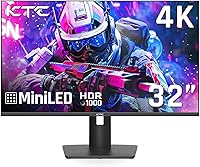
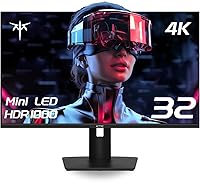
The KTC M32P10 32-inch 4K Mini LED Monitor enters a crowded mid-to-premium segment with an ambitious spec sheet and a price point that undercuts more established names like LG and Samsung. KTC isn't a brand most buyers recognize on sight, but it has been quietly building a presence among value-conscious shoppers since this display hit the market in August 2024. The headline feature is 1152-zone local dimming, a genuinely rare specification at this price tier that puts it in direct competition with displays costing noticeably more. That said, a 2.6-out-of-5 rating on Amazon demands honest scrutiny — this isn't a monitor you buy on spec sheet alone.

Features & Benefits

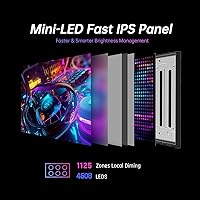
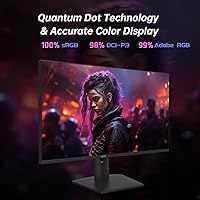
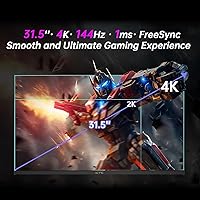
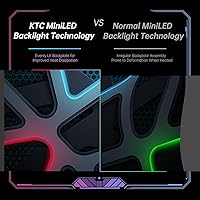
Those 1152 dimming zones translate to noticeably better black depth and brighter highlights compared to a standard IPS backlight — you will actually see the difference in dark game environments or HDR movie scenes. The Fast IPS panel keeps motion clean at 144Hz with a 1ms MPRT response time, though buyers should note that KTC markets this up to 160Hz while the officially supported spec lands at 144Hz. Color coverage is strong: 100% sRGB and 98% DCI-P3 via Quantum Dot technology makes this a credible option for photo editing, not just gaming. The USB-C port delivers 45W charging, and the built-in KVM switch lets you control two machines from one keyboard and mouse.

Best For

This KTC gaming monitor makes the most sense for PC or console gamers who want a proper 4K HDR experience without stretching to a flagship-brand price. Creative professionals who need wide color gamut accuracy for photo retouching or video grading will find the DCI-P3 coverage genuinely useful rather than just a marketing checkbox. The KVM and USB-C combo is a natural fit for anyone juggling a gaming PC alongside a work laptop at the same desk. The fully adjustable stand, including pivot for portrait mode, covers mixed-use setups well. Just be comfortable betting on a lesser-known brand with a relatively short track record.

User Feedback

Buyers satisfied with the M32P10 tend to praise its color vibrancy and a stand that feels sturdier than expected. The frustrations, though, are worth taking seriously. Quality control inconsistency appears repeatedly in reviews — some buyers report blooming around bright objects in dark scenes, which is a known Mini LED trade-off but seems worse on certain units. Others flag OSD software quirks and backlight uniformity issues. KTC support gets mixed marks compared to brands like LG or Dell. The honest summary: impressive specs, real potential, but enough unit-level variance that securing a clear return or exchange policy before buying is genuinely worth the extra step.

Pros

  • 1152-zone full-array local dimming produces noticeably deeper blacks and brighter highlights than standard IPS panels.
  • HDR1000 peak brightness makes a real visual difference in supported games and HDR video content.
  • 98% DCI-P3 color coverage is wide enough to be genuinely useful for photo and video editing work.
  • Dual HDMI 2.1 ports allow two 4K 144Hz sources to connect simultaneously without adapters.
  • Built-in KVM switch is a rare and practical feature at this price point for multi-device desk setups.
  • USB-C with 45W Power Delivery keeps a laptop charged while carrying the display signal over a single cable.
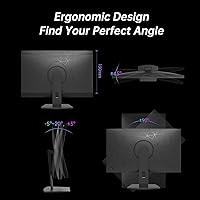
  • The ergonomic stand covers height, tilt, swivel, and full pivot — more flexibility than most competitors offer here.
  • FreeSync and G-Sync compatibility means the M32P10 works cleanly with both AMD and Nvidia graphics cards.
  • Matte panel surface cuts reflections effectively in brighter room conditions.
  • At its price tier, the raw specification density — resolution, refresh rate, HDR tier, and connectivity — is hard to match from established brands.

Cons

  • A 2.6-out-of-5 star average reflects real quality control variance that buyers should take seriously before purchasing.
  • Blooming around bright objects in dark scenes is a noted issue on some units, which is a significant flaw for HDR gaming.
  • KTC markets this display at up to 160Hz, but the officially supported refresh rate is 144Hz — a gap that feels misleading.
  • OSD software and menu navigation have drawn repeated criticism for being clunky and unintuitive.
  • Backlight uniformity problems appear often enough in user reports to suggest it is not an isolated defect.
  • KTC customer support response times and warranty handling do not match the reliability of established monitor brands.
  • At 31.2 pounds, this is a heavy panel that makes repositioning or wall-mount installation a two-person job.
  • Brand unfamiliarity creates real resale value uncertainty if you decide to upgrade within a year or two.
  • Limited professional review coverage makes independent verification of claimed specs harder than with mainstream brands.
  • Some buyers report that the RGB lighting controls are poorly implemented and difficult to disable cleanly.

Ratings

Our AI rating system analyzed verified global user reviews for the KTC M32P10 32-inch 4K Mini LED Monitor, actively filtering out incentivized, bot-generated, and spam submissions to surface what real buyers consistently experienced. Scores reflect the full picture — where the M32P10 genuinely impresses and where it falls short — so you can make a grounded decision rather than one based on spec sheet optimism alone.

HDR Performance
78%
22%
The 1152-zone full-array local dimming delivers a visibly more layered HDR image than most IPS panels at this price tier — dark dungeon scenes in RPGs and nighttime driving in racing sims genuinely benefit from the per-zone brightness control. HDR1000 peak brightness is real and noticeable on supported content.
Blooming around bright UI elements on dark backgrounds is a recurring complaint, particularly in windowed desktop use. Some users report that HDR mode requires manual tuning to avoid overly aggressive dimming that crushes shadow detail in fast-paced games.
Color Accuracy
82%
18%
Satisfied buyers — especially those doing photo culling and light video color work — consistently praise the vibrancy and saturation that the Quantum Dot layer adds. The 98% DCI-P3 coverage holds up in practice, not just on paper, making skin tones and natural landscapes look rich without appearing over-processed.
Out-of-box calibration is inconsistent across units, meaning some buyers needed third-party calibration tools to get accurate results. Users doing professional print-matching work flagged that delta-E accuracy without calibration was not competitive with purpose-built color monitors at similar prices.
Gaming Performance
76%
24%
At 144Hz with FreeSync and G-Sync compatibility, the M32P10 handles fast-paced shooters and open-world titles smoothly, and the 4K resolution makes distant detail genuinely crisper than on 1440p alternatives. Console gamers running PS5 or Xbox Series X at 4K 120Hz via HDMI 2.1 report a clean, tear-free experience.
The 1ms MPRT figure is measured under strobing conditions and does not represent typical gray-to-gray response, which some competitive players noticed as mild ghosting in very fast motion. The discrepancy between the advertised 160Hz ceiling and the real 144Hz cap also left a portion of buyers feeling misled.
Connectivity
86%
The port selection is genuinely one of the strongest aspects of this display — dual HDMI 2.1 for two full-bandwidth 4K sources, DisplayPort 1.4, USB-C with 45W PD, and three USB 3.0 downstream ports covers virtually every modern device combination without a hub. The KVM switch is a practical bonus that multi-device users actively praised.
The USB-C 45W charging ceiling is enough for ultrabooks and mid-range laptops but falls short for power-hungry 16-inch laptops under load. A small number of users also reported that the KVM switching process through the OSD felt unnecessarily slow compared to dedicated KVM switches.
Build Quality
63%
37%
Users who received well-built units described the stand as surprisingly solid and the overall chassis finish as above average for a brand at this price point. The quick-release stand mechanism was called out as a thoughtful design touch that made desk reconfiguration genuinely easier.
Quality control variance is the defining concern with the M32P10 — a significant share of reviewers reported panel flex, uneven bezels, or backlight uniformity issues that suggest inconsistent manufacturing tolerances. The gap in build consistency between best-case and worst-case units is wider than buyers would accept from an established brand.
Ergonomics & Adjustability
84%
The full range of height, tilt, swivel, and 90-degree pivot adjustment is genuinely more than most competitors bundle in this segment, and users who switched to portrait mode for coding or document work found the pivot smooth and stable. VESA 100x100mm compatibility and the quick-release mount make arm upgrades straightforward.
At 31.2 pounds, repositioning the monitor solo — particularly when mounting on a VESA arm — is cumbersome and realistically requires a second person. A handful of users noted that the height adjustment range, while present, felt slightly limited compared to premium ergonomic monitors from Dell or HP.
Display Uniformity
54%
46%
On units where uniformity was acceptable, the matte coating helped even out perceived brightness variations during everyday desktop use, and most gaming scenarios masked minor panel inconsistencies effectively during normal play sessions.
Backlight uniformity is a documented weak point across a notable proportion of user reports — clouding and hot spots are visible on solid gray or dark screens, which matters most for designers checking tonal gradients or gamers in dark environments. This appears to be a systemic quality control issue rather than isolated bad luck.
OSD & Software
51%
49%
The OSD provides access to a reasonable range of picture presets and input switching options, and users who took time to configure it manually found settings for color temperature and local dimming intensity that improved their specific use case.
The menu navigation consistently draws criticism for being slow, unintuitive, and poorly laid out — reaching commonly used settings like input switching or dimming zones requires navigating multiple layers. RGB lighting controls in particular were flagged as difficult to adjust or disable, which frustrated users who simply wanted a clean, backlight-free setup.
Value for Money
67%
33%
On paper, the spec density relative to price is difficult to match from established brands — 1152-zone Mini LED, HDR1000, dual HDMI 2.1, KVM, and full ergonomics bundled together represents genuine hardware value for buyers who prioritize raw specification.
The real-world value calculus is complicated by the QC variance risk — if your unit has uniformity or blooming issues, the effective value drops substantially compared to a slightly pricier but consistent panel from LG or Samsung. The brand uncertainty around long-term warranty support also erodes the value proposition for buyers who expect ownership beyond two years.
Setup & Installation
72%
28%
Most buyers reported a reasonably smooth out-of-box experience — the stand clicks into place without tools, cable routing is workable, and the display was detected automatically by both Windows and macOS without driver installation. The quick-release stand genuinely speeds up the initial assembly.
The physical weight makes solo desk installation awkward, and several users noted the manual provides minimal guidance for configuring HDR or local dimming settings correctly at first launch. Getting the display properly tuned for HDR gaming versus SDR desktop use requires time that less technical buyers may not want to invest.
Customer Support
47%
53%
A portion of buyers who contacted KTC support for defective units reported eventual resolution, and the brand does appear to be active in responding to Amazon review concerns, which suggests some level of post-sale engagement.
Response times and resolution quality are significantly below what buyers get from established names like LG or BenQ — complaints about delayed replies, unclear warranty terms, and difficult return processes appear frequently enough to be a genuine structural concern rather than isolated incidents. For a monitor at this price point, support reliability matters and KTC has not yet demonstrated consistency here.
Viewing Angles
81%
19%
The Fast IPS panel delivers the wide viewing angle characteristic of IPS technology — color and contrast hold up well when viewing from off-center positions, which users in shared workspaces or couch gaming setups appreciated. Side-by-side content creation with a colleague standing nearby does not produce the color shift common on VA panels.
In HDR mode with aggressive local dimming active, some users noticed contrast and brightness consistency shifts at wider angles that are less obvious in SDR. This is a known interaction between zone dimming and IPS panel optics rather than a unique flaw, but it does slightly undercut the otherwise strong IPS angle performance.
Motion Clarity
73%
27%
At 144Hz, scrolling, panning, and fast UI transitions are noticeably smoother than on 60Hz or even 100Hz displays, and adaptive sync kept screen tearing absent during everyday gaming sessions in both AMD and Nvidia GPU configurations reported by buyers.
The 1ms MPRT rating is achieved through backlight strobing, which some users found caused visible flicker at lower brightness settings. True gray-to-gray response is slower than MPRT implies, and competitive FPS players migrating from high-refresh 1080p or 1440p monitors may notice the difference in the sharpest fast-motion scenarios.

Suitable for:

The KTC M32P10 32-inch 4K Mini LED Monitor is a strong fit for PC and console gamers who want a genuine HDR experience — not just a badge — without spending flagship money on an LG or Samsung equivalent. The 1152-zone local dimming makes a real, visible difference in games with high contrast scenes, and 144Hz at 4K keeps fast-paced gameplay sharp. Creative professionals who work in photo editing or video color grading will appreciate the 98% DCI-P3 coverage, which is accurate enough to be useful rather than just a marketing figure. Multi-device workers who run a gaming rig alongside a work laptop will find the KVM switch and USB-C single-cable setup genuinely convenient day to day. If you are comfortable taking a calculated risk on a challenger brand in exchange for a spec sheet that punches well above its price tier, this monitor deserves serious consideration.

Not suitable for:

Buyers who prioritize reliability and after-sales peace of mind above all else should approach this display cautiously — the KTC M32P10 32-inch 4K Mini LED Monitor carries a 2.6-out-of-5 star average that cannot be dismissed as a handful of bad reviews. Quality control inconsistency is a recurring theme, meaning the unit you receive may not perform identically to the best-case samples reviewers describe. Competitive esports players chasing the absolute lowest input lag should also look elsewhere, as there are purpose-built 1080p and 1440p options with faster real-world response characteristics. Those heavily invested in Dolby Vision or full HDMI Forum VRR compliance may find the feature set incomplete for their specific setup. And if you need the reassurance of a well-established brand with a proven support infrastructure, the uncertainty around KTC's long-term warranty responsiveness is a legitimate concern worth weighing.

Specifications

  • Screen Size: The panel measures 32 inches diagonally, offering a large viewing area well-suited to both immersive gaming and multi-window productivity workflows.
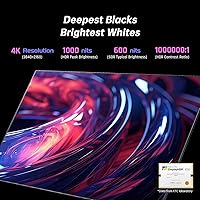
  • Resolution: Native resolution is 3840 x 2160 pixels (4K UHD), delivering sharp detail at typical desktop viewing distances of 2 to 3 feet.
  • Panel Type: Fast IPS panel with a Mini LED backlight layer, combining the wide viewing angles of IPS technology with improved contrast from zone-controlled backlighting.
  • Local Dimming: Full-array local dimming operates across 1152 independent zones, allowing precise control of brightness and shadow reproduction across different screen regions simultaneously.
  • Refresh Rate: The panel officially supports 144Hz; KTC's marketing references up to 160Hz, but 144Hz is the confirmed stable operating frequency for day-to-day use.
  • Response Time: Rated at 1ms MPRT (Moving Picture Response Time), which reflects motion clarity under backlight strobing conditions rather than traditional gray-to-gray pixel transition speed.
  • HDR Standard: Certified to HDR1000, meaning the panel can sustain up to 1000 nits of peak brightness in HDR content with a 1,000,000:1 contrast ratio under HDR mode.
  • Color Gamut: Covers 100% of the sRGB color space and 98% of DCI-P3, with Quantum Dot technology used to achieve and maintain color saturation across the brightness range.
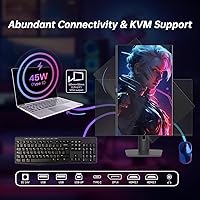
  • Connectivity: Inputs include two HDMI 2.1 ports, one DisplayPort 1.4, and one USB-C port with 45W Power Delivery; three USB 3.0 downstream ports are also provided for peripherals.
  • Adaptive Sync: Compatible with both AMD FreeSync and Nvidia G-Sync, allowing variable refresh rate operation to reduce screen tearing on both GPU ecosystems.
  • KVM Switch: An integrated KVM switch allows a single keyboard and mouse to control two connected computers, toggling between them without unplugging any devices.
  • Ergonomics: The stand supports height adjustment, tilt, swivel, and full 90-degree pivot rotation for portrait mode, covering the ergonomic needs of most desk configurations.
  • VESA Mount: The monitor is compatible with standard VESA 100x100mm wall and arm mounts, and the stand uses a quick-release mechanism for straightforward removal.
  • Panel Surface: The screen uses a matte anti-glare coating, which reduces reflections in moderately lit rooms without significantly degrading color saturation at normal viewing distances.
  • Dimensions: With the stand attached, the unit measures approximately 28 x 9 x 18 inches (width x depth x height), requiring reasonable desk depth for stable placement.
  • Weight: The assembled monitor weighs 31.2 pounds, making it heavier than average for a 32-inch display and a consideration when planning desk or arm mount setups.
  • Power Input: The monitor operates at 24 volts DC; the USB-C port supports up to 45W reverse charging, meaning it can simultaneously power a connected laptop while receiving video input.
  • Aspect Ratio: Standard 16:9 widescreen aspect ratio, compatible with all modern console and PC content formats without letterboxing under typical use cases.

Related Reviews
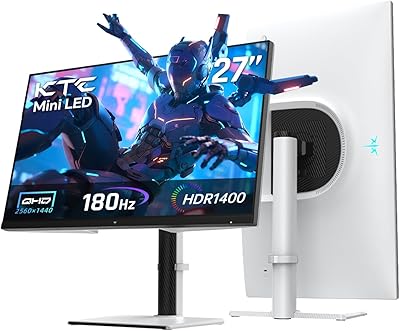
KTC M27T6 27-inch Mini LED Gaming Monitor
76%
84%
HDR Performance
88%
Contrast & Black Levels
86%
Peak Brightness
57%
Color Accuracy
71%
Motion Handling
More
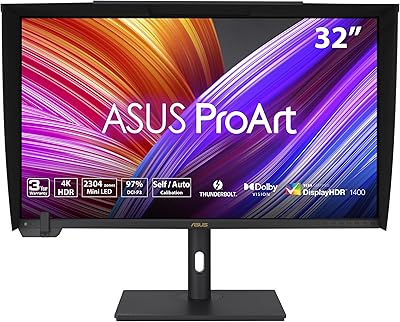
ASUS ProArt PA32UCXR 32-inch 4K Monitor

78%
96%
Color Accuracy
91%
Built-in Colorimeter
78%
HDR Performance
89%
Build Quality
87%
Connectivity
More
ViewSonic VP3256-4K 32-inch 4K IPS Monitor
80%
93%
Color Accuracy
89%
Panel Clarity & Sharpness
88%
Build Quality & Stand
79%
USB-C Connectivity
86%
Ergonomics & Comfort
More
ViewSonic VX3267U-4K 32-inch 4K IPS Monitor

74%
91%
Image Sharpness
83%
USB-C Functionality
76%
Color Accuracy
54%
HDR Performance
47%
Stand & Ergonomics
More
ViewSonic VX3276-4K-MHD 32-inch 4K Monitor
76%
91%
Image Clarity & Sharpness
74%
Color Accuracy
86%
Contrast & Black Levels
61%
HDR Performance
58%
Refresh Rate & Motion Handling
More
ViewSonic VP3268A-4K 32-inch 4K Monitor

79%
93%
Color Accuracy
91%
Out-of-Box Calibration
88%
Build Quality
86%
Ergonomics & Stand
89%
Connectivity
More
BenQ PD3226G 32-inch 4K Designer Monitor
81%
93%
Color Accuracy
91%
Connectivity
88%
Anti-Glare Performance
79%
Refresh Rate Utility
82%
KVM Switch
More
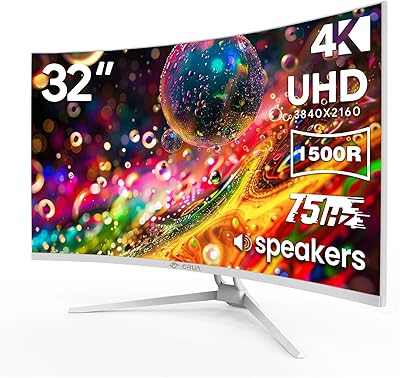
CRUA CR320C 32″ Curved 4K Monitor
73%
91%
Image Sharpness
78%
Color Accuracy
88%
Contrast & Black Levels
84%
Curvature & Immersion
67%
Refresh Rate & Smoothness
More
KTC H32T13 32-Inch QHD IPS Monitor
78%
86%
Image Quality
79%
Color Accuracy
82%
Refresh Rate & Smoothness
51%
HDR Performance
44%
Ergonomics & Adjustability
More
BenQ MA320U 32-inch 4K Monitor
81%
94%
Mac Ecosystem Integration
91%
Color Accuracy
88%
Connectivity & USB Hub
83%
Stand Ergonomics
92%
Display Sharpness
More

FAQ

The stable, officially supported refresh rate is 144Hz. KTC references 160Hz in some marketing materials, but most users report that 144Hz is the practical ceiling under normal operating conditions. Plan your GPU requirements around 144Hz to avoid surprises.

With 1152 zones, the difference is real and visible — particularly in games or films with high-contrast scenes, like a bright explosion in a dark environment. That said, no Mini LED panel is completely free of blooming, and some users of this specific display have noted it is more pronounced on certain units than others.

Yes. The USB-C port handles both video signal and up to 45W of Power Delivery simultaneously, so a single cable carries the display connection and keeps your laptop charged. Keep in mind that 45W may only partially charge higher-wattage laptops like a MacBook Pro 16-inch under load.

The KVM switch lets you connect two computers to the monitor and share one keyboard and mouse between them. You toggle the active device through the monitor's OSD menu. It is a genuinely useful feature for anyone running a work laptop and a gaming PC on the same desk, though the OSD controls to switch between devices have been described as clunky by some users.

Yes. The two HDMI 2.1 ports support the bandwidth needed for 4K at 120Hz, which is exactly what the PS5 and Xbox Series X output. You can connect both consoles simultaneously and switch between them without touching any cables.

The recurring complaints center on a few specific issues: backlight uniformity problems, more noticeable blooming than expected for a 1152-zone panel, and OSD software that frustrates users trying to configure settings. Some negative reviews also reflect unit-to-unit variance, suggesting inconsistent quality control at the factory level rather than a universal design flaw. That said, the volume of complaints is high enough that it warrants real caution, not dismissal.

Honestly, the stand is one of the stronger points of this display. Height, tilt, swivel, and full pivot adjustment in one stand is more than many competitors bundle at this tier, where pivot is often cut to save costs. The quick-release mechanism also makes it easy to swap to a VESA arm later if you change your setup.

It has the color coverage for it — 98% DCI-P3 and 100% sRGB are solid figures for editing work. The caveat is that the backlight uniformity concerns noted by some buyers matter more for color-critical work than for gaming, where minor inconsistencies are less noticeable. If you need a primary professional editing display, the QC variance in user reports is worth factoring into that decision.

KTC typically offers a limited manufacturer warranty, but their support infrastructure is not as well-established as brands like LG, Dell, or BenQ. User reports on support responsiveness are mixed — some buyers report satisfactory resolutions, while others describe slow or difficult communication. Confirming the return and exchange policy with your retailer before purchasing is a practical precaution given the quality control feedback.

31 pounds is notably heavy for a 32-inch panel — most competitors in this size class come in closer to 18 to 22 pounds. If you plan to use a monitor arm, check the weight rating carefully; many mid-range arms are rated to 25 pounds or less. A heavy-duty arm rated to at least 35 pounds is recommended to hold the M32P10 safely and allow smooth adjustment.