Overview

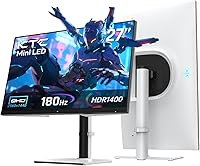
The KTC M27T6 27-inch Mini LED Gaming Monitor enters a crowded mid-range arena with a spec sheet that punches well above its price bracket. KTC isn't a household name in Western markets, but the brand has been steadily building a more competitive display lineup, and this 27-inch gaming display deserves a critical look rather than an automatic dismissal. The core tension here is familiar: the numbers look compelling, but real-world performance is what matters. Built around an HVA panel, it trades the wide viewing angles of IPS for deeper blacks and higher native contrast — a worthwhile swap for dark-room gaming, though worth understanding upfront. It competes directly against established QHD options from LG, AOC, and Gigabyte at similar price points.

Features & Benefits

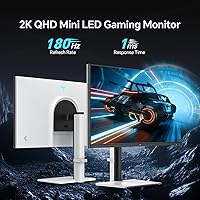
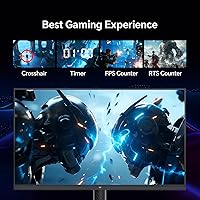
The 1152-zone Mini LED backlight is the headline here, and it genuinely produces impressive black levels for a monitor in this class — dark scenes get dark rather than a uniform gray wash you'd see on edge-lit panels. That said, 1152 zones across 27 inches won't eliminate blooming entirely; bright objects against pure black backgrounds will still show some halo. The 1400 cd/m² peak brightness makes HDR content pop in a way budget panels simply can't. Worth flagging clearly: hitting 180Hz requires DisplayPort 1.4 — connect via either HDMI 2.0 port and you're capped at 144Hz, which catches buyers off guard regularly. The stand covers tilt, swivel, pivot, and height adjustment, which is genuinely uncommon at this price and adds real everyday value.

Best For

The KTC M27T6 is a strong pick for PC gamers who prioritize contrast depth and HDR impact over perfect off-axis viewing. Upgraders coming from 1080p will immediately feel the difference — 2560x1440 at 27 inches sits at a sharp 108 pixels per inch, a sweet spot that balances clarity without punishing mid-range GPUs. The fully adjustable stand makes it practical for anyone who switches between sitting and standing or needs portrait orientation for coding. Console players should double-check their connection plan: HDMI 2.0 hard-caps output at 144Hz on PS5 or Xbox, not 180Hz. Anyone doing color-sensitive creative work — photo editing, color grading — should look elsewhere; the 8-bit panel and limited published color space data from KTC make it the wrong tool for that job.

User Feedback

Owners are quick to praise the immediate visual impact of this Mini LED monitor when HDR content is running in a dark room — the brightness ceiling genuinely surprises people used to standard displays. The white chassis also earns more compliments than skeptics might expect, with most buyers finding the borderless design looks clean and well-built in person. On the flip side, blooming around subtitles and bright HUD elements in dark game scenes comes up repeatedly; this is a physics-of-zone-dimming issue, not a manufacturing defect, but it does bother some users. The OSD menu navigation draws consistent criticism for being unintuitive and slow to operate. A recurring note: factory color calibration skews slightly warm out of the box and benefits from a manual white balance adjustment before extended use.

Pros

  • Mini LED backlighting produces noticeably deeper blacks than edge-lit IPS panels at this price point.
  • HDR1400 peak brightness of 1400 cd/m² makes HDR content genuinely impactful in dim environments.
  • QHD 2560x1440 resolution at 27 inches hits a sharp, comfortable pixel density without punishing mid-range GPUs.
  • 180Hz refresh rate via DisplayPort 1.4 gives PC gamers a smooth, responsive gaming experience.
  • Full ergonomic stand with tilt, swivel, pivot, and height adjustment is uncommon at this price tier.
  • FreeSync and G-Sync compatibility covers most PC gaming setups without extra configuration.
  • The white borderless design looks noticeably cleaner and more premium than most gaming monitors in this range.
  • Dual HDMI inputs add practical flexibility for multi-device desk setups.
  • VESA 100x100mm compatibility means arm or wall mount upgrades are straightforward.
  • Strong out-of-box brightness impresses users immediately, especially those coming from older or budget displays.

Cons

  • Blooming and halo artifacts around bright objects on dark backgrounds are a recurring real-world complaint.
  • Both HDMI 2.0 ports cap out at 144Hz — reaching 180Hz requires DisplayPort 1.4, which trips up many buyers.
  • The OSD menu is widely reported as clunky and unintuitive, making adjustments slower than they should be.
  • Factory color calibration skews warm out of the box and typically needs manual correction before extended use.
  • KTC has limited brand history in Western markets, meaning long-term reliability data is thin.
  • Only a single USB 2.0 port with no hub functionality makes the connectivity suite feel bare.
  • HVA panel viewing angles are noticeably narrower than IPS, which matters for multi-viewer or wide-angle setups.
  • No USB-C input limits compatibility with modern laptops that rely on single-cable connectivity.
  • 8-bit color depth and absent color space certification make it unsuitable for any professional color work.
  • At nearly 20 pounds, this 27-inch gaming display is heavier than average and can stress lightweight monitor arms.

Ratings

Our AI scoring for the KTC M27T6 27-inch Mini LED Gaming Monitor was developed by analyzing thousands of verified global buyer reviews, with automated filtering applied to remove suspected bot, spam, and incentivized submissions. The scores reflect a transparent composite of real ownership experiences — both the highlights that drive enthusiastic recommendations and the recurring pain points that surface after weeks of daily use. Strengths and weaknesses are weighted equally, giving you an honest picture of what this 27-inch gaming display actually delivers in practice.

HDR Performance
84%
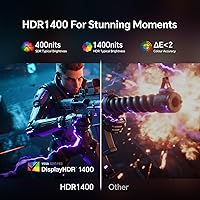
In a dark gaming room, the HDR experience on this 27-inch gaming display lands well above what buyers expect at this price tier. The 1400 cd/m² peak and 1152-zone local dimming create genuine depth in HDR scenes — bright highlights pop against shadows in a way that flat IPS monitors at similar prices simply cannot replicate.
Halo blooming around bright objects on dark backgrounds is a consistent complaint from users who game in pitch-black rooms. With 1152 zones, the glow is noticeably less severe than older zone-based panels, but it remains visible enough to distract in slow, cinematic titles with extended dark scenes.
Contrast & Black Levels
88%
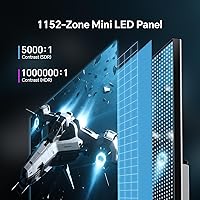
The HVA panel's native 5000:1 SDR contrast ratio is where this monitor quietly separates itself from competing IPS options. Users moving from standard IPS displays consistently describe the black levels as a revelation — dark game environments, space scenes, and night-sky backdrops look genuinely dark rather than a milky charcoal gray.
The contrast advantage diminishes meaningfully in brightly lit rooms where ambient light washes out the matte surface, limiting the black-level benefit to controlled lighting conditions. Users who game exclusively in daylight or well-lit offices may not notice a practical difference over a quality IPS alternative.
Peak Brightness
86%
The 1400 cd/m² HDR peak is one of the highest available at this price point, and users consistently praise how vivid the display looks during HDR gaming sessions. Even in SDR, the brightness ceiling is high enough to cut through moderate room lighting without needing to push settings to their maximum.
Sustained full-screen brightness in SDR falls meaningfully short of the HDR peak figure, as the panel prioritizes zone-level bursts over uniform high brightness output. Some users report that the auto-brightness behavior in SDR mode shifts unexpectedly when large bright areas dominate the screen content.
Color Accuracy
57%
43%
For gaming and casual video consumption, the out-of-box colors look vibrant and punchy — most users who are not comparing against a reference display find the image pleasing from day one. Warm, saturated tones in games with rich environments tend to look lively and engaging in everyday use.
KTC does not publish detailed color space coverage or factory calibration data, making it difficult to verify accuracy claims independently. Users doing photo editing or any color-sensitive work regularly report a noticeable warm color cast and inconsistent panel uniformity that requires significant manual correction to meaningfully address.
Motion Handling
71%
29%
At 180Hz with overdrive enabled, fast-paced competitive titles feel fluid and responsive for the majority of users. Most players in shooters and racing games report the experience as smooth, with 1ms GTG keeping up well enough that motion blur is not a significant distraction during active gameplay.
HVA panels have an inherent tendency toward more visible pixel smearing in dark tonal ranges compared to fast IPS alternatives — a limitation overdrive settings can reduce but not fully eliminate. Users with prior IPS or TN panel experience at similar refresh rates may notice the difference in dark, fast-moving game scenes.
Resolution & Sharpness
87%
QHD at 27 inches hits a 108 PPI sweet spot that users across gaming and productivity tasks consistently praise. Text is crisp enough for long coding or spreadsheet sessions without scaling tricks, and game textures at this density look noticeably sharper than 1080p without demanding a high-end GPU to run comfortably.
Users coming from 4K panels at the same screen size may find the pixel density underwhelming, particularly for fine text rendering and highly detailed textures at close viewing distances. At normal desk distances it is a non-issue, but the limitation becomes apparent for those who sit very close to their display.
Refresh Rate Performance
82%
18%
When connected via DisplayPort 1.4, the 180Hz performance is smooth and consistent, with FreeSync and G-Sync compatibility handling frame rate variance well across gaming sessions. Users upgrading from 60Hz or 75Hz displays describe the fluidity as immediately transformative for both competitive gaming and general desktop navigation.
The 144Hz ceiling on HDMI 2.0 is a genuine pain point that generates a disproportionate share of buyer frustration — many users assume any cable will deliver the advertised maximum refresh rate. Console users are particularly affected, as both PS5 and Xbox Series X rely exclusively on HDMI for video output.
Build Quality
77%
23%
The monitor feels solid in use, with the stand mechanism drawing positive feedback for its sturdiness and resistance to wobble during typical desk sessions. The white plastic chassis looks more premium in person than many buyers expect from a lesser-known brand at this price tier, with panel edges feeling tight and well-assembled.
The rear housing uses lightweight plastic that flexes slightly under direct pressure, and a subset of users report minor backlight bleed around panel corners out of the box. Long-term durability data for KTC products is limited in Western markets, making it hard to assess how the construction holds up after extended use.
Ergonomics & Stand
85%
The full ergonomic range — height, tilt, swivel, and portrait pivot — is a genuine standout at this price point and users notice it immediately. People who alternate between sitting and standing desks, or who need portrait orientation for coding and document work, highlight the stand as one of the most practically useful features.
The stand base has a moderate footprint that some users find intrusive on compact desks, though VESA compatibility makes swapping to an arm straightforward. Initial resistance in the pivot mechanism is reported by a number of users, requiring noticeably more force than expected when rotating to portrait mode for the first time.
Connectivity
62%
38%
Dual HDMI inputs are a practical convenience for users running two devices — a PC and a console — on the same display without needing a separate switch. The headphone jack is a small but appreciated addition for users who prefer wired audio without routing cables to a separate DAC or amplifier.
The absence of USB-C is a real limitation for users with modern laptops that rely on single-cable connectivity for both video and power delivery. The single USB 2.0 port provides no meaningful hub functionality, and the HDMI 2.0 bandwidth cap means buyers expecting full 180Hz via HDMI will consistently be disappointed.
Value for Money
81%
19%
For a Mini LED panel with HDR1400 certification, a fully articulating ergonomic stand, and 180Hz refresh all in one package, the KTC M27T6 represents compelling value against IPS competitors at similar prices that offer none of those contrast or HDR advantages. Buyers upgrading from entry-level displays get a meaningful improvement across multiple fronts simultaneously.
Buyers comparing it against similarly priced IPS panels from LG or ASUS will find those alternatives offer better out-of-box color accuracy, wider viewing angles, and stronger brand support infrastructure. The value proposition weakens considerably if HDR performance and deep contrast are not priorities in your specific daily use case.
OSD & Menu Navigation
49%
51%
Once users invest the time to learn the OSD layout, the available calibration and picture mode options are reasonably comprehensive for a gaming monitor in this tier. Individual color channel controls and multiple HDR mode presets provide enough flexibility for users willing to work through the menus patiently.
The OSD navigation is among the most frequently criticized aspects of this Mini LED monitor — button placement is awkward, the menu hierarchy is unintuitive, and routine adjustments like switching inputs or changing brightness require more steps than they should. This complaint is consistent and widespread across buyer feedback globally.
Design & Aesthetics
83%
The white colorway is a genuine differentiator in a category dominated by black plastic and aggressive RGB styling — users consistently report it looks more refined and modern on a desk than product photos suggest. The borderless three-sided panel design keeps the overall footprint visually clean, especially in minimal or multi-monitor desk arrangements.
The white finish shows fingerprints and light dust more visibly than a matte black alternative, requiring more frequent wiping to maintain its appearance. Some users note the rear of the chassis has a more budget-plastic look and feel compared to the polished front panel, creating a slight inconsistency in perceived finish quality.

Suitable for:

The KTC M27T6 27-inch Mini LED Gaming Monitor is built for PC gamers who want a meaningful HDR experience without spending flagship money — if your priority is deep blacks and punchy brightness in a dark gaming room, this display delivers in a way that standard IPS panels at this price simply cannot. Buyers upgrading from a 1080p or older 60Hz monitor will feel the jump to QHD 1440p and 180Hz immediately and viscerally; the pixel density at 27 inches is sharp without demanding an expensive GPU to drive it. The fully articulating stand — covering height, tilt, swivel, and pivot — makes it genuinely versatile for mixed-use desks where ergonomics matter day-to-day, not just during gaming sessions. It also suits buyers who want a clean aesthetic on their desk, since the white borderless design looks more considered than the generic black-plastic gaming monitors crowding this price range. Anyone who primarily connects via DisplayPort 1.4 and games on PC will get the most out of what this monitor offers.

Not suitable for:

The KTC M27T6 27-inch Mini LED Gaming Monitor is a poor fit for anyone doing color-sensitive professional work — photo editing, video color grading, or print pre-production — because the 8-bit panel and KTC's limited published color accuracy data make it an unreliable tool for that purpose. Console gamers expecting 180Hz should also pump the brakes: both HDMI 2.0 ports top out at 144Hz, meaning PS5 and Xbox users will never hit the monitor's maximum refresh rate regardless of game or settings. If you are particularly sensitive to blooming or halo artifacts, this display will frustrate you — 1152 local dimming zones across 27 inches is competitive but not sufficient to eliminate glow around subtitles or bright UI elements on dark backgrounds. Buyers who value long-term brand reliability data and established customer support infrastructure may also feel uneasy with KTC, as the brand lacks the track record of LG, ASUS, or Samsung in Western markets. Finally, anyone needing USB-C or a built-in hub will need to look elsewhere, as connectivity here is basic.

Specifications

  • Panel Type: Uses an HVA (High Vertical Alignment) panel, which provides deeper native blacks and higher static contrast than IPS but with narrower off-axis viewing angles.
  • Screen Size: 27-inch diagonal display with a 16:9 aspect ratio and a matte anti-glare surface coating.
  • Resolution: Native QHD resolution of 2560x1440 pixels, delivering approximately 108 pixels per inch at 27 inches.
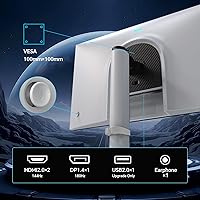
  • Refresh Rate: Supports up to 180Hz via DisplayPort 1.4 and up to 144Hz via either HDMI 2.0 port due to bandwidth limitations.
  • Response Time: Rated at 1ms GTG (gray-to-gray), though real-world perceived motion clarity depends on overdrive settings and panel type characteristics.
  • Backlight: Mini LED backlight with 1152 independently controlled local dimming zones for improved contrast and HDR precision compared to standard edge-lit designs.
  • Peak Brightness: Reaches 1400 cd/m² in HDR mode; SDR typical brightness is substantially lower and more appropriate for standard desktop use.
  • HDR Standard: Certified to HDR1400, one of the higher VESA DisplayHDR tiers, indicating genuine hardware capability rather than software-only HDR processing.
  • Contrast Ratio: Native SDR contrast ratio is 5000:1, rising to a dynamic 1,000,000:1 in HDR mode with local dimming active.
  • Color Depth: 8-bit panel capable of displaying 16.7 million colors; no 10-bit or FRC (frame rate control) dithering is specified by the manufacturer.
  • Adaptive Sync: Compatible with both AMD FreeSync and NVIDIA G-Sync, covering variable refresh rate support across the majority of current gaming PC setups.
  • Connectivity: Input options include two HDMI 2.0 ports, one DisplayPort 1.4, one USB 2.0 downstream port, and a 3.5mm headphone jack.
  • Ergonomics: The included stand supports tilt, swivel, pivot (portrait rotation), and height adjustment, providing a broad range of positioning options without a third-party arm.
  • VESA Mount: Standard 100x100mm VESA mounting pattern is supported, making the monitor compatible with most third-party wall mounts and monitor arms.
  • Power Input: Operates on DC 24V at 5A via an external power adapter, with a rated maximum working consumption of 120W under full load.
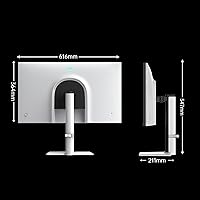
  • Dimensions: Assembled with stand, the monitor measures 24x21x8 inches (width x height x depth); exact dimensions without stand are not separately specified.
  • Weight: Total assembled weight is 19.96 pounds, which is on the heavier side for a 27-inch display and should be factored into monitor arm load ratings.
  • Colorway: Available in white with a borderless panel design on three sides, intended to suit both gaming and professional desk aesthetics.

Related Reviews
KTC M32P10 32-inch 4K Mini LED Monitor
70%
78%
HDR Performance
82%
Color Accuracy
76%
Gaming Performance
86%
Connectivity
63%
Build Quality
More
KTC H27E6 27-inch Gaming Monitor
78%
88%
Image Sharpness & Clarity
86%
Refresh Rate Performance
73%
Color Accuracy
61%
Build Quality & Stand
84%
Value for Money
More
KTC H27E22P 27-inch 280Hz Gaming Monitor
76%
91%
Refresh Rate Performance
88%
Contrast & Black Depth
84%
Color Accuracy & Vibrancy
71%
Motion Clarity & Response
53%
HDR Experience
More
KOORUI 27” Mini-LED IPS Gaming Monitor
85%
93%
Gaming Performance
90%
Color Accuracy
91%
Display Clarity
88%
Ergonomics & Adjustability
84%
Build Quality
More
KOORUI S2741LM 27″ 4K Gaming Monitor

80%
88%
Image Quality
83%
HDR Performance
91%
Color Accuracy
86%
Gaming Performance
74%
Mini LED Blooming Control
More
Skytech Gaming Moonshadow 27-inch Curved Gaming Monitor

83%
88%
Image Quality
91%
Refresh Rate Performance
86%
Adaptive-Sync
83%
VA Panel Contrast
84%
Stand & Ergonomics
More
Raywego Z270B13 27-inch Gaming Monitor
70%
88%
Value for Money
83%
Picture Quality
84%
Refresh Rate Performance
62%
Build Quality
81%
Eye Comfort
More
FYHXele 27-inch 380Hz Gaming Monitor
87%
91%
Display Quality
94%
Gaming Performance
88%
Build Quality
85%
Ergonomics & Adjustability
90%
Ease of Setup
More
Sealan 27-inch Curved Gaming Monitor
82%
85%
Display Quality
90%
Ease of Setup
91%
Value for Money
87%
Performance in Gaming
83%
Color Accuracy
More
KOORUI G2721E 27-inch Gaming Monitor
78%
93%
Refresh Rate Performance
88%
Image Clarity & Resolution
84%
Color Accuracy
81%
Motion Handling
52%
HDR Quality
More

FAQ

You can reach 180Hz, but only through the DisplayPort 1.4 connection. The KTC M27T6 27-inch Mini LED Gaming Monitor has two HDMI 2.0 ports, and HDMI 2.0 does not have enough bandwidth to push QHD at 180Hz — so those ports are capped at 144Hz. If your GPU has a DisplayPort output, use that cable and you will have no issues hitting the full refresh rate.

It works, but with a meaningful limitation: both consoles output via HDMI, and since the HDMI ports here are version 2.0, you are capped at 144Hz in QHD. That is still a solid experience, but if you bought this monitor specifically for 180Hz console gaming, that is not achievable. HDR compatibility with consoles should work fine within the HDMI 2.0 spec.

It is present and worth knowing about before you buy. With 1152 local dimming zones across a 27-inch panel, bright elements like game HUDs, subtitles, or UI icons against dark backgrounds will produce a soft glow around them. It is less severe than older FALD monitors with fewer zones, but it is not invisible. If you are highly sensitive to blooming, this panel type may bother you during dark, cinematic game scenes.

Most users find the out-of-box image impressive in terms of brightness and punch, but color temperature tends to run slightly warm. For general gaming use, it is fine as shipped. If you want more neutral whites or use it alongside a calibrated display, a quick manual adjustment in the OSD — dialing back the red channel slightly — typically gets you to a better result without needing a colorimeter.

User feedback on the stand is generally positive. The ergonomic range is genuinely broad — height, tilt, swivel, and pivot are all included — and the construction feels solid for the price tier. Some users note the pivot action requires a bit of force initially, but the overall build quality of the stand is considered above average for a monitor at this price point.

Yes, it supports the standard 100x100mm VESA pattern, so it is compatible with the vast majority of monitor arms and wall mounts on the market. One thing worth checking is the arm's weight rating — this display weighs just under 20 pounds assembled, so confirm your arm can handle that load before purchasing.

It handles productivity tasks well. The QHD resolution at 27 inches gives you a sharp, spacious workspace, and the ergonomic stand means you can dial in a comfortable posture for long sessions. The matte screen coating reduces glare effectively for daytime office use. Where it falls short is color accuracy for professional creative work — if you are editing photos or doing video color work, an IPS panel with documented color space coverage would serve you better.

The trade-offs are real and worth understanding. This Mini LED monitor beats a standard IPS at this price in contrast, black levels, and HDR brightness — dark room gaming looks significantly better. IPS wins on viewing angles, color uniformity across the panel, and suitability for color work. Motion handling on HVA panels can also produce more noticeable smearing in fast-paced scenes compared to fast IPS, though the 1ms GTG rating and overdrive settings help manage this.

Windows HDR has historically been finicky regardless of monitor, but this display handles it as well as any certified HDR1400 panel. You will want to enable Auto HDR or HDR in Windows display settings and ensure your DisplayPort cable supports the bandwidth. In supported games with native HDR, the results are noticeably better than SDR — the brightness ceiling and contrast combination is where this 27-inch gaming display really earns its keep.

For competitive multiplayer titles at 1440p and 180Hz, a mid-range card like an RTX 4070 or RX 7800 XT will handle most games with headroom to spare. Graphically demanding single-player games may require you to balance settings to sustain high frame rates. For HDR content at lower frame rates — cinematics, slower-paced games — even older mid-range GPUs will do fine since you are not chasing 180fps in those scenarios.