
Overview

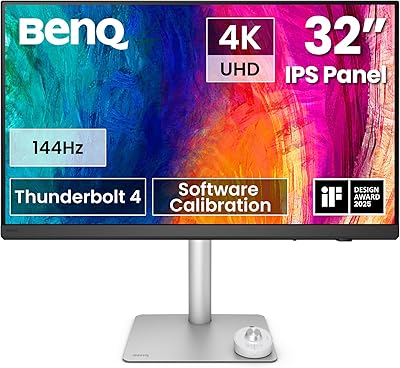
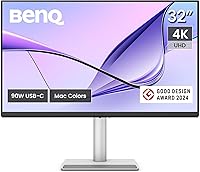
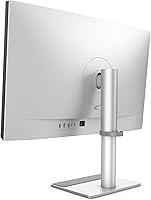
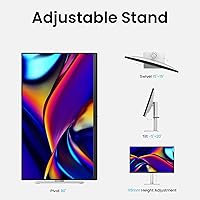
The BenQ MA320U 32-inch 4K Monitor arrived in late 2024 as BenQ's clearest answer to one specific question: what does a display built entirely around the MacBook experience actually look like? It sits at the premium end of BenQ's lineup, and that positioning shows in every design decision — from the Mac-calibrated color tuning to the USB-C ecosystem that replaces a tangle of adapters. This is not a monitor chasing refresh rates or HDR headline specs. It is a productivity-first display built for people who live in macOS daily. The fully adjustable stand — height, tilt, swivel, and pivot — is a genuine differentiator at this price point, not an afterthought.

Features & Benefits

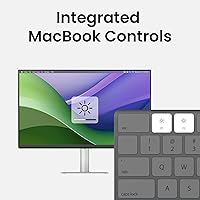
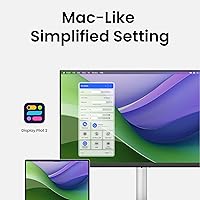
The MA320U's standout feature is its Mac Color Match calibration, which tunes the panel's wide P3 color gamut to match what macOS actually renders — colors look consistent whether you're viewing them on your MacBook screen or the external display. The dual USB-C setup is genuinely practical: one port pushes 90W to keep a MacBook Pro running at full tilt, while a second delivers 15W for an iPhone or iPad on the side. No dock required. Keyboard brightness and volume adjustments work natively without installing any software, which sounds minor until you've spent a week fighting a monitor that refuses to cooperate with macOS. The built-in USB hub rounds out a surprisingly clean desk setup.

Best For

This 32-inch 4K display makes the most sense for MacBook Pro and MacBook Air owners who want to consolidate their desk into a single-cable workspace — one USB-C connection handles video, power, and data simultaneously. Designers and photographers working in macOS will appreciate the P3 coverage for color-critical tasks like photo retouching or layout work. It also suits home office workers who have outgrown a cluttered multi-adapter setup. If you're coming from a 1080p or aging 1440p panel, the jump to native 4K on a 32-inch matte screen is immediately noticeable. That said, if your primary machine is Windows-based or you need high refresh rates for gaming, this is not the right monitor for that job.

User Feedback

With a 4.6-star average across 210+ ratings, the MA320U earns its praise largely for plug-and-play Mac compatibility and color accuracy that users say matches expectations right out of the box — no manual calibration needed. Repeat praise goes to how naturally it integrates with macOS, which buyers comparing it to LG and Dell alternatives specifically call out as a real differentiator. The criticisms are worth noting, though. Some users report that the brightness ceiling feels limiting in bright rooms, and a handful mention the stand can be stiff to reposition. HDR performance draws mixed reactions. Whether the price feels justified depends largely on how much you value Mac-native integration; buyers coming from generic monitors tend to find it worthwhile.

Pros

  • Single USB-C cable handles display, 90W charging, and data — no dock needed for most MacBook setups.
  • P3 color calibration is done at the factory, so colors look accurate on macOS right from the start.
  • MacBook keyboard controls brightness and volume natively, with zero software installation required.
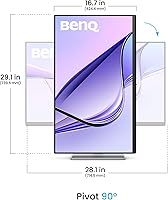
  • The adjustable stand covers height, tilt, swivel, and pivot — genuinely useful for all-day desk comfort.
  • Built-in USB hub adds connectivity without cluttering the desk with extra hardware.
  • A secondary 15W USB-C port lets you charge an iPhone or iPad at the same time as your MacBook.
  • The matte 32-inch 4K panel delivers noticeably sharp text and detail for productivity and design work.
  • Rated 4.6 stars across 210-plus buyers, with consistent praise for plug-and-play Mac compatibility.
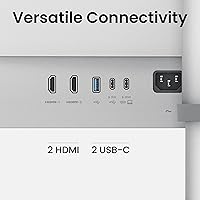
  • Two HDMI ports provide flexibility if you occasionally need to connect a non-USB-C device.
  • Buyers switching from generic monitors frequently cite the Mac-native experience as worth the price difference.

Cons

  • Brightness levels can feel insufficient in rooms with strong ambient light or direct sun exposure.
  • HDR performance is basic — it checks the box but does not deliver the quality serious media professionals expect.
  • The stand can be stiff and resistant when repositioning, which gets frustrating during frequent adjustments.
  • No meaningful benefit for Windows users — the Mac-specific features that justify the price simply do not apply.
  • Refresh rate is standard for productivity use, making it a poor choice for gaming or fast-motion content.
  • At this price point, buyers expecting best-in-class HDR or peak brightness may feel the value is uneven.
  • Heavier than average at 33.2 pounds, which can complicate mounting or repositioning on smaller desks.
  • Competing Mac-compatible monitors from LG offer comparable panel quality at a lower price if ecosystem integration matters less to you.

Ratings

The scores below reflect our AI-driven analysis of verified global buyer reviews for the BenQ MA320U 32-inch 4K Monitor, with spam, bot activity, and incentivized feedback actively filtered out before scoring. Each category is assessed on real-world usage patterns — not spec sheets — so both the genuine strengths and the recurring frustrations are represented honestly. Where buyers consistently agreed, the scores are decisive; where opinions split, that tension is reflected too.

Mac Ecosystem Integration
94%
This is the category where the MA320U genuinely stands apart from the competition. Buyers repeatedly describe the setup experience as plug-and-play in the truest sense — connect one USB-C cable and macOS recognizes the display, maps the keyboard brightness and volume controls, and begins charging without any configuration. For MacBook users tired of fighting third-party software or display managers, this level of native compatibility is a meaningful relief.
The integration only delivers full value within the Apple ecosystem. Windows users connecting via HDMI get a functional display but none of the keyboard control benefits, and a handful of buyers noted that after macOS updates, the keyboard controls occasionally needed a reconnect cycle to re-sync — a minor but real friction point.
Color Accuracy
91%
The factory-calibrated P3 wide color gamut earns consistent praise from designers and photographers who noticed that colors on the external display match their MacBook screen far more closely than previous monitors they had used. Buyers working in Adobe applications or macOS-native creative tools specifically called out the skin tone and gradient accuracy as noticeably better than competing panels they had tried.
A small group of highly color-critical users — particularly those doing professional print pre-press work — felt that factory calibration alone was not a substitute for a proper hardware calibration with a colorimeter. Out-of-box accuracy is strong, but the panel does not ship with a calibration report, which matters to some professional workflows.
Connectivity & USB Hub
88%
Having 90W USB-C charging, a second 15W USB-C port for mobile devices, two HDMI inputs, and a USB hub all built into one monitor genuinely reduces desk clutter. Buyers who previously ran a MacBook alongside a separate hub or dock found they could retire that hardware entirely, which is a real space and cost saving for home office setups.
The USB hub does not include a USB-A port on the front panel for quick thumb drive access, which a few buyers found inconvenient. Additionally, the 15W secondary charging port is adequate for an iPhone but slower than expected for iPad Pro models that support higher wattage charging.
Stand Ergonomics
83%
The full range of adjustments — height, tilt, swivel, and pivot — is not something every monitor at this price offers, and buyers notice it. Taller users especially appreciated being able to raise the panel high enough to maintain a neutral neck position without resorting to monitor risers or aftermarket arms. The build feels sturdy rather than plasticky.
Stand stiffness is the most consistent ergonomic complaint in buyer reviews. Adjusting the height in particular requires noticeable force, and some users reported that the stand creeps down slightly over time once set. For buyers who like to frequently reposition their monitor, this stiffness becomes a daily annoyance rather than a one-time setup quirk.
Display Sharpness
92%
At 32 inches with a native 4K resolution, the pixel density produces text and UI elements that look crisp and well-defined at typical arm-length desk distances. Buyers upgrading from 1080p or 1440p displays consistently describe the clarity improvement as immediately obvious, especially in dense spreadsheets, code editors, and fine-detail photo work.
A small number of buyers noted that at macOS default scaling, some UI elements can feel slightly small on a 32-inch panel and required adjusting display scaling preferences to find their preferred balance between sharpness and element size — a minor setup step that not everyone anticipated.
Brightness
67%
33%
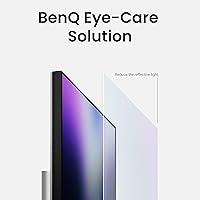
For typical indoor office environments with controlled lighting, the brightness is adequate and the matte coating does solid work reducing reflections from overhead lights. Buyers who work in dim or moderate lighting reported no complaints, and the matte surface helps the display feel comfortable during extended work sessions.
The brightness ceiling is one of the most frequently cited criticisms in user reviews. Buyers with desks near windows or in sun-lit rooms found the panel underwhelming at maximum brightness, with some describing it as washed out during daylight hours. Compared to competing monitors in a similar price range, the peak nit level falls noticeably short.
HDR Performance
58%
42%
HDR is technically supported, and for casual HDR video consumption — streaming services, YouTube HDR content — the panel provides a visible if modest improvement over SDR. Buyers who use the monitor primarily for productivity and only occasionally watch HDR content did not find this a dealbreaker.
Buyers with any professional HDR use case — color grading, video review, or HDR gaming — consistently describe the HDR performance as disappointing. The lack of local dimming and the limited peak brightness mean HDR mode does not deliver the contrast or highlight detail that the feature implies, and several buyers advised disabling HDR mode entirely for better overall image quality.
Build Quality
86%
The monitor's physical construction earns positive remarks for feeling premium and well-engineered. The silver finish matches Apple hardware closely enough that buyers specifically noted it looked intentional on a Mac desk rather than generic, and the chassis does not flex or creak when adjusting the stand or cleaning the screen.
A few buyers noted that the silver color description was slightly misleading — the actual finish leans closer to light gray than true silver in most lighting conditions. This is largely cosmetic, but buyers who purchased specifically for a color match with older Apple peripherals occasionally felt the tone did not align as closely as expected.
Value for Money
72%
28%
For MacBook users who would otherwise buy a separate dock alongside a generic 4K monitor, the MA320U's all-in-one connectivity proposition genuinely shifts the value calculation. When you factor out the cost of a quality USB-C dock, the effective premium over a comparable panel without Mac integration narrows considerably, and buyers who made this comparison tended to feel the price was fair.
Buyers who do not need the Mac-native features — or who compared it directly against LG UltraFine panels or Dell UltraSharp monitors spec-for-spec — sometimes felt the price was hard to justify. For the brightness and HDR performance offered, several reviewers noted that competing monitors deliver better panel specs at the same or lower price if ecosystem integration is not a priority.
Setup & Out-of-Box Experience
89%
The unboxing and initial setup experience draws consistent praise. Most MacBook users report being up and running within minutes of connecting the USB-C cable, with no driver installation, no OSD configuration hunting, and no compatibility troubleshooting. For buyers who dread monitor setup, the MA320U's near-instant compatibility is a genuine differentiator.
Buyers connecting via HDMI rather than USB-C found the experience less intuitive, as several of the Mac-specific features are only active on the USB-C connection. The included cable is functional but short for some desk configurations, prompting a few buyers to immediately source a longer USB-C cable to make the setup work comfortably.
OSD & Controls
74%
26%
For Mac users, the on-screen display is something you barely need to touch, since brightness and volume are handled from the keyboard. The OSD itself is clean and logically organized when you do access it, covering input switching and image mode selection without unnecessary complexity.
The physical OSD navigation buttons on the monitor are small and located in an awkward position on the rear edge, making manual adjustments fiddly without looking. Buyers who frequently switch input sources between a MacBook and a second device found the button layout frustrating compared to monitors with front-facing joystick controls.
Matte Screen Coating
81%
19%
The matte anti-glare coating performs well in real home and office environments, reducing distracting reflections from windows and overhead lighting without creating the grainy, washed-out look that heavy matte coatings sometimes produce. Buyers who previously used glossy displays specifically appreciated the reduction in eye fatigue during long work sessions.
A small number of buyers felt the matte coating slightly softened fine text and image detail compared to a glossy panel at the same resolution. This is a known trade-off with matte displays rather than a defect, but buyers who prefer the punch of a glossy screen should be aware the coating does affect perceived sharpness to a minor degree.
Long-Term Reliability
78%
22%
Given the monitor launched in late 2024, the long-term reliability data is still accumulating, but early buyers report consistent performance without backlight uniformity issues, dead pixels, or USB-C charging degradation after several months of daily use. BenQ's general reputation for monitor durability holds up in user commentary so far.
A handful of buyers reported intermittent USB-C connectivity drops — where the MacBook briefly lost the display signal before reconnecting — typically resolved by reseating the cable. It is not a widespread complaint, but it appears with enough frequency in reviews to be worth noting, particularly for buyers in demanding daily-use scenarios.

Suitable for:

The BenQ MA320U 32-inch 4K Monitor was built with a very specific buyer in mind, and if you fit that profile, it is hard to argue against. MacBook Pro and MacBook Air users who want to connect a single USB-C cable and immediately have a fully powered, color-accurate 32-inch workspace will find that this monitor delivers exactly that without the usual friction of third-party software or dock shopping. Creative professionals — graphic designers, photographers, and video reviewers working within the Apple ecosystem — benefit meaningfully from the P3-calibrated panel, which produces colors that hold up against the MacBook's own Retina display rather than clashing with it. Home office workers who want a tidier desk will appreciate that the MA320U consolidates display, charging, and USB connectivity into one connection, with no separate dock eating up desk space or budget. If you are upgrading from a 1080p or 1440p display and primarily work in macOS, the step up to native 4K on a large matte panel is immediately noticeable in text clarity and overall screen real estate.

Not suitable for:

The BenQ MA320U 32-inch 4K Monitor is a purpose-built Mac accessory, and that focus is also its most significant limitation for certain buyers. Windows users will not get any of the native keyboard integration benefits, and the Mac Color Match calibration is largely irrelevant outside of macOS — making the price premium harder to justify on a PC setup. Gamers should look elsewhere entirely: this 32-inch 4K display does not prioritize high refresh rates or low response times, so anyone chasing smooth frame rates in fast-paced games will find it underwhelming compared to gaming-focused panels at similar or lower prices. Buyers who work in very bright environments may find the brightness ceiling restrictive, particularly if the monitor is placed near a window. HDR performance is functional rather than impressive, so professionals whose work depends on HDR grading should evaluate it carefully against displays with more robust HDR specs. Finally, if you are budget-conscious and mostly need a functional second screen rather than Mac-native integration, there are competing monitors from LG and Dell that offer similar panel quality at a lower cost.

Specifications

  • Screen Size: The display measures 32 inches diagonally, providing a substantial work surface without requiring an oversized desk footprint.
  • Resolution: Native resolution is 3840x2160 (4K UHD), delivering sharp text and fine detail across the full panel at standard macOS scaling.
  • Aspect Ratio: The panel uses a standard 16:9 widescreen aspect ratio, compatible with all modern video formats and macOS display layouts.
  • Panel Surface: The screen uses a matte anti-glare coating, which reduces reflections in bright office or home environments without degrading color quality.
  • Color Gamut: The display covers the DCI-P3 wide color gamut and is factory-calibrated using BenQ's Mac Color Match tuning for accurate macOS rendering.
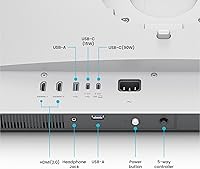
  • USB-C Ports: Two USB-C ports are included: one delivers up to 90W power delivery for charging a MacBook Pro or Air, and the second outputs 15W for mobile devices.
  • Video Inputs: Connectivity includes two HDMI ports and two USB-C ports, allowing connection from multiple source devices simultaneously.
  • Power Delivery: The primary USB-C port supports up to 90W power delivery, sufficient to charge a MacBook Pro at full performance while driving the display.
  • Mac Integration: Native macOS keyboard shortcuts for brightness and volume control work out of the box with no drivers or third-party software required.
  • Stand Adjustments: The included stand supports height, tilt, swivel, and pivot adjustments, covering the full range of ergonomic positioning needs.
  • Dimensions: The monitor with stand measures 28 x 24 x 8 inches (L x W x H), fitting standard deep desks without overhanging the edge.
  • Weight: Total weight with stand is 33.2 pounds, which is on the heavier side and worth factoring in if VESA mounting or frequent repositioning is planned.
  • VESA Compatibility: The MA320U supports VESA mounting, allowing users to remove the stand and attach the panel to a third-party arm or wall mount.
  • USB Hub: The built-in USB hub expands downstream connectivity, letting users connect peripherals directly to the monitor rather than to the MacBook itself.
  • Release Date: The monitor was first made available in September 2024, placing it among the more recent Mac-optimized displays currently on the market.
  • Brand & Model: Manufactured by BenQ under the model designation MA320U, part of the brand's Mac-focused monitor lineup.
  • Color Finish: The monitor is offered in a silver finish that is designed to visually complement the aluminum aesthetic of Apple MacBook and Mac hardware.

Related Reviews
BenQ PD3225U 32-inch 4K Monitor
88%
94%
Color Accuracy
90%
Ergonomics & Comfort
89%
Thunderbolt 3 Connectivity
88%
Setup & Installation
87%
Build Quality
More
BenQ PD3226G 32-inch 4K Designer Monitor
81%
93%
Color Accuracy
91%
Connectivity
88%
Anti-Glare Performance
79%
Refresh Rate Utility
82%
KVM Switch
More
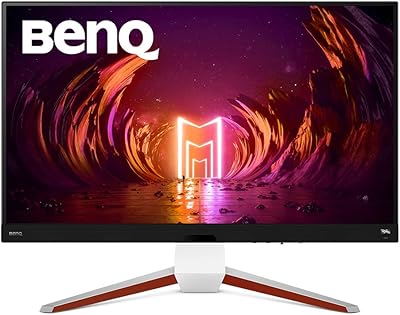
BenQ EW3280U 32-inch 4K UHD Monitor
83%
94%
Display Quality
91%
Color Accuracy
78%
Ease of Setup
70%
Audio Performance
89%
Connectivity
More
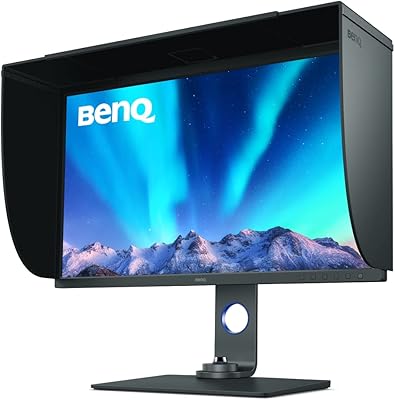
BenQ SW321C 32-inch Photo Editing Monitor
82%
94%
Color Accuracy
91%
Factory Calibration
93%
Color Gamut Coverage
88%
Build Quality
86%
Ergonomics
More
BenQ EX3210U 32-inch 4K Gaming Monitor

78%
93%
Image Quality
89%
Color Accuracy
88%
Gaming Performance
67%
HDR Performance
86%
Build Quality
More
ViewSonic VP3256-4K 32-Inch 4K UHD Monitor
88%
94%
Display Quality
92%
Color Accuracy
88%
Ergonomics & Comfort
86%
Build Quality
90%
Ease of Setup
More
ViewSonic VX3267U-4K 32-inch 4K IPS Monitor

74%
91%
Image Sharpness
83%
USB-C Functionality
76%
Color Accuracy
54%
HDR Performance
47%
Stand & Ergonomics
More
ViewSonic VP3268A-4K 32-inch 4K UHD IPS Monitor
86%
94%
Color Accuracy
88%
Ergonomics/Comfort
91%
Build Quality
83%
HDR Performance
85%
Connectivity Options
More
ViewSonic VX3276-4K-MHD 32-inch 4K Monitor
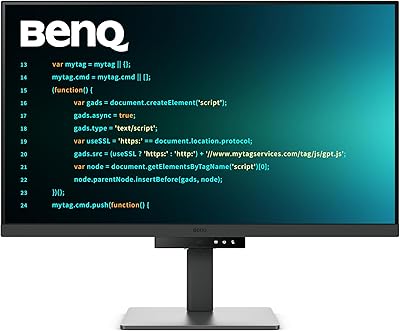
76%
91%
Image Clarity & Sharpness
74%
Color Accuracy
86%
Contrast & Black Levels
61%
HDR Performance
58%
Refresh Rate & Motion Handling
More
BenQ RD320U 32” 4K Monitor
87%
94%
Display Quality
89%
Ergonomics & Comfort
91%
Eye-care Features
93%
Color Accuracy
80%
Size & Desk Compatibility
More

FAQ

It works with both. The MA320U is compatible with any MacBook that supports USB-C with DisplayPort Alt Mode and USB Power Delivery, which covers recent MacBook Air and MacBook Pro models. The 90W charging is enough to keep a MacBook Pro running under load, and MacBook Air users will find it charges faster than they actually need.

Yes, in most cases a single USB-C cable handles the display signal, 90W charging, and USB hub data all at once. You plug in one cable and your MacBook is powered, extended, and connected to any peripherals plugged into the monitor. It genuinely replaces the need for a separate dock for everyday productivity use.

They do, as long as you are connecting via USB-C. macOS recognizes the BenQ MA320U 32-inch 4K Monitor as a compatible display and maps the standard brightness and volume keys automatically. No drivers, no apps, no setup — it just works the way Apple intends external displays to behave.

It is closer than most monitors at this size. BenQ's Mac Color Match calibration tunes the P3 gamut specifically to match macOS color rendering, so moving your eyes between the laptop screen and this display does not produce the jarring color shift that generic monitors often create. For design and photo work, the consistency is genuinely useful.

It is adequate for typical indoor lighting, but it has a noticeable ceiling. If your desk gets direct sunlight or you work in a very bright room, you may find the maximum brightness underwhelming compared to some competing panels. A matte coating helps with glare, but the brightness level itself is a fair criticism raised by a number of real buyers.

You can connect any device with a compatible HDMI or USB-C output, including Windows PCs and iPads. The hardware works fine. However, the Mac-native keyboard integration and color calibration benefits do not carry over to Windows, so you would essentially be paying for features you cannot use. For iPad, the second USB-C port handles both video and 15W charging simultaneously.

The stand is functional and covers height, tilt, swivel, and pivot adjustments, which is more than most monitors in this category offer. That said, some users report the adjustment mechanisms feel stiff, particularly for height changes. If you frequently reposition your monitor throughout the day, a quality monitor arm might be a worthwhile upgrade — the monitor does support VESA mounting.

The MA320U competes directly with LG's Mac-targeted lineup. The BenQ tends to get stronger marks for stand ergonomics and the native macOS keyboard controls, while LG's panels are sometimes favored for peak brightness and a thinner profile. Price-wise they sit in a similar range. If Mac integration is your top priority, the BenQ holds up well in that comparison; if you want the thinnest possible bezels or higher brightness, LG is worth a close look.

HDR is supported but is not a standout feature. It handles standard HDR content adequately, but the peak brightness and local dimming are not at the level you would expect from a monitor marketed for its HDR performance. If accurate HDR grading or HDR gaming is a priority for you, there are better-suited panels available. For general productivity and creative work in SDR, it is not a concern.

At 32 inches with a 4K resolution, macOS scaling keeps UI elements comfortable at typical desk distances of around 24 to 30 inches. The screen real estate is genuinely generous for multitasking — you can comfortably have two full-width documents side by side. The physical dimensions (28 x 24 inches with the stand) fit most standard desks, though shallower desks under 24 inches deep may feel a bit cramped.

Where to Buy