Overview

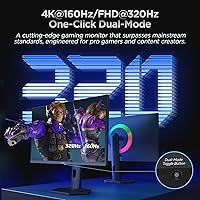
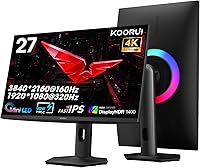
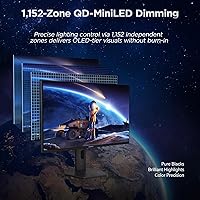
The KOORUI S2741LM 27″ 4K Gaming Monitor sits at an interesting crossroads — designed for gamers but credible enough for creative professionals, and that dual identity is rare at this price tier. KOORUI is a Chinese brand still building its reputation in Western markets, but this panel reflects genuine ambition. The backlighting technology here is QD-Mini LED, not OLED, and that distinction matters. You won't get per-pixel black levels, but 1152-zone local dimming brings contrast meaningfully closer than a standard IPS backlight ever could. The standout differentiator is dual-mode switching — one button toggles between full 4K for cinematic gaming and 1080p for raw competitive speed. Few monitors at any price offer that kind of flexibility.
Features & Benefits

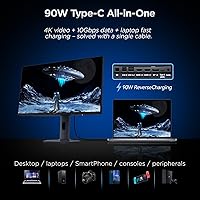
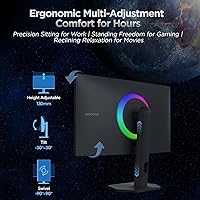
What makes the KOORUI 27-inch 4K panel worth a closer look is the depth behind its specs. With over a thousand individually controlled backlight zones, dark scenes in games — deep-space environments, noir-style interiors — render with real shadow detail. Blooming is minimized here, though not fully absent as it would be on OLED. The factory color calibration ships with a Delta E below 1, which translates to reliable accuracy across the wide color spaces photographers and video editors actually use. Connectivity is a genuine strength: two HDMI 2.1 ports, DisplayPort 1.4, and a 90W USB-C port that handles laptop charging and 4K video through a single cable. The fully adjustable stand covers height, swivel, and tilt comfortably.

Best For

This dual-mode gaming display is a strong fit for people who genuinely live in two modes. If you play story-driven games at night and edit photos or grade footage during the day, finding a single monitor that covers both without meaningful compromise is rare. Console owners running both a PS5 and Xbox Series X will appreciate two HDMI 2.1 ports and no switcher required. Laptop users get a clean single-cable workflow through USB-C — power and a full 4K signal in one connection. It also suits buyers stepping up from 1080p or 1440p who want a sharper 27-inch panel without moving to an oversized screen. Those who only care about raw competitive speed may find better options elsewhere.

User Feedback

Because this QD-Mini LED monitor is a relatively recent release, the review pool is still growing — treat early patterns as directional rather than settled. That said, buyers in creative fields have responded positively to the out-of-box color accuracy, with several noting it held up well against hardware calibrators without additional profiling. Gamers describe noticeable improvements in dark-scene clarity during HDR content, which is encouraging. The most consistent criticism centers on Mini LED blooming — bright interface elements against dark backgrounds can produce some haloing on edges. A smaller group of users have flagged the OSD navigation as less intuitive than expected. USB-C charging has drawn relatively few complaints and appears consistent across different laptop brands.

Pros

  • Dual-mode switching lets you run 4K for immersive games and drop to 1080p for competitive play on the same display.
  • Over a thousand local dimming zones deliver noticeably deeper shadow detail than cheaper backlit panels.
  • Factory color calibration ships accurate enough for photo editing and video grading without extra profiling steps.
  • Two HDMI 2.1 ports mean a PS5 and Xbox Series X can both stay connected simultaneously.
  • The 90W USB-C port genuinely replaces a separate laptop charger while carrying a full 4K video signal.
  • HDR certification at this brightness tier produces visible highlights in supported games and streaming content.
  • The stand covers a wide height range with full swivel, making long work and gaming sessions more comfortable.
  • Matte screen coating reduces glare without visibly softening the image during daylight use.
  • At this price point, the breadth of connectivity is difficult to match in a comparable panel type.
  • Adaptive sync support keeps gameplay smooth across both modes without screen tearing.

Cons

  • KOORUI lacks the brand recognition and independent review history of established monitor manufacturers, making long-term reliability harder to assess.
  • Mini LED blooming is still visible when bright UI elements or subtitles appear against very dark backgrounds.
  • The OSD navigation has been flagged by some users as less intuitive than it should be for a display with this many configurable options.
  • As a newer product listing, the available real-world review data is limited, so early impressions may shift significantly over time.
  • DisplayHDR 1400 certification does not close the gap with OLED — deep pure blacks are still not achievable on an LCD backlit panel.
  • Running at the highest refresh rate requires dropping to 1080p resolution, which may disappoint buyers expecting native 4K at full speed.
  • At 15 pounds, this dual-mode gaming display is on the heavier side, making repositioning or arm mounting more cumbersome.
  • Warranty and after-sales support infrastructure for KOORUI in Western markets is not as developed as it is for tier-one brands.

Ratings

The KOORUI S2741LM 27″ 4K Gaming Monitor scores below are generated by our AI rating engine after analyzing verified global user reviews, with spam, bot activity, and incentivized feedback actively filtered out. The results reflect a genuine cross-section of buyer experiences — from competitive gamers and creative professionals to home office users — and both the standout strengths and the real frustrations are weighted into every score transparently.
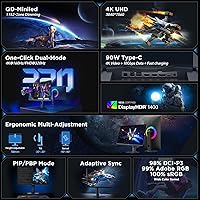
Image Quality
88%
Users consistently describe the picture as a clear step above standard IPS panels, particularly in scenes with rich color gradients and cinematic HDR content. The quantum dot layer adds visible depth and saturation that owners coming from budget monitors find immediately noticeable in games and streaming alike.
A handful of reviewers note that peak brightness in SDR mode does not feel as impactful as the HDR spec sheet implies, and color uniformity toward the corners of the panel has drawn occasional criticism from users doing flat-color design work.
HDR Performance
83%
In supported titles and HDR video, the local dimming system produces genuinely convincing highlights and shadow separation that LCD monitors at lower price points cannot replicate. Night driving sequences in racing games and dark atmospheric titles are among the most frequently praised use cases.
This is still an LCD panel, and anyone arriving from an OLED display will notice blooming around bright interface elements on dark backgrounds. The HDR experience is strong for the technology, but it should not be mistaken for the per-pixel precision that self-emissive panels deliver.
Color Accuracy
91%
Photographers and video editors have been particularly positive, with several noting the factory calibration held up well when cross-checked against hardware colorimeters without additional profiling. Coverage of both the DCI-P3 and Adobe RGB color spaces makes it genuinely versatile across different creative workflows.
A small number of creative users working in commercial print environments found the factory profile needed adjustment at the extremes of the Adobe RGB gamut to match their output devices precisely. For the majority of general creative work, however, the out-of-box accuracy earns consistent praise.
Gaming Performance
86%
The dual-mode concept wins over buyers who genuinely split time between story-driven games and competitive multiplayer — the ability to stay on one monitor without compromise is a recurring theme in positive reviews. Motion handling at high refresh rates draws favorable comparisons to more expensive single-spec gaming panels.
Switching display modes through the OSD adds a layer of friction that some users find annoying mid-session, and a few competitive players note that the 1080p image at maximum refresh rate looks soft on a panel with this native pixel density, which is an inherent trade-off of resolution downscaling.
Mini LED Blooming Control
74%
26%
With over a thousand dimming zones, halo artifacts are noticeably more controlled than entry-level Mini LED panels with far fewer zones. In mixed-lighting gameplay scenes, the local dimming largely operates invisibly, which is a meaningful engineering achievement at this price tier.
Blooming remains visible in high-contrast scenarios — bright subtitle text on black letterboxing and star fields in space games are the scenarios most commonly flagged by reviewers. Users who watch a lot of dark cinema content will notice this more than those focused on general gaming.
Connectivity
93%
The dual HDMI 2.1 port configuration is repeatedly called out as a practical differentiator, letting console owners keep two devices connected without a switcher. The USB-C port functioning as a 90W charger, data hub, and 4K video input simultaneously is described as a significant desk-simplification feature by laptop users.
A small number of users have reported that the USB-B hub connection requires reconnection after certain sleep states, which adds minor friction to the USB hub functionality. The absence of a USB-C with Thunderbolt certification may matter to users in professional creative workflows reliant on daisy chaining.
USB-C Charging Reliability
81%
19%
Across a range of laptop brands tested by buyers — including MacBook Pro, Dell XPS, and Lenovo ThinkPad — the 90W output has generally been reported as stable and sufficient for sustained workloads. The single-cable desk setup is a frequently cited quality-of-life improvement in positive reviews.
MacBook Pro 16-inch users under sustained heavy CPU load note that 90W may not fully offset power draw, resulting in slow battery drain during intensive sessions. A small number of buyers have also reported the USB-C port not being recognized immediately after the monitor wakes from sleep.
Stand & Ergonomics
84%
The height adjustment range is wider than most gaming monitor stands in this category, and reviewers who work long hours appreciate being able to dial in a comfortable viewing angle without buying a separate arm. The swivel range is particularly valued by users who share a desk between two seating positions.
The stand does not support pivot rotation into portrait mode, which limits its utility for developers and readers who use vertical orientation. A few users also mention that the base footprint is wider than expected, consuming more desk depth than the panel size alone would suggest.
OSD & Controls
62%
38%
The physical buttons are accessible and responsive, and most users find the menu structure logical enough after a brief learning curve. Basic adjustments like brightness and input switching are reachable within a few presses once you are familiar with the layout.
The OSD has drawn consistent criticism as one of the weaker aspects of this display — navigating between submenu layers to access dual-mode switching or fine-tune local dimming settings frustrates users who expect quicker access. Several reviewers specifically mention the lack of a joystick-style navigator as a notable omission at this price point.
Build Quality
78%
22%
The panel housing feels solid and well-assembled, with minimal flex when adjusting the stand and a matte finish on the chassis that does not attract fingerprints visibly. Buyers report that unboxing and assembly are straightforward, with the stand attaching securely without tools.
The plastic used on the rear panel and stand column feels slightly below what some buyers expect given the overall price positioning, and a few reviewers note that the stand wobbles slightly at maximum height extension when the desk surface is not perfectly level. It is functional but not confidence-inspiring.
Value for Money
79%
21%
Buyers who cross-shopped against competing QD-Mini LED monitors from more established brands generally conclude that the feature-to-price ratio here is favorable, particularly given the dual HDMI 2.1 ports and 90W USB-C inclusion. For buyers who need both gaming and creative capabilities from a single display, the value case is strongest.
Buyers who only need one of the two use cases — pure gaming or pure creative work — can find more specialized displays at comparable or lower prices from brands with deeper support infrastructures. The value argument weakens if you are paying for features you will never actually use.
Brand Trust & Support
58%
42%
KOORUI has demonstrated credible build quality improvements as it has moved upmarket, and the monitor arrives with documentation suggesting a functioning warranty process. Early adopters generally report that the product matches its listed specifications without obvious corner-cutting.
KOORUI lacks the established service network and independent long-term reliability data that brands like LG, ASUS, or Samsung carry. Buyers who have needed warranty support in non-primary markets report slower response times, and the limited review history for this specific model makes durability predictions difficult to substantiate.
Setup & Out-of-Box Experience
82%
18%
Most buyers report the physical assembly taking under fifteen minutes with the included hardware, and the factory color calibration means the display is usable for serious work immediately without running additional profiles. Input detection on first boot has generally been described as reliable.
The included cable selection is basic, and buyers connecting via DisplayPort or USB-C for the first time may need to source their own cables if the included ones do not match their setup. The quick-start guide does not cover dual-mode configuration in enough detail for less experienced users.
Glare & Viewing Angle
77%
23%
The matte coating handles reflections effectively in typical room lighting conditions, and most buyers using the display near a window during the day report no significant glare issues. Color shift at moderate off-axis viewing angles is minimal for a panel in this technology class.
At steeper off-axis angles, brightness and color saturation drop more noticeably than some buyers expected, which matters for shared viewing or if your monitor position requires you to sit significantly to one side. The matte coating also introduces a slight texture that bothers users who are accustomed to glossy panels.

Suitable for:

The KOORUI S2741LM 27″ 4K Gaming Monitor is built for people who genuinely need one display to carry multiple roles without obvious compromise. If you spend evenings in expansive single-player titles and mornings retouching photos or cutting video, the combination of wide color gamut accuracy and strong contrast performance is a real practical advantage rather than a marketing claim. Console players with both a PS5 and Xbox Series X in their setup will find the dual HDMI 2.1 ports solve a genuine cable-management headache. Laptop users who want a clean desk and a single USB-C cable to handle both power delivery and a full 4K signal will feel immediately at home here. It also works well for buyers upgrading from a 1080p or 1440p display who want the jump to 4K without moving to a physically larger screen than a 27-inch form factor allows.
Not suitable for:

Buyers who exclusively play fast-paced competitive games and have no interest in the creative or cinematic side of this display should probably look elsewhere. At this price, a high-refresh 1440p panel with a more established panel brand may offer better motion clarity and a more familiar support ecosystem. The KOORUI 27-inch 4K panel is also not the right call for anyone expecting OLED-level contrast — Mini LED local dimming is a genuine improvement over standard backlighting, but blooming around bright objects on dark backgrounds is still a real behavior you will notice in certain scenes. Those who need a professionally certified display for print production work should verify this panel against their specific color standards rather than relying solely on factory figures. Buyers who prioritize long-term brand support, established warranty service, or a widely reviewed product track record may also want to wait until this newer model accumulates more independent testing data.

Specifications

  • Panel Type: This monitor uses a Quantum Dot Mini LED (QD-Mini LED) panel, which combines a Mini LED backlight with a quantum dot layer for enhanced color volume and contrast over standard IPS displays.
  • Screen Size: The display measures 27 inches diagonally, offering a compact footprint that suits single-monitor desks without the eye-scanning fatigue common on larger panels.
  • Resolution: Native resolution is 3840×2160 pixels (4K UHD), delivering sharp detail at normal viewing distances without requiring upscaling.
  • Refresh Rate: The panel operates in two selectable modes: 4K at 160Hz for high-fidelity gaming, or 1080p at 320Hz for competitive play requiring maximum motion clarity.
  • Response Time: Rated at 1ms gray-to-gray response time, which is sufficient to minimize trailing or ghosting during fast-motion gameplay in either display mode.
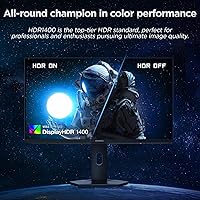
  • HDR Certification: Carries VESA DisplayHDR 1400 certification, indicating a peak brightness capable of producing strong specular highlights in compatible HDR content.
  • Local Dimming: The backlight is divided into 1152 independently controlled zones, allowing the panel to deepen blacks in dark areas of a scene while maintaining brightness elsewhere.
  • Color Gamut: Factory-calibrated to cover 99% of the Adobe RGB color space, 98% DCI-P3, and 100% sRGB, making it usable for color-critical photo and video workflows.
  • Color Accuracy: Ships with a factory-measured Delta E of 0.55, which falls within the threshold considered accurate for professional color work without additional hardware calibration.
  • Video Inputs: Connectivity includes two HDMI 2.1 ports (each supporting up to 48Gbps bandwidth) and one DisplayPort 1.4 input for PC connection at high refresh rates.
  • USB-C Port: A single USB-C port delivers up to 90W of power delivery for laptop charging while simultaneously transmitting a 4K video signal over one cable.
  • USB Hub: The monitor includes two USB-A downstream ports and one USB-B upstream port, allowing it to function as a basic USB hub when connected to a host device.
  • Adaptive Sync: Supports Adaptive Sync Premium (FreeSync Premium), which dynamically matches the display refresh rate to GPU output to reduce screen tearing across both display modes.
  • Stand Adjustment: The included stand supports 130mm of height adjustment, ±90-degree swivel rotation, and forward/backward tilt for flexible ergonomic positioning.
  • VESA Mounting: The rear panel is compatible with 100×100mm VESA mounts, allowing the monitor to be used with most third-party monitor arms or wall-mount brackets.
  • Aspect Ratio: Standard 16:9 widescreen aspect ratio, consistent with the vast majority of gaming, streaming, and productivity content formats.
  • Screen Coating: The display surface uses a matte anti-glare coating, which reduces reflections from ambient light sources without introducing significant image diffusion.
  • Dimensions: With the stand attached, the monitor measures approximately 21×11×14 inches, occupying a moderate footprint suitable for standard desk depths.
  • Weight: The complete unit including stand weighs 15 pounds, which is manageable for solo setup but on the heavier side for frequent repositioning.
  • Brightness (SDR): Standard dynamic range brightness is rated at 550 nits, which is adequate for well-lit rooms and above average for the IPS-class panel category.

Related Reviews
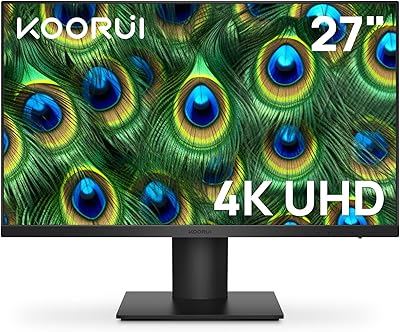
KOORUI N07 27-inch 4K IPS Monitor
76%
93%
Image Sharpness
89%
Color Accuracy
88%
Color Gamut Coverage
91%
Value for Money
82%
Eye Comfort
More
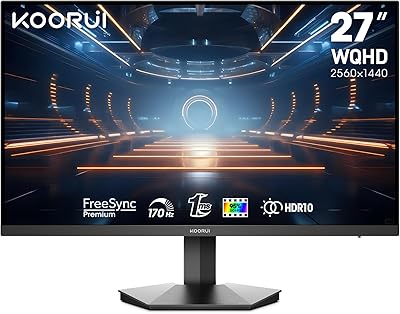
KOORUI 27E3Q 27-inch QHD Gaming Monitor
76%
88%
Value for Money
83%
Image Quality
76%
Refresh Rate Performance
91%
Stand & Ergonomics
47%
HDR Performance
More
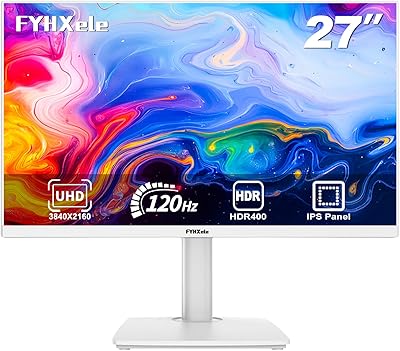
FYHXele 27-inch 4K 120Hz Gaming Monitor
72%
83%
Value for Money
88%
Image Sharpness
79%
Panel Response & Motion
76%
Color Accuracy
47%
HDR Performance
More
KOORUI G2721E 27-inch Gaming Monitor
78%
93%
Refresh Rate Performance
88%
Image Clarity & Resolution
84%
Color Accuracy
81%
Motion Handling
52%
HDR Quality
More
INNOCN 27M2V 27″ 4K Gaming Monitor
76%
91%
Color Accuracy
74%
HDR Performance
87%
Gaming Performance
82%
Value for Money
89%
Connectivity
More
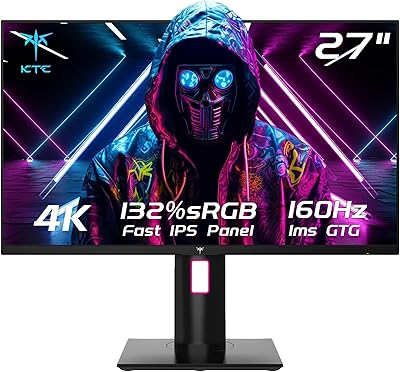
KTC H27T22 27″ 4K Gaming Monitor
78%
93%
Image Sharpness
88%
Color Accuracy
91%
Gaming Performance
58%
HDR Quality
89%
Ergonomics & Stand
More
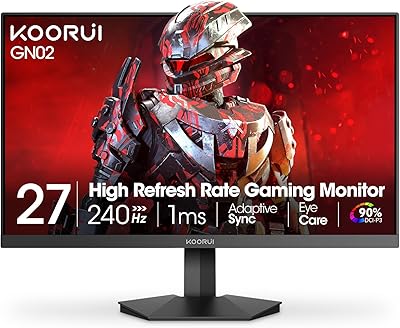
KOORUI GN02 27-inch 240Hz Gaming Monitor
87%
91%
Gaming Performance
89%
Display Quality
88%
Color Accuracy
93%
Response Time
85%
Ergonomics and Design
More
KOORUI G2711P 27″ Gaming Monitor
79%
93%
Refresh Rate Performance
88%
Panel Color Quality
91%
Motion Clarity
89%
Value for Money
61%
Resolution & Sharpness
More
KOORUI 27” Mini-LED IPS Gaming Monitor
85%
93%
Gaming Performance
90%
Color Accuracy
91%
Display Clarity
88%
Ergonomics & Adjustability
84%
Build Quality
More
ASUS VG27UQ1A 27-inch 4K Gaming Monitor
77%
93%
Image Clarity & Sharpness
88%
Gaming Performance
84%
Color Accuracy
51%
HDR Performance
91%
Adaptive Sync
More

FAQ

The mode switch is accessible through the OSD menu rather than a dedicated physical button, so it takes a few button presses rather than a single click. It is not instant, but it is straightforward once you learn the menu path. Most users set it and leave it based on what they are playing rather than switching constantly mid-session.

90W is sufficient to charge most thin-and-light laptops and many 14-inch or 15-inch models at full or near-full speed. MacBook Pro 14-inch users should find it adequate, though a MacBook Pro 16-inch may charge more slowly under heavy load since Apple recommends higher wattage for that model. Most Windows ultrabooks will have no issues at all.

It depends heavily on the content. In scenes with small bright elements — like subtitles, HUD icons, or stars against a black sky — you may notice a soft halo of light around them. In general gameplay with mixed lighting, it is far less obvious. This is a characteristic of all zone-based local dimming displays and not unique to this panel, but anyone who has used OLED will notice the difference immediately.

Yes. Both HDMI 2.1 ports support the bandwidth needed for 4K at 120Hz, which is the PS5 and Xbox Series X gaming standard. You can keep both consoles plugged in simultaneously and switch between inputs without any adapter or switcher.

The factory calibration is genuinely solid for a gaming monitor — a Delta E below 1 is better than many displays marketed specifically for creative work. For casual photo editing and color grading, most users should find it reliable without running a hardware calibration. If you work in commercial print production with tight color tolerances, running your own calibration with a colorimeter is still advisable.

The included stand is more capable than average — height adjustment, swivel, and tilt are all present and functional. If you want portrait mode or very precise positioning, you would need a third-party arm since pivot rotation is not supported. The VESA 100×100mm pattern makes aftermarket arm compatibility straightforward.

Yes, running native 4K at 160Hz in modern AAA games is demanding and will require a high-end graphics card — think current flagship GPU territory. If your card cannot sustain 4K at high frame rates, the dual-mode option to drop to 1080p at 320Hz makes this monitor significantly more accessible across a wider range of hardware.

This QD-Mini LED monitor does not have an internal fan, so there is no active cooling noise to worry about. Mini LED monitors occasionally generate mild warmth from the backlight under prolonged high-brightness HDR use, but passive heat dissipation is the norm for panels in this category.

Quite practical. The matte coating reduces glare in office lighting, the USB-C single-cable connection works well for laptop docking, and the color accuracy is more than adequate for design, productivity, and video calls. The stand gives you enough adjustment range to set a comfortable eye level for long work sessions. It is not a dedicated productivity display, but it covers that role comfortably.

KOORUI has been gaining visibility in the monitor market over the past few years, particularly in the budget-to-mid-range segment, and this panel represents a step into more premium territory for them. As with any growing brand, the long-term reliability track record is less established than companies like LG, Samsung, or ASUS. The product specification and early user feedback are encouraging, but buyers who prioritize well-documented warranty support and a long service history may want to factor that into their decision.