Overview

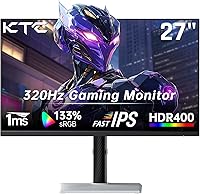
The KTC H27E6 27-inch Gaming Monitor enters the competitive mid-range monitor space with a proposition that's hard to dismiss: Fast IPS panel quality at a price where TN displays still dominate. KTC isn't a household name like LG or ASUS, and they're transparent about being a value-focused brand — which sets realistic expectations around build finish and bundled accessories. What actually matters here is the panel itself. At 300Hz with WQHD resolution, this display punches meaningfully above its weight class. The Fast IPS advantage over TN isn't subtle — better viewing angles, richer colors, and no washed-out image when you shift slightly in your seat.
Features & Benefits

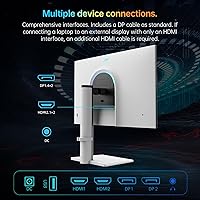
On paper, 300Hz at 1440p sounds like a demanding combination — and it is, requiring a capable GPU to fully exploit. But this KTC gaming monitor handles it well. The Fast IPS panel's 144% sRGB coverage translates to noticeably punchy, vibrant colors in games, though out of the box the saturation can lean a touch rich for productivity work — a quick calibration pass helps. The 450 cd/m² brightness keeps the image readable in daylit rooms without cranking to uncomfortable levels. AMD FreeSync and NVIDIA G-Sync compatibility means tear-free gameplay regardless of which GPU you're running. Two HDMI ports and a DisplayPort round out a connectivity layout that handles a PC and console simultaneously without swapping cables.

Best For

This 27-inch WQHD display makes the most sense for competitive PC gamers who are ready to step up from 1080p 144Hz but don't want to cross into high-end pricing territory. The jump from 1080p to 1440p on a 27-inch screen is genuinely visible — text is sharper, game environments carry more detail, and the larger canvas works well at typical desktop distances. Console and PC users running multiple sources will appreciate having two HDMI ports without needing a switch box. For people who spend long hours in front of a screen — whether gaming evenings or working through the day — the flicker-free panel and low blue light settings add real, practical comfort over time.

User Feedback

Buyers generally come away positive on the H27E6, with the most consistent praise landing on image sharpness and how smooth gameplay feels at high refresh rates. Less expected — and appreciated — is how well the matte coating handles glare without muddying the image. On the critical side, the stand has been flagged more than once as feeling less sturdy than the panel deserves, and the OSD menu isn't the most intuitive to navigate. The 320Hz overclock works for some users, but opinions are split — treat it as a nice-to-have rather than a selling point. Long-term reliability reports are encouraging, and the 3-year warranty gives buyers meaningful peace of mind when choosing a less-established brand.

Pros

  • Fast IPS panel delivers noticeably richer colors and wider viewing angles than TN alternatives at this price.
  • 300Hz native refresh rate keeps motion crisp and genuinely competitive in fast-paced multiplayer titles.
  • WQHD resolution at 27 inches is a visible, meaningful upgrade from 1080p that you notice immediately.
  • Compatible with both AMD FreeSync and NVIDIA G-Sync, covering the full range of GPU users.
  • Dual HDMI ports let you connect a PC and console simultaneously without juggling cables or adapters.
  • 450 cd/m² brightness holds up well in naturally lit rooms without washing out the image.
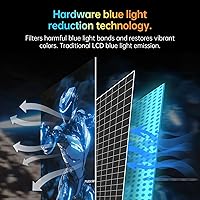
  • Flicker-free and low blue light certification reduce eye strain during long gaming or work sessions.
  • Three-year warranty offers solid coverage and genuine peace of mind when buying from a lesser-known brand.
  • Matte anti-glare coating handles reflections cleanly without introducing noticeable haze across the panel.
  • The 320Hz overclock option is a welcome bonus for users whose GPU can push it stably.

Cons

  • The stand feels less rigid than the panel quality warrants — a monitor arm is worth budgeting for.
  • OSD navigation is clunky and takes time to learn, making routine adjustments more tedious than they should be.
  • Colors ship oversaturated out of the box; accurate results require a manual calibration pass.
  • KTC's limited brand profile makes it harder to gauge long-term parts availability and support responsiveness.
  • Consistently reaching 300Hz at 1440p demands a high-end GPU that buyers in this price range may not own.
  • The 320Hz overclock is inconsistent across units — stability is not guaranteed and should not be the deciding factor.
  • At 13 pounds, the monitor sits on the heavier end, which is worth factoring in for VESA arm load ratings.
  • No built-in speakers means all audio depends on the headphone jack or a separate external setup.

Ratings

The KTC H27E6 27-inch Gaming Monitor scores below are generated by our AI engine after analyzing thousands of verified global buyer reviews, actively filtering out incentivized, bot-generated, and spam submissions. Each category score reflects honest consensus — both the strengths that make this display stand out and the recurring pain points that real owners have flagged. You will find no sugar-coating here: the ratings are calibrated to help you make a clear-eyed purchasing decision.
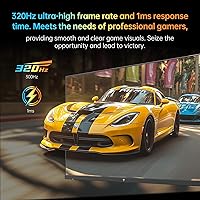
Image Sharpness & Clarity
88%
At 1440p on a 27-inch screen, text and in-game detail look noticeably crisp compared to 1080p setups at the same size. Buyers upgrading from lower-resolution panels consistently call out how much more readable UI elements and distant textures appear — particularly in open-world games and competitive titles with complex environments.
While sharpness is strong, some users note the matte coating slightly softens perceived crispness compared to glossy-panel competitors, which is a real trade-off in darker, low-contrast scenes. The difference is subtle, but buyers coming from high-end glossy displays may initially notice it.
Refresh Rate Performance
86%
At 300Hz, fast-paced games like shooters and battle royale titles feel genuinely smoother than what most 144Hz or 165Hz owners have experienced — the motion clarity improvement is tangible, not just a spec-sheet story. Most buyers who game competitively report that the high frame rate makes a real difference in how clean aim tracking and camera movements feel.
The 320Hz overclocking option is inconsistent — some users achieve a stable result while others report flickering, which undermines confidence in that feature. More practically, reaching 300fps at 1440p in demanding titles requires a high-end GPU that many buyers in this budget range simply do not have yet.
Color Accuracy
73%
27%
The 144% sRGB coverage means colors in games pop with genuine vibrancy — landscapes, lighting effects, and UI elements look richer than what most TN panels can manage at this price. After a calibration pass, several buyers report that the Fast IPS panel holds its own surprisingly well against monitors in higher price brackets.
Out of the box, saturation runs noticeably high — what looks exciting in a fast-paced shooter can read as inaccurate in productivity or content creation work. Buyers who care about precise color rendition will need to invest time or a colorimeter into dialing the display in before it becomes a reliable working tool.
Build Quality & Stand
61%
39%
The screen bezel is slim and the overall panel construction feels appropriate for the price — the display itself does not look cheap on a desk, and the matte finish gives it a clean, practical aesthetic that works in both gaming and office setups without looking out of place.
The stand is a recurring complaint — users describe it as wobblier and less adjustable than expected for a monitor of this spec level. Height adjustment is limited, and the stand's flex makes precise placement frustrating; a VESA monitor arm is effectively a recommended purchase if ergonomics matter to you.
Value for Money
84%
For what you get — a Fast IPS panel, 300Hz refresh rate, and WQHD resolution — the H27E6 sits at a price point where its spec list is genuinely hard to beat. Most buyers feel they are getting above-average performance for the money, particularly those comparing it to branded alternatives with similar specs priced noticeably higher.
KTC's lesser-known status introduces some uncertainty — the value calculation partly depends on after-sales support holding up over the 3-year warranty period, which is harder to predict for a brand without a long track record in Western markets. Some buyers may reasonably pay a premium elsewhere simply for the peace of mind that comes with established names.
Response Time & Motion
87%
The 1ms GtG response time keeps up with the 300Hz refresh rate in practice — motion blur in fast shooters is minimal, and pixel ghosting is largely absent even in high-contrast chase sequences. Buyers coming from 144Hz IPS monitors specifically note how much cleaner the trailing on moving objects looks.
A small number of users have noted faint inverse ghosting when overdrive settings are pushed to their highest preset, which is a known trade-off with Fast IPS overdrive tuning. Dialing back the overdrive level one notch typically resolves it, but the default settings are not optimal for every user straight out of the box.
Brightness & Visibility
82%
18%
The 450 cd/m² output handles bright, naturally lit spaces well — working near a window during the day or gaming in a well-lit living room does not require maxing out the brightness slider the way lower-rated monitors do. Most users in varied lighting environments report that the display holds up clearly without fatigue-inducing eye adjustment.
There is no HDR support of any meaningful grade, so buyers hoping for HDR gaming experiences will be disappointed — peak brightness is solid for SDR but does not approach the levels needed for HDR highlights to land correctly. Backlight uniformity has also been flagged by a minority of buyers, with slight brightness variations in darker scenes near screen edges.
Connectivity & Ports
83%
Dual HDMI ports and a DisplayPort give this monitor genuine flexibility — running a gaming PC through DisplayPort while keeping a console on one HDMI input means no cable shuffling between sessions. The headphone jack is a small but appreciated addition that keeps the cable mess manageable on a gaming desk.
There is no USB hub built into the display, which is a common omission at this price tier but still a limitation for users who want to plug in peripherals directly at the monitor. No built-in speakers means you are fully reliant on the headphone jack or an external audio setup, which adds a minor inconvenience for some configurations.
Adaptive Sync
81%
19%
Both AMD FreeSync and NVIDIA G-Sync Compatible support mean the vast majority of gaming setups can benefit from tear-free output without needing to verify GPU compatibility first. Users on both green and red team hardware report that enabling adaptive sync makes a real, visible improvement to smoothness at varying frame rates.
A handful of users report that G-Sync Compatible mode requires manual activation in the NVIDIA Control Panel and is not always intuitive to enable for first-time setup. A small number of buyers have also noted that at very low frame rates the adaptive sync range does not always eliminate all tearing artifacts.
Eye Comfort
78%
22%
Flicker-free backlighting and a properly implemented low blue light mode make this a noticeably easier display to spend extended hours in front of compared to monitors without these features. Office users who game in the evening and need to protect their sleep quality find the low blue light mode practically useful rather than just a checkbox feature.
The low blue light mode shifts the white balance noticeably warm, which some users find initially off-putting and may require several days to adjust to. The monitor also ships without any factory-set eye comfort preset that balances warmth and color accuracy, so users must experiment with OSD settings to find their own preference.
OSD & Controls
57%
43%
The OSD menu covers all necessary adjustment categories — brightness, color temperature, overdrive presets, and input switching — and buyers generally find that once they have navigated it a few times, routine adjustments become less of a chore. The physical buttons are responsive and do not feel flimsy.
The OSD layout is genuinely unintuitive — menu structure buries common settings like refresh rate selection and overdrive under non-obvious submenu paths, and the navigation buttons are not labeled clearly enough for new users to find what they need without trial and error. Buyers who frequently switch between gaming and productivity modes find this particularly frustrating.
Long-Term Reliability
71%
29%
The 3-year warranty is a meaningful safety net and stands out as one of the more buyer-friendly policies in this price category. Early reliability reports from buyers who have owned the display for six months or more are generally positive, with no widespread reports of panel failure or serious hardware defects.
KTC's limited brand history in Western markets means there is less community data on how their monitors hold up past the three-year mark, making long-term durability harder to assess than with more established manufacturers. Support access and parts availability for out-of-warranty repairs is also less predictable than what you would get from a brand with broader service infrastructure.
Setup Experience
76%
24%
Physical assembly is quick and cable management is straightforward — most buyers report being up and running within 15 minutes of opening the box. The monitor auto-detects input sources reliably, and the default settings, while not perfectly calibrated, are watchable without immediate adjustment for casual use.
Getting the most out of the display — enabling G-Sync Compatible, adjusting overdrive, and dialing in color settings — requires several separate OSD trips that are not guided anywhere in the included documentation. The manual is minimal, which leaves buyers who are unfamiliar with monitor calibration doing more trial-and-error than they should need to.
Viewing Angles & Uniformity
79%
21%
The Fast IPS panel offers genuinely wide viewing angles — colors and contrast do not shift significantly when viewed from slightly off-center positions, which matters both for co-op gaming where a second person watches alongside and for multi-person work review scenarios. Horizontal color consistency is noticeably better than TN panels in this price range.
Some backlight bleed has been noted by buyers in dark room environments, particularly in the lower panel corners — not unusual for IPS at this price, but worth knowing if you game in complete darkness. A small subset of users also reports slight glow from panel edges when displaying very dark content, which can be distracting in cinematic games.

Suitable for:

The KTC H27E6 27-inch Gaming Monitor is built squarely for gamers who have outgrown 1080p and want a meaningful upgrade without committing to flagship pricing. If you're running a mid-to-high-tier GPU and play competitively — fast-paced shooters, battle royale, or esports titles — the 300Hz refresh rate and 1ms response time will be genuinely put to use rather than wasted. The WQHD resolution is a noticeable step up at 27 inches: environments read sharper, UI elements are cleaner, and the extra detail helps in both games and everyday desktop tasks. Dual HDMI ports make this a practical pick for anyone running a console alongside a PC, removing the need for a separate switch box. Home office workers who game in the evenings will also appreciate the flicker-free panel and low blue light mode, which take some of the edge off long screen days without sacrificing brightness.

Not suitable for:

Buyers who prioritize out-of-the-box color accuracy for creative work — photo editing, video grading, or color-critical design — should look elsewhere before committing to the KTC H27E6 27-inch Gaming Monitor. Fast IPS panels at this price tier often ship with oversaturated defaults that look vibrant in games but skew color-critical work; calibration helps, but it's an extra step many users won't take. Brand-conscious buyers who want the reassurance of an established name — ASUS, LG, Dell — may find KTC's relative obscurity uncomfortable, especially if accessible long-term support matters to them. The stand has drawn consistent real-world criticism for feeling less solid than the panel quality suggests, so buyers expecting a premium physical build should budget for a third-party monitor arm. If your GPU is mid-range or below, consistently reaching 300Hz at 1440p may also be out of reach, leaving the monitor's headline spec underutilized.

Specifications

  • Panel Type: Fast IPS technology delivers wide viewing angles and quicker pixel transitions compared to standard IPS or TN panel alternatives.
  • Screen Size: The display measures 27 inches diagonally, offering a well-balanced canvas for competitive gaming and general desktop use.
  • Resolution: Native WQHD resolution of 2560x1440 pixels yields approximately 108 pixels per inch on the 27-inch panel.
  • Refresh Rate: The native refresh rate is 300Hz, with a 320Hz overclock mode accessible via the on-screen display settings.
  • Response Time: Rated at 1ms (GtG), reducing motion blur and pixel ghosting during fast-paced gameplay sequences.
  • Color Gamut: Covers 144% of the sRGB color space, producing colors that exceed the standard sRGB range in vibrancy and saturation.
  • Brightness: Peak luminance of 450 cd/m² maintains image clarity and punch in well-lit or naturally bright room conditions.
  • Aspect Ratio: Standard 16:9 widescreen format, compatible with all modern gaming, streaming, and productivity content.
  • Screen Surface: Matte anti-glare coating reduces reflections from ambient light without significantly diffusing or muddying the image.
  • Connectivity: Includes two HDMI ports and one DisplayPort input, enabling simultaneous connection of multiple video sources.
  • Audio Output: A 3.5mm headphone jack provides direct audio output; no built-in speakers are included.
  • Adaptive Sync: Supports AMD FreeSync and is NVIDIA G-Sync Compatible, enabling tear-free gameplay across both major GPU platforms.
  • Eye Care: Flicker-free backlight and low blue light mode are included to help reduce eye fatigue during extended use.
  • Warranty: Backed by a 3-year manufacturer warranty covering defects and hardware failures through KTC's support channel.
  • Dimensions: Physical dimensions with stand measure 34 x 21 x 5 inches (width x height x depth).
  • Weight: Complete unit with stand weighs 13 pounds, typical for a 27-inch monitor in this class.

Related Reviews

KTC H27E22P 27-inch 280Hz Gaming Monitor
76%
91%
Refresh Rate Performance
88%
Contrast & Black Depth
84%
Color Accuracy & Vibrancy
71%
Motion Clarity & Response
53%
HDR Experience
More
KTC M27T6 27-inch Mini LED Gaming Monitor
76%
84%
HDR Performance
88%
Contrast & Black Levels
86%
Peak Brightness
57%
Color Accuracy
71%
Motion Handling
More
Skytech Gaming Moonshadow 27-inch Curved Gaming Monitor
83%
88%
Image Quality
91%
Refresh Rate Performance
86%
Adaptive-Sync
83%
VA Panel Contrast
84%
Stand & Ergonomics
More
Raywego Z270B13 27-inch Gaming Monitor
70%
88%
Value for Money
83%
Picture Quality
84%
Refresh Rate Performance
62%
Build Quality
81%
Eye Comfort
More
Amazon Basics 27-inch 1080p Gaming Monitor
76%
88%
Value for Money
79%
Display Quality
91%
Refresh Rate Performance
86%
Response Time
67%
Build Quality
More
Alienware AW2723DF 27-inch Gaming Monitor
80%
93%
Motion Clarity
88%
Color Accuracy
91%
Refresh Rate Performance
54%
HDR Quality
89%
Build Quality
More
KTC 24-inch 190Hz Gaming Monitor
76%
88%
Refresh Rate Performance
76%
Color Accuracy
83%
Motion Clarity
54%
HDR Quality
91%
Value for Money
More
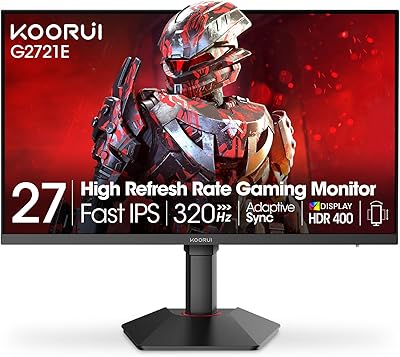
KOORUI G2721E 27-inch Gaming Monitor
78%
93%
Refresh Rate Performance
88%
Image Clarity & Resolution
84%
Color Accuracy
81%
Motion Handling
52%
HDR Quality
More
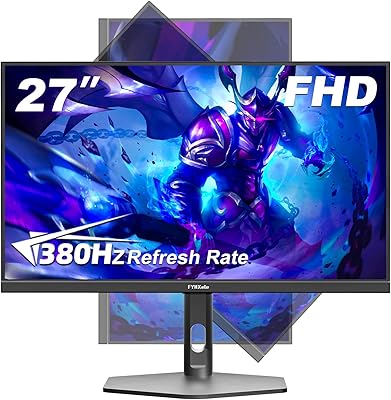
FYHXele 27-inch 380Hz Gaming Monitor
87%
91%
Display Quality
94%
Gaming Performance
88%
Build Quality
85%
Ergonomics & Adjustability
90%
Ease of Setup
More
memzuoix 27-inch QHD 165Hz Gaming Monitor
70%
88%
Image Clarity
84%
Refresh Rate Performance
91%
Value for Money
82%
Adaptive Sync (FreeSync/G-Sync)
77%
Color Accuracy
More

FAQ

The H27E6 supports both AMD FreeSync and NVIDIA G-Sync Compatible, so it works with either GPU brand for tear-free gameplay. You may need to manually enable G-Sync Compatible mode the first time through the NVIDIA Control Panel, but once it's set up it runs without any further configuration.

The 320Hz overclock is a real option you can enable through the OSD menu, but stability varies between individual units. Some buyers report a smooth experience at 320Hz, while others notice flickering or instability at that setting. Treat it as a potential bonus rather than a guaranteed spec — 300Hz is the reliable baseline you should count on.

Out of the box, the panel ships on the warmer and more saturated side, which suits gaming well but can skew results for color-critical work. If you plan to use it for photo editing or video grading, a calibration pass using a colorimeter or a downloaded ICC profile will make a meaningful difference. For general gaming and desktop use, the defaults are fine.

To consistently hit 300Hz at 2560x1440 in demanding modern titles, you'll want a high-end graphics card — roughly an RTX 4070 or RX 7800 XT and above as a starting point. In lighter or older games you'll reach those frame rates more easily, but in AAA titles at high settings expect to land somewhere between 100Hz and 200Hz in practice.

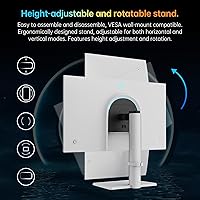
The stand supports tilt adjustment, which covers basic positioning needs. Height adjustment is limited, and several buyers have noted the stand feels less solid than the panel quality warrants. If desk ergonomics are important to you, the monitor is VESA-compatible and pairs well with a third-party monitor arm.

Yes — the KTC H27E6 27-inch Gaming Monitor has two HDMI ports, so you can leave both devices connected simultaneously and switch between them through the OSD input selector without unplugging anything. It is a genuinely practical setup for anyone running a console and PC side by side.
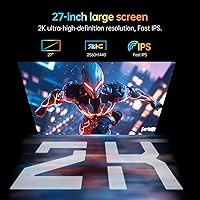
Not noticeably for most users. The matte finish handles ambient reflections well, and the 450 cd/m² brightness compensates enough to keep the image looking vivid. You will not get the ultra-sharp punch of a glossy panel, but in a typical gaming or office environment the trade-off is worth it.

KTC is a legitimate display manufacturer — lesser known in Western markets than the big names, but not an unknown quantity. The 3-year warranty is a genuine differentiator at this price point, and their support team has generally been reported as responsive. That said, if local service centers or a long-established brand reputation are important factors for you, that is a fair consideration worth weighing before purchasing.

At 27 inches, the upgrade from 1080p to 1440p is immediately visible — text looks noticeably crisper, game environments carry significantly more detail, and the overall image sharpness improvement is obvious rather than subtle. Most users who make this jump find it hard to go back, especially at typical desktop viewing distances.

It shifts the white balance slightly warmer, which can look a little yellow-tinted at first glance. Most users adapt within a day or two, and the comfort benefit during evening sessions is real. The H27E6 allows you to adjust the intensity level rather than simply toggling the mode on or off, which makes it easier to find a comfortable middle ground.

Where to Buy